Introduction
Kubernetes has become the de facto container orchestration platform, but its flexibility comes with a considerably broad attack surface. A misconfigured cluster can expose credentials in environment variables, run containers with root privileges, lack network policies, or have RBAC roles with wildcard permissions granting unrestricted access to any resource. Detecting all these issues systematically and repeatably requires reviewing dozens of objects spread across multiple namespaces, doing it manually is slow, error-prone, and hard to document.
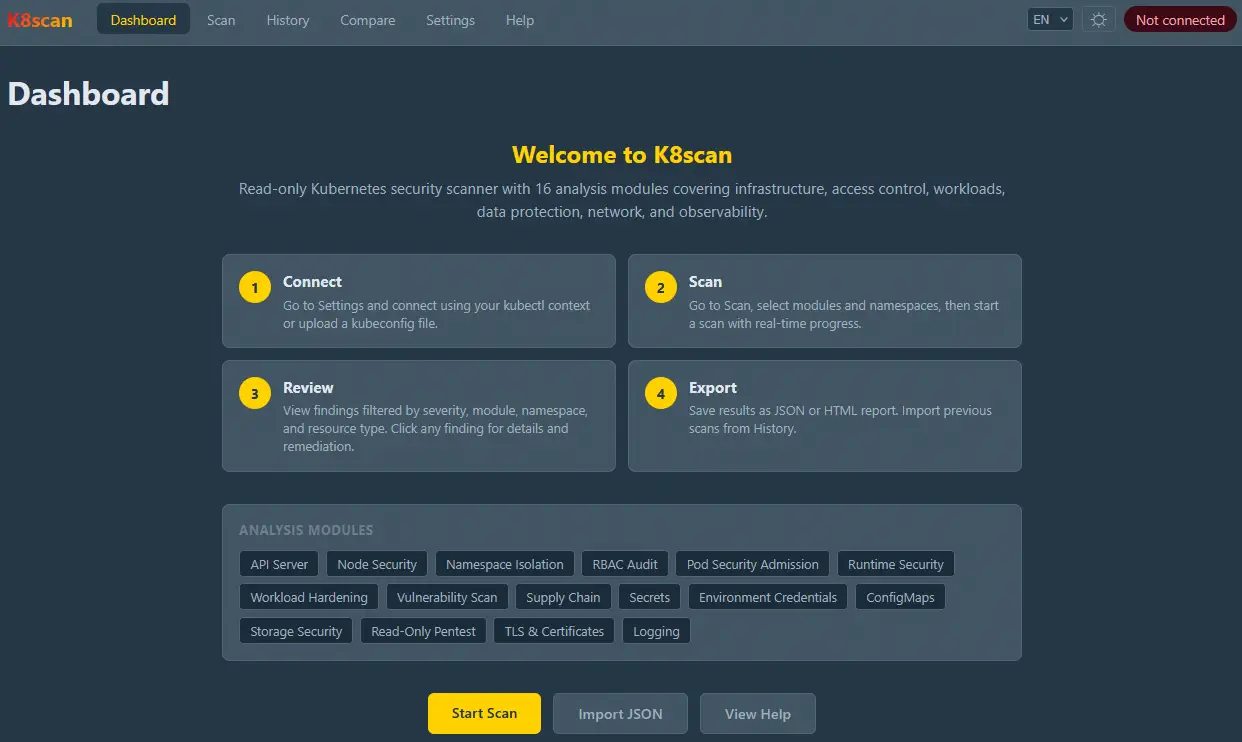
K8scan was built to address exactly that need: a read-only security analysis tool that automates the review of a Kubernetes cluster across 16 specialized modules, with a web interface, CLI, and REST API. It is an evolution of the previous K8sAudit tool scoped to be an interactive web application, but it also includes a command-line interface.
Tool Architecture
K8scan is composed of three well-defined layers:
- Backend (Python 3.13+ / FastAPI): handles requests, runs scanning modules in the background, and exposes results through a REST API. Scan progress is streamed in real time via Server-Sent Events (SSE).
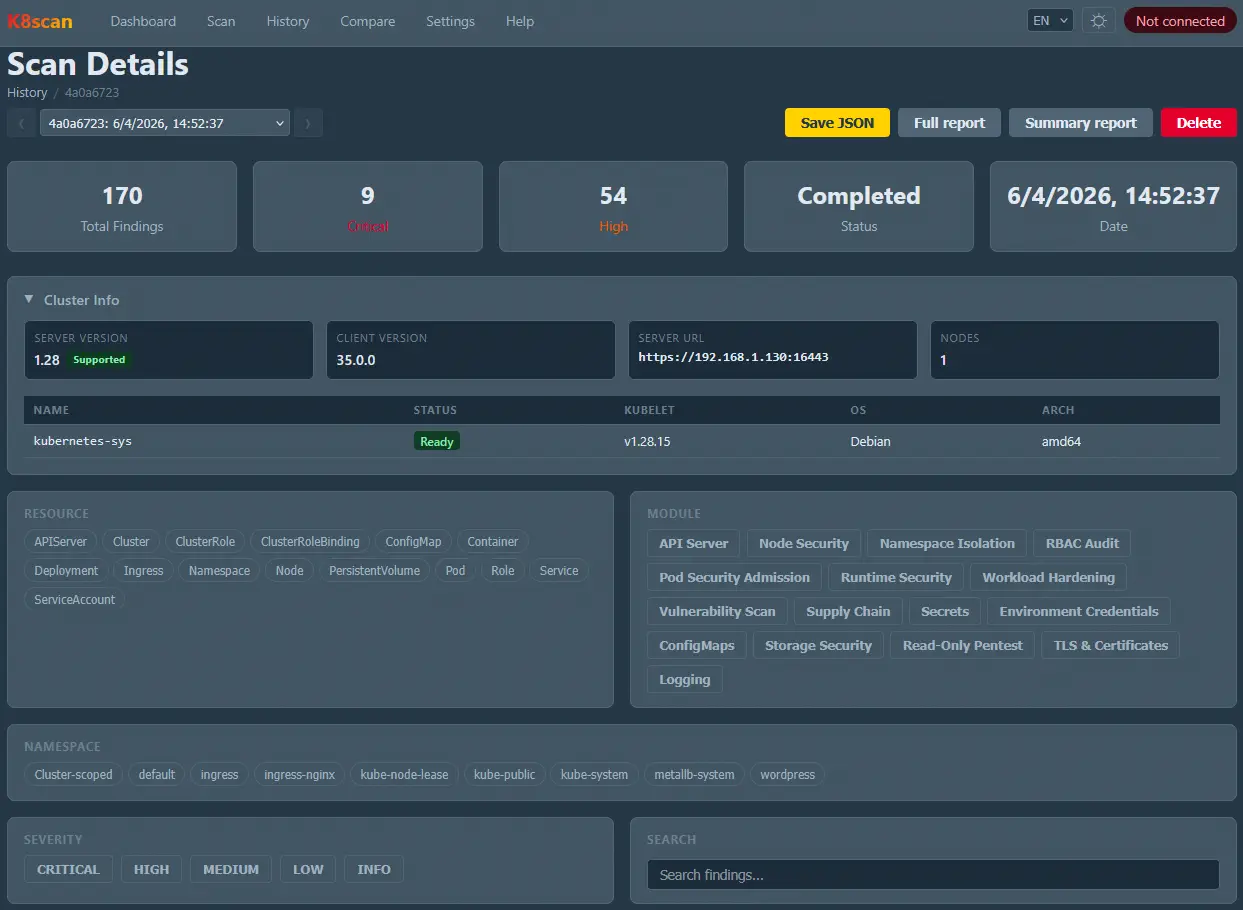
- Frontend (Vue 3 / TypeScript / Pinia): web interface with 7 views; Dashboard, Scan, Scan Details, History, Compare, Settings, and Help, available in English and Spanish.
- CLI (Typer / Rich): command-line interface for environments without browser access, featuring progress bars, severity badges, and JSON export.
Authentication is performed using the existing kubectl context or by uploading a kubeconfig file. The tool verifies connectivity before confirming the connection and gracefully handles the most common errors: invalid SSL certificates, unresolved DNS, expired credentials, and access denied.
A key design aspect is the read-only guarantee: the internal Kubernetes client (ReadOnlyClient) only exposes list_*, read_*, and get_* methods. Analysis modules never receive the raw API client, and tests verify that the client source code contains no mutating calls. This makes K8scan safe to run in production environments.
The 16 Analysis Modules
The modules are organized into six categories covering the full security lifecycle of a cluster:
Cluster Infrastructure
api_server: detects outdated or EOL Kubernetes versions, deprecated APIs, ports 6443 and 2379 exposed externally, anonymous access enabled, or missing admission plugins.node_security: identifies control plane nodes without taints, nodes in NotReady state or under resource pressure, and kubelet version skew across nodes.namespace_isolation: flags coexistence of production and non-production workloads, workloads in thedefaultnamespace, or cross-namespace RoleBindings.
Access Control
rbac: looks forcluster-adminbindings, wildcard verbs and resources, dangerous verbs such asescalateorbind, and ServiceAccounts with unnecessarily auto-mounted tokens.psa: evaluates the use of Pod Security Admission, checkingenforce,warn, andauditlevels per namespace and detecting the deprecatedPodSecurityPolicy.
Workload Security
runtime: checks for privileged containers, execution as root, use ofhostNetwork/hostPID/hostIPC, dangerous capabilities, and missing resource limits.workload: reviews single-replica deployments, missing liveness/readiness probes, absent PodDisruptionBudgets, and pods stuck in CrashLoopBackOff.vulnerability: detects untagged images, use of:latest, untrusted registries, and known CVE patterns.supply_chain: verifies that images are pinned by digest, that private registries haveimagePullSecrets, and that theRecreatestrategy is not used with multiple replicas.
Data Protection
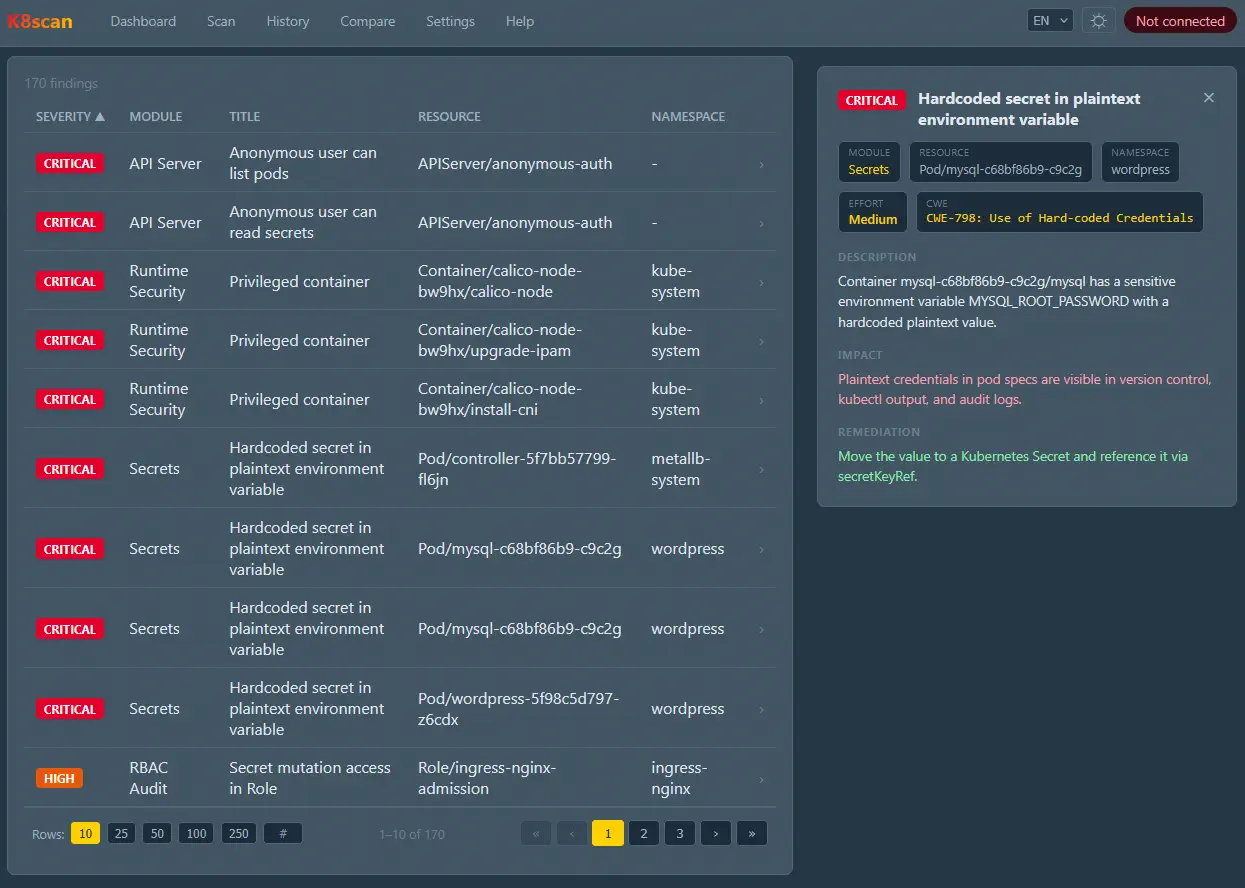
secrets: analyzes stale secrets (older than one year), unreferenced secrets, missing encryption at rest, secrets exposed as environment variables, and values matching known credential patterns (AWS, GitHub, GitLab, Stripe, private keys, JWTs…).env_credentials: scans environment variables for hardcoded credentials: AWS keys, GitHub/GitLab/Slack tokens, private keys, connection strings, and variables with sensitive names (password,secret,token…).configmaps: detects ConfigMaps with sensitive keys, credential patterns in values, empty objects, or objects larger than 1 MB.storage: identifieshostPathvolumes, Docker socket mounts, the deprecatedRecyclereclaim policy, and PVCs stuck in pending state.
Network & Exposure
pentest: locates services exposed via LoadBalancer or NodePort, Ingress without TLS, default database credentials, accessible dashboards, and missing NetworkPolicy.tls_certificates: reviews expired or soon-to-expire certificates, self-signed certs, wildcard certificates, and configurations lacking HTTP-to-HTTPS redirection or HSTS headers.
Observability
logging: detects the presence of logging agents (Fluentd, Fluent Bit, Filebeat, Promtail, Vector), configured backends (Elasticsearch, Loki, Splunk), and workloads without a log collection sidecar.
Security Score
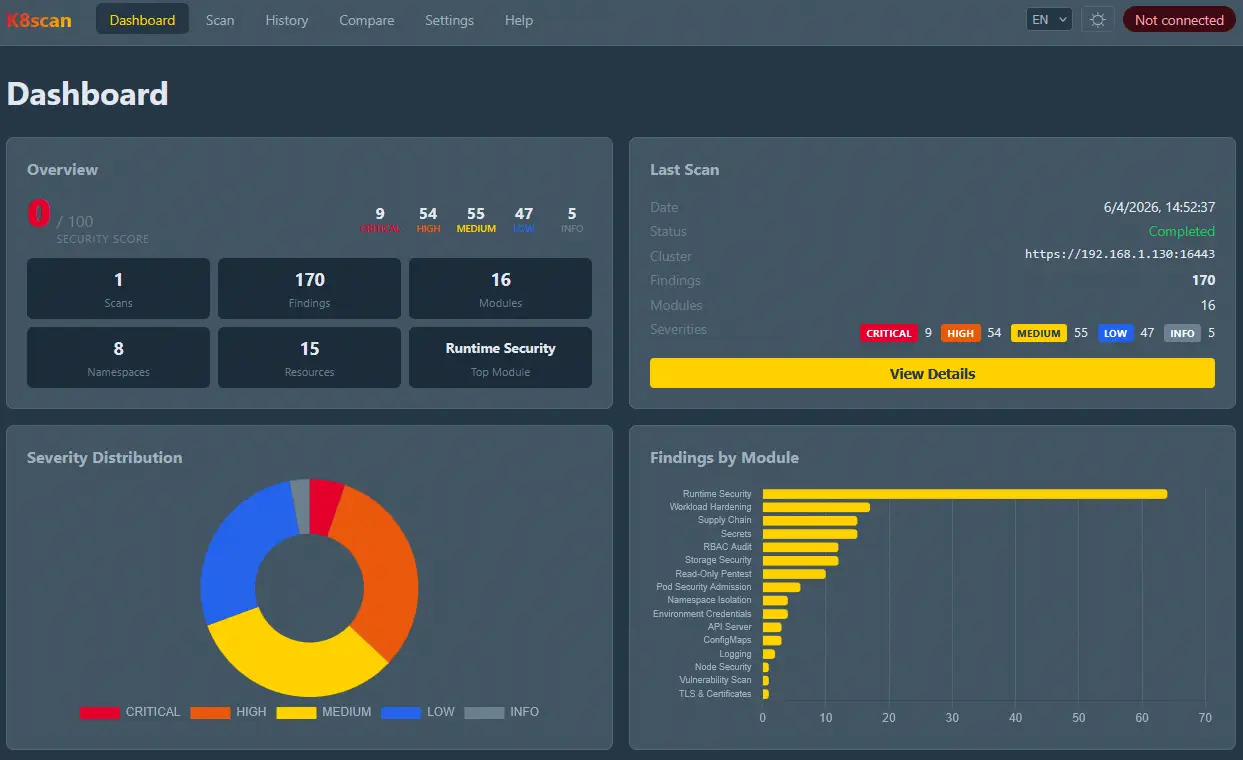
Each scan generates a score from 0 to 100 reflecting the overall security posture of the cluster. The penalty per finding depends on its severity:
| Severity | Penalty |
|---|---|
| CRITICAL | −10 points |
| HIGH | −5 points |
| MEDIUM | −2 points |
| LOW | −0.5 points |
| INFO | 0 points |
A cluster with no findings scores 100. The score never drops below 0.
Screenshots
Main Dashboard
Finding Detail View
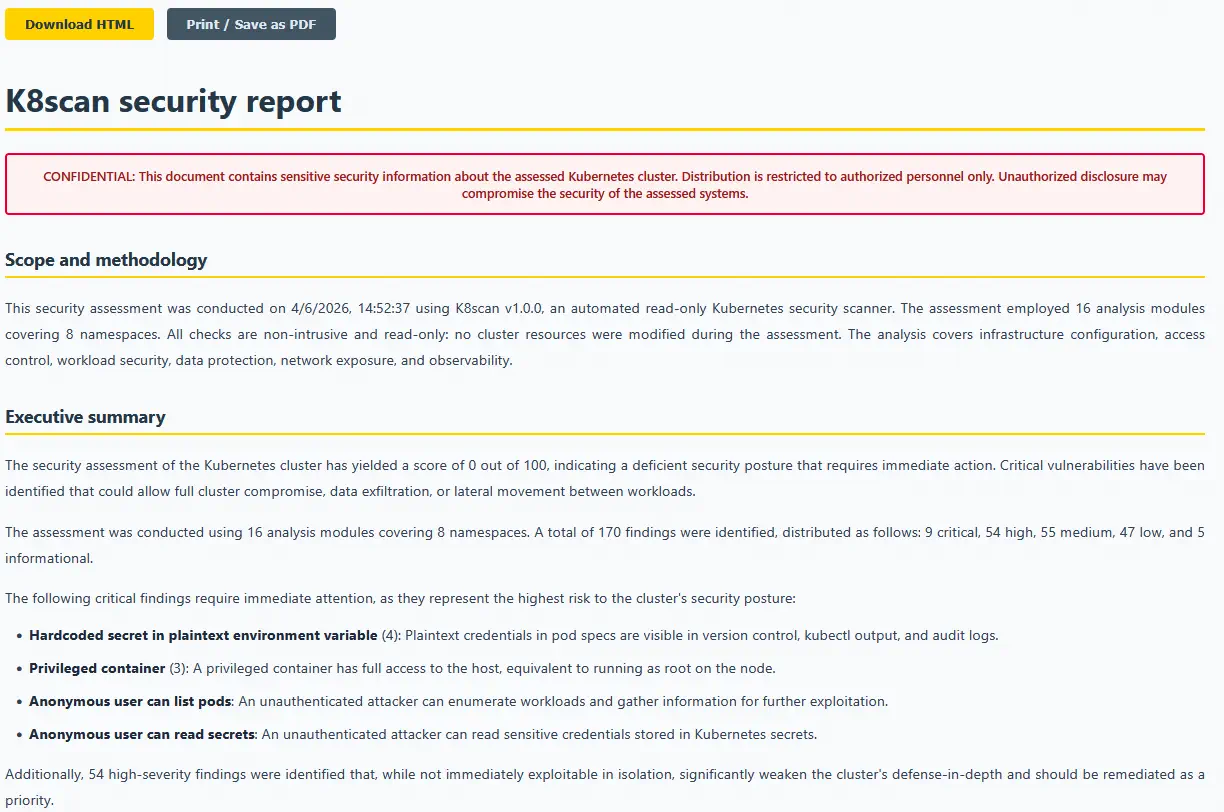
Report Generation
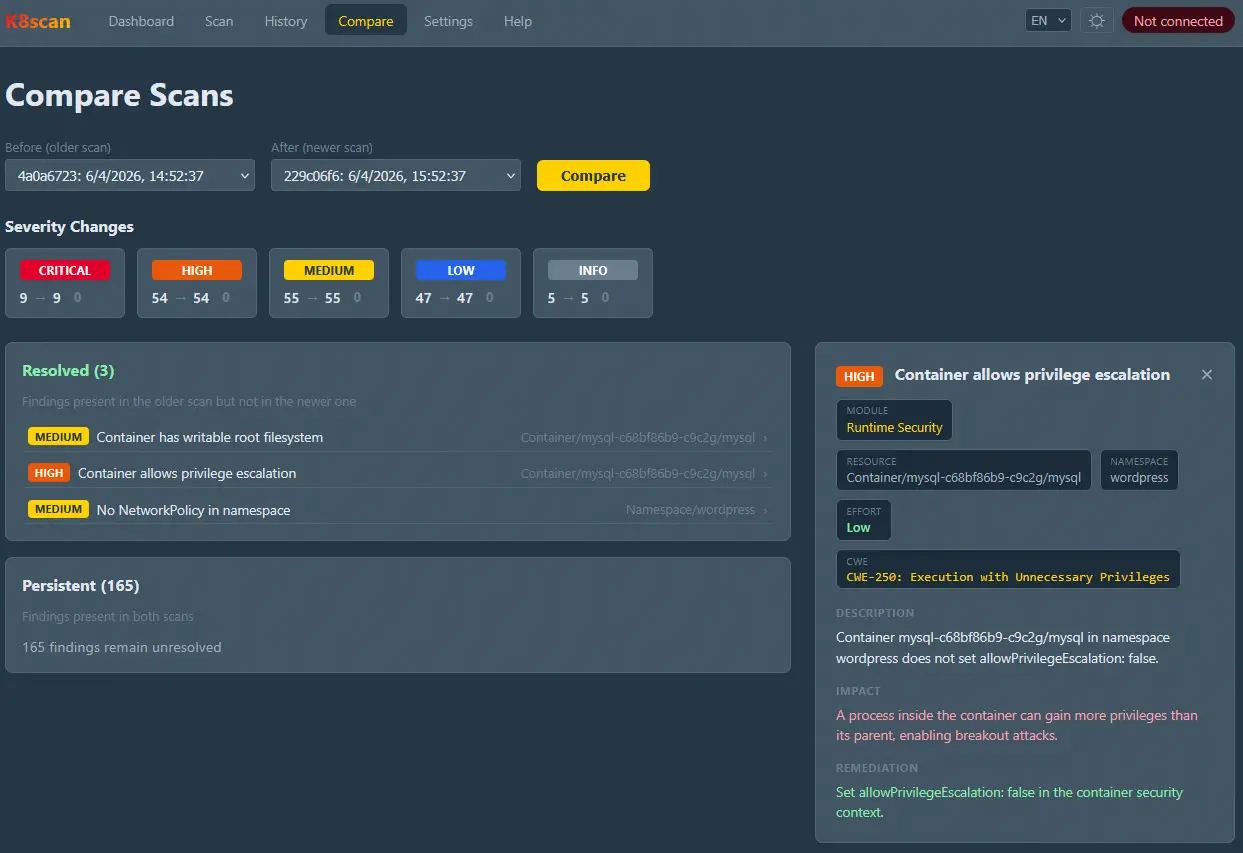
Scan Comparison
Installation and Setup
The tool is distributed as a .zip file. After extracting it, the full installation (backend, frontend, and CLI) is done with a single command:
make install-deps
For development, backend and frontend are started in separate terminals:
make dev-backend    # Port 8000, hot-reload
make dev-frontend   # Port 5173, hot-reload
For standalone production, the frontend is compiled and served alongside the API from a single process:
make build && make prod # Port 8000, 4 uvicorn workers
A Docker mode is also available with nginx as a reverse proxy:
make docker-build && make docker-up # Port 8080
The kubeconfig is mounted read-only from ~/.kube, so there is no need to copy credentials inside the container.
CLI Usage
The CLI is particularly useful in CI/CD pipelines or environments without browser access:
# Connect to the cluster
k8scan auth context

# Full scan and export results
k8scan scan run --all --output results.json

# Review only critical and high findings from the RBAC module
k8scan scan run --modules rbac --severity critical,high

# Display a saved report grouped by severity
k8scan results show results.json --group
The session is persisted in k8scan-cli-session.json, so authentication state survives between executions.
Limited Access and Restricted Environments
K8scan works even when the kubeconfig does not have cluster-wide permissions. In that case, the tool connects anyway, displays a warning with the context namespace, and limits the scan to accessible resources. Checks that return a 403 error are skipped and listed in a banner in the results rather than aborting the scan. This allows using K8scan in multi-tenant environments where each team only has access to their own namespaces.
Conclusion
K8scan provides a comprehensive and automated view of a Kubernetes cluster’s security posture, covering everything from API Server configuration to hardcoded credentials in environment variables. Its read-only guarantee makes it suitable for production environments, and its triple interface; web, CLI, and REST API, makes it easy to integrate into different workflows, from manual reviews to automated CI/CD pipelines.
The source code and the .zip distribution file are available in this link under the GNU GPLv3 license.