Introduction
The Bluetooth Low Energy (BLE) protocol has become a fundamental standard within the IoT ecosystem, used in wearables, sensors, peripherals, and a wide variety of connected devices. It is possible to capture and analyze its traffic in real time using dedicated hardware. For this purpose, the nRF52840 Dongle from Nordic Semiconductor, together with the tool nRF Sniffer for Bluetooth LE, constitutes an accessible and powerful solution.
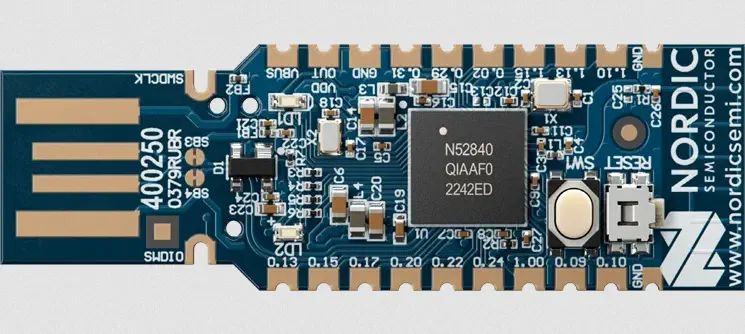 The necessary firmware will be installed on the dongle, the sniffer will be integrated into a Linux environment, and BLE traffic will be captured in Wireshark. Three analysis scenarios are also addressed with different levels of security: connections without pairing, vulnerable classic pairing (Legacy Pairing), and modern and robust pairing based on elliptic curves (LE Secure Connections).
Installation of the Sniffer firmware on the nRF52840 Dongle
To begin, it is necessary to prepare the nRF52840 Dongle by installing a special firmware that allows it to function as a BLE sniffer. The first step is to put the dongle into DFU mode. This is done by connecting it to the computer’s USB port and pressing the RESET button it includes. The device’s LED will start to blink in red, indicating that it has entered bootloader mode. The tool nrfutil will be used, so we download the binary along with the sub-tool ble-sniffer and device.
$ curl https://files.nordicsemi.com/artifactory/swtools/external/nrfutil/executables/x86_64-unknown-linux-gnu/nrfutil -o nrfutil
$ chmod +x nrfutil
$ ./nrfutil install ble-sniffer
Next we will check that the device is connected using the command device list. If the device that appears is Open DFU Bootloader, we can continue confirming that the device is in DFU mode.
$ ./nrfutil device list
A1234B5678C9
Product         Open DFU Bootloader
Ports           /dev/ttyACM0
Traits          nordicDfu, nordicUsb, serialPorts, usb

Supported devices found: 1
We take note of the device serial number that appears in the first line, in this case A1234B5678C9 to proceed with the firmware installation using the command device program. In this case the sub-tools of nrfutil have been installed in the directory ~/.nrfutil, and the firmwares are located in the folder .nrfutil/share/nrfutil-ble-sniffer/firmware/.
$ ls .nrfutil/share/nrfutil-ble-sniffer/firmware/
sniffer_nrf52833dk_nrf52833_4.1.1.hex
sniffer_nrf52840dongle_nrf52840_4.1.1.zip
sniffer_nrf52840dk_nrf52840_4.1.1.hex
sniffer_nrf52dk_nrf52832_4.1.1.hex
In this case, since it is an nRF52840 Dongle (model PCA10059), we install the firmware sniffer_nrf52840dongle_nrf52840_4.1.1.zip.
./nrfutil device program --serial-number A1234B5678C9 --firmware .nrfutil/share/nrfutil-ble-sniffer/firmware/sniffer_nrf52840dongle_nrf52840_4.1.1.zip
After the correct installation, the device will be disconnected and reconnected in order for the new firmware to be loaded. When updating the list of devices, we will find the device nRF Sniffer for Bluetooth LE.
$ ./nrfutil device list
A1234B5678C9
Product         nRF Sniffer for Bluetooth LE
Ports           /dev/ttyACM0
Traits          nordicUsb, serialPorts, usb

Supported devices found: 1
Installation of the nRF Sniffer Capture Tool in Wireshark
Next we will install Wireshark if it is not already installed on the system. The capture tool is installed as an external capture plugin in Wireshark. The installation of the plugin is done simply by using the sub-command ble-sniffer bootstrap.
$ ./nrfutil ble-sniffer bootstrap
Bootstrapping ble-sniffer...
Bootstrap succeeded
We will start Wireshark and find that the menu option View > Interface Toolbars > nRF Sniffer for Bluetooth LE exists, we activate it to expand the configuration toolbar. In the list of interfaces we will find something similar to nRF Sniffer for Bluetooth LE: /dev/ttyACM0-4.4.
Configuration and capture of traffic in Wireshark
After expanding the configuration toolbar, we have several options: Interface, Device, Key, Value and Adv Hop. When starting the capture, the tool will begin to display all BLE packets it detects within range, including advertising, connection establishment, link control packets, L2CAP traffic and ATT/GATT communication.
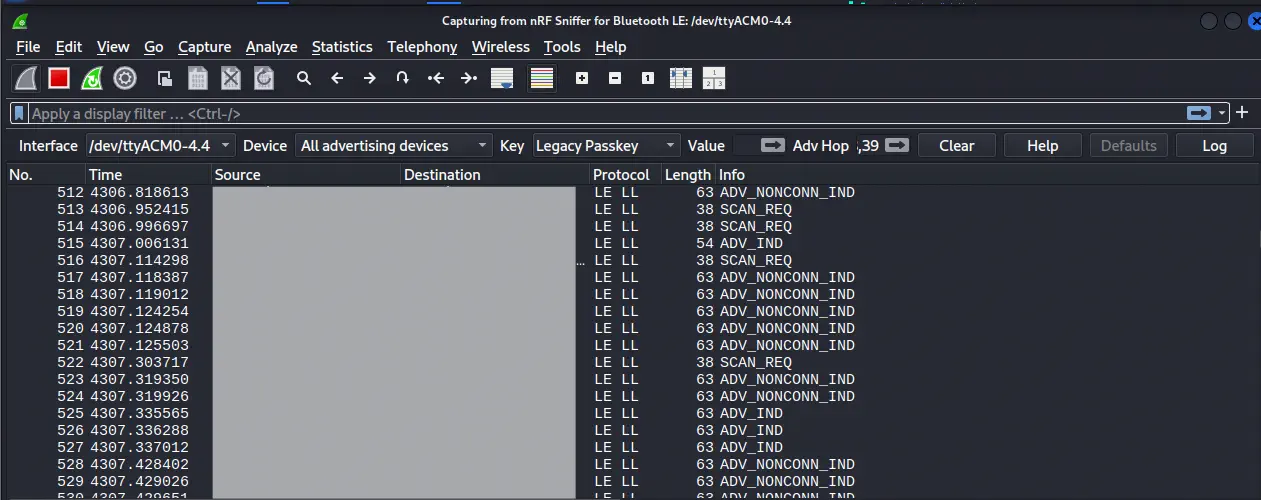 In many cases it will be necessary to follow the connection between central and peripheral, which can be done by selecting the MAC address of the device that you want to monitor. Depending on the security level of the link, the traffic may be seen in clear or remain encrypted.
First scenario: unencrypted traffic (no pairing)
Many BLE devices operate without any type of pairing. This type of operation is common in advertising beacons, unprotected sensors, or peripherals that only send telemetry. In these situations, the traffic is not protected by any cryptographic mechanism and all packets are displayed in clear text. The analysis is straightforward: it is possible to observe ATT notifications, transmitted values, used handles, and in general the complete structure of the GATT exchange without needing to perform any additional operations.
We can scan available devices from an Android device in a visual way using the application nRF Connect. If the devices follow the standard Bluetooth specifications regarding the transmission of sensor data, we can use the application nRF Toolbox to connect to the device and obtain the sensor data.
The advertisement messages constitute the first point of contact between a BLE device and its environment. Before any connection exists, a BLE peripheral transmits periodically small broadcast packages on the so-called advertising channels. These packages allow announcing its presence, informing about its capabilities, offering basic data such as service identifiers, device name or manufacturer information, and even transmitting light telemetry without the need to establish a link.
We will perform this test with a pulsemeter. While the scan is active, new devices discovered through the advertisement messages will be added to the Device option. If the MAC address has not been added to this list, we can add it by following this procedure: select in Key the option Add LE Address and in the Value field enter the MAC address, then press the button on the right. We select the device and observe how the message rate decreases by capturing only messages from that device. We observe the advertisement message of the device.
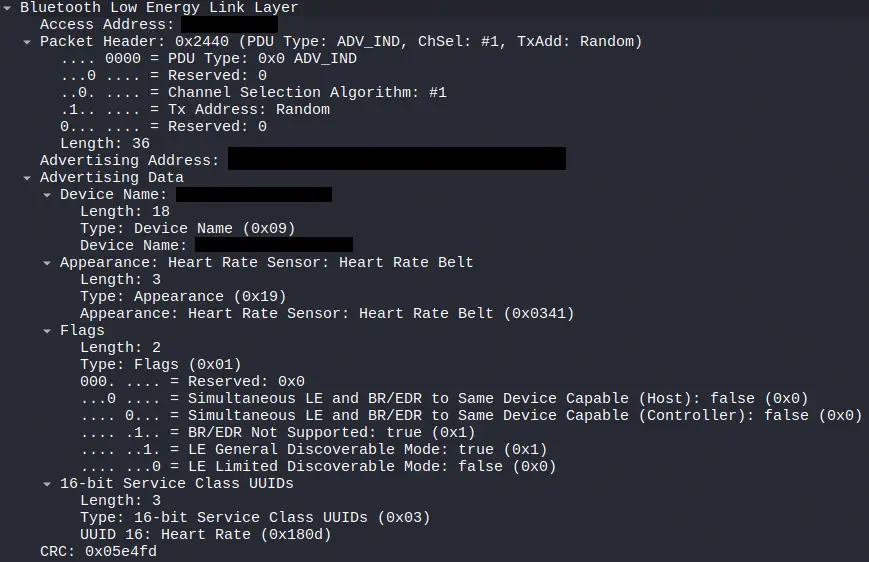 Indeed we confirm that it is a
 Heart Rate Sensor, of type Heart Rate Belt. We proceed with the connection to the device using nRF Toolbox. The connection is made on one of the advertisement channels (37, 38 or 39). The tool cannot scan all three at the same time, therefore if the connection is made on a channel different from the one being scanned, it will not be possible to follow the connection, as it is done through channel hopping. In that case the connection will be restarted towards the device.
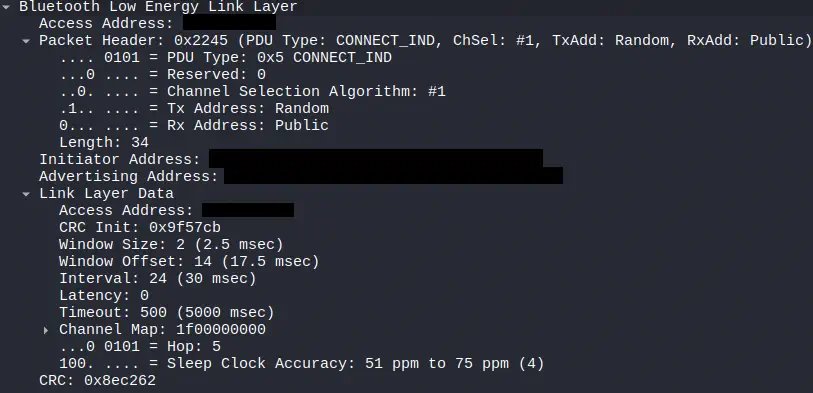 The establishment of a BLE connection begins when a central device, after receiving an advertisement packet from a peripheral, decides to initiate a link. To do so, it sends a special packet called
 CONNECT_IND. This message marks the transition from the open broadcast phase to the start of a point-to-point relationship. In the CONNECT_IND the fundamental parameters such as the interval, latency or supervision timeout, as well as the channels that will be used for communication are specified.
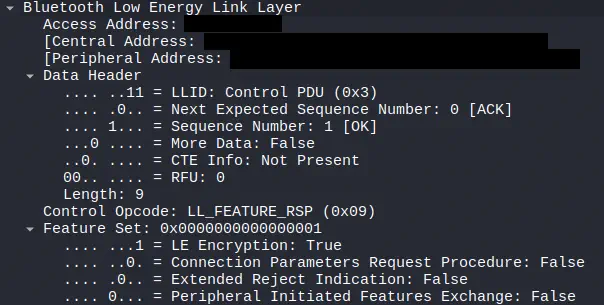 Immediately after the establishment of the connection, both devices exchange certain information related to their capabilities at the Link Layer level. One of the first visible messages in a capture is usually the
 LL_FEATURE_REQ and its corresponding LL_FEATURE_RSP. This negotiation allows each end to communicate which features it supports, such as the use of Data Length Extension, LE 2M PHY, LE Coded PHY or encryption. In this case, in the response, we detect that the device would support encryption.
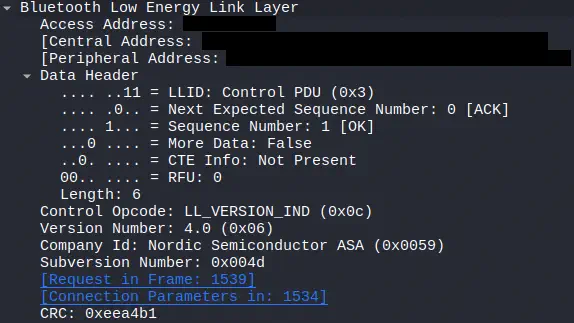 Via
Via LL_VERSION_IND central and peripheral declare their Bluetooth versions, their revision number, and, in some cases, manufacturer information. This facilitates compatibility between devices that could implement variants of the standard or specific capabilities. In this case we observe in the message sent by the peripheral that it has Bluetooth version 4.0, using a chip from the manufacturer Nordic.
 Once the initial phase of negotiation at the link level is completed, the regular discovery process at the upper layer begins, which is carried out through the
 ATT (Attribute Protocol) protocol. This discovery allows the central device to identify the services and characteristics that the peripheral offers. Normally, the central device sends a request such as Read By Group Type Request looking for primary services. The peripheral responds with the identifiers of the services it contains, along with the associated handle ranges. From there, the central device continues to make ATT requests to enumerate characteristics, descriptors, and properties, progressively building a complete map of the GATT of the device.
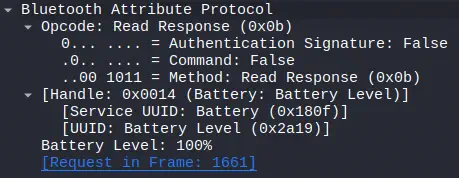 We observe a response to a read request of a value
 Read Response, in this case of the device’s battery, whose value is 100%.
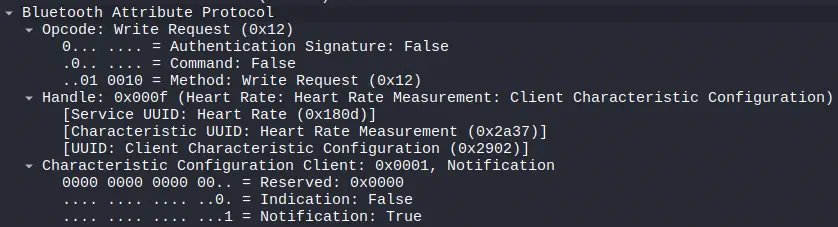 There is a write (
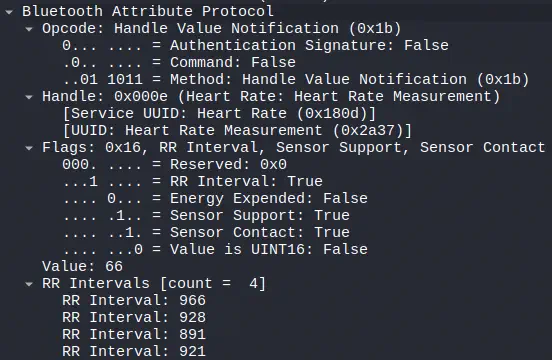
Write Request) from the central device requesting the peripheral for the sensor values, in this case the heart rate values. In this case the peripheral is sending the values on its own once they are available through notifications Notification. Later, through a message Handle Value Notification, the device sends the values corresponding to the heart rate and the RR intervals, which are used to calculate the heart rate variability.
Segundo escenario: Legacy Pairing, cifrado vulnerable
The next level of complexity appears when a device uses classic pairing (Legacy Pairing), the original BLE 4.x system. This method is based on key derivation through a Temporary Key (TK) that is generated in various ways: from a six-digit PIN up to the zero value when there is no user input. Due to this weakness, it is possible to decrypt the traffic if the entire pairing process is captured.
Once the packets corresponding to the pairing request and pairing response exchange are captured, tools such as crackle allow recovery of the Short Term Key (STK) through brute force on the TK, and from it, obtain the Long Term Key (LTK). With the resulting key, it is possible to decrypt a PCAP file and visualize the GATT communication as if it were unprotected traffic.
For this to work, it is essential to start the capture before the pairing. If the devices were already previously paired, it will be necessary to remove the pairing on both ends and redo the process while capturing. We perform the same process as before with another device, in this case a blood pressure monitor, in which it is checked on the mobile device that pairing is required and it is added to the list of remembered devices.
Pairing in Bluetooth Low Energy is managed through the Security Manager Protocol (SMP), which operates on the ATT/L2CAP layer and is responsible for establishing encryption keys, authenticating devices, and protecting the integrity of the communication. The goal of SMP is to ensure that two devices can exchange data securely, preventing a third party from intercepting or modifying the information.
When a device initiates pairing, SMP messages are sent that contain essential parameters to define the type of pairing and the capabilities of each end. Among these parameters stand out the flags, which are control fields that indicate, for example, if the device supports long-term encryption, if it requires authentication through user input, or if it allows key generation through LE Secure Connections based on elliptic curves.
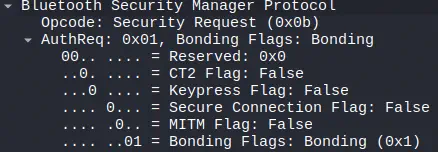 After the messages we observed in the previous section, we see that the peripheral requests pairing with the device, without using Secure Connections, that is, Legacy Pairing.
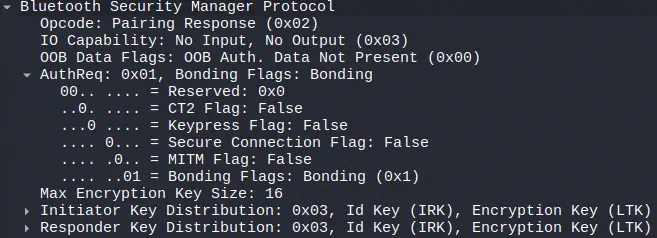
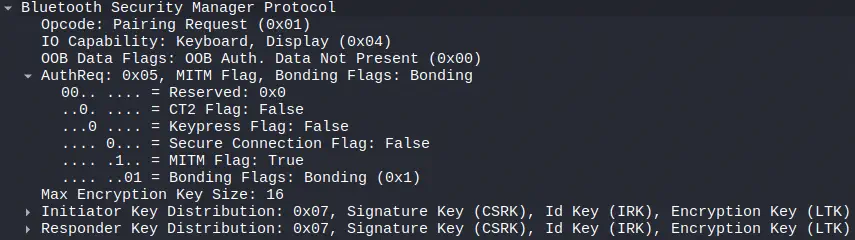 Later we observe that the central device requests pairing by requesting only the flag
 MITM. The peripheral responds to the pairing request by offering only the flag Bonding.
 The following sequence of messages confirms the pairing, exchanges the encryption keys, and initiates the encryption session through the messages
 LL_ENC and LL_START.
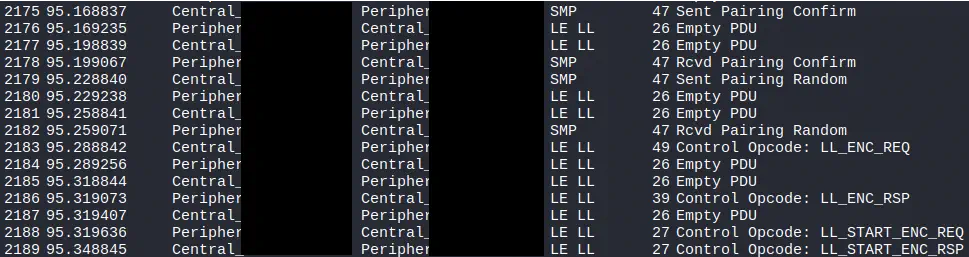 In this case, and upon detecting the type of pairing, the tool automatically decrypts all the traffic without the need to use external tools such as
 crackle when using a Just Works pairing with no use of PIN code.
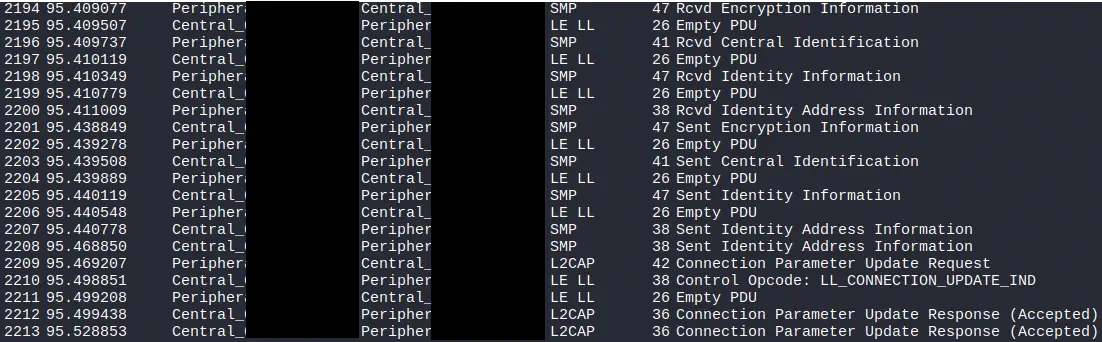 We observe the key
 LTK (Long Term Key), in the message Encryption Information.
 We observe the decrypted ATT packets from the central and peripheral device.

Third scenario: LE Secure Connections, robust modern encryption
The most secure scenario is the one that uses LE Secure Connections, introduced with Bluetooth 4.2. This system uses key exchange based on elliptic curves (ECDH with P-256), which prevents recovering the session key even if the entire pairing process is captured. The use of ECDH implies that the shared secret is never transmitted, but rather generated independently in each device, so there is no useful information that can be subjected to brute force attacks.
The capture process will be the same as in the previous two scenarios, in this case we will perform a pairing with a smart scale. A PIN code comparison connection has been established.
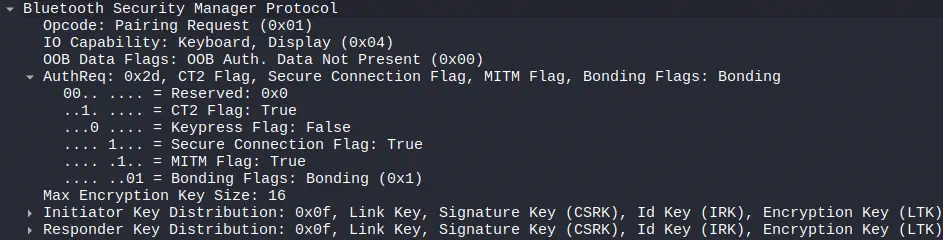 We now observe that among the pairing flags, there is the
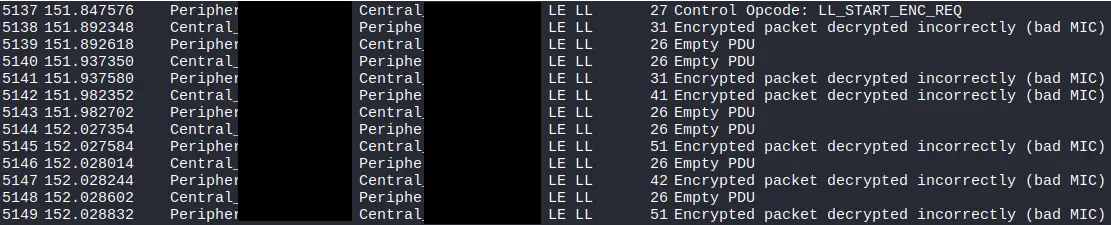
 Secure Connections. Later messages observe that the encrypted messages could not be decrypted.
Conclusion
The nRF52840 Dongle together with nRF Sniffer for Bluetooth LE constitutes an excellent tool to learn practically how the BLE protocol works. It allows to see in real time the establishment of connections, the structure of the packets and the behavior of the traffic in different security scenarios. LE Secure Connections demonstrates how modern protection mechanisms based on elliptic curve cryptography prevent the recovery of encrypted traffic even for an observer equipped with a sniffer.